LEXUS LS430 2006 Workshop Manual
LS430 2006
LEXUS
LEXUS
https://www.carmanualsonline.info/img/36/57996/w960_57996-0.png
LEXUS LS430 2006 Workshop Manual
Page 305 of 419
289
4-3. Do-it-yourself maintenance
4
Maintenance and care
Air conditioning filters
The air conditioning filters must be changed regularly to maintain air condi-
tioning efficiency.
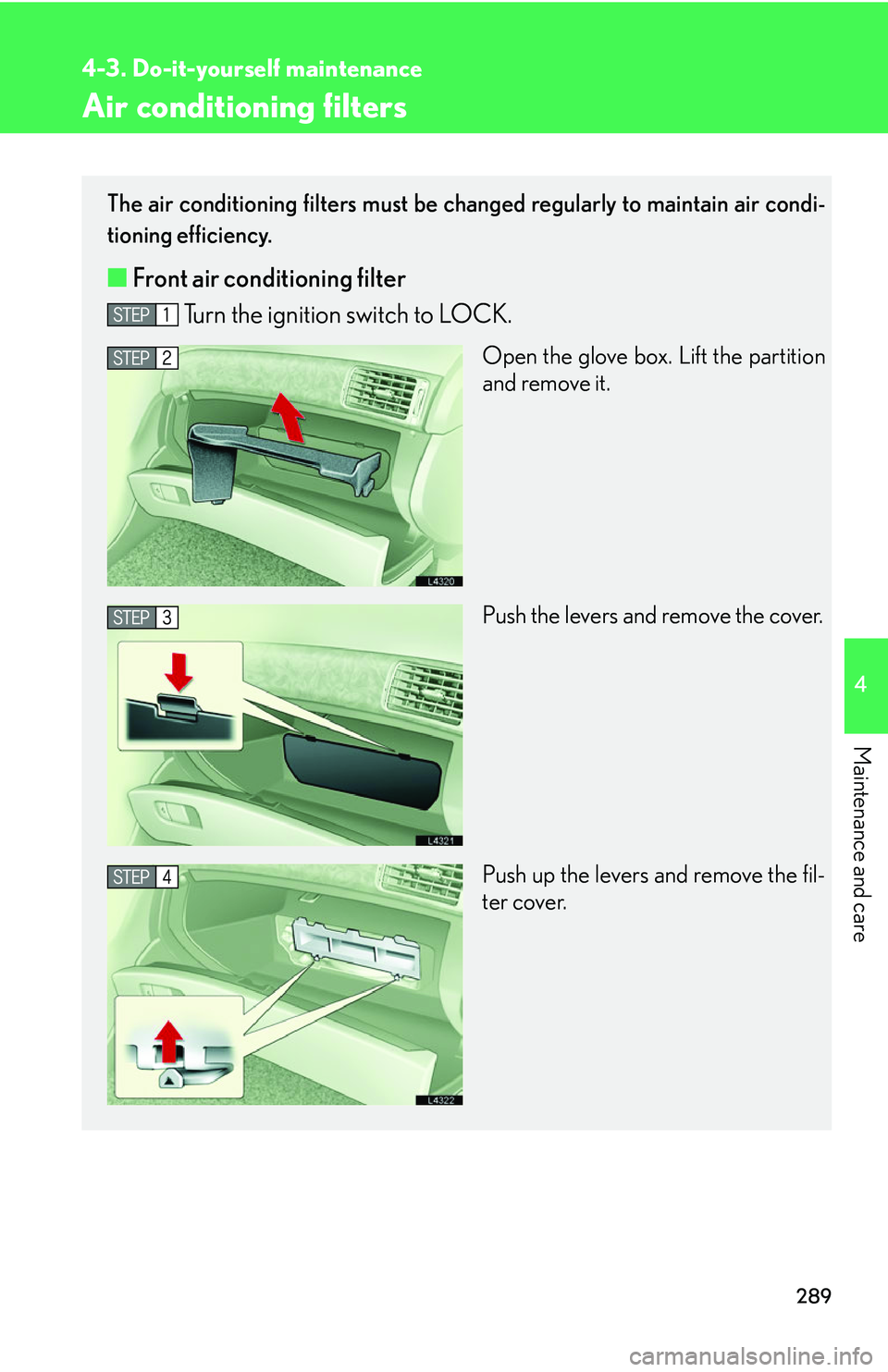
■ Front air conditioning filter
Turn the ignition switch to LOCK.
Open the glove box. Lift the partition
and remove it.
Push the levers and remove the cover.
Push up the levers and remove the fil -
ter cover.
Page 306 of 419
290
4-3. Do-it-yourself maintenance
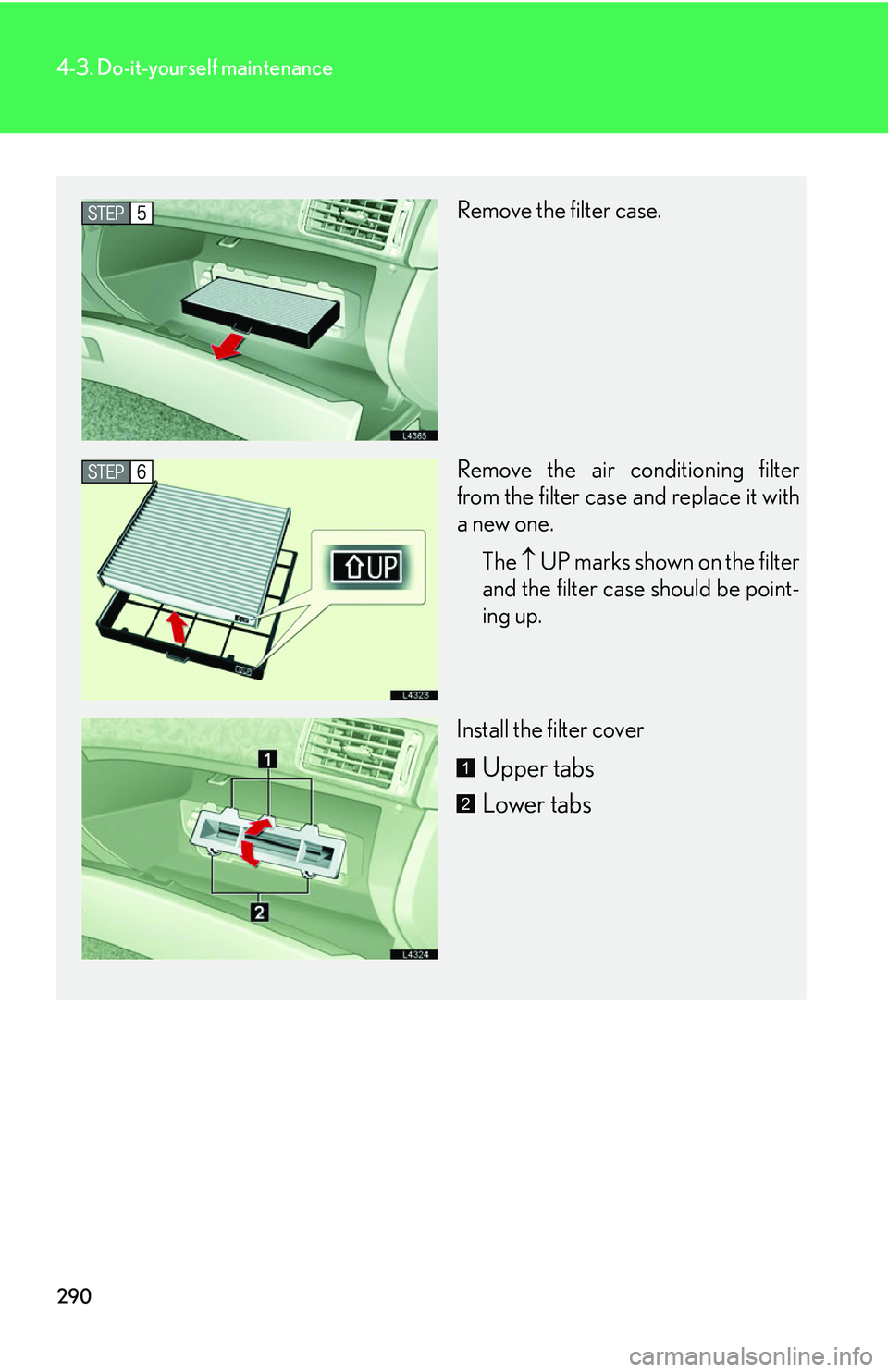
Remove the filter case.
Remove the air conditioning filter
from the filter case and replace it with
a new one.The UP
marks shown on the filter
and the filter case should be point -
ing up.
Install the filter cover
Upper tabs
Lower tabs1
2
Page 307 of 419
291
4-3. Do-it-yourself maintenance
4
Maintenance and care
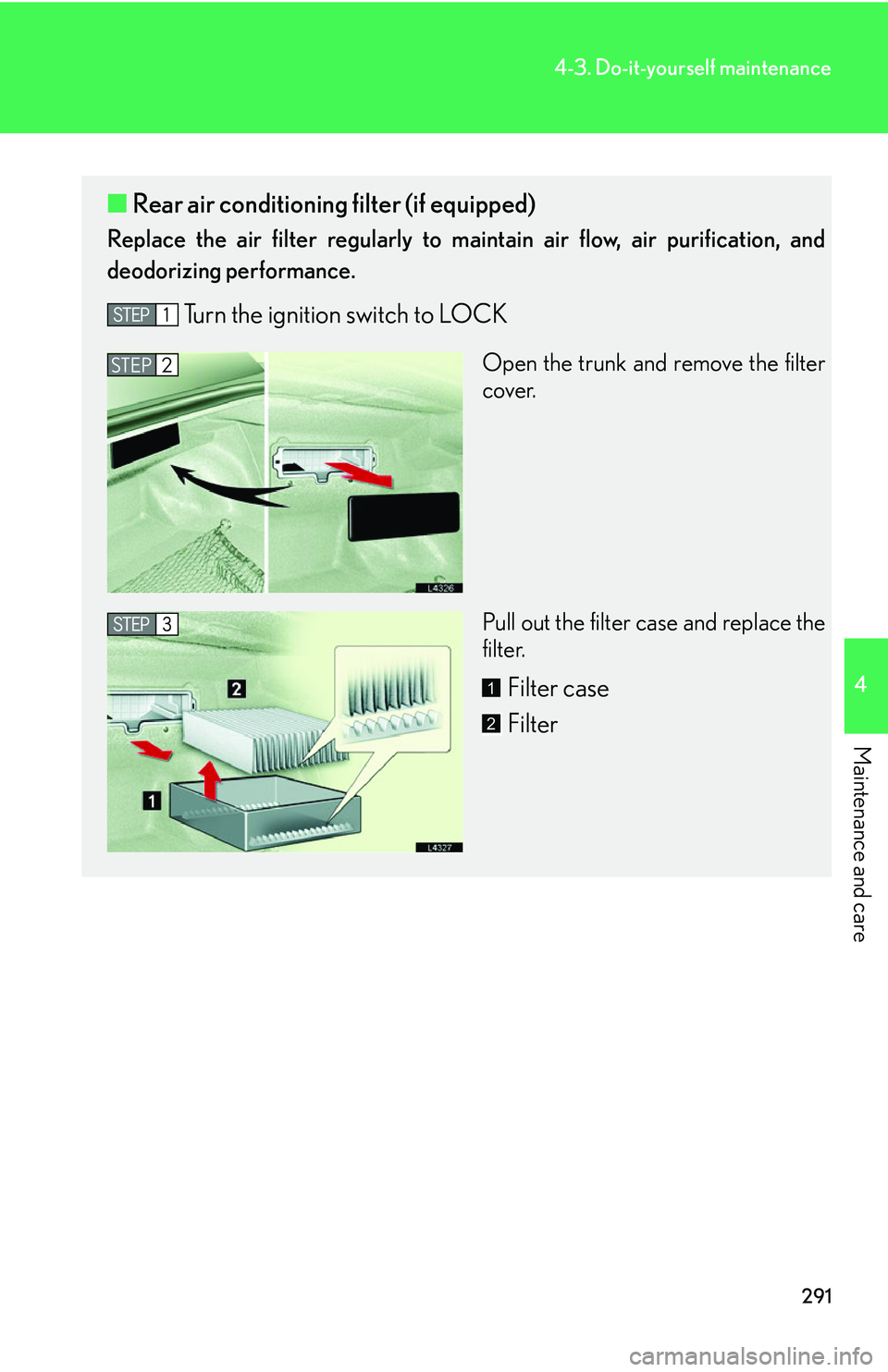
■Rear air conditioning filter (if equipped)
Replace the air filter regularly to ma intain air flow, air purification, and
deodorizing performance.
Turn the ignition switch to LOCK
Open the trunk and remove the filter
cover.
Pull out the filter case and replace the
fil
ter.
Filter case
Filter
STEP2
1
2
Page 308 of 419
292
4-3. Do-it-yourself maintenance
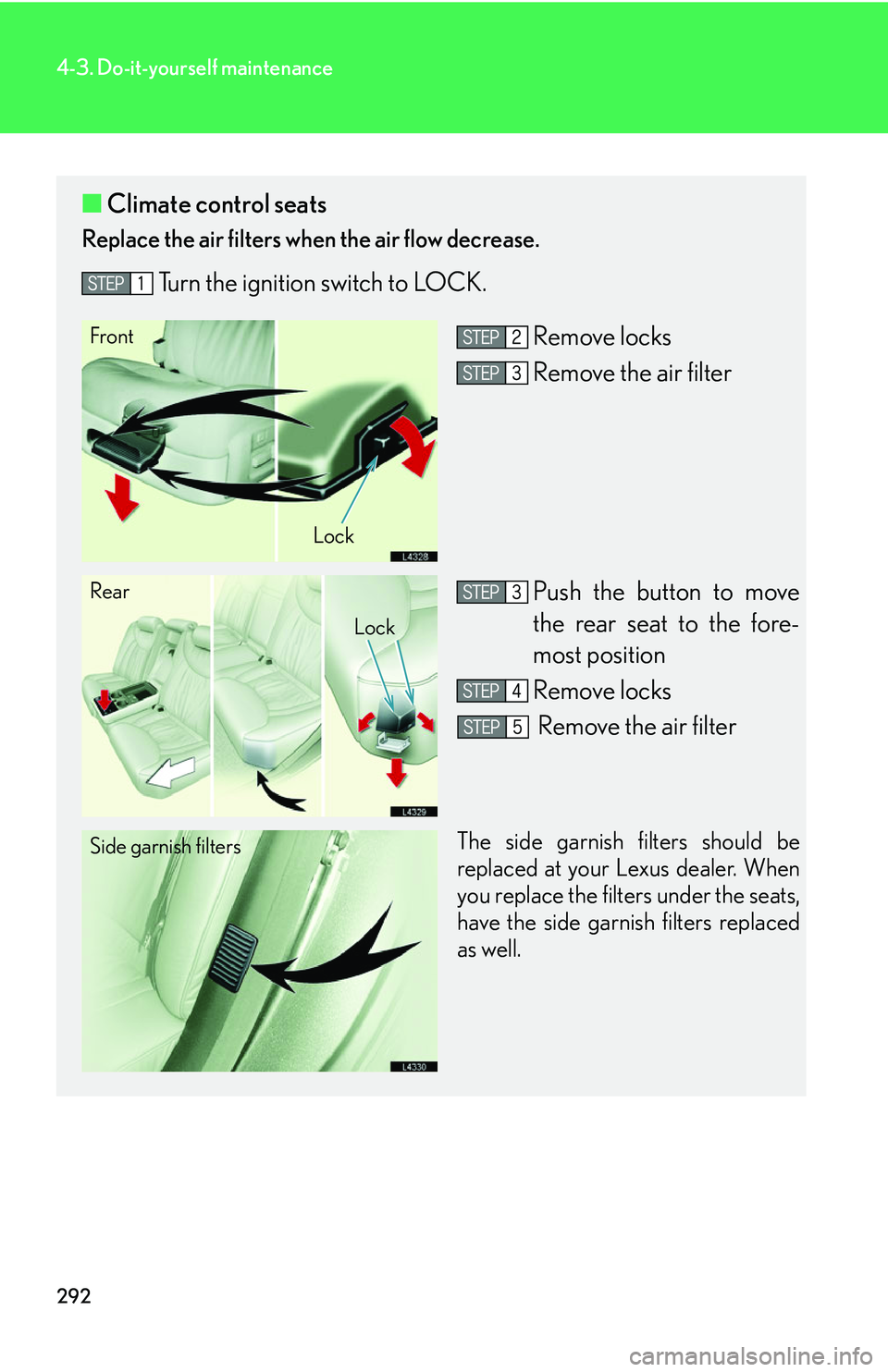
■Climate control seats
Replace the air filters when the air flow decrease.
Turn the ignition switch to LOCK.
Remove locks
Remove the air filter
Push the button to move
the rear seat to the fore-
most position
Remove locks
Remove the air filter
The side garnish filters should be
replaced at your Lexus dealer. When
you replace the filters under the seats,
have the side garnish filters replaced
as well.
Front
Lock
Rear
Lock
Side garnish filters
Page 309 of 419
293
4-3. Do-it-yourself maintenance
4
Maintenance and care
■Changing interval for the front air conditioning filter
Inspect and replace the air conditioning filter according to the maintenance
schedule. In dusty areas or areas with heavy traffic flow, such as inner city or
desert areas, early replacement may be required. (For scheduled mainte -
nance information, please refer to the "Owner's Manual Supplement/Sched-
uled Maintenance".)
■If air flow decreases dramatically
The filter may be blocked. Check the filter and replace if necessary.
CAUTION
■Air purifier precautions
●Do not look into the xenon tube or directly expose your skin to the light in the
tube's light. The tube emits less than 300nm of ultraviolet light, however some
people may experience symptoms such as sore eyes, vision trouble, skin inflam-
mation, etc.
●Do not disassemble the air purifier. Some parts contain high voltage, and there is
also the possibility of causing a malfunction.
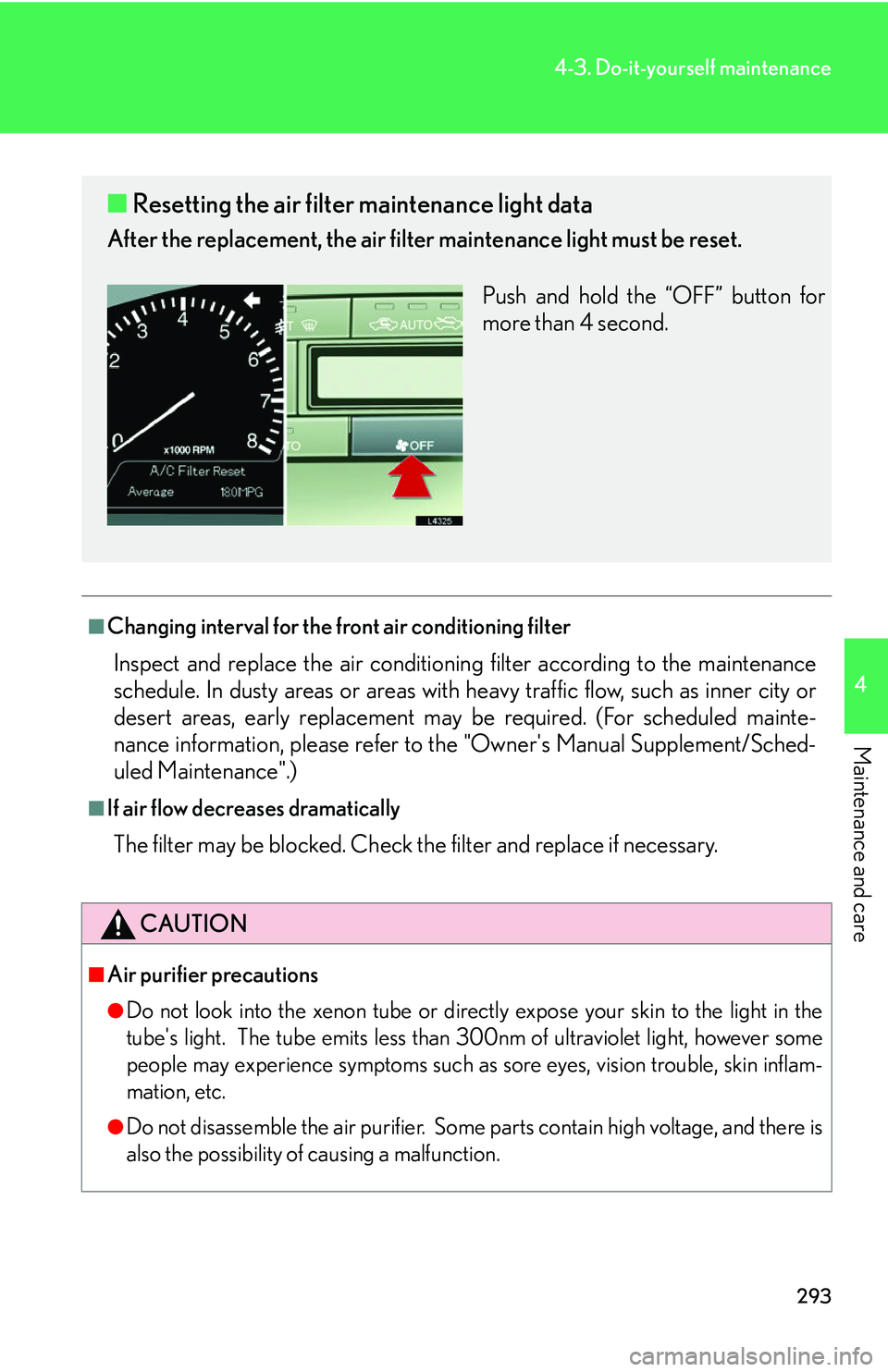
■ Resetting the air filter maintenance light data
After the replacement, the air filter maintenance light must be reset.
Push and hold the “OFF” button for
mor
e than 4 second.
Page 310 of 419
294
4-3. Do-it-yourself maintenance
NOTICE
■When using the rear air conditioning system
Use of the system with the air filter removed or improperly installed could result in a
ma
lfunction.
Make sure that a filter is always installed.
■Do not wash or air-blow the filter
Do not wash or air- blow the filter or it may cause the system to malfunction.
Always replace dirty filters.
Page 311 of 419
295
4-3. Do-it-yourself maintenance
4
Maintenance and care
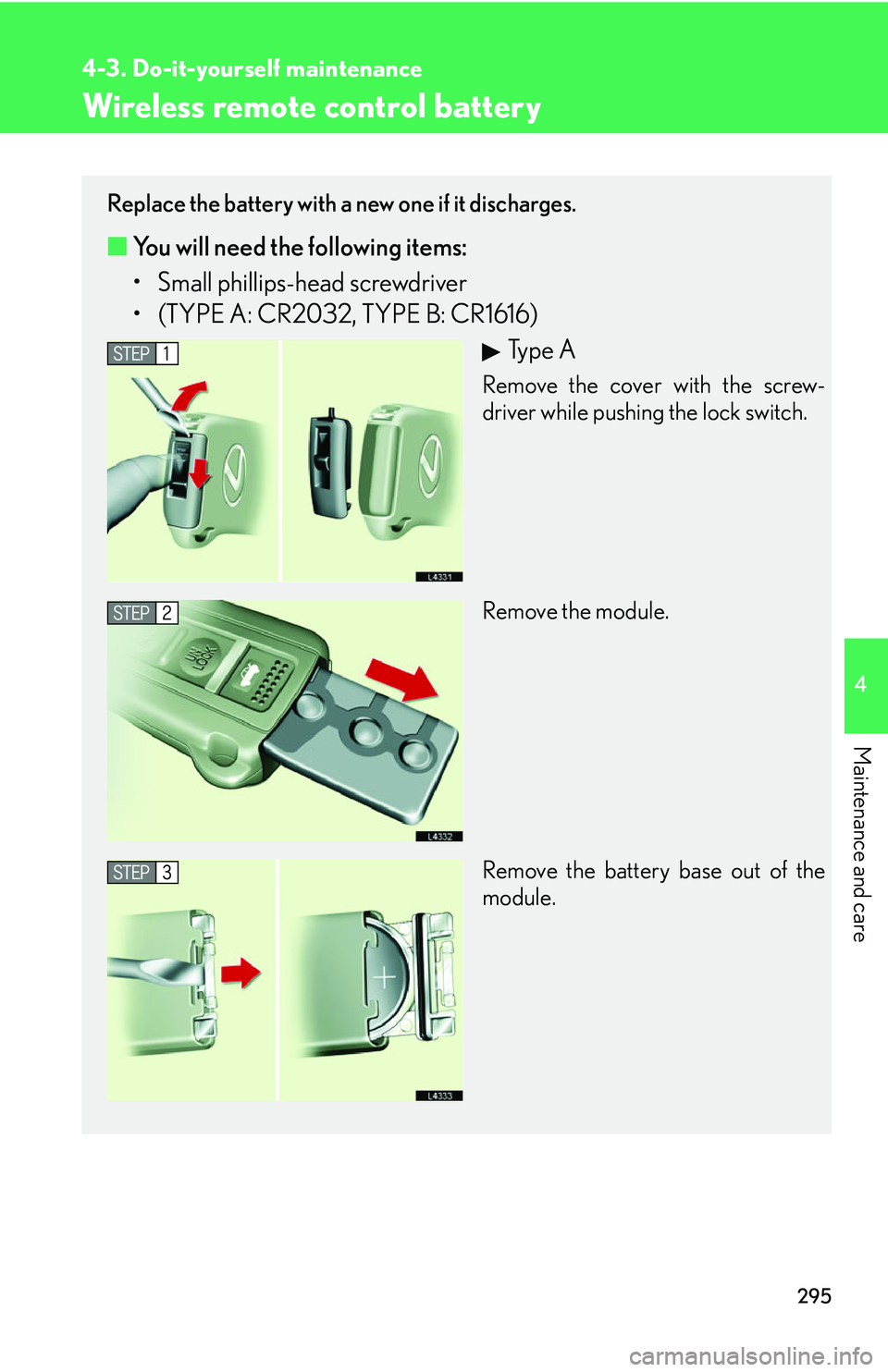
Wireless remote control battery
Replace the battery with a new one if it discharges.
■You will need the following items:
• Small phillips-head sc rewd
river
• (TYPE A: CR2032, TYPE B: CR1616)
Ty p e A
Remove the cover with the screw-
driver while pushing the lock switch.
Remove the module.
Remove the battery base out of the
module.
Page 312 of 419
296
4-3. Do-it-yourself maintenance
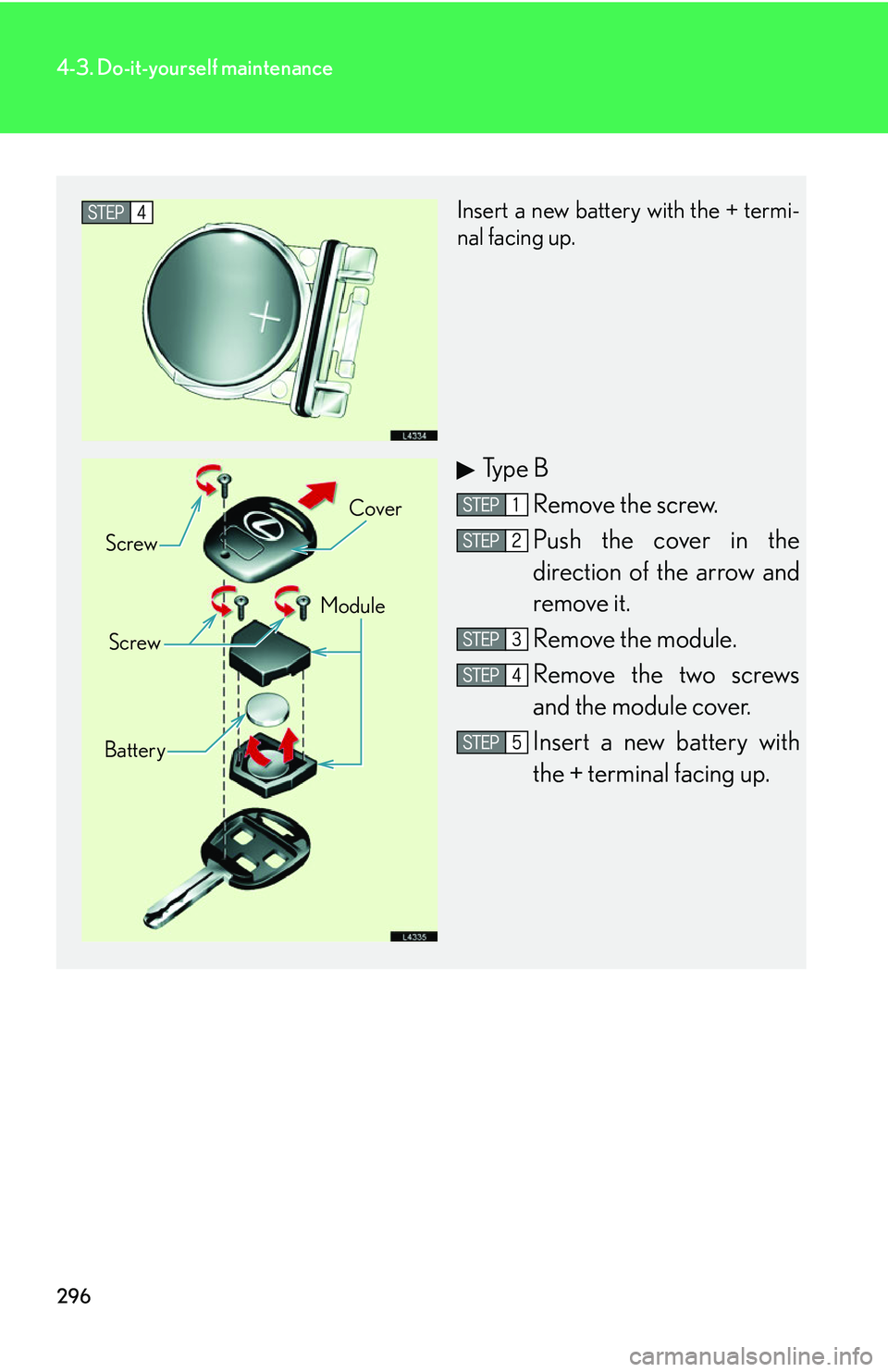
Insert a new battery with the + termi-
nal facing up.
Ty p e B
Remove the screw.
Push the cover in the
direction of the arrow and
r
emove it.
Remove the module.
Remove the two screws
and the module cover.
Insert a new battery with
the + terminal facing up.
Screw Cover
Screw Module
Battery
Page 313 of 419
297
4-3. Do-it-yourself maintenance
4
Maintenance and care
■If the wireless remote control key battery is discharged
The following symptoms may occur.
• The wireless remote control does not function properly.
• The operation distance becomes shorter.
• The brightness of the LED on the remote c
ontrol decreases or does not light up.
■Use specified lithium battery
Batteries can be purchased at your Lexus dealer, jeweler, or camera store.
■Checking remote control operation after replacing the battery
Push any of the buttons on the remote control and check that the LED lights up.
CAUTION
■Removed battery and other parts
Keep away from children.
These parts are small and if swallowed by a child they can cause choking.
NOTICE
■For normal operation after replacing the battery
Observe the following precautions when replacing the wireless remote control’s
ba
ttery.
• Always replace the battery with clean hands.
Moisture may cause the battery to rust.
• Do not touch or move any other comp o
nents inside the remote control.
• Do not bend either of the battery terminals.
• Do not let foreign objects, oils, etc. enter the module.
• Do not to lose the screws or O-ring.
• Do not to bend or damage the O-ring when replacing the module cover.
Page 314 of 419
298
4-3. Do-it-yourself maintenance
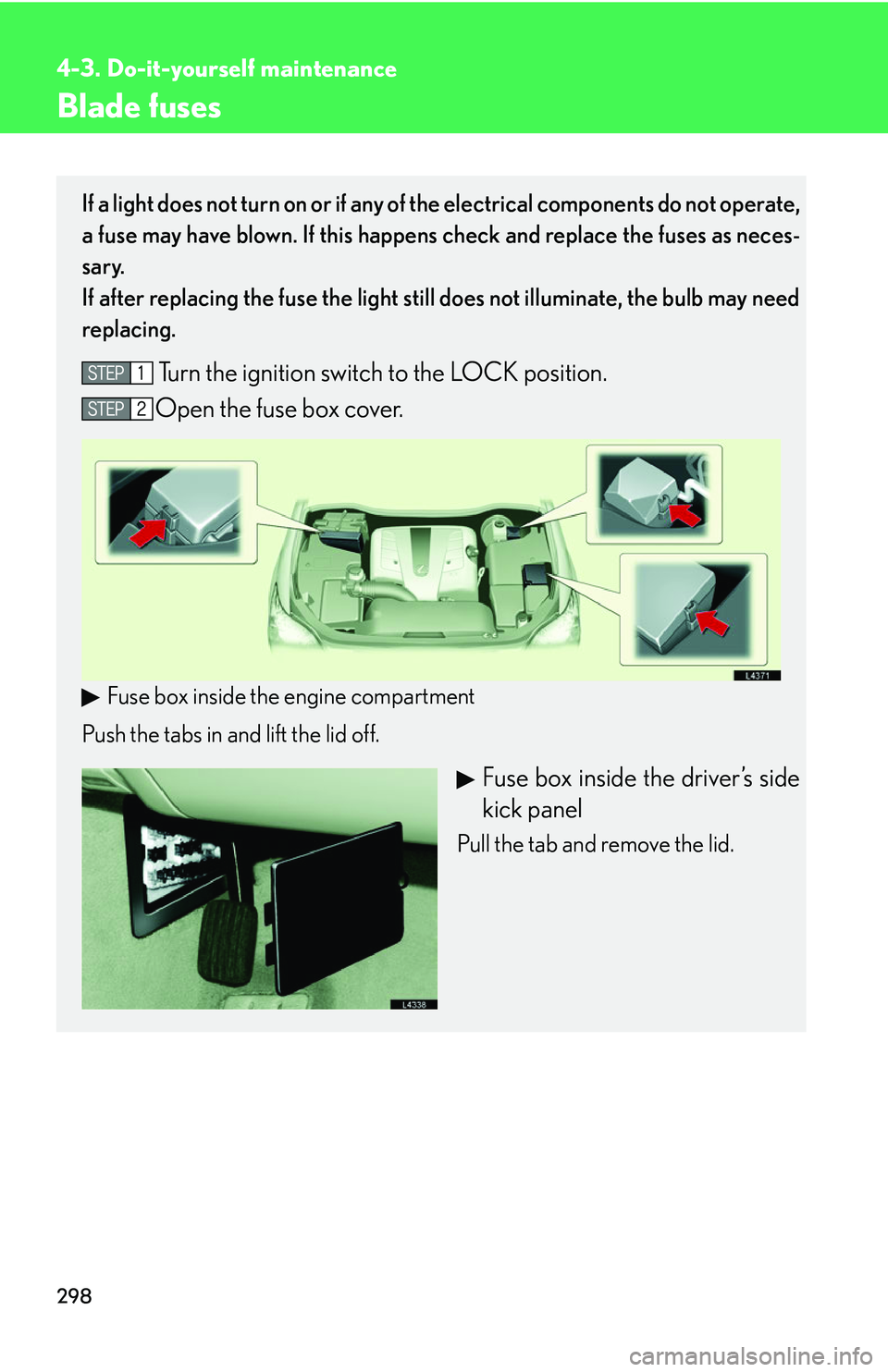
Blade fuses
If a light does not turn on or if any of the electrical components do not operate,
a fuse may have blown. If this happens check and replace the fuses as neces
-
sary.
If after replacing the fuse the light stil l
does not illuminate, the bulb may need
replacing.
Turn the ignition switch to the LOCK position.
Open the fuse box cover.
Fuse box inside the engine compartment
Push the tabs in and lift the lid off.
Fuse box inside the driver’s side
kick panel
Pull the tab and remove the lid.