ESP LEXUS LS460L 2016 User Guide
[x] Cancel search | Manufacturer: LEXUS, Model Year: 2016, Model line: LS460L, Model: LEXUS LS460L 2016Pages: 708, PDF Size: 36.57 MB
Page 227 of 708
2273-3. Adjusting the seats
3
Operation of each component
LS460/LS460L_GE (OM50G06E)
■When using the rear seat head restraints
Manual type:
Always raise the head restraint one level from the stowed position when using.
Rear center seat:
Make sure to pull the head restraint forward when using the rear center seat.
■Active head restraints (if equipped)
●The active head restraint on the front passenger seat will not activate if the seat is
unoccupied. However, it may activate during a rear-end collision if luggage is in the
seat or the seat belt is fastened.
●Once the active head restraint has activated, the head restraint remains protruded
forward and upward. After it has operated, have it repaired at your Lexus dealer.
CAUTION
■Head restraint precautions
Observe the following precautions regarding the head restraints. Failure to do so
may result in death or serious injury.
●Use the head restraints designed for each respective seat.
●Adjust the head restraints to the correct position at all times.
●Manual type: After adjusting the head restraints, push down on them and make
sure they are locked in position.
●Do not drive with the head restraints removed.
■The active head restraint on the front passenger seat (if equipped)
Do not place anything, such as a cushion, on the front passenger’s seat.
Doing so will disperse the passenger’s weight, which may prevents the sensor from
detecting the passenger’s weight properly. As a result, the active head restraint
may not activate in the event of an accident.
■Active head restraint precautions (if equipped)
●Do not put head restraint covers.
●For removal, installation, modification, disassembly or disposal of the active head
restraints, contact your Lexus dealer.
Inappropriate handling of the active head restraints may prevent them from oper-
ating properly during an accident.
Page 230 of 708
2303-4. Adjusting the steering wheel and mirrors
LS460/LS460L_GE (OM50G06E)
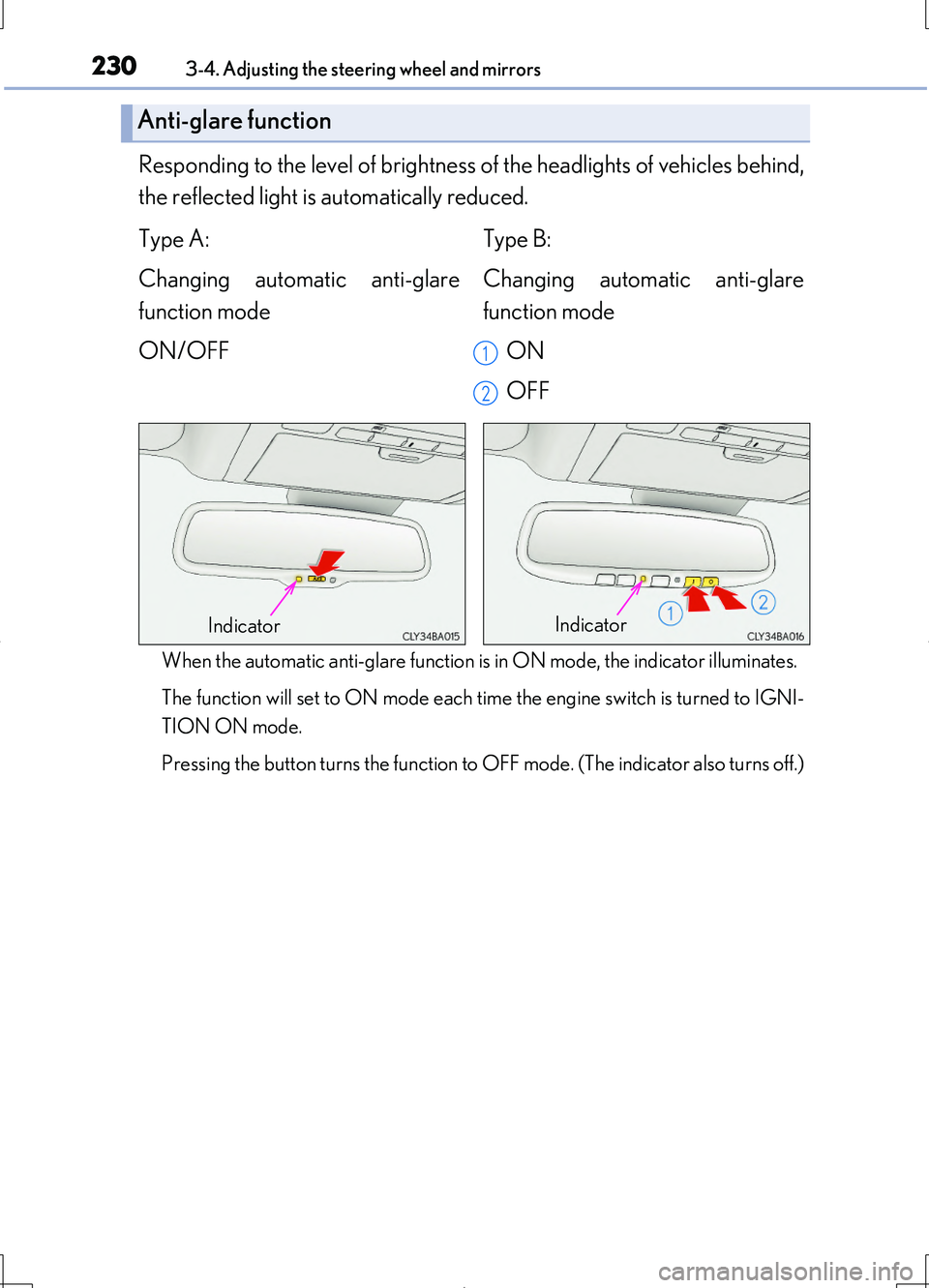
Responding to the level of brightness of the headlights of vehicles behind,
the reflected light is automatically reduced.
When the automatic anti-glare function is in ON mode, the indicator illuminates.
The function will set to ON mode each time the engine switch is turned to IGNI-
TION ON mode.
Pressing the button turns the function to OFF mode. (The indicator also turns off.)
Anti-glare function
Type A: Type B:
Changing automatic anti-glare
function mode
ON/OFF
Changing automatic anti-glare
function mode
ON
OFF
1
2
IndicatorIndicator
Page 238 of 708
2383-5. Opening, closing the windows and moon roof
LS460/LS460L_GE (OM50G06E)
■Door lock linked window operation
●The power windows can be closed using the entry function. (P. 155)
●The power windows can be opened and closed using the mechanical key.
( P. 631)
■Customization
Settings (e.g. linked door lock operation) can be changed.
(Customizable features P. 667)
CAUTION
Observe the following precautions.
Failure to do so may result in death or serious injury.
■Closing the windows
●The driver is responsible for all the power window operations, including the oper-
ation for the passengers. In order to prevent accidental operation, especially by a
child, do not let a child operate the power windows. It is possible for children and
other passengers to have body parts caug ht in the power window. Also, when rid-
ing with a child, it is recommended to use the window lock switch. ( P. 236)
●Check to make sure that all passengers do not have any part of their body in a
position where it could be caught when a window is being operated.
●When using the smart entry & start system, wireless remote control or mechani-
cal key and operating the power windows, operate the power window after
checking to make sure that there is no possibility of any passenger having any of
their body parts caught in the window. Also do not let a child operate window by
the smart entry & start system, wireless remote control or mechanical key. It is
possible for children and other passengers to get caught in the power window.
●When exiting the vehicle, turn the engine switch off, carry the key and exit the
vehicle along with the child. There may be accidental operation, due to mischief,
etc., that may possibly lead to an accident.
Page 243 of 708
2433-5. Opening, closing the windows and moon roof
3
Operation of each component
LS460/LS460L_GE (OM50G06E)
■Moon roof open warning buzzer
The buzzer sounds and a message is shown on the multi-information display in the
instrument cluster when the engine switch is turned off and the driver’s door is
opened with the moon roof open.
■Customization
Settings (e.g. linked door lock operation) can be changed.
(Customizable features P. 667)
CAUTION
Observe the following precautions.
Failure to do so may cause death or serious injury.
■Opening the moon roof
●Do not allow any passengers to put their hands or heads outside the vehicle while
it is moving.
●Do not sit on top of the moon roof.
■Closing the moon roof
●The driver is responsible for moon roof opening and closing operations.
In order to prevent accidental operation, especially by a child, do not let a child
operate the moon roof. It is possible for children and other passengers to have
body parts caught in the moon roof.
●Check to make sure that all passengers do not have any part of their body in a
position where it could be caught when the moon roof is being operated.
●When using the smart entry & start system, wireless remote control or mechani-
cal key and operating the moon roof, operate the moon roof after checking to
make sure that there is no possibility of any passenger having any of their body
parts caught in the moon roof. Also, do not let a child operate moon roof by the
smart entry & start system, wireless remote control or mechanical key. It is possi-
ble for children and other passengers to get caught in the moon roof.
●When exiting the vehicle, turn the engine switch off, carry the key and exit the
vehicle along with the child. There may be accidental operation, due to mischief,
etc., that may possibly lead to an accident.
■Jam protection function
●Never use any part of your body to intentionally activate the jam protection func-
tion.
●The jam protection function may not work if something gets caught just before
the moon roof fully closes.
Page 247 of 708
2474-1. Before driving
4
Driving
LS460/LS460L_GE (OM50G06E)
Make sure that the parking brake is set and shift the shift lever to D.
Gently depress the accelerator pedal.
Release the parking brake.
■When starting off on a uphill
Hill-start assist control will operate. ( P. 360)
■Driving in the rain
●Drive carefully when it is raining, because visibility will be reduced, the windows
may become fogged-up, and the road will be slippery.
●Drive carefully when it starts to rain, because the road surface will be especially
slippery.
●Refrain from high speeds when driving on an expressway in the rain, because there
may be a layer of water between the tires and the road surface, preventing the
steering and brakes from operating properly.
■Engine speed while driving
In the following conditions, the engine spee d may become high while driving. This is
due to automatic up-shifting control or down-shifting implementation to meet driv-
ing conditions. It does not indicate sudden acceleration.
●The vehicle is judged to be driving uphill or downhill
●When the accelerator pedal is released
●When the brake pedal is depressed while sport mode is selected
Starting off on a steep uphill
1
2
3
Page 249 of 708
2494-1. Before driving
4
Driving
LS460/LS460L_GE (OM50G06E)
CAUTION
Observe the following precautions.
Failure to do so may result in death or serious injury.
■When starting the vehicle
Always keep your foot on the brake pedal while stopped with the engine running.
This prevents the vehicle from creeping.
■When driving the vehicle
●Do not drive if you are unfamiliar with the location of the brake and accelerator
pedals to avoid depressing the wrong pedal.
• Accidentally depressing the accelerator pedal instead of the brake pedal will
result in sudden acceleration that may lead to an accident.
• When backing up, you may twist your body around, leading to a difficulty in
operating the pedals. Make sure to operate the pedals properly.
• Make sure to keep a correct driving posture even when moving the vehicle
only slightly. This allows you to depress the brake and accelerator pedals prop-
erly.
• Depress the brake pedal using your right foot. Depressing the brake pedal
using your left foot may delay response in an emergency, resulting in an acci-
dent.
●Do not drive the vehicle over or stop the vehicle near flammable materials.
The exhaust system and exhaust gases can be extremely hot. These hot parts may
cause a fire if there is any flammable material nearby.
Page 316 of 708
3164-5. Using the driving support systems
LS460/LS460L_GE (OM50G06E)
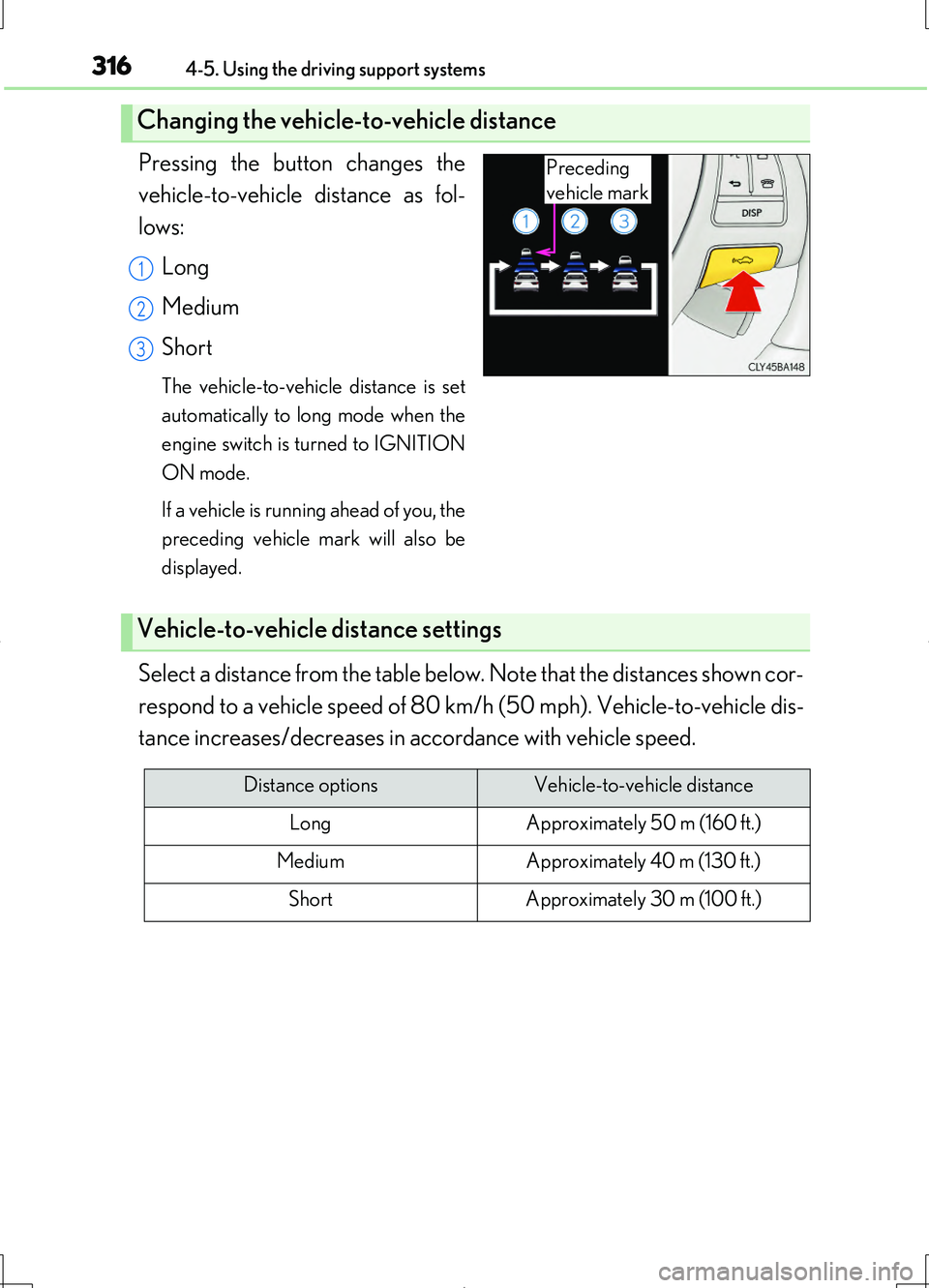
Pressing the button changes the
vehicle-to-vehicle distance as fol-
lows:
Long
Medium
Short
The vehicle-to-vehicle distance is set
automatically to long mode when the
engine switch is turned to IGNITION
ON mode.
If a vehicle is running ahead of you, the
preceding vehicle mark will also be
displayed.
Select a distance from the table below. Note that the distances shown cor-
respond to a vehicle speed of 80 km/h (50 mph). Vehicle-to-vehicle dis-
tance increases/decreases in accordance with vehicle speed.
Changing the vehicle-to-vehicle distance
Preceding
vehicle mark
1
2
3
Vehicle-to-vehicle distance settings
Distance optionsVehicle-to-vehicle distance
LongApproximately 50 m (160 ft.)
MediumApproximately 40 m (130 ft.)
ShortApproximately 30 m (100 ft.)
Page 331 of 708
3314-5. Using the driving support systems
4
Driving
LS460/LS460L_GE (OM50G06E)
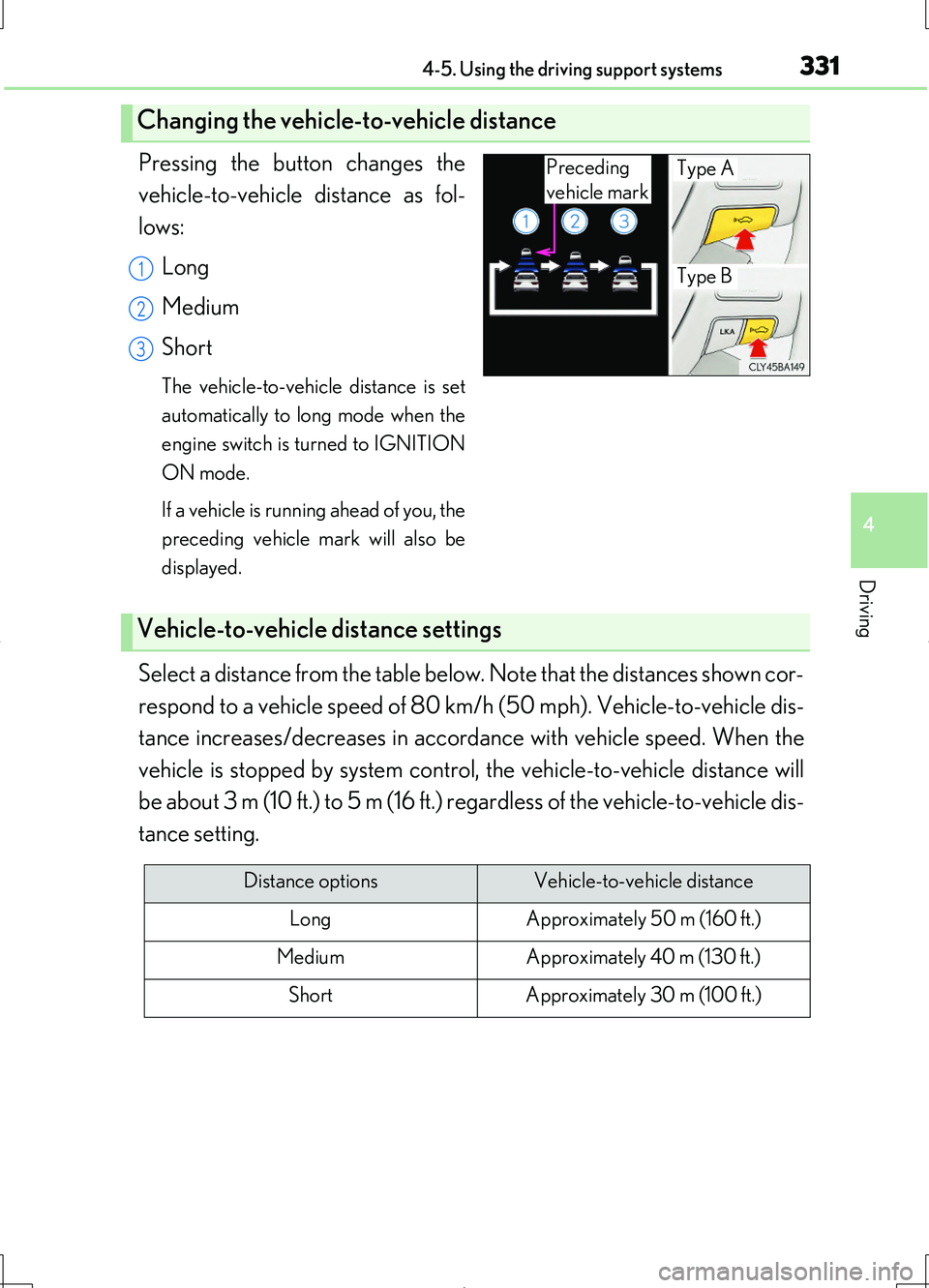
Pressing the button changes the
vehicle-to-vehicle distance as fol-
lows:
Long
Medium
Short
The vehicle-to-vehicle distance is set
automatically to long mode when the
engine switch is turned to IGNITION
ON mode.
If a vehicle is running ahead of you, the
preceding vehicle mark will also be
displayed.
Select a distance from the table below. Note that the distances shown cor-
respond to a vehicle speed of 80 km/h (50 mph). Vehicle-to-vehicle dis-
tance increases/decreases in accorda nce with vehicle speed. When the
vehicle is stopped by system control, the vehicle-to-vehicle distance will
be about 3 m (10 ft.) to 5 m (16 ft.) regardless of the vehicle-to-vehicle dis-
tance setting.
Changing the vehicle-to-vehicle distance
Preceding
vehicle mark
Type A
Type B1
2
3
Vehicle-to-vehicle distance settings
Distance optionsVehicle-to-vehicle distance
LongApproximately 50 m (160 ft.)
MediumApproximately 40 m (130 ft.)
ShortApproximately 30 m (100 ft.)
Page 334 of 708
3344-5. Using the driving support systems
LS460/LS460L_GE (OM50G06E)
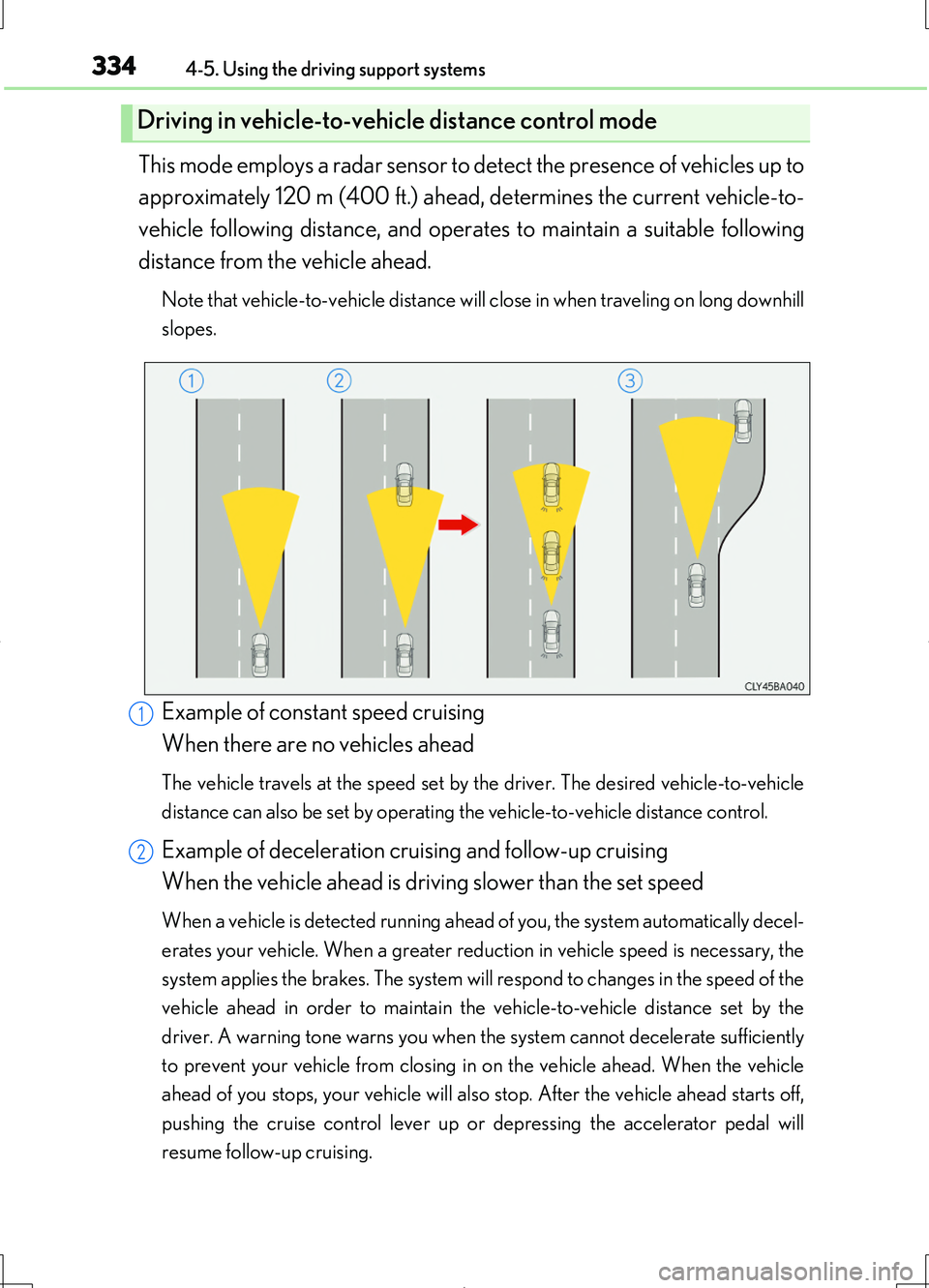
This mode employs a radar sensor to detect the presence of vehicles up to
approximately 120 m (400 ft.) ahead, determines the current vehicle-to-
vehicle following distance, and operates to maintain a suitable following
distance from the vehicle ahead.
Note that vehicle-to-vehicle distance will close in when traveling on long downhill
slopes.
Example of constant speed cruising
When there are no vehicles ahead
The vehicle travels at the speed set by the driver. The desired vehicle-to-vehicle
distance can also be set by operating the vehicle-to-vehicle distance control.
Example of deceleration cruising and follow-up cruising
When the vehicle ahead is driving slower than the set speed
When a vehicle is detected running ahead of you, the system automatically decel-
erates your vehicle. When a greater reduction in vehicle speed is necessary, the
system applies the brakes. The system will respond to changes in the speed of the
vehicle ahead in order to maintain the vehicle-to-vehicle distance set by the
driver. A warning tone warns you when the system cannot decelerate sufficiently
to prevent your vehicle from closing in on the vehicle ahead. When the vehicle
ahead of you stops, your vehicle will also stop. After the vehicle ahead starts off,
pushing the cruise control lever up or depressing the accelerator pedal will
resume follow-up cruising.
Driving in vehicle-to-vehicle distance control mode
1
2
Page 351 of 708
3514-5. Using the driving support systems
4
Driving
LS460/LS460L_GE (OM50G06E)
●When driving on a road surface that is wet due to rain, previous rainfall, standing
water, etc.
●When the vehicle experiences strong up-and-down motion such as when driving
on an extremely rough road or on a seam in the pavement
●When headlight brightness at nighttime is reduced due to dirt on the lenses, or
when the headlights are misaligned
●When driving with a strong crosswind
●When driving on winding roads or roads that are uneven
●When driving on rough or unpaved roads
■When changing the tires
Depending on the tires used, such as snow tires, etc., sufficient performance may not
be maintainable.
■Warning messages for LKA
Warning messages are used to indicate a system malfunction or to inform the driver
of the need for caution while driving. ( P. 614)
CAUTION
■Before using the LKA system
Do not rely solely on the LKA system. The LKA system does not drive the vehicle
automatically, nor does it reduce the amount of care you need to take. As such, the
driver must always assume full responsibility for understanding his/her surround-
ings, for operating the steering wheel to correct the driving line, and for driving
safely.
Inappropriate or negligent driving could lead to an accident.
■To avoid operating the LKA by mistake
Switch the LKA off using the LKA switch when not in use.