light LEXUS LS460L 2016 Workshop Manual
[x] Cancel search | Manufacturer: LEXUS, Model Year: 2016, Model line: LS460L, Model: LEXUS LS460L 2016Pages: 708, PDF Size: 36.57 MB
Page 139 of 708
1392. Instrument cluster
2
Instrument cluster
LS460/LS460L_GE (OM50G06E)
Press the “MENU” button on the Remote Touch, then select on the
“Menu” screen.
If does not appear, select on the “Menu” screen. If the “Information”
screen appears, select “Fuel consumption” on the screen.
If the “Past Record” screen is displayed, select “Trip Information”.
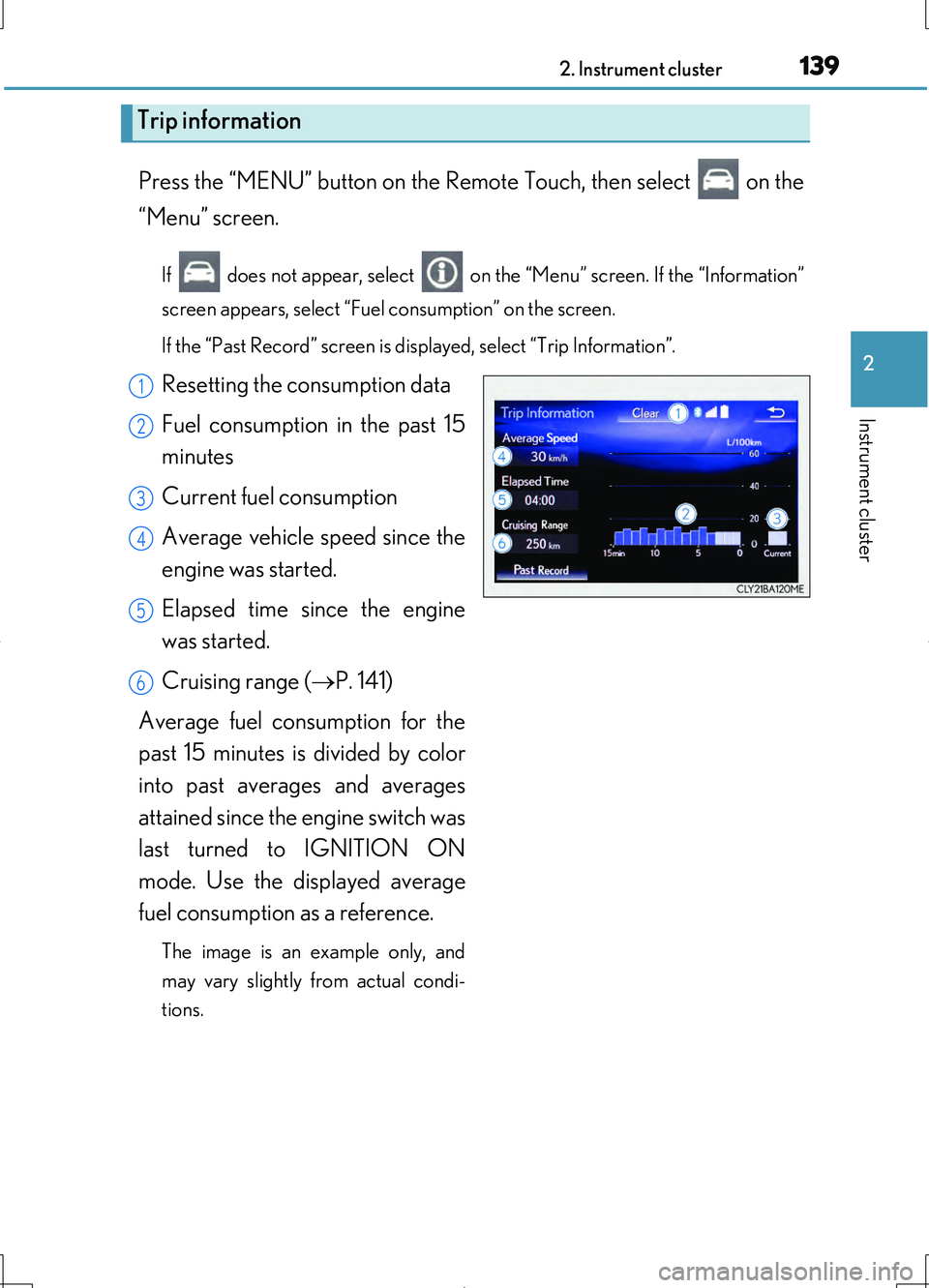
Resetting the consumption data
Fuel consumption in the past 15
minutes
Current fuel consumption
Average vehicle speed since the
engine was started.
Elapsed time since the engine
was started.
Cruising range ( P. 141)
Average fuel consumption for the
past 15 minutes is divided by color
into past averages and averages
attained since the engine switch was
last turned to IGNITION ON
mode. Use the displayed average
fuel consumption as a reference.
The image is an example only, and
may vary slightly from actual condi-
tions.
Trip information
1
2
3
4
5
6
Page 140 of 708
1402. Instrument cluster
LS460/LS460L_GE (OM50G06E)
Press the “MENU” button on the Remote Touch, then select on the
“Menu” screen.
If does not appear, select on the “Menu” screen. If the “Information”
screen appears, select “Fuel consumption” on the screen.
If the “Trip Information” screen is displayed, select “Past Record”.
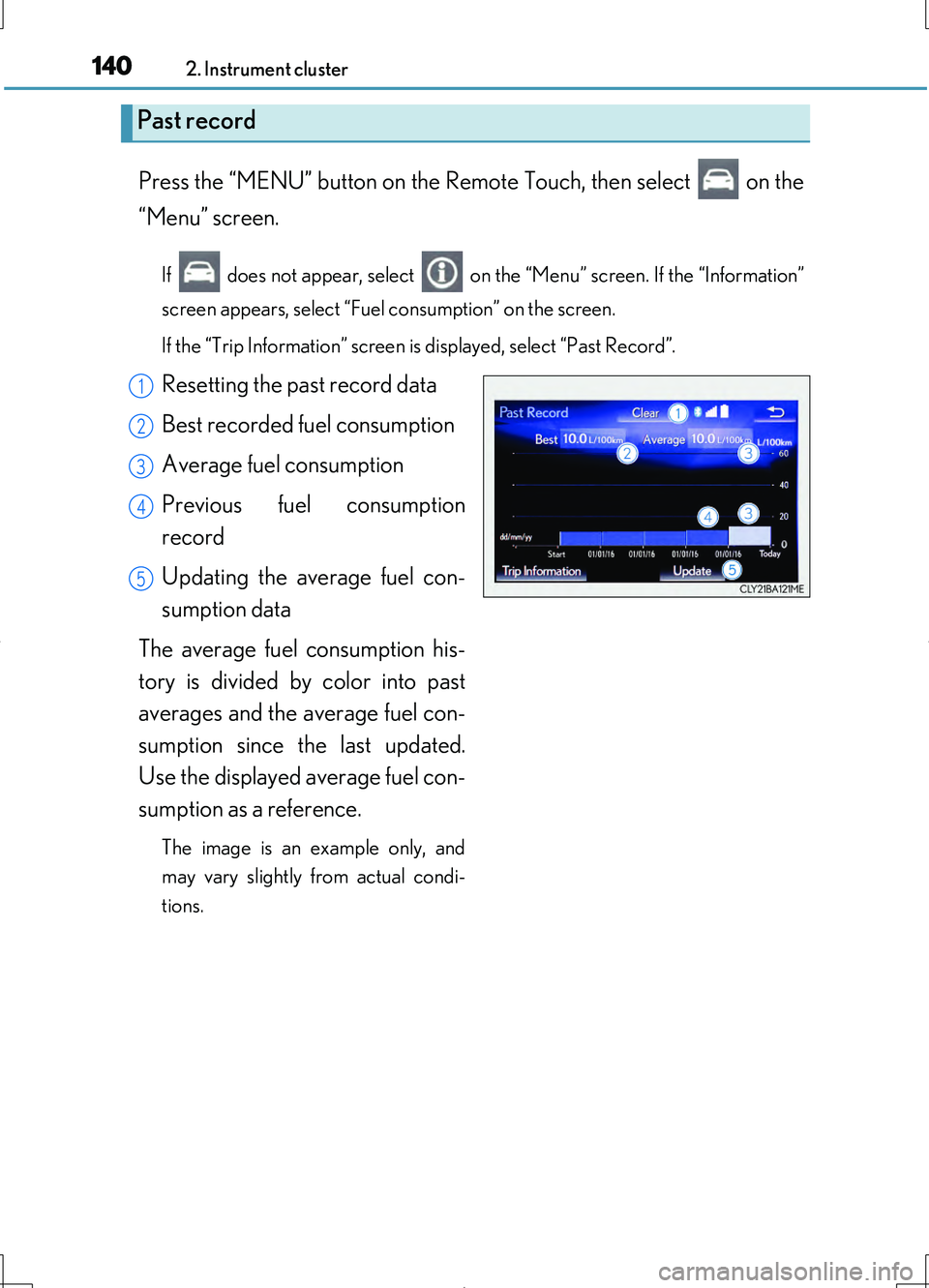
Resetting the past record data
Best recorded fuel consumption
Average fuel consumption
Previous fuel consumption
record
Updating the average fuel con-
sumption data
The average fuel consumption his-
tory is divided by color into past
averages and the average fuel con-
sumption since the last updated.
Use the displayed average fuel con-
sumption as a reference.
The image is an example only, and
may vary slightly from actual condi-
tions.
Past record
1
2
3
4
5
Page 142 of 708
1422. Instrument cluster
LS460/LS460L_GE (OM50G06E)
Vehicle information can be displayed on the side display (P. 415), then
select “<” or “>” to select the desired screen.
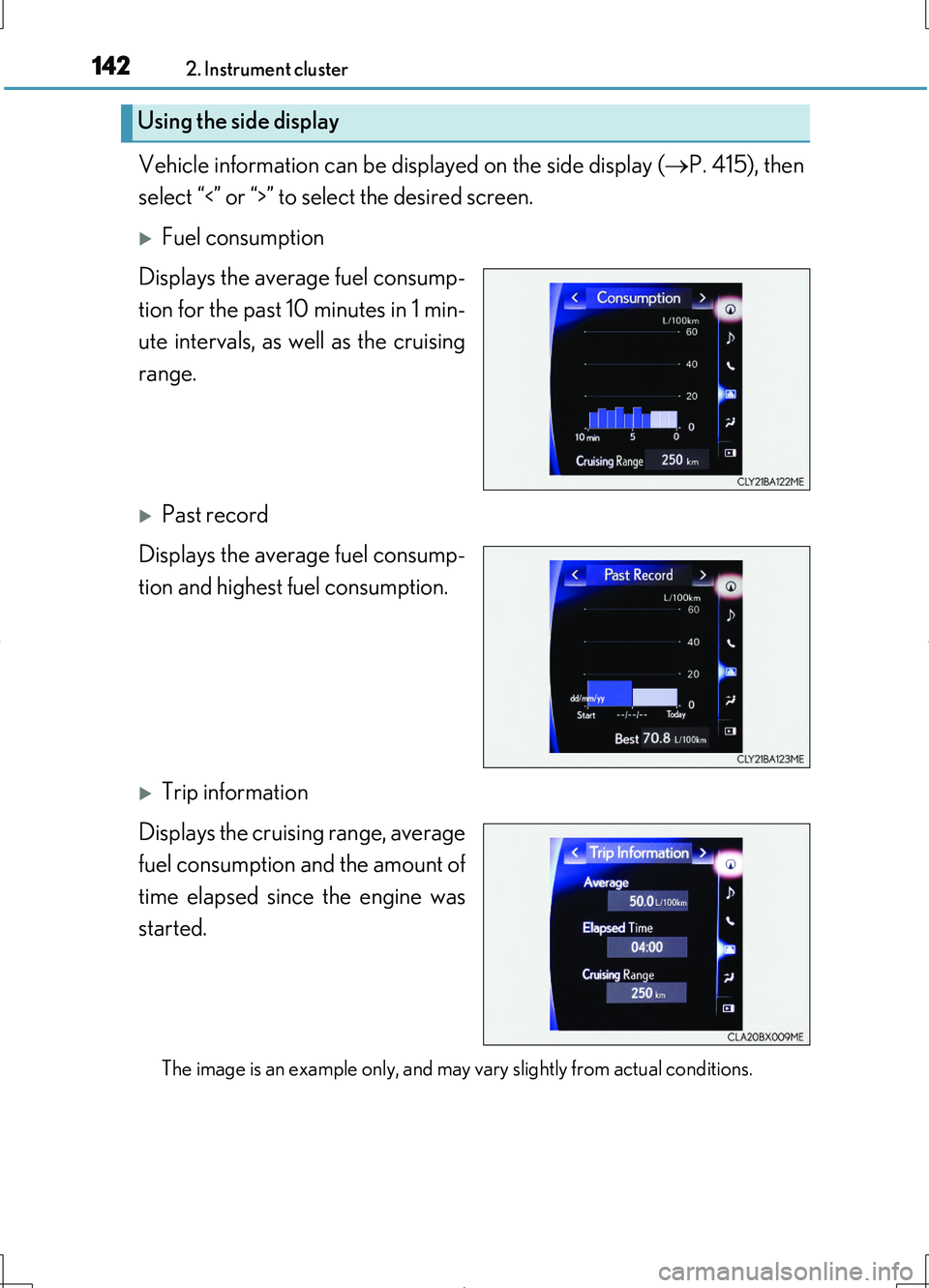
Fuel consumption
Displays the average fuel consump-
tion for the past 10 minutes in 1 min-
ute intervals, as well as the cruising
range.
Past record
Displays the average fuel consump-
tion and highest fuel consumption.
Trip information
Displays the cruising range, average
fuel consumption and the amount of
time elapsed since the engine was
started.
The image is an example only, and may vary slightly from actual conditions.
Using the side display
Page 146 of 708
1463-1. Key information
LS460/LS460L_GE (OM50G06E)
■Electronic keys
●Part of the electronic key uses leather. Refer to P. 514 for details on cleaning the
leather portion.
●When cleaning the metallic portion, wet a cloth and firmly wring out any excess
water from it, then thoroughly wipe off any dirt.
●When not using the electronic key for an extended period of time, store it in a dry
place of normal temperature away from direct sunlight and interior light after
removing any dirt.
■Card key (if equipped)
●The card key is not waterproof.
●The mechanical key that is stored inside the card key should be used only if a prob-
lem arises, such as when the card key does not operate properly.
●If it is difficult to take out the mechanical key, push down the lock release button
using a pen tip etc. If it is still difficult to pull it out, use a coin etc.
■When required to leave the vehicle’s key with a parking attendant
Turn the trunk opener main switch off and lock the glove box and the trunk storage
extension (if equipped) as circumstances demand. ( P. 192, 453, 494)
Remove the mechanical key for your own use and provide the attendant with the
electronic key only.
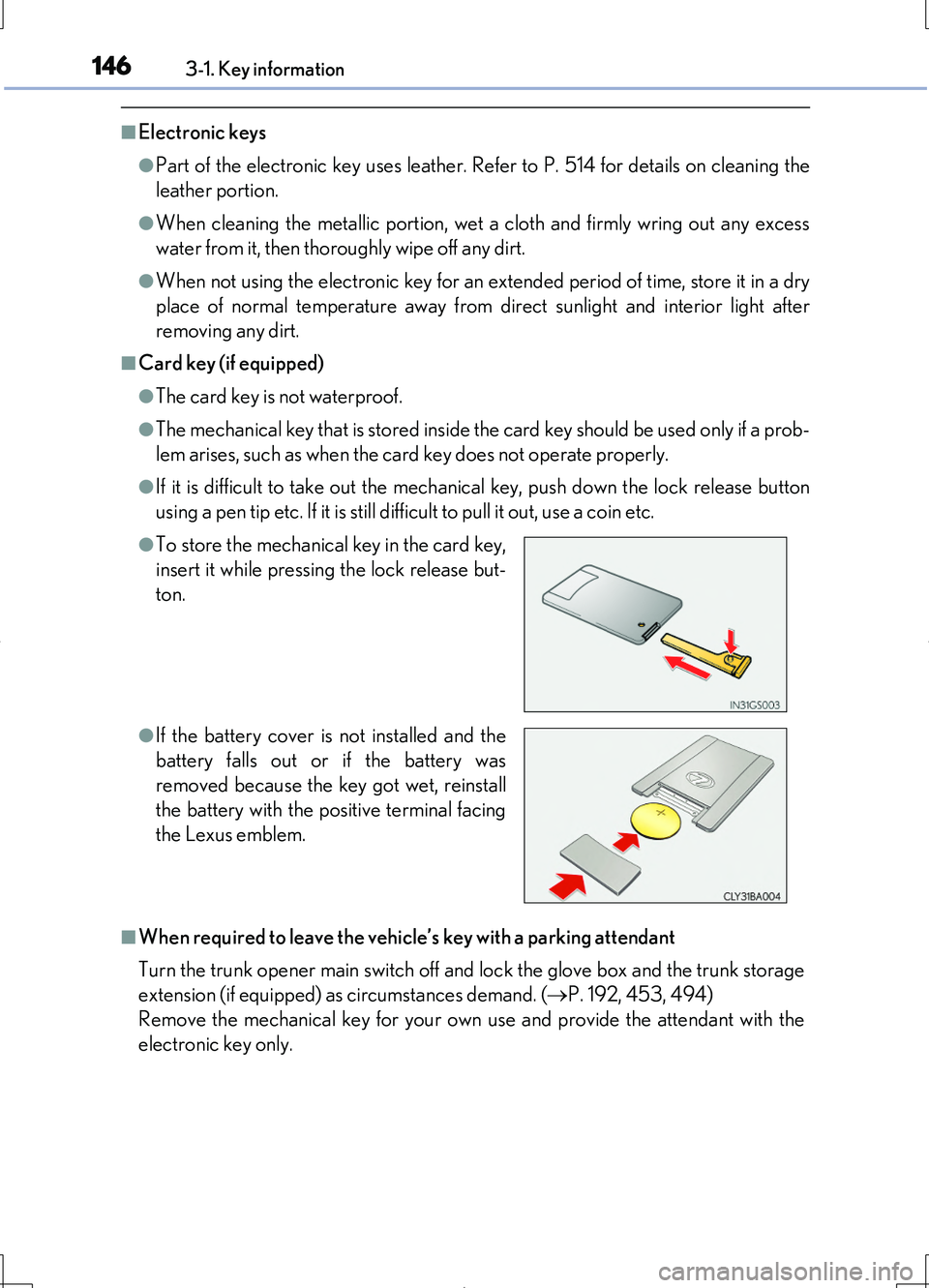
●To store the mechanical key in the card key,
insert it while pressing the lock release but-
ton.
●If the battery cover is not installed and the
battery falls out or if the battery was
removed because the key got wet, reinstall
the battery with the positive terminal facing
the Lexus emblem.
Page 151 of 708
1513-1. Key information
3
Operation of each component
LS460/LS460L_GE (OM50G06E)
NOTICE
■To prevent key damage
●Do not drop the keys, subject them to strong shocks or bend them.
●Do not expose the keys to high temperatures for a long period of time.
●Do not get the keys wet or wash them in an ultrasonic washer etc.
●Do not attach metallic or magnetic materials to the keys or place the keys close to
such materials.
●Do not disassemble the keys.
●Do not attach a sticker or anything else to the surface of the electronic key.
●Do not place the keys near objects that produce magnetic fields, such as TVs,
audio systems and induction cookers, or medical electrical equipment, such as
low-frequency therapy equipment.
■Handling the electronic keys
●Observe the following to prevent deterioration, changes in shape and damage to
the leather area.
• Do not carry the electronic key together with hard objects, such as other keys
or accessories.
• Do not expose the electronic keys to direct sunlight or interior light for
extended periods of time.
• Do not place the electronic key on items made of vinyl, plastic or that contain
wax.
They may stick to the leather surface if the items become warm.
• Do not get the electronic key wet.
Even if the electronic gets slightly wet, dry it with a soft cloth and let it dry in the
shade.
• Do not touch the electronic key with hands that have oil, medicine, hand
cream or perfume on them.
• When cleaning, do not use a leather cleaner, solvents or leather filling agents.
●Because the leather portion is dyed, if the electronic key touches clothing while it
has sweat and moisture adhered to it, there is a possibility that the clothing may
change color.
Page 152 of 708
1523-1. Key information
LS460/LS460L_GE (OM50G06E)
NOTICE
■In case of a smart entry & start system malfunction or other key-related problems
Take your vehicle with all the electronic keys provided with your vehicle, including
the card key, to your Lexus dealer.
■When an electronic key is lost
If the electronic key remains lost, the risk of vehicle theft increases significantly.
Visit your Lexus dealer immediately with all remaining electronic keys and the card
key that was provided with your vehicle.
■Handling the card key
●Do not apply excess force when inserting the mechanical key into the card key.
Doing so may damage the card key.
●If the battery or card key terminals get wet, the battery may corrode.
If the key is dropped into water, or if drinking water etc. is spilled on the key,
immediately remove the battery cover and wipe the battery and terminals. (To
remove the battery cover, lightly grasp and pull it.) If the battery is corroded, have
your Lexus dealer replace the battery.
●Do not crush the battery cover or use a screwdriver to remove the battery cover.
Forcibly removing the battery cover may bend or damage the key.
●If the battery cover is frequently removed, the battery cover may become loose.
●When installing the battery, make sure to check the direction of the battery.
Installing the battery in the wrong direction may cause the battery to deplete rap-
idly.
●The surface of the card key may be damaged, or its coating may peel off in the
following situations:
• The card key is carried together with hard objects, such as coins and keys.
• The card key is scraped with a sharp object, such as the tip of a mechanical
pencil.
• The surface of the card key is wiped with thinner or benzene.
Page 154 of 708
1543-2. Opening, closing and locking the doors
LS460/LS460L_GE (OM50G06E)
■Operation signals
Doors:
The emergency flashers flash to indicate that the doors have been locked/unlocked.
(Locked: Once; Unlocked: Twice)
Windows and moon roof:
A buzzer sounds to indicate that th e windows and moon roof are operating.
Some models, the buzzer also sounds from the doors and the trunk.
■Security feature
If a door is not opened within approximately 30 seconds after the vehicle is
unlocked, the security feature automatically locks the vehicle again.
■Welcome light illumination control
The front position, tail and license plate lights automatically turn on at night when the
doors are unlocked using the entry function or wireless remote control if the head-
light switch is in the “AUTO” position.
Page 178 of 708
1783-2. Opening, closing and locking the doors
LS460/LS460L_GE (OM50G06E)
■Operation signals
Doors:
The emergency flashers flash to indicate that the doors have been locked/unlocked.
(Locked: Once; Unlocked: Twice)
Windows and moon roof:
A buzzer sounds to indicate that th e windows and moon roof are operating.
Some models, the buzzer sounds from the doors and the trunk.
■Welcome light illumination control
P. 154
■Door lock buzzer
If an attempt to lock the doors is made when a door is not fully closed, a buzzer
sounds continuously for 5 seconds. Fully close the door to stop the buzzer, and lock
the vehicle once more.
■Panic mode (if equipped)
■Security feature
P. 154
■Alarm
Using the wireless remote control to lock the doors will set the alarm system.
( P. 112)
■Conditions affecting operation
P. 163
When is pressed for longer than about
one second, an alarm will sound intermittently
and the vehicle lights will flash to deter any
person from trying to break into or damage
your vehicle.
To stop the alarm, press any button on the
electronic key.
Page 189 of 708
1893-2. Opening, closing and locking the doors
3
Operation of each component
LS460/LS460L_GE (OM50G06E)
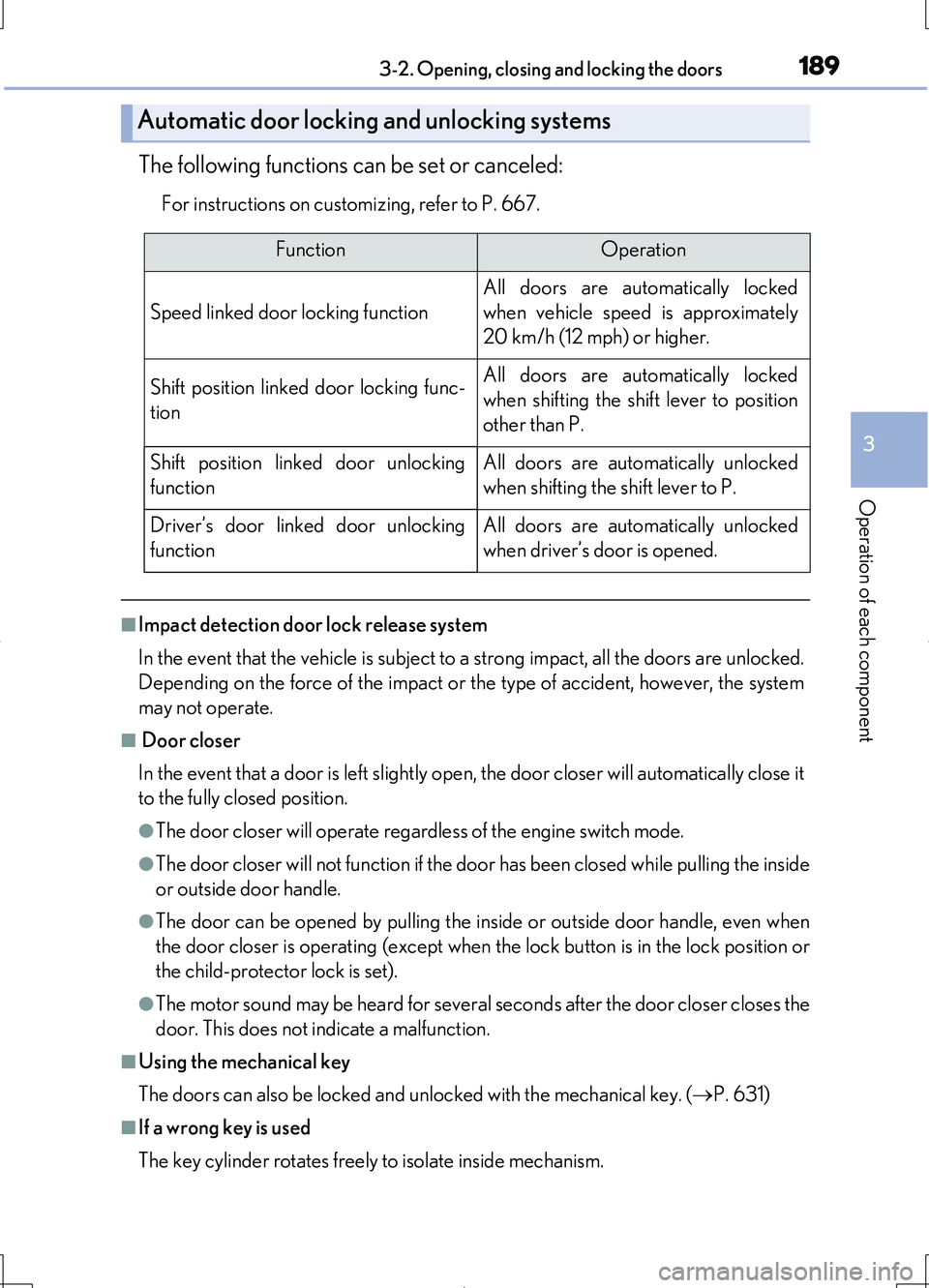
The following functions can be set or canceled:
For instructions on customizing, refer to P. 667.
■Impact detection door lock release system
In the event that the vehicle is subject to a strong impact, all the doors are unlocked.
Depending on the force of the impact or the type of accident, however, the system
may not operate.
■ Door closer
In the event that a door is left slightly open, the door closer will automatically close it
to the fully closed position.
●The door closer will operate regardless of the engine switch mode.
●The door closer will not function if the door has been closed while pulling the inside
or outside door handle.
●The door can be opened by pulling the in side or outside door handle, even when
the door closer is operating (except when the lock button is in the lock position or
the child-protector lock is set).
●The motor sound may be heard for several s econds after the door closer closes the
door. This does not indicate a malfunction.
■Using the mechanical key
The doors can also be locked and unlocked with the mechanical key. ( P. 631)
■If a wrong key is used
The key cylinder rotates freely to isolate inside mechanism.
Automatic door locking and unlocking systems
FunctionOperation
Speed linked door locking function
All doors are automatically locked
when vehicle speed is approximately
20 km/h (12 mph) or higher.
Shift position linked door locking func-
tion
All doors are automatically locked
when shifting the shift lever to position
other than P.
Shift position linked door unlocking
function
All doors are automatically unlocked
when shifting the shift lever to P.
Driver’s door linked door unlocking
function
All doors are automatically unlocked
when driver’s door is opened.
Page 190 of 708
1903-2. Opening, closing and locking the doors
LS460/LS460L_GE (OM50G06E)
■Customization
Settings (e.g. unlocking function using a key) can be changed.
(Customizable features P. 667)
CAUTION
■To prevent an accident
Observe the following precautions while driving the vehicle.
Failure to do so may result in a door opening and an occupant throwing out of the
vehicle, resulting in death or serious injury.
●Ensure that all doors are properly closed and locked.
●Do not pull the inside handle of the doors while driving.
For Korea and other countries with airbag manual on-off system except South
Africa
Be especially careful for the front doors, as the doors may be opened even if the
inside lock buttons are in locked position.
Other than listed above
Be especially careful for the driver’s door, as the door may be opened even if the
inside lock button is in locked position.
●Set the rear door child-protector locks when children are seated in the rear seats.
■ Door closer
In the event that a door is left slightly open, the door closer will automatically close
it to the fully closed position.
If the child-protector lock is set, the door closer will not stop during operation even
if an attempt is made to open the door from inside the vehicle. Be careful not to
catch fingers or anything else in the door. Failure to do so may result in serious
injury.
NOTICE
■ To prevent door closer malfunction
Do not frequently repeat opening and closing of doors, or apply excessive force to
a door while the door closer is operating.