display LEXUS LS460L 2016 Repair Manual
[x] Cancel search | Manufacturer: LEXUS, Model Year: 2016, Model line: LS460L, Model: LEXUS LS460L 2016Pages: 708, PDF Size: 36.57 MB
Page 354 of 708
3544-5. Using the driving support systems
LS460/LS460L_GE (OM50G06E)
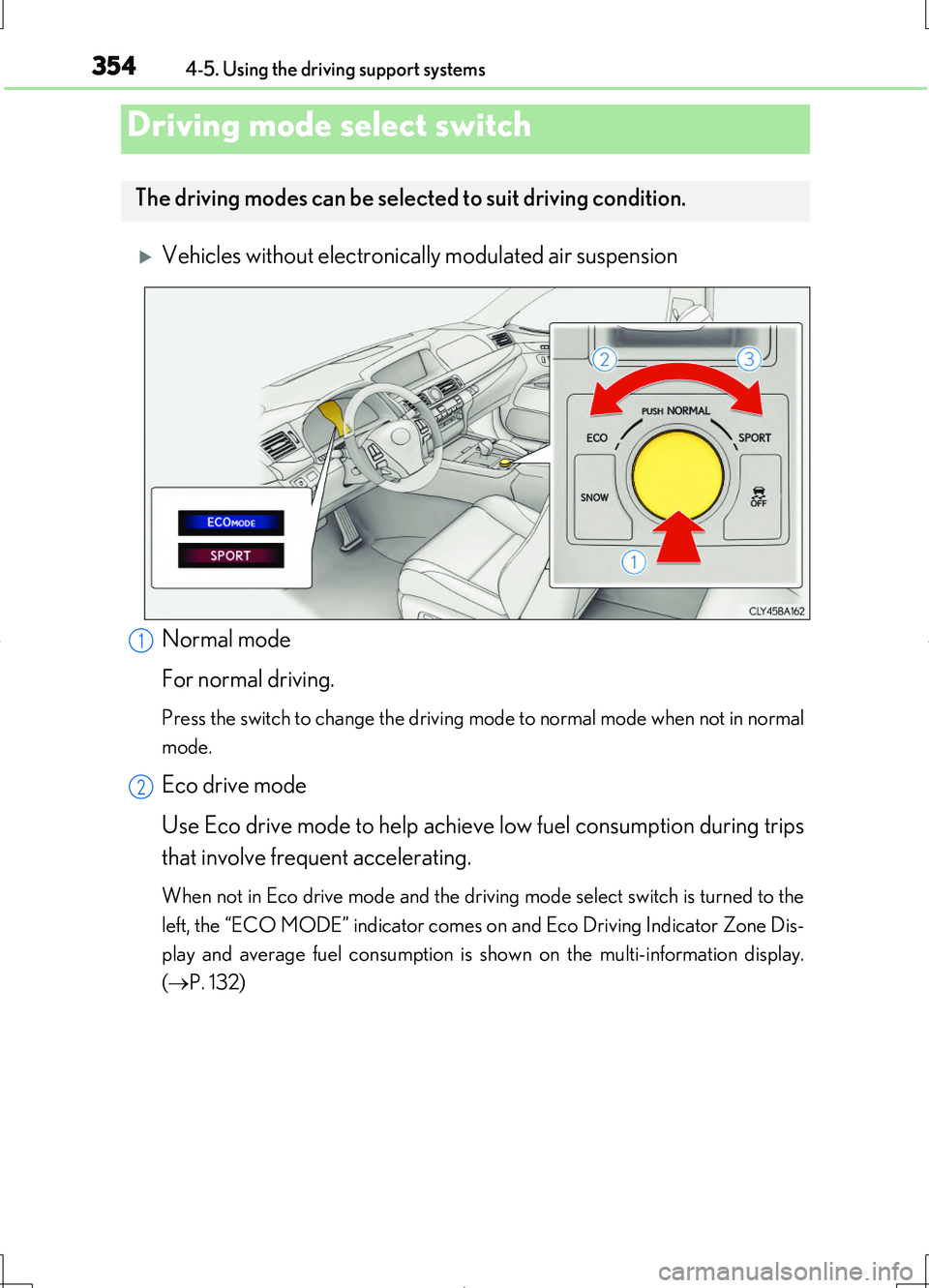
Vehicles without electronically modulated air suspension
Normal mode
For normal driving.
Press the switch to change the driving mode to normal mode when not in normal
mode.
Eco drive mode
Use Eco drive mode to help achieve low fuel consumption during trips
that involve frequent accelerating.
When not in Eco drive mode and the driving mode select switch is turned to the
left, the “ECO MODE” indicator comes on and Eco Driving Indicator Zone Dis-
play and average fuel consumption is shown on the multi-information display.
( P. 132)
Driving mode select switch
The driving modes can be selected to suit driving condition.
1
2
Page 355 of 708

3554-5. Using the driving support systems
4
Driving
LS460/LS460L_GE (OM50G06E)
Sport mode
Assists acceleration response by controlling the transmission and
steering. Suitable for when precise handling is desirable, for example
when driving on mountain roads.
When not in Sport mode and the driving mode select switch is turned to the right,
the “SPORT” indicator comes on in the multi-information display.
3
Page 356 of 708
3564-5. Using the driving support systems
LS460/LS460L_GE (OM50G06E)
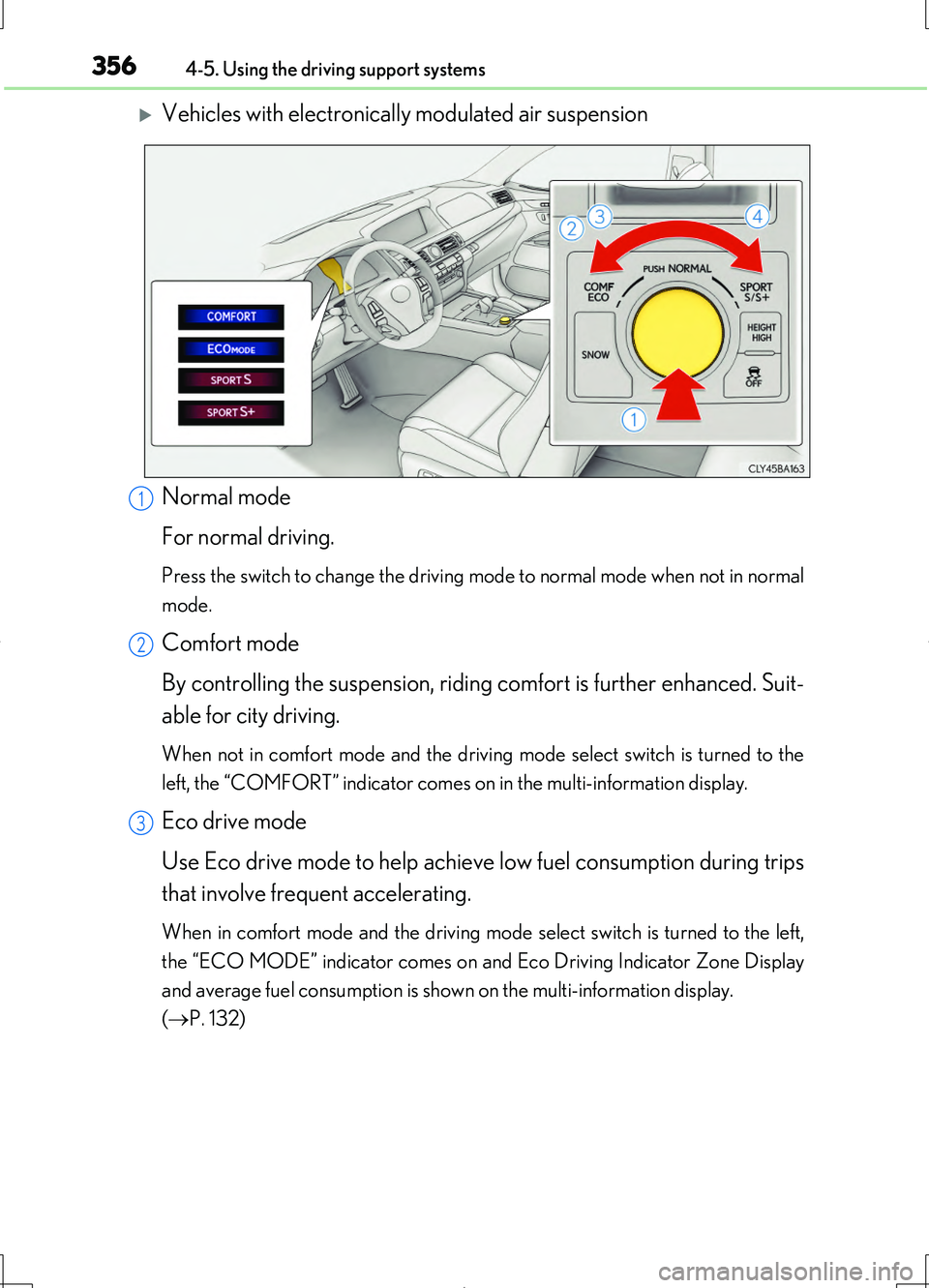
Vehicles with electronically modulated air suspension
Normal mode
For normal driving.
Press the switch to change the driving mode to normal mode when not in normal
mode.
Comfort mode
By controlling the suspension, riding comfort is further enhanced. Suit-
able for city driving.
When not in comfort mode and the driving mode select switch is turned to the
left, the “COMFORT” indicator comes on in the multi-information display.
Eco drive mode
Use Eco drive mode to help achieve low fuel consumption during trips
that involve frequent accelerating.
When in comfort mode and the driving mode select switch is turned to the left,
the “ECO MODE” indicator comes on and Eco Driving Indicator Zone Display
and average fuel consumption is shown on the multi-information display.
( P. 132)
1
2
3
Page 357 of 708
3574-5. Using the driving support systems
4
Driving
LS460/LS460L_GE (OM50G06E)
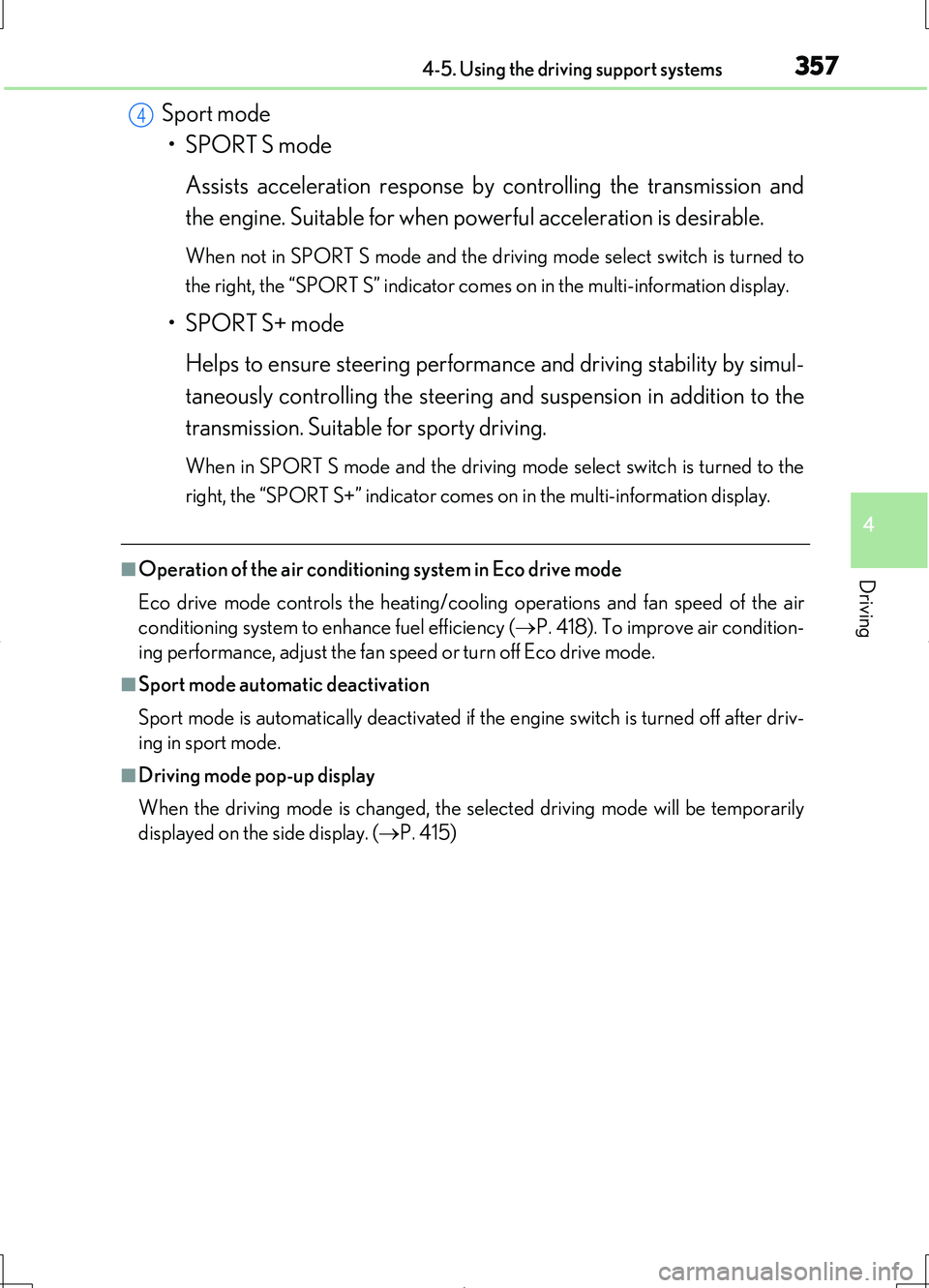
Sport mode
• SPORT S mode
Assists acceleration response by controlling the transmission and
the engine. Suitable for when powerful acceleration is desirable.
When not in SPORT S mode and the driv ing mode select switch is turned to
the right, the “SPORT S” indicator comes on in the multi-information display.
• SPORT S+ mode
Helps to ensure steering performance and driving stability by simul-
taneously controlling the steering and suspension in addition to the
transmission. Suitable for sporty driving.
When in SPORT S mode and the driving mo de select switch is turned to the
right, the “SPORT S+” indicator comes on in the multi-information display.
■Operation of the air conditioni ng system in Eco drive mode
Eco drive mode controls the heating/cooling operations and fan speed of the air
conditioning system to enhance fuel efficiency ( P. 418). To improve air condition-
ing performance, adjust the fan speed or turn off Eco drive mode.
■Sport mode automatic deactivation
Sport mode is automatically deactivated if the engine switch is turned off after driv-
ing in sport mode.
■Driving mode pop-up display
When the driving mode is changed, the selected driving mode will be temporarily
displayed on the side display. ( P. 415)
4
Page 362 of 708
3624-5. Using the driving support systems
LS460/LS460L_GE (OM50G06E)
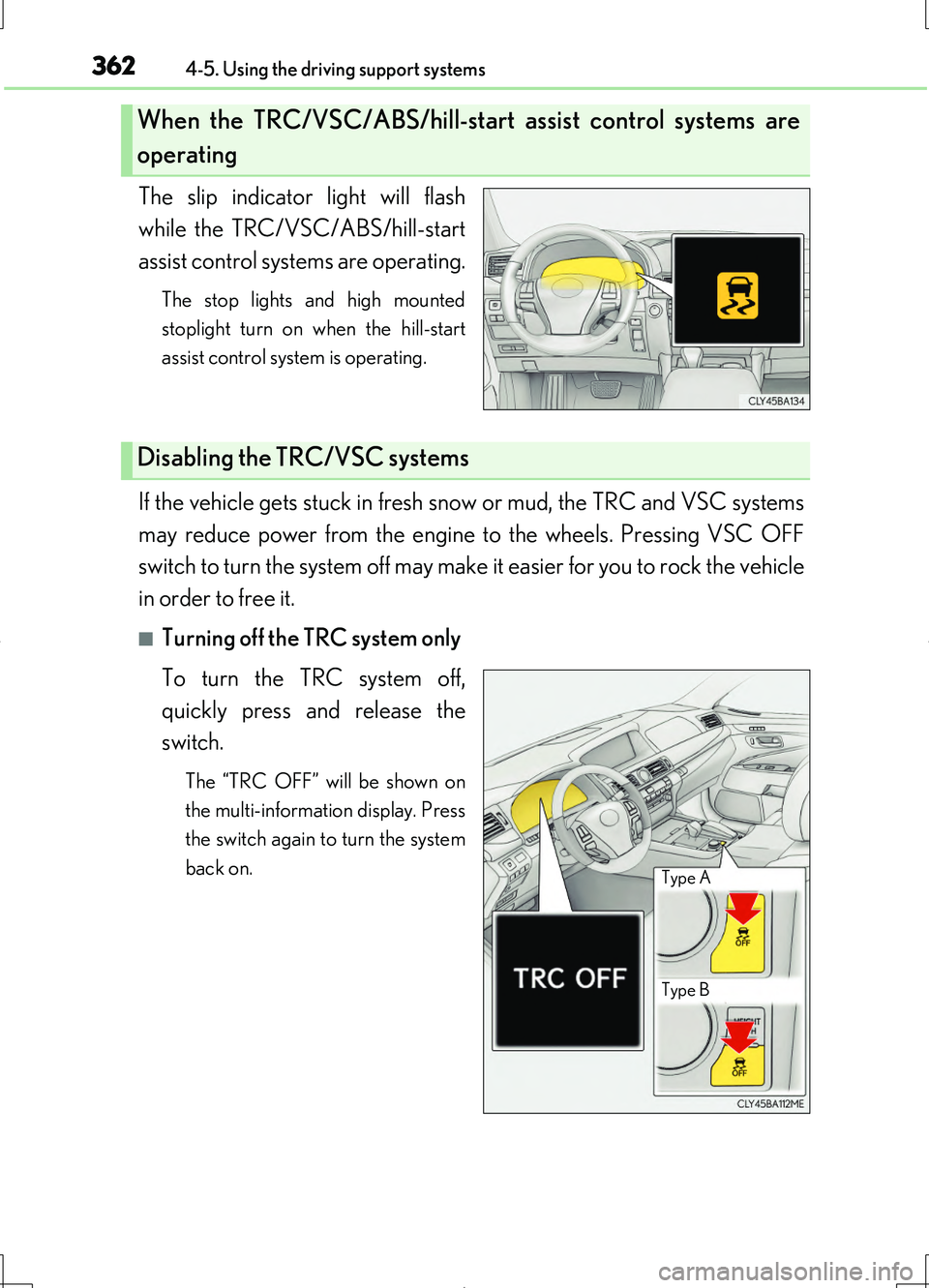
The slip indicator light will flash
while the TRC/VSC/ABS/hill-start
assist control systems are operating.
The stop lights and high mounted
stoplight turn on when the hill-start
assist control system is operating.
If the vehicle gets stuck in fresh snow or mud, the TRC and VSC systems
may reduce power from the engine to the wheels. Pressing VSC OFF
switch to turn the system off may make it easier for you to rock the vehicle
in order to free it.
■Turning off the TRC system only
To turn the TRC system off,
quickly press and release the
switch.
The “TRC OFF” will be shown on
the multi-information display. Press
the switch again to turn the system
back on.
When the TRC/VSC/ABS/hill-start assist control systems are
operating
Disabling the TRC/VSC systems
Type B
Type A
Page 363 of 708
3634-5. Using the driving support systems
4
Driving
LS460/LS460L_GE (OM50G06E)
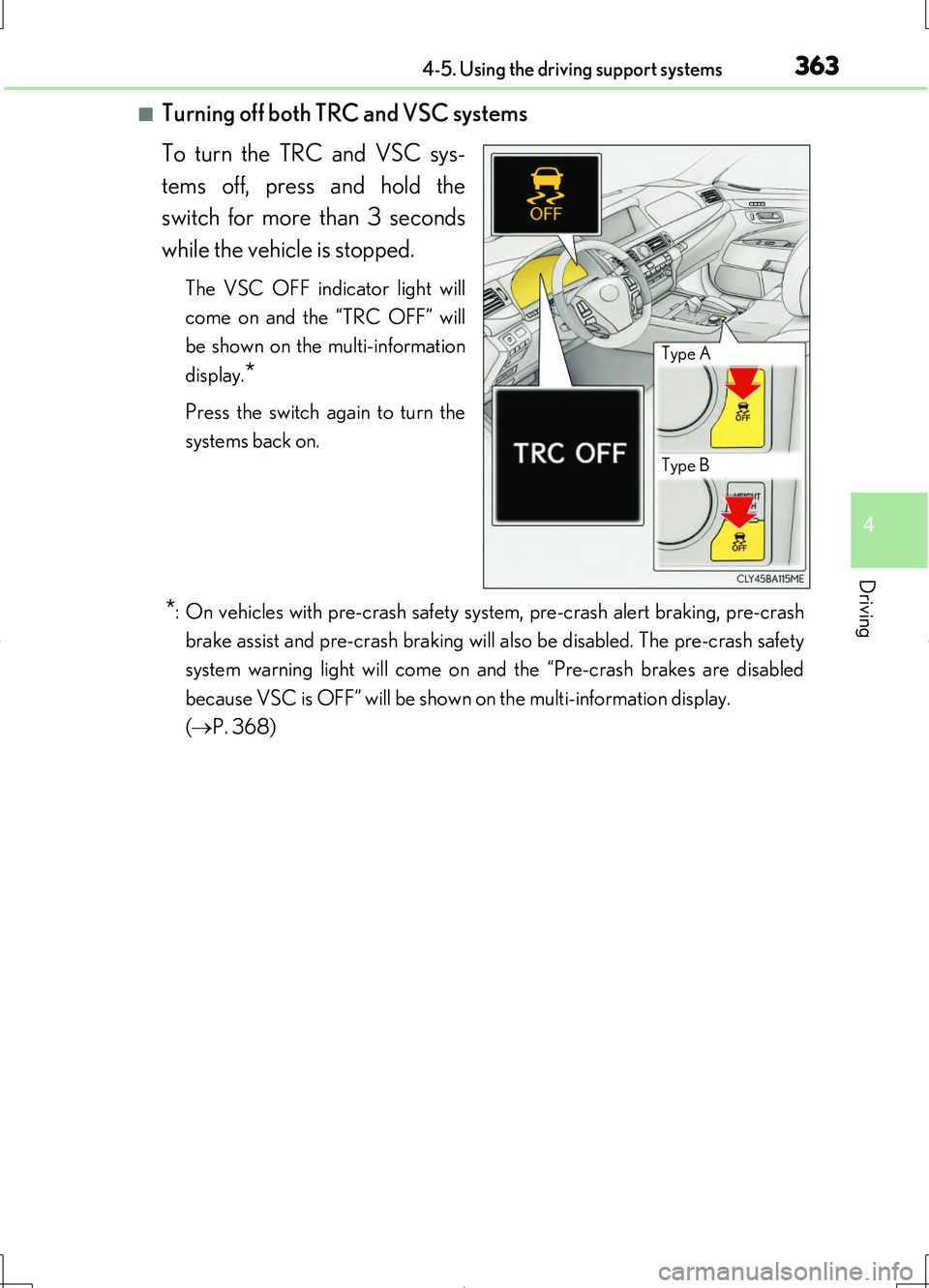
■Turning off both TRC and VSC systems
To turn the TRC and VSC sys-
tems off, press and hold the
switch for more than 3 seconds
while the vehicle is stopped.
The VSC OFF indicator light will
come on and the “TRC OFF” will
be shown on the multi-information
display.*
Press the switch again to turn the
systems back on.
*: On vehicles with pre-crash safety system, pre-crash alert braking, pre-crash
brake assist and pre-crash braking will also be disabled. The pre-crash safety
system warning light will come on and the “Pre-crash brakes are disabled
because VSC is OFF” will be shown on the multi-information display.
( P. 368)
Type A
Type B
Page 364 of 708
3644-5. Using the driving support systems
LS460/LS460L_GE (OM50G06E)
■When the message is displayed on the multi-information display showing that TRC
has been disabled even if the VSC OFF switch has not been pressed
TRC and hill-start assist control cannot be operated. Contact your Lexus dealer.
■Hill-start assist control is operational when
●The system has detected that the vehicle is moving backward.
●Vehicles without paddle shift switches: The shift lever is in the D or S position.
Vehicles with paddle shift switches: The shift lever is in the D or M position.
●The brake pedal is not depressed.
■VGRS is disabled when
VGRS may stop operating in the following situations.
In this event, the steering wheel may move from its straight forward position, but it
will return when the system restarts.
●When the steering wheel is operated for an extended period of time while the vehi-
cle is stopped or is moving very slowly
●When the steering wheel has been held fully to the left or right
●When the battery is low or the voltage temporarily drops
The center position of the steering wheel may change when VGRS is disabled. How-
ever, the position will return to normal after VGRS is reactivated.
■Sounds and vibrations caused by the ABS, brake assist, TRC, VSC, hill-start assist
control and VGRS systems
●A sound may be heard from the engine compartment when the brake pedal is
depressed repeatedly, when the engine is started or just after the vehicle begins to
move. This sound does not indicate that a malfunction has occurred in any of these
systems.
●Any of the following conditions may occur when the above systems are operating.
None of these indicates that a malfunction has occurred.
• Vibrations may be felt through the vehicle body and steering.
• A motor sound may be heard after the vehicle comes to a stop.
●The steering wheel may be moved slightly or a sound may be heard when the
engine is started or stopped. None of these indicate that a malfunction has
occurred.
■EPS operation sound
When the steering wheel is operated, a motor sound (whirring sound) may be heard.
This does not indicate a malfunction.
Page 365 of 708
3654-5. Using the driving support systems
4
Driving
LS460/LS460L_GE (OM50G06E)
■Reactivation of the TRC/VSC systems
Even after the TRC/VSC systems have been turned off, turning the engine off and
then on again will automatically reactivate the TRC/VSC systems.
■Reactivation of the TRC system linked to vehicle speed
When only the TRC system is turned off, the TRC system will turn on when vehicle
speed increases. However, when both TRC and VSC systems are turned off, the sys-
tems will not turn on even when vehicle speed increases.
■Reduced effectiveness of the EPS system
The effectiveness of the EPS system is reduced to prevent the system from overheat-
ing when there is frequent steering input over an extended period of time. The steer-
ing wheel may feel heavy as a result.* Should this occur, refrain from excessive
steering input or stop the vehicle and turn the engine off. The EPS system should
return to normal within 10 minutes.
*: If the LKA (Lane-Keeping Assist) system cannot operate in this case, a warning
message will be shown on the multi-information display.
■Operating conditions of emergency brake signal
When the following three conditions are met, the emergency brake signal will oper-
ate:
●The emergency flashers are off.
●Actual vehicle speed is over 55 km/h (35 mph).
●The brake pedal is depressed in a manner that cause the system to judge from the
vehicle deceleration that this is a sudden braking operation.
■Automatic system cancelation of emergency brake signal (if equipped)
The emergency brake signal will turn o ff in any of the following situations:
●The emergency flashers are turned on.
●The brake pedal is released.
●The system judges from the vehicle deceleration that is not a sudden braking oper-
ation.
Page 368 of 708
3684-5. Using the driving support systems
LS460/LS460L_GE (OM50G06E)
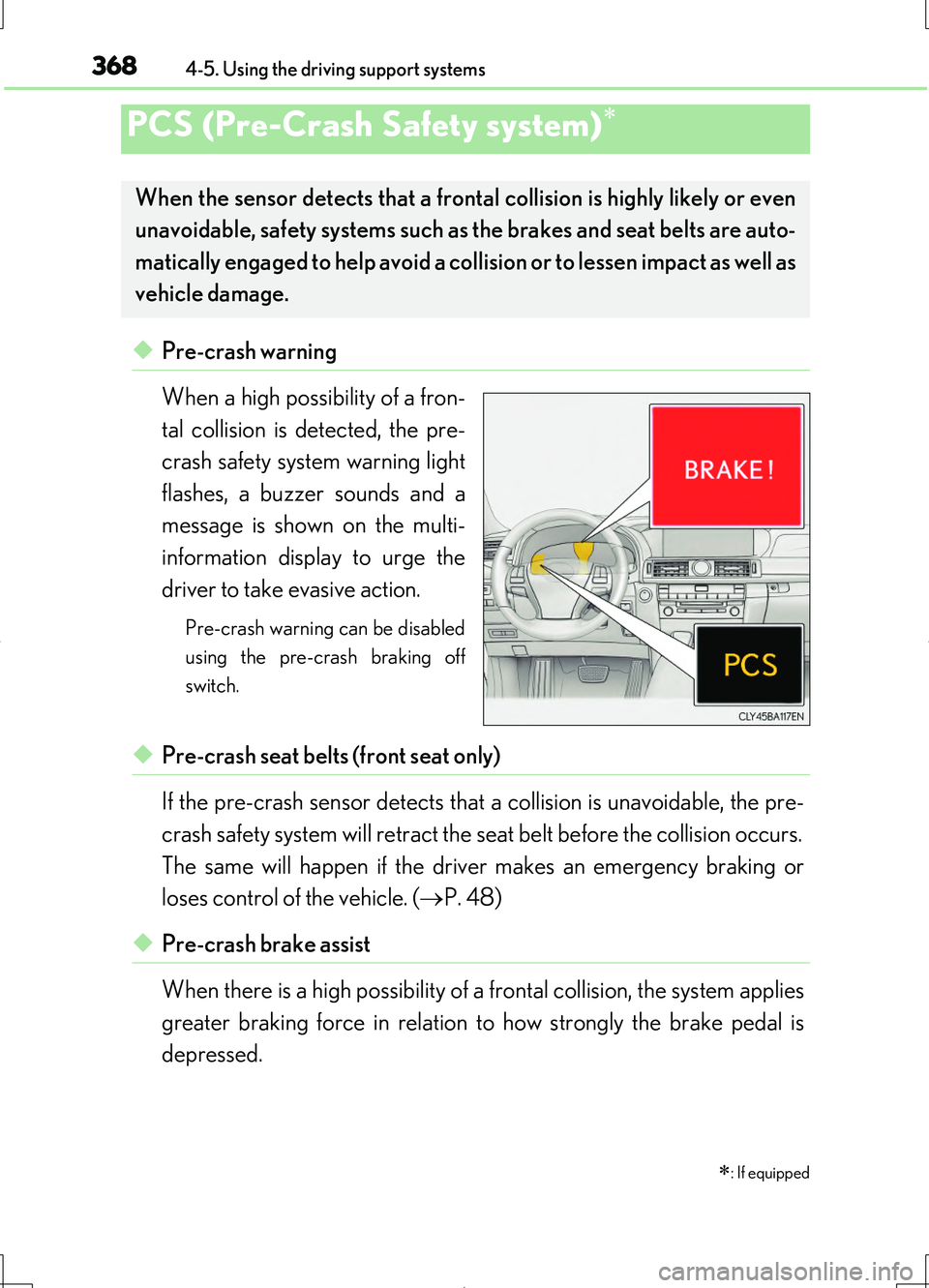
◆Pre-crash warning
When a high possibility of a fron-
tal collision is detected, the pre-
crash safety system warning light
flashes, a buzzer sounds and a
message is shown on the multi-
information display to urge the
driver to take evasive action.
Pre-crash warning can be disabled
using the pre-crash braking off
switch.
◆Pre-crash seat belts (front seat only)
If the pre-crash sensor detects that a collision is unavoidable, the pre-
crash safety system will retract the seat belt before the collision occurs.
The same will happen if the driver makes an emergency braking or
loses control of the vehicle. ( P. 48)
◆Pre-crash brake assist
When there is a high possibility of a frontal collision, the system applies
greater braking force in relation to how strongly the brake pedal is
depressed.
PCS (Pre-Crash Safety system)
: If equipped
When the sensor detects that a frontal collision is highly likely or even
unavoidable, safety systems such as the brakes and seat belts are auto-
matically engaged to help avoid a collision or to lessen impact as well as
vehicle damage.
Page 369 of 708
3694-5. Using the driving support systems
4
Driving
LS460/LS460L_GE (OM50G06E)
◆Pre-crash braking (if equipped)
When there is a high possibility of a frontal collision, the system warns
the driver using a warning light, warning display and buzzer. If the sys-
tem determines that a collision is unavoidable, the brakes are automati-
cally applied to help avoid a collision or to reduce the collision speed.
When the vehicle is being stopped by pre-crash braking, the brake will
be engaged for a maximum of 2 seconds and then released automati-
cally. This pre-crash braking can be canceled by depressing the accel-
erator pedal or brake pedal.
Pre-crash braking can be disabled using the pre-crash braking off switch.
◆Suspension control
When there is a high possibility of a frontal collision, the operation of
suspension control helps prevent the front of the vehicle from dropping
when the brakes are applied suddenly.
◆Steering gear control (VGRS) (vehicles with camera sensors)
When the system determines that a collision is unavoidable, the steer-
ing gear ratio is changed to help improve the response to steering
input.
◆Driver monitor system (if equipped)
When the system determines that there is a possibility of a collision, and
either the driver is not facing forward or the driver’s eyes are closed,
pre-crash warnings are given in adva nce to warn the driver. If the sys-
tem determines that the conditions to operate pre-crash alert braking
have been met even when the possibility of a collision increases further,
pre-crash alert braking will operate.
Pre-crash alert braking can be disabled using the pre-crash braking off switch.