display LEXUS LS500 2018 Owners Manual
[x] Cancel search | Manufacturer: LEXUS, Model Year: 2018, Model line: LS500, Model: LEXUS LS500 2018Pages: 514, PDF Size: 10.62 MB
Page 237 of 514
2374-5. Using the driving support systems
LS500_OM_OM50F54U_(U) 4
Driving ■
Warning message
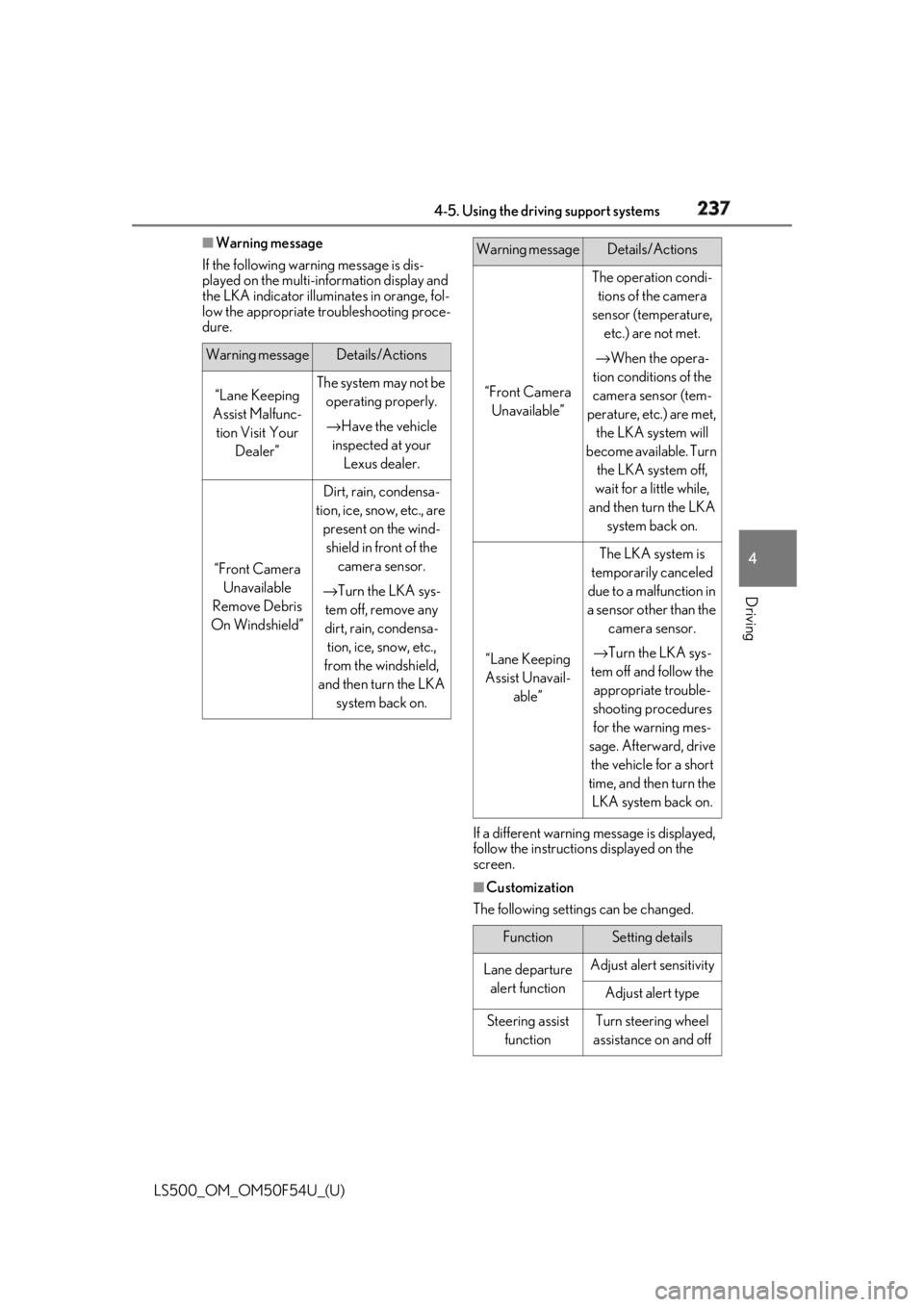
If the following warning message is dis-
played on the multi-information display and
the LKA indicator illumi nates in orange, fol-
low the appropriate troubleshooting proce-
dure.
If a different warning message is displayed,
follow the instructio ns displayed on the
screen.
■
Customization
The following settings can be changed.Warning message Details/Actions
“Lane Keeping
Assist Malfunc-
tion Visit Your
Dealer” The system may not be
operating properly.
→ Have the vehicle
inspected at your
Lexus dealer.
“Front Camera
Unavailable
Remove Debris
On Windshield” Dirt, rain, condensa-
tion, ice, snow, etc., are
present on the wind-
shield in front of the
camera sensor.
→ Turn the LKA sys-
tem off, remove any
dirt, rain, condensa-
tion, ice, snow, etc.,
from the windshield,
and then turn the LKA
system back on. “Front Camera
Unavailable” The operation condi-
tions of the camera
sensor (temperature,
etc.) are not met.
→ When the opera-
tion conditions of the
camera sensor (tem-
perature, etc.) are met,
the LKA system will
become available. Turn
the LKA system off,
wait for a little while,
and then turn the LKA
system back on.
“Lane Keeping
Assist Unavail-
able” The LKA system is
temporarily canceled
due to a malfunction in
a sensor other than the
camera sensor.
→ Turn the LKA sys-
tem off and follow the
appropriate trouble-
shooting procedures
for the warning mes-
sage. Afterward, drive
the vehicle for a short
time, and then turn the
LKA system back on.
Function Setting details
Lane departure
alert function Adjust alert sensitivity
Adjust alert type
Steering assist
function Turn steering wheel
assistance on and offWarning message Details/Actions
Page 238 of 514
238 4-5. Using the driving support systems
LS500_OM_OM50F54U_(U) For how to change settings, refer to
→ P.468 *
: If equipped
Vehicle sway
warning function Turn function on and
off
Adjust alert sensitivity
Lane centering
function Turn function on and
offFunction Setting details
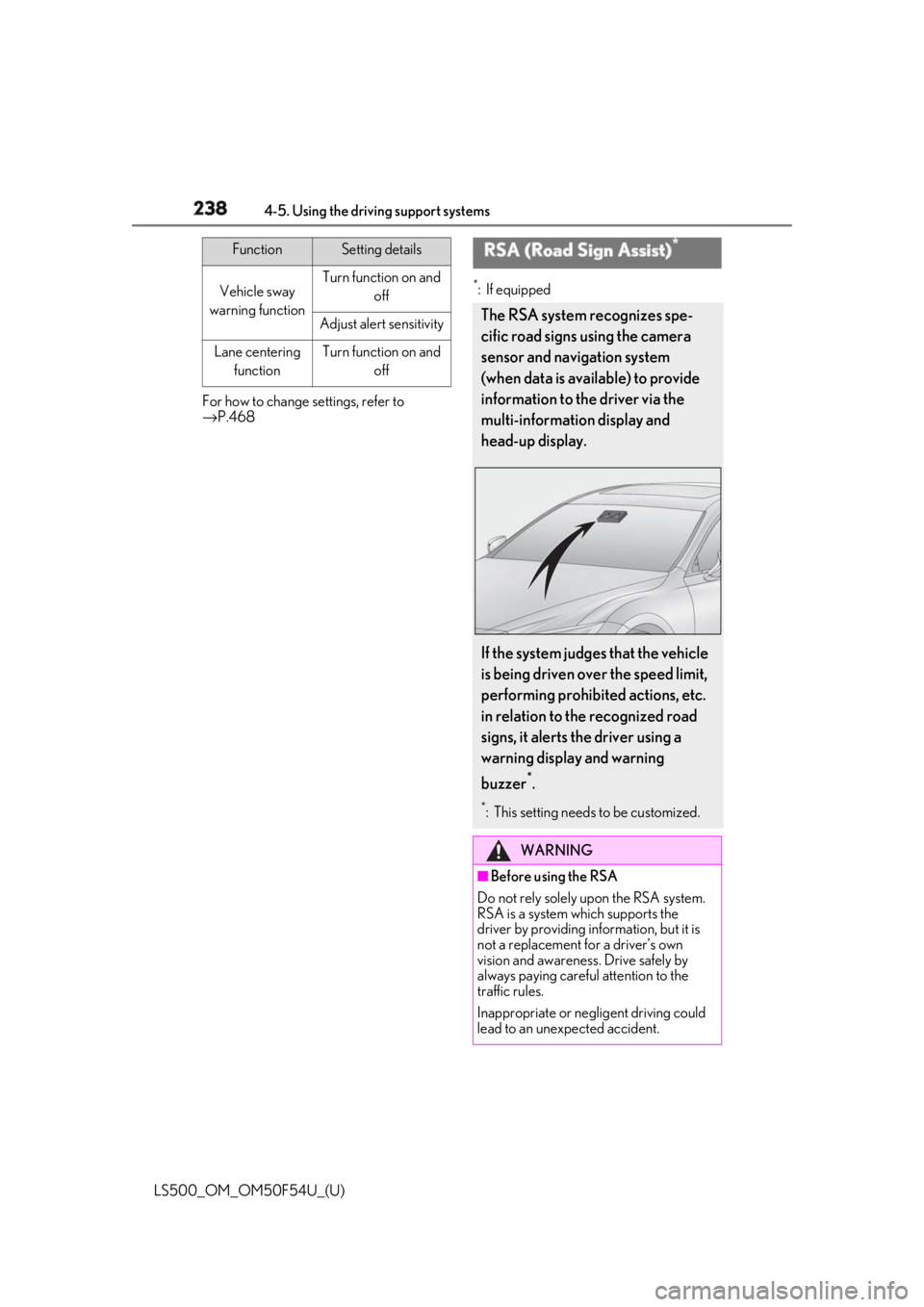
RSA (Road Sign Assist) *
The RSA system recognizes spe-
cific road signs using the camera
sensor and navigation system
(when data is available) to provide
information to the driver via the
multi-information display and
head-up display.
If the system judges that the vehicle
is being driven over the speed limit,
performing prohibited actions, etc.
in relation to the recognized road
signs, it alerts the driver using a
warning display and warning
buzzer *
. *
: This setting needs to be customized.
WARNING
■
Before using the RSA
Do not rely solely upon the RSA system.
RSA is a system which supports the
driver by providing information, but it is
not a replacement for a driver’s own
vision and awareness. Drive safely by
always paying careful attention to the
traffic rules.
Inappropriate or neg ligent driving could
lead to an unexpected accident.
Page 239 of 514
2394-5. Using the driving support systems
LS500_OM_OM50F54U_(U) 4
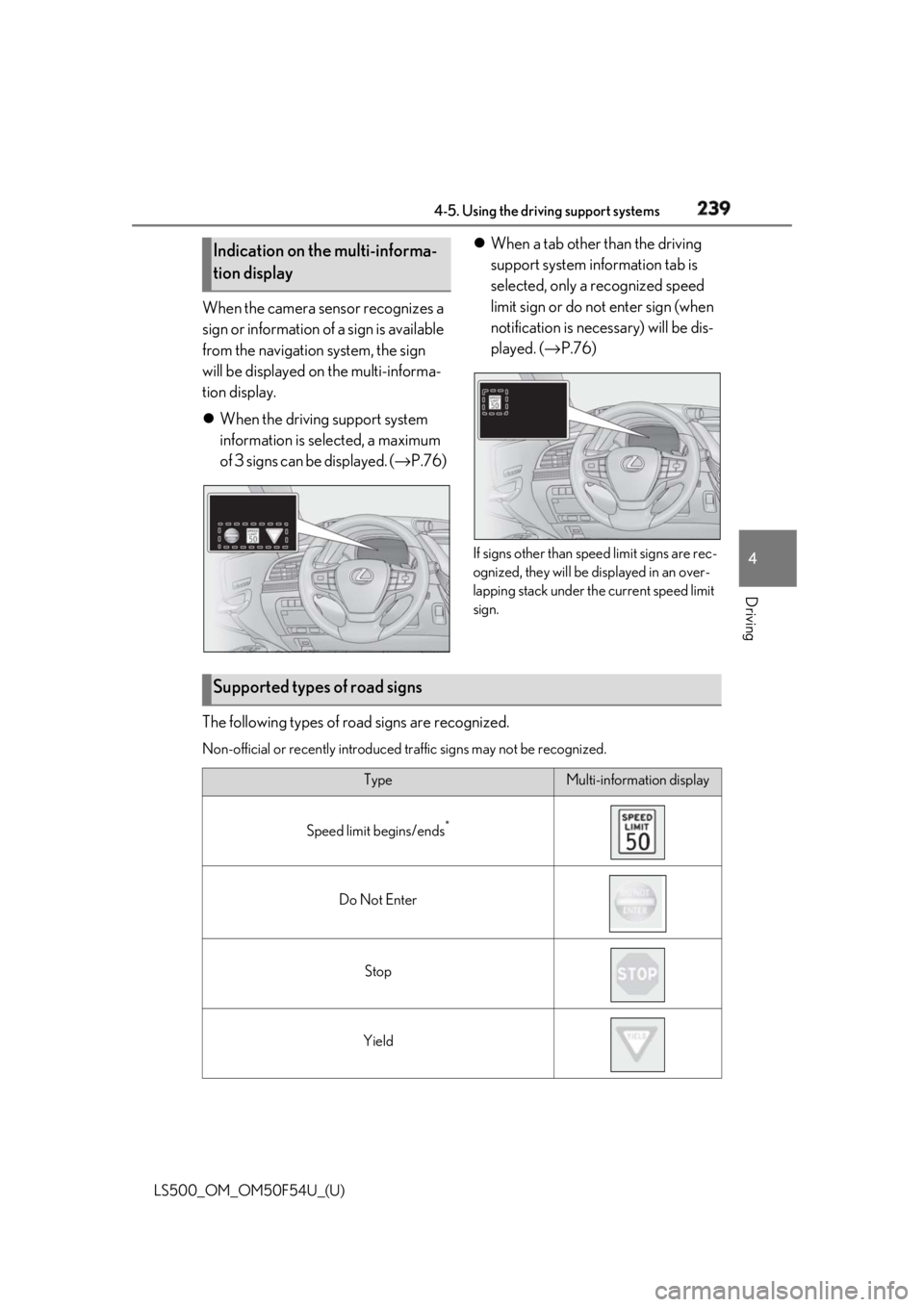
Driving When the camera sensor recognizes a
sign or information of a sign is available
from the navigation system, the sign
will be displayed on the multi-informa-
tion display.
When the driving support system
information is selected, a maximum
of 3 signs can be displayed. ( → P.76) When a tab other than the driving
support system information tab is
selected, only a recognized speed
limit sign or do not enter sign (when
notification is necessary) will be dis-
played. ( → P.76)
If signs other than speed limit signs are rec-
ognized, they will be displayed in an over-
lapping stack under th e current speed limit
sign.
The following types of ro ad signs are recognized.Non-official or recently introduced traffic signs may not be recognized.Indication on the multi-informa-
tion display
Supported types of road signs Type Multi-information display
Speed limit begins/ends *
Do Not Enter
Stop
Yield
Page 240 of 514
240 4-5. Using the driving support systems
LS500_OM_OM50F54U_(U) *
: Displayed when speed limit information for th e road is available from the navigation sys-
tem
In the following situations, the RSA sys-
tem will alert the driver.
When the vehicle speed exceeds
the speed warning threshold of the
speed limit sign displayed, the sign
display will be emphasized and a
buzzer will sound.
When the RSA system recognizes a
do not enter sign and determines
that your vehicle has entered a
no-entry area, the displayed sign will
flash and a buzzer will sound.
Depending on the situation, traffic
environment (traffic direction, speed,
unit) may be detected incorrectly and a
warning display may not operate prop-
erly. ■
Turning the system on/off
1 Select on of the
multi-information display ( → P.76)
2 Press on the steering wheel.
■
Automatic turn-off of RSA sign display
In the following situations, a displayed
speed limit sign will stop being displayed
automatically:
●
A new sign is not recognized for a certain
distance. (When speed limit information
is not available from the navigation sys-
tem)
In the following situations, do not enter, stop
and yield signs will st op being displayed
automatically:
●
The system determines that your vehicle
has passed the sign.
●
The road changes due to a left or right turn, etc. ■
Conditions in which the function may
not operate or detect correctly
In the following situations, RSA does not
operate normally and may not recognize
signs, display the incorrect sign, etc. How-
ever, this does not indicate a malfunction. ●
The camera sensor is misaligned due to a
strong impact being applied to the sen-
sor, etc. ●
Dirt, snow, stickers, etc. are on the wind-
shield near the camera sensor. ●
In inclement weather such as heavy rain,
fog, snow or sand storms ●
Light from an oncoming vehicle, the sun,
etc. enters the camera sensor. ●
The sign is dirty, faded, tilted or bent. ●
All or part of the sign is hidden by the
leaves of a tree, a pole, etc. ●
The sign is only visible to the camera sen-
sor for a short amount of time. ●
The driving scene (turning, lane change,
etc.) is judged incorrectly. ●
Even if it is a sign not appropriate for the
currently traveled lane, such a sign exists
directly after a freeway branches, or in an
adjacent lane just before merging. ●
Stickers are attached to the rear of the
preceding vehicle. ●
A sign resembling a system compatible
sign is recognized. ●
The front of the vehicle is raised or low-
ered due to the carried load.
●
The surrounding brightness is not suffi-
cient or changes suddenly.
●
When a sign intended for trucks, etc. is
recognized.
●
The navigation system map data is old.
●
The navigation system is not operating.
●
Side road speed signs may be detected
and displayed (if positioned in sight of the
camera sensor) while the vehicle is trav-
eling on the main road.Warning indication
Page 241 of 514
2414-5. Using the driving support systems
LS500_OM_OM50F54U_(U) 4
Driving ●
Roundabout exit road speed signs may
be detected and displayed (if positioned
in sight of the camera sensor) while trav-
eling on a roundabout.■
Speed limit sign display
If the engine switch wa s last turned off while
a speed limit sign wa s displayed on the
multi-information display, the same sign dis-
plays again when the engine switch is
turned to IGNITION ON mode. ■
Customization
Some functions can be customized.
( → P.468)
■
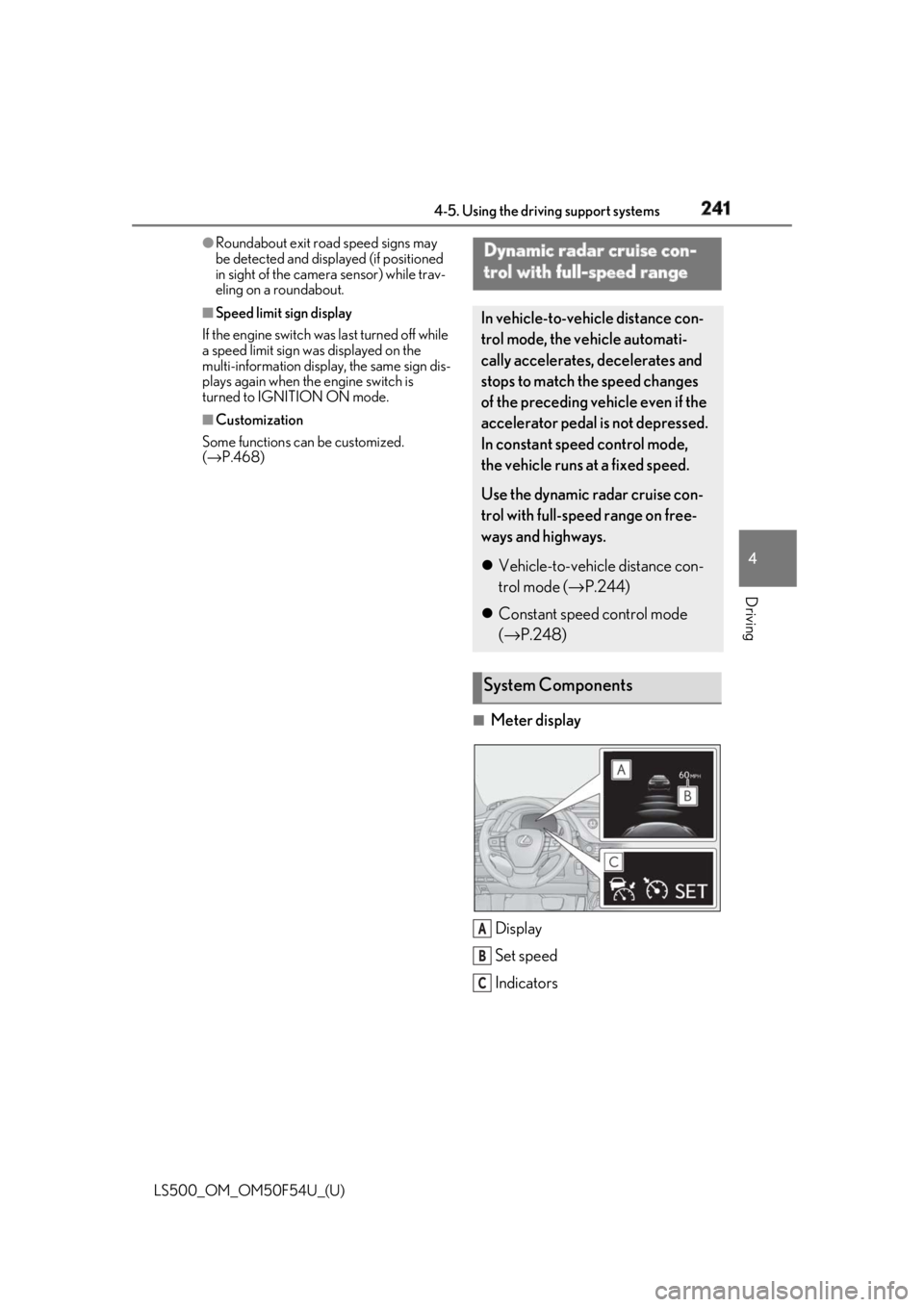
Meter display
Display
Set speed
IndicatorsDynamic radar cruise con-
trol with full-speed range In vehicle-to-vehicle distance con-
trol mode, the ve hicle automati-
cally accelerates, decelerates and
stops to match the speed changes
of the preceding vehicle even if the
accelerator pedal is not depressed.
In constant speed control mode,
the vehicle runs at a fixed speed.
Use the dynamic radar cruise con-
trol with full-speed range on free-
ways and highways.
Vehicle-to-vehicle distance con-
trol mode ( → P.244)
Constant speed control mode
( → P.248)
System Components
A
B
C
Page 245 of 514
2454-5. Using the driving support systems
LS500_OM_OM50F54U_(U) 4
Driving speedThe system accelerates until the set speed is re ached. The system then returns to constant
speed cruising.
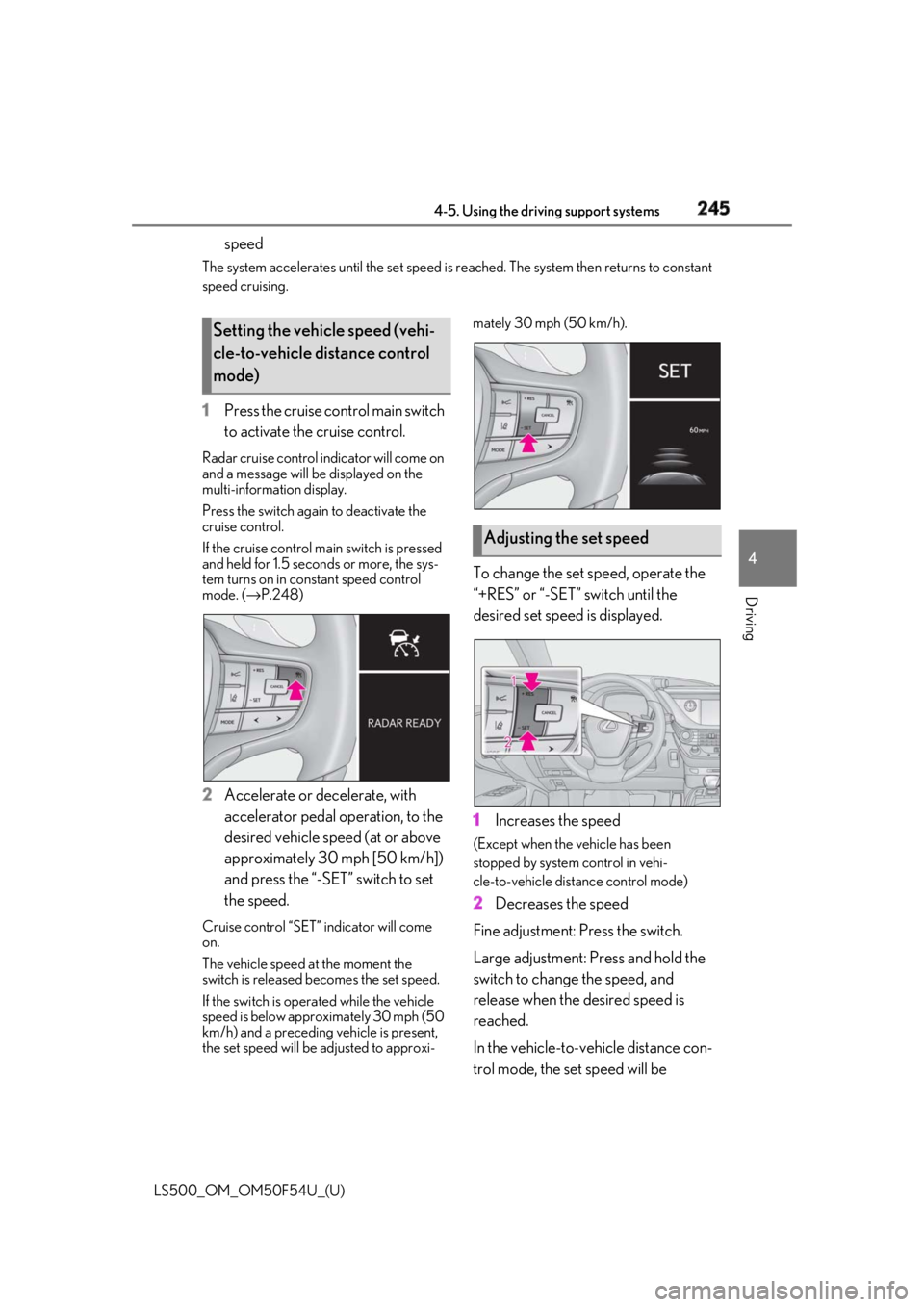
1 Press the cruise control main switch
to activate the cruise control.Radar cruise control indicator will come on
and a message will be displayed on the
multi-information display.
Press the switch again to deactivate the
cruise control.
If the cruise control ma in switch is pressed
and held for 1.5 seconds or more, the sys-
tem turns on in constant speed control
mode. ( → P.248)
2 Accelerate or decelerate, with
accelerator pedal operation, to the
desired vehicle speed (at or above
approximately 30 mph [50 km/h])
and press the “-SET” switch to set
the speed.Cruise control “SET” indicator will come
on.
The vehicle speed at the moment the
switch is released becomes the set speed.
If the switch is operated while the vehicle
speed is below approximately 30 mph (50
km/h) and a preceding vehicle is present,
the set speed will be adjusted to approxi- mately 30 mph (50 km/h).
To change the set speed, operate the
“+RES” or “-SET” switch until the
desired set speed is displayed.
1 Increases the speed (Except when the vehicle has been
stopped by system control in vehi-
cle-to-vehicle distance control mode)
2 Decreases the speed
Fine adjustment: Press the switch.
Large adjustment: Press and hold the
switch to change the speed, and
release when the desired speed is
reached.
In the vehicle-to-vehicle distance con-
trol mode, the set speed will be Setting the vehicle speed (vehi-
cle-to-vehicle distance control
mode)
Adjusting the set speed
Page 247 of 514
2474-5. Using the driving support systems
LS500_OM_OM50F54U_(U) 4
Driving
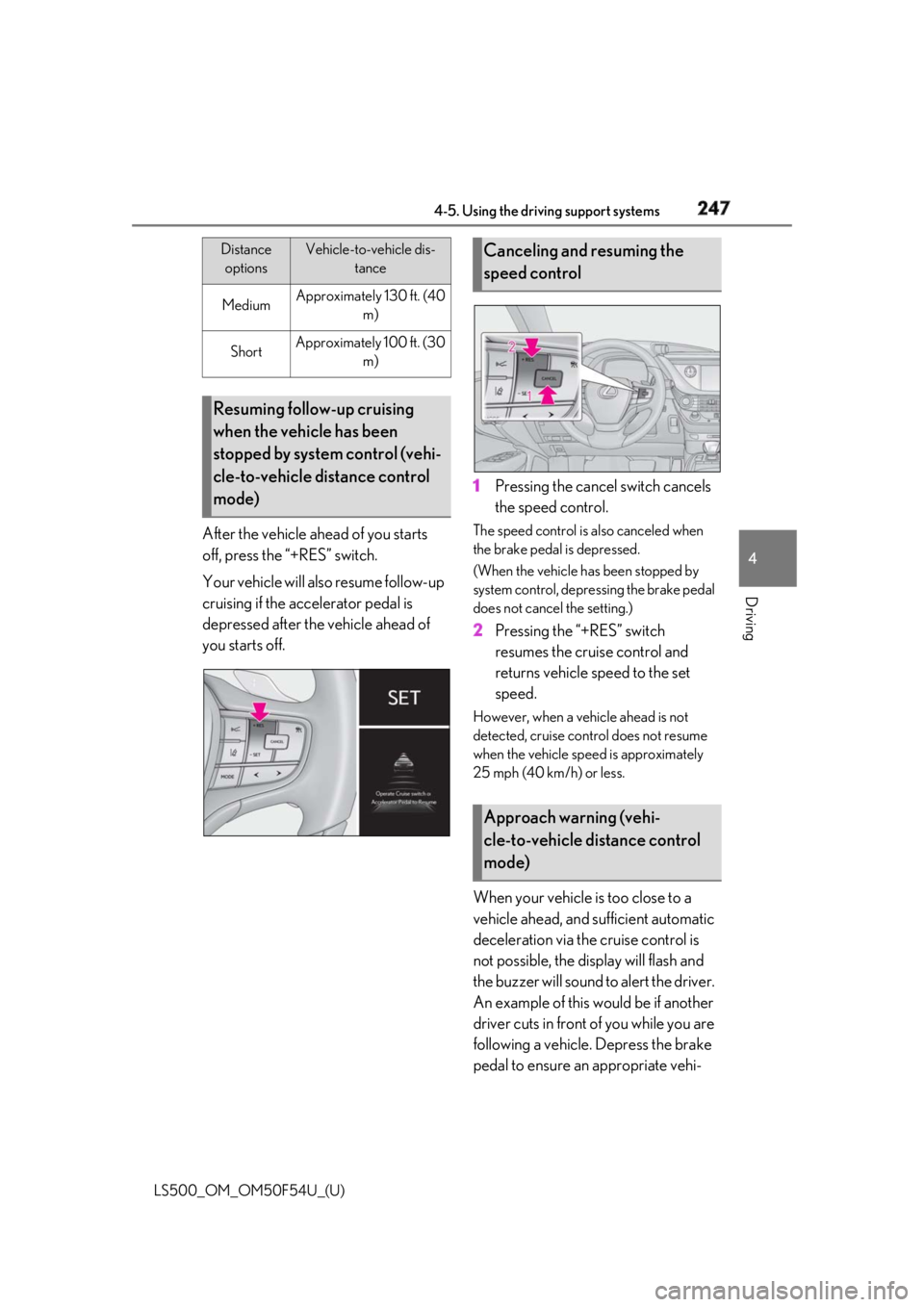
After the vehicle ahead of you starts
off, press the “+RES” switch.
Your vehicle will also resume follow-up
cruising if the accelerator pedal is
depressed after the vehicle ahead of
you starts off. 1 Pressing the cancel switch cancels
the speed control. The speed control is also canceled when
the brake pedal is depressed.
(When the vehicle has been stopped by
system control, depressing the brake pedal
does not cancel the setting.)
2 Pressing the “+RES” switch
resumes the cruise control and
returns vehicle speed to the set
speed. However, when a vehicle ahead is not
detected, cruise control does not resume
when the vehicle speed is approximately
25 mph (40 km/h) or less.
When your vehicle is too close to a
vehicle ahead, and sufficient automatic
deceleration via the cruise control is
not possible, the display will flash and
the buzzer will sound to alert the driver.
An example of this would be if another
driver cuts in front of you while you are
following a vehicle. Depress the brake
pedal to ensure an appropriate vehi-Medium Approximately 130 ft. (40
m)
Short Approximately 100 ft. (30
m)
Resuming follow-up cruising
when the vehicle has been
stopped by system control (vehi-
cle-to-vehicle distance control
mode) Distance
options Vehicle-to-vehicle dis-
tance
Canceling and resuming the
speed control
Approach warning (vehi-
cle-to-vehicle distance control
mode)
Page 249 of 514
2494-5. Using the driving support systems
LS500_OM_OM50F54U_(U) 4
Driving by using the paddle shift switch.●
Vehicle speed is at or above approxi-
mately 30 mph (50 km/h).
However, when a preceding vehicle is
detected, the dynamic radar cruise con-
trol with full-speed range can be set even
if the vehicle speed is below approxi-
mately 30 mph (50 km/h).■
Accelerating after setting the vehicle
speed
The vehicle can accelerate by operating the
accelerator pedal. After accelerating, the
set speed resumes. However, during vehi-
cle-to-vehicle distance control mode, the
vehicle speed may decrease below the set
speed in order to maintain the distance to
the preceding vehicle. ■
When the vehicle stops while follow-up
cruising●
Pressing the “+RES” switch while the
vehicle ahead stops w ill resume follow-up
cruising if the vehicle ahead starts off
within approximately 3 seconds after the
switch is pressed.●
If the vehicle ahead starts off within 3 sec-
onds after your vehicle stops, follow-up
cruising will be resumed.■
Automatic cancelation of vehi-
cle-to-vehicle distance control mode
Vehicle-to-vehicle dist ance control mode is
automatically canceled in the following situ-
ations. ●
Actual vehicle speed falls at or below
approximately 25 mph (40 km/h) when
there are no vehicles ahead.●
The preceding vehicle leaves the lane
when your vehicle is following at a vehicle
speed at or below approximately 25 mph
(40 km/h). Otherwise, the sensor cannot
properly detect the vehicle. (“CRUISE
NOT AVAILABLE No Preceding Vehi-
cles” is displayed on the multi-information
display.)
●
VSC is activated.
●
TRAC is activated for a period of time.
●
When the VSC or TRAC system is
turned off.
●
When snow mode is set. ●
The sensor cannot detect correctly
because it is covered in some way. ●
Pre-collision braking is activated. ●
The parking brake is operated. ●
The vehicle is stopped by system control
on a steep incline. ●
The following are detected when the
vehicle has been stopped by system con-
trol:
• The driver is not wearing a seat belt.
• The driver’s door is opened.
• The vehicle has been stopped for about 3
minutes.
If vehicle-to-vehicle distance control mode
is automatically canceled for any other rea-
son, there may be a malfunction in the sys-
tem. Contact your Lexus dealer. ■
Automatic cancelation of constant
speed control mode
Constant speed control mode is automati-
cally canceled in the following situations: ●
Actual vehicle speed is more than
approximately 10 mph (16 km/h) below
the set vehicle speed. ●
Actual vehicle speed falls below approxi-
mately 25 mph (40 km/h). ●
VSC is activated. ●
TRAC is activated for a period of time. ●
When the VSC or TRAC system is
turned off. ●
Pre-collision braking is activated.
If constant speed control mode is automati-
cally canceled for any other reason, there
may be a malfunction in the system. Con-
tact your Lexus dealer.
■
If “Radar Cruise Control Unavailable” is
shown on the multi-information display
The radar cruise control system cannot be
used temporarily. Use the system when it
becomes available again.
■
Brake system operation sound
When the brakes are operated in vehi-
cle-to-vehicle distance mode, a brake oper-
ating sound may be heard. This is not a
malfunction.
Page 250 of 514
250 4-5. Using the driving support systems
LS500_OM_OM50F54U_(U) ■
Warning messages and buzzers for
dynamic radar cruise control with
full-speed range
Warning messages and buzzers are used to
indicate a system malfunction or to inform
the driver of the need for caution while driv-
ing. If a warning message is shown on the
multi-information display, read the message
and follow the instructions. ■
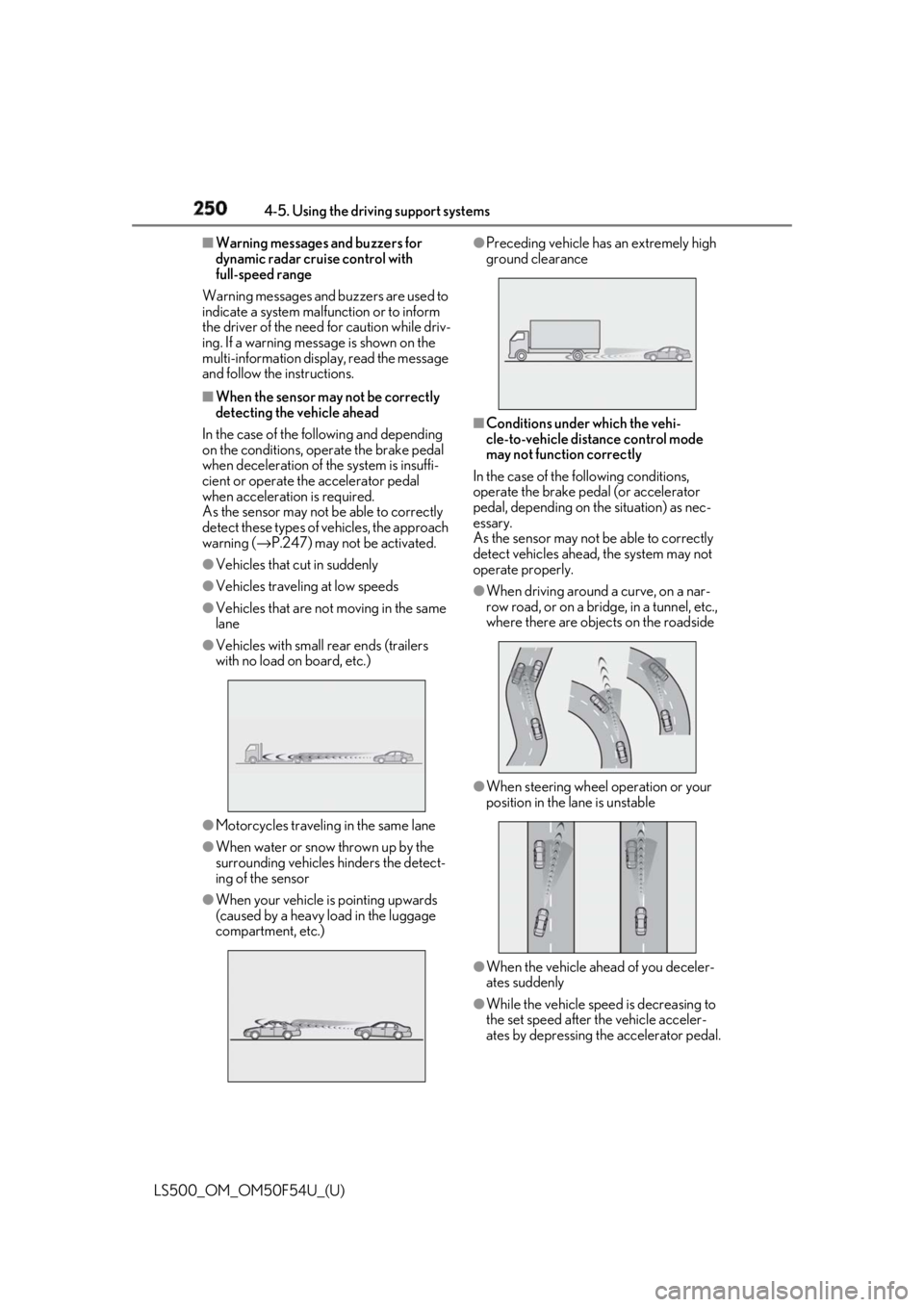
When the sensor may not be correctly
detecting the vehicle ahead
In the case of the following and depending
on the conditions, operate the brake pedal
when deceleration of the system is insuffi-
cient or operate the accelerator pedal
when acceleration is required.
As the sensor may not be able to correctly
detect these types of vehicles, the approach
warning ( → P.247) may not be activated.●
Vehicles that cut in suddenly●
Vehicles traveling at low speeds●
Vehicles that are not moving in the same
lane●
Vehicles with small rear ends (trailers
with no load on board, etc.)
●
Motorcycles travelin g in the same lane●
When water or snow thrown up by the
surrounding vehicles hinders the detect-
ing of the sensor
●
When your vehicle is pointing upwards
(caused by a heavy load in the luggage
compartment, etc.) ●
Preceding vehicle has an extremely high
ground clearance
■
Conditions under which the vehi-
cle-to-vehicle dist ance control mode
may not function correctly
In the case of the following conditions,
operate the brake pedal (or accelerator
pedal, depending on the situation) as nec-
essary.
As the sensor may not be able to correctly
detect vehicles ahead, the system may not
operate properly. ●
When driving around a curve, on a nar-
row road, or on a bridge, in a tunnel, etc.,
where there are objects on the roadside
●
When steering wheel operation or your
position in the lane is unstable
●
When the vehicle ahead of you deceler-
ates suddenly
●
While the vehicle speed is decreasing to
the set speed after the vehicle acceler-
ates by depressing the accelerator pedal.
Page 251 of 514
2514-5. Using the driving support systems
LS500_OM_OM50F54U_(U) 4
Driving *
:If equipped
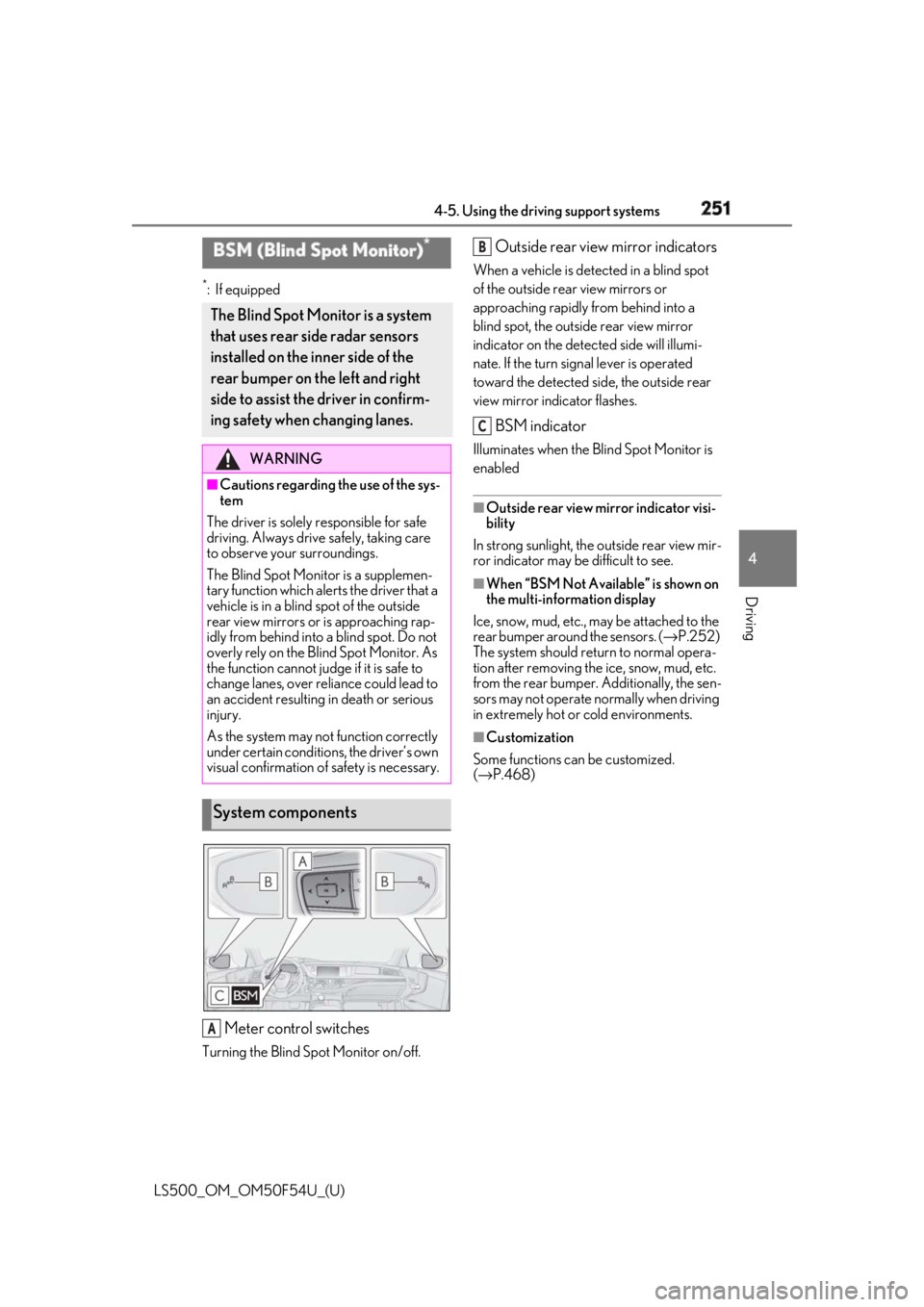
Meter control switchesTurning the Blind Spot Monitor on/off. Outside rear view mirror indicators When a vehicle is dete cted in a blind spot
of the outside rear view mirrors or
approaching rapidly from behind into a
blind spot, the outside rear view mirror
indicator on the detected side will illumi-
nate. If the turn signal lever is operated
toward the detected side, the outside rear
view mirror indicator flashes.
BSM indicator Illuminates when the Blind Spot Monitor is
enabled ■
Outside rear view mirror indicator visi-
bility
In strong sunlight, the outside rear view mir-
ror indicator may be difficult to see. ■
When “BSM Not Available” is shown on
the multi-information display
Ice, snow, mud, etc., may be attached to the
rear bumper around the sensors. ( → P.252)
The system should return to normal opera-
tion after removing the ice, snow, mud, etc.
from the rear bumper. Additionally, the sen-
sors may not operate normally when driving
in extremely hot or cold environments. ■
Customization
Some functions can be customized.
( → P.468)BSM (Blind Spot Monitor) *
The Blind Spot Monitor is a system
that uses rear side radar sensors
installed on the inner side of the
rear bumper on the left and right
side to assist the driver in confirm-
ing safety when changing lanes. WARNING■
Cautions regarding the use of the sys-
tem
The driver is solely responsible for safe
driving. Always driv e safely, taking care
to observe your surroundings.
The Blind Spot Monitor is a supplemen-
tary function which alerts the driver that a
vehicle is in a blind spot of the outside
rear view mirrors or is approaching rap-
idly from behind into a blind spot. Do not
overly rely on the Blind Spot Monitor. As
the function cannot judge if it is safe to
change lanes, over reliance could lead to
an accident resulting in death or serious
injury.
As the system may not function correctly
under certain conditions, the driver’s own
visual confirmation of safety is necessary.
System components
A B
C