display LEXUS LS500 2018 Owners Manual
[x] Cancel search | Manufacturer: LEXUS, Model Year: 2018, Model line: LS500, Model: LEXUS LS500 2018Pages: 514, PDF Size: 10.62 MB
Page 309 of 514
3095-1. Remote Touch/Display
LS500_OM_OM50F54U_(U) 5
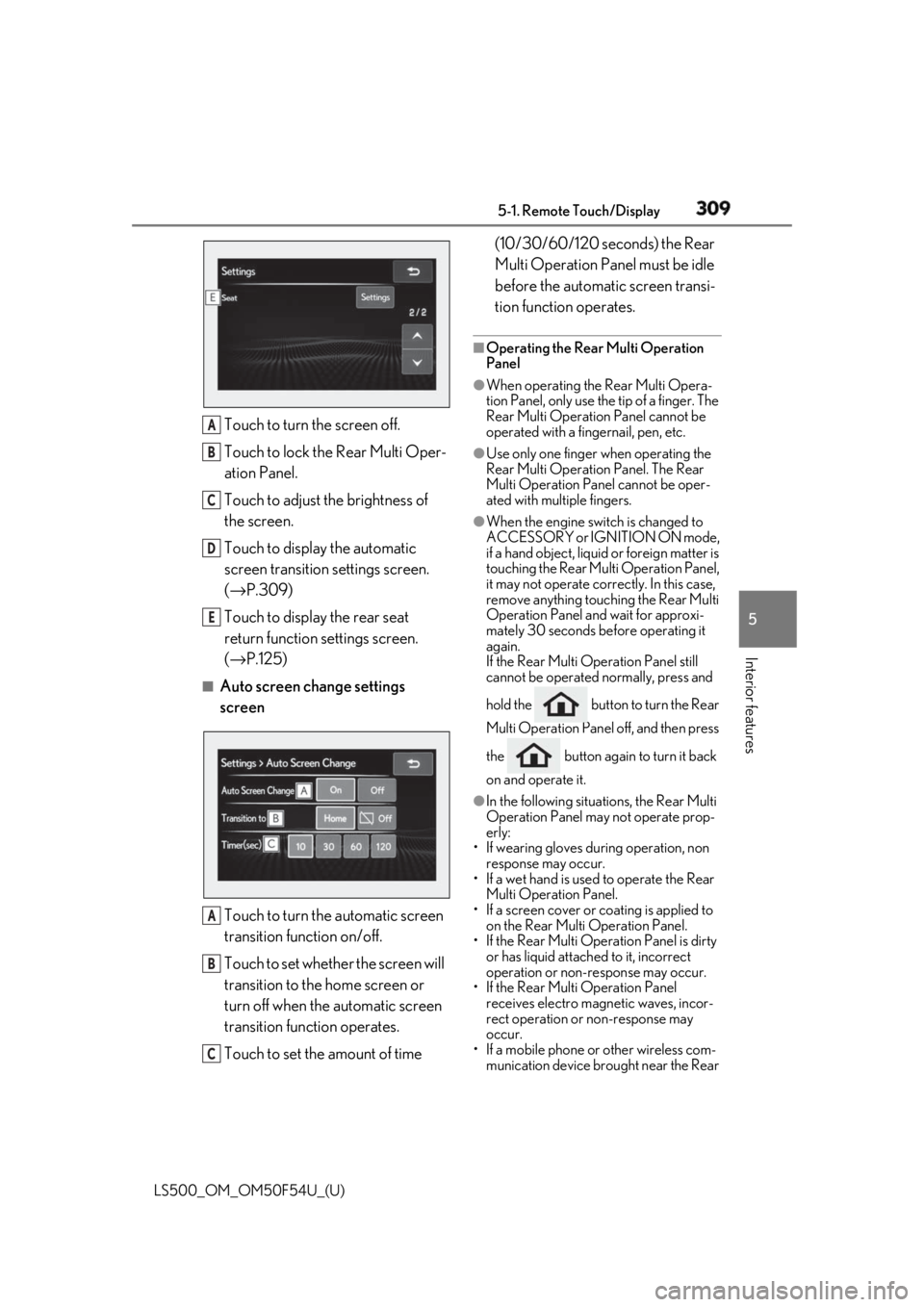
Interior features Touch to turn the screen off.
Touch to lock the Rear Multi Oper-
ation Panel.
Touch to adjust the brightness of
the screen.
Touch to display the automatic
screen transition settings screen.
( → P.309)
Touch to display the rear seat
return function settings screen.
( → P.125)■
Auto screen change settings
screen
Touch to turn the automatic screen
transition function on/off.
Touch to set whether the screen will
transition to the home screen or
turn off when the automatic screen
transition function operates.
Touch to set the amount of time (10/30/60/120 seconds) the Rear
Multi Operation Panel must be idle
before the automatic screen transi-
tion function operates. ■
Operating the Rear Multi Operation
Panel ●
When operating the Rear Multi Opera-
tion Panel, only use the tip of a finger. The
Rear Multi Operation Panel cannot be
operated with a fingernail, pen, etc. ●
Use only one finger when operating the
Rear Multi Operation Panel. The Rear
Multi Operation Panel cannot be oper-
ated with multiple fingers. ●
When the engine swit ch is changed to
ACCESSORY or IGNITION ON mode,
if a hand object, liquid or foreign matter is
touching the Rear Multi Operation Panel,
it may not operate correctly. In this case,
remove anything touching the Rear Multi
Operation Panel and wait for approxi-
mately 30 seconds be fore operating it
again.
If the Rear Multi Operation Panel still
cannot be operated normally, press and
hold the button to turn the Rear
Multi Operation Panel off, and then press
the button again to turn it back
on and operate it. ●
In the following situations, the Rear Multi
Operation Panel may not operate prop-
erly:
• If wearing gloves during operation, non
response may occur.
• If a wet hand is used to operate the Rear
Multi Operation Panel.
• If a screen cover or coating is applied to
on the Rear Multi Operation Panel.
• If the Rear Multi Operation Panel is dirty
or has liquid attached to it, incorrect
operation or non-response may occur.
• If the Rear Multi Operation Panel
receives electro magnetic waves, incor-
rect operation or non-response may
occur.
• If a mobile phone or other wireless com-
munication device br ought near the Rear A
B
C
D
E
A
B
C
Page 310 of 514
310 5-1. Remote Touch/Display
LS500_OM_OM50F54U_(U) Multi Operation Panel.●
If the a metal object, such as the follow-
ing, is touching or covering the Rear
Multi Operation Panel:
•Coins
•Keys
• Metallic wallets or bags
• Magnetic isolation cards
• Metallic foil, such as the inner packaging
of a cigarette box
• Disposable heat packs
• Discs, such as a CD or DVD, Cables,
such as a USB cable
• Mobile devices, such as smartphones,
mobile phones, tablets, etc.●
Make sure to keep the Rear Multi Oper-
ation Panel clean. If the Rear Multi Oper-
ation Panel is dirty, it may not operate
correctly. (When cleaning the Rear Multi
Operation Panel, turn the screen off to
avoid unexpected operation.)
NOTICE■
To prevent damage to the Rear Multi
Operation Panel
Observe the following precautions. Fail-
ure to do so may cause damage to the
Rear Multi Operation Panel. ●
Keep the Rear Mult i Operation Panel
free of liquids, such as drinks or rain, as
they may cause a short circuit.
●
Do not sit on or set heavy objects on
the Rear Multi Operation Panel.
●
Do not push the Rear Multi Operation
Panel with a strong force or use a
sharp pointed object to operate the
panel.
Page 311 of 514
3115-2. Lexus Climate Concierge
LS500_OM_OM50F54U_(U) 5
Interior features 5-2.Lexus Climate Concierge
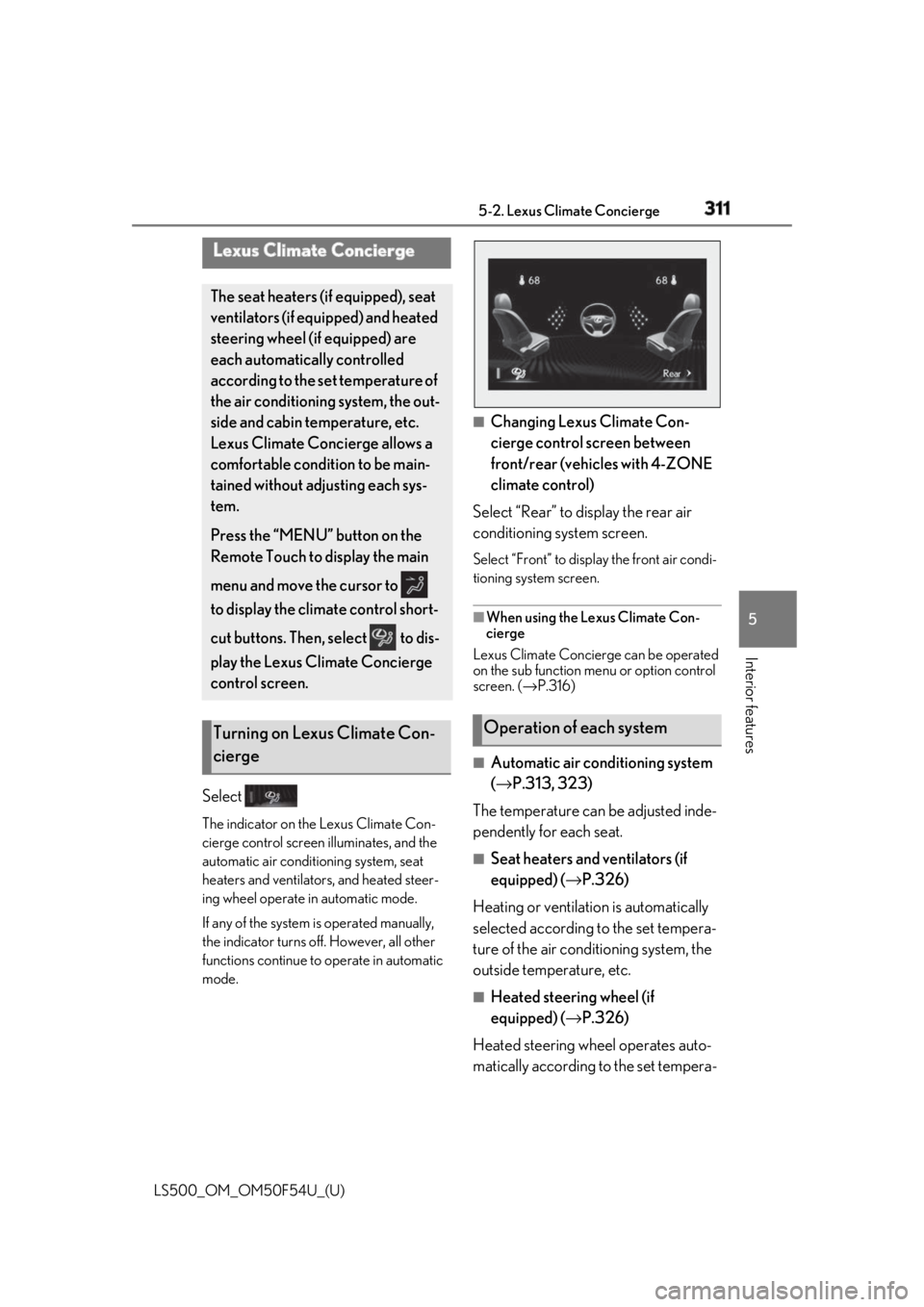
Select The indicator on the Lexus Climate Con-
cierge control screen illuminates, and the
automatic air conditioning system, seat
heaters and ventilators, and heated steer-
ing wheel operate in automatic mode.
If any of the system is operated manually,
the indicator turns off. However, all other
functions continue to operate in automatic
mode. ■
Changing Lexus Climate Con-
cierge control screen between
front/rear (vehicles with 4-ZONE
climate control)
Select “Rear” to display the rear air
conditioning system screen. Select “Front” to display the front air condi-
tioning system screen.
■
When using the Lexus Climate Con-
cierge
Lexus Climate Concierge can be operated
on the sub function menu or option control
screen. ( → P.316)
■
Automatic air conditioning system
( → P.313, 323)
The temperature can be adjusted inde-
pendently for each seat. ■
Seat heaters and ventilators (if
equipped) ( → P.326)
Heating or ventilation is automatically
selected according to the set tempera-
ture of the air conditioning system, the
outside temperature, etc. ■
Heated steering wheel (if
equipped) ( → P.326)
Heated steering wheel operates auto-
matically according to the set tempera-Lexus Climate Concierge The seat heaters (if equipped), seat
ventilators (if equipped) and heated
steering wheel (if equipped) are
each automatically controlled
according to the set temperature of
the air conditioning system, the out-
side and cabin temperature, etc.
Lexus Climate Concierge allows a
comfortable condition to be main-
tained without adjusting each sys-
tem.
Press the “MENU” button on the
Remote Touch to display the main
menu and move the cursor to
to display the climate control short-
cut buttons. Then, select to dis-
play the Lexus Climate Concierge
control screen.
Turning on Lexus Climate Con-
cierge Operation of each system
Page 313 of 514
3135-3. Using the air conditio ning system and defogger
LS500_OM_OM50F54U_(U) 5
Interior features 5-3.Using the air conditioning system and defogger
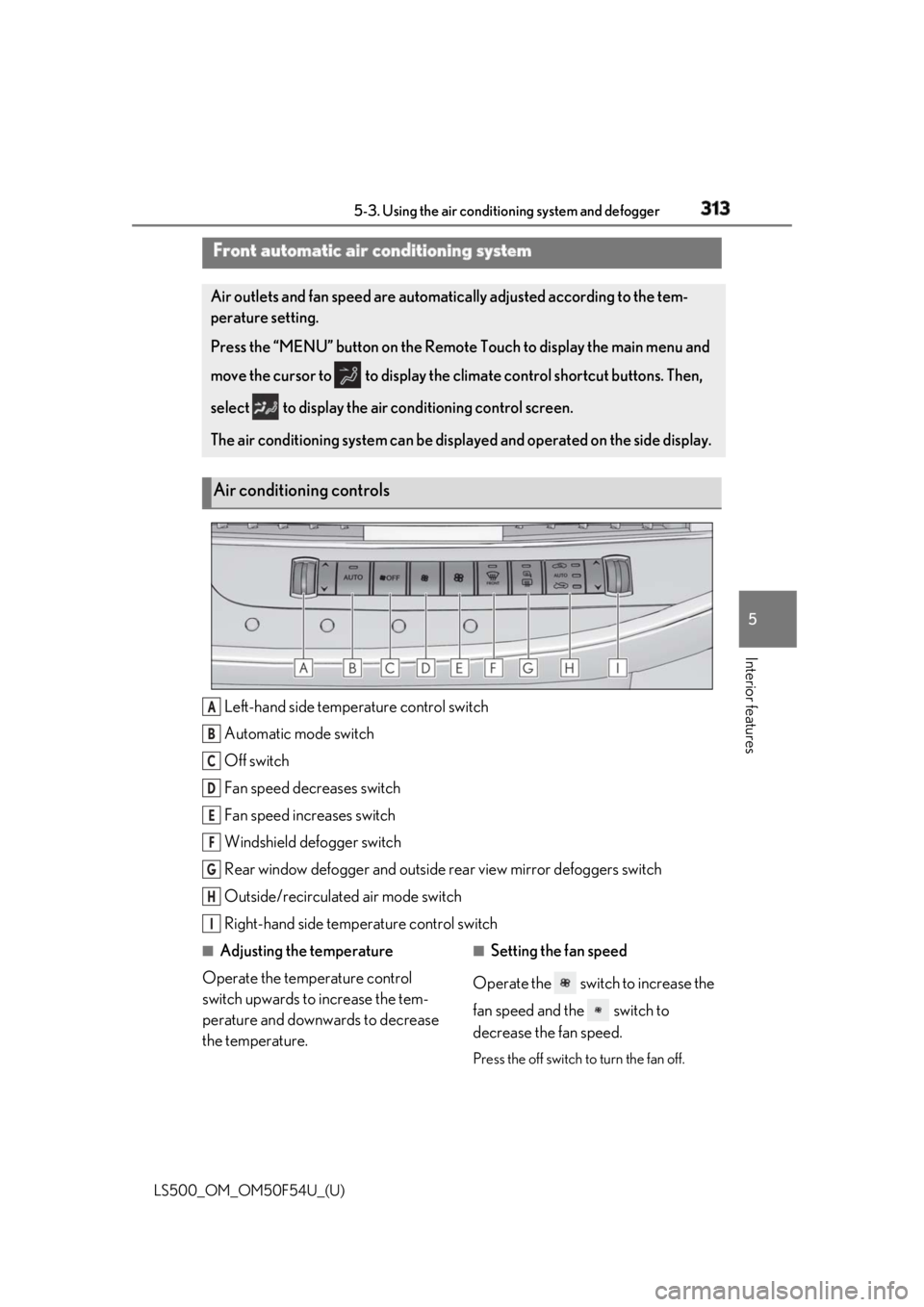
Left-hand side temperature control switch
Automatic mode switch
Off switch
Fan speed decreases switch
Fan speed increases switch
Windshield defogger switch
Rear window defogger and outside rear view mirror defoggers switch
Outside/recirculated air mode switch
Right-hand side temp erature control switch■
Adjusting the temperature
Operate the temperature control
switch upwards to increase the tem-
perature and downwards to decrease
the temperature. ■
Setting the fan speed
Operate the switch to increase the
fan speed and the switch to
decrease the fan speed.
Press the off switch to turn the fan off.Front automatic air conditioning system Air outlets and fan speed are automati cally adjusted according to the tem-
perature setting.
Press the “MENU” button on the Remote Touch to display the main menu and
move the cursor to to display the climate control shortcut buttons. Then,
select to display the air conditioning control screen.
The air conditioning system can be displa yed and operated on the side display.
Air conditioning controls
A
B
C
D
E
F
G
H
I
Page 316 of 514
316 5-3. Using the air conditioning system and defogger
LS500_OM_OM50F54U_(U) ■
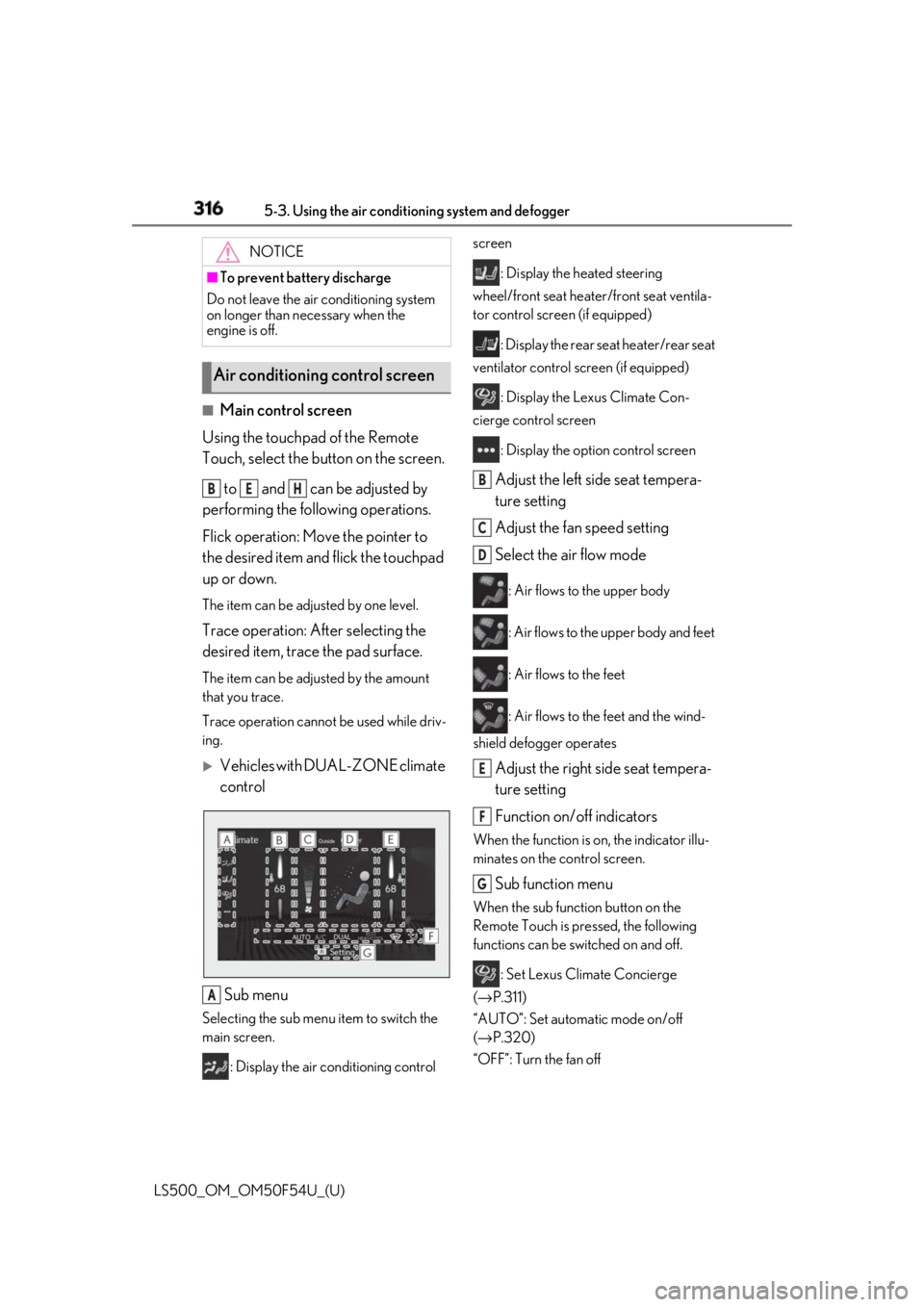
Main control screen
Using the touchpad of the Remote
Touch, select the button on the screen.
to and can be adjusted by
performing the following operations.
Flick operation: Move the pointer to
the desired item and flick the touchpad
up or down. The item can be adjusted by one level.
Trace operation: After selecting the
desired item, trace the pad surface. The item can be adjusted by the amount
that you trace.
Trace operation cannot be used while driv-
ing.
Vehicles with DUAL-ZONE climate
control
Sub menu Selecting the sub menu item to switch the
main screen.
: Display the air conditioning control screen
: Display the heated steering
wheel/front seat heater /front seat ventila-
tor control screen (if equipped)
: Display the rear seat heater/rear seat
ventilator control screen (if equipped)
: Display the Lexus Climate Con-
cierge control screen
: Display the option control screen
Adjust the left side seat tempera-
ture setting
Adjust the fan speed setting
Select the air flow mode : Air flows to the upper body
: Air flows to the upper body and feet
: Air flows to the feet
: Air flows to the feet and the wind-
shield defogger operates
Adjust the right side seat tempera-
ture setting
Function on/off indicators When the function is on, the indicator illu-
minates on the control screen.
Sub function menu When the sub function button on the
Remote Touch is pressed, the following
functions can be switched on and off.
: Set Lexus Climate Concierge
( → P.311)
“AUTO”: Set automatic mode on/off
( → P.320)
“OFF”: Turn the fan off NOTICE■
To prevent battery discharge
Do not leave the air conditioning system
on longer than necessary when the
engine is off.
Air conditioning control screen B E H
A B
C
D
E
F
G
Page 317 of 514
3175-3. Using the air conditio ning system and defogger
LS500_OM_OM50F54U_(U) 5
Interior features “A/C”: Set cooling and dehumidification
function
“DUAL”: Adjust the temperature for driver
and passenger seats separately (“DUAL”
mode) ( → P.321)
: Set eco air conditioning mode
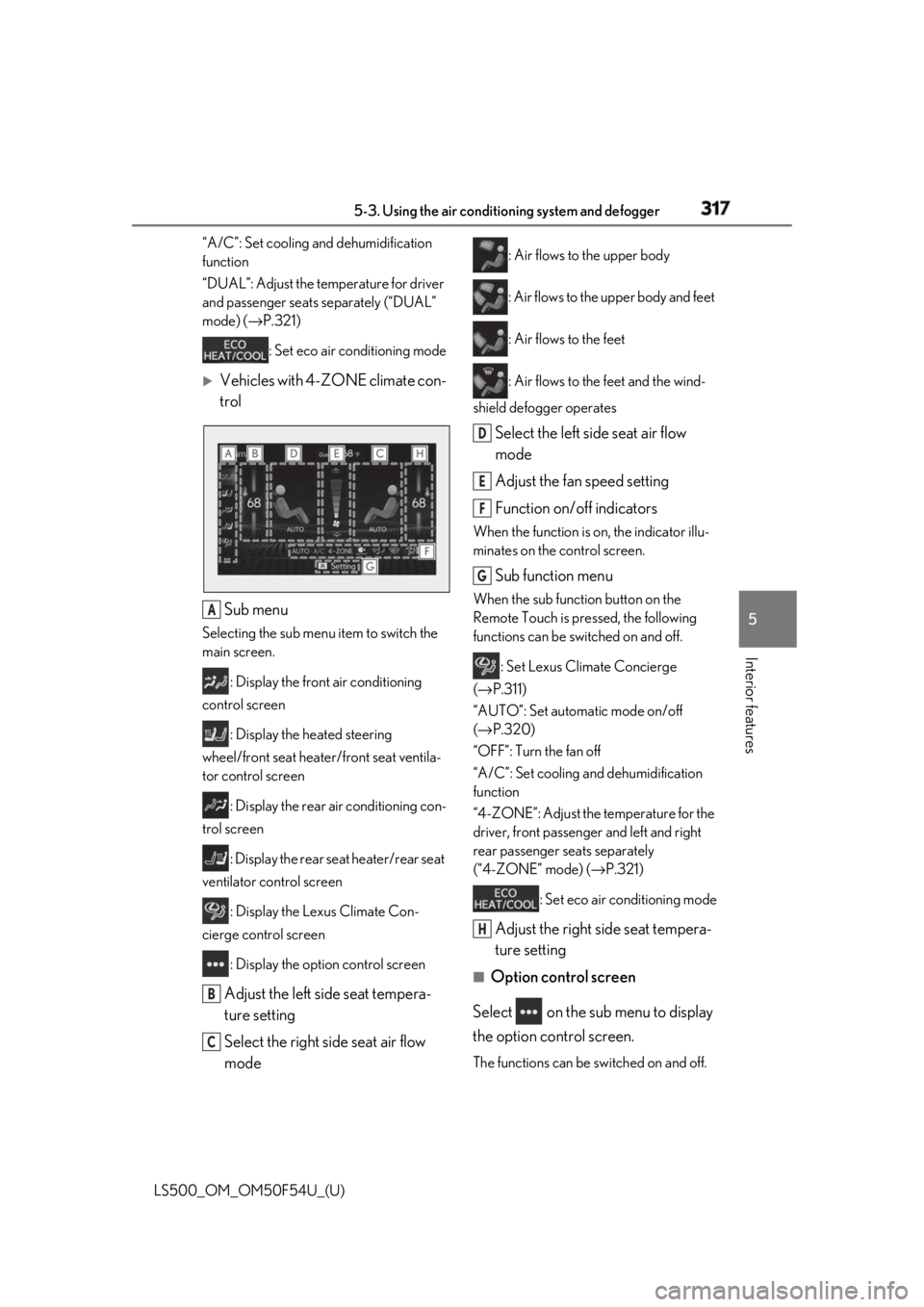
Vehicles with 4-ZONE climate con-
trol
Sub menu Selecting the sub menu item to switch the
main screen.
: Display the front air conditioning
control screen
: Display the heated steering
wheel/front seat heater/front seat ventila-
tor control screen
: Display the rear air conditioning con-
trol screen
: Display the rear seat heater/rear seat
ventilator control screen
: Display the Lexus Climate Con-
cierge control screen
: Display the option control screen
Adjust the left side seat tempera-
ture setting
Select the right side seat air flow
mode : Air flows to the upper body
: Air flows to the upper body and feet
: Air flows to the feet
: Air flows to the feet and the wind-
shield defogger operates
Select the left side seat air flow
mode
Adjust the fan speed setting
Function on/off indicators When the function is on, the indicator illu-
minates on the control screen.
Sub function menu When the sub function button on the
Remote Touch is pressed, the following
functions can be switched on and off.
: Set Lexus Climate Concierge
( → P.311)
“AUTO”: Set automatic mode on/off
( → P.320)
“OFF”: Turn the fan off
“A/C”: Set cooling and dehumidification
function
“4-ZONE”: Adjust the temperature for the
driver, front passenger and left and right
rear passenger se ats separately
(“4-ZONE” mode) ( → P.321)
: Set eco air conditioning mode
Adjust the right side seat tempera-
ture setting ■
Option control screen
Select on the sub menu to display
the option control screen.
The functions can be switched on and off.A
B
C D
E
F
G
H
Page 319 of 514
3195-3. Using the air conditio ning system and defogger
LS500_OM_OM50F54U_(U) 5
Interior features ■
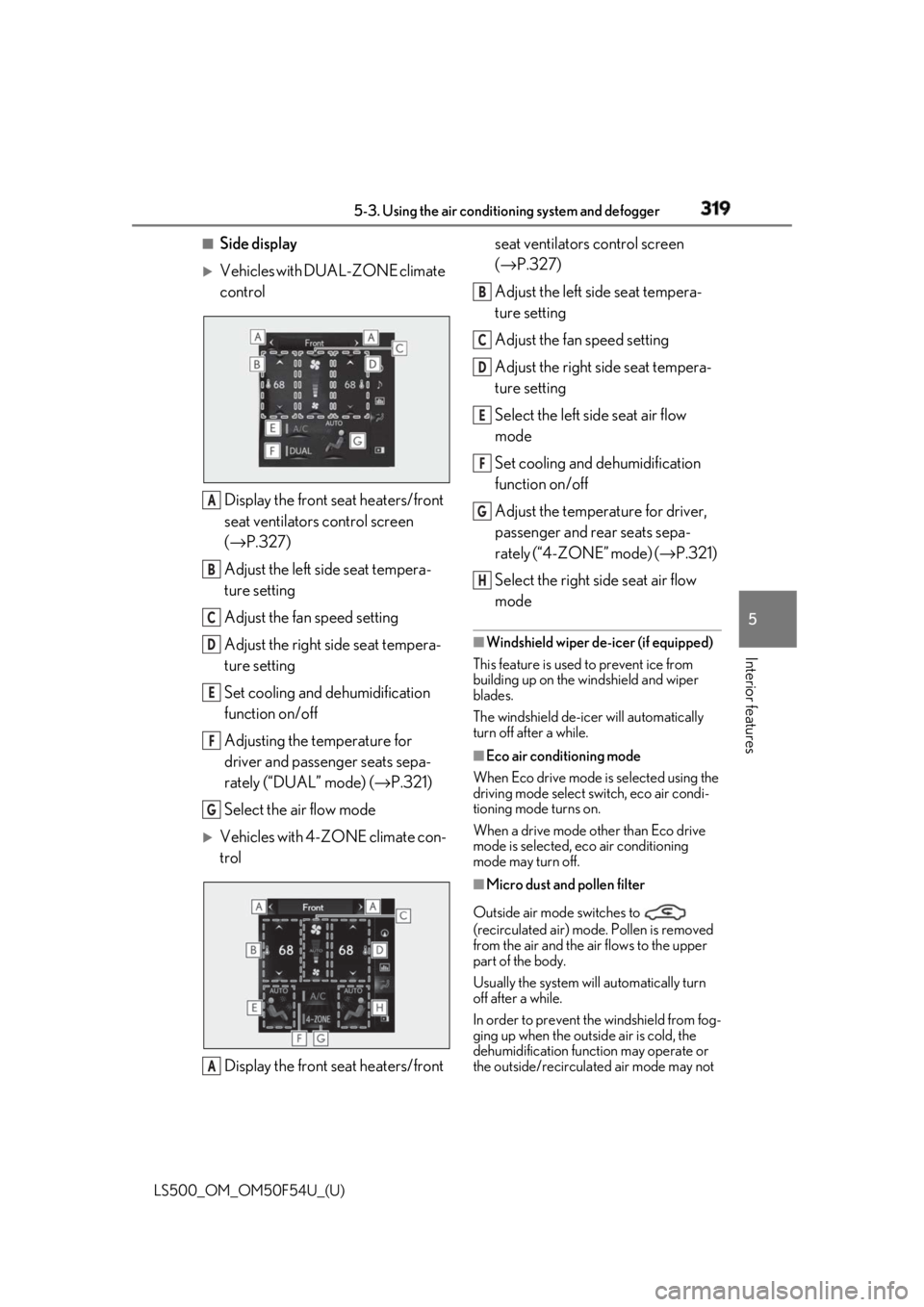
Side display
Vehicles with DUAL-ZONE climate
control
Display the front seat heaters/front
seat ventilators control screen
( → P.327)
Adjust the left side seat tempera-
ture setting
Adjust the fan speed setting
Adjust the right side seat tempera-
ture setting
Set cooling and dehumidification
function on/off
Adjusting the temperature for
driver and passenger seats sepa-
rately (“DUAL” mode) ( → P.321)
Select the air flow mode
Vehicles with 4-ZONE climate con-
trol
Display the front seat heaters/front seat ventilators control screen
( → P.327)
Adjust the left side seat tempera-
ture setting
Adjust the fan speed setting
Adjust the right side seat tempera-
ture setting
Select the left side seat air flow
mode
Set cooling and dehumidification
function on/off
Adjust the temperature for driver,
passenger and rear seats sepa-
rately (“4-ZONE” mode) ( → P.321)
Select the right side seat air flow
mode ■
Windshield wiper de-icer (if equipped)
This feature is used to prevent ice from
building up on the windshield and wiper
blades.
The windshield de-icer will automatically
turn off after a while. ■
Eco air conditioning mode
When Eco drive mode is selected using the
driving mode select switch, eco air condi-
tioning mode turns on.
When a drive mode other than Eco drive
mode is selected, eco air conditioning
mode may turn off.
■
Micro dust and pollen filter
Outside air mode switches to
(recirculated air) mode. Pollen is removed
from the air and the air flows to the upper
part of the body.
Usually the system will automatically turn
off after a while.
In order to prevent the windshield from fog-
ging up when the outside air is cold, the
dehumidification function may operate or
the outside/recirculated air mode may not A
B
C
D
E
F
G
A B
C
D
E
F
G
H
Page 323 of 514
3235-3. Using the air conditio ning system and defogger
LS500_OM_OM50F54U_(U) 5
Interior features *
:If equipped
■
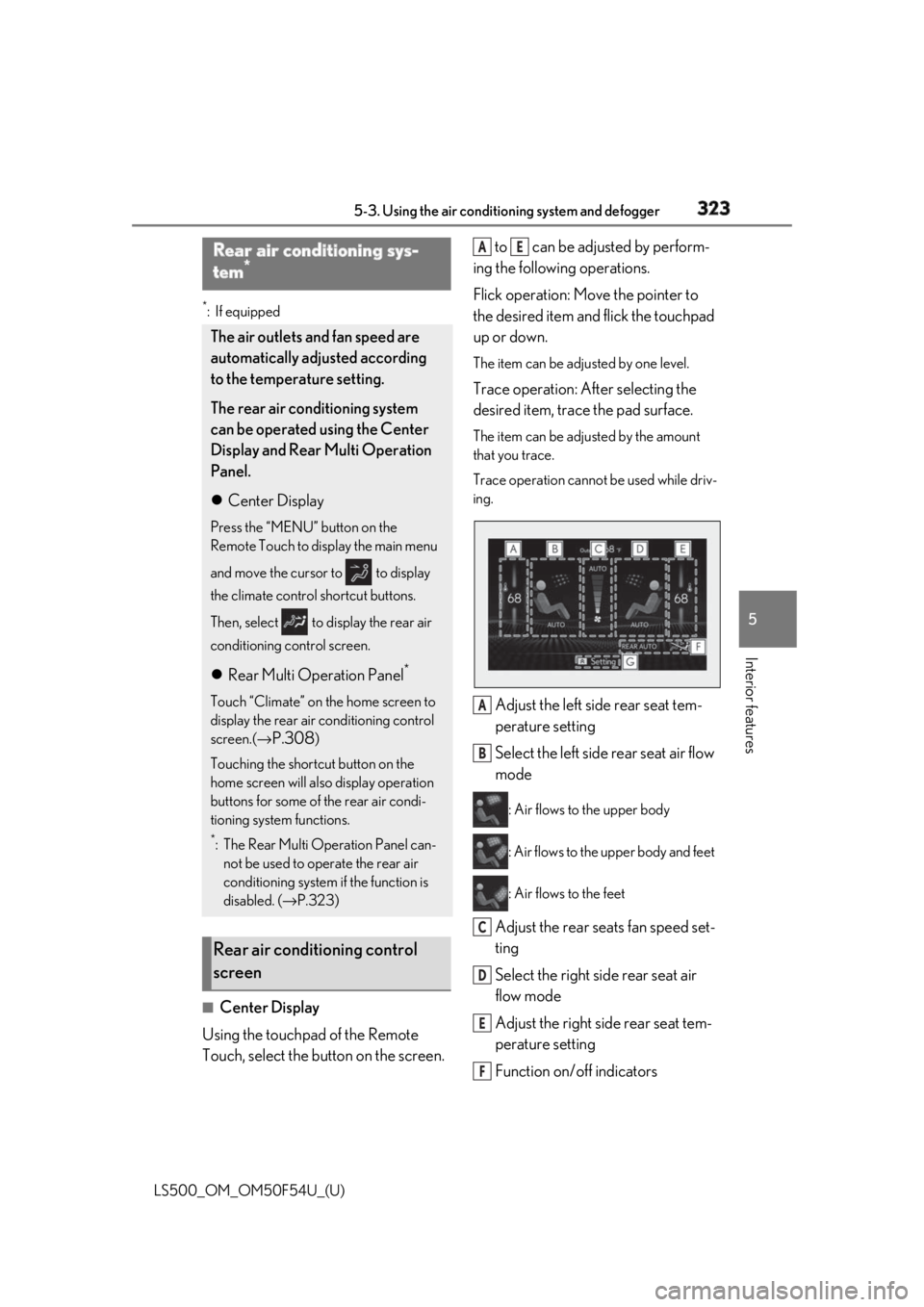
Center Display
Using the touchpad of the Remote
Touch, select the button on the screen. to can be adjusted by perform-
ing the following operations.
Flick operation: Move the pointer to
the desired item and flick the touchpad
up or down. The item can be adjusted by one level.
Trace operation: After selecting the
desired item, trace the pad surface. The item can be adjusted by the amount
that you trace.
Trace operation cannot be used while driv-
ing.
Adjust the left side rear seat tem-
perature setting
Select the left side rear seat air flow
mode : Air flows to the upper body
: Air flows to the upper body and feet
: Air flows to the feet
Adjust the rear seats fan speed set-
ting
Select the right side rear seat air
flow mode
Adjust the right side rear seat tem-
perature setting
Function on/off indicators Rear air conditioning sys-
tem *
The air outlets and fan speed are
automatically adjusted according
to the temperature setting.
The rear air conditioning system
can be operated using the Center
Display and Rear Multi Operation
Panel.
Center Display Press the “MENU” button on the
Remote Touch to display the main menu
and move the cursor to to display
the climate control shortcut buttons.
Then, select to display the rear air
conditioning control screen.
Rear Multi Operation Panel *
Touch “Climate” on the home screen to
display the rear air conditioning control
screen.( →
P.308 )
Touching the shortcut button on the
home screen will al so display operation
buttons for some of the rear air condi-
tioning system functions. *
: The Rear Multi Operation Panel can-
not be used to operate the rear air
conditioning system if the function is
disabled. ( → P.323)
Rear air conditioning control
screen A E
A
B
C
D
E
F
Page 324 of 514
324 5-3. Using the air conditioning system and defogger
LS500_OM_OM50F54U_(U) When the function is on, the indicator illu-
minates on the control screen.
Sub function menu When the sub function button on the
Remote Touch is pressed, the following
functions can be switched on and off.
“Rear off”: Turn the rear seats fan off
“Rear AUTO”: Set the rear seats automatic
mode on/off ( → P.324)
: Disables operation of the rear air
conditioning system using the Rear Multi
Operation Panel ■
Rear Multi Operation Panel *
Various functions can be operated by
touching the displayed buttons on the
Rear Multi Operation Panel. *
: The Rear Multi Operation Panel cannot
be used to operate the rear air condi-
tioning system if the function is disabled.
( → P.323)
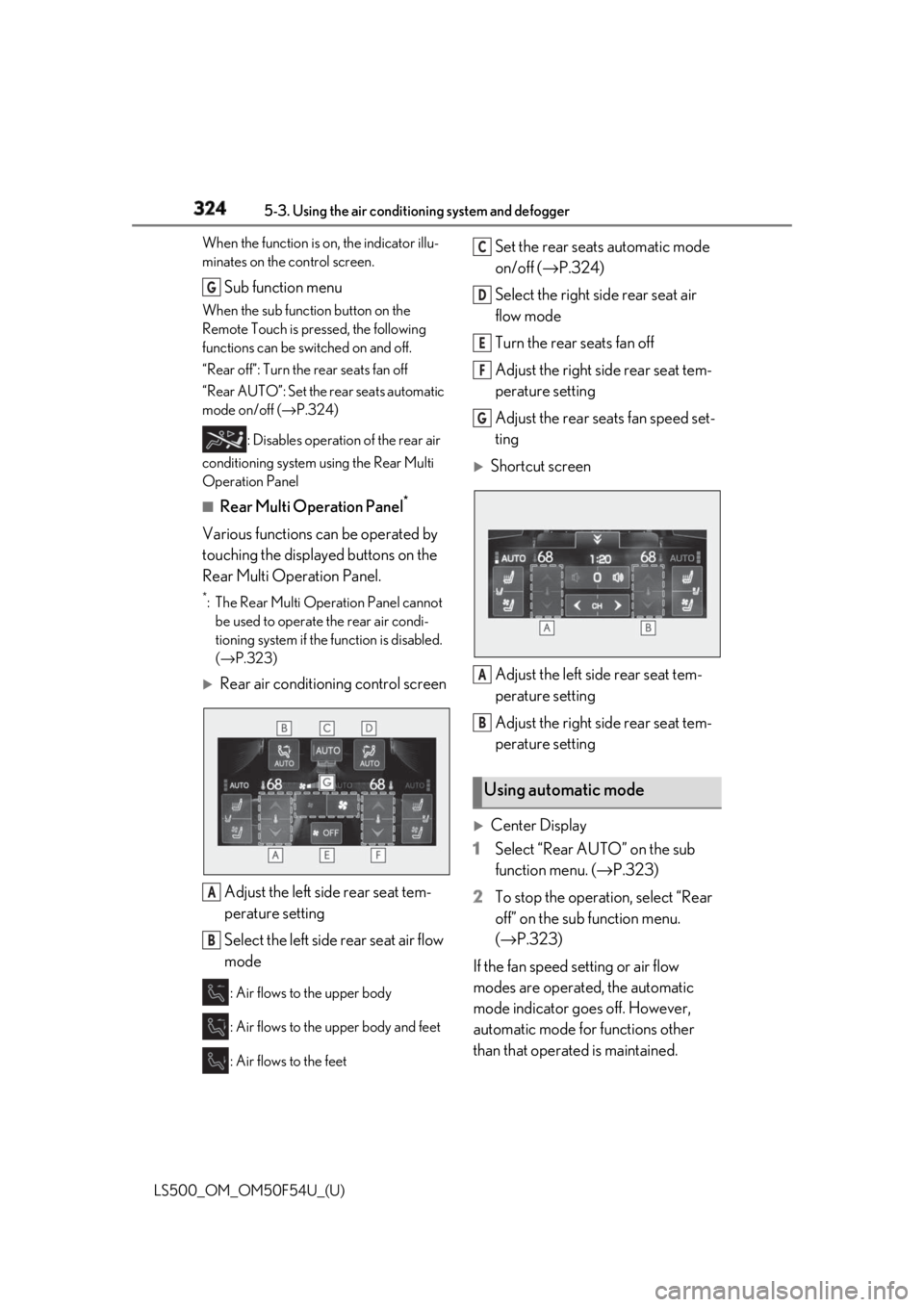
Rear air conditioning control screen
Adjust the left side rear seat tem-
perature setting
Select the left side rear seat air flow
mode : Air flows to the upper body
: Air flows to the upper body and feet
: Air flows to the feet Set the rear seats automatic mode
on/off ( → P.324)
Select the right side rear seat air
flow mode
Turn the rear seats fan off
Adjust the right side rear seat tem-
perature setting
Adjust the rear seats fan speed set-
ting
Shortcut screen
Adjust the left side rear seat tem-
perature setting
Adjust the right side rear seat tem-
perature setting
Center Display
1 Select “Rear AUTO” on the sub
function menu. ( → P.323)
2 To stop the operation, select “Rear
off” on the sub function menu.
( → P.323)
If the fan speed setting or air flow
modes are operated, the automatic
mode indicator goes off. However,
automatic mode for functions other
than that operated is maintained.G
A
B Using automatic mode C
D
E
F
G
A
B
Page 325 of 514
3255-3. Using the air conditio ning system and defogger
LS500_OM_OM50F54U_(U) 5
Interior features
Rear Multi Operation Panel
1 Select “AUTO” on the rear air con-
ditioning control screen. ( → P.324)
2 To stop the operation, select “OFF”
on the rear air co nditioning control
screen. ( → P.323)
If the fan speed setting or air flow
modes are operated , the automatic
mode indicator goes off. However,
automatic mode for functions other
than that operated is maintained. ■
Using automatic mode
Fan speed is adjusted automatically accord-
ing to the temperature setting and the
ambient conditions.
Therefore, the fan may stop for a while until
warm or cool air is ready to flow immedi-
ately after “Rear AUTO” is selected or
“AUTO” is touched.
Cool air may blow around the upper body
even when the heater is on due to sunlight.
The temperature setting of the rear
seats can be adjusted using the follow-
ing methods:
When the “4-ZONE” indicator is
off: Adjust the driv er’s seat tempera-
ture. Adjust the temperature setting of each
rear seat using the Center Display or Rear
Multi Operation Panel.
Adjust the temperature setting of
each rear seat using the Center Dis-
play (rear air conditioning control
screen) or Rear Multi Operation
Panel. The temperature setting of each rear seat
can be changed independently.
■
Rear center outlets and rear side
outlets
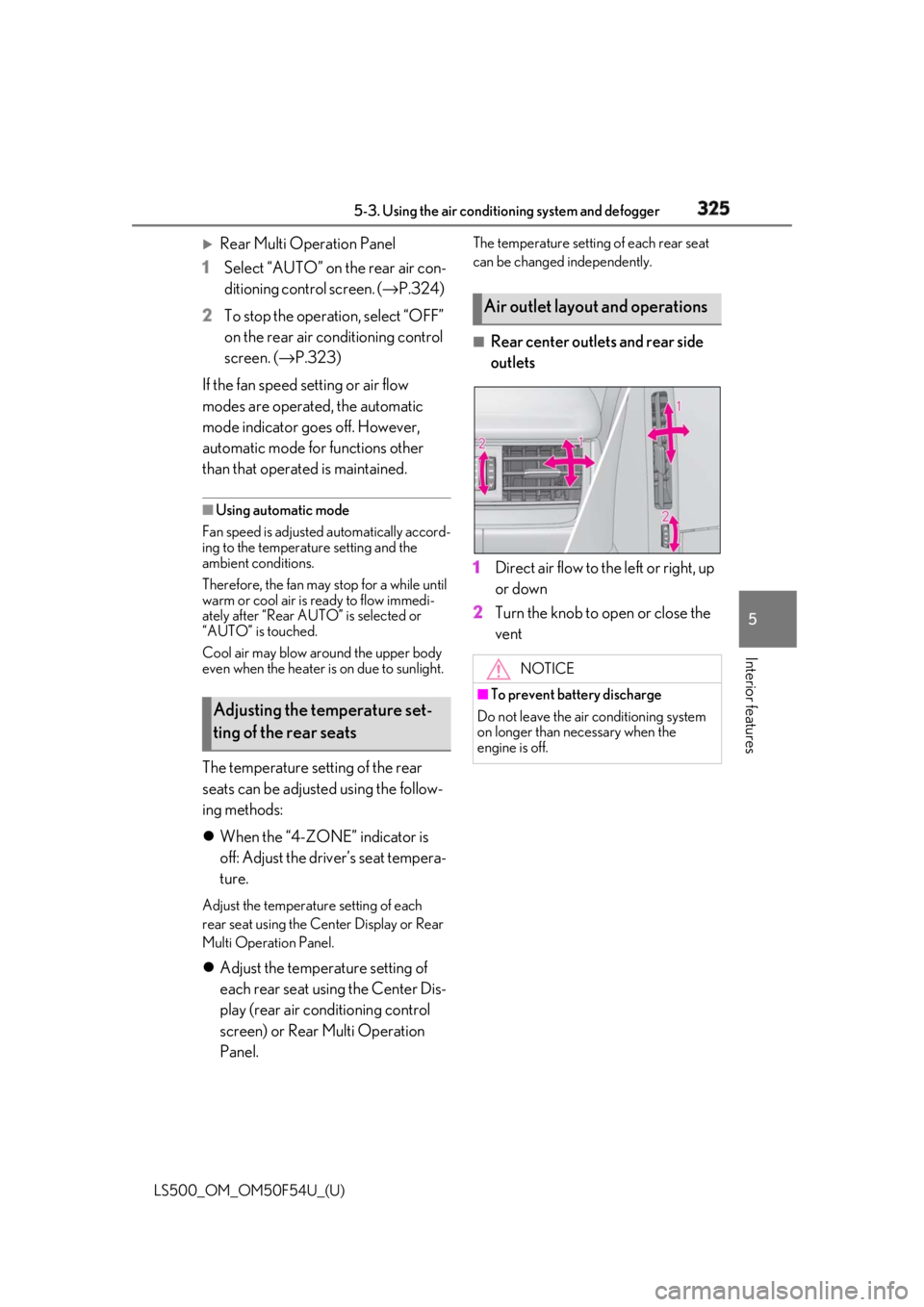
1 Direct air flow to the left or right, up
or down
2 Turn the knob to open or close the
vent
Adjusting the temperature set-
ting of the rear seats Air outlet layout and operations
NOTICE■
To prevent battery discharge
Do not leave the air conditioning system
on longer than necessary when the
engine is off.