ESP LEXUS LS500 2018 Workshop Manual
[x] Cancel search | Manufacturer: LEXUS, Model Year: 2018, Model line: LS500, Model: LEXUS LS500 2018Pages: 514, PDF Size: 10.62 MB
Page 332 of 514
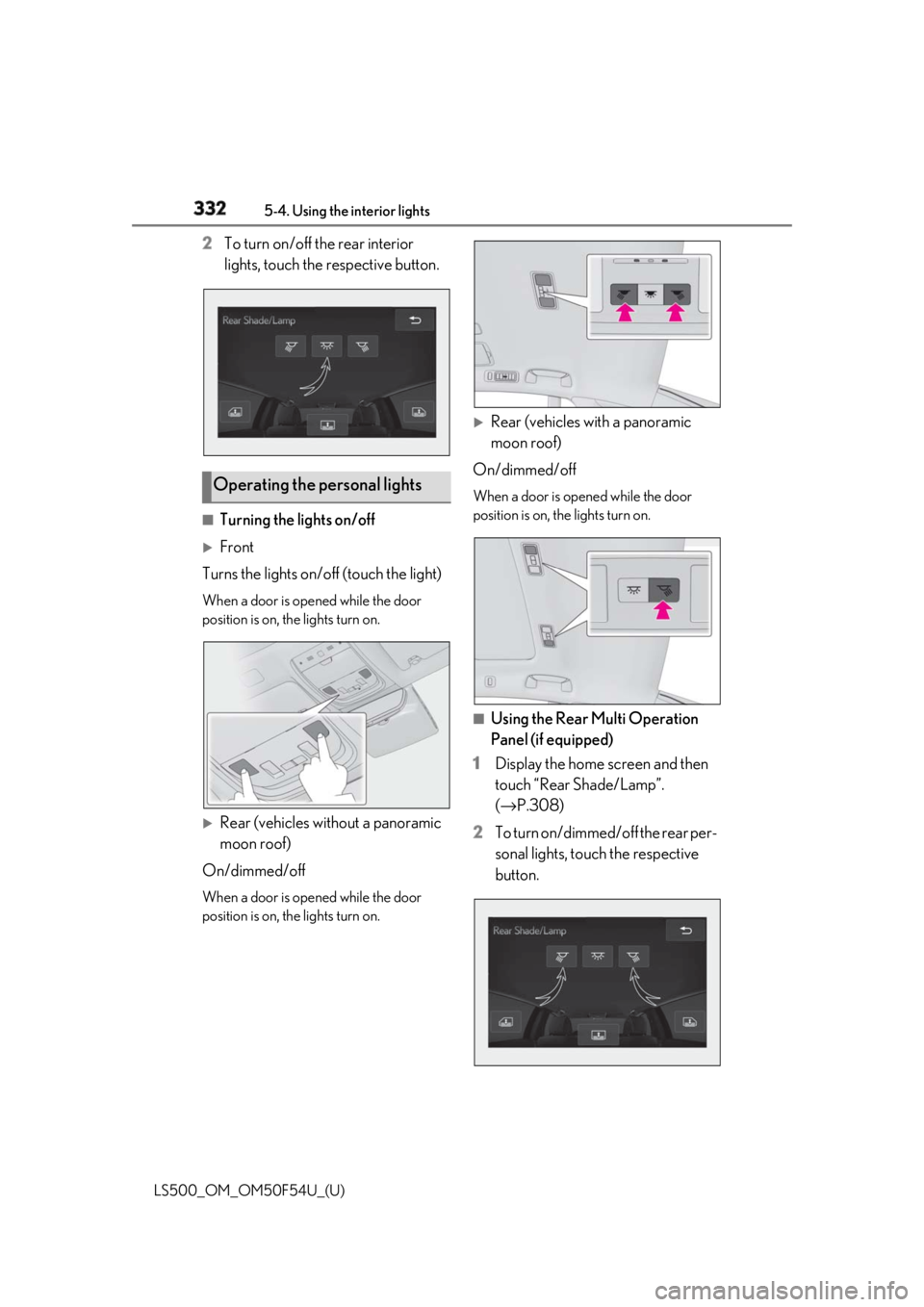
332 5-4. Using the interior lights
LS500_OM_OM50F54U_(U) 2 To turn on/off the rear interior
lights, touch the respective button.
■
Turning the lights on/off
Front
Turns the lights on/off (touch the light) When a door is opened while the door
position is on, the lights turn on.
Rear (vehicles without a panoramic
moon roof)
On/dimmed/off When a door is opened while the door
position is on, the lights turn on.
Rear (vehicles with a panoramic
moon roof)
On/dimmed/off When a door is opened while the door
position is on, the lights turn on.
■
Using the Rear Multi Operation
Panel (if equipped)
1 Display the home screen and then
touch “Rear Shade/Lamp”.
( → P.308)
2 To turn on/dimmed/off the rear per-
sonal lights, touch the respective
button.Operating the personal lights
Page 333 of 514
3335-4. Using the interior lights
LS500_OM_OM50F54U_(U) 5
Interior features ■
Illuminated entry system
The lights automatically turn on/off accord-
ing to the engine switch mode, the pres-
ence of the electronic key, whether the
doors are locked/unlocked, and whether
the doors are opened/closed. ■
To prevent the battery from being dis-
charged
If the interior lights remain on when the
engine switch is turned off, the lights will go
off automatically after 20 minutes. ■
When front interior light or front per-
sonal lights do not respond as normal●
When water, dirt, et c., have adhered to
the lens surface●
When operated with a wet hand●
When wearing gloves, etc.■
Customization
Some functions can be customized.
( → P.468)
NOTICE■
To prevent battery discharge
Do not leave the lights on longer than
necessary when the engine is not run-
ning.
■
Removing light lenses
Never remove the lens for the front inte-
rior light and front personal lights. Other-
wise, the lights will be damaged. If a lens
needs to be removed, contact your Lexus
dealer.
Page 347 of 514
3475-6. Using the other interior features
LS500_OM_OM50F54U_(U) 5
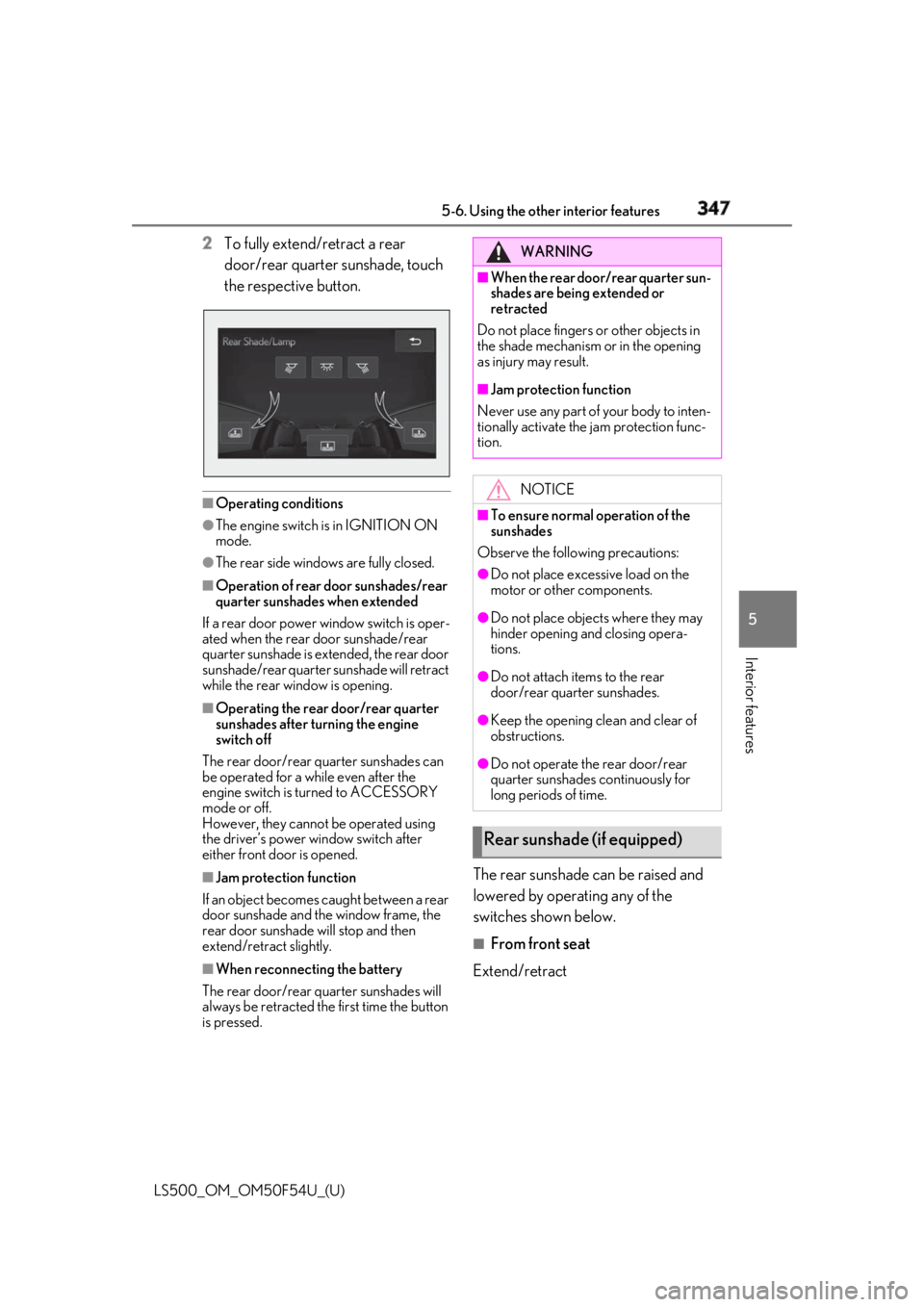
Interior features 2 To fully extend/retract a rear
door/rear quarter sunshade, touch
the respective button.
■
Operating conditions●
The engine switch is in IGNITION ON
mode.●
The rear side windows are fully closed.■
Operation of rear door sunshades/rear
quarter sunshades when extended
If a rear door power window switch is oper-
ated when the rear door sunshade/rear
quarter sunshade is extended, the rear door
sunshade/rear quarter sunshade will retract
while the rear window is opening. ■
Operating the rear door/rear quarter
sunshades after turning the engine
switch off
The rear door/rear quarter sunshades can
be operated for a while even after the
engine switch is turned to ACCESSORY
mode or off.
However, they cannot be operated using
the driver’s power window switch after
either front door is opened.
■
Jam protection function
If an object becomes caught between a rear
door sunshade and the window frame, the
rear door sunshade will stop and then
extend/retract slightly.
■
When reconnecting the battery
The rear door/rear quarter sunshades will
always be retracted the first time the button
is pressed. The rear sunshade can be raised and
lowered by operating any of the
switches shown below. ■
From front seat
Extend/retract WARNING■
When the rear door/rear quarter sun-
shades are being extended or
retracted
Do not place fingers or other objects in
the shade mechanism or in the opening
as injury may result. ■
Jam protection function
Never use any part of your body to inten-
tionally activate the jam protection func-
tion.
NOTICE■
To ensure normal operation of the
sunshades
Observe the following precautions: ●
Do not place excessive load on the
motor or other components. ●
Do not place objects where they may
hinder opening and closing opera-
tions. ●
Do not attach items to the rear
door/rear quarter sunshades. ●
Keep the opening clean and clear of
obstructions.
●
Do not operate the rear door/rear
quarter sunshades continuously for
long periods of time.
Rear sunshade (if equipped)
Page 348 of 514
348 5-6. Using the other interior features
LS500_OM_OM50F54U_(U) ■
From rear seat
Vehicles without power rear seat
Extend/retract
Vehicles with power rear seat
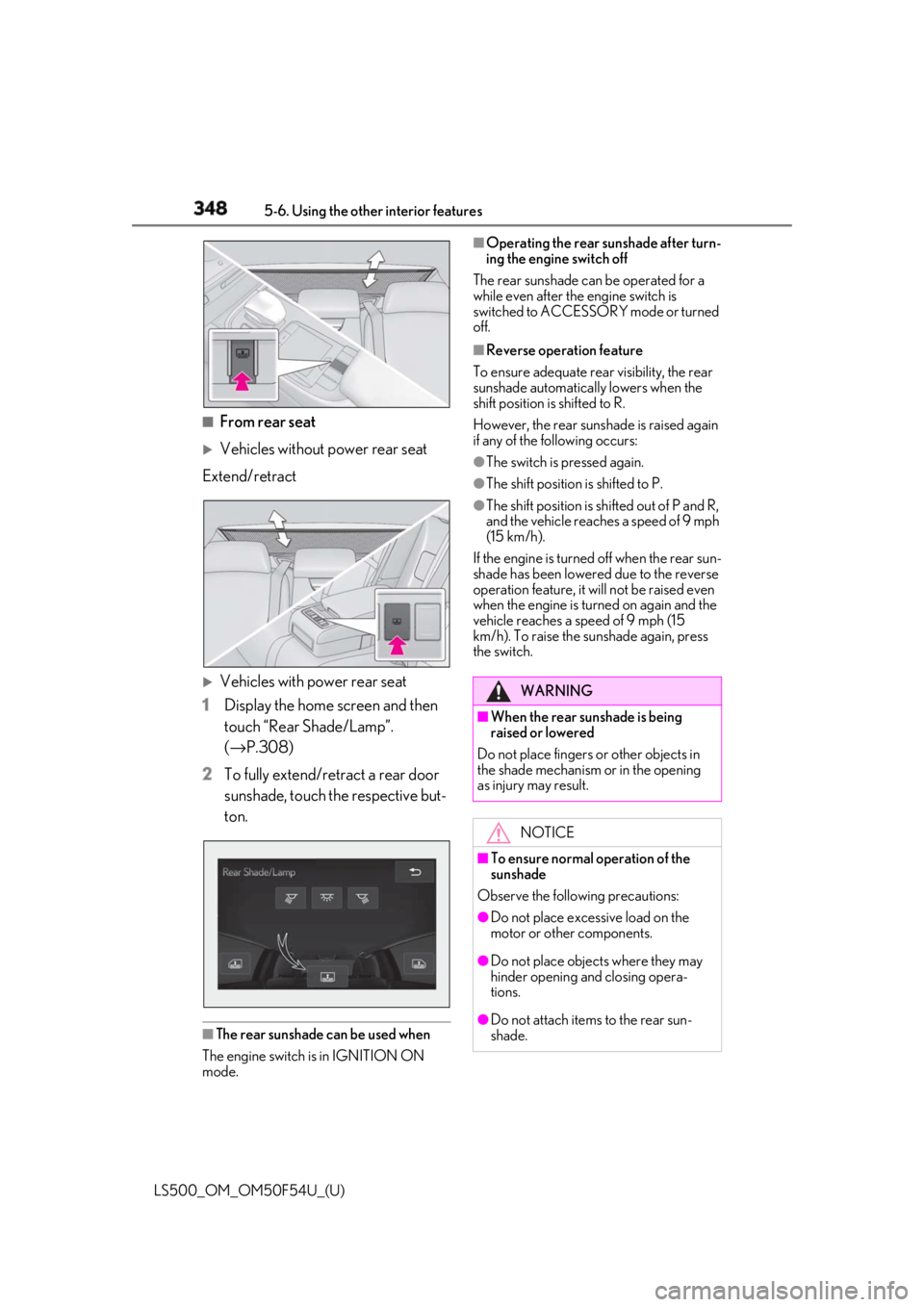
1 Display the home screen and then
touch “Rear Shade/Lamp”.
( → P.308)
2 To fully extend/retract a rear door
sunshade, touch the respective but-
ton.
■
The rear sunshade can be used when
The engine switch is in IGNITION ON
mode. ■
Operating the rear sunshade after turn-
ing the engine switch off
The rear sunshade ca n be operated for a
while even after the engine switch is
switched to ACCESSORY mode or turned
off. ■
Reverse operation feature
To ensure adequate rear visibility, the rear
sunshade automatically lowers when the
shift position is shifted to R.
However, the rear suns hade is raised again
if any of the following occurs: ●
The switch is pressed again.●
The shift position is shifted to P. ●
The shift position is sh ifted out of P and R,
and the vehicle reaches a speed of 9 mph
(15 km/h).
If the engine is turned off when the rear sun-
shade has been lowered due to the reverse
operation feature, it will not be raised even
when the engine is turned on again and the
vehicle reaches a speed of 9 mph (15
km/h). To raise the sunshade again, press
the switch.
WARNING■
When the rear sunshade is being
raised or lowered
Do not place fingers or other objects in
the shade mechanism or in the opening
as injury may result.
NOTICE
■
To ensure normal operation of the
sunshade
Observe the following precautions:
●
Do not place excessive load on the
motor or other components.
●
Do not place objects where they may
hinder opening and closing opera-
tions.
●
Do not attach items to the rear sun-
shade.
Page 355 of 514
3555-6. Using the other interior features
LS500_OM_OM50F54U_(U) 5
Interior features *
:If equipped
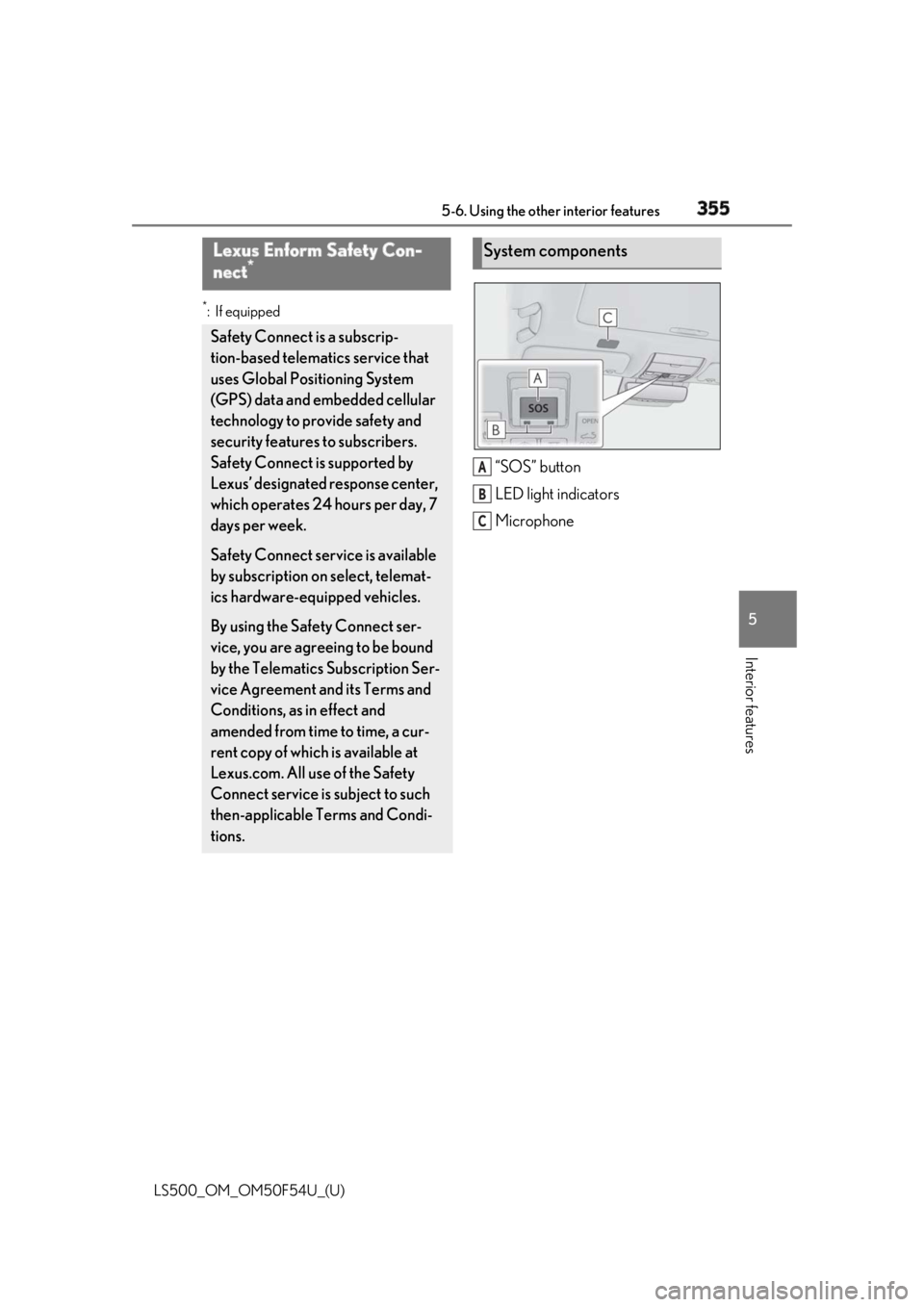
“SOS” button
LED light indicators
MicrophoneLexus Enform Safety Con-
nect *
Safety Connect is a subscrip-
tion-based telematics service that
uses Global Positioning System
(GPS) data and embedded cellular
technology to provide safety and
security features to subscribers.
Safety Connect is supported by
Lexus’ designated response center,
which operates 24 hours per day, 7
days per week.
Safety Connect service is available
by subscription on select, telemat-
ics hardware-equipped vehicles.
By using the Safety Connect ser-
vice, you are agreeing to be bound
by the Telematics Subscription Ser-
vice Agreement and its Terms and
Conditions, as in effect and
amended from time to time, a cur-
rent copy of which is available at
Lexus.com. All use of the Safety
Connect service is subject to such
then-applicable Terms and Condi-
tions. System components
A
B
C
Page 356 of 514
356 5-6. Using the other interior features
LS500_OM_OM50F54U_(U) ■
Certification for Lexus Enform
Subscribers have the following Safety
Connect services available: Automatic Collision Notification *
Helps drivers receive necessary response
from emergency service providers.
( →
P.358 )Services
Page 357 of 514
3575-6. Using the other interior features
LS500_OM_OM50F54U_(U) 5
Interior features *
: U.S. Patent No. 7,508,298 B2
Stolen Vehicle Location Helps drivers in the event of vehicle theft.
( →
P.358 )
Emergency Assistance Button
(“SOS”) Connects drivers to response-center sup-
port. ( →
P.358 )
Enhanced Roadside Assistance Provides drivers various on-road assis-
tance. ( →
P.358 )
After you have signed the Telematics
Subscription Service Agreement and
are enrolled, you can begin receiving
services.
A variety of subscription terms is avail-
able for purchase. Contact your Lexus
dealer, call 1-800-25-LEXUS
(1-800-255-3987) in the Unites
States (1-877-539-8777 in Puerto
Rico, 1-800-26-LEXUS in Canada) or
push the “SOS” button in your vehicle
for further subscription details. ■
Safety Connect Serv ices Information●
Phone calls using the vehicles Blue-
tooth ®
technology will not be possible
during Safety Connect.
●
Safety Connect is available beginning Fall
2009 on select Lexus models (in the
contiguous United States only). Contact
with the Safety Connect response center
is dependent upon the telematics device
being in operative co ndition, cellular con-
nection availability, and GPS satellite sig-
nal reception, which ca n limit the ability to
reach the response center or receive
emergency service support. Enrollment
and Telematics Subscription Service Agreement required. A variety of sub-
scription terms is available; charges vary
by subscription term selected and loca-
tion. ●
Automatic Collision Notification, Emer-
gency Assistance and Stolen Vehicle
Location will function in the United
States, including Hawaii and Alaska,
Puerto Rico and in Canada, and
Enhanced Roadside Assistance will func-
tion in the United States, Puerto Rico and
in Canada. ●
Automatic Collision Notification, Emer-
gency Assistance, Stolen Vehicle Loca-
tion and Enhanced Roadside Assistance
will not function in the United States Vir-
gin Islands.
No Safety Connect services will function
outside of the United States in countries
other than Canada.
For vehicles first sold in the USVI, no
Safety Connect services will function in
and outside the United States Virgin
Islands. ●
Safety Connect services are not subject
to section 255 of the Telecommunica-
tions Act and the device is not TTY com-
patible. ■
Languages
The Safety Connect re sponse center will
offer support in mult iple languages. The
Safety Connect system will offer voice
prompts in English, Spanish, and French.
Please indicate your language of choice
when enrolling. ■
When contacting the response center
You may be unable to contact the response
center if the network is busy.
When the engine switch is turned to
IGNITION ON mode, the red indica-
tor light comes on for 2 seconds then
turns off. Afterward, the green indica-
tor light comes on, indicating that the
service is active.Subscription
Safety Connect LED light Indi-
cators
Page 358 of 514
358 5-6. Using the other interior features
LS500_OM_OM50F54U_(U) The following indicator light patterns
indicate specific system usage condi-
tions:
Green indicator light on = Active
service
Green indicator light flashing =
Safety Connect call in process
Red indicator light (except at vehi-
cle start-up) = System malfunction
(contact your Lexus dealer)
No indicator light (off) = Safety
Connect service not active ■
Automatic Collision Notification
In case of either airbag deployment or
severe rear-end collision, the system is
designed to automatically call the
response center. The responding agent
receives the vehicle’s location and
attempts to speak with the vehicle
occupants to assess the level of emer-
gency. If the occupants are unable to
communicate, the ag ent automatically
treats the call as an emergency, con-
tacts the nearest emergency services
provider to describe the situation, and
requests that assistance be sent to the
location. ■
Stolen Vehicle Location
If your vehicle is stolen, Safety Connect
can work with local authorities to assist
them in locating and recovering the
vehicle. After filing a police report, call
the Safety Connect response center at
1-800-25-LEXUS
(1-800-255-3987) and follow the prompts for Safety Connect to initiate
this service.
In addition to assisting law enforce-
ment with recovery of a stolen vehicle,
Safety-Connect-equipped vehicle
location data may, under certain cir-
cumstances, be shared with third par-
ties to locate your vehicle. Further
information is available at Lexus.com. ■
Emergency Assistance Button
(“SOS”)
In the event of an emergency on the
road, push the “SOS” button to reach
the Safety Connect response center.
The answering agent will determine
your vehicle’s location, assess the
emergency, and dispatch the neces-
sary assistance required. If you accidentally press the “SOS” button,
tell the response-center agent that you are
not experiencing an emergency. ■
Enhanced Roadside Assistance
Enhanced Roadside Assistance adds
GPS data to the already included war-
ranty-based Lexus roadside service.
Subscribers can press the “SOS” but-
ton to reach a Safety Connect
response-center agent, who can help
with a wide range of needs, such as:
towing, flat tire, fuel delivery, etc. For a
description of the Roadside Assistance
services and their limitations, please
see the Safety Connect Terms and
Conditions, which are available at
Lexus.com.Safety Connect services
Page 365 of 514
3656-1. Maintenance and care
LS500_OM_OM50F54U_(U) 6
Maintenance and care Remove dirt and dust using a vac-
uum cleaner. Wipe dirty surfaces
with a cloth dampened with luke-
warm water.
If dirt cannot be removed, wipe it off
with a soft cloth dampened with
neutral detergent diluted to approx-
imately 1%.
Wring out any excess water from
the cloth and thoroughly wipe off
remaining traces of detergent and
water. ■
Shampooing the carpets
There are several commercial foaming-type
cleaners available. Use a sponge or brush
to apply the foam. Rub in overlapping cir-
cles. Do not use water. Wipe dirty surfaces
and let them dry. Excellent results are
obtained by keeping the carpet as dry as
possible.
■
Handling the seat belts
Clean with mild soap and lukewarm water
using a cloth or spon ge. Also check the
belts periodically for excessive wear, fraying
or cuts.
■
When cleaning the carpeted portions of
the glove box, console box, etc.
If a strong adhesive tape is used, there is a
possibility that the surface of the carpet
could be damaged.Cleaning and protecting the
vehicle interior Perform cleaning in a manner
appropriate to each component
and its material.
Protecting the vehicle interior WARNING■
Water in the vehicle ●
Do not splash or spill liquid in the vehi-
cle.
Doing so may cause electrical compo-
nents, etc. to malfunction or catch fire. ●
Do not get any of the SRS components
or wiring in the vehicle interior wet.
( → P.29)
An electrical malfunction may cause
the airbags to deploy or not function
properly, resulting in death or serious
injury. ■
Cleaning the interior (especially
instrument panel)
Do not use polish wax or polish cleaner.
The instrument panel may reflect off the
windshield, obstructin g the driver’s view
and leading to an accident, resulting in
death or serious injury.
NOTICE■
Cleaning detergents ●
Do not use the following types of
detergent, as they may discolor the
vehicle interior or cause streaks or
damage to painted surfaces:
• Areas other than the seats and steer-
ing wheel: Organic substances such as
benzene or gasoline, alkaline or acidic
solutions, dye, and bleach
• Seats: Alkaline or acidic solutions,
such as thinner, benzene, and alcohol
• Steering wheel: Organic substances,
such as thinner, and cleaner that con-
tains alcohol
●
Do not use polish wax or polish
cleaner. The instrument panel’s or
other interior part’s painted surface
may be damaged.
Page 366 of 514
366 6-1. Maintenance and care
LS500_OM_OM50F54U_(U) Remove dirt using a water-damp-
ened soft cloth or synthetic chamois.
Wipe the surface with a dry, soft
cloth to remove any remaining
moisture. ■
Cleaning the areas with satin-finish
metal accents
The metal areas use a layer of real metal for
the surface. It is necessary to clean them
regularly. If dirty area s are left uncleaned for
long periods of time, they may be difficult to
clean.
Remove dirt and dust using a vac-
uum cleaner.
Wipe off any excess dirt and dust
with a soft cloth dampened with
diluted detergent. Use a diluted water solution of approxi-
mately 5% neutral wool detergent.
Wring out any excess water from
the cloth and thoroughly wipe off all
remaining traces of detergent.
Wipe the surface with a dry, soft
cloth to remove any remaining
moisture. Allow the leather to dry in
a shaded and ventilated area. ■
Caring for leather areas
Lexus recommends cleani ng the interior of
the vehicle at least twice a year to maintain
the quality of the vehicle’s interior.NOTICE■
Preventing damage to leather sur-
faces
Observe the following precautions to
avoid damage to and deterioration of
leather surfaces: ●
Remove any dust or dirt from leather
surfaces immediately.●
Do not expose the vehicle to direct
sunlight for extended periods of time.
Park the vehicle in the shade, espe-
cially during summer.●
Do not place items made of vinyl, plas-
tic, or containing wax on the uphol-
stery, as they may stick to the leather
surface if the vehicle interior heats up
significantly.■
Water on the floor
Do not wash the vehicle floor with water.
Vehicle systems such as the audio system
may be damaged if water comes into
contact with electrical components such
as the audio system above or under the
floor of the vehicle. Water may also
cause the body to rust. ■
When cleaning the inside of the wind-
shield
Do not allow glass cleaner to contact the
camera sensor lens. Also, do not touch
the lens. ( → P.188, 195)
■
Cleaning the inside of the rear win-
dow●
Do not use glass cleaner to clean the
rear window, as this may cause dam-
age to the rear window defogger
heater wires or antenna. Use a cloth
dampened with lukewarm water to
gently wipe the window clean. Wipe
the window in strokes running parallel
to the heater wires or antenna.
●
Be careful not to scratch or damage
the heater wires or antenna. Cleaning the areas with satin-fin-
ish metal accents
Cleaning the leather areas