set LEXUS LS500 2019 Owners Manual
[x] Cancel search | Manufacturer: LEXUS, Model Year: 2019, Model line: LS500, Model: LEXUS LS500 2019Pages: 512, PDF Size: 9.71 MB
Page 391 of 512
3916-3. Do-it-yourself maintenance
LS500_OM_(U)_1810 6
Maintenance and care approximately 10 to 30 minutes to com-
plete ID code registration.)
If ID code registration is not complete
after driving for approximately 30 min-
utes, continue driving for a while.
• If the vehicle is driven on an unpaved
road, it may take longer than normal to
complete registration.
• If the vehicle is backed up while perform-
ing registration, data collected during
registration will be cleared, and it will take
longer than normal to complete.
• If the vehicle is driven in heavy traffic or
another situation where other vehicles
are driven close by, it may take time for
the system to recognize the tire pressure
warning valve and tran smitters of your
vehicle over those of other vehicles.
• If a wheel with a tire pressure warning
valve and transmitter installed is inside or
near the vehicle, registration of the ID
codes for the installed wheels may not be
possible.
If ID registration is not complete after driv-
ing for approximately 1 hour, park the vehi-
cle in a safe place for approximately 20
minutes and then perform the ID code reg-
istration procedure again. ●
In the following situat ions, ID code regis-
tration will not be started or was not com-
pleted properly and the system will not
operate properly. Perform the ID code
registration procedure again.
• If, when attempting to start ID code regis-
tration, the tire pressure warning light
does not blink slowly 3 times.
• If, when the vehicle has been driven for
about 20 minutes after performing ID
code registration, the tire pressure warn-
ing light blinks for approximately 1 minute
and then illuminates.
●
If ID code registration cannot be com-
pleted after performing the above proce-
dure, contact your Lexus dealer. Stop the vehicle in a safe place on a
hard, flat surface.
Set the parking brake.
Shift the shift position to P.
Disabling the height control. (if
equipped) ( P.293)
Stop the engine. ■
Jack and tools
As your vehicle is eq uipped with run-flat
tires, the following tools for replacing a tire
are not included with your vehicle. They can
be purchased at your Lexus dealer. ●
Wheel nut wrench ●
Jack ●
Jack handleReplacing the tire When raising your vehicle with a
jack, position the jack correctly.
Improper placement may damage
your vehicle or cause injury.
If necessary tire replacement
seems difficult to perform, contact
your Lexus dealer.
Before jacking up the vehicle
Page 396 of 512
396 6-3. Do-it-yourself maintenance
LS500_OM_(U)_1810 ing.●
Always use a tire pressure gauge.
It is difficult to judge if a tire is properly
inflated based only on its appearance.●
It is normal for the tire inflation pressure
to be higher after driving as heat is gen-
erated in the tire. Do not reduce tire infla-
tion pressure after driving.●
Never exceed the vehicle capacity
weight.
Passengers and luggage weight should
be placed so that the vehicle is balanced.
When replacing wheels, care should
be taken to ensure that they are equiv-
alent to those removed in load capac-
ity, diameter, rim width and inset *
.
Replacement wheels are available at
your Lexus dealer. *
: Conventionally referred to as offset.
Lexus does not recommend using the
following:
Wheels of different sizes or types
Used wheels
Bent wheels that have been straight-
ened ■
When replacing wheels
The wheels of your vehicle are equipped
with tire pressure wa rning valves and trans-
mitters that allow the tire pressure warning
system to provide advance warning in the
event of a loss in tire inflation pressure.
Whenever wheels are replaced, the tire
pressure warning valves and transmitters
must be installed. ( P.387)WARNING■
Proper inflation is critical to save tire
performance
Keep your tires properly inflated.
If the tires are not properly inflated, the
following conditions may occur which
could lead to an accident resulting in
death or serious injury: ●
Excessive wear●
Uneven wear●
Poor handling●
Possibility of blowouts resulting from
overheated tires
●
Air leaking from between tire and
wheel
●
Wheel deformation and/or tire dam-
age
●
Greater possibility of tire damage
while driving (due to road hazards,
expansion joints, sharp edges in the
road, etc.)
NOTICE
■
When inspecting and adjusting tire
inflation pressure
Be sure to put the tire valve caps back on.
If a valve cap is not installed, dirt or mois-
ture may get into the valve and cause an
air leak, resulting in decreased tire infla-
tion pressure. Wheels If a wheel is bent, cracked or heavily
corroded, it should be replaced.
Otherwise, the tire may separate
from the wheel or cause a loss of
handling control.
Wheel selection
WARNING
■
When replacing wheels
●
Do not use wheels that are a different
size from those recommended in the
Owner’s Manual, as this may result in a
loss of handling control.
Page 428 of 512

428 7-2. Steps to take in an emergency
LS500_OM_(U)_1810 becomes available again. ■
If “Front Camera Unavailable” or “Front
Camera Unavailable See Owner's
Manual” is displayed
The following systems may be suspended
until the problem shown in the message is
resolved. ( P.196, 202, 421)●
PCS (Pre-Collision system)●
LTA (Lane Tracing Assist)●
Dynamic radar cruise control with
full-speed range●
RSA (Road Sign Assist) (if equipped)●
AHB (Automatic High Beam)■
If “Maintenance Required Soon” is dis-
played
Indicates that all maintenance according to
the driven distance on the maintenance
schedule *
should be performed soon.
Comes on approximately 4500 miles
(7200 km) after the message has been
reset. If necessary, perform maintenance.
Please reset the message after the mainte-
nance is performed. ( P.364)*
: Refer to the separa te “Scheduled Main-
tenance” or “Owner’s Manual Supple-
ment” for the maintenance interval
applicable to your vehicle.■
If “Maintenance Required Visit Your
Dealer” is displayed
Indicates that all maintenance is required to
correspond to the driven distance on the
maintenance schedule *
.
Comes on approximately 5000 miles
(8000 km) after the message has been
reset. (The indicator will not work properly
unless the message ha s been reset.) Per-
form the necessary maintenance. Please
reset the message after the maintenance is
performed. ( P.364)*
: Refer to the separa te “Scheduled Main-
tenance” or “Owner’s Manual Supple-
ment” for the maintenance interval
applicable to your vehicle. ■
If “Oil Maintenance Required Soon” is
displayed
Indicates that the engine oil should be
scheduled to be changed.
Check the engine oil an d change it if neces-
sary. After changing th e engine oil, make
sure to reset the message. ( P.377)■
If “Oil Maintenance Required” is dis-
played
Indicates that the engine oil should be
changed.
Check and change the en gine oil, and oil fil-
ter by your Lexus dealer. After changing the
engine oil, make sure to reset the message.
( P.377) ■
If “Shift System Malfunction Driving
Unavailable” is displayed
There is a malfunction in the shift control
system. Have the vehicle inspected by your
Lexus dealer immediately. ■
If a message that indicates the need for
the shift lever operation is displayed
To prevent the shift le ver from being oper-
ated incorrectly or the vehicle from moving
unexpectedly, a message that requires shift-
ing the shift position may be displayed on
the multi-information display. In that case,
follow the instruction of the message and
shift the shift position. ■
If a message that indicates the need for
visiting your Lexus dealer is displayed
The system or part shown on the
multi-information display is malfunctioning.
Have the vehicle inspected by your Lexus
dealer immediately.
■
If a message that indicates the need for
referring to Owner’ s Manual is dis-
played
●
If any of the following messages are
shown on the multi-information display,
follow the instructions.
• “Engine Coolant Temp High” ( P.440)
•“Battery Low” ( P.435)
• “Transmission Fluid Temp High” ( P.168)
●
If any of the following messages are
shown on the multi-info rmation display, it
may indicate a malf unction. Have the
vehicle inspected by your Lexus dealer
Page 431 of 512
4317-2. Steps to take in an emergency
LS500_OM_(U)_1810 7
When trouble arises ( P.435)
The battery terminal connections
may be loose or corroded.
( P.380)
The engine starting system may be
malfunctioning due to an electrical
problem such as electronic key battery
depletion or a blown fuse. However, an
interim measure is available to start the
engine. ( P.431)
One of the following may be the cause
of the problem:
One or both of the battery terminals
may be disconnected. ( P.380)
The battery may be discharged.
( P.435)
There may be a malfunction in the
steering lock system. Contact your Lexus dealer if the problem
cannot be repaired, or if repair procedures
are unknown.
When the engine does not start, the
following steps can be used as an
interim measure to start the engine if
the engine switch is functioning nor- mally.
Do not use this starting procedure
except in cases of emergency.
1 Press the parking brake switch to
check that the parking brake is set.
( P.174) Parking brake indicator will come on.
2 Turn the engine switch to ACCES-
SORY mode.
3 Press and hold the engine switch
for about 15 seconds while
depressing the brake pedal firmly.
Even if the engine can be started using
the above steps, the system may be
malfunctioning. Have the vehicle
inspected by your Lexus dealer.The starter motor does not turn
over
The starter motor does not turn
over, the interior lights and head-
lights do not turn on, or the horn
does not sound.
Starting the engine in an emer-
gency
Page 433 of 512
4337-2. Steps to take in an emergency
LS500_OM_(U)_1810 7
When trouble arises ■
When the electronic key does not work
properly●
Make sure that the smart access system
with push-button start has not been dis-
abled at your Lexus dealer. If it has been
disabled, re-enable it.●
Check if battery-saving mode is set. If it is
set, cancel the function. ( P.113)
■
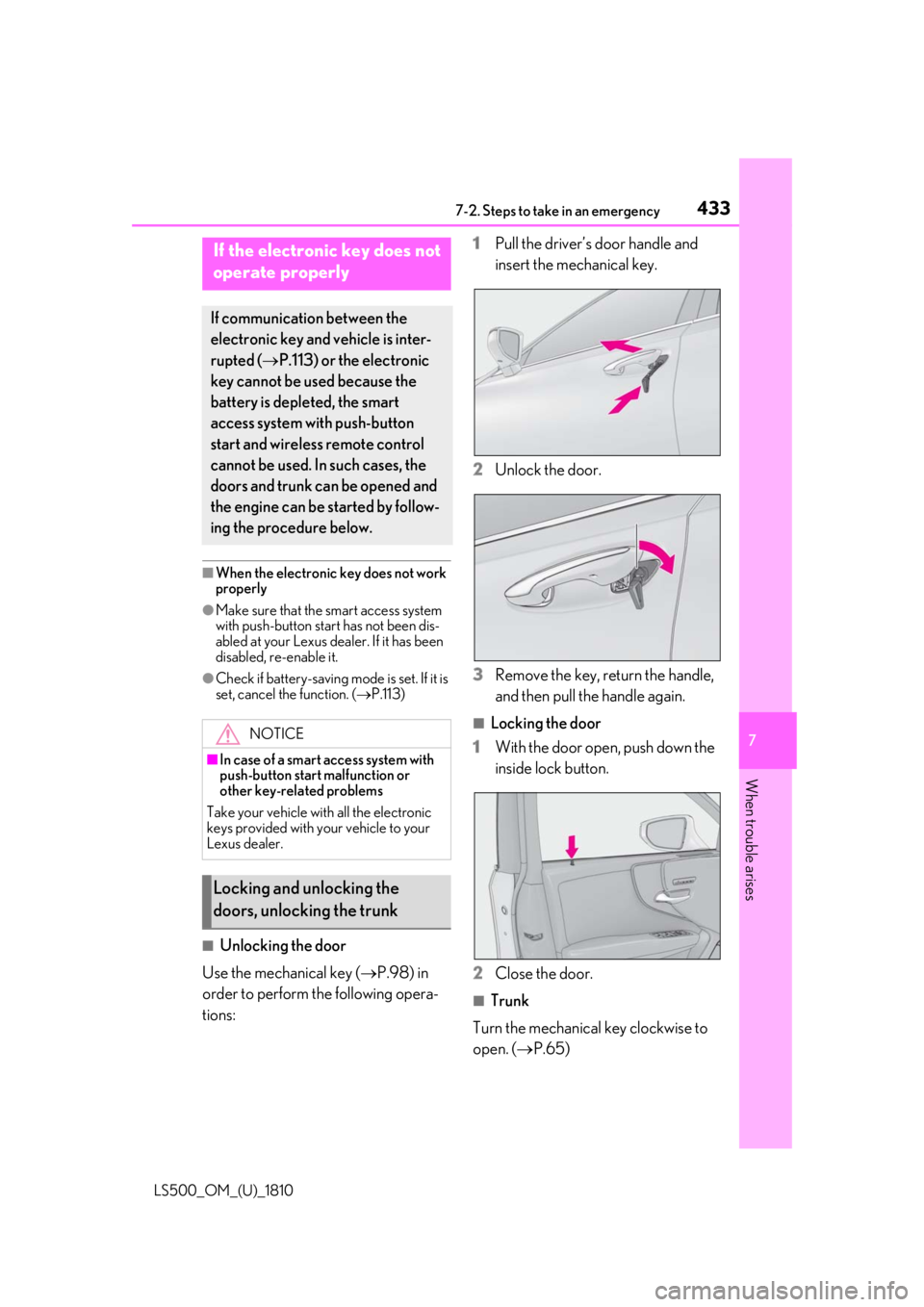
Unlocking the door
Use the mechanical key ( P.98) in
order to perform the following opera-
tions: 1 Pull the driver’s door handle and
insert the mechanical key.
2 Unlock the door.
3 Remove the key, return the handle,
and then pull the handle again. ■
Locking the door
1 With the door open, push down the
inside lock button.
2 Close the door. ■
Trunk
Turn the mechanical key clockwise to
open. ( P.65)If the electronic key does not
operate properly If communication between the
electronic key and vehicle is inter-
rupted ( P.113) or the electronic
key cannot be used because the
battery is depleted, the smart
access system with push-button
start and wireless remote control
cannot be used. In such cases, the
doors and trunk can be opened and
the engine can be started by follow-
ing the procedure below.
NOTICE■
In case of a smart access system with
push-button start malfunction or
other key-related problems
Take your vehicle with all the electronic
keys provided with your vehicle to your
Lexus dealer.
Locking and unlocking the
doors, unlocking the trunk
Page 434 of 512
434 7-2. Steps to take in an emergency
LS500_OM_(U)_1810 ■
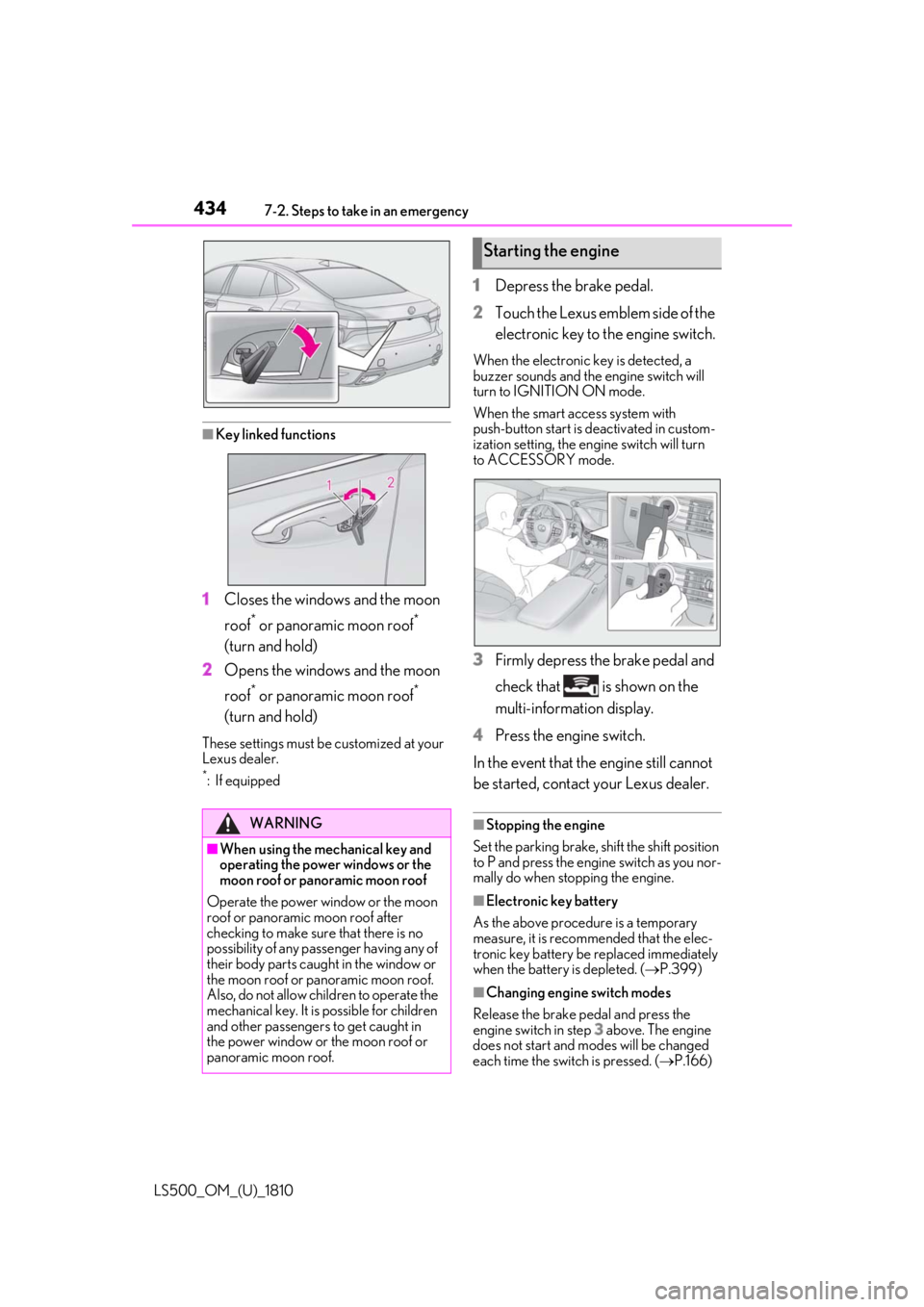
Key linked functions
1 Closes the windows and the moon
roof *
or panoramic moon roof *
(turn and hold)
2 Opens the windows and the moon
roof *
or panoramic moon roof *
(turn and hold)These settings must be customized at your
Lexus dealer. *
:If equipped 1 Depress the brake pedal.
2 Touch the Lexus emblem side of the
electronic key to the engine switch. When the electronic key is detected, a
buzzer sounds and the engine switch will
turn to IGNITION ON mode.
When the smart access system with
push-button start is deactivated in custom-
ization setting, the engine switch will turn
to ACCESSORY mode.
3 Firmly depress the brake pedal and
check that is shown on the
multi-information display.
4 Press the engine switch.
In the event that the engine still cannot
be started, contact your Lexus dealer. ■
Stopping the engine
Set the parking brake, shift the shift position
to P and press the engine switch as you nor-
mally do when stop ping the engine.
■
Electronic key battery
As the above procedure is a temporary
measure, it is recommended that the elec-
tronic key battery be replaced immediately
when the battery is depleted. ( P.399)
■
Changing engine switch modes
Release the brake pe dal and press the
engine switch in step 3 above. The engine
does not start and modes will be changed
each time the switch is pressed. ( P.166)WARNING
■
When using the mechanical key and
operating the power windows or the
moon roof or panoramic moon roof
Operate the power window or the moon
roof or panoramic moon roof after
checking to make sure that there is no
possibility of any passe nger having any of
their body parts caught in the window or
the moon roof or panoramic moon roof.
Also, do not allow ch ildren to operate the
mechanical key. It is possible for children
and other passengers to get caught in
the power window or the moon roof or
panoramic moon roof. Starting the engine
Page 435 of 512
4357-2. Steps to take in an emergency
LS500_OM_(U)_1810 7
When trouble arises If you have a set of jumper (or booster)
cables and a second vehicle with a
12-volt battery, you can jump start your
vehicle by following the steps below.
Method connecting jumper (or
booster) cables to the battery
1 Confirm that the electronic key is
being carried. When connecting the jumper (or booster)
cables, depending on the situation, the
alarm may activate and doors locked.
( P.66)
2 Open the trunk lid and remove the
luggage mat. ( P.340)In the event that the trunk opener cannot
be used, use the mechanical key to open
the trunk. ( P.433)
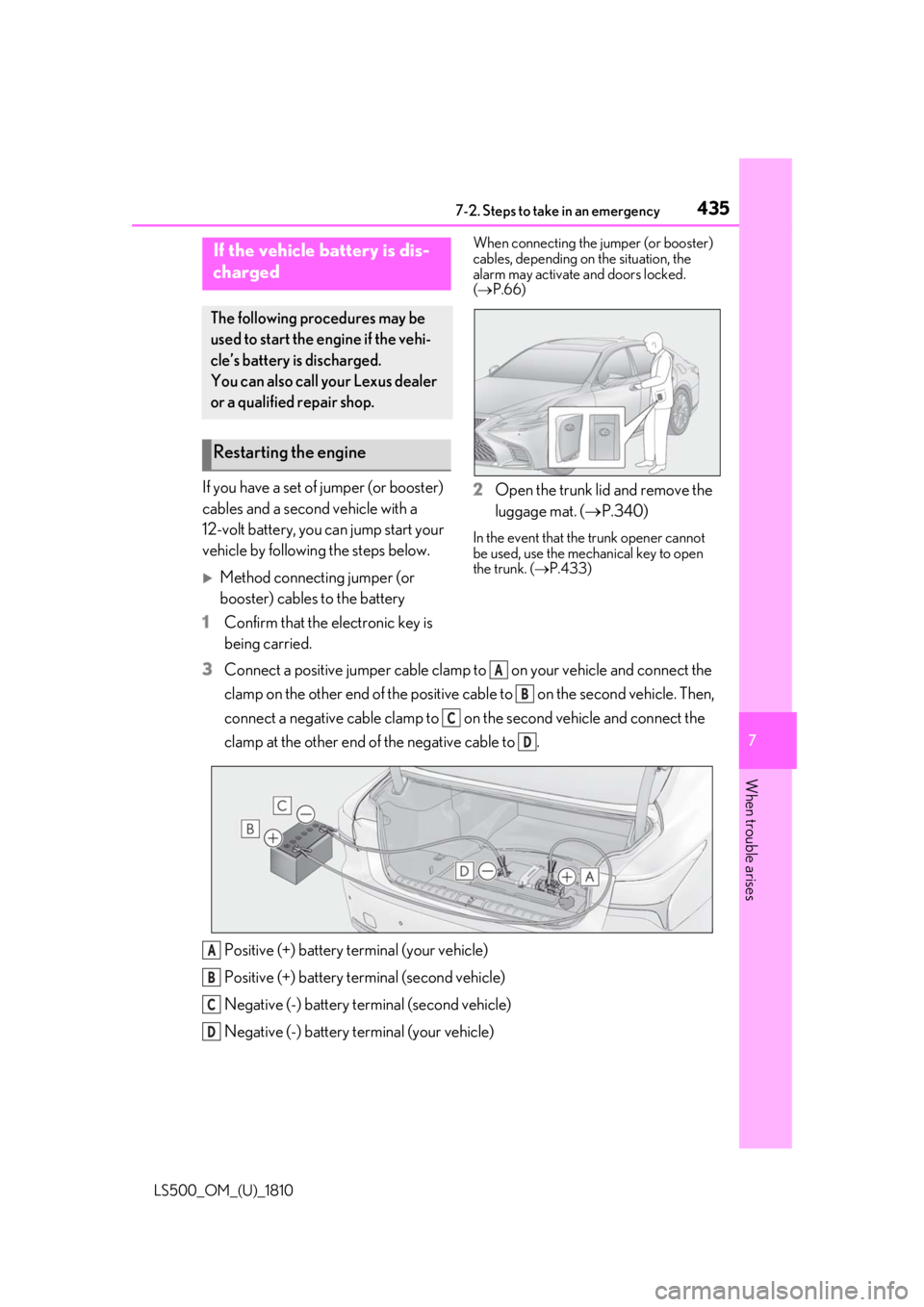
3 Connect a positive jumper cable clamp to on your vehicle and connect the
clamp on the other end of the positive cab le to on the second vehicle. Then,
connect a negative cable clamp to on the second vehicle and connect the
clamp at the other end of the negative cable to .
Positive (+) battery terminal (your vehicle)
Positive (+) battery terminal (second vehicle)
Negative (-) battery terminal (second vehicle)
Negative (-) battery terminal (your vehicle)If the vehicle battery is dis-
charged The following procedures may be
used to start the engine if the vehi-
cle’s battery is discharged.
You can also call your Lexus dealer
or a qualified repair shop.
Restarting the engine
A
B
C
D
A
B
C
D
Page 443 of 512
4437-2. Steps to take in an emergency
LS500_OM_(U)_1810 7
When trouble arises 1 Stop the engine. Set the parking
brake and shift the shift position to
P.
2 Remove the mud, snow or sand
from around the rear wheels.
3 Place wood, stones or some other
material under the rear wheels to
help provide traction.
4 Restart the engine.
5 Shift the shift position to D or R and
release the parking brake. Then,
while exercising caution, depress
the accelerator pedal. ■
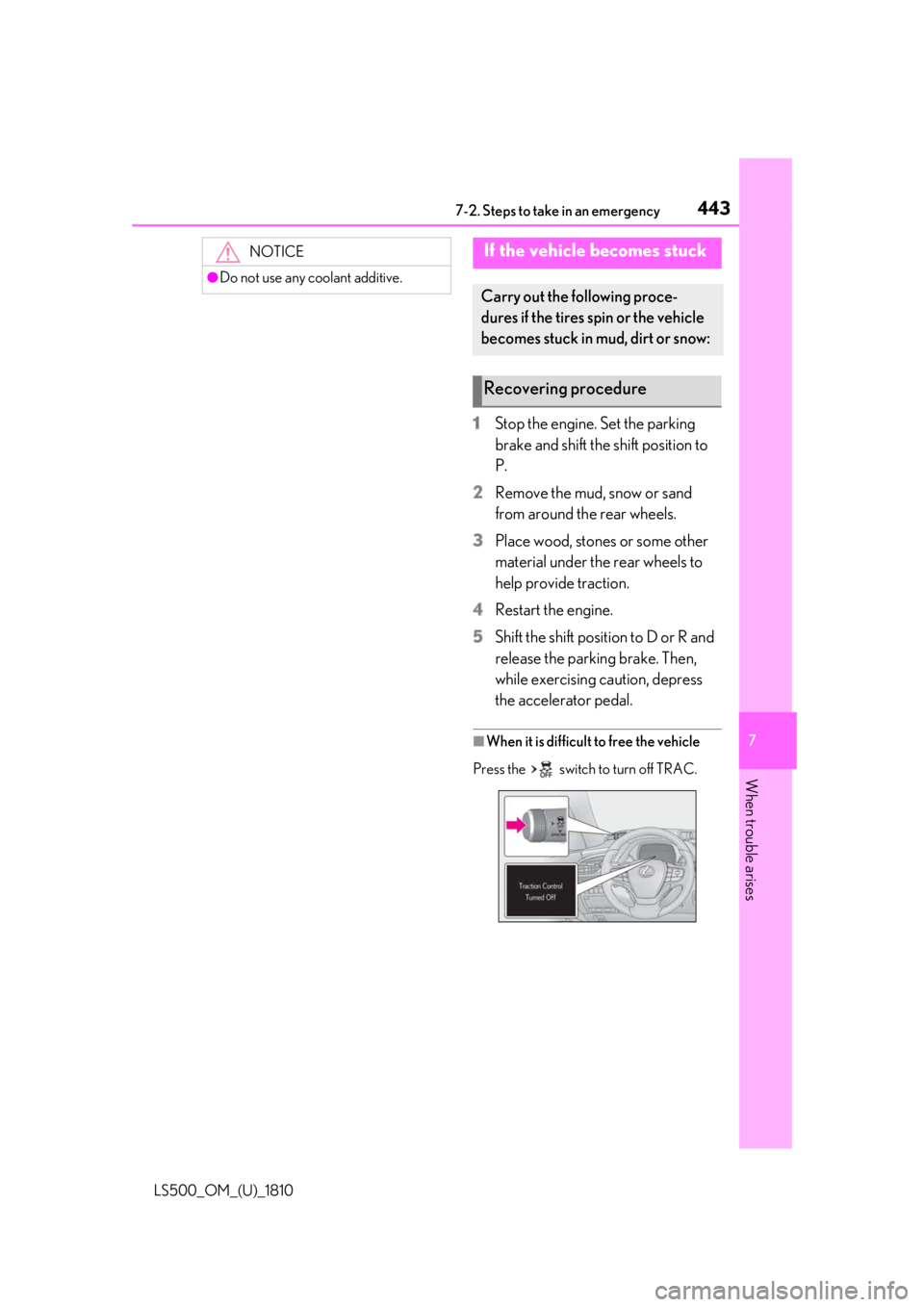
When it is difficult to free the vehicle
Press the switch to turn off TRAC.NOTICE●
Do not use any coolant additive.
If the vehicle becomes stuck Carry out the following proce-
dures if the tires spin or the vehicle
becomes stuck in mud, dirt or snow:
Recovering procedure
Page 466 of 512
466 8-2. Customization
LS500_OM_(U)_1810 8-2.Customization
■
Changing by using the meter con-
trol switches
1 Press or to select .
2 Operate the meter control
switches to select the desired item
to be customized.
3 According to the display, select the
desired setting and then press .To go back to the previous screen or exit
the customize mode, press .
■
Changing by using the Remote
Touch
1 Press the “MENU” button on the
Remote Touch.
2 Select “Setup” on the menu screen
and select “Vehicle”.
3 Select “Vehicle Customization” or
“Drive Mode Customization”.Various setting can be changed. Refer to
the list of settings that can be changed for
details.
For details on the Remote Touch, refer
to the “NAVIGATION AND MULTI-
MEDIA SYSTEM OWNER’S MAN- UAL”. ■
Changing by using the Rear Multi
Operation Panel (if equipped)
1 Display the home screen on the
Rear Multi Operation Panel and
then touch “Settings”.
2 Touch “Seat”.
3 Select the desired setting. ■
When customizing using the Remote
Touch
Stop the vehicle in a safe place, apply the
parking brake, and shift the shift position to
P. Also, to prevent battery discharge, leave
the engine running while customizing the
features.Customizable features Your vehicle includes a variety of
electronic features that can be per-
sonalized to your preferences. The
settings of these features can be
changed by using the meter control
switches, the Remote Touch, Rear
Multi Operation Panel or at your
Lexus dealer.
Customizing vehicle features WARNING■
During customization
As the engine needs to be running
during customization, ensure that the
vehicle is parked in a place with ade-
quate ventilation. In a closed area such as
a garage, exhaust gases including harm-
ful carbon monoxide (CO) may collect
and enter the vehicle. This may lead to
death or a serious health hazard.
NOTICE
■
During customization
To prevent battery discharge, ensure that
the engine is running while customizing
features.
Page 467 of 512
4678-2. Customization
LS500_OM_(U)_1810 8
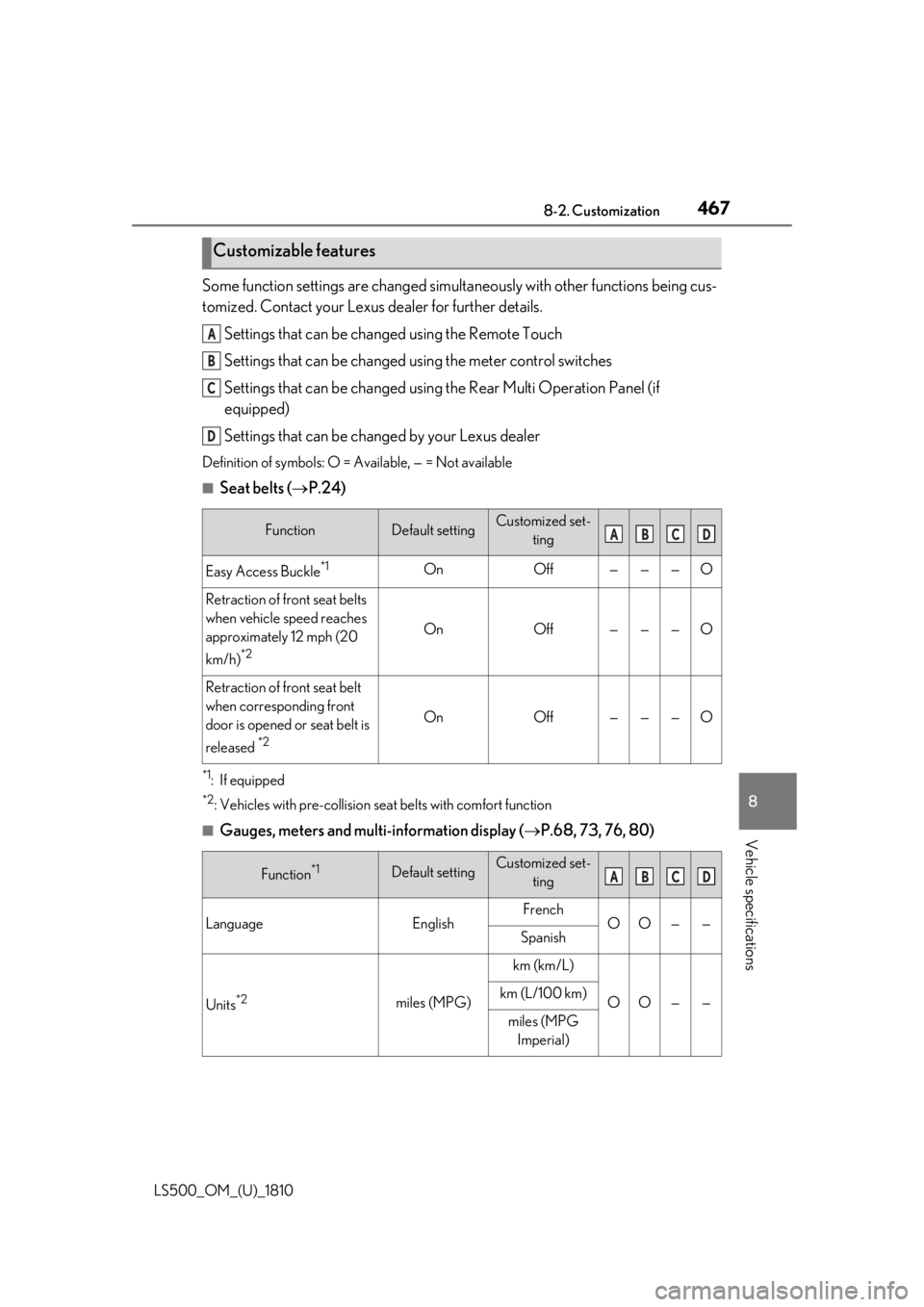
Vehicle specifications Some function settings are changed simultaneously with other functions being cus-
tomized. Contact your Lexus dealer for further details.
Settings that can be changed using the Remote Touch
Settings that can be changed using the meter control switches
Settings that can be changed using the Rear Multi Operation Panel (if
equipped)
Settings that can be changed by your Lexus dealerDefinition of symbols: O = Available, — = Not available ■
Seat belts ( P.24)
*1
: If equipped *2
: Vehicles with pre-collision se at belts with comfort function
■
Gauges, meters and multi-information display ( P.68, 73, 76, 80)Customizable features
Function Default setting Customized set-
ting
Easy Access Buckle *1
On Off — — — O
Retraction of front seat belts
when vehicle speed reaches
approximately 12 mph (20
km/h) *2
On Off — — — O
Retraction of front seat belt
when corresponding front
door is opened or seat belt is
released *2
On Off — — — O
Function *1
Default setting Customized set-
ting
Language English French
O O — —
Spanish
Units *2
miles (MPG) km (km/L)
O O — —km (L/100 km)
miles (MPG
Imperial)A
B
C
D
A B C D
A B C D