key battery LEXUS LS500 2019 User Guide
[x] Cancel search | Manufacturer: LEXUS, Model Year: 2019, Model line: LS500, Model: LEXUS LS500 2019Pages: 512, PDF Size: 9.71 MB
Page 114 of 512

114 3-2. Opening, closing and locking the doors and trunk
LS500_OM_(U)_1810 engine is started or engine switch modes
are changed.●
Do not leave the electronic key on top of
the instrument panel or near the door
pockets when exiting the vehicle.
Depending on the radio wave reception
conditions, it may be detected by the
antenna outside the cabin and the doors
will become lockable from the outside,
possibly trapping the electronic key
inside the vehicle.●
As long as the electron ic key is within the
effective range, the doors may be locked
or unlocked by anyone. However, only
the doors detecting the electronic key
can be used to unlock the vehicle.●
Even if the electronic key is not inside the
vehicle, it may be possible to start the
engine if the electronic key is near the
window.●
The doors may unlock or lock if a large
amount of water spla shes on the door
handle, such as in the rain or in a car
wash, when the electronic key is within
the effective range. (The doors will auto-
matically be locked after approximately
60 seconds if the d oors are not opened
and closed.)●
If the wireless remote control is used to
lock the doors when the electronic key is
near the vehicle, there is a possibility that
the door may not be unlocked by the
entry function. (Use the wireless remote
control to unlock the doors.)●
Touching the door lock sensor while
wearing gloves may delay or prevent lock
operation.●
When the lock operation is performed
using the lock sensor, recognition signals
will be shown up to two consecutive
times. After this, no recognition signals
will be given.
●
If the door handle becomes wet while the
electronic key is within the effective
range, the door may lock and unlock
repeatedly. In this case, follow the follow-
ing correction procedures to wash the
vehicle:
• Place the electronic key in a location 6 ft.
(2 m) or more away from the vehicle.
(Take care to ensure that the key is not stolen.)
• Set the electronic key to battery-saving
mode to disable the smart access system
with push-button start. ( P.113)●
If the electronic key is inside the vehicle
and a door handle becomes wet during a
car wash, a message may be shown on
the multi-information display and a
buzzer will sound outside the vehicle. To
turn off the alarm, lock all the doors. ●
The lock sensor may not work properly if
it comes into contact with ice, snow, mud,
etc. Clean the lock sensor and attempt to
operate it again. ●
A sudden approach to the effective
range or door handle may prevent the
doors from being unlocked. In this case,
return the door handle to the original
position and check that the doors unlock
before pulling the door handle again. ●
If there is another electronic key in the
detection area, it may take slightly longer
to unlock the doors after the door handle
is gripped. ■
When the vehicle is not driven for
extended periods ●
To prevent theft of the vehicle, do not
leave the electronic key within 6 ft. (2 m)
of the vehicle. ●
The smart access system with push-but-
ton start can be deactivated in advance. ●
Setting the electronic key to battery-sav-
ing mode helps to reduce key battery
depletion. ( P.113)■
To operate the system properly ●
Make sure to carry the electronic key
when operating the system. Do not get
the electronic key too close to the vehicle
when operating the system from the out-
side of the vehicle.
Depending on the position and holding
condition of the electr onic key, the key may
not be detected correctly and the system
may not operate properly. (The alarm may
go off accidentally, or the door lock pre-
vention function may not operate.)
●
Do not leave the electr onic key inside the
trunk.
Page 164 of 512
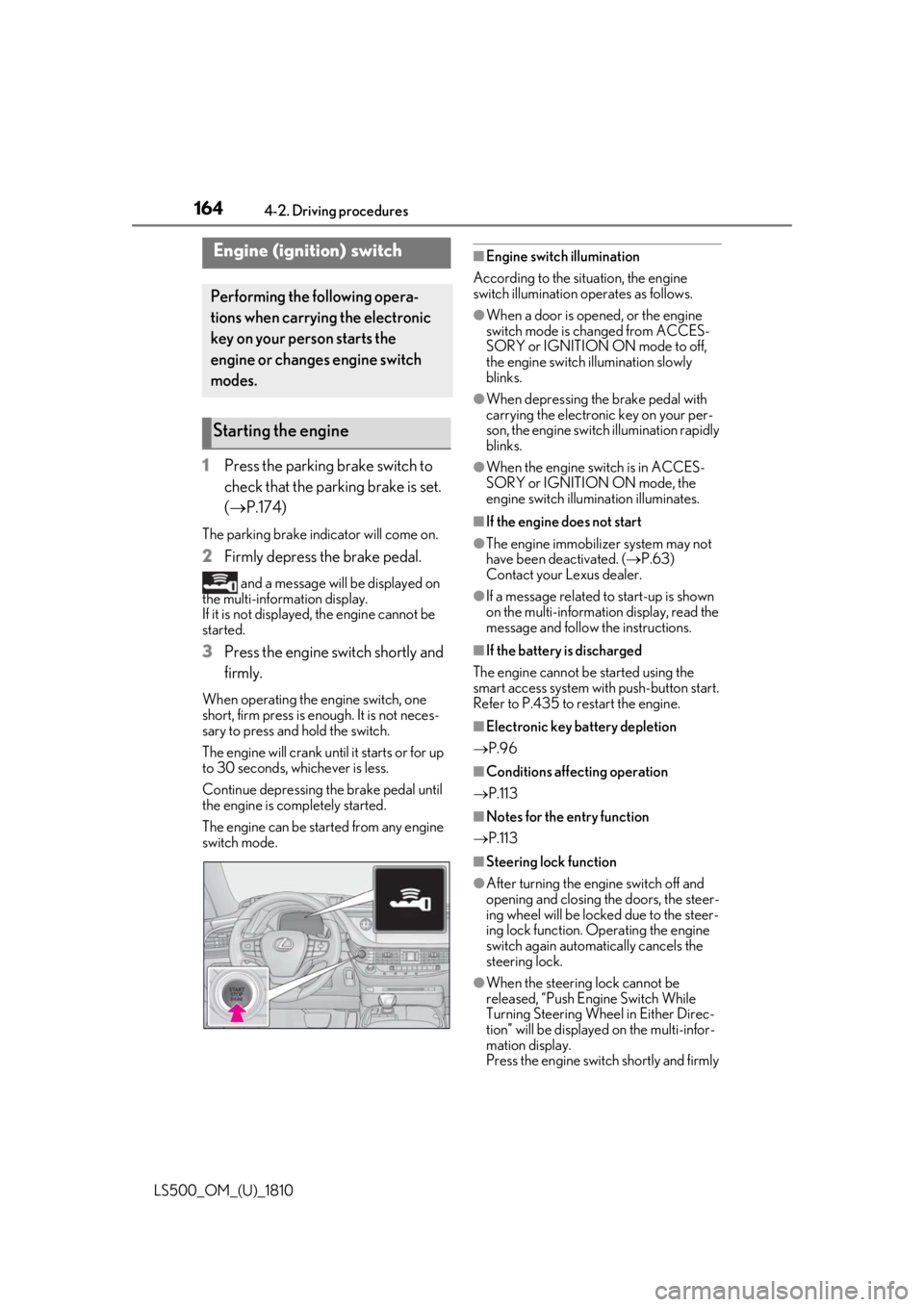
164 4-2. Driving procedures
LS500_OM_(U)_1810 4-2.Driving procedures
1 Press the parking brake switch to
check that the parking brake is set.
( P.174)The parking brake indicator will come on.
2 Firmly depress the brake pedal. and a message will be displayed on
the multi-information display.
If it is not displayed, the engine cannot be
started.
3 Press the engine switch shortly and
firmly.When operating the engine switch, one
short, firm press is enough. It is not neces-
sary to press and hold the switch.
The engine will crank until it starts or for up
to 30 seconds, whichever is less.
Continue depressing the brake pedal until
the engine is completely started.
The engine can be started from any engine
switch mode. ■
Engine switch illumination
According to the situation, the engine
switch illumination operates as follows. ●
When a door is opened, or the engine
switch mode is changed from ACCES-
SORY or IGNITION ON mode to off,
the engine switch illumination slowly
blinks. ●
When depressing the brake pedal with
carrying the electronic key on your per-
son, the engine switch illumination rapidly
blinks. ●
When the engine sw itch is in ACCES-
SORY or IGNITION ON mode, the
engine switch illumination illuminates. ■
If the engine does not start ●
The engine immobilizer system may not
have been deactivated. ( P.63)
Contact your Lexus dealer. ●
If a message related to start-up is shown
on the multi-information display, read the
message and follow the instructions. ■
If the battery is discharged
The engine cannot be started using the
smart access system with push-button start.
Refer to P.435 to restart the engine. ■
Electronic key battery depletion
P.96 ■
Conditions affecting operation
P.113 ■
Notes for the entry function
P.113
■
Steering lock function
●
After turning the engine switch off and
opening and closing the doors, the steer-
ing wheel will be lock ed due to the steer-
ing lock function. Operating the engine
switch again automatically cancels the
steering lock.
●
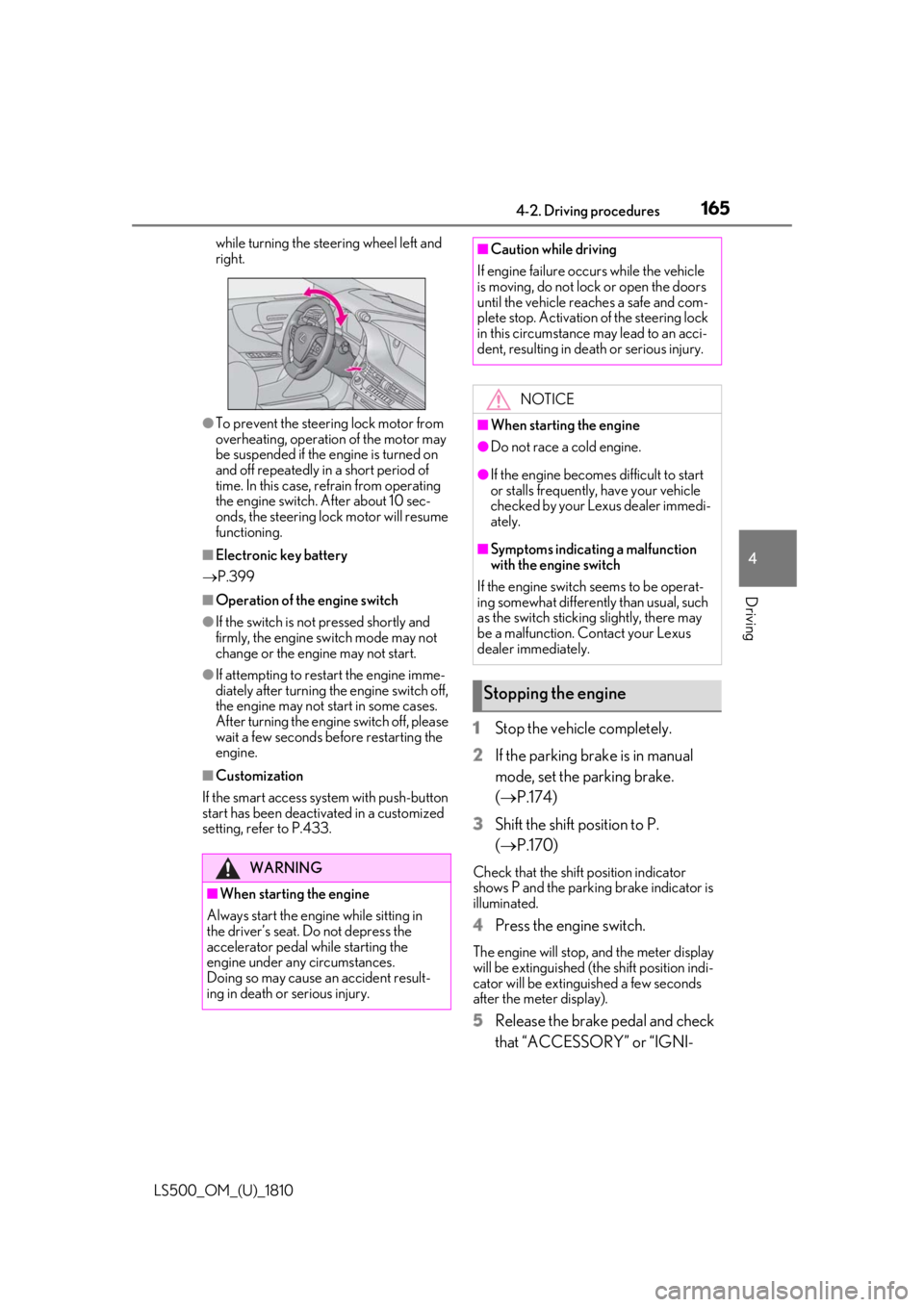
When the steering lock cannot be
released, “Push Engine Switch While
Turning Steering Whee l in Either Direc-
tion” will be displayed on the multi-infor-
mation display.
Press the engine switch shortly and firmly Engine (ignition) switch Performing the following opera-
tions when carryin g the electronic
key on your person starts the
engine or changes engine switch
modes.
Starting the engine
Page 165 of 512
1654-2. Driving procedures
LS500_OM_(U)_1810 4
Driving while turning the steering wheel left and
right.
●
To prevent the steering lock motor from
overheating, operation of the motor may
be suspended if the engine is turned on
and off repeatedly in a short period of
time. In this case, refrain from operating
the engine switch. After about 10 sec-
onds, the steering lock motor will resume
functioning.■
Electronic key battery
P.399■
Operation of the engine switch●
If the switch is not pressed shortly and
firmly, the engine switch mode may not
change or the engine may not start.●
If attempting to restart the engine imme-
diately after turning the engine switch off,
the engine may not start in some cases.
After turning the engine switch off, please
wait a few seconds before restarting the
engine.■
Customization
If the smart access sy stem with push-button
start has been deactivated in a customized
setting, refer to P.433. 1 Stop the vehicle completely.
2 If the parking brake is in manual
mode, set the parking brake.
( P.174)
3 Shift the shift position to P.
( P.170) Check that the shift position indicator
shows P and the parking brake indicator is
illuminated.
4 Press the engine switch. The engine will stop, and the meter display
will be extinguished (the shift position indi-
cator will be extinguished a few seconds
after the meter display).
5 Release the brake pedal and check
that “ACCESSORY” or “IGNI-WARNING
■
When starting the engine
Always start the engine while sitting in
the driver’s seat. Do not depress the
accelerator pedal while starting the
engine under any circumstances.
Doing so may cause an accident result-
ing in death or serious injury. ■
Caution while driving
If engine failure occurs while the vehicle
is moving, do not lock or open the doors
until the vehicle reaches a safe and com-
plete stop. Activation of the steering lock
in this circumstance may lead to an acci-
dent, resulting in death or serious injury.
NOTICE■
When starting the engine ●
Do not race a cold engine. ●
If the engine becomes difficult to start
or stalls frequently, have your vehicle
checked by your Lexus dealer immedi-
ately. ■
Symptoms indicating a malfunction
with the engine switch
If the engine switch seems to be operat-
ing somewhat differently than usual, such
as the switch sticking slightly, there may
be a malfunction. Contact your Lexus
dealer immediately.
Stopping the engine
Page 180 of 512
180 4-3. Operating the lights and wipers
LS500_OM_(U)_1810 The sensor may not function properly if an
object is placed on th e sensor, or anything
that blocks the sensor is affixed to the wind-
shield.
Doing so interferes with the sensor detect-
ing the level of ambient light and may cause
the automatic headlight system to malfunc-
tion. ■
Automatic light off system●
When the headlights are on: The head-
lights and tail lights tu rn off 30 seconds
after the driver’s door is opened and
closed if the engine switch is turned to
ACCESSORY mode or turned off. (The
lights turn off immediately if on the
key is pressed after all the doors are
closed.)●
When only the tail lights are on: The tail
lights turn off automatically if the engine
switch is turned to ACCESSORY mode
or turned off and the driver’s door is
opened.
To turn the lights on again, turn the engine
switch to IGNITION ON mode, or turn the
light switch off once and then back to
or . ■
Light reminder buzzer
A buzzer sounds when the engine switch is
turned off or turned to ACCESSORY
mode and the driver’s door is opened while
the lights are turned on. ■
Automatic headlight leveling system
The level of the headlights is automatically
adjusted according to the number of pas-
sengers and the loading condition of the
vehicle to ensure that the headlights do not
interfere with other road users.
■
Windshield wiper linked headlight illu-
mination
When driving during daytime with the
headlight switch turned to , if the wind-
shield wipers are used, the headlights will
turn on automatically after several seconds
to help enhance the visibility of your vehicle.
■
Battery-saving function
In order to prevent the battery of the vehicle from discharging, if the headlights and/or
tail lights are on when the engine switch is
turned off the battery saving function will
operate and automatically turn off all the
lights after approximately 20 minutes.
When the engine switch is turned to IGNI-
TION ON mode, the battery-saving func-
tion will be disabled.
When any of the following are performed,
the battery-saving function is canceled
once and then reactivated. All the lights will
turn off automatically 20 minutes after the
Battery- saving function has been reacti-
vated: ●
When the headlight switch is operated●
When a door is opened or closed ■
Welcome light illumination control
The parking lights and tail lights automati-
cally turn on at night when the doors are
unlocked using the entr y function or wire-
less remote control if the light switch is in
the position. ■
Customization
Some functions can be customized.
( P.466)
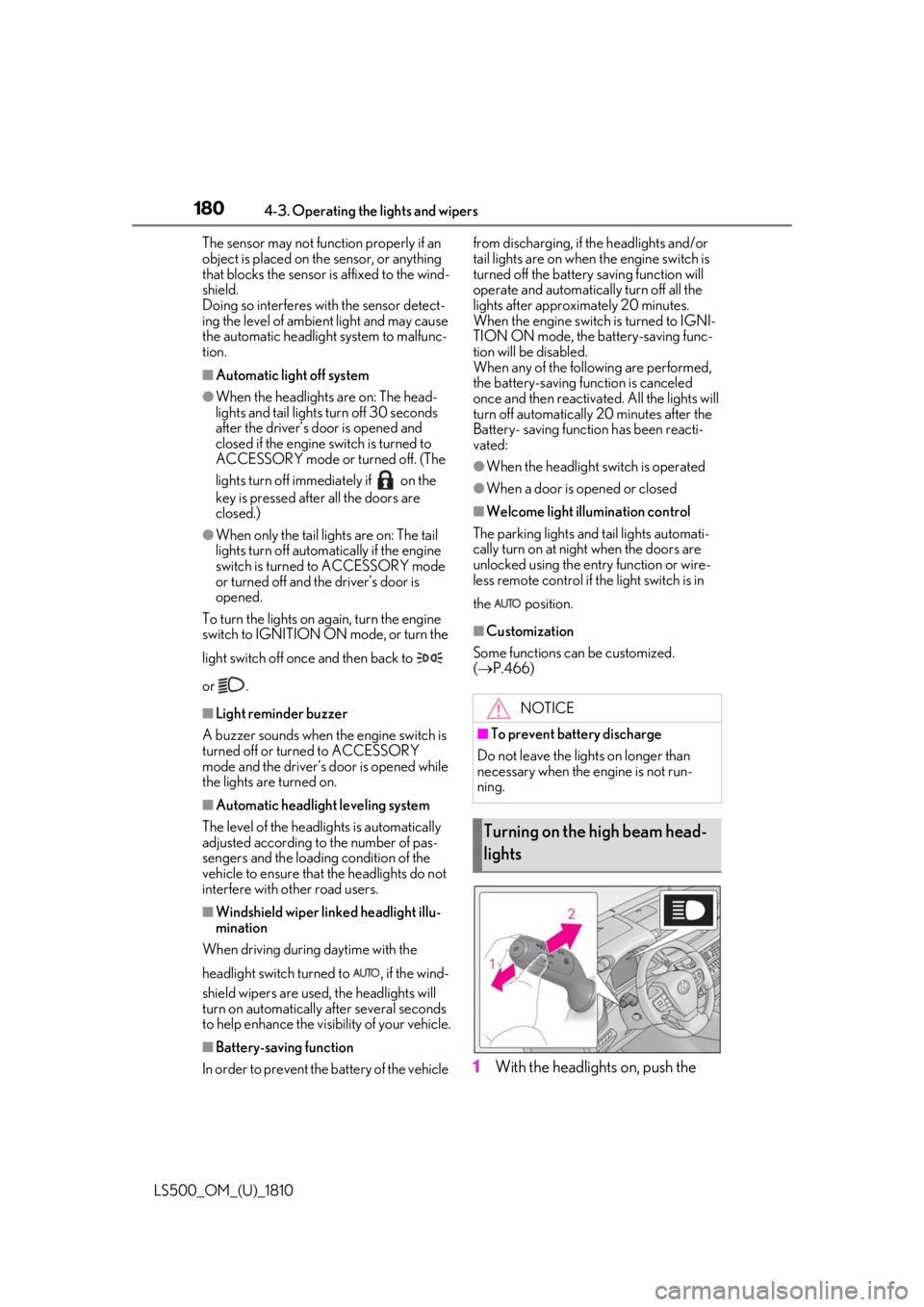
1 With the headlights on, push the NOTICE■
To prevent battery discharge
Do not leave the lights on longer than
necessary when the engine is not run-
ning.
Turning on the high beam head-
lights
Page 334 of 512
334 5-4. Using the interior lights
LS500_OM_(U)_1810 ■
Illuminated entry system
The lights automatically turn on/off accord-
ing to the engine switch mode, the pres-
ence of the electronic key, whether the
doors are locked/unlocked, and whether
the doors are opened/closed. ■
To prevent the battery from being dis-
charged
If the interior lights remain on when the
engine switch is turned off, the lights will go
off automatically after 20 minutes. ■
When front interior light or front per-
sonal lights do not respond as normal●
When water, dirt, et c., have adhered to
the lens surface●
When operated with a wet hand●
When wearing gloves, etc.■
The interior lights may turn on automati-
cally when
If any of the SRS airbags deploy (inflate) or
in the event of a strong rear impact, the inte-
rior lights will turn on automatically.
The interior lights will turn off automatically
after approximately 20minutes.
The interior lights can be turned off manu-
ally. However, in order to help prevent fur-
ther collisions, it is recommended that they
be left on until sa fety can be ensured.
(The interior lights may not turn on auto-
matically depending on the force of the
impact and conditions of the collision.) ■
Customization
Some functions can be customized.
( P.466)
NOTICE
■
To prevent battery discharge
Do not leave the lights on longer than
necessary when the engine is not run-
ning. ■
Removing light lenses
Never remove th e lens for the front inte-
rior light and front personal lights. Other-
wise, the lights will be damaged. If a lens
needs to be removed, contact your Lexus
dealer.
Page 357 of 512
357
LS500_OM_(U)_1810 6 6
Maintenance and care Maintenance and care .
6-1. Maintenance and care
Cleaning and protecting the vehi-
cle exterior ................................ 358
Cleaning and protecting the vehi-
cle interior .................................. 361
6-2. Maintenance
Maintenance requirements
........................................................ 364
General maintenance ............. 365
Emission inspection and mainte-
nance (I/M) programs ......... 368
6-3. Do-it-yourself maintenance
Do-it-yourself service precautions
........................................................ 369
Hood................................................ 371
Positioning a floor jack............. 371
Engine compartment............... 373
Battery ........................................... 380
Tires ................................................ 382
Replacing the tire ....................... 391
Tire inflation pressure .............. 395
Wheels........................................... 396
Air conditioning filter............... 398
Electronic key battery ............. 399
Checking and replacing fuses
......................................................... 401
Light bulbs .................................... 404
Page 358 of 512
358 6-1. Maintenance and care
LS500_OM_(U)_1810 6-1.Maintenance and care
Working from top to bottom, liber-
ally apply water to the vehicle body,
wheel wells and underside of the
vehicle to remove any dirt and dust.
Wash the vehicle body using a
sponge or soft cloth, such as a
chamois.
For hard-to-remove marks, use car
wash soap and rinse thoroughly with
water.
Wipe away any water.
Wax the vehicle when the water-
proof coating deteriorates. If water does not bead on a clean surface,
apply wax when the vehicle body is cool.
■
Self-restoring coat
The vehicle body has a self-restoring coat-
ing that is resistant to small surface
scratches caused in a car wash etc.
●
The coating lasts for 5 to 8 years from
when the vehicle is delivered from the
plant.
●
The restoration time differs depending on
the depth of the scratch and outside tem-
perature.
The restoration time may become
shorter when the coating is warmed by
applying warm water.
●
Deep scratches caused by keys, coins,
etc. cannot be restored.
●
Do not use wax that contains abrasives. ■
Automatic car washes ●
Before washing the vehicle:
• Fold the mirrors
• Turn off the power trunk opener and
closer (if equipped)
Start washing from the front of the vehicle.
Extend the mirrors before driving.●
Brushes used in automatic car washes
may scratch the vehicl e surface and harm
your vehicle’s paint. ■
High pressure car washes ●
Do not allow the nozzles of the car wash
to come within close proximity of the win-
dows and the air suspension unit (if
equipped). ●
Before using the car wash, check that the
fuel filler door on your vehicle is closed
properly. ■
When using a car wash
If the door handle becomes wet while the
electronic key is within the effective range,
the door may lock and unlock repeatedly. In
that case, follow the following correction
procedures to wash the vehicle: ●
Place the key in a position 6 ft. (2 m) or
more separate from the vehicle while the
vehicle is being wash ed. (Take care to
ensure that the key is not stolen.) ●
Set the electronic key to battery-saving
mode to disable the smart access system
with push-button start. ( P.112)■
Aluminum wheels ●
Remove any dirt immediately by using a
neutral detergent. ●
Wash detergent off with water immedi-
ately after use.
●
To protect the paint from damage, make
sure to observe the following precau-
tions.
• Do not use acidic, alkaline or abrasive
detergent
• Do not use hard brushes
• Do not use detergent on the wheels when
they are hot, such as after driving or park-
ing in hot weatherCleaning and protecting the
vehicle exterior Perform cleaning in a manner
appropriate to each component
and its material.
Cleaning instructions
Page 380 of 512
380 6-3. Do-it-yourself maintenance
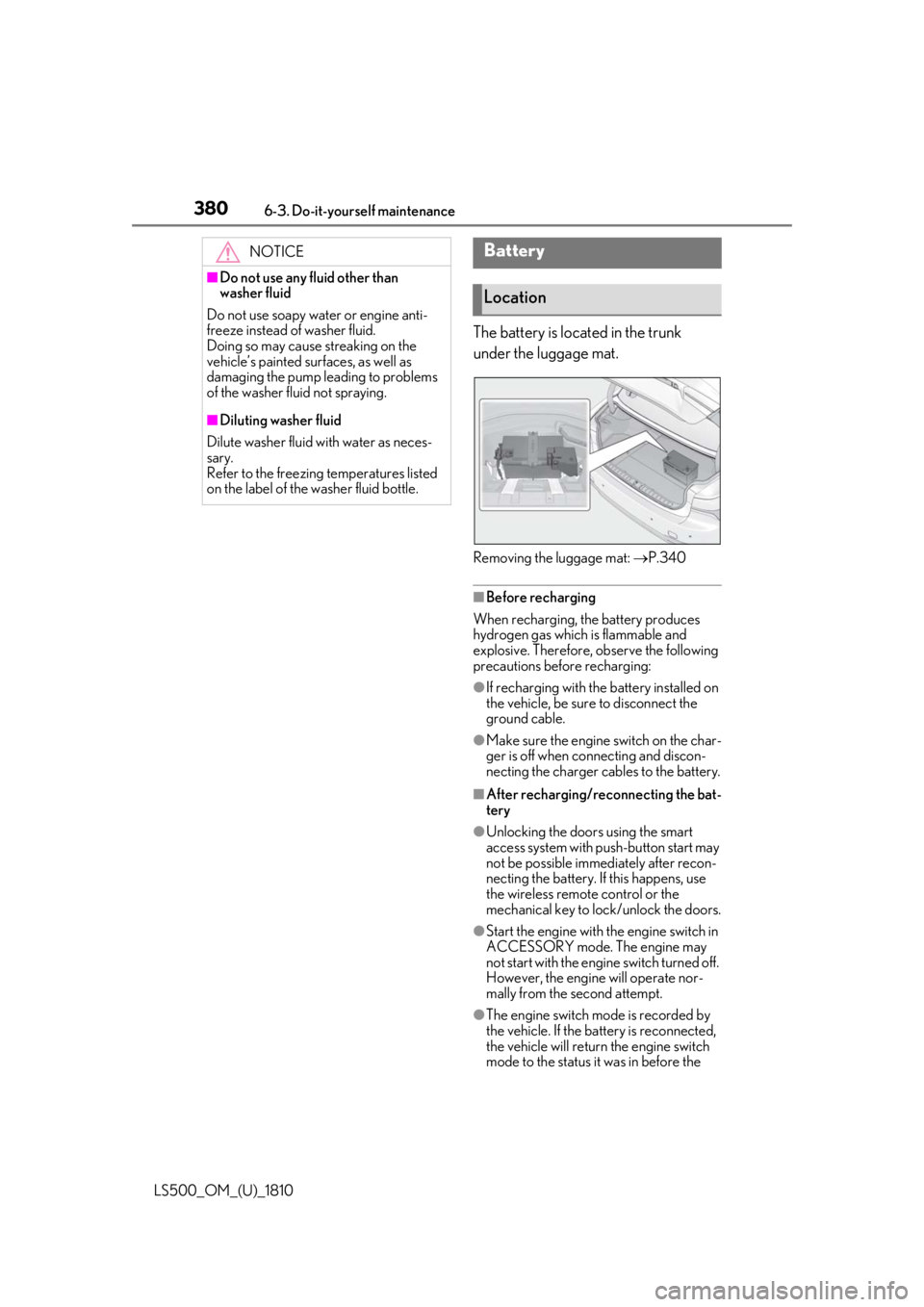
LS500_OM_(U)_1810 The battery is located in the trunk
under the luggage mat.
Removing the luggage mat: P.340
■
Before recharging
When recharging, the battery produces
hydrogen gas which is flammable and
explosive. Therefore, observe the following
precautions before recharging: ●
If recharging with the battery installed on
the vehicle, be sure to disconnect the
ground cable. ●
Make sure the engine switch on the char-
ger is off when connecting and discon-
necting the charger cables to the battery. ■
After recharging/reconnecting the bat-
tery ●
Unlocking the doors using the smart
access system with pu sh-button start may
not be possible immediately after recon-
necting the battery. If this happens, use
the wireless remote control or the
mechanical key to lo ck/unlock the doors.
●
Start the engine with the engine switch in
ACCESSORY mode. The engine may
not start with the engine switch turned off.
However, the engine will operate nor-
mally from the second attempt.
●
The engine switch mode is recorded by
the vehicle. If the battery is reconnected,
the vehicle will return the engine switch
mode to the status it was in before the NOTICE■
Do not use any fluid other than
washer fluid
Do not use soapy water or engine anti-
freeze instead of washer fluid.
Doing so may cause streaking on the
vehicle’s painted surfaces, as well as
damaging the pump leading to problems
of the washer fluid not spraying. ■
Diluting washer fluid
Dilute washer fluid with water as neces-
sary.
Refer to the freezing temperatures listed
on the label of the washer fluid bottle. Battery
Location
Page 399 of 512
3996-3. Do-it-yourself maintenance
LS500_OM_(U)_1810 6
Maintenance and care filter.
■
If the electronic key battery is depleted
The following symptoms may occur: ●
The smart access system with push-but-
ton start and wireless remote control will
not function properly. ●
The operationa l range will be reduced.■
When the card key battery needs to be
replaced (if equipped)
The battery for the card key is available only
at Lexus dealers. Your Lexus dealer can
replace the battery for you.
Flathead screwdriver
Small flathead screwdriver
Lithium battery CR2032 ■
Use a CR2032 lithium battery ●
Batteries can be purchased at your Lexus
dealer, local electrical appliance shops or
camera stores.
●
Replace only with the same or equivalent
type recommended by the manufacturer.
●
Dispose of used batteries according to
local laws.NOTICE■
When using the air conditioning sys-
tem
Make sure that a filter is always installed.
Using the air conditioning system without
a filter may cause damage to the system. ■
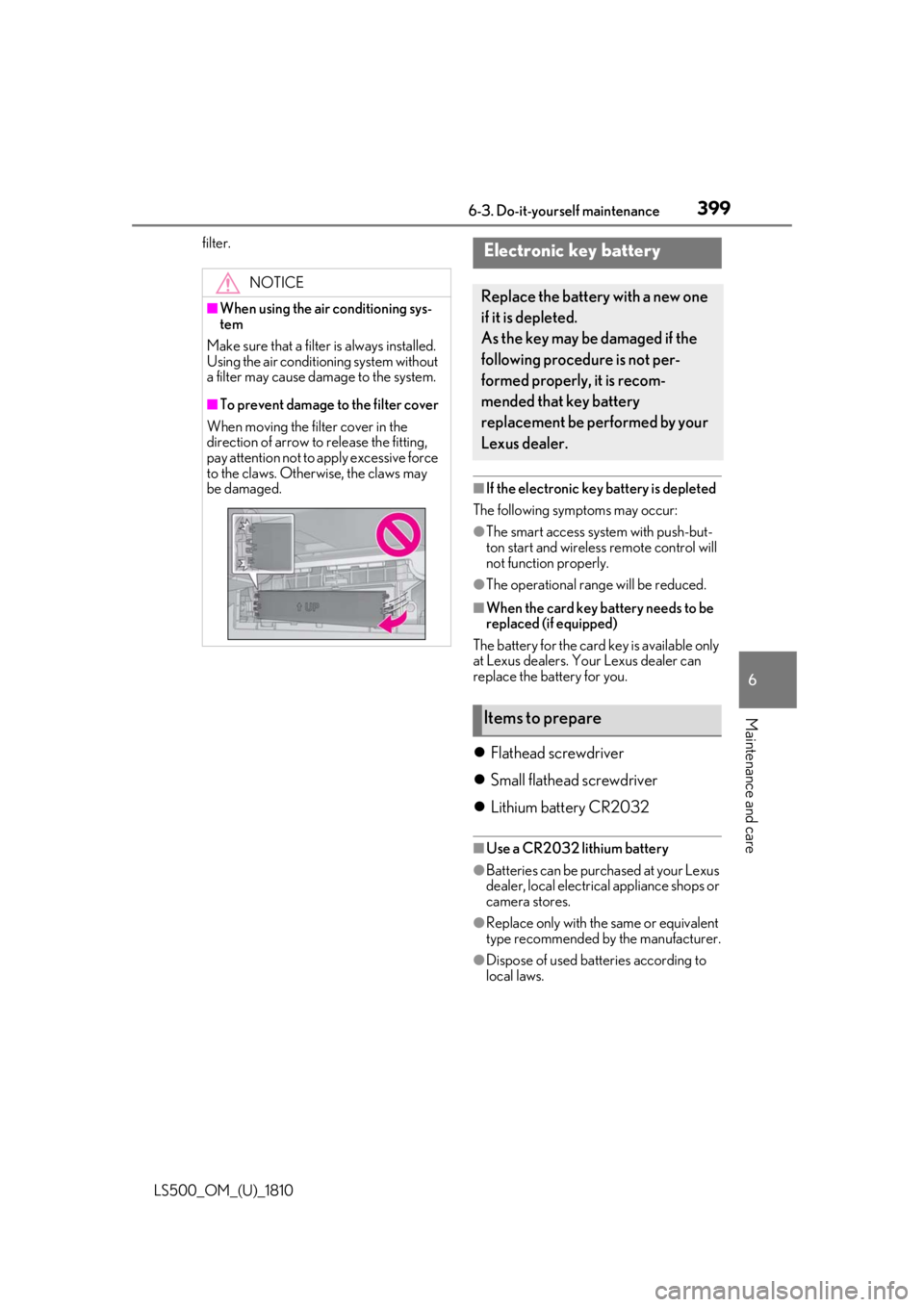
To prevent damage to the filter cover
When moving the filter cover in the
direction of arrow to release the fitting,
pay attention not to apply excessive force
to the claws. Otherwise, the claws may
be damaged. Electronic key battery Replace the battery with a new one
if it is depleted.
As the key may be damaged if the
following procedure is not per-
formed properly, it is recom-
mended that key battery
replacement be performed by your
Lexus dealer.
Items to prepare
Page 400 of 512
400 6-3. Do-it-yourself maintenance
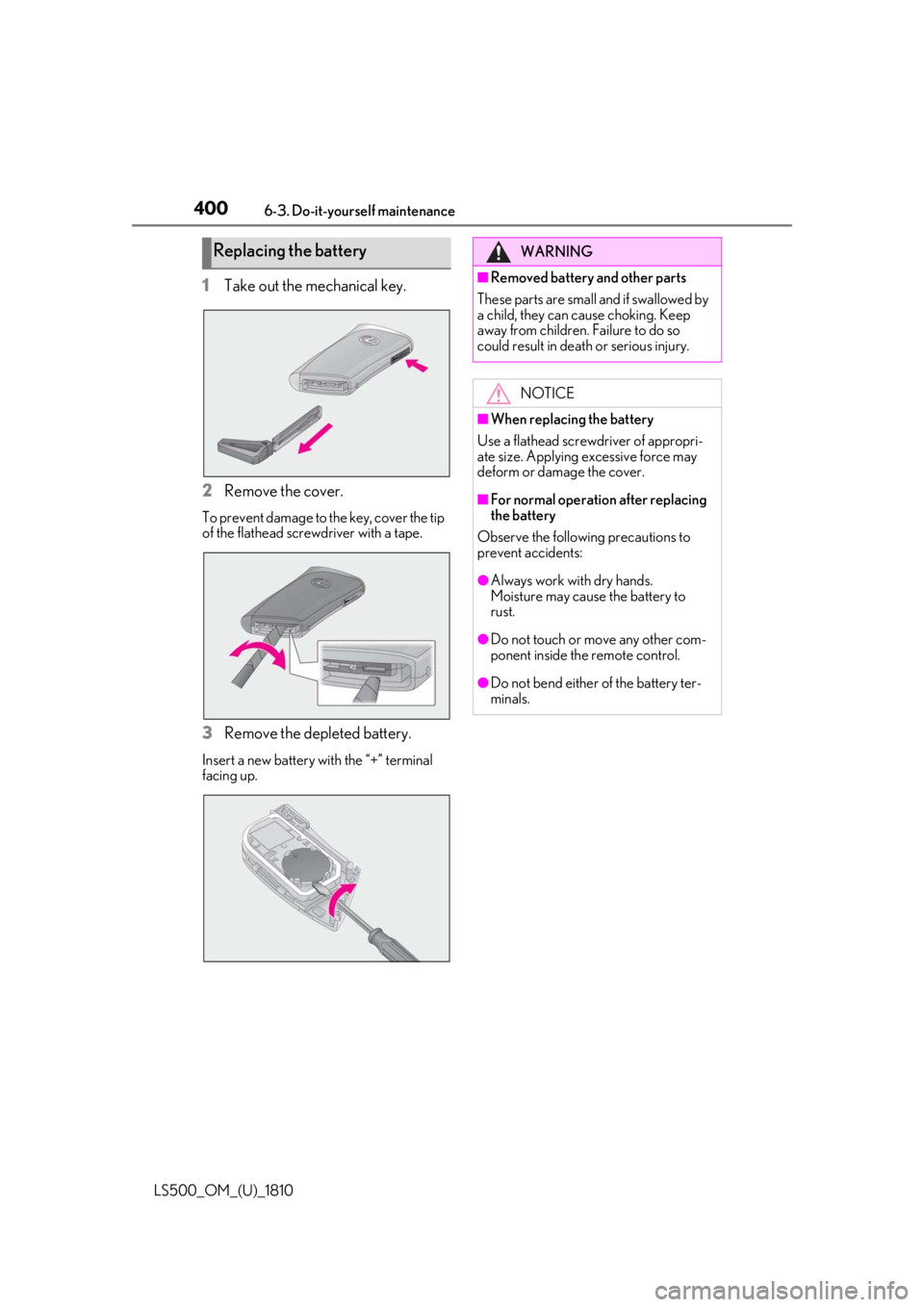
LS500_OM_(U)_1810 1 Take out the mechanical key.
2 Remove the cover.To prevent damage to the key, cover the tip
of the flathead screwdriver with a tape.
3 Remove the depleted battery.Insert a new battery with the “+” terminal
facing up.Replacing the battery WARNING■
Removed battery and other parts
These parts are small and if swallowed by
a child, they can cau se choking. Keep
away from children. Failure to do so
could result in death or serious injury.
NOTICE■
When replacing the battery
Use a flathead screwdriver of appropri-
ate size. Applying excessive force may
deform or damage the cover. ■
For normal operation after replacing
the battery
Observe the following precautions to
prevent accidents: ●
Always work with dry hands.
Moisture may cause the battery to
rust. ●
Do not touch or move any other com-
ponent inside the remote control. ●
Do not bend either of the battery ter-
minals.