set LEXUS LS500 2019 Owner's Manual
[x] Cancel search | Manufacturer: LEXUS, Model Year: 2019, Model line: LS500, Model: LEXUS LS500 2019Pages: 512, PDF Size: 9.71 MB
Page 101 of 512
1013-2. Opening, closing and locking the doors and trunk
LS500_OM_(U)_1810 3
Before driving
To prevent unintended triggering of the
alarm, unlock the doors using the wireless
remote control and open and close a door
once after the settings have been changed.
(If a door is not opened within 60 seconds
after is pressed, the doors will be
locked again and the alarm will automati-
cally be set.)
In a case that the alarm is triggered, imme-
diately stop the alarm. ( P.65)■
Impact detection door lock release sys-
tem
In the event that the vehicle is subject to a
strong impact, all the doors are unlocked.
Depending on the force of the impact or the
type of accident, however, the system may
not operate.
■
Operation signals
A buzzer sounds and the emergency flash-
ers flash to indicate that the doors have
been locked/unlocked. (Locked: once;
Unlocked: twice)
A buzzer sounds to indicate that the win-
dows and moon roof or panoramic moon
roof are operating.
■
Security feature
If a door is not opened within approximately 60 seconds after the vehicle is unlocked,
the security feature automatically locks the
vehicle again. ■
When the doors cannot be locked by the
lock sensor on the upper part of the
door handle
When the doors cannot be locked even if
the lock sensor on th e upper part of the
door handle is touched by a finger, touch
the lock sensor with the palm.
If you are wearing gloves, remove them.
■
Open door warning buzzer
If an attempt to lock the doors is made when
a door is not fully closed, a buzzer sounds
continuously for 5 seconds. Fully close the
door to stop the buzzer, and lock the vehi-
cle once more. ■
Setting the alarm
Locking the doors will set the alarm system.
( P.65) ■
Conditions affecting the operation of
the smart access system with push-but-
ton start or wireless remote control
P.113 ■
If the smart access system with
push-button start or the wireless remote
control does not operate properly
Use the mechanical key to lock and unlock
the doors. ( P.433)
Replace the key battery with a new one if it
is depleted. ( P.399)
■
If the battery is discharged
The doors cannot be locked and unlocked
using the smart access system with
push-button start or wireless remote con-
trol. Lock or unlock the doors using the
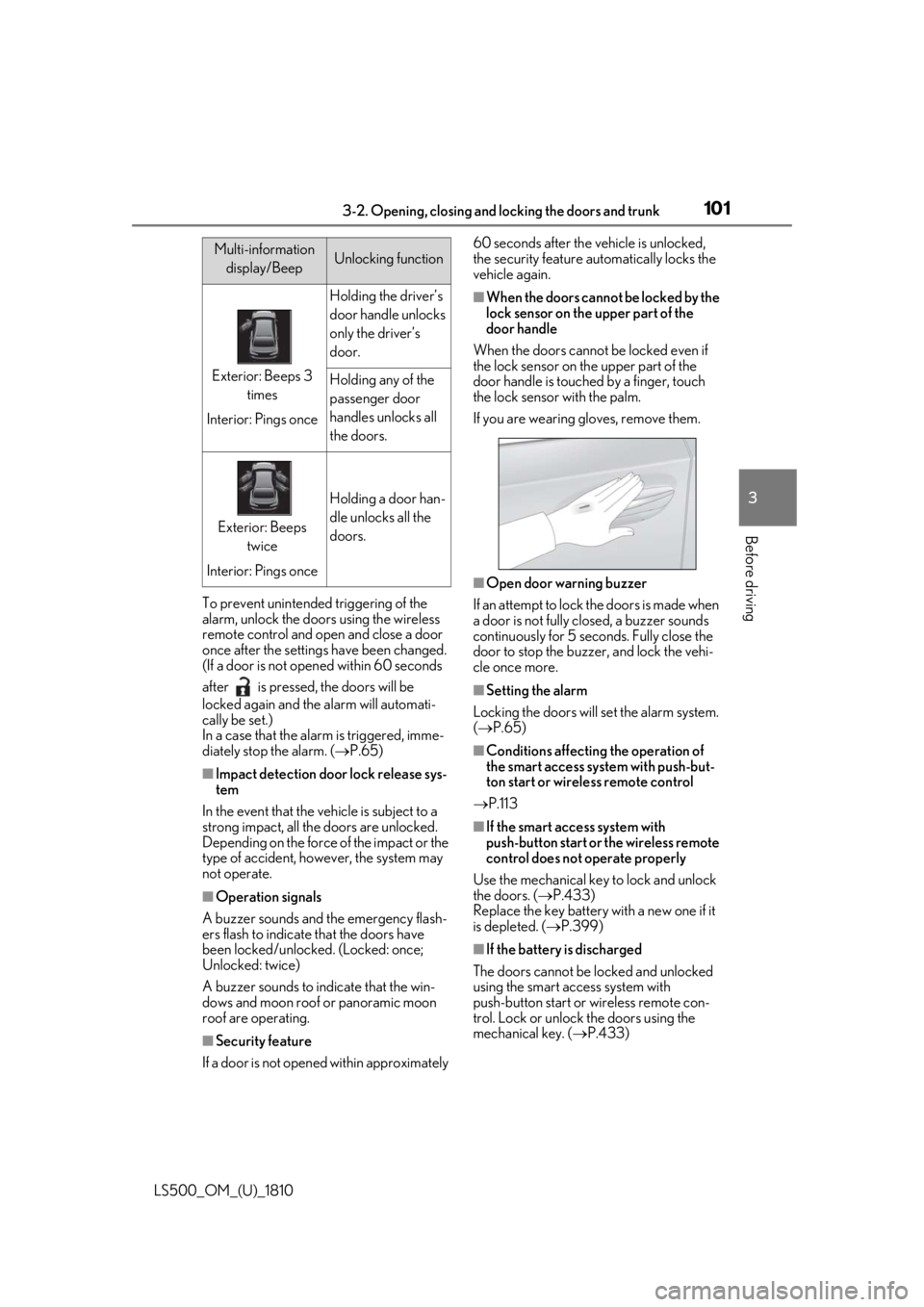
mechanical key. ( P.433)Multi-information
display/Beep Unlocking function
Exterior: Beeps 3
times
Interior: Pings once Holding the driver’s
door handle unlocks
only the driver’s
door.
Holding any of the
passenger door
handles unlocks all
the doors.
Exterior: Beeps
twice
Interior: Pings once Holding a door han-
dle unlocks all the
doors.
Page 102 of 512
102 3-2. Opening, closing and locking the doors and trunk
LS500_OM_(U)_1810 ■
Customization
Some functions can be customized.
( P.466) ■
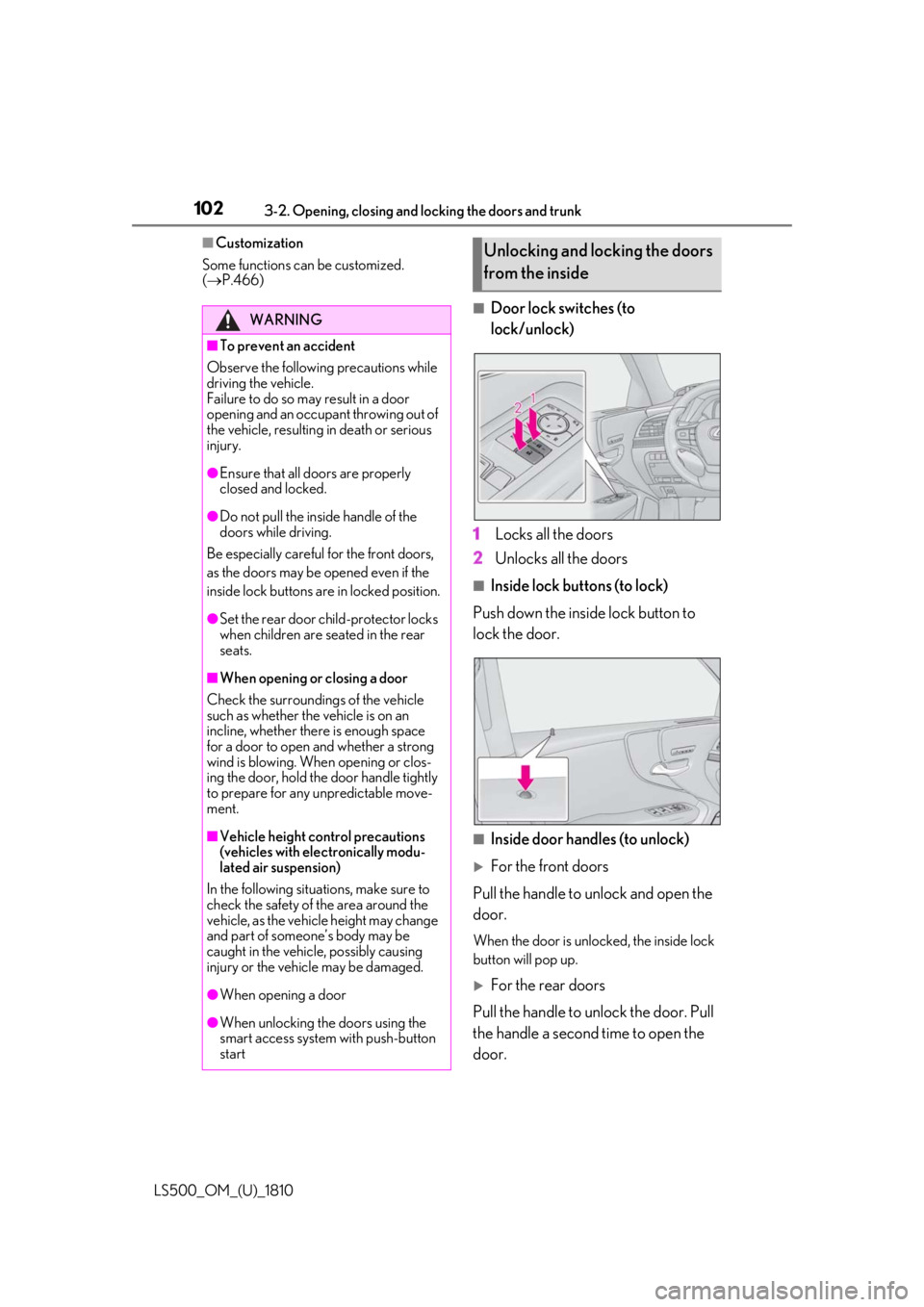
Door lock switches (to
lock/unlock)
1 Locks all the doors
2 Unlocks all the doors ■
Inside lock buttons (to lock)
Push down the inside lock button to
lock the door.
■
Inside door handles (to unlock)
For the front doors
Pull the handle to unlock and open the
door. When the door is unlo cked, the inside lock
button will pop up.
For the rear doors
Pull the handle to unlock the door. Pull
the handle a second time to open the
door.WARNING■
To prevent an accident
Observe the following precautions while
driving the vehicle.
Failure to do so may result in a door
opening and an occupant throwing out of
the vehicle, resulting in death or serious
injury. ●
Ensure that all doors are properly
closed and locked.●
Do not pull the inside handle of the
doors while driving.
Be especially careful for the front doors,
as the doors may be opened even if the
inside lock buttons are in locked position. ●
Set the rear door ch ild-protector locks
when children are seated in the rear
seats.■
When opening or closing a door
Check the surroundings of the vehicle
such as whether the vehicle is on an
incline, whether ther e is enough space
for a door to open and whether a strong
wind is blowing. When opening or clos-
ing the door, hold the door handle tightly
to prepare for any unpredictable move-
ment.
■
Vehicle height co ntrol precautions
(vehicles with electronically modu-
lated air suspension)
In the following situations, make sure to
check the safety of the area around the
vehicle, as the vehicle height may change
and part of someone’s body may be
caught in the vehicle, possibly causing
injury or the vehicle may be damaged.
●
When opening a door
●
When unlocking the doors using the
smart access system with push-button
start Unlocking and locking the doors
from the inside
Page 103 of 512
1033-2. Opening, closing and locking the doors and trunk
LS500_OM_(U)_1810 3
Before driving When the door is unlocked, the inside lock
button will pop up.
■
Locking the front doors from the outside
without a key
1 Push down the inside lock button.
2 Close the door.
The door cannot be locked if the engine
switch is in ACCESSORY or IGNITION
ON mode, or the electronic key is left
inside the vehicle. However, the key may not
be detected correctly and the door may be
locked. ■
Door closer (if equipped)
In the event that a door is left slightly open,
the door closer will automatically close it to
the fully closed position. ●
The door closer will operate regardless
of the engine switch mode.●
The door closer will not function if the
door has been clos ed while pulling the
inside or outside door handle.●
The door can be opened by pulling the
inside or outside door handle, even when
the door closer is operating (except
when the lock button is in the lock posi-
tion or the child-protector lock is set).
●
A motor sound may be heard for several
seconds after the door closer closes the
door. This does not indicate a malfunc-
tion.
■
Open door warning buzzer
If a door or the trunk is not fully closed, a
buzzer will sound when the vehicle speed
reaches 3 mph (5 km/h).
The open door(s) or trunk is indicated on
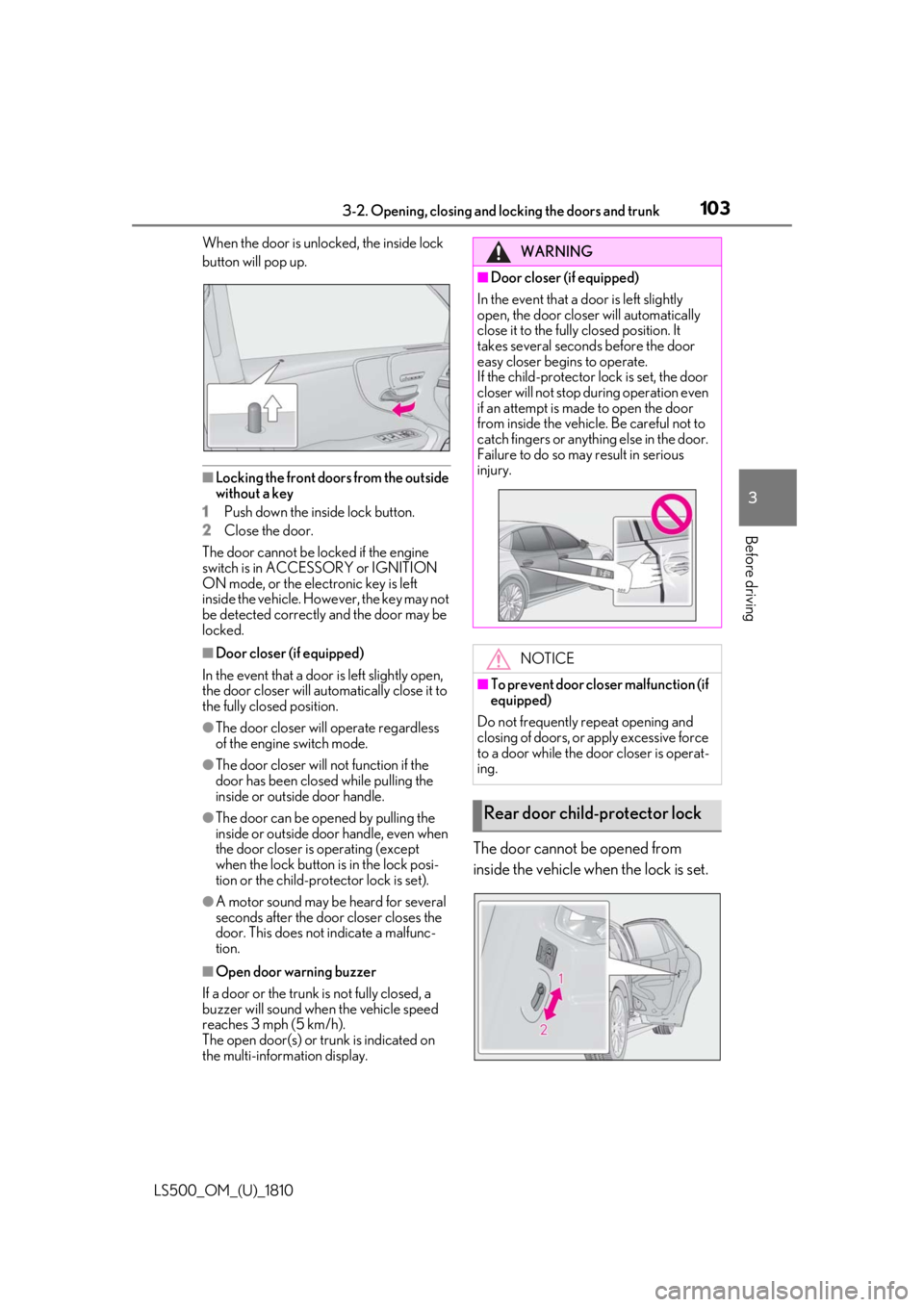
the multi-information display. The door cannot be opened from
inside the vehicle when the lock is set. WARNING■
Door closer (if equipped)
In the event that a d oor is left slightly
open, the door closer will automatically
close it to the fully closed position. It
takes several second s before the door
easy closer begins to operate.
If the child-protector lock is set, the door
closer will not stop during operation even
if an attempt is made to open the door
from inside the vehicle. Be careful not to
catch fingers or anything else in the door.
Failure to do so may result in serious
injury.
NOTICE■
To prevent door closer malfunction (if
equipped)
Do not frequently repeat opening and
closing of doors, or apply excessive force
to a door while the door closer is operat-
ing.
Rear door child-protector lock
Page 104 of 512
104 3-2. Opening, closing and locking the doors and trunk
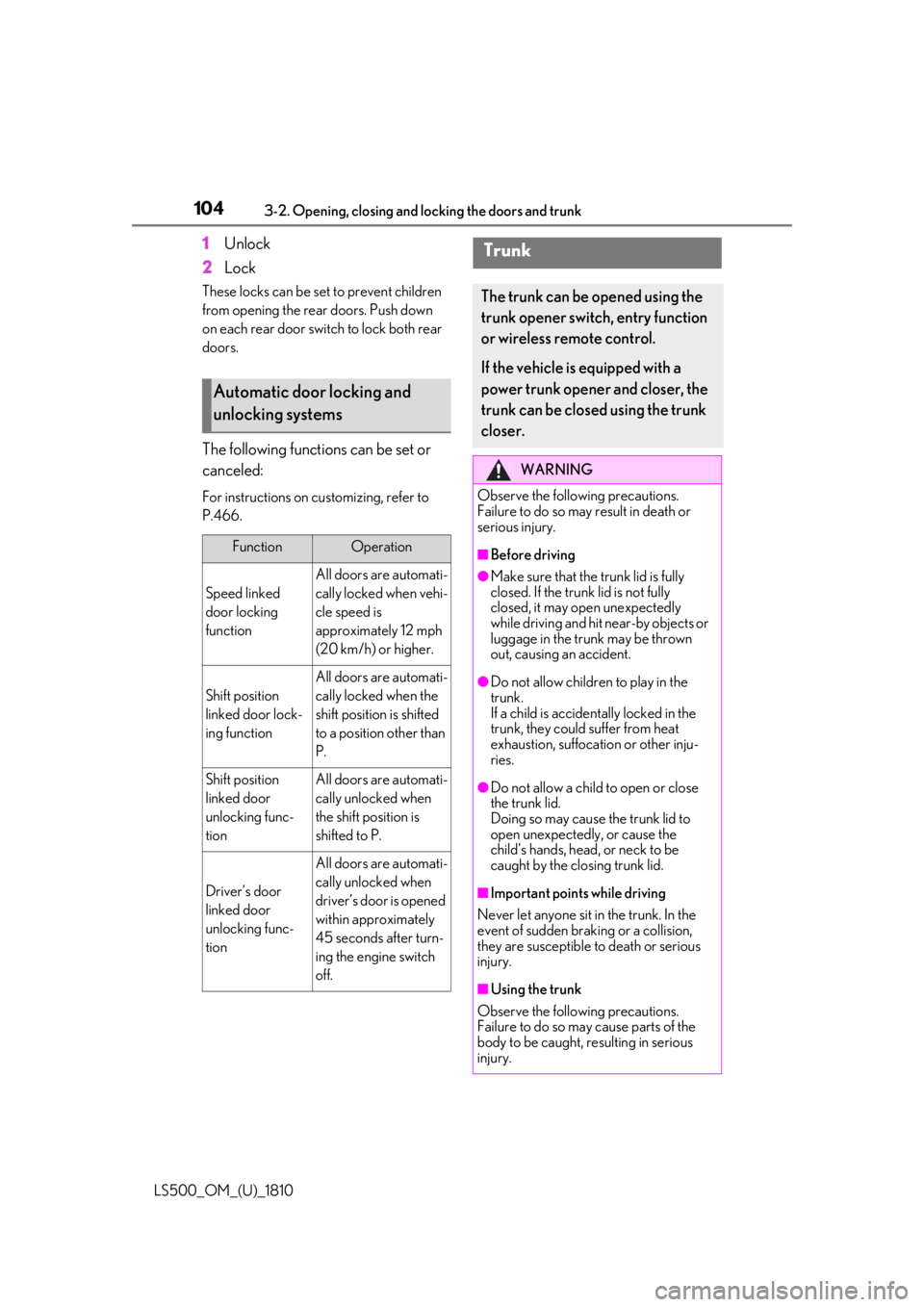
LS500_OM_(U)_1810 1 Unlock
2 LockThese locks can be set to prevent children
from opening the rear doors. Push down
on each rear door switch to lock both rear
doors.
The following functions can be set or
canceled: For instructions on customizing, refer to
P.466.
Automatic door locking and
unlocking systems Function Operation
Speed linked
door locking
function All doors are automati-
cally locked when vehi-
cle speed is
approximately 12 mph
(20 km/h) or higher.
Shift position
linked door lock-
ing function All doors are automati-
cally locked when the
shift position is shifted
to a position other than
P.
Shift position
linked door
unlocking func-
tion All doors are automati-
cally unlocked when
the shift position is
shifted to P.
Driver’s door
linked door
unlocking func-
tion All doors are automati-
cally unlocked when
driver’s door is opened
within approximately
45 seconds after turn-
ing the engine switch
off. Trunk The trunk can be opened using the
trunk opener switch, entry function
or wireless remote control.
If the vehicle is equipped with a
power trunk opener and closer, the
trunk can be closed using the trunk
closer. WARNING
Observe the following precautions.
Failure to do so may result in death or
serious injury. ■
Before driving ●
Make sure that the trunk lid is fully
closed. If the trunk lid is not fully
closed, it may open unexpectedly
while driving and hit near-by objects or
luggage in the trunk may be thrown
out, causing an accident. ●
Do not allow children to play in the
trunk.
If a child is accident ally locked in the
trunk, they could suffer from heat
exhaustion, suffocation or other inju-
ries.
●
Do not allow a child to open or close
the trunk lid.
Doing so may cause the trunk lid to
open unexpectedly, or cause the
child’s hands, head, or neck to be
caught by the closing trunk lid.
■
Important points while driving
Never let anyone sit in the trunk. In the
event of sudden braking or a collision,
they are susceptible to death or serious
injury.
■
Using the trunk
Observe the following precautions.
Failure to do so may cause parts of the
body to be caught, resulting in serious
injury.
Page 109 of 512
1093-2. Opening, closing and locking the doors and trunk
LS500_OM_(U)_1810 3
Before driving cally close it to the fully closed position. ●
The trunk easy closer will operate
regardless of the en gine switch mode.●
If the trunk easy closer does not operate,
open the trunk to the half open position
or more and then close it.■
Function to prevent the trunk being
locked with the electronic key inside●
When all doors are locked, closing the
trunk lid with the electr onic key left inside
the trunk will sound an alarm.
In this case, the trunk lid can be opened
pressing the trunk release button on the
trunk lid.●
If the spare electronic key is put in the
trunk with all the doors locked, the key
confinement prevention function is acti-
vated so the trunk can be opened. In
order to prevent theft, take all electronic
keys with you when leaving the vehicle.●
If the electronic key is put in the trunk with
all the doors locked, the key may not be
detected depending on the location of
the key and the surrounding radio wave
conditions. In this case, the key confine-
ment prevention function cannot be acti-
vated, causing the doors to lock when the
trunk is closed. Make sure to check
where the key is before closing the trunk.●
The key confinement prevention function
cannot be activated if any one of the
doors is unlocked. In this case, open the
trunk using the trunk opener.■
Overload protection function (vehicles
with power trunk opener and closer)
The trunk lid will not operate when exces-
sive load is present on the top of the trunk
lid.
■
Fall-down protection function (vehicles
with power trunk opener and closer)
While the trunk lid is opening automatically,
applying excessive force to it will stop the
opening operation to prevent the trunk lid
from rapidly falling down.
■
Jam protection function (vehicles with
power trunk opener and closer)
While the trunk lid is closing automatically,
the trunk lid will stop closing and open if something gets caught. ■
Internal trunk release lever
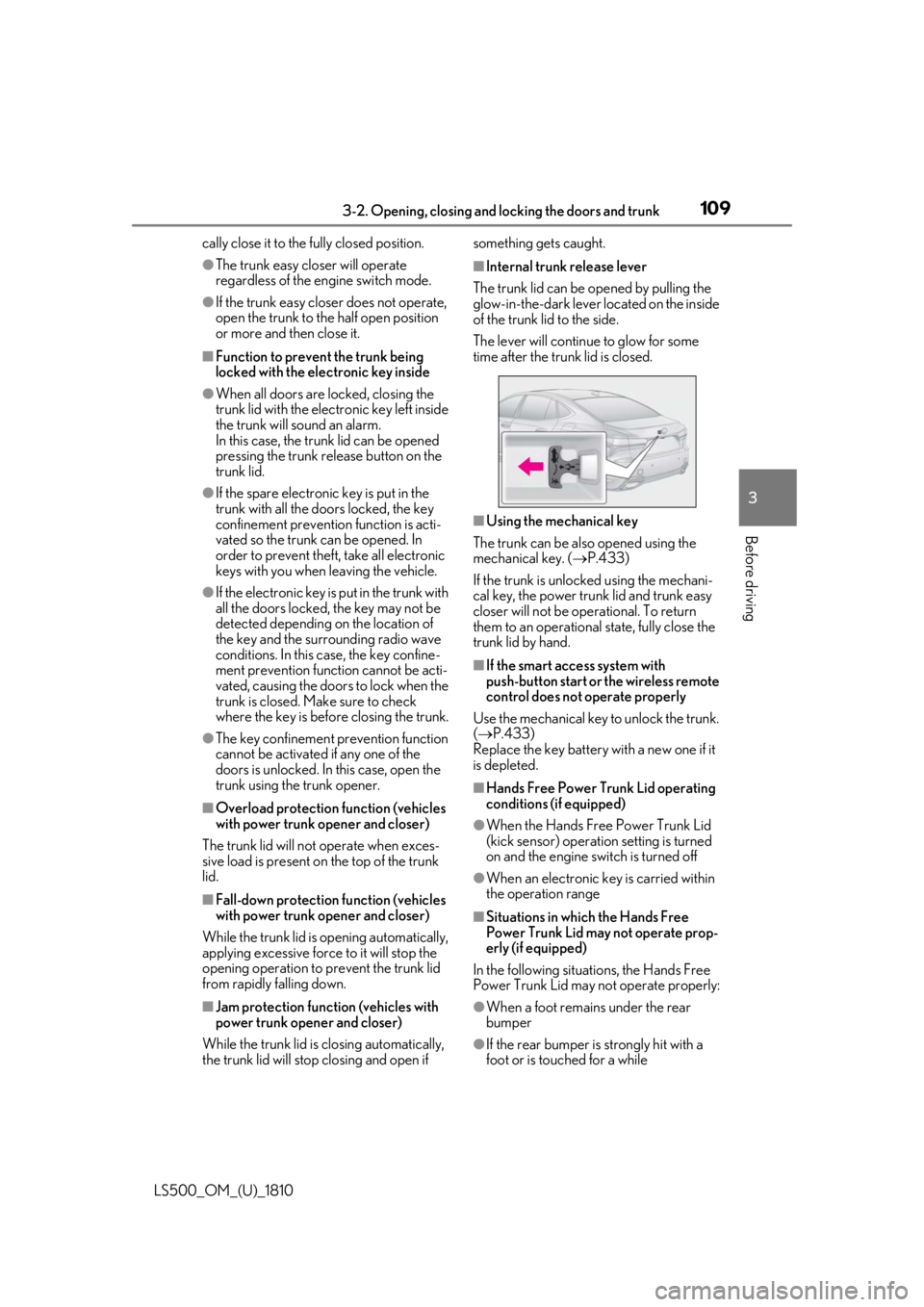
The trunk lid can be opened by pulling the
glow-in-the-dark lever located on the inside
of the trunk lid to the side.
The lever will continue to glow for some
time after the trunk lid is closed.
■
Using the mechanical key
The trunk can be also opened using the
mechanical key. ( P.433)
If the trunk is unlocked using the mechani-
cal key, the power trunk lid and trunk easy
closer will not be operational. To return
them to an operational state, fully close the
trunk lid by hand. ■
If the smart access system with
push-button start or the wireless remote
control does not operate properly
Use the mechanical key to unlock the trunk.
( P.433)
Replace the key battery with a new one if it
is depleted. ■
Hands Free Power Trunk Lid operating
conditions (if equipped) ●
When the Hands Free Power Trunk Lid
(kick sensor) operatio n setting is turned
on and the engine switch is turned off
●
When an electronic key is carried within
the operation range
■
Situations in which the Hands Free
Power Trunk Lid may not operate prop-
erly (if equipped)
In the following situations, the Hands Free
Power Trunk Lid may not operate properly:
●
When a foot remain s under the rear
bumper
●
If the rear bumper is strongly hit with a
foot or is touched for a while
Page 110 of 512

110 3-2. Opening, closing and locking the doors and trunk
LS500_OM_(U)_1810 If the rear bumper has been touched for a
while, wait for a short time before
attempting to operate the Hands Free
Power Trunk Lid again.●
When standing excessively close to the
rear bumper●
When an external radio wave source
interferes with the communication
between the electronic key and the vehi-
cle ( P.113)●
When the vehicle is parked near an elec-
trical noise source which affects the sen-
sitivity of the Hands Free Power Trunk Lid,
such as a pay parking spot, gas station,
electrically heated road, or fluorescent
light●
When the vehicle is near a TV tower,
electric power plant, radio station, large
display, airport or other facility that gen-
erates strong radio waves or electrical
noise●
When a large amount of water is applied
to the rear bumper, such as when the
vehicle is being washed or in heavy rain●
When mud, snow, ice, etc. is attached to
the rear bumper●
When the vehicle has been parked for a
while near objects that may move and
contact the rear bumper, such as plants●
When an accessory is installed to the rear
bumper
If an accessory has been installed, turn the
Hands Free Power Trunk Lid (kick sensor)
operation setting off.
■
Preventing unintentional operation of
the Hands Free Power Trunk Lid (if
equipped)
When an electronic ke y is in the operation
detection area, the Ha nds Free Power Trunk
Lid may operate unintentionally, so be care-
ful in the following situations:
●
When a large amount of water is applied
to the rear bumper, such as when the
vehicle is being washed or in heavy rain
●
When dirt is wiped off the rear bumper
●
When a small animal or small object, such
as a ball, moves under the rear bumper ●
When an object is moved from under the
rear bumper ●
If someone is swinging their legs while sit-
ting on the rear bumper ●
If the legs or another part of someone’s
body contacts the rear bumper while
passing by the vehicle ●
When the vehicle is parked near an elec-
trical noise source which affects the sen-
sitivity of the Hands Free Power Trunk Lid,
such as a pay parking spot, gas station,
electrically heated road, or fluorescent
light ●
When the vehicle is near a TV tower,
electric power plant, radio station, large
display, airport or ot her facility that gen-
erates strong radio waves or electrical
noise ●
When the vehicle is parked in a place
where objects such as plants are near the
rear bumper ●
If luggage, etc. is set near the rear
bumper ●
If accessories or a vehicle cover is
installed/removed ne ar the rear bumper●
When the vehicle is being towed
To prevent unintentiona l operation, turn the
Hands Free Power Trunk Lid (kick sensor)
operation setting off. ■
Open door warning buzzer
P.103 ■
Customization
Some functions can be customized.
( P.466)
The trunk opener switch can be tem-
porarily disabled to protect luggage
stored in the trunk against theft.
Turn the main switch in the glove box
off to disable the trunk opener.Luggage security system
Page 113 of 512
1133-2. Opening, closing and locking the doors and trunk
LS500_OM_(U)_1810 3
Before driving take some time to unlock the doors.
• The electronic key has been left in an
area of approximately 6 ft. (2 m) of the
outside of the vehicle for 10 minutes or
longer.
• The smart access system with push-but-
ton start has not been used for 5 days or
longer.●
If the smart access system with push-but-
ton start has not been used for 14 days or
longer, the doors cannot be unlocked at
any doors except the driver’s door. In this
case, take hold of the driver’s door han-
dle, or use the wireless remote control or
the mechanical key, to unlock the doors.■
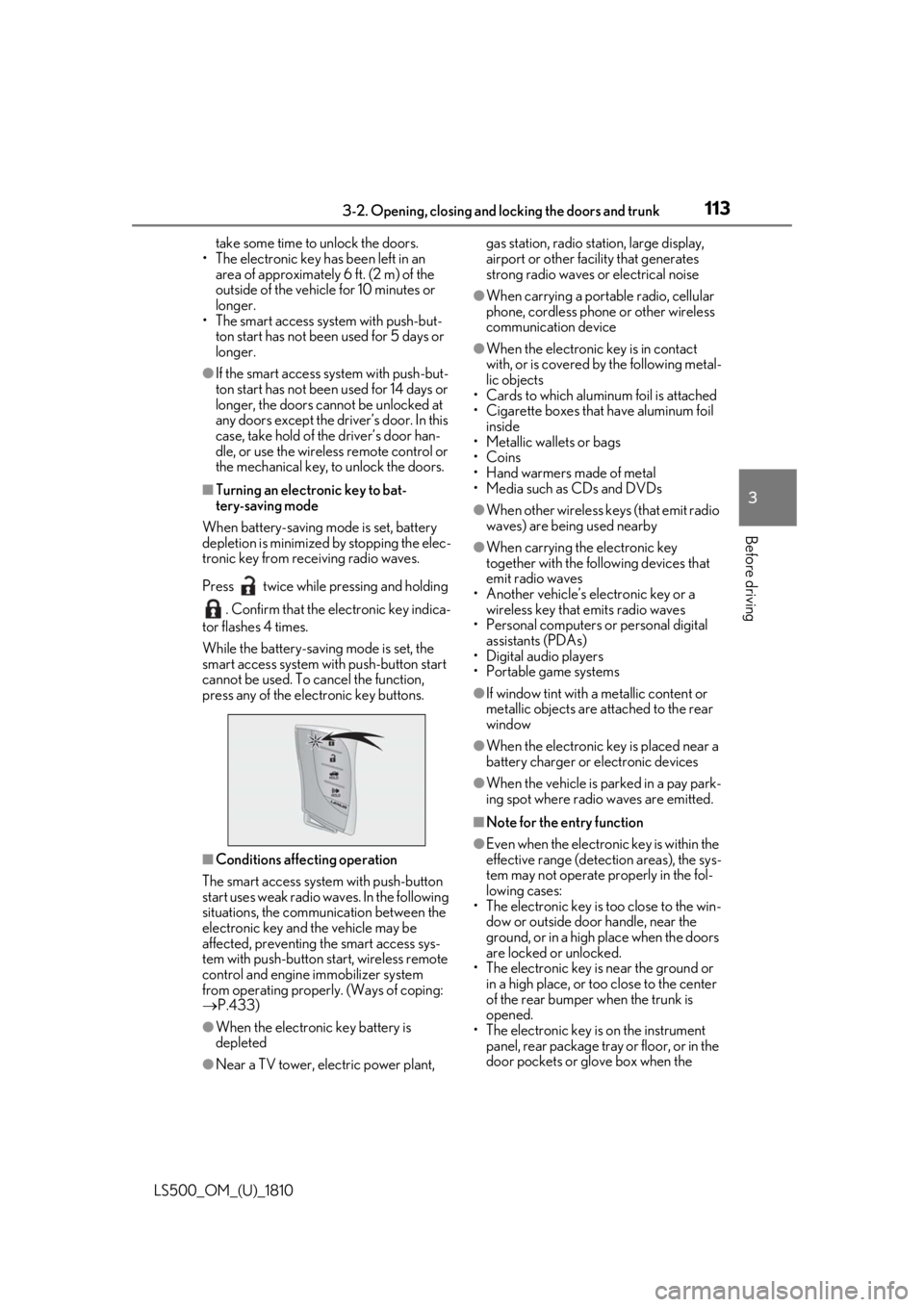
Turning an electronic key to bat-
tery-saving mode
When battery-saving mode is set, battery
depletion is minimized by stopping the elec-
tronic key from re ceiving radio waves.
Press twice while pressing and holding
. Confirm that the electronic key indica-
tor flashes 4 times.
While the battery-saving mode is set, the
smart access system with push-button start
cannot be used. To cancel the function,
press any of the electronic key buttons.
■
Conditions affe cting operation
The smart access system with push-button
start uses weak radio waves. In the following
situations, the communication between the
electronic key and the vehicle may be
affected, preventing the smart access sys-
tem with push-button start, wireless remote
control and engine immobilizer system
from operating properly. (Ways of coping:
P.433)
●
When the electronic key battery is
depleted
●
Near a TV tower, electric power plant, gas station, radio stat ion, large display,
airport or other fac ility that generates
strong radio waves or electrical noise ●
When carrying a portable radio, cellular
phone, cordless phone or other wireless
communication device ●
When the electronic key is in contact
with, or is covered by the following metal-
lic objects
• Cards to which aluminum foil is attached
• Cigarette boxes that have aluminum foil
inside
• Metallic wallets or bags
•Coins
• Hand warmers made of metal
• Media such as CDs and DVDs ●
When other wireless keys (that emit radio
waves) are being used nearby ●
When carrying the electronic key
together with the following devices that
emit radio waves
• Another vehicle’s electronic key or a
wireless key that emits radio waves
• Personal computers or personal digital
assistants (PDAs)
• Digital audio players
• Portable game systems ●
If window tint with a metallic content or
metallic objects are attached to the rear
window ●
When the electronic key is placed near a
battery charger or electronic devices ●
When the vehicle is parked in a pay park-
ing spot where radio waves are emitted. ■
Note for the entry function ●
Even when the electronic key is within the
effective range (detection areas), the sys-
tem may not operate properly in the fol-
lowing cases:
• The electronic key is too close to the win-
dow or outside door handle, near the
ground, or in a high place when the doors
are locked or unlocked.
• The electronic key is near the ground or
in a high place, or too close to the center
of the rear bumper when the trunk is
opened.
• The electronic key is on the instrument
panel, rear package tray or floor, or in the
door pockets or glove box when the
Page 114 of 512

114 3-2. Opening, closing and locking the doors and trunk
LS500_OM_(U)_1810 engine is started or engine switch modes
are changed.●
Do not leave the electronic key on top of
the instrument panel or near the door
pockets when exiting the vehicle.
Depending on the radio wave reception
conditions, it may be detected by the
antenna outside the cabin and the doors
will become lockable from the outside,
possibly trapping the electronic key
inside the vehicle.●
As long as the electron ic key is within the
effective range, the doors may be locked
or unlocked by anyone. However, only
the doors detecting the electronic key
can be used to unlock the vehicle.●
Even if the electronic key is not inside the
vehicle, it may be possible to start the
engine if the electronic key is near the
window.●
The doors may unlock or lock if a large
amount of water spla shes on the door
handle, such as in the rain or in a car
wash, when the electronic key is within
the effective range. (The doors will auto-
matically be locked after approximately
60 seconds if the d oors are not opened
and closed.)●
If the wireless remote control is used to
lock the doors when the electronic key is
near the vehicle, there is a possibility that
the door may not be unlocked by the
entry function. (Use the wireless remote
control to unlock the doors.)●
Touching the door lock sensor while
wearing gloves may delay or prevent lock
operation.●
When the lock operation is performed
using the lock sensor, recognition signals
will be shown up to two consecutive
times. After this, no recognition signals
will be given.
●
If the door handle becomes wet while the
electronic key is within the effective
range, the door may lock and unlock
repeatedly. In this case, follow the follow-
ing correction procedures to wash the
vehicle:
• Place the electronic key in a location 6 ft.
(2 m) or more away from the vehicle.
(Take care to ensure that the key is not stolen.)
• Set the electronic key to battery-saving
mode to disable the smart access system
with push-button start. ( P.113)●
If the electronic key is inside the vehicle
and a door handle becomes wet during a
car wash, a message may be shown on
the multi-information display and a
buzzer will sound outside the vehicle. To
turn off the alarm, lock all the doors. ●
The lock sensor may not work properly if
it comes into contact with ice, snow, mud,
etc. Clean the lock sensor and attempt to
operate it again. ●
A sudden approach to the effective
range or door handle may prevent the
doors from being unlocked. In this case,
return the door handle to the original
position and check that the doors unlock
before pulling the door handle again. ●
If there is another electronic key in the
detection area, it may take slightly longer
to unlock the doors after the door handle
is gripped. ■
When the vehicle is not driven for
extended periods ●
To prevent theft of the vehicle, do not
leave the electronic key within 6 ft. (2 m)
of the vehicle. ●
The smart access system with push-but-
ton start can be deactivated in advance. ●
Setting the electronic key to battery-sav-
ing mode helps to reduce key battery
depletion. ( P.113)■
To operate the system properly ●
Make sure to carry the electronic key
when operating the system. Do not get
the electronic key too close to the vehicle
when operating the system from the out-
side of the vehicle.
Depending on the position and holding
condition of the electr onic key, the key may
not be detected correctly and the system
may not operate properly. (The alarm may
go off accidentally, or the door lock pre-
vention function may not operate.)
●
Do not leave the electr onic key inside the
trunk.
Page 115 of 512
1153-2. Opening, closing and locking the doors and trunk
LS500_OM_(U)_1810 3
Before driving The key confinement prevention function
may not operate, depending on the loca-
tion of the key (the inside edge of the
trunk), conditions (inside a metal bag,
close to metallic objects) and the radio
waves in the surrounding area. ( P.109)■
If the smart access system with
push-button start does not operate
properly●
Locking and unlocking the doors and
trunk: P.433●
Starting the engine: P.434 ■
Customization
Some functions can be customized.
( P.466) ■
If the smart access system with
push-button start has been deactivated
in a customized setting ●
Locking and unloc king the doors and
opening the trunk:
Use the wireless remote control or
mechanical key. ( P.100, 107, 433)●
Starting the engine and changing engine
switch modes: P.434●
Stopping the engine: P.165■
Certification for the smart access system with push-button start
For vehicles sold in the U.S.A. , Hawaii, Guam and Puerto Rico
Page 122 of 512

122 3-3. Adjusting the seats
LS500_OM_(U)_1810 ■
Operating the foldable head restraint
using the driver’s seat adjustment
switches in front passenger mode (if
equipped)●
When the front passenger’s seatback
angle is adjusted using the driver’s seat
adjustment switches in front passenger
mode, the front passenger’s head
restraint will operate automatically as fol-
lows:
• When the front passenger’s seatback is
moved forward to the upright position,
the head restraint will lower and fold for-
ward when the seatback angle adjust-
ment switch is released.
• When the front passenger’s seatback is
moved backward to the upright position,
the head restraint will move to the upright
position when the se atback angle adjust-
ment switch is released.●
If any of the following conditions are met,
the front passenger’s head restraint will
not fold forward even though the front
passenger’s seatback angle is being
adjusted using the driver’s seat adjust-
ment switches in front passenger mode:
• The engine switch is in ACCESSORY
mode or off.
• The weight of an occupant or heavy
object, etc. is detected on the front pas-
senger’s seat.
Once weight is detect ed on the seat, the
seat will be judged as occupied until the
front passenger’s door is opened then
closed or the engine switch is turned off.
• Vehicles without a rear seat entertain-
ment system:The front passenger’s seat is
in the rear most position.
• The front passenger’s seat belt is fas-
tened.
• The front passenger’s door is open. (The
front seat will not move forward.)
• The front passenger’s seat is not in the
lowest position.
• The front passenger’s seat seat cushion
(front) is not in the lowest position.
• The front passenger’s seat seat cushion is
extended (if equipped).
●
If either of the following conditions is met,
the front passenger’s head restraint will
not return to the upright position even though the front passenger’s seatback
angle is being adjusted using the driver’s
seat adjustment switch es in front passen-
ger mode:
• The engine switch is in ACCESSORY
mode or off.
• The front passenger’s seat position is
moved to a position forward of the neu-
tral position. ■
Operating the foldable head restraint
using the front passenger’s seat adjust-
ment switches (if equipped)
When the front passenger’s head restraint is
folded forward and the front passenger’s
door is open, if the front passenger’s seat
adjustment switches are used to move the
seat backward or recline the seatback, the
head restraint will move to the upright posi-
tion automatically when the switch is
released.
To stop the operation of the front passen-
ger’s head restraint part-way, perform any
of the following operations: ●
Operate any front passenger’s seat
adjustment switch.
The head restraint will stop when the seat
position adjustment switch or seatback
angle adjustment switch is operated to
move the seat backward or recline the
seatback, and will resume operating when
the switch is released. ●
Press the “SET” button. ●
Press the “1”, “2” or “3” button. ●
Press the seat switch.
■
Operation of the front passenger’s seat
using the Center Display will be can-
celed when (vehicles with a foldable
head restraint)
In the following situations, the front passen-
ger’s seat cannot be operated using the
Center Display:
●
The engine switch is in ACCESSORY
mode or off.
●
The weight of an occupant or heavy
object, etc. is detected on the front pas-
senger’s seat.
Once weight is detected on the seat, the