brake sensor LEXUS LS500 2021 User Guide
[x] Cancel search | Manufacturer: LEXUS, Model Year: 2021, Model line: LS500, Model: LEXUS LS500 2021Pages: 520, PDF Size: 9.81 MB
Page 263 of 520
2634-5. Using the driving support systems
4
Driving
■Situations in which the curve speed
reduction function may not operate
(vehicles with Lexus Safety System + A)
In situations such as the following, the curve
speed reduction function may not operate:
●When the vehicle is being driven around
a gentle curve
●When the accelerator pedal is being
depressed
●When the vehicle is being driven around
an extremely short curve
■Brake operation
A brake operation sound may be heard and
the brake pedal respon se may change, but
these are not malfunctions.
■Warning messages and buzzers for
dynamic radar cruise control with
full-speed range
Warning messages and buzzers are used to
indicate a system malfunction or to inform
the driver of the need for caution while driv-
ing. If a warning message is shown on the
multi-information display, read the message
and follow the instructions.( P.207, 213,
436)
■When the sensor may not be correctly
detecting the vehicle ahead
In the case of the following and depending
on the conditions, operate the brake pedal
when deceleration of the system is insuffi-
cient or operate the accelerator pedal
when acceleration is required.
As the sensor may not be able to correctly
detect these types of vehicles, the approach
warning ( P.260) may not be activated.
●Vehicles that cut in suddenly
●Vehicles traveling at low speeds
●Vehicles that are not moving in the same
lane
●Vehicles with small rear ends (trailers
with no load on board, etc.)
●Motorcycles traveling in the same lane
●When water or snow thrown up by the
surrounding vehicles hinders the detect-
ing of the sensor
●When your vehicle is pointing upwards
(caused by a heavy load in the luggage
compartment, etc.)
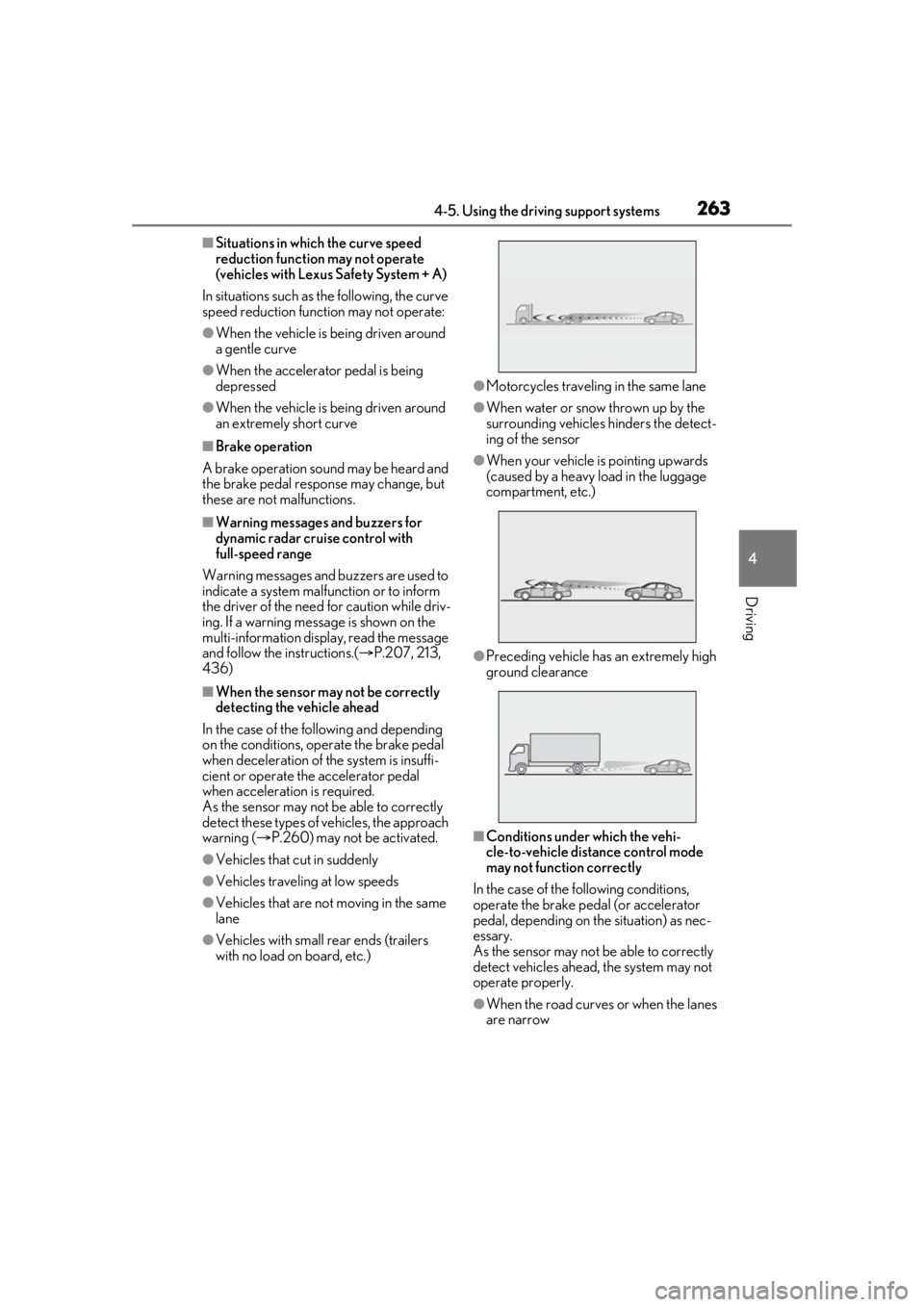
●Preceding vehicle has an extremely high
ground clearance
■Conditions under which the vehi-
cle-to-vehicle dist ance control mode
may not function correctly
In the case of the following conditions,
operate the brake pedal (or accelerator
pedal, depending on the situation) as nec-
essary.
As the sensor may not be able to correctly
detect vehicles ahead, the system may not
operate properly.
●When the road curves or when the lanes
are narrow
Page 273 of 520
2734-5. Using the driving support systems
4
Driving
segmentsmay blink.)
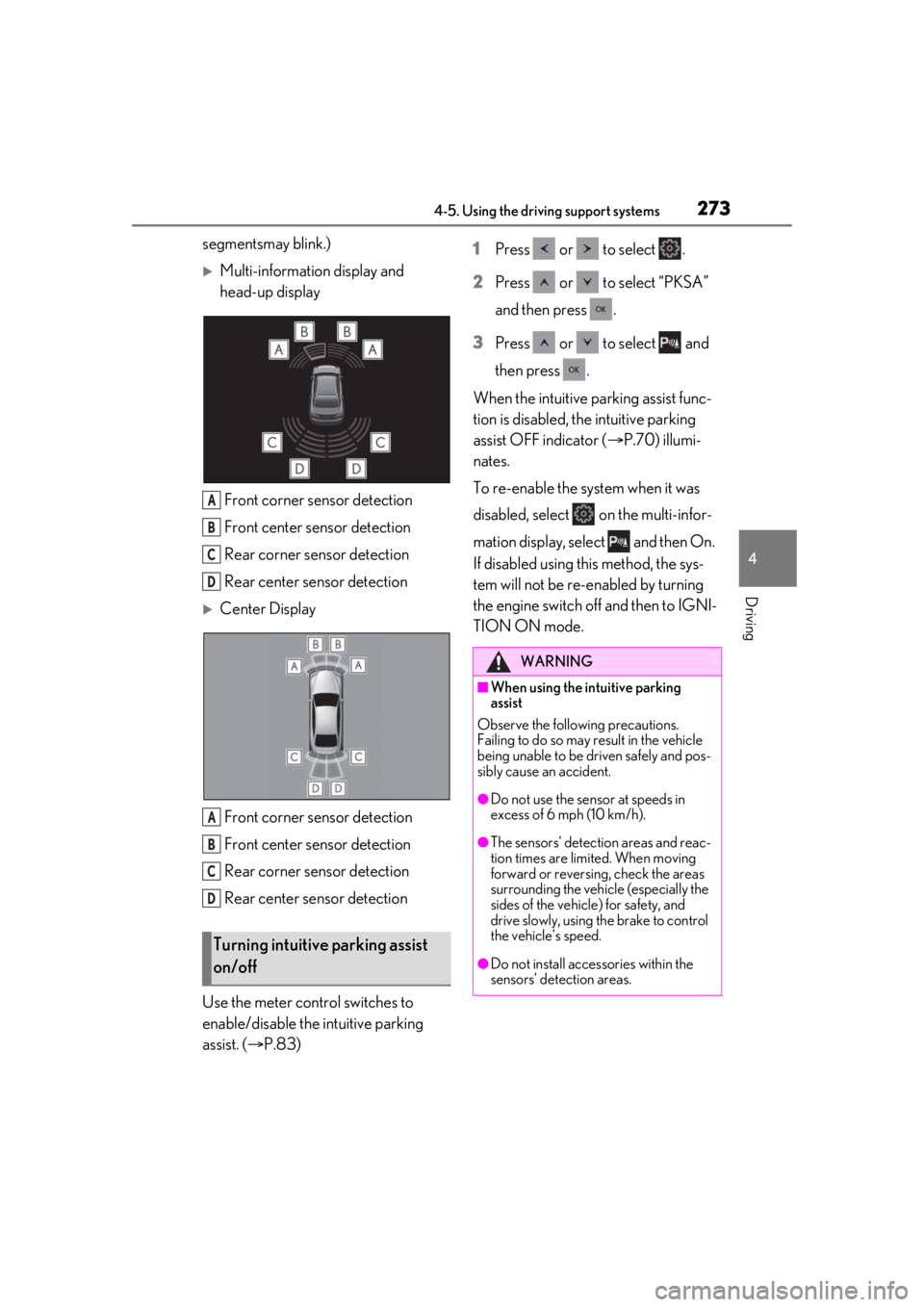
Multi-information display and
head-up displayFront corner sensor detection
Front center sensor detection
Rear corner sensor detection
Rear center sensor detection
Center Display
Front corner sensor detection
Front center sensor detection
Rear corner sensor detection
Rear center sensor detection
Use the meter control switches to
enable/disable the intuitive parking
assist. ( P.83) 1
Press or to select .
2 Press or to select “PKSA”
and then press .
3 Press or to select and
then press .
When the intuitive parking assist func-
tion is disabled, th e intuitive parking
assist OFF indicator ( P.70) illumi-
nates.
To re-enable the system when it was
disabled, select on the multi-infor-
mation display, select and then On.
If disabled using this method, the sys-
tem will not be re-enabled by turning
the engine switch off and then to IGNI-
TION ON mode.
Turning intuitive parking assist
on/off
A
B
C
D
A
B
C
D
WARNING
■When using the intuitive parking
assist
Observe the following precautions.
Failing to do so may result in the vehicle
being unable to be driven safely and pos-
sibly cause an accident.
●Do not use the sensor at speeds in
excess of 6 mph (10 km/h).
●The sensors’ detection areas and reac-
tion times are limited. When moving
forward or reversin g, check the areas
surrounding the vehicle (especially the
sides of the vehicl e) for safety, and
drive slowly, using the brake to control
the vehicle’s speed.
●Do not install accessories within the
sensors’ detection areas.
Page 275 of 520
2754-5. Using the driving support systems
4
Driving
■If a battery terminal has been discon-
nected and reconnected
The system needs to be initialized. To initial-
ize the system, drive the vehicle straight
ahead for 5 seconds or more at a speed of
approximately 22 mph (35 km/h) or more.
Additionally, for vehicles with the Parking
Support Brake function, turn the steering
wheel fully to the left and right with the vehi-
cle stopped.
■Sensor detectio n information
●The following situations may occur
during use.
• The sensors may be able to only detect
objects near the front and rear bumpers.
• Depending on the shape of the object and other factors, the detection distance
may shorten, or detection may be impos-
sible.
• There will be a short delay between
object detection and display. Even at low
speeds, there is a possibility that the
object will come within the sensor’s
detection areas before the display is
shown and the warning beep sounds.
• It might be difficult to hear the buzzer due
to the volume of the audio system or air
flow noise of the air conditioning system.
• It may be difficult to hear the buzzer if
buzzers for other systems are sounding.
■Conditions under which the function
may not function correctly
Certain vehicle conditions and the sur-
rounding environment may affect the ability
of a sensor to correctly detect objects. Par-
ticular instances where this may occur are
listed below.
●There is dirt, snow, water drops or ice on
a sensor. (Cleaning the sensors will
resolve this problem.)
●A sensor is frozen. (Thawing the area will
resolve this problem.)
In especially cold weather, if a sensor is
frozen the sensor display may be dis-
played abnormally, or objects, such as a
wall, may not be detected.
●A sensor is covered in any way.
●When a sensor or the area around a sen-
sor is extremely hot or cold.
●On an extremely bumpy road, on an incline, on gravel, or on grass.
●The vicinity of the vehicle is noisy due to
vehicle horns, motorcycle engines, air
brakes of large vehicles, or other loud
noises producing ultrasonic waves.
●There is another vehicle equipped with
parking assist sensors in the vicinity.
●A sensor is coated with a sheet of spray
or heavy rain.
●If a sensor is hit by a large amount of
water, such as when driving on a flooded
road.
●If the vehicle is significantly tilted.
●The vehicle is approaching a tall or
curved curb.
●If objects draw too close to the sensor.
■Objects which may not be properly
detected
The shape of the object may prevent the
sensor from detectin g it. Pay particular
attention to the following objects:
●Wires, fences, ropes, etc.
●Cotton, snow and other materials that
absorb sound waves
●Sharply-angled objects
●Low objects
●Tall objects with upper sections project-
ing outwards in the direction of your vehi-
cle
People may not be de tected if they are
wearing certain types of clothing.
Page 284 of 520
2844-5. Using the driving support systems
*:If equipped
■Parking Support Brake function
(static objects)
Ultrasonic sensors are used to detect
static objects, such as a wall, in the
detection area when driving at a low
speed or backing up. ( P.288)
■Parking Support Brake function
(rear-crossing vehicles)
Rear radar sensors are used to detect
approaching vehicles in the detection
area behind the vehicle when backing
up. ( P.293)
■Parking Support Brake function
(rear pedestrians) (if equipped)
A rear camera sensor is used to detect
pedestrians in the detection area
behind the vehicle when backing up.
( P.296)PKSB (Parking Support
Brake)*
The Parking Support Brake system
consists of the following functions
that operate when driving at a low
speed or backing up, such as when
parking. When the system deter-
mines that a collision with a
detected object or pedestrian is
high, a warning operates to urge
the driver to take evasive action. If
the system determines that the pos-
sibility of a collision with a detected
object or pedestrian is extremely
high, the brakes are automatically
applied to help avoid the collision or
help reduce the impact of the colli-
sion.
PKSB (Parking Support Brake)
system
WARNING
■Limitations of the Parking Support
Brake system
Do not overly rely on the system, as
doing so may lead to an accident. Always
drive while checking th e safety of the sur-
roundings of the vehicle.
Depending on the vehicle and road con-
ditions, weather, etc., the system may not
operate.
The detection capab ilities of sensors,
radars and camera are limited. Always
drive while checking th e safety of the sur-
roundings of the vehicle.
●Do not attempt to test the operation of
this system by driving the vehicle
toward another vehicle, a person or
detected object, as it may not operate
properly, possibly leading to an acci-
dent.
●The driver is solely responsible for safe
driving. Always drive carefully, taking
care to observe your surroundings.
The Parking Support Brake system is
designed to provide support to lessen
the severity of collisions. However, it
may not operate in some situations.
●The Parking Support Brake system is
not designed to stop the vehicle com-
pletely. Additionally, even if the system
has stopped the vehicl e, it is necessary
to depress the brake pedal immedi-
ately as brake control will be canceled
after approximately 2 seconds.
Page 287 of 520
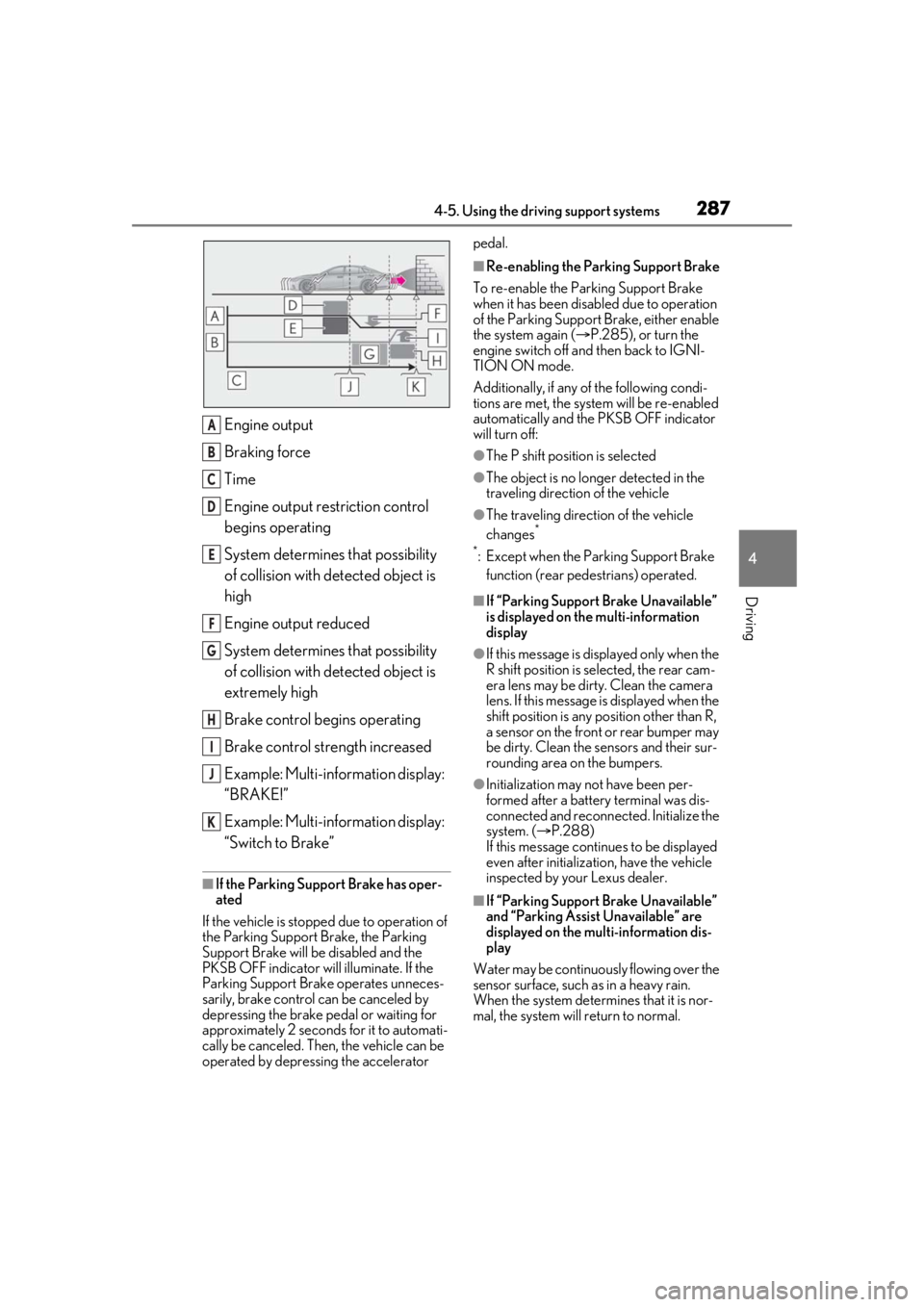
2874-5. Using the driving support systems
4
Driving
Engine output
Braking force
Time
Engine output restriction control
begins operating
System determines that possibility
of collision with detected object is
high
Engine output reduced
System determines that possibility
of collision with detected object is
extremely high
Brake control begins operating
Brake control strength increased
Example: Multi-information display:
“BRAKE!”
Example: Multi-information display:
“Switch to Brake”
■If the Parking Support Brake has oper-
ated
If the vehicle is stopped due to operation of
the Parking Support Brake, the Parking
Support Brake will be disabled and the
PKSB OFF indicator will illuminate. If the
Parking Support Brake operates unneces-
sarily, brake control can be canceled by
depressing the brake pedal or waiting for
approximately 2 seconds for it to automati-
cally be canceled. Then, the vehicle can be
operated by depressing the accelerator pedal.
■Re-enabling the Parking Support Brake
To re-enable the Parking Support Brake
when it has been disabled due to operation
of the Parking Support Brake, either enable
the system again ( P.285), or turn the
engine switch off and then back to IGNI-
TION ON mode.
Additionally, if any of the following condi-
tions are met, the system will be re-enabled
automatically and the PKSB OFF indicator
will turn off:
●The P shift position is selected
●The object is no longer detected in the
traveling direction of the vehicle
●The traveling direction of the vehicle
changes*
*
: Except when the Parking Support Brake function (rear pedestrians) operated.
■If “Parking Support Brake Unavailable”
is displayed on th e multi-information
display
●If this message is di splayed only when the
R shift position is selected, the rear cam-
era lens may be dirty. Clean the camera
lens. If this message is displayed when the
shift position is any position other than R,
a sensor on the front or rear bumper may
be dirty. Clean the sensors and their sur-
rounding area on the bumpers.
●Initialization may not have been per-
formed after a battery terminal was dis-
connected and reconnected. Initialize the
system. ( P.288)
If this message continues to be displayed
even after initializati on, have the vehicle
inspected by your Lexus dealer.
■If “Parking Support Brake Unavailable”
and “Parking Assist Unavailable” are
displayed on the multi-information dis-
play
Water may be continuous ly flowing over the
sensor surface, such as in a heavy rain.
When the system determines that it is nor-
mal, the system will return to normal.
A
B
C
D
E
F
G
H
I
J
K
Page 288 of 520
2884-5. Using the driving support systems
■If “Parking Support Brake Unavailable”
and “Clean Parking Assist Sensor” are
displayed on the multi-information dis-
play
●A sensor may be covered with water
drops, ice, snow, dirt, etc. Remove the
water drops, ice, snow , dirt, etc., from the
sensor to return the system to normal. If
this message continue s to be displayed
even after cleaning the sensor, or is dis-
played even though the sensor is clean,
have the vehicle inspected by your Lexus
dealer.
●A sensor may be frozen. Once the ice
melts, the system will return to normal.
■If a battery terminal has been discon-
nected and reconnected
The system needs to be initialized. To initial-
ize the system, drive the vehicle straight
ahead for 5 seconds or more at a speed of
approximately 22 mph (35 km/h) or more.
Additionally, for vehicles with the Parking
Support Brake function, turn the steering
wheel fully to the left and right with the vehi-
cle stopped.
*: If equipped
This function will operate in situations
such as the following if an object is
detected in the traveling direction of
the vehicle.
When traveling at a low speed and
the brake pedal is not depressed, or
is depressed late
Parking Support Brake func-
tion (static objects)*
If the sensors detect a static object,
such as a wall, in the travelling
direction of the vehicle and the sys-
tem determines that a collision may
occur due to the vehicle suddenly
moving forward due to an acciden-
tal accelerator pedal operation, the
vehicle moving the unintended
direction due to the wrong shift
position being selected, or while
parking or traveling at low speeds,
the system will operate to lessen
the impact with the detected static
object and reduce the resulting
damage.
Examples of function operation
Page 289 of 520
2894-5. Using the driving support systems
4
Driving
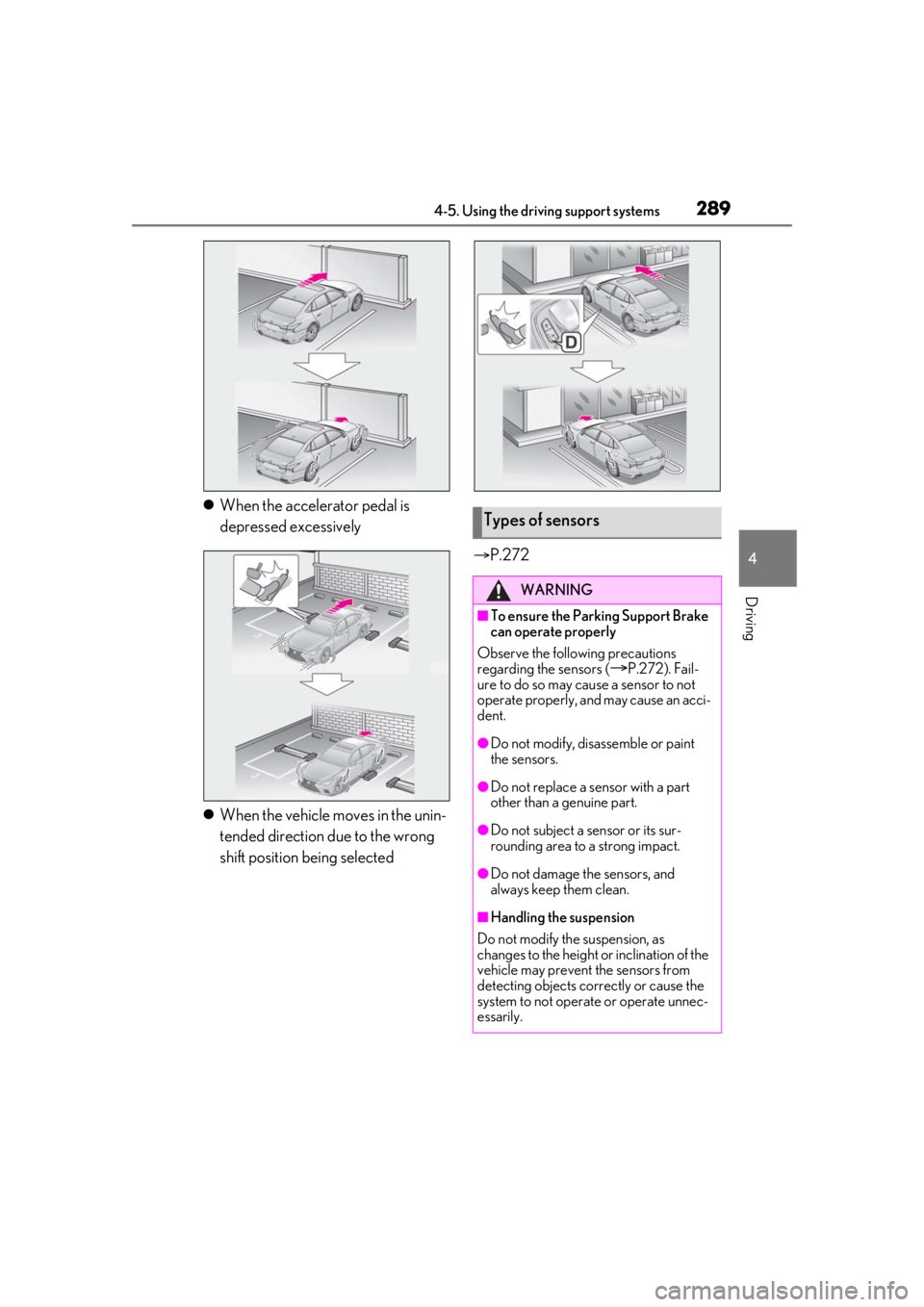
When the accelerator pedal is
depressed excessively
When the vehicle moves in the unin-
tended direction due to the wrong
shift position being selected
P.272Types of sensors
WARNING
■To ensure the Parking Support Brake
can operate properly
Observe the following precautions
regarding the sensors (
P.272). Fail-
ure to do so may cause a sensor to not
operate properly, and may cause an acci-
dent.
●Do not modify, disassemble or paint
the sensors.
●Do not replace a sensor with a part
other than a genuine part.
●Do not subject a sensor or its sur-
rounding area to a strong impact.
●Do not damage the sensors, and
always keep them clean.
■Handling the suspension
Do not modify the suspension, as
changes to the height or inclination of the
vehicle may prevent the sensors from
detecting objects correctly or cause the
system to not operate or operate unnec-
essarily.
Page 290 of 520
2904-5. Using the driving support systems
■The Parking Support Brake function
(static object) will operate when
The function will operate when the PKSB
OFF indicator is not illuminated ( P.72)
and all of the following conditions are met:
●Engine output restriction control
• The Parking Support Brake is enabled.
• The vehicle speed is 9 mph (15 km/h) or
less.
• There is a static object in the traveling
direction of the vehicle and 6 to 13 ft. (2
to 4 m) away.
• The Parking Support Brake determines
that a stronger-than-normal brake opera-
tion is necessary to avoid a collision.
●Brake control
• Engine output restriction control is oper- ating.
• The Parking Support Brake determines that an immediate brake operation is nec-
essary to avoid a collision.
■The Parking Support Brake function
(static objects) will stop operating when
The function will stop operating if any of the
following conditions are met:
●Engine output restriction control
• The Parking Support Brake is disabled.
• The system determines that the collision
has become avoidable with normal brake
operation.
• The static object is no longer 6 to 13 ft. (2 to 4 m) away from the vehicle or in the
traveling direction of the vehicle.
●Brake control
• The Parking Support Brake is disabled.
• Approximately 2 seconds have elapsed
since the vehicle was stopped by brake
control.
• The brake pedal is depressed after the vehicle is stopped by brake control.
• The static object is no longer 6 to 13 ft. (2
to 4 m) away from the vehicle or in the
WARNING
■If the Parking Support Brake function
(static objects) operates unnecessar-
ily, such as at a railroad crossing
In the event that the Parking Support
Brake function (static objects) operates
unnecessarily, such as at a railroad cross-
ing, brake control w ill be canceled after
approximately 2 seconds, allowing you
to proceed forward and leave the area,
brake control can also be canceled by
depressing the brake pedal. Depressing
the accelerator pedal after brake control
is canceled will allow you to proceed for-
ward and leave the area.
■Notes when washing the vehicle
Do not apply intensive bursts of water or
steam to the sensor area.
Doing so may result in the sensor mal-
functioning.
●When using a high pressure washer to
wash the vehicle, do not spray the sen-
sors directly, as doing so may cause a
sensor to malfunction.
●When using steam to clean the vehicle,
do not direct steam too close to the
sensors as doing so may cause a sen-
sor to malfunction.
■When to disable the Parking Support
Brake
In the following situations, disable the
Parking Support Brake as the system
may operate even though there is no
possibility of a collision.
●When inspecting the vehicle using a
chassis roller, chassis dynamo or free
roller
●When loading the vehicle onto a boat,
truck or other transport vessel
●If the suspension has been modified or
tires of a size other than specified are
installed
●If the front of the vehicle is raised or
lowered due to the carried load
●When equipment that may obstruct a
sensor is installed, such as a towing
eyelet, bumper protector (an addi-
tional trim strip, etc.), bicycle carrier, or
snow plow
●When using an automatic car wash
Page 291 of 520
2914-5. Using the driving support systems
4
Driving
traveling direction of the vehicle.
■Re-enabling the Parking Support Brake
function (static objects)
P.287
■Detection range of the Parking Support
Brake function (static objects)
The detection range of the Parking Support
Brake function (static objects) differs from
the detection range of the intuitive parking
assist. ( P.276) Therefore, even if the intui-
tive parking assist de tects an object and
provides a warning, the Parking Support
Brake function (static objects) may not start
operating.
■Objects that the Parking Support Brake
function (static obje cts) may not detect
The sensors may not be able to detect cer-
tain objects, such as the following:
●Pedestrian
●Cotton cloth, snow, and other materials
that are poor reflectors of ultrasonic
waves
●Objects which are not perpendicular to
the ground, are not perpendicular to the
traveling direction of the vehicle, are
uneven or are waving
●Low objects
●Thin objects such as wires, fences, ropes
and signposts
●Objects that are extremely close to the
bumper
●Sharply-angled objects
●Tall objects with upper sections project-
ing outwards in the direction of your vehi-
cle
■Situations in which the Parking Support
Brake function (stati c objects) may not
operate
When driving with the shift position in N
■Intuitive parking assist buzzer
Regardless of whether the intuitive parking
assist system is enabled or not ( P.273), if
the Parking Support Brake function (static
objects) is enabled ( P.285), the front or
rear sensors detect an object and brake
control is performed, the intuitive parking assist buzzer will sound to notify the driver
of the approximate distance to the object.
■Situations in which the Parking Support
Brake function (static objects) may
operate even if there is no possibility of a
collision
In some situations, such as the following, the
Parking Support Brake function (static
objects) may operate even though there is
no possibility of a collision.
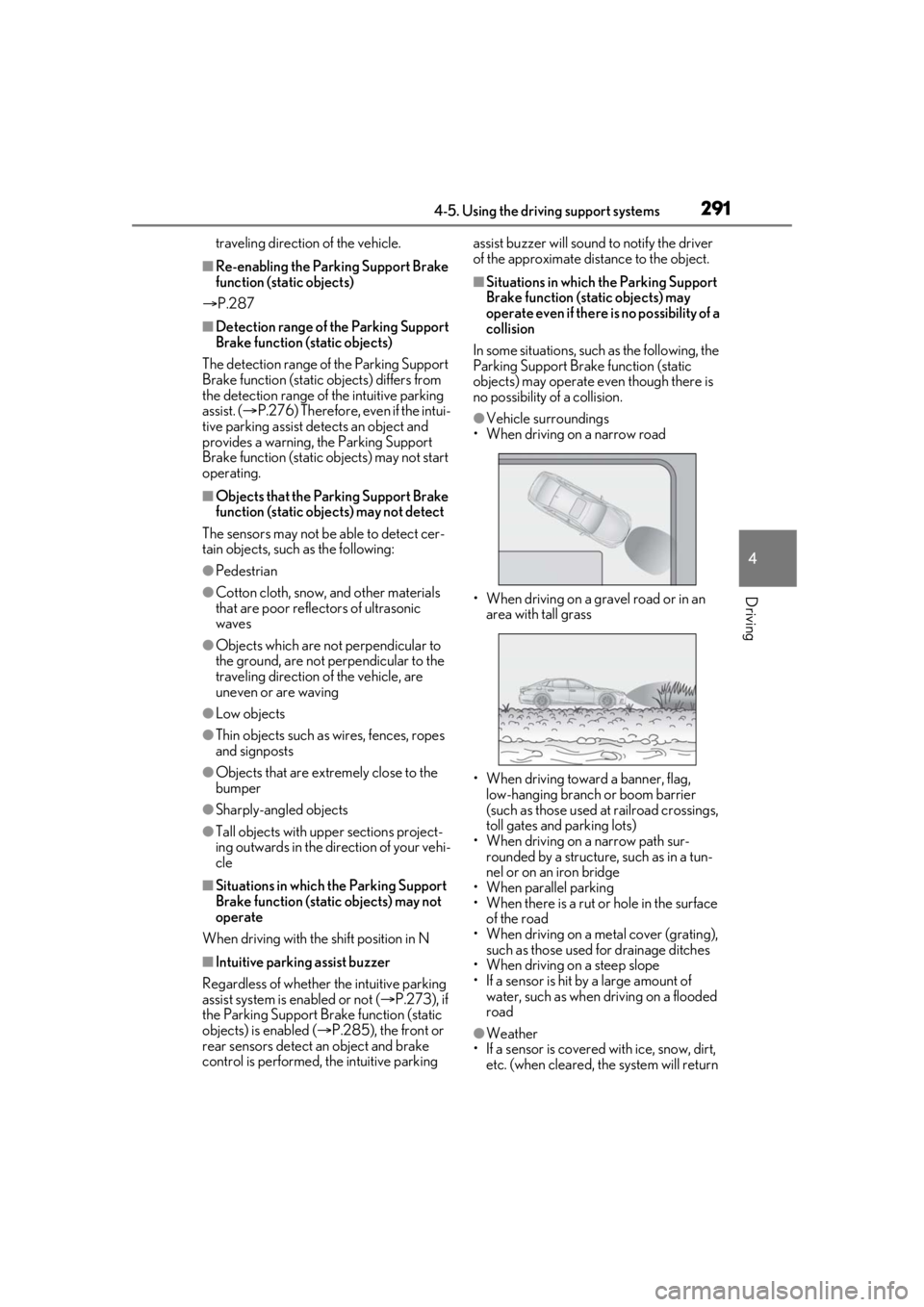
●Vehicle surroundings
• When driving on a narrow road
• When driving on a gravel road or in an area with tall grass
• When driving toward a banner, flag, low-hanging branch or boom barrier
(such as those used at railroad crossings,
toll gates and parking lots)
• When driving on a narrow path sur-
rounded by a structure, such as in a tun-
nel or on an iron bridge
• When parallel parking
• When there is a rut or hole in the surface of the road
• When driving on a metal cover (grating), such as those used for drainage ditches
• When driving on a steep slope
• If a sensor is hit by a large amount of
water, such as when driving on a flooded
road
●Weather
• If a sensor is covered with ice, snow, dirt, etc. (when cleared, the system will return
Page 292 of 520
2924-5. Using the driving support systems
to normal)
• If heavy rain or water strikes a sensor
• When driving in incl ement weather such
as fog, snow or a sandstorm
• When strong winds are blowing
●Other ultrasonic wave sources
• When vehicle horns, vehicle detectors, motorcycle engines, air brakes of large
vehicles, the clearance sonar of other
vehicles or other devices which produce
ultrasonic waves are near the vehicle
• If a sticker or an el ectronic component,
such as a backlit license plate (especially
fluorescent type), fog lights, fender pole
or wireless antenna is installed near a
sensor
●Changes in the vehicle posture
• If the vehicle is significantly tilted
• If the front of the vehicle is raised or low- ered due to the carried load
• If the orientation of a sensor has been changed due to a collision or other
impact
■Situations in which the Parking Support
Brake function (stati c objects) may not
operate properly
In some situations, such as the following, this
function may not operate properly.
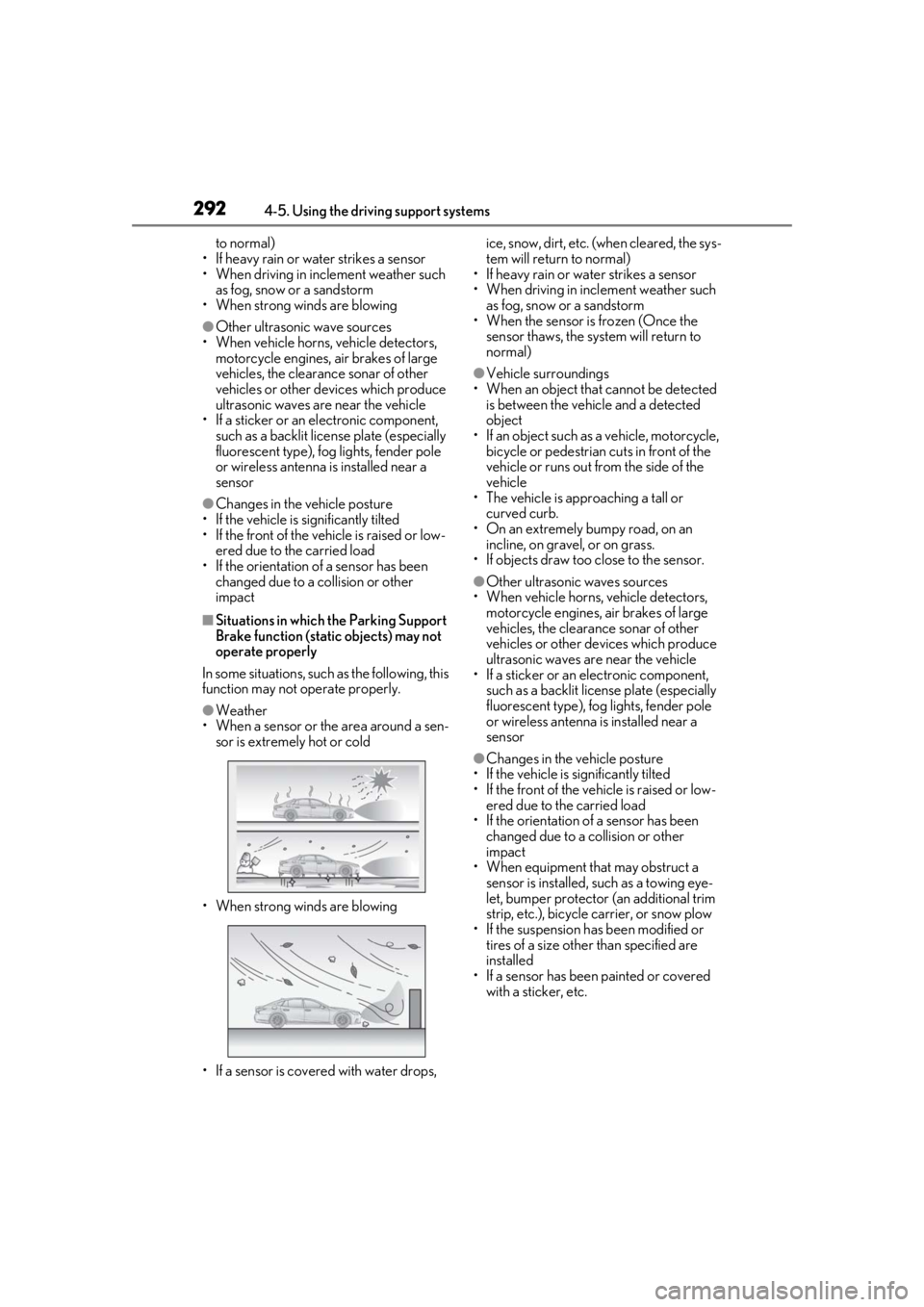
●Weather
• When a sensor or the area around a sen-
sor is extremely hot or cold
• When strong winds are blowing
• If a sensor is covered with water drops, ice, snow, dirt, etc. (when cleared, the sys-
tem will return to normal)
• If heavy rain or water strikes a sensor
• When driving in incl ement weather such
as fog, snow or a sandstorm
• When the sensor is frozen (Once the
sensor thaws, the system will return to
normal)
●Vehicle surroundings
• When an object that cannot be detected is between the vehicle and a detected
object
• If an object such as a vehicle, motorcycle, bicycle or pedestrian cuts in front of the
vehicle or runs out from the side of the
vehicle
• The vehicle is approaching a tall or
curved curb.
• On an extremely bumpy road, on an incline, on gravel, or on grass.
• If objects draw too close to the sensor.
●Other ultrasonic waves sources
• When vehicle horns, vehicle detectors, motorcycle engines, air brakes of large
vehicles, the clearance sonar of other
vehicles or other de vices which produce
ultrasonic waves are near the vehicle
• If a sticker or an electronic component,
such as a backlit license plate (especially
fluorescent type), fog lights, fender pole
or wireless antenna is installed near a
sensor
●Changes in the vehicle posture
• If the vehicle is significantly tilted
• If the front of the vehicle is raised or low- ered due to the carried load
• If the orientation of a sensor has been
changed due to a collision or other
impact
• When equipment that may obstruct a sensor is installed, such as a towing eye-
let, bumper protector (an additional trim
strip, etc.), bicycle carrier, or snow plow
• If the suspension has been modified or tires of a size othe r than specified are
installed
• If a sensor has been painted or covered with a sticker, etc.