display LEXUS LS500 2021 Manual Online
[x] Cancel search | Manufacturer: LEXUS, Model Year: 2021, Model line: LS500, Model: LEXUS LS500 2021Pages: 520, PDF Size: 9.81 MB
Page 187 of 520
1874-2. Driving procedures
4
Driving
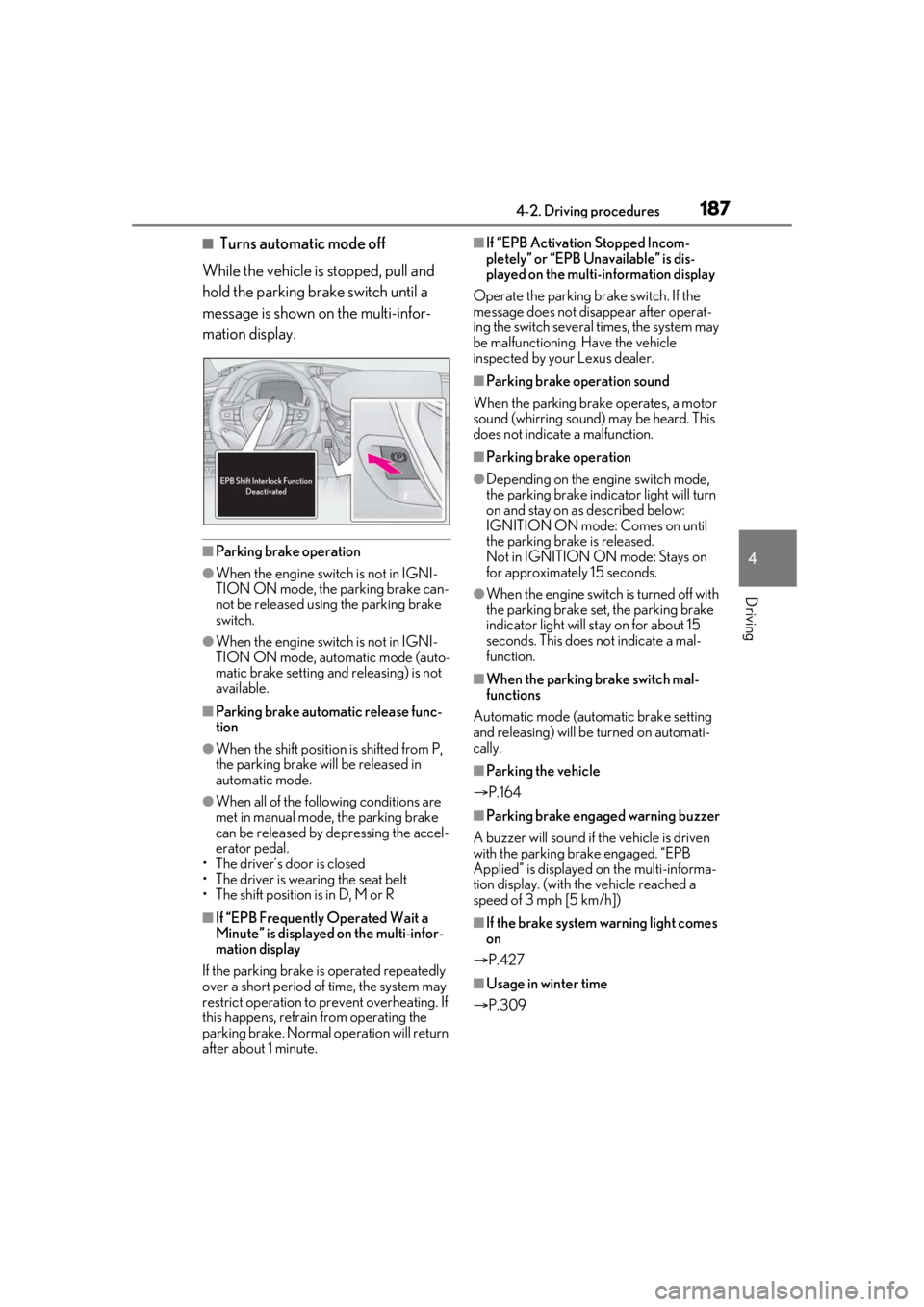
■Turns automatic mode off
While the vehicle is stopped, pull and
hold the parking brake switch until a
message is shown on the multi-infor-
mation display.
■Parking brake operation
●When the engine swit ch is not in IGNI-
TION ON mode, the parking brake can-
not be released using the parking brake
switch.
●When the engine swit ch is not in IGNI-
TION ON mode, automatic mode (auto-
matic brake setting and releasing) is not
available.
■Parking brake automatic release func-
tion
●When the shift position is shifted from P,
the parking brake will be released in
automatic mode.
●When all of the foll owing conditions are
met in manual mode, the parking brake
can be released by depressing the accel-
erator pedal.
• The driver’s door is closed
• The driver is wearing the seat belt
• The shift position is in D, M or R
■If “EPB Frequently Operated Wait a
Minute” is displayed on the multi-infor-
mation display
If the parking brake is operated repeatedly
over a short period of time, the system may
restrict operation to prevent overheating. If
this happens, refrain from operating the
parking brake. Normal operation will return
after about 1 minute.
■If “EPB Activation Stopped Incom-
pletely” or “EPB Unavailable” is dis-
played on the multi-information display
Operate the parking brake switch. If the
message does not disappear after operat-
ing the switch several times, the system may
be malfunctioning. Have the vehicle
inspected by your Lexus dealer.
■Parking brake operation sound
When the parking brake operates, a motor
sound (whirring sound) may be heard. This
does not indicate a malfunction.
■Parking brake operation
●Depending on the engine switch mode,
the parking brake indicator light will turn
on and stay on as described below:
IGNITION ON mode: Comes on until
the parking brake is released.
Not in IGNITION ON mode: Stays on
for approximately 15 seconds.
●When the engine switch is turned off with
the parking brake set, the parking brake
indicator light will stay on for about 15
seconds. This does not indicate a mal-
function.
■When the parking brake switch mal-
functions
Automatic mode (automatic brake setting
and releasing) will be turned on automati-
cally.
■Parking the vehicle
P.164
■Parking brake engaged warning buzzer
A buzzer will sound if the vehicle is driven
with the parking brake engaged. “EPB
Applied” is displayed on the multi-informa-
tion display. (with the vehicle reached a
speed of 3 mph [5 km/h])
■If the brake system warning light comes
on
P.427
■Usage in winter time
P.309
Page 189 of 520
1894-2. Driving procedures
4
Driving
play. The parking brake will then be set
automatically.
■Brake hold function
●If the brake pedal is left released for a
period of about 3 minutes after the sys-
tem has started holding the brake, the
parking brake will be set automatically. In
this case, a warning buzzer sounds and a
message is shown on the multi-informa-
tion display.
●To turn the system off while the system is
holding the brake, firmly depress the
brake pedal and press the button again.
●The brake hold function may not hold the
vehicle when the vehicle is on a steep
incline. In this situation, it may be neces-
sary for the driver to apply the brakes. A
warning buzzer will sound and the
multi-information display will inform the
driver of this situation. If a warning mes-
sage is shown on the multi-information
display, read the message and follow the
instructions.
■When the parking brake is set automati-
cally while the system is holding the
brakes
Perform any of the follo wing operations to
release the parking brake.
●Depress the accelerator pedal. (The
parking brake will not be released auto-
matically if the seat belt is not fastened.)
●Operate the parking brake switch with
the brake pedal depressed.
Make sure that the pa rking brake indicator
light goes off. ( P.186)
■When an inspection at your Lexus
dealer is necessary
When the brake hold standby indicator
(green) does not illuminate even when the
brake hold switch is pressed with the brake
hold system operating conditions met, the
system may be malfun ctioning. Have the
vehicle inspected at your Lexus dealer.
■If “Brake Hold Malfunction Press Brake
to Deactivate Visit Your Dealer” or
“Brake Hold Malfunction Visit Your
Dealer” is displayed on the multi-infor-
mation display
The system may be ma lfunctioning. Have
the vehicle inspected by your Lexus dealer.
■Warning messages and buzzers
Warning messages and buzzers are used to
indicate a system malfunction or to inform
the driver of the need for caution. If a warn-
ing message is shown on the multi-informa-
tion display, read the message and follow
the instructions.
■If the brake hold operated indicator
flashes
P.433
WARNING
■When the vehicle is on a steep incline
When using the brake hold system on a
steep incline exercise caution. The brake
hold function may not hold the vehicle in
such a situation.
■When stopped on a slippery road
The system cannot stop the vehicle when
the gripping ability of the tires has been
exceeded. Do not use the system when
stopped on a slippery road.
NOTICE
■When parking the vehicle
The brake hold system is not designed
for use when parking the vehicle for a
long period of time. Turning the engine
switch off while the system is holding the
brake may release the brake, which
would cause the vehicle to move. When
operating the engine switch, depress the
brake pedal, shift the shift position to P
and set the parking brake.
Page 201 of 520
2014-4. Refueling
4
Driving
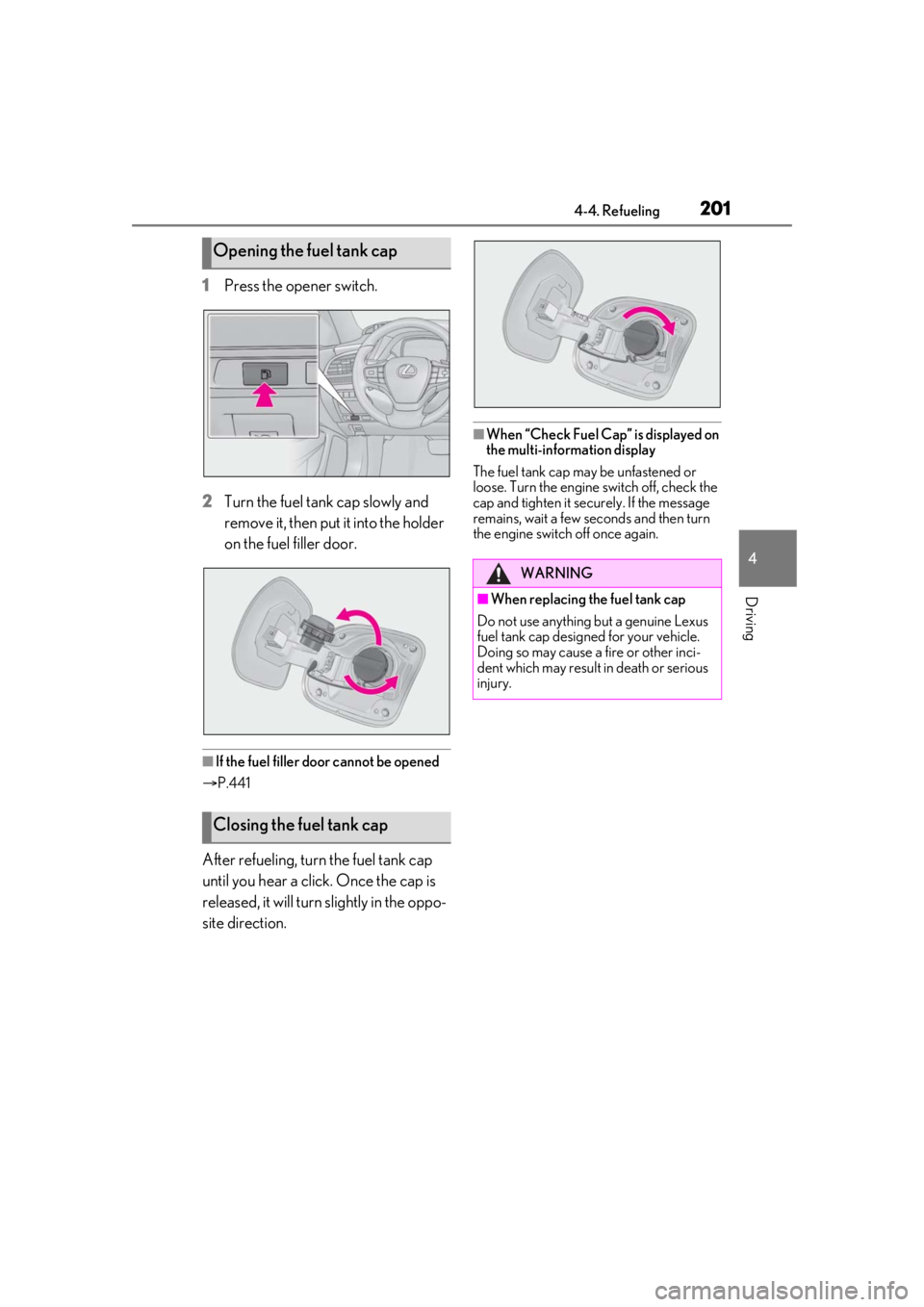
1Press the opener switch.
2 Turn the fuel tank cap slowly and
remove it, then put it into the holder
on the fuel filler door.
■If the fuel filler door cannot be opened
P.441
After refueling, turn the fuel tank cap
until you hear a click. Once the cap is
released, it will turn slightly in the oppo-
site direction.
■When “Check Fuel Cap” is displayed on
the multi-information display
The fuel tank cap may be unfastened or
loose. Turn the engine switch off, check the
cap and tighten it securely. If the message
remains, wait a few se conds and then turn
the engine switch off once again.
Opening the fuel tank cap
Closing the fuel tank cap
WARNING
■When replacing the fuel tank cap
Do not use anything but a genuine Lexus
fuel tank cap designed for your vehicle.
Doing so may cause a fire or other inci-
dent which may result in death or serious
injury.
Page 204 of 520
2044-5. Using the driving support systems
WARNING
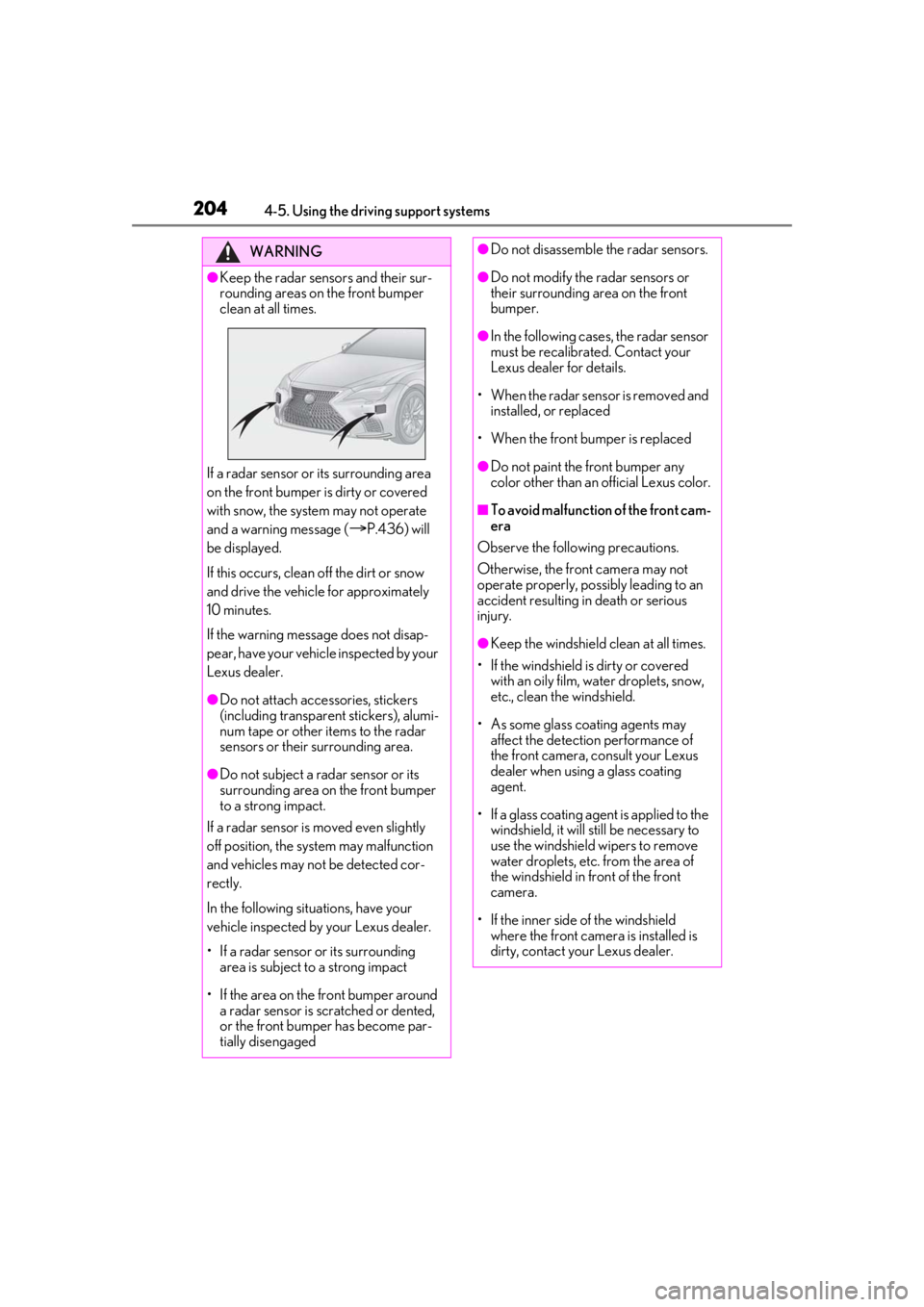
●Keep the radar sensors and their sur-
rounding areas on the front bumper
clean at all times.
If a radar sensor or its surrounding area
on the front bumper is dirty or covered
with snow, the system may not operate
and a warning message (
P.436) will
be displayed.
If this occurs, clean off the dirt or snow
and drive the vehicle for approximately
10 minutes.
If the warning message does not disap-
pear, have your vehicle inspected by your
Lexus dealer.
●Do not attach accessories, stickers
(including transparen t stickers), alumi-
num tape or other items to the radar
sensors or their surrounding area.
●Do not subject a radar sensor or its
surrounding area on the front bumper
to a strong impact.
If a radar sensor is moved even slightly
off position, the system may malfunction
and vehicles may not be detected cor-
rectly.
In the following situations, have your
vehicle inspected by your Lexus dealer.
• If a radar sensor or its surrounding area is subject to a strong impact
• If the area on the front bumper around a radar sensor is scratched or dented,
or the front bumper has become par-
tially disengaged
●Do not disassemble the radar sensors.
●Do not modify the radar sensors or
their surrounding area on the front
bumper.
●In the following cases, the radar sensor
must be recalibrated. Contact your
Lexus dealer for details.
• When the radar sens or is removed and
installed, or replaced
• When the front bumper is replaced
●Do not paint the front bumper any
color other than an official Lexus color.
■To avoid malfunction of the front cam-
era
Observe the following precautions.
Otherwise, the front camera may not
operate properly, possibly leading to an
accident resulting in death or serious
injury.
●Keep the windshield clean at all times.
• If the windshield is dirty or covered with an oily film, water droplets, snow,
etc., clean the windshield.
• As some glass coating agents may affect the detection performance of
the front camera, consult your Lexus
dealer when using a glass coating
agent.
• If a glass coating agent is applied to the windshield, it will still be necessary to
use the windshield wipers to remove
water droplets, etc. from the area of
the windshield in front of the front
camera.
• If the inner side of the windshield where the front camera is installed is
dirty, contact your Lexus dealer.
Page 207 of 520
2074-5. Using the driving support systems
4
Driving
■If a warning message is displayed on the multi-information display
A system may be temporarily unavailable or there may be a malfunction in the system.
●In the following situations, perform the actions specified in the table. When the normal
operating conditions are detected, the message will disappear and the system will
become operational.
If the message does not disappea r, contact your Lexus dealer.
SituationActions
When the area around a sensor is covered
with dirt, moisture (fogged up, covered with
condensation, ice, etc.), or other foreign
matterTo clean the part of the windshield in front of
the front camera , use the windshield wipers
or the windshield defo gger of the air condi-
tioning system ( P.324).
Page 213 of 520
2134-5. Using the driving support systems
4
Driving
■If a warning message is displayed on the multi-information display
A system may be temporarily unavailable or there may be a malfunction in the system.
●In the following situations, perform the actions specified in the table. When the normal
operating conditions are detected, the message will disappear and the system will
become operational.
If the message does not disappea r, contact your Lexus dealer.
SituationActions
When the area around a sensor is covered
with dirt, moisture (fogged up, covered with
condensation, ice, etc.), or other foreign
matterTo clean the part of the windshield in front of
the front camera , use the windshield wipers
or the windshield defo gger of the air condi-
tioning system ( P.324).
Page 215 of 520
2154-5. Using the driving support systems
4
Driving
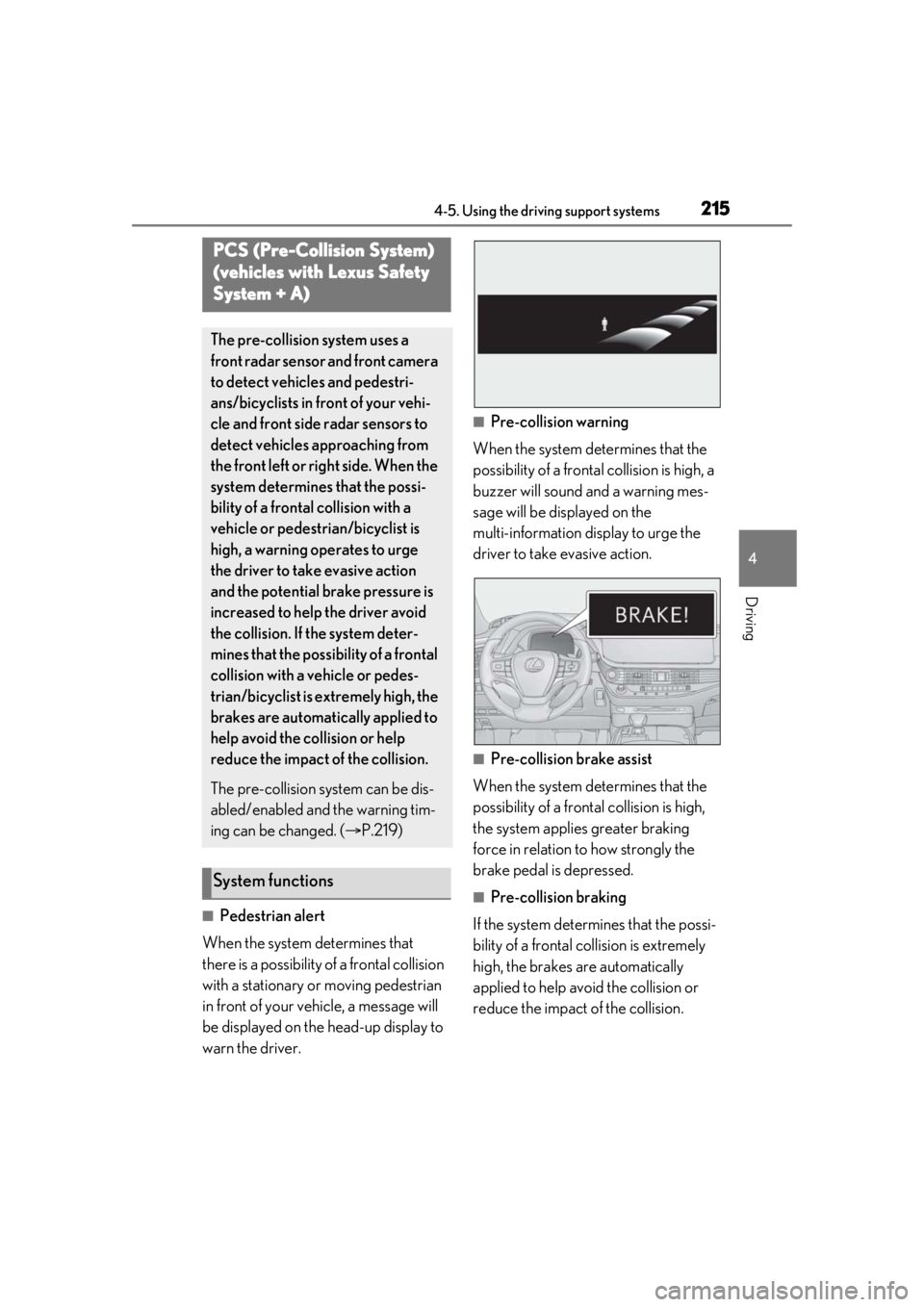
■Pedestrian alert
When the system determines that
there is a possibility of a frontal collision
with a stationary or moving pedestrian
in front of your vehicle, a message will
be displayed on the head-up display to
warn the driver.
■Pre-collision warning
When the system determines that the
possibility of a frontal collision is high, a
buzzer will sound and a warning mes-
sage will be displayed on the
multi-information display to urge the
driver to take evasive action.
■Pre-collision brake assist
When the system determines that the
possibility of a frontal collision is high,
the system applies greater braking
force in relation to how strongly the
brake pedal is depressed.
■Pre-collision braking
If the system determines that the possi-
bility of a frontal collision is extremely
high, the brakes are automatically
applied to help avoid the collision or
reduce the impact of the collision.
PCS (Pre-Collision System)
(vehicles with Lexus Safety
System + A)
The pre-collision system uses a
front radar sensor and front camera
to detect vehicles and pedestri-
ans/bicyclists in front of your vehi-
cle and front side radar sensors to
detect vehicles approaching from
the front left or right side. When the
system determines that the possi-
bility of a frontal collision with a
vehicle or pedestrian/bicyclist is
high, a warning operates to urge
the driver to take evasive action
and the potential brake pressure is
increased to help the driver avoid
the collision. If the system deter-
mines that the possibility of a frontal
collision with a vehicle or pedes-
trian/bicyclist is extremely high, the
brakes are automatically applied to
help avoid the collision or help
reduce the impact of the collision.
The pre-collision system can be dis-
abled/enabled and the warning tim-
ing can be changed. ( P.219)
System functions
Page 218 of 520
2184-5. Using the driving support systems
■Enabling/disabling the pre-colli-
sion system
The pre-collision system can be
enabled/disabled on ( P.82) of
the multi-information display.
The system is automa tically enabled each
time the engine switch is turned to IGNI-
TION ON mode.
If the system is disabled, the PCS warn-
WARNING
• In some situations, while the active steering assist is operating, operation
of the function may be canceled if the
accelerator pedal is depressed
strongly or the steering wheel is turned
and the system determines that the
driver is taking evasive action.
• When the active steering assist is operating, if the stee ring wheel is held
firmly or is operated in the opposite
direction to that which the system is
generating torque, the function may be
canceled.
• If the brake pedal is depressed, the sys- tem may determine that the driver is
taking evasive action and the active
steering assist operation may be
delayed.
■Active Asssit for seat belts
If the Active Assist has operated and the
seat belts are locked in a retracted posi-
tion, immediately stop the vehicle in a
safe place, release and retract the seat
belts to unlock them and then fasten
them again.
Also, if a seat belt can be loosened, it can
be unlocked by slightly retracting it with-
out releasing it.
■When to disable the pre-collision sys-
tem
In the following situations, disable the
system, as it may not operate properly,
possibly leading to an accident resulting
in death or serious injury:
●When the vehicle is being towed
●When your vehicle is towing another
vehicle
●When transporting the vehicle via
truck, boat, train or similar means of
transportation
●When the vehicle is raised on a lift with
the engine running and the tires are
allowed to rotate freely
●When inspecting the vehicle using a
drum tester such as a chassis dyna-
mometer or speedometer tester, or
when using an on vehicle wheel bal-
ancer
●When a strong impact has been
applied to the front bumper, rear
bumper or front grille, due to an acci-
dent or other reasons
●If the vehicle cannot be driven in a sta-
ble manner, such as when the vehicle
has been in an accid ent or is malfunc-
tioning
●When the vehicle is driven in a sporty
manner or off-road
●When the tires are not properly
inflated
●When the tires are very worn
●When tires of a size other than speci-
fied are installed
●When tire chains are installed
●When a compact spare tire or an
emergency tire punctu re repair kit is
used
●If equipment (snow plow, etc.) that may
obstruct a radar sensor or the front
camera is temporarily installed to the
vehicle
Changing settings of the pre-col-
lision system
Page 219 of 520
2194-5. Using the driving support systems
4
Driving
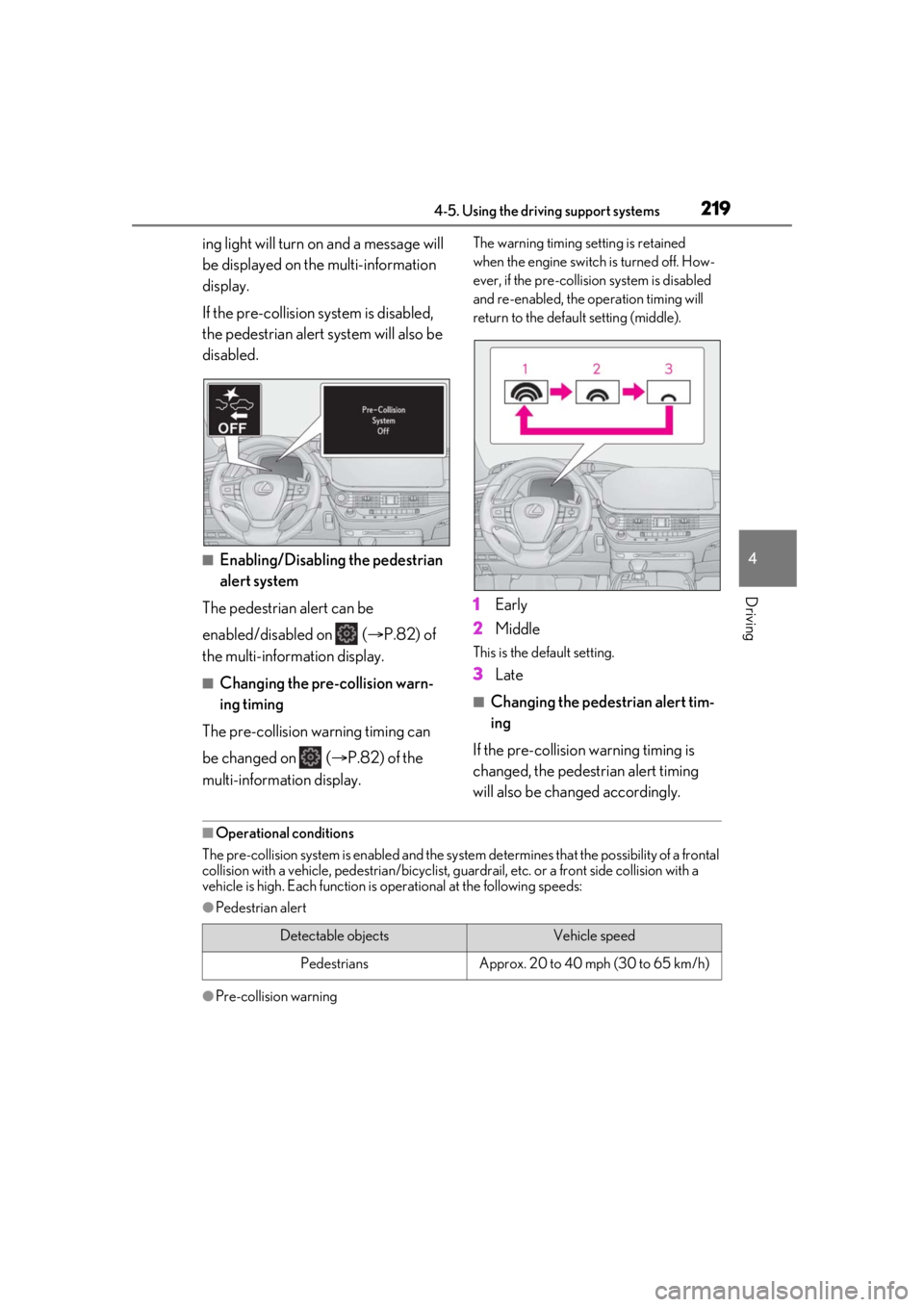
ing light will turn on and a message will
be displayed on the multi-information
display.
If the pre-collision system is disabled,
the pedestrian alert system will also be
disabled.
■Enabling/Disabling the pedestrian
alert system
The pedestrian alert can be
enabled/disabled on ( P.82) of
the multi-information display.
■Changing the pre-collision warn-
ing timing
The pre-collision warning timing can
be changed on ( P.82) of the
multi-information display.
The warning timing setting is retained
when the engine switch is turned off. How-
ever, if the pre-collision system is disabled
and re-enabled, the operation timing will
return to the default setting (middle).
1 Early
2 Middle
This is the default setting.
3Late
■Changing the pedestrian alert tim-
ing
If the pre-collision warning timing is
changed, the pedestrian alert timing
will also be changed accordingly.
■Operational conditions
The pre-collision system is enabled and the system determines that the possibility of a frontal
collision with a vehicle, pedestri an/bicyclist, guardrail, etc. or a front side collision with a
vehicle is high. Each function is operational at the following speeds:
●Pedestrian alert
●Pre-collision warning
Detectable objectsVehicle speed
PedestriansApprox. 20 to 40 mph (30 to 65 km/h)
Page 226 of 520
2264-5. Using the driving support systems
emerge from behind a vehicle or large
object
• Pedestrians and bicyclists which are
extremely close to the side of the vehicle
(outside rear view mirror, etc.)
• When driving in a tr affic lane separated
by more than one lane where oncoming
vehicles are driving while making a
right/left turn
• When largely out of place with the oppo- site facing targeted oncoming vehicle
during a right/left turn
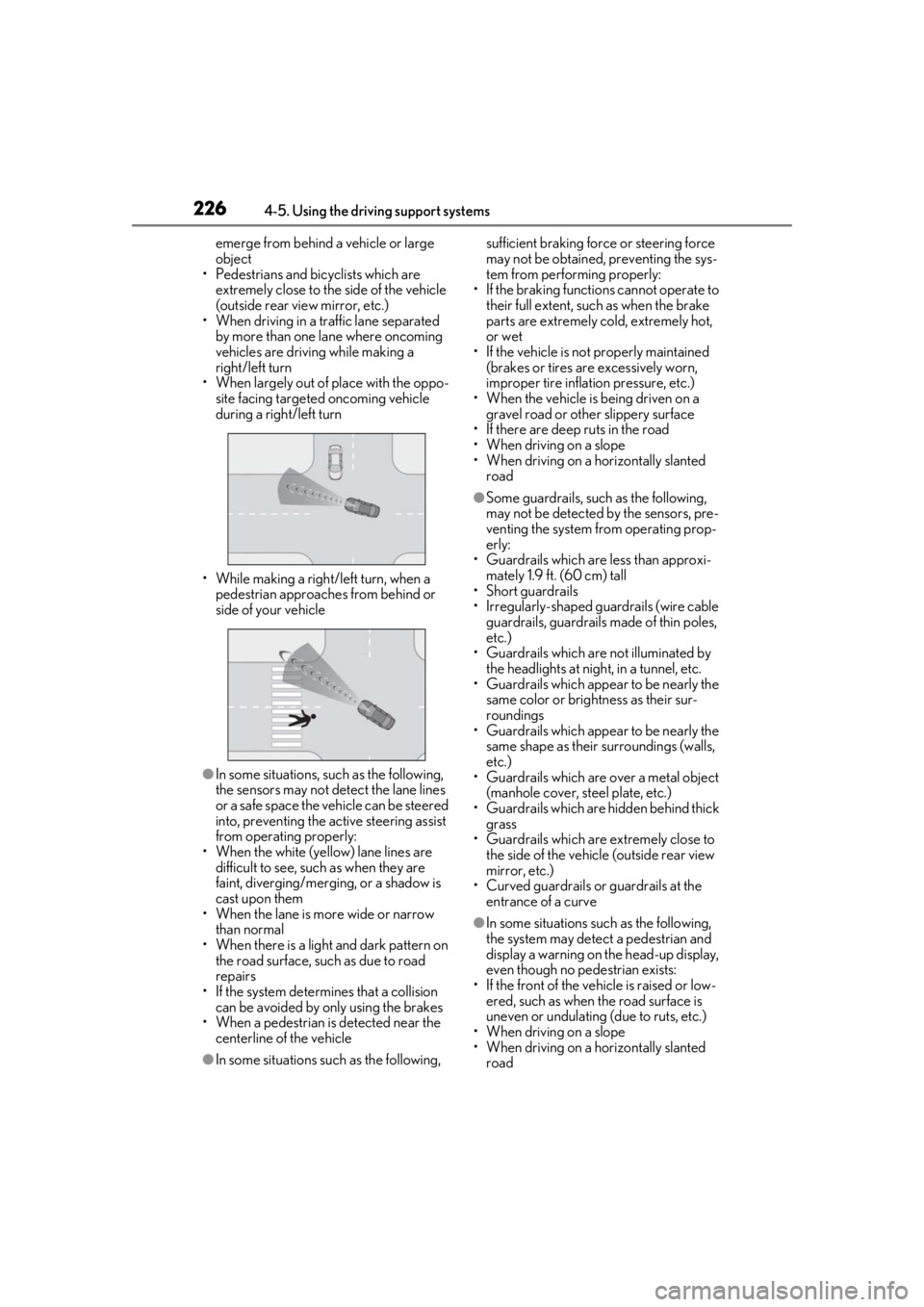
• While making a right/left turn, when a pedestrian approaches from behind or
side of your vehicle
●In some situations, such as the following,
the sensors may not detect the lane lines
or a safe space the vehicle can be steered
into, preventing the ac tive steering assist
from operating properly:
• When the white (yellow) lane lines are difficult to see, such as when they are
faint, diverging/merging, or a shadow is
cast upon them
• When the lane is more wide or narrow
than normal
• When there is a light and dark pattern on the road surface, such as due to road
repairs
• If the system determines that a collision can be avoided by only using the brakes
• When a pedestrian is detected near the
centerline of the vehicle
●In some situations such as the following, sufficient braking forc
e or steering force
may not be obtained, preventing the sys-
tem from performing properly:
• If the braking functions cannot operate to their full extent, such as when the brake
parts are extremely cold, extremely hot,
or wet
• If the vehicle is not properly maintained (brakes or tires are excessively worn,
improper tire inflation pressure, etc.)
• When the vehicle is being driven on a gravel road or other slippery surface
• If there are deep ruts in the road
• When driving on a slope
• When driving on a horizontally slanted road
●Some guardrails, such as the following,
may not be detected by the sensors, pre-
venting the system from operating prop-
erly:
• Guardrails which are less than approxi- mately 1.9 ft. (60 cm) tall
• Short guardrails
• Irregularly-shaped gu ardrails (wire cable
guardrails, guardrails made of thin poles,
etc.)
• Guardrails which are not illuminated by the headlights at nigh t, in a tunnel, etc.
• Guardrails which appear to be nearly the
same color or brightness as their sur-
roundings
• Guardrails which appear to be nearly the
same shape as their surroundings (walls,
etc.)
• Guardrails which are over a metal object
(manhole cover, steel plate, etc.)
• Guardrails which are hidden behind thick grass
• Guardrails which are extremely close to the side of the vehicle (outside rear view
mirror, etc.)
• Curved guardrails or guardrails at the entrance of a curve
●In some situations su ch as the following,
the system may detect a pedestrian and
display a warning on the head-up display,
even though no pedestrian exists:
• If the front of the vehicle is raised or low- ered, such as when the road surface is
uneven or undulating (due to ruts, etc.)
• When driving on a slope
• When driving on a horizontally slanted road