steering LEXUS LS500H 2018 User Guide
[x] Cancel search | Manufacturer: LEXUS, Model Year: 2018, Model line: LS500H, Model: LEXUS LS500H 2018Pages: 528, PDF Size: 10.8 MB
Page 73 of 528
732-1. Instrument cluster
LS500h_OM_OM50F42U_(U) 2
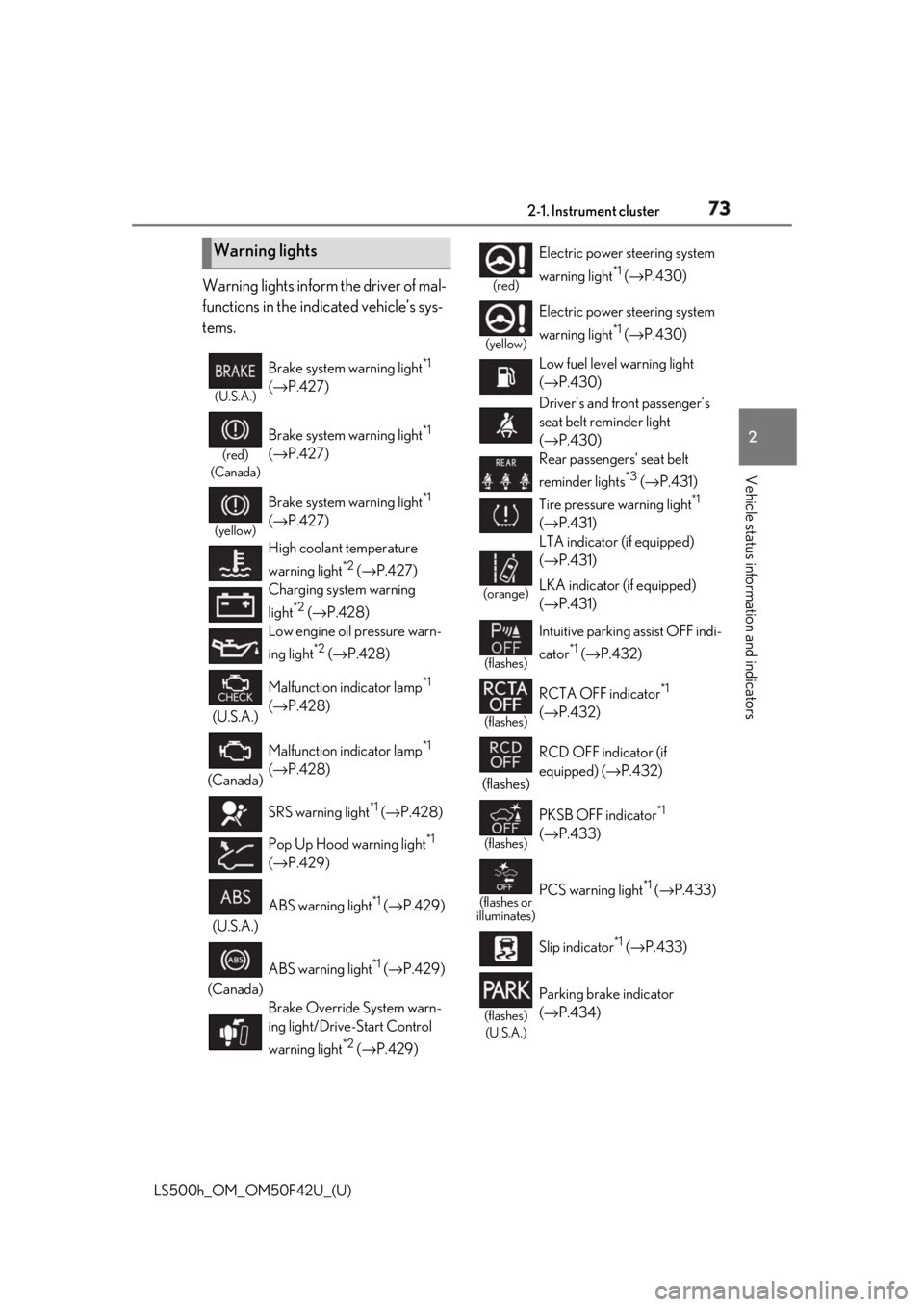
Vehicle status information and indicators Warning lights inform the driver of mal-
functions in the indicated vehicle’s sys-
tems.
Warning lights (U.S.A.)
Brake system warning light *1
( → P.427)(red)
(Canada)
Brake system warning light *1
( → P.427)(yellow)
Brake system warning light *1
( → P.427)
High coolant temperature
warning light *2
( → P.427)
Charging system warning
light *2
( → P.428)
Low engine oil pressure warn-
ing light *2
( → P.428)
(U.S.A.) Malfunction indicator lamp *1
( → P.428)
(Canada) Malfunction indicator lamp *1
( → P.428)
SRS warning light *1
( → P.428)
Pop Up Hood warning light *1
( → P.429)
(U.S.A.) ABS warning light *1
( → P.429)
(Canada) ABS warning light *1
( → P.429)
Brake Override System warn-
ing light/Drive-Start Control
warning light *2
( → P.429) (red)
Electric power steering system
warning light *1
( → P.430)(yellow)
Electric power steering system
warning light *1
( → P.430)
Low fuel level warning light
( → P.430)
Driver’s and front passenger’s
seat belt reminder light
( → P.430)
Rear passengers’ seat belt
reminder lights *3
( → P.431)
Tire pressure warning light *1
( → P.431)(orange)
LTA indicator (if equipped)
( → P.431)
LKA indicator (if equipped)
( → P.431)(flashes)
Intuitive parking assist OFF indi-
cator *1
( → P.432)
(flashes)
RCTA OFF indicator *1
( → P.432)
(flashes) RCD OFF indicator (if
equipped) ( → P.432)
(flashes)
PKSB OFF indicator *1
( → P.433)
(flashes or
illuminates)
PCS warning light *1
( → P.433)
Slip indicator *1
( → P.433)
(flashes)
(U.S.A.) Parking brake indicator
( → P.434)
Page 89 of 528
892-1. Instrument cluster
LS500h_OM_OM50F42U_(U) 2
Vehicle status information and indicators may not be updated.■
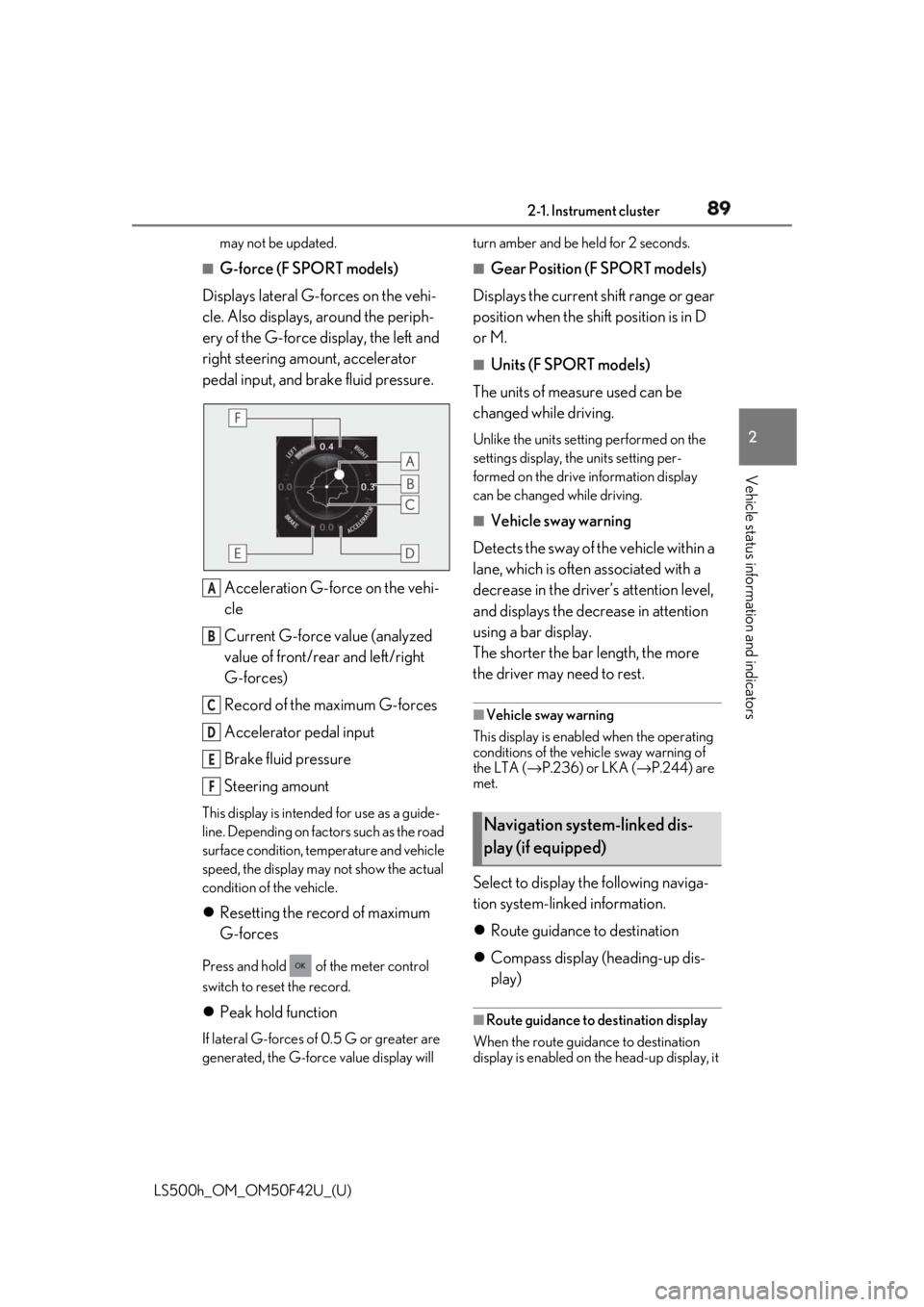
G-force (F SPORT models)
Displays lateral G-forces on the vehi-
cle. Also displays, around the periph-
ery of the G-force display, the left and
right steering amount, accelerator
pedal input, and brake fluid pressure.
Acceleration G-force on the vehi-
cle
Current G-force value (analyzed
value of front/rear and left/right
G-forces)
Record of the maximum G-forces
Accelerator pedal input
Brake fluid pressure
Steering amountThis display is intended for use as a guide-
line. Depending on factors such as the road
surface condition, temperature and vehicle
speed, the display may not show the actual
condition of the vehicle.
Resetting the record of maximum
G-forces Press and hold of the meter control
switch to reset the record.
Peak hold function If lateral G-forces of 0.5 G or greater are
generated, the G-forc e value display will turn amber and be held for 2 seconds. ■
Gear Position (F SPORT models)
Displays the current shift range or gear
position when the shift position is in D
or M. ■
Units (F SPORT models)
The units of measure used can be
changed while driving. Unlike the units sett ing performed on the
settings display, th e units setting per-
formed on the drive information display
can be changed while driving.■
Vehicle sway warning
Detects the sway of the vehicle within a
lane, which is often associated with a
decrease in the driver’s attention level,
and displays the decrease in attention
using a bar display.
The shorter the bar length, the more
the driver may need to rest. ■
Vehicle sway warning
This display is enable d when the operating
conditions of the vehicle sway warning of
the LTA ( → P.236) or LKA ( → P.244) are
met.
Select to display the following naviga-
tion system-linked information.
Route guidance to destination
Compass display (heading-up dis-
play) ■
Route guidance to destination display
When the route guidance to destination
display is enabled on th e head-up display, it A
B
C
D
E
F
Navigation system-linked dis-
play (if equipped)
Page 95 of 528
952-1. Instrument cluster
LS500h_OM_OM50F42U_(U) 2
Vehicle status information and indicators Displays the operational status of the
following systems:
LTA (Lane Tracing Assist) (if
equipped) ( → P.230)
LKA (Lane-Keeping Assist) (if
equipped) ( → P.240)
Dynamic radar cruise control with
full-speed range ( → P.250)Details of content displayed on the
head-up display may differ from that dis-
played on the multi-information display. For
details, refer to the explanation of each sys-
tem.
Pop-up displays for the following sys-
tems will be displayed when necessary. ■
Driving support systems
Displays a warning/suggestion/advice
message or the operating state of a rel-
evant system.
PCS (Pre-Collision System)
( → P.209, 220)
FCTA (Front Cross Traffic Alert) (if
equipped) ( → P.227)
Intuitive parking assist ( → P.266)
Parking Support Brake function (for
static objects) ( → P.286)
Brake Override System ( → P.159)
Drive-Start Control ( → P.159)Details of content displayed on the
head-up display may differ from that dis-
played on the multi-information display. For details, refer to the explanation of each sys-
tem. ■
/ icons
These icons are linked to the
multi-information display
: Master warning icon Displayed when a warn ing message is dis-
played on the multi-information display.
( → P.437)
: Information icon Displayed when a suggestion pop-up dis-
play ( → P.91) or advice pop-up display is
displayed on the multi-information display. ■
Warning message
Some warning messages are displayed
when necessary, according to certain
conditions. Details of content displayed on the
head-up display may differ from that dis-
played on the multi-information display. ■
Audio system operation status
Displayed when an audio remote con-
trol switch on the steering wheel is
operated. ■
Hands-free system status
Displayed when the hands-free system
is operated. ■
When a pop-up display is displayed
When a pop-up display is displayed, a cur-
rent display may no long er be displayed. In
this case, the display will return after the
pop-up display disappears.Driving support system display
area
Pop-up display
Page 103 of 528
103
LS500h_OM_OM50F42U_(U) 3 3
Before driving Before driving .
3-1. Key information
Keys ................................................. 104
3-2. Opening, closing and locking the
doors and trunk
Doors............................................... 108
Trunk................................................. 112
Smart access system with
push-button start ...................... 119
3-3. Adjusting the seats
Front seats ..................................... 128
Power rear seat........................... 135
Driving position memory ........ 139
Rear seat position memory .... 143
Head restraints............................ 144
3-4. Adjusting the steering wheel and
mirrors
Steering wheel............................. 147
Inside rear view mirror............. 148
Outside rear view mirrors ...... 149
3-5. Opening, closing the windows
and moon roof
Power windows............................ 151
Moon roof ..................................... 153
Page 139 of 528
1393-3. Adjusting the seats
LS500h_OM_OM50F42U_(U) 3
Before driving rear seat relaxation system for that seat. ■
Relaxation system●
Operating conditions
• The power switch is in ON mode.
• The temperature in the cabin is not
extremely high.
• The weight of an occupant is detected on
the rear seat or the rear seat belt is fas-
tened.
Once weight is detect ed on the seat, the
seat will be judged as occupied until the
rear door is opened then closed or the
power switch is turned off. ●
Automatic stop function
• The operation will be canceled automati-
cally after approximately 15 minutes.
• If the door for a seat that the relaxation
system is currently being used is opened,
the relaxation system will stop operating.
The seat and steering wheel are auto-
matically adjusted to allow the driver to
enter and exit the vehicle easily.
Driver’s seat
When all of the following have been
performed, the seat and steering
wheel are automatically adjusted to a
position that allows driver to enter and
exit the vehicle easily.
• The shift position has been shifted to
P.
• The power switch has been turned
off.
• The driver’s seat belt has been
unfastened. When the driver’s seat adjustment
switches are in front passenger mode
( → P.130), the seat and steering wheel will
not move.WARNING■
Using the relaxation system●
Those who are pregnant, have recently
given birth, or suffer from ailments
requiring rest (heart disease etc.)
should consult a doctor before use.●
Do not allow children to use the relax-
ation function.
●
Do not use immediately after consum-
ing a meal or alcohol, or for an
extended period of time.
●
If you feel sick while using the relax-
ation function, immediately discon-
tinue use. Driving position memory This feature automatically adjusts
the positions of the front seats,
steering wheel, outside rear view
mirrors and head-up display (if
equipped) to make entering and
exiting the vehicle easier or to suit
your preferences.
Up to 3 different driving positions
can be recorded.
Each electronic key (including a
card key) can be registered to
recall your preferred driving posi-
tion.
Power easy access system
Page 140 of 528
140 3-3. Adjusting the seats
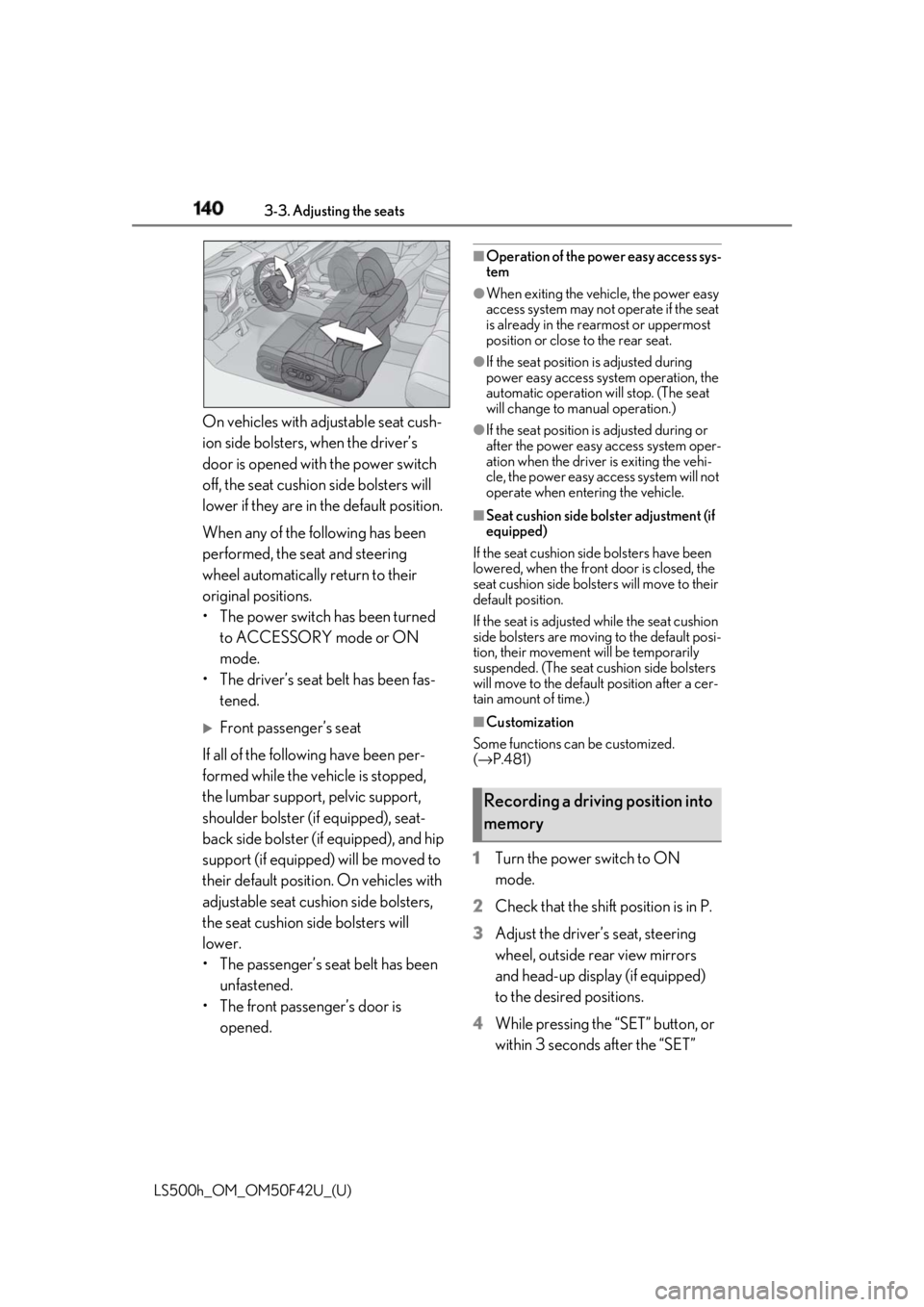
LS500h_OM_OM50F42U_(U) On vehicles with adjustable seat cush-
ion side bolsters, when the driver’s
door is opened with the power switch
off, the seat cushio n side bolsters will
lower if they are in the default position.
When any of the following has been
performed, the seat and steering
wheel automatically return to their
original positions.
• The power switch has been turned
to ACCESSORY mode or ON
mode.
• The driver’s seat belt has been fas-
tened.
Front passenger’s seat
If all of the following have been per-
formed while the vehicle is stopped,
the lumbar support, pelvic support,
shoulder bolster (if equipped), seat-
back side bolster (if equipped), and hip
support (if equipped) will be moved to
their default position. On vehicles with
adjustable seat cushion side bolsters,
the seat cushion side bolsters will
lower.
• The passenger’s seat belt has been
unfastened.
• The front passenger’s door is
opened. ■
Operation of the power easy access sys-
tem ●
When exiting the vehicle, the power easy
access system may not operate if the seat
is already in the rearmost or uppermost
position or close to the rear seat. ●
If the seat position is adjusted during
power easy access syst em operation, the
automatic operation will stop. (The seat
will change to manual operation.) ●
If the seat position is adjusted during or
after the power easy access system oper-
ation when the driver is exiting the vehi-
cle, the power easy access system will not
operate when entering the vehicle. ■
Seat cushion side bolster adjustment (if
equipped)
If the seat cushion side bolsters have been
lowered, when the front door is closed, the
seat cushion side bolsters will move to their
default position.
If the seat is adjusted while the seat cushion
side bolsters are moving to the default posi-
tion, their movement will be temporarily
suspended. (The seat cushion side bolsters
will move to the default position after a cer-
tain amount of time.) ■
Customization
Some functions can be customized.
( → P.481)
1 Turn the power switch to ON
mode.
2 Check that the shift position is in P.
3 Adjust the driver’s seat, steering
wheel, outside rear view mirrors
and head-up display (if equipped)
to the desired positions.
4 While pressing the “SET” button, or
within 3 seconds after the “SET” Recording a driving position into
memory
Page 141 of 528
1413-3. Adjusting the seats
LS500h_OM_OM50F42U_(U) 3
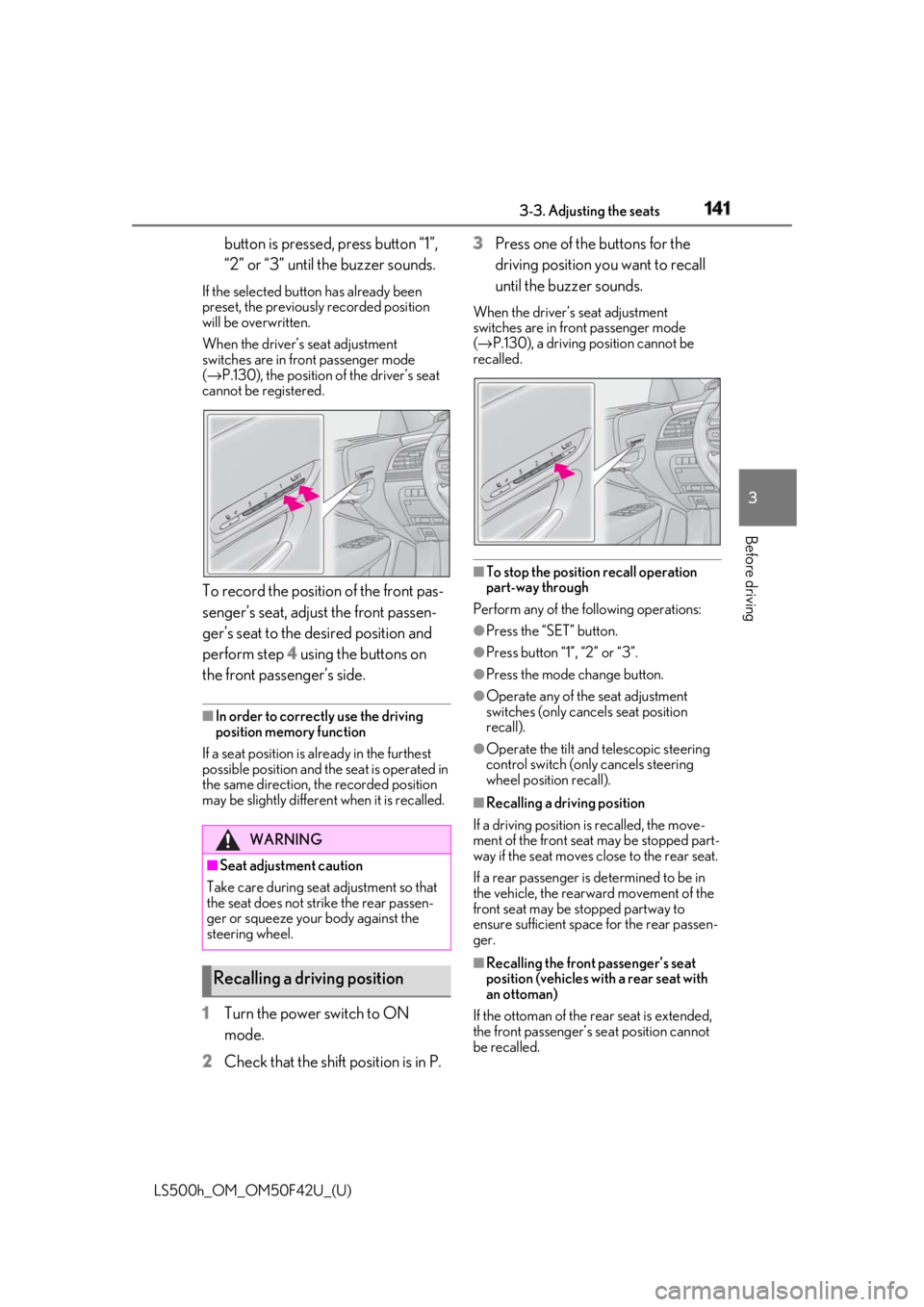
Before driving button is pressed, press button “1”,
“2” or “3” until the buzzer sounds.If the selected button has already been
preset, the previously recorded position
will be overwritten.
When the driver’s seat adjustment
switches are in front passenger mode
( → P.130), the position of the driver’s seat
cannot be registered.
To record the position of the front pas-
senger’s seat, adjust the front passen-
ger’s seat to the desired position and
perform step 4 using the buttons on
the front passenger’s side. ■
In order to correctly use the driving
position memory function
If a seat position is already in the furthest
possible position and the seat is operated in
the same direction, the recorded position
may be slightly differen t when it is recalled.
1 Turn the power switch to ON
mode.
2 Check that the shift position is in P. 3 Press one of the buttons for the
driving position you want to recall
until the buzzer sounds. When the driver’s seat adjustment
switches are in front passenger mode
( → P.130), a driving position cannot be
recalled.
■
To stop the position recall operation
part-way through
Perform any of the following operations: ●
Press the “SET” button. ●
Press button “1”, “2” or “3”. ●
Press the mode change button. ●
Operate any of the seat adjustment
switches (only cancels seat position
recall). ●
Operate the tilt and telescopic steering
control switch (onl y cancels steering
wheel position recall). ■
Recalling a driving position
If a driving position is recalled, the move-
ment of the front seat may be stopped part-
way if the seat moves close to the rear seat.
If a rear passenger is determined to be in
the vehicle, the rearward movement of the
front seat may be stopped partway to
ensure sufficient space for the rear passen-
ger.
■
Recalling the front passenger’s seat
position (vehicles with a rear seat with
an ottoman)
If the ottoman of the rear seat is extended,
the front passenger’s se at position cannot
be recalled.WARNING
■
Seat adjustment caution
Take care during seat adjustment so that
the seat does not strike the rear passen-
ger or squeeze your body against the
steering wheel.
Recalling a driving position
Page 143 of 528
1433-3. Adjusting the seats
LS500h_OM_OM50F42U_(U) 3
Before driving cle easier.
If the driving position is in a position that
has already been recorded, the seat and
outside rear view mirrors will not move.
2 Turn the power switch to ACCES-
SORY mode or ON mode, or fas-
ten a seat belt.The seat, steering wheel and head-up dis-
play (if equipped) will move to the
recorded position. ■
Recalling the driving position using the
memory recall function●
Different driving positions can be regis-
tered for each electronic key. Therefore,
the driving position that is recalled may
be different depending on the key being
carried.●
If a door other than the driver’s door is
unlocked with the smart access system
with push-button start, the driving posi-
tion cannot be recalled. In this case, press
the driving position button which has
been set.■
Customization
Some functions can be customized.
( → P.481) *
: If equipped
1 Turn the power switch to ON
mode.
2 Display the home screen on the
Rear Multi Operation Panel
( → P.318) and then touch “Seat”.
3 Touch “Left” or “Right”.
4 Adjust the rear seat to the desired
position and then touch “Set Mem-
ory”.
5 Touch “1” or “2”. If the preset is being used, the previously
recorded seat position will be overwritten.
■
In order to correctly use the position
memory function
If a seat position is already in the furthest
possible position and the seat is operated in
the same direction, the recorded position
may be slightly differen t when it is recalled.Rear seat position memory *
The rear seat position can be mem-
orized and recalled with the touch
of a button.
Recording a position into mem-
ory
WARNING
■
Seat adjustme nt caution
Take care during seat adjustment so that
the rear passengers do not strike the
front seats.
Page 147 of 528
1473-4. Adjusting the steering wheel and mirrors
LS500h_OM_OM50F42U_(U) 3
Before driving 3-4.Adjusting the steering wheel and mirrors
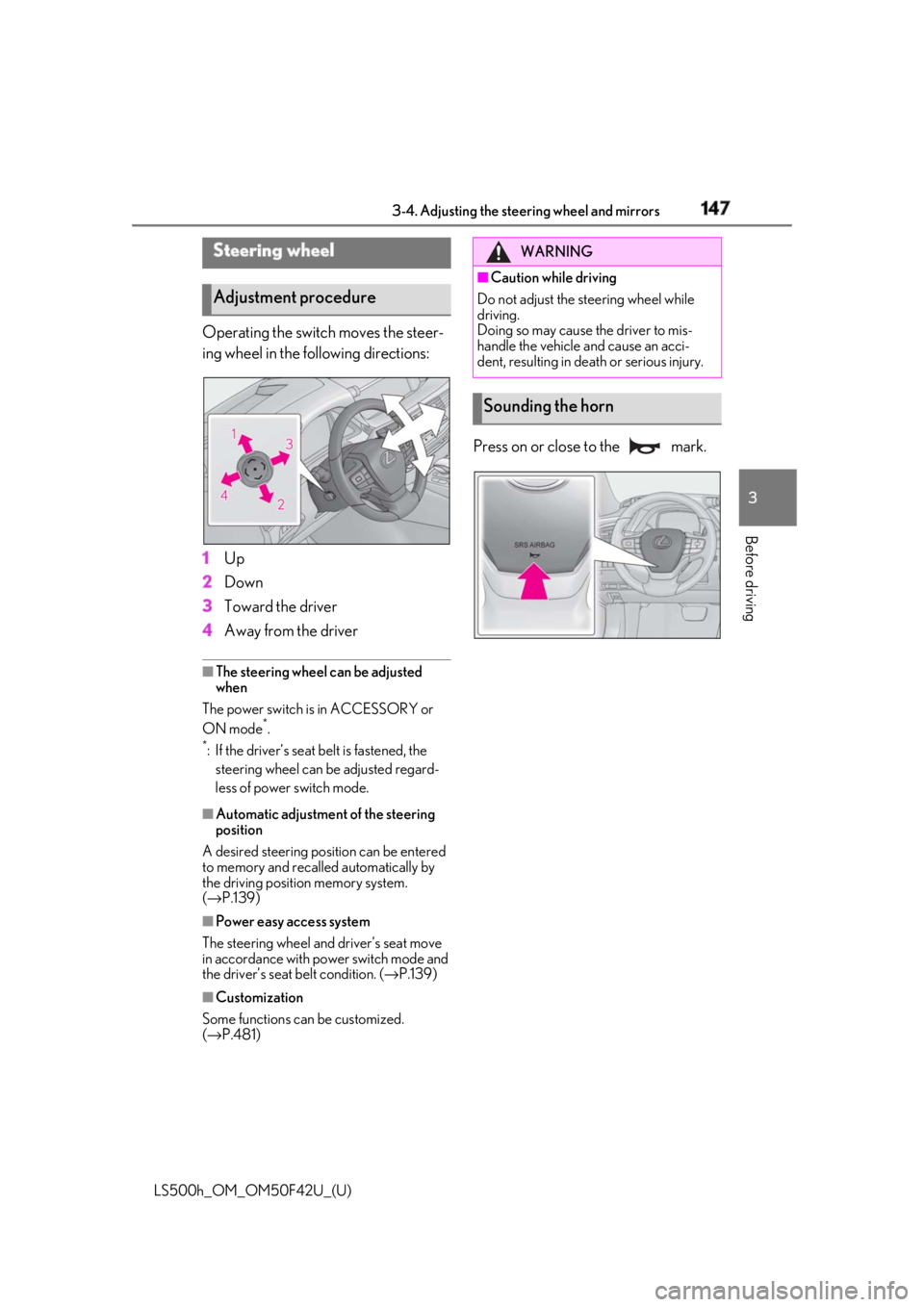
Operating the switch moves the steer-
ing wheel in the following directions:
1 Up
2 Down
3 Toward the driver
4 Away from the driver ■
The steering wheel can be adjusted
when
The power switch is in ACCESSORY or
ON mode *
.*
: If the driver’s seat belt is fastened, the
steering wheel can be adjusted regard-
less of power switch mode.
■
Automatic adjustment of the steering
position
A desired steering position can be entered
to memory and recalled automatically by
the driving position memory system.
( → P.139)
■
Power easy access system
The steering wheel and driver’s seat move
in accordance with power switch mode and
the driver’s seat belt condition. ( → P.139)
■
Customization
Some functions can be customized.
( → P.481) Press on or close to the mark.Steering wheel
Adjustment procedure WARNING■
Caution while driving
Do not adjust the steering wheel while
driving.
Doing so may cause the driver to mis-
handle the vehicle and cause an acci-
dent, resulting in death or serious injury.
Sounding the horn
Page 148 of 528
148 3-4. Adjusting the steering wheel and mirrors
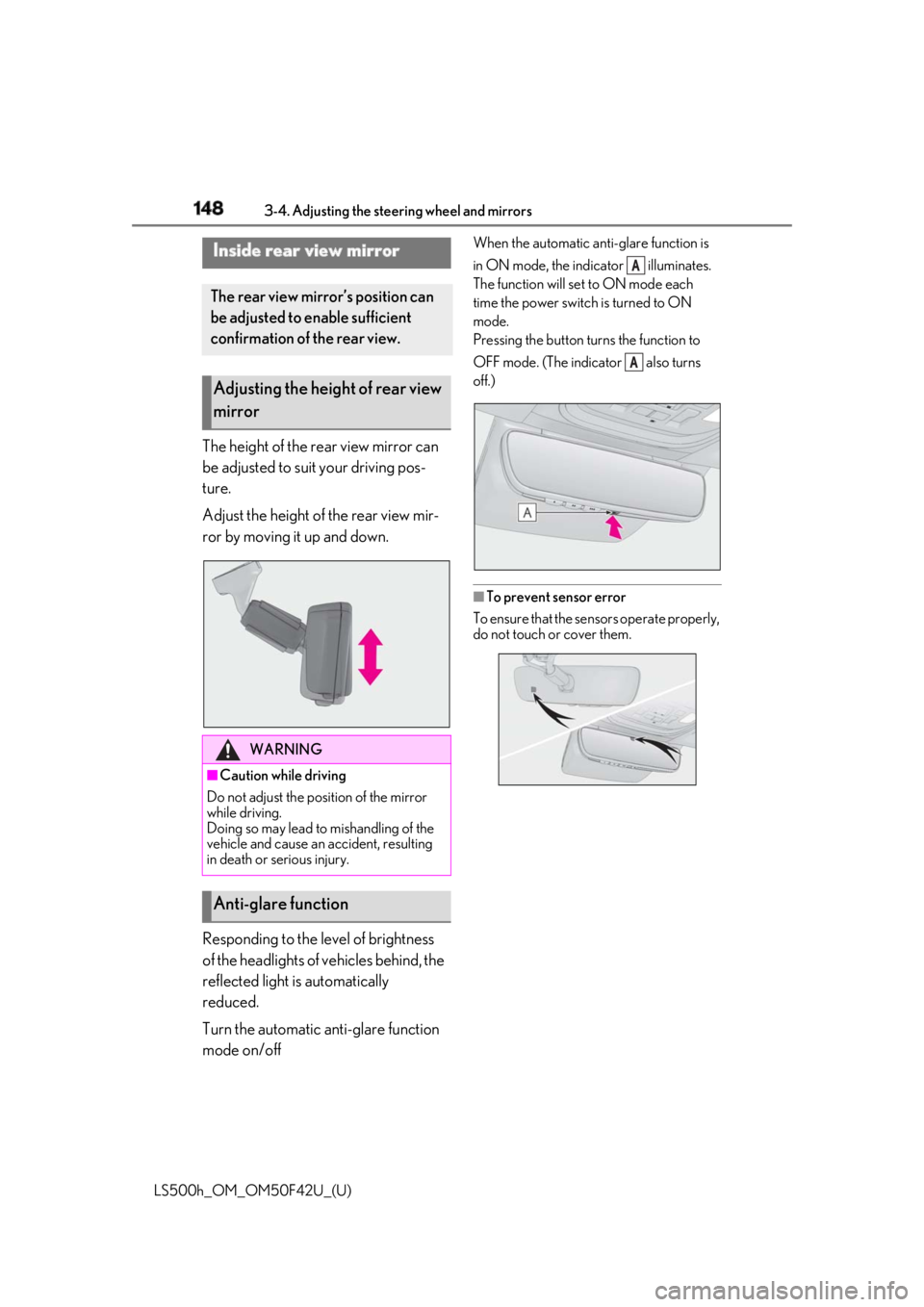
LS500h_OM_OM50F42U_(U) The height of the rear view mirror can
be adjusted to suit your driving pos-
ture.
Adjust the height of the rear view mir-
ror by moving it up and down.
Responding to the level of brightness
of the headlights of vehicles behind, the
reflected light is automatically
reduced.
Turn the automatic anti-glare function
mode on/off When the automatic anti-glare function is
in ON mode, the indicator illuminates.
The function will set to ON mode each
time the power switch is turned to ON
mode.
Pressing the button turns the function to
OFF mode. (The indicator also turns
off.)
■
To prevent sensor error
To ensure that the sensors operate properly,
do not touch or cover them.Inside rear view mirror The rear view mirror’s position can
be adjusted to enable sufficient
confirmation of the rear view.
Adjusting the height of rear view
mirror
WARNING■
Caution while driving
Do not adjust the position of the mirror
while driving.
Doing so may lead to mishandling of the
vehicle and cause an accident, resulting
in death or serious injury.
Anti-glare function A
A