ESP LEXUS LS500H 2019 Workshop Manual
[x] Cancel search | Manufacturer: LEXUS, Model Year: 2019, Model line: LS500H, Model: LEXUS LS500H 2019Pages: 523, PDF Size: 15.79 MB
Page 307 of 523
3074-6. Driving tips
LS500h_OM_(U)_1809
4
Driving
4-6.Driving tips
When using Eco drive mode, the
torque corresponding to the accelera-
tor pedal depression amount can be
generated more smoothly than it is in
normal conditions. In addition, the
operation of the air conditioning sys-
tem (heating/cooling) will be mini-
mized, improving the fuel economy.
( P.297)
The Eco-friendly driving is possible by
keeping the indicate of Hybrid System
Indicator within Eco area. ( P.82, 87)
Shift the shift position to D when
stopped at a traffic light, or driving in
heavy traffic etc. Shift the shift position
to P when parking. When using the N
position, there is no positive effect on
fuel consumption. In the N position, the
gasoline engine operates but electric-
ity cannot be generated. Also, when
using the air conditio ning system, etc.,
the hybrid battery (traction battery)
power is consumed.
Drive your vehicle smoothly. Avoid
abrupt acceleration and decelera-
tion. Gradual acceleration and
deceleration will make more effec-
tive use of the electric motor (trac-
tion motor) without having to use
gasoline engine power.
Avoid repeated acceleration.
Repeated acceleration consumes
hybrid battery (traction battery)
power, resulting in poor fuel con-
sumption. Battery power can be
restored by driving with the acceler-
ator pedal slightly released.
Make sure to operate the brakes gently
and in a timely manner. A greater
amount of electrical energy can be
regenerated when slowing down.
Repeated acceleration and decelera-
tion, as well as long waits at traffic
lights, will lead to bad fuel economy.
Check traffic reports before leaving
and avoid delays as much as possible.
When driving in a traffic jam, gently
release the brake pedal to allow the
vehicle to move forward slightly while
avoiding overuse of the accelerator
pedal. Doing so can help control
excessive gasoline consumption.
Hybrid vehicle driving tips
For economical and ecological
driving, pay attention to the follow-
ing points:
Using Eco drive mode
Use of Hybrid System Indicator
Changing the shift position
Accelerator pedal/brake pedal
operation
When braking
Delays
Page 317 of 523
3175-1. Remote Touch/Display
LS500h_OM_(U)_1809
5
Interior features
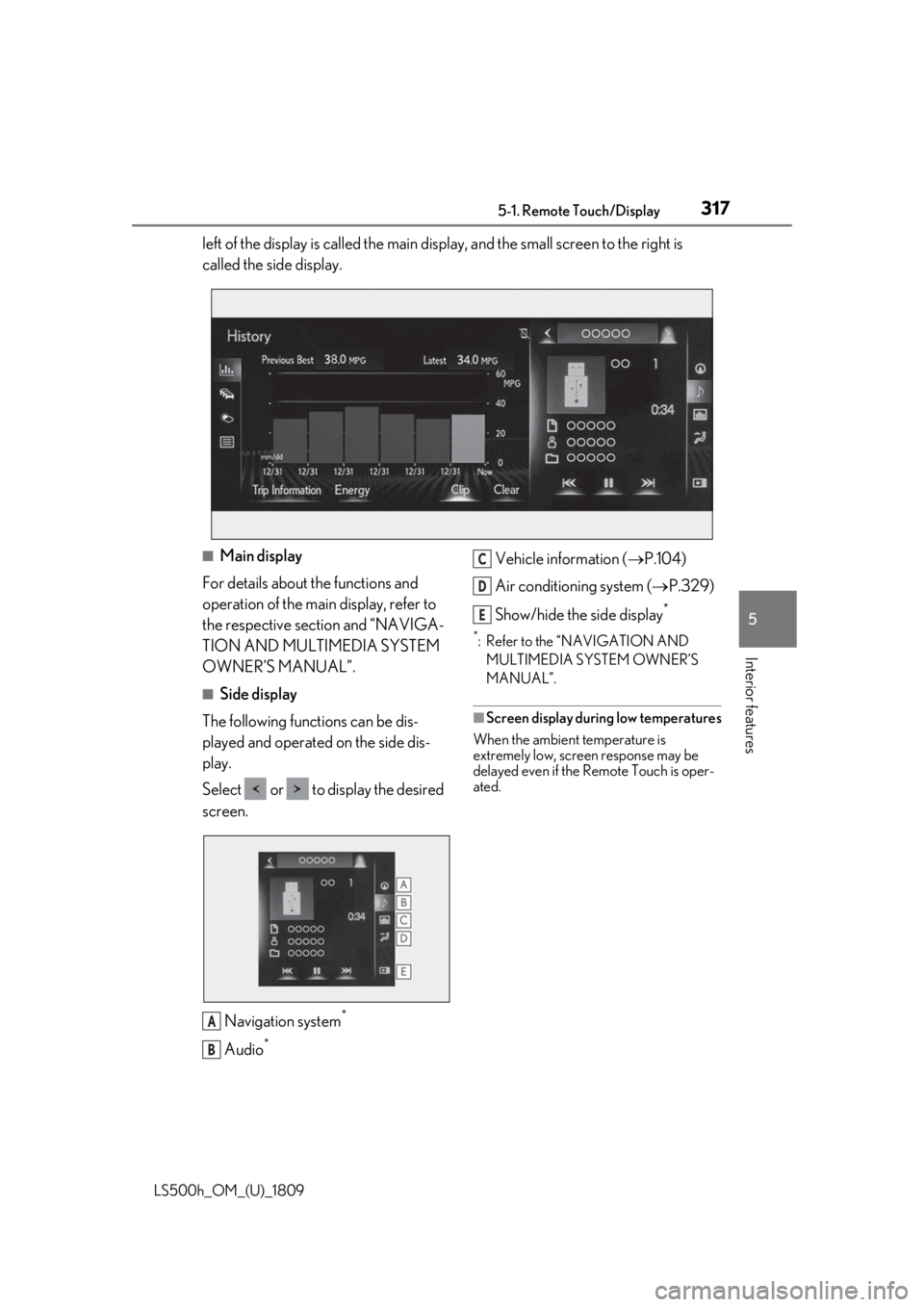
left of the display is called the main display, and the small screen to the right is
called the side display.
■Main display
For details about the functions and
operation of the main display, refer to
the respective section and “NAVIGA-
TION AND MULTIMEDIA SYSTEM
OWNER’S MANUAL”.
■Side display
The following functions can be dis-
played and operated on the side dis-
play.
Select or to display the desired
screen.
Navigation system
*
Audio*
Vehicle information ( P.104)
Air conditioning system ( P.329)
Show/hide the side display
*
*: Refer to the “NAVIGATION AND MULTIMEDIA SYSTEM OWNER’S
MANUAL”.
■Screen display during low temperatures
When the ambient temperature is
extremely low, screen response may be
delayed even if the Remote Touch is oper-
ated.
A
B
C
D
E
Page 320 of 523
3205-1. Remote Touch/Display
LS500h_OM_(U)_1809remove anything touc
hing the Rear Multi
Operation Panel and wait for approxi-
mately 30 seconds be fore operating it
again.
If the Rear Multi Op eration Panel still
cannot be operated normally, press and
hold the button to turn the Rear
Multi Operation Panel off, and then press
the button again to turn it back
on and operate it.
●In the following situations, the Rear Multi
Operation Panel may not operate prop-
erly:
• If wearing gloves during operation, non response may occur.
• If a wet hand is used to operate the Rear Multi Operation Panel.
• If a screen cover or coating is applied to
on the Rear Multi Operation Panel.
• If the Rear Multi Operation Panel is dirty or has liquid attach ed to it, incorrect
operation or non-response may occur.
• If the Rear Multi Operation Panel receives electro magnetic waves, incor-
rect operation or non-response may
occur.
• If a mobile phone or other wireless com-
munication device brought near the Rear
Multi Operation Panel.
●If the a metal object, such as the follow-
ing, is touching or covering the Rear
Multi Operation Panel:
•Coins
•Keys
• Metallic wallets or bags
• Magnetic isolation cards
• Metallic foil, such as the inner packaging of a cigarette box
• Disposable heat packs
• Discs, such as a CD or DVD, Cables, such as a USB cable
• Mobile devices, such as smartphones,
mobile phones, tablets, etc.
●Make sure to keep the Rear Multi Oper-
ation Panel clean. If the Rear Multi Oper-
ation Panel is dirty, it may not operate
correctly. (When cleaning the Rear Multi
Operation Panel, turn the screen off to
avoid unexpected operation.)
NOTICE
■To prevent damage to the Rear Multi
Operation Panel
Observe the following precautions. Fail-
ure to do so may cause damage to the
Rear Multi Operation Panel.
●Keep the Rear Multi Operation Panel
free of liquids, such as drinks or rain, as
they may cause a short circuit.
●Do not sit on or set heavy objects on
the Rear Multi Operation Panel.
●Do not push the Rear Multi Operation
Panel with a strong force or use a
sharp pointed object to operate the
panel.
Page 342 of 523
3425-4. Using the interior lights
LS500h_OM_(U)_1809
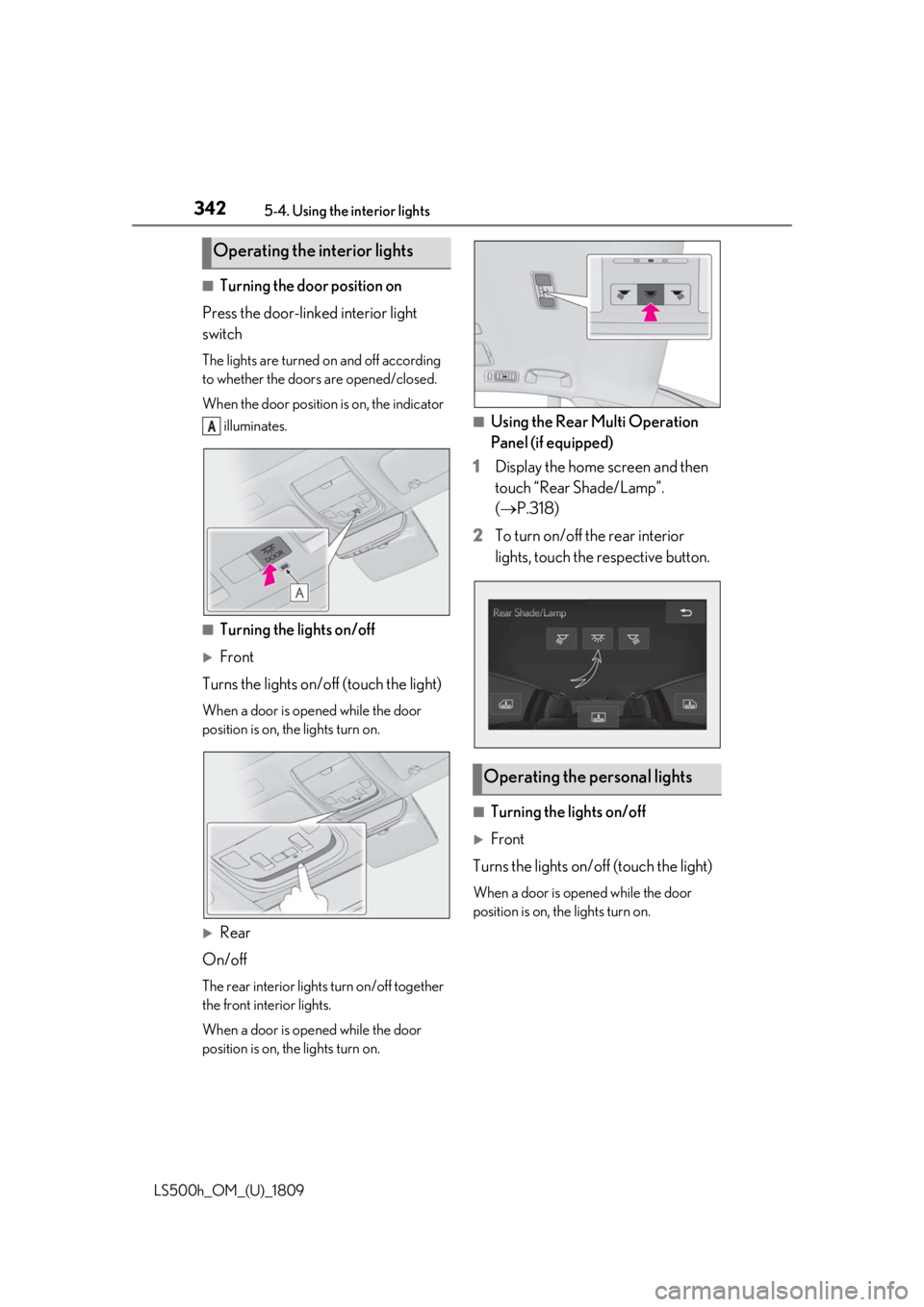
■Turning the door position on
Press the door-linked interior light
switch
The lights are turned on and off according
to whether the doors are opened/closed.
When the door position is on, the indicator illuminates.
■Turning the lights on/off
Front
Turns the lights on/off (touch the light)
When a door is opened while the door
position is on, the lights turn on.
Rear
On/off
The rear interior lights turn on/off together
the front interior lights.
When a door is opened while the door
position is on, the lights turn on.
■Using the Rear Multi Operation
Panel (if equipped)
1 Display the home screen and then
touch “Rear Shade/Lamp”.
(P.318)
2 To turn on/off the rear interior
lights, touch the respective button.
■Turning the lights on/off
Front
Turns the lights on/off (touch the light)
When a door is opened while the door
position is on, the lights turn on.
Operating the interior lights
A
Operating the personal lights
Page 343 of 523
3435-4. Using the interior lights
LS500h_OM_(U)_1809
5
Interior features
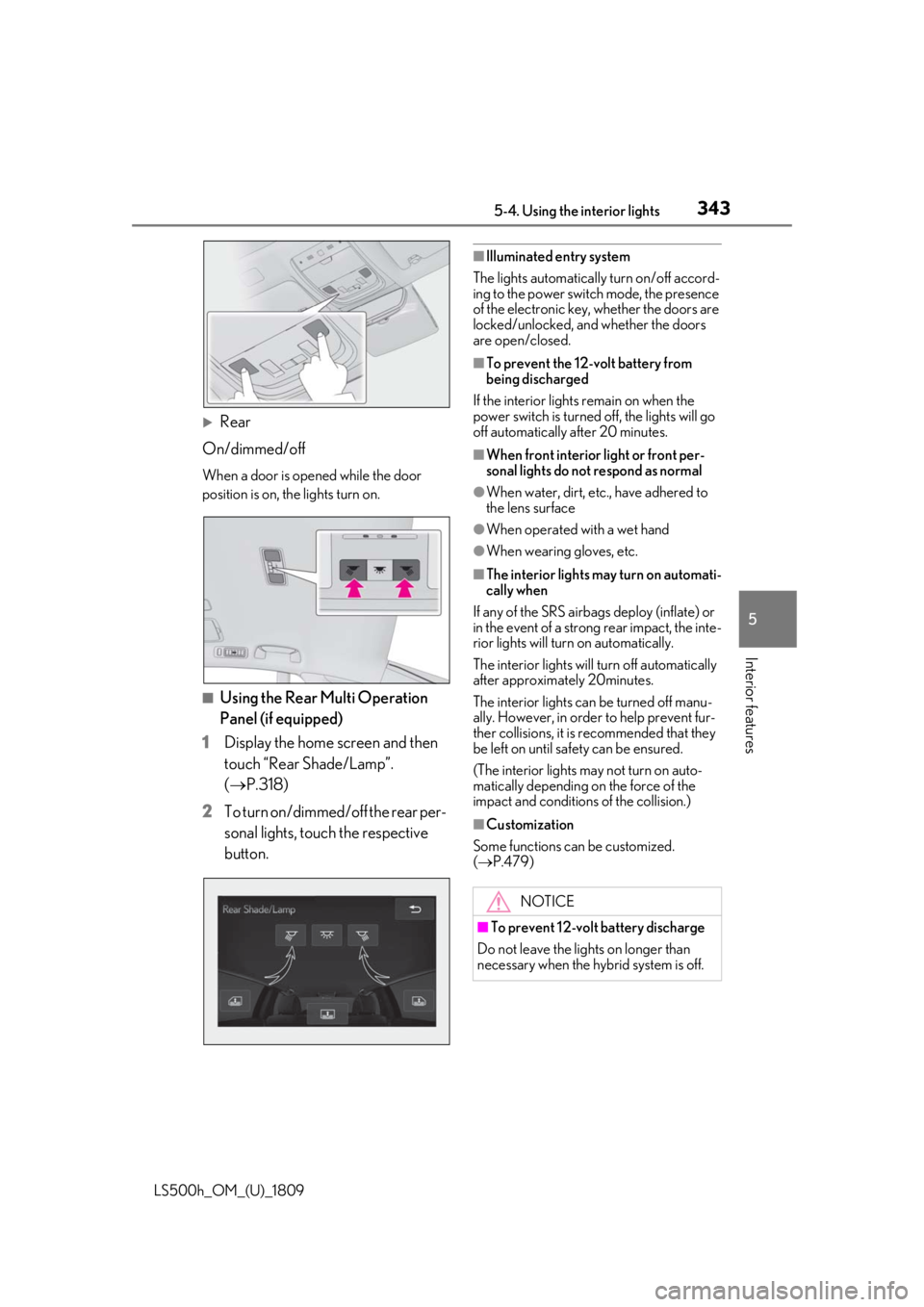
Rear
On/dimmed/off
When a door is opened while the door
position is on, the lights turn on.
■Using the Rear Multi Operation
Panel (if equipped)
1 Display the home screen and then
touch “Rear Shade/Lamp”.
(P.318)
2 To turn on/dimmed/off the rear per-
sonal lights, touch the respective
button.
■Illuminated entry system
The lights automatically turn on/off accord-
ing to the power switch mode, the presence
of the electronic key, whether the doors are
locked/unlocked, and whether the doors
are open/closed.
■To prevent the 12-volt battery from
being discharged
If the interior lights remain on when the
power switch is turned off, the lights will go
off automatically after 20 minutes.
■When front interior light or front per-
sonal lights do not respond as normal
●When water, dirt, etc., have adhered to
the lens surface
●When operated with a wet hand
●When wearing gloves, etc.
■The interior lights may turn on automati-
cally when
If any of the SRS airbag s deploy (inflate) or
in the event of a strong rear impact, the inte-
rior lights will turn on automatically.
The interior lights will turn off automatically
after approximately 20minutes.
The interior lights can be turned off manu-
ally. However, in order to help prevent fur-
ther collisions, it is recommended that they
be left on until sa fety can be ensured.
(The interior lights may not turn on auto-
matically depending on the force of the
impact and conditions of the collision.)
■Customization
Some functions can be customized.
( P.479)
NOTICE
■To prevent 12-volt battery discharge
Do not leave the lights on longer than
necessary when the hy brid system is off.
Page 358 of 523
3585-6. Using the other interior features
LS500h_OM_(U)_1809
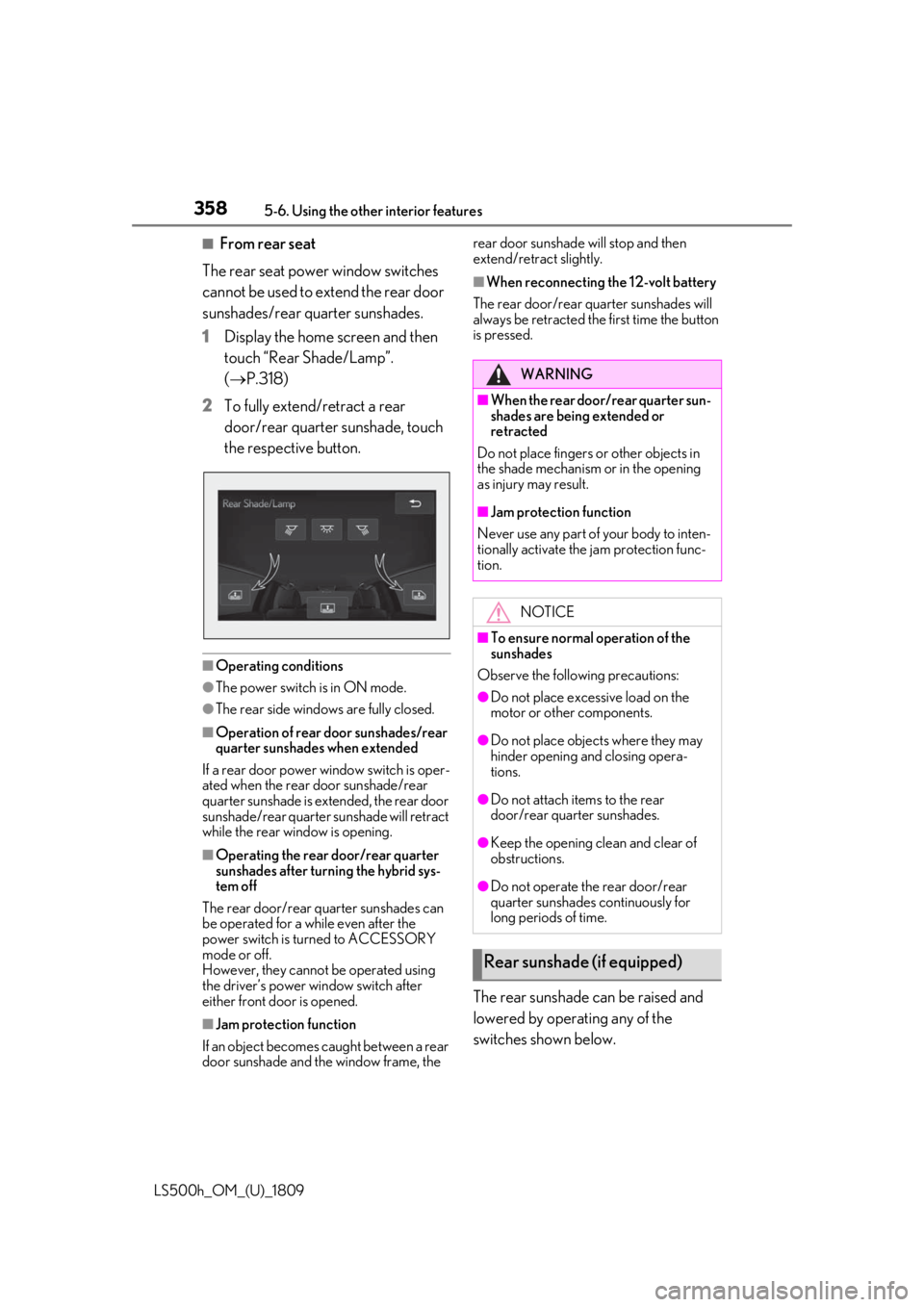
■From rear seat
The rear seat power window switches
cannot be used to extend the rear door
sunshades/rear quarter sunshades.
1 Display the home screen and then
touch “Rear Shade/Lamp”.
(P.318)
2 To fully extend/retract a rear
door/rear quarter sunshade, touch
the respective button.
■Operating conditions
●The power switch is in ON mode.
●The rear side windows are fully closed.
■Operation of rear door sunshades/rear
quarter sunshades when extended
If a rear door power window switch is oper-
ated when the rear door sunshade/rear
quarter sunshade is extended, the rear door
sunshade/rear quarter sunshade will retract
while the rear window is opening.
■Operating the rear door/rear quarter
sunshades after turning the hybrid sys-
tem off
The rear door/rear quarter sunshades can
be operated for a while even after the
power switch is turned to ACCESSORY
mode or off.
However, they cannot be operated using
the driver’s power window switch after
either front door is opened.
■Jam protection function
If an object becomes caught between a rear
door sunshade and the window frame, the rear door sunshade will stop and then
extend/retract slightly.
■When reconnecting the 12-volt battery
The rear door/rear quarter sunshades will
always be retracted the first time the button
is pressed.
The rear sunshade can be raised and
lowered by operating any of the
switches shown below.
WARNING
■When the rear door/rear quarter sun-
shades are being extended or
retracted
Do not place fingers or other objects in
the shade mechanism or in the opening
as injury may result.
■Jam protection function
Never use any part of your body to inten-
tionally activate the jam protection func-
tion.
NOTICE
■To ensure normal operation of the
sunshades
Observe the following precautions:
●Do not place excessive load on the
motor or other components.
●Do not place objects where they may
hinder opening and closing opera-
tions.
●Do not attach items to the rear
door/rear quarter sunshades.
●Keep the opening clean and clear of
obstructions.
●Do not operate the rear door/rear
quarter sunshades continuously for
long periods of time.
Rear sunshade (if equipped)
Page 359 of 523
3595-6. Using the other interior features
LS500h_OM_(U)_1809
5
Interior features
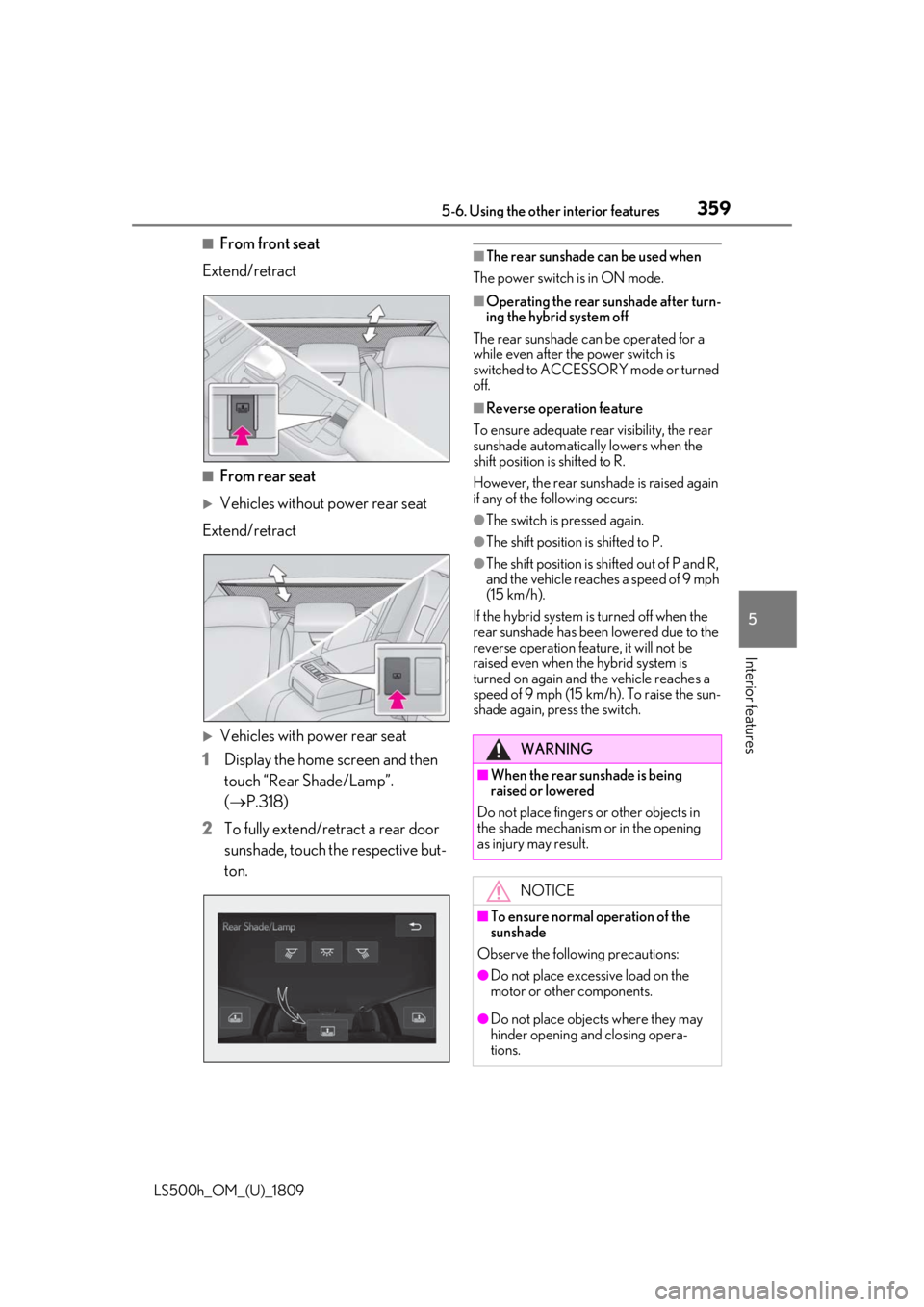
■From front seat
Extend/retract
■From rear seat
Vehicles without power rear seat
Extend/retract
Vehicles with power rear seat
1 Display the home screen and then
touch “Rear Shade/Lamp”.
(P.318)
2 To fully extend/retract a rear door
sunshade, touch the respective but-
ton.
■The rear sunshade can be used when
The power switch is in ON mode.
■Operating the rear sunshade after turn-
ing the hybrid system off
The rear sunshade ca n be operated for a
while even after the power switch is
switched to ACCESSORY mode or turned
off.
■Reverse operation feature
To ensure adequate rear visibility, the rear
sunshade automatically lowers when the
shift position is shifted to R.
However, the rear suns hade is raised again
if any of the following occurs:
●The switch is pressed again.
●The shift position is shifted to P.
●The shift position is sh ifted out of P and R,
and the vehicle reaches a speed of 9 mph
(15 km/h).
If the hybrid system is turned off when the
rear sunshade has been lowered due to the
reverse operation feature, it will not be
raised even when the hybrid system is
turned on again and the vehicle reaches a
speed of 9 mph (15 km/h). To raise the sun-
shade again, press the switch.
WARNING
■When the rear sunshade is being
raised or lowered
Do not place fingers or other objects in
the shade mechanism or in the opening
as injury may result.
NOTICE
■To ensure normal operation of the
sunshade
Observe the following precautions:
●Do not place excessive load on the
motor or other components.
●Do not place objects where they may
hinder opening and closing opera-
tions.
Page 371 of 523

3716-1. Maintenance and care
LS500h_OM_(U)_1809
6
Maintenance and care
Remove dirt and dust using a vac-
uum cleaner. Wipe dirty surfaces
with a cloth dampened with luke-
warm water.
If dirt cannot be removed, wipe it off
with a soft cloth dampened with
neutral detergent diluted to approx-
imately 1%.
Wring out any excess water from
the cloth and thoroughly wipe off
remaining traces of detergent and
water.
■Shampooing the carpets
There are several commercial foaming-type
cleaners available. Use a sponge or brush
to apply the foam. Rub in overlapping cir-
cles. Do not use water. Wipe dirty surfaces
and let them dry. Excellent results are
obtained by keeping the carpet as dry as
possible.
■Handling the seat belts
Clean with mild soap and lukewarm water
using a cloth or spon ge. Also check the
belts periodically for excessive wear, fraying
or cuts.
■When cleaning the carpeted portions of
the glove box, console box, etc.
If a strong adhesive tape is used, there is a
possibility that the surface of the carpet
could be damaged.
Cleaning and protecting the
vehicle interior
Perform cleaning in a manner
appropriate to each component
and its material.
Protecting the vehicle interior
WARNING
■Water in the vehicle
●Do not splash or spill liquid in the vehi-
cle, such as on the floor, in the hybrid
battery (traction battery) air vents, and
in the trunk. ( P.69)
Doing so may cause the hybrid battery,
electrical components, etc. to mal-
function or catch fire.
●Do not get any of the SRS components
or wiring in the vehicle interior wet.
( P.29)
An electrical malfunction may cause
the airbags to deploy or not function
properly, resulting in death or serious
injury.
■Cleaning the interior (especially
instrument panel)
Do not use polish wax or polish cleaner.
The instrument panel may reflect off the
windshield, obstructin g the driver’s view
and leading to an accident, resulting in
death or serious injury.
NOTICE
■Cleaning detergents
●Do not use the following types of
detergent, as they may discolor the
vehicle interior or cause streaks or
damage to painted surfaces:
• Areas other than the seats and steer- ing wheel: Organic substances such as
benzene or gasoline, alkaline or acidic
solutions, dye, and bleach
• Seats: Alkaline or acidic solutions, such as thinner, benzene, and alcohol
• Steering wheel: Organic substances, such as thinner, and cleaner that con-
tains alcohol
●Do not use polish wax or polish
cleaner. The instrument panel’s or
other interior part’s painted surface
may be damaged.
Page 372 of 523
3726-1. Maintenance and care
LS500h_OM_(U)_1809
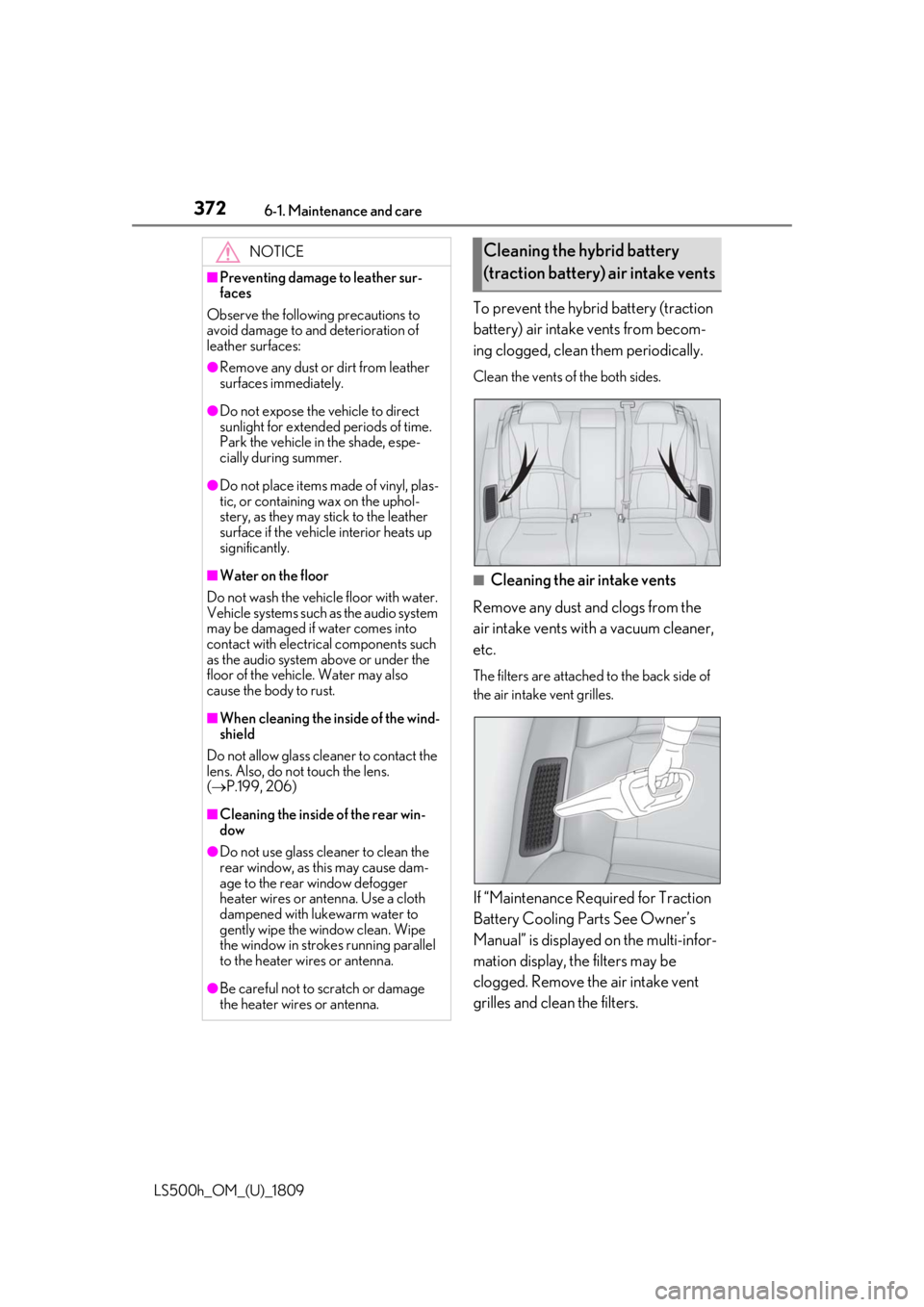
To prevent the hybrid battery (traction
battery) air intake vents from becom-
ing clogged, clean them periodically.
Clean the vents of the both sides.
■Cleaning the air intake vents
Remove any dust and clogs from the
air intake vents with a vacuum cleaner,
etc.
The filters are attached to the back side of
the air intake vent grilles.
If “Maintenance Required for Traction
Battery Cooling Parts See Owner’s
Manual” is displayed on the multi-infor-
mation display, the filters may be
clogged. Remove the air intake vent
grilles and clean the filters.
NOTICE
■Preventing damage to leather sur-
faces
Observe the following precautions to
avoid damage to and deterioration of
leather surfaces:
●Remove any dust or dirt from leather
surfaces immediately.
●Do not expose the vehicle to direct
sunlight for extended periods of time.
Park the vehicle in the shade, espe-
cially during summer.
●Do not place items made of vinyl, plas-
tic, or containing wax on the uphol-
stery, as they may stick to the leather
surface if the vehicle interior heats up
significantly.
■Water on the floor
Do not wash the vehicle floor with water.
Vehicle systems such as the audio system
may be damaged if water comes into
contact with electrical components such
as the audio system above or under the
floor of the vehicle. Water may also
cause the body to rust.
■When cleaning the inside of the wind-
shield
Do not allow glass cleaner to contact the
lens. Also, do not touch the lens.
( P.199, 206)
■Cleaning the inside of the rear win-
dow
●Do not use glass cleaner to clean the
rear window, as this may cause dam-
age to the rear window defogger
heater wires or antenna. Use a cloth
dampened with lukewarm water to
gently wipe the window clean. Wipe
the window in strokes running parallel
to the heater wires or antenna.
●Be careful not to scratch or damage
the heater wires or antenna.
Cleaning the hybrid battery
(traction battery) air intake vents
Page 375 of 523
3756-2. Maintenance
LS500h_OM_(U)_1809
6
Maintenance and care
6-2.Maintenance
■Repair and replacement
It is recommended that genuine Lexus parts
be used for repairs to ensure performance
of each system. If non-Lexus parts are used
in replacement or if a repair shop other than
a Lexus dealer perfor ms repairs, confirm
the warranty coverage.
■Allow inspection and repairs to be per-
formed by a Lexus dealer
●Lexus technicians are well-trained spe-
cialists and are kept up to date with the
latest service information. They are well
informed about the operation of all sys-
tems on your vehicle.
●Keep a copy of the repa ir order. It proves
that the maintenance that has been per-
formed is under warra nty coverage. If any
problem should arise while your vehicle is
under warranty, your Lexus dealer will
promptly take care of it.
General maintenance should be per-
formed on a daily basis. This can be
done by yourself or by a Lexus dealer.
Scheduled maintenance should be
performed at specified intervals
according to the maintenance sched-
ule.
For details about ma intenance items and
schedules, refer to the “Warranty and Ser-
vice Guide”, “Owner’s Manual Supple-
ment” or “Scheduled Maintenance”.
■Resetting the message indicating main-
tenance is required
After the required maintenance is per-
formed according to the maintenance
schedule, please reset the message.
To reset the message, follow the procedure
described below:
1 Press or of the meter control
switch to select .
2 Press or to select “Vehicle Set-
tings” and then press .
Maintenance requirements
To ensure safe and economical driv-
ing, day-to-day care and regular
maintenance are essential. It is the
owner’s responsibility to perform
regular checks. Lexus recommends
the maintenance below.
WARNING
■If your vehicle is not properly main-
tained
Improper maintenanc e could result in
serious damage to the vehicle and possi-
ble death or serious injury.
■Handling of the 12-volt battery
●Engine exhaust, some of its constitu-
ents, and a wide variety of automobile
components contain or emit chemicals
known to the State of California to
cause cancer and birth defects and
other reproductive harm. Work in a
well ventilated area.
●Oils, fuels and fluids contained in vehi-
cles as well as waste produced by
component wear contain or emit
chemicals known to the State of Cali-
fornia to cause cancer and birth
defects or other re productive harm.
Avoid exposure and wash any affected
area immediately.
●12-volt battery post s, terminals and
related accessories contain lead and
lead compounds which are known to
cause brain damage. Wash your hands
after handling. ( P.390)
General maintenance
Scheduled maintenance