battery LEXUS LS600H 2015 User Guide
[x] Cancel search | Manufacturer: LEXUS, Model Year: 2015, Model line: LS600H, Model: LEXUS LS600H 2015Pages: 620, PDF Size: 7.66 MB
Page 88 of 620

861-2. Hybrid system
LS600hL_U(OM50E41U)
CAUTION
■Hybrid battery (traction battery)
●Your vehicle contains a sealed nickel-metal hydride battery. Never resell, hand
over or modify the hybrid battery. To prevent accidents, hybrid batteries that have
been removed from a disposed vehicle are collected through Lexus dealer. Do
not dispose of the battery yourself.
Unless the battery is properly collected, the following may occur, resulting in
death or serious injury:
• The hybrid battery may be illegally disp osed of or dumped, and it is hazardous
to the environment or someone may touch a high voltage part, resulting in an
electric shock.
• The hybrid battery is intended to be used exclusively with your hybrid vehicle. If the hybrid battery is used outside of your vehicle or modified in any way,
accidents such as electric shock, heat generation, smoke generation, an
explosion and electrolyte leakage may occur.
When reselling or handing over your vehicle, the possibility of an accident is
extremely high because the person rece iving the vehicle may not be aware of
these dangers.
●If your vehicle is disposed of without the hybrid battery having been removed,
there is a danger of serious electric shock if high voltage parts, cables and their
connectors are touched. In the event that your vehicle must be disposed of, the
hybrid battery must be disposed of by your Lexus dealer or a qualified service
shop. If the hybrid battery is not disposed of properly, it may cause electric shock
that can result in death or serious injury.
■Emergency shut off system
●Carefully check to see if there are expose d high voltage parts or cables. Never
touch the parts or cables. ( P. 8 1 )
●Carefully inspect the ground under the vehicle. If you find that liquid has leaked
onto the ground, the fuel system may have been damaged. Leave the vehicle as
soon as possible.
Page 89 of 620

871-2. Hybrid system
1
For safety and security
LS600hL_U(OM50E41U)
NOTICE
■Hybrid battery air vents
●Do not put foreign objects over the air vents. The hybrid battery (traction battery)
may overheat and be damaged.
●Clean the air vents regularly to prevent the hybrid battery (traction battery) from
overheating.
●Do not wet or allow foreign substances to enter the air vents as this may cause a
short circuit and damage the h ybrid battery (traction battery).
●Do not carry large amounts of water such as water cooler bottles in the vehicle. If
water spills onto the hybrid battery (t raction battery), the battery may be dam-
aged. Have the vehicle inspected by your Lexus dealer.
Page 93 of 620
911-3. Theft deterrent system
1
For safety and security
LS600hL_U(OM50E41U)
■System maintenance
The vehicle has a maintenance-free type alarm system.
■Items to check before locking the vehicle
To prevent unexpected triggering of the alarm and vehicle theft, make sure of the fol-
lowing:
●Nobody is in the vehicle.
●The windows and moon roof are closed before the alarm is set.
●No valuables or other personal items are left in the vehicle.
■Triggering of the alarm
The alarm may be triggered in the following situations:
(Stopping the alarm deactivates the alarm system.)
■Alarm-operated door lock
●When the alarm is operating, the doors ar e locked automatically to prevent intrud-
ers.
●Do not leave the key inside the vehicle when the alarm is operating, and make sure
the key is not inside the vehicle when rech arging or replacing the 12-volt battery.
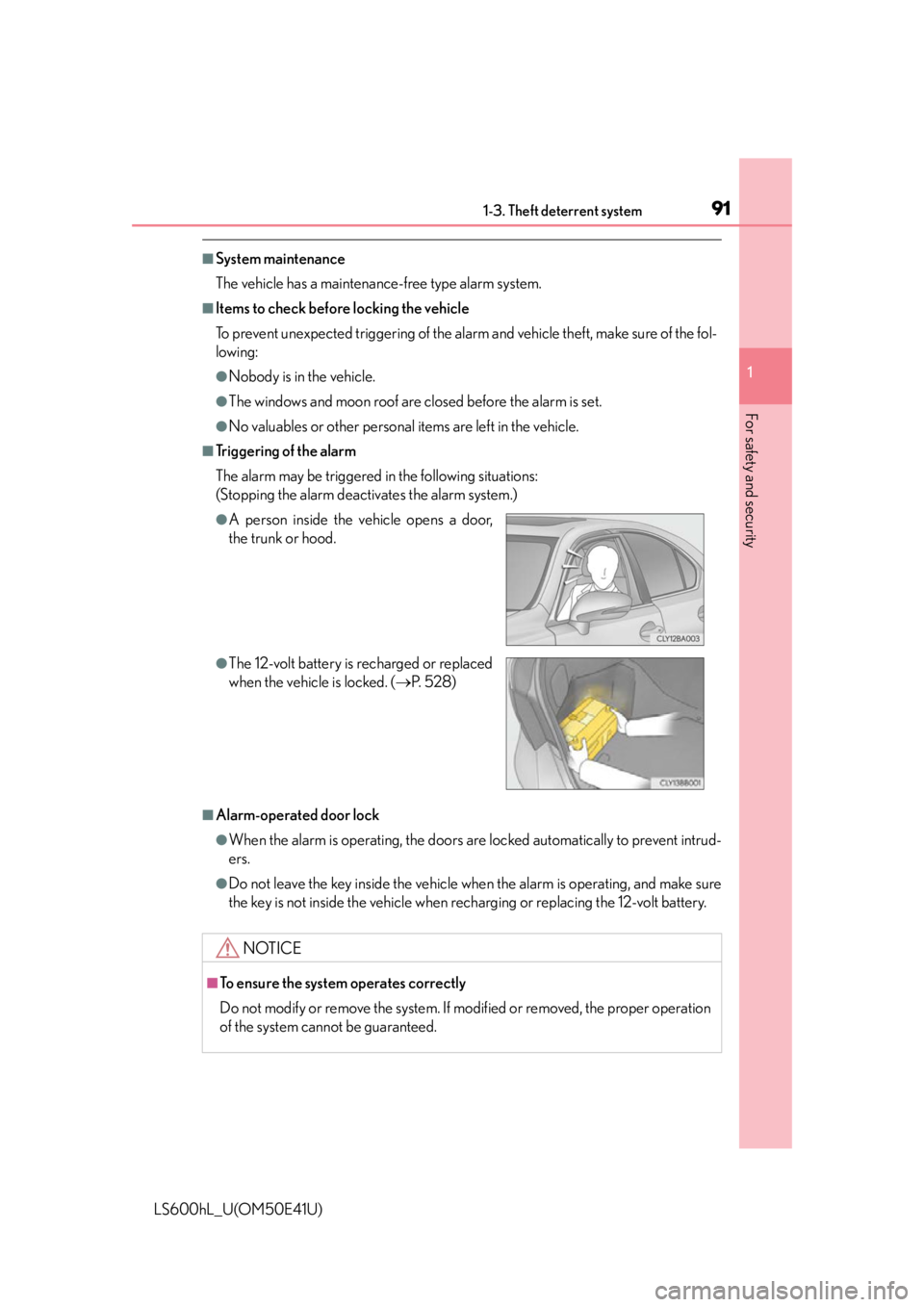
●A person inside the vehicle opens a door,
the trunk or hood.
●The 12-volt battery is recharged or replaced
when the vehicle is locked. (P. 5 2 8 )
NOTICE
■To ensure the system operates correctly
Do not modify or remove the system. If modified or removed, the proper operation
of the system cannot be guaranteed.
Page 105 of 620
1032. Instrument cluster
2
Instrument cluster
LS600hL_U(OM50E41U)
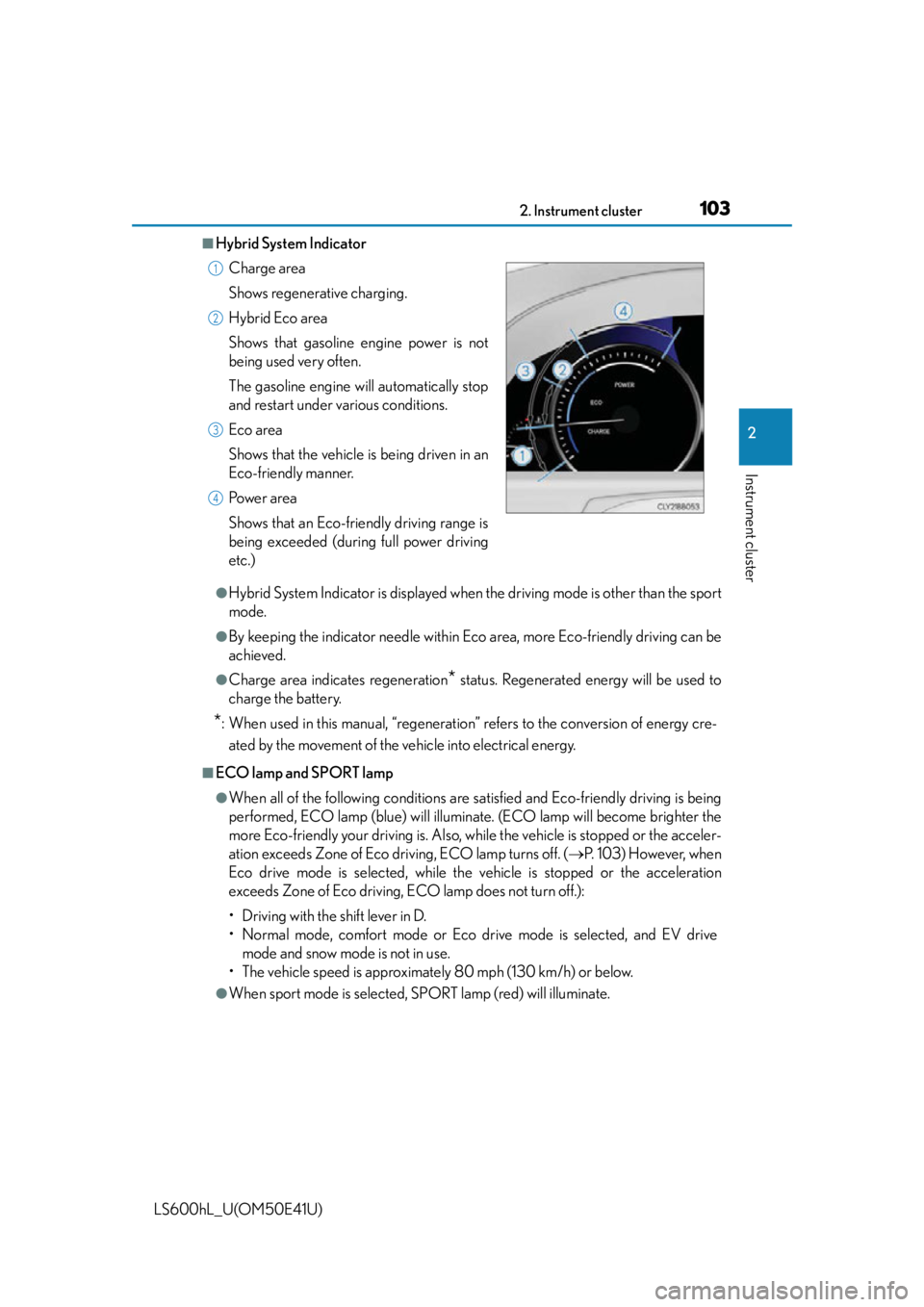
■Hybrid System Indicator
●Hybrid System Indicator is displayed when the driving mode is other than the sport
mode.
●By keeping the indicator needle within Ec o area, more Eco-friendly driving can be
achieved.
●Charge area indicates regeneration* status. Regenerated energy will be used to
charge the battery.
*: When used in this manual, “regeneration” refers to the conversion of energy cre-
ated by the movement of the vehicle into electrical energy.
■ECO lamp and SPORT lamp
●When all of the following conditions are satisfied and Eco-friendly driving is being
performed, ECO lamp (blue) will illuminate. (ECO lamp will become brighter the
more Eco-friendly your driving is. Also, while the vehicle is stopped or the acceler-
ation exceeds Zone of Eco driving, ECO lamp turns off. ( P. 103) However, when
Eco drive mode is selected, while the vehicle is stopped or the acceleration
exceeds Zone of Eco driving, ECO lamp does not turn off.):
• Driving with the shift lever in D.
• Normal mode, comfort mode or Eco dr ive mode is selected, and EV drive
mode and snow mode is not in use.
• The vehicle speed is approximately 80 mph (130 km/h) or below.
●When sport mode is selected, SPORT lamp (red) will illuminate. Charge area
Shows regenerative charging.
Hybrid Eco area
Shows that gasoline engine power is not
being used very often.
The gasoline engine will automatically stop
and restart under various conditions.
Eco area
Shows that the vehicle is being driven in an
Eco-friendly manner.
Po w e r a r e a
Shows that an Eco-friendly driving range is
being exceeded (during full power driving
etc.)
1
2
3
4
Page 112 of 620
1102. Instrument cluster
LS600hL_U(OM50E41U)
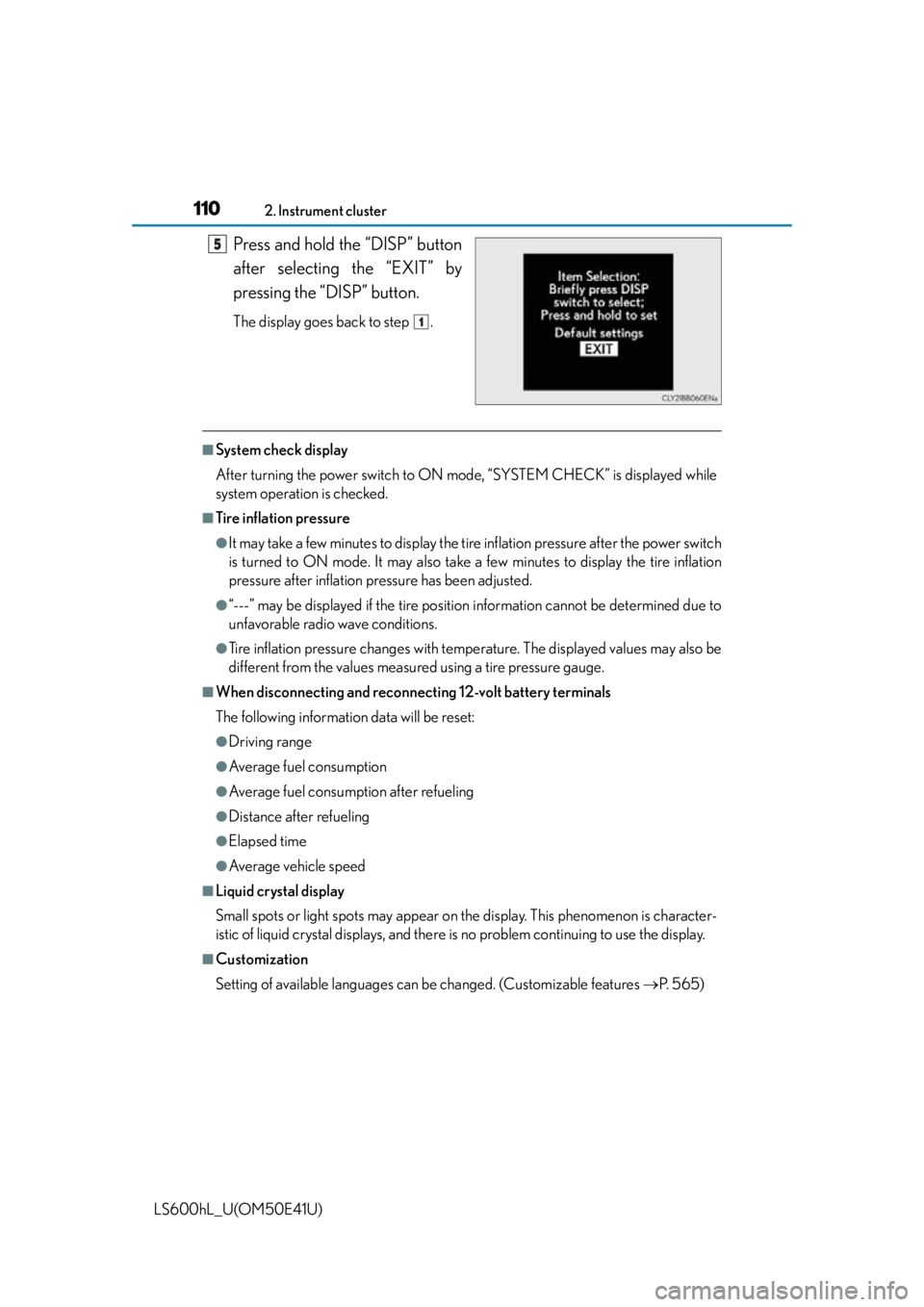
Press and hold the “DISP” button
after selecting the “EXIT” by
pressing the “DISP” button.
The display goes back to step .
■System check display
After turning the power switch to ON mode, “SYSTEM CHECK” is displayed while
system operation is checked.
■Tire inflation pressure
●It may take a few minutes to display the tire inflation pressure after the power switch
is turned to ON mode. It may also take a few minutes to display the tire inflation
pressure after inflation pr essure has been adjusted.
●“---” may be displayed if the tire position information cannot be determined due to
unfavorable radio wave conditions.
●Tire inflation pressure changes with temperature. The displayed values may also be
different from the values measured using a tire pressure gauge.
■When disconnecting and reconnecting 12-volt battery terminals
The following information data will be reset:
●Driving range
●Average fuel consumption
●Average fuel consumption after refueling
●Distance after refueling
●Elapsed time
●Average vehicle speed
■Liquid crystal display
Small spots or light spots may appear on th e display. This phenomenon is character-
istic of liquid crystal displays, and there is no problem continuing to use the display.
■Customization
Setting of available languages can be changed. (Custo mizable features P. 565)
5
1
Page 113 of 620

1112. Instrument cluster
2
Instrument cluster
LS600hL_U(OM50E41U)
CAUTION
■The information display at low temperatures
Allow the interior of the vehicle to warm up before using the liquid crystal informa-
tion display. At extremely low temperatures, the information display monitor may
respond slowly, and display changes may be delayed.
For example, there is a lag between the driver’s shifting and the new gear number
appearing on the display. This lag could ca use the driver to downshift again, caus-
ing rapid and excessive engine braking and possibly an accident resulting in death
or injury.
■Cautions during setting up the display
As the hybrid system needs to be operating during setting up the display, ensure
that the vehicle is parked in a place with adequate ventilation. In a closed area such
as a garage, exhaust gases including harmful carbon monoxide (CO) may collect
and enter the vehicle. This may lead to death or a serious health hazard.
NOTICE
■During setting up the display
To prevent 12-volt battery discharge, ensu re that the hybrid system is operating
while setting up the display features.
Page 116 of 620
1142. Instrument cluster
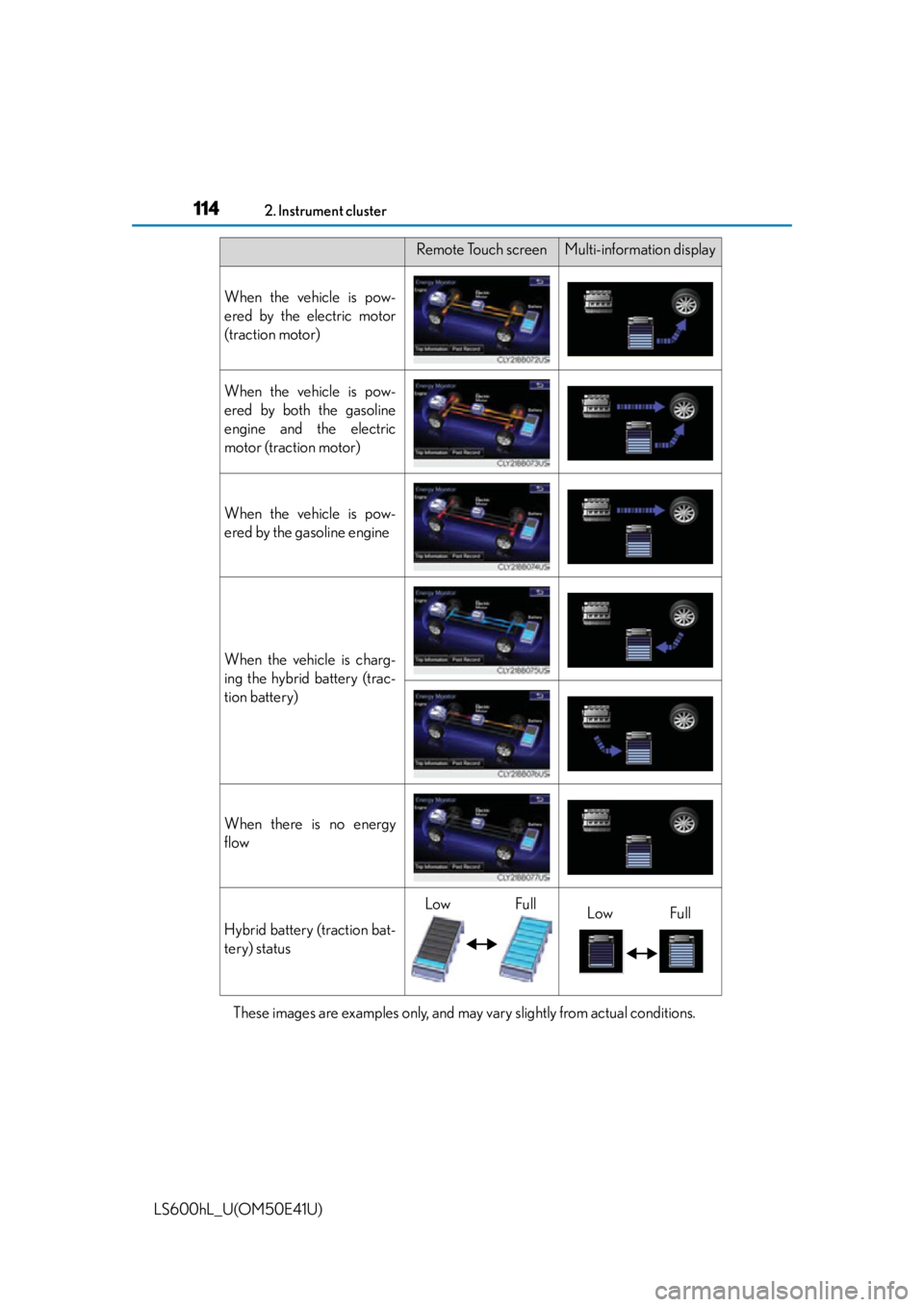
LS600hL_U(OM50E41U)These images are examples only, and may vary slightly from actual conditions.
Remote Touch screenMulti-information display
When the vehicle is pow-
ered by the electric motor
(traction motor)
When the vehicle is pow-
ered by both the gasoline
engine and the electric
motor (traction motor)
When the vehicle is pow-
ered by the gasoline engine
When the vehicle is charg-
ing the hybrid battery (trac-
tion battery)
When there is no energy
flow
Hybrid battery (traction bat-
tery) status
LowFullLowFull
Page 123 of 620
1213-1. Key information
3
Operation of each component
LS600hL_U(OM50E41U)
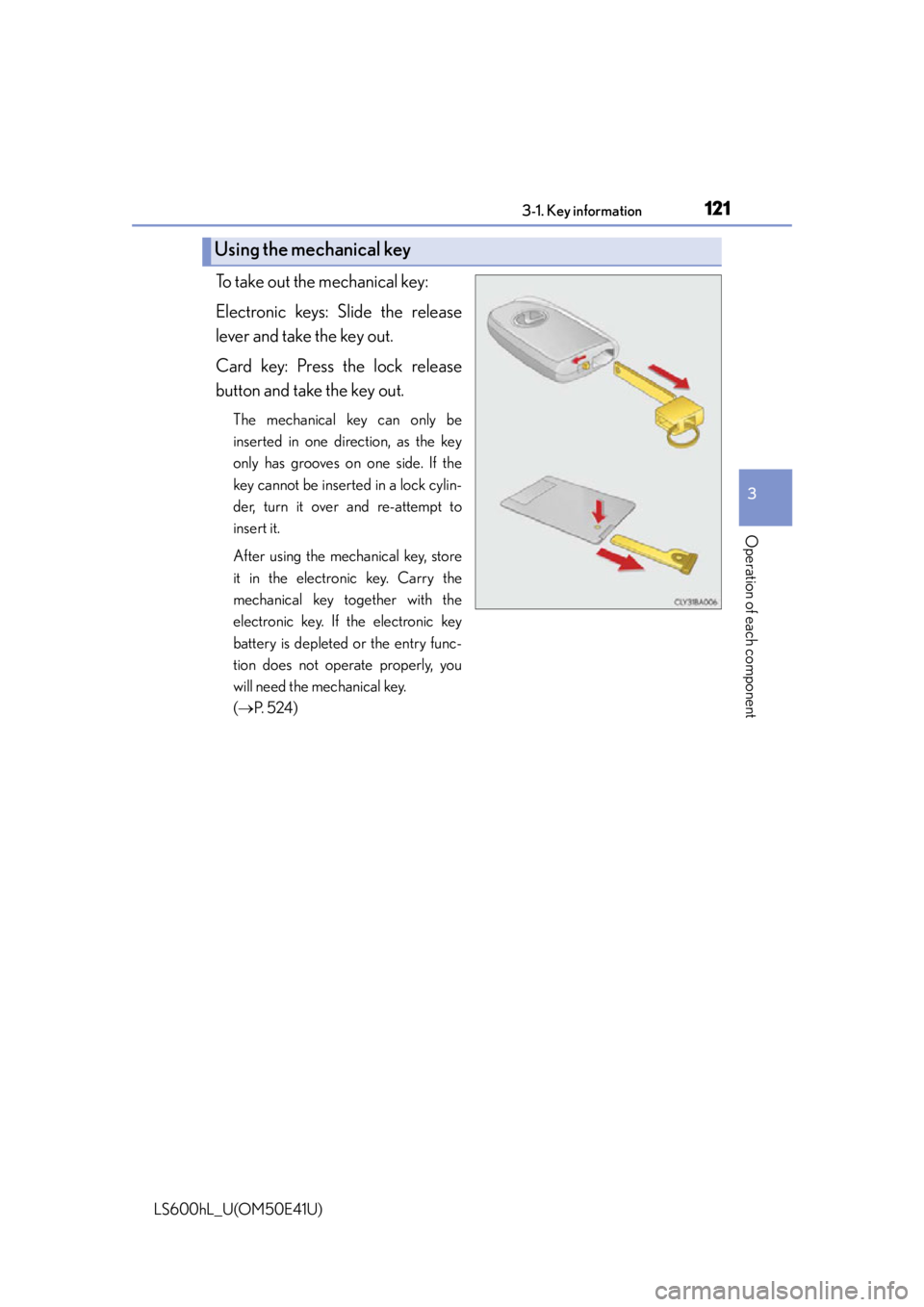
To take out the mechanical key:
Electronic keys: Slide the release
lever and take the key out.
Card key: Press the lock release
button and take the key out.
The mechanical key can only be
inserted in one direction, as the key
only has grooves on one side. If the
key cannot be inserted in a lock cylin-
der, turn it over and re-attempt to
insert it.
After using the mechanical key, store
it in the electronic key. Carry the
mechanical key together with the
electronic key. If the electronic key
battery is depleted or the entry func-
tion does not operate properly, you
will need the mechanical key.
( P. 5 2 4 )
Using the mechanical key
Page 124 of 620
1223-1. Key information
LS600hL_U(OM50E41U)
■Electronic keys
●Part of the electronic key uses leather. Refer to P. 422 for details on cleaning the
leather portion.
●When cleaning the metallic portion, wet a cloth and firmly wring out any excess
water from it, then thoroughly wipe off any dirt.
●When not using the electronic key for an extended period of time, store it in a dry
place of normal temperature away from direct sunlight and interior light after
removing any dirt.
■Card key (if equipped)
●The card key is not waterproof.
●The mechanical key that is stored inside the card key should be used only if a prob-
lem arises, such as when the card key does not operate properly.
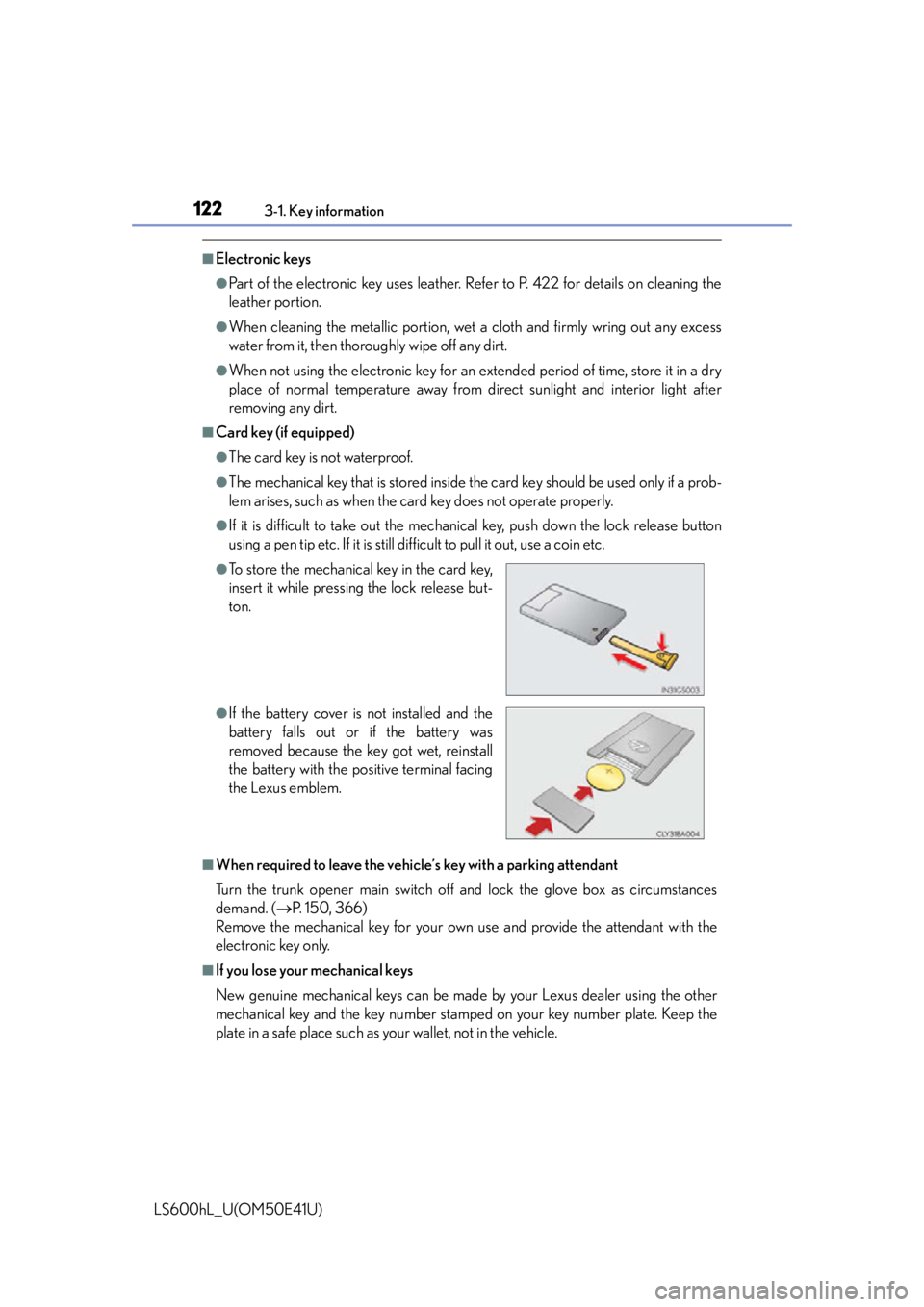
●If it is difficult to take out the mechanic al key, push down the lock release button
using a pen tip etc. If it is still difficult to pull it out, use a coin etc.
■When required to leave the vehicle’s key with a parking attendant
Turn the trunk opener main switch off and lock the glove box as circumstances
demand. ( P. 150, 366)
Remove the mechanical key for your own use and provide the attendant with the
electronic key only.
■If you lose your mechanical keys
New genuine mechanical keys can be made by your Lexus dealer using the other
mechanical key and the key number stamped on your key number plate. Keep the
plate in a safe place such as your wallet, not in the vehicle.
●To store the mechanical key in the card key,
insert it while pressing the lock release but-
ton.
●If the battery cover is not installed and the
battery falls out or if the battery was
removed because the key got wet, reinstall
the battery with the po sitive terminal facing
the Lexus emblem.
Page 126 of 620

1243-1. Key information
LS600hL_U(OM50E41U)
NOTICE
■In case of a smart access system with push-button start malfunction or other key-
related problems
Take your vehicle with all the electronic ke ys provided with your vehicle, including
the card key to your Lexus dealer.
■When an electronic key is lost
If the electronic key remains lost, the risk of vehicle theft increases significantly.
Visit your Lexus dealer immediately with all remaining electronic keys and the card
key that was provided with your vehicle.
■Handling the card key
●Do not apply excess force when inserting the mechanical key into the card key.
Doing so may damage the card key.
●If the battery or card key terminal s get wet, the battery may corrode.
If the key is dropped into water, or if drinking water etc. is spilled on the key,
immediately remove the battery cover an d wipe the battery and terminals. (To
remove the battery cover, lightly grasp and pull it.) If the battery is corroded, have
your Lexus dealer replace the battery.
●Do not crush the battery cover or use a screwdriver to remove the battery cover.
Forcibly removing the battery cover may bend or damage the key.
●If the battery cover is frequently removed, the battery cover may become loose.
●When installing the battery, make sure to check the direction of the battery.
Installing the battery in the wrong direct ion may cause the battery to deplete rap-
idly.
●The surface of the card key may be damaged, or its coating may peel off in the
following situations:
• The card key is carried together with hard objects, such as coins and keys.
• The card key is scraped with a sharp object, such as the tip of a mechanical pencil.
• The surface of the card key is wiped with thinner or benzene.