light LEXUS LS600H 2015 Workshop Manual
[x] Cancel search | Manufacturer: LEXUS, Model Year: 2015, Model line: LS600H, Model: LEXUS LS600H 2015Pages: 620, PDF Size: 7.66 MB
Page 120 of 620
1182. Instrument cluster
LS600hL_U(OM50E41U)
■“Side Display”
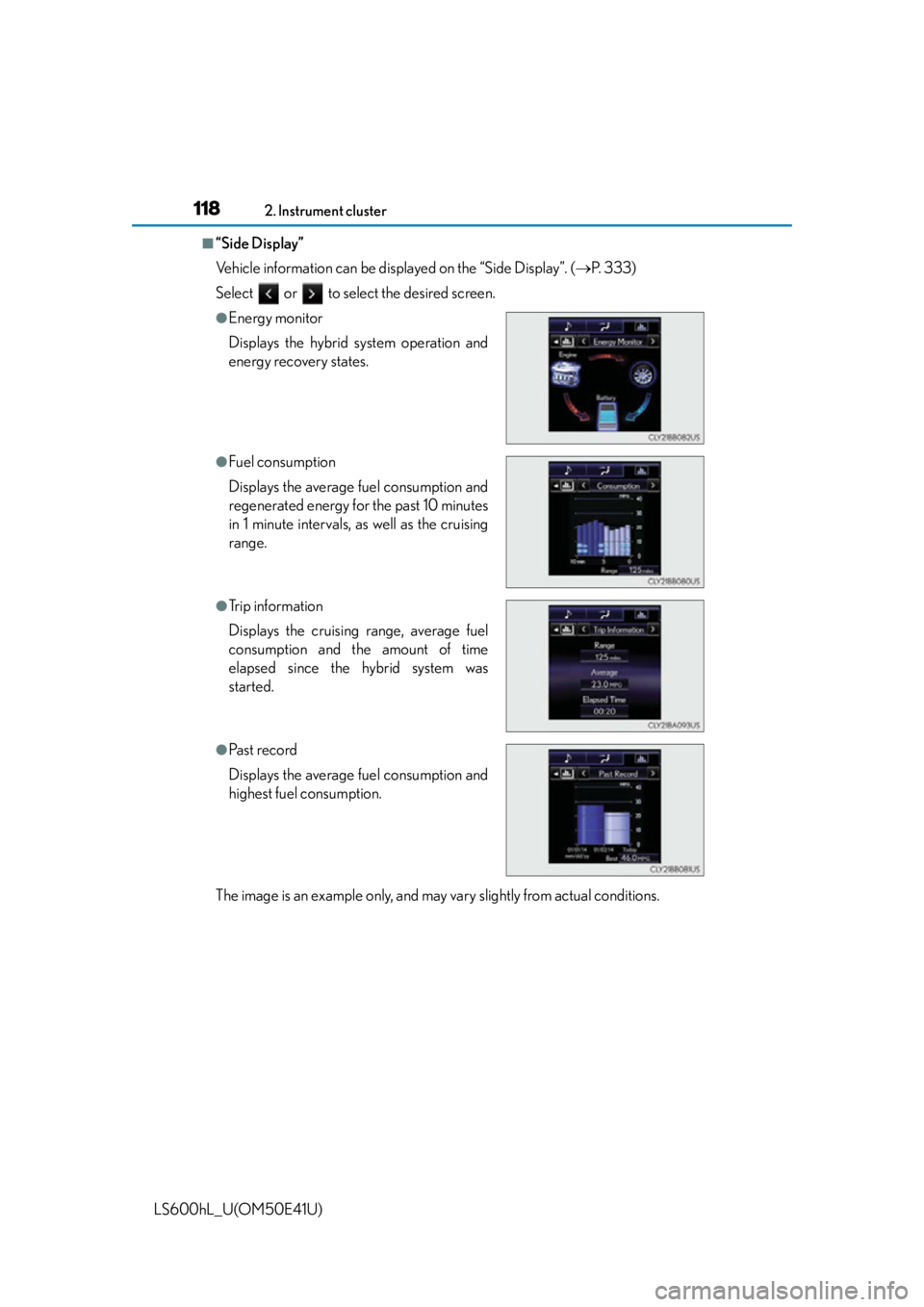
Vehicle information can be displayed on the “Side Display”. (P. 3 3 3 )
Select or to select the desired screen.
The image is an example only, and may vary slightly from actual conditions.
●Energy monitor
Displays the hybrid system operation and
energy recovery states.
●Fuel consumption
Displays the average fuel consumption and
regenerated energy for the past 10 minutes
in 1 minute intervals, as well as the cruising
range.
●Trip information
Displays the cruising range, average fuel
consumption and the amount of time
elapsed since the hybrid system was
started.
●Past record
Displays the average fuel consumption and
highest fuel consumption.
Page 124 of 620
1223-1. Key information
LS600hL_U(OM50E41U)
■Electronic keys
●Part of the electronic key uses leather. Refer to P. 422 for details on cleaning the
leather portion.
●When cleaning the metallic portion, wet a cloth and firmly wring out any excess
water from it, then thoroughly wipe off any dirt.
●When not using the electronic key for an extended period of time, store it in a dry
place of normal temperature away from direct sunlight and interior light after
removing any dirt.
■Card key (if equipped)
●The card key is not waterproof.
●The mechanical key that is stored inside the card key should be used only if a prob-
lem arises, such as when the card key does not operate properly.
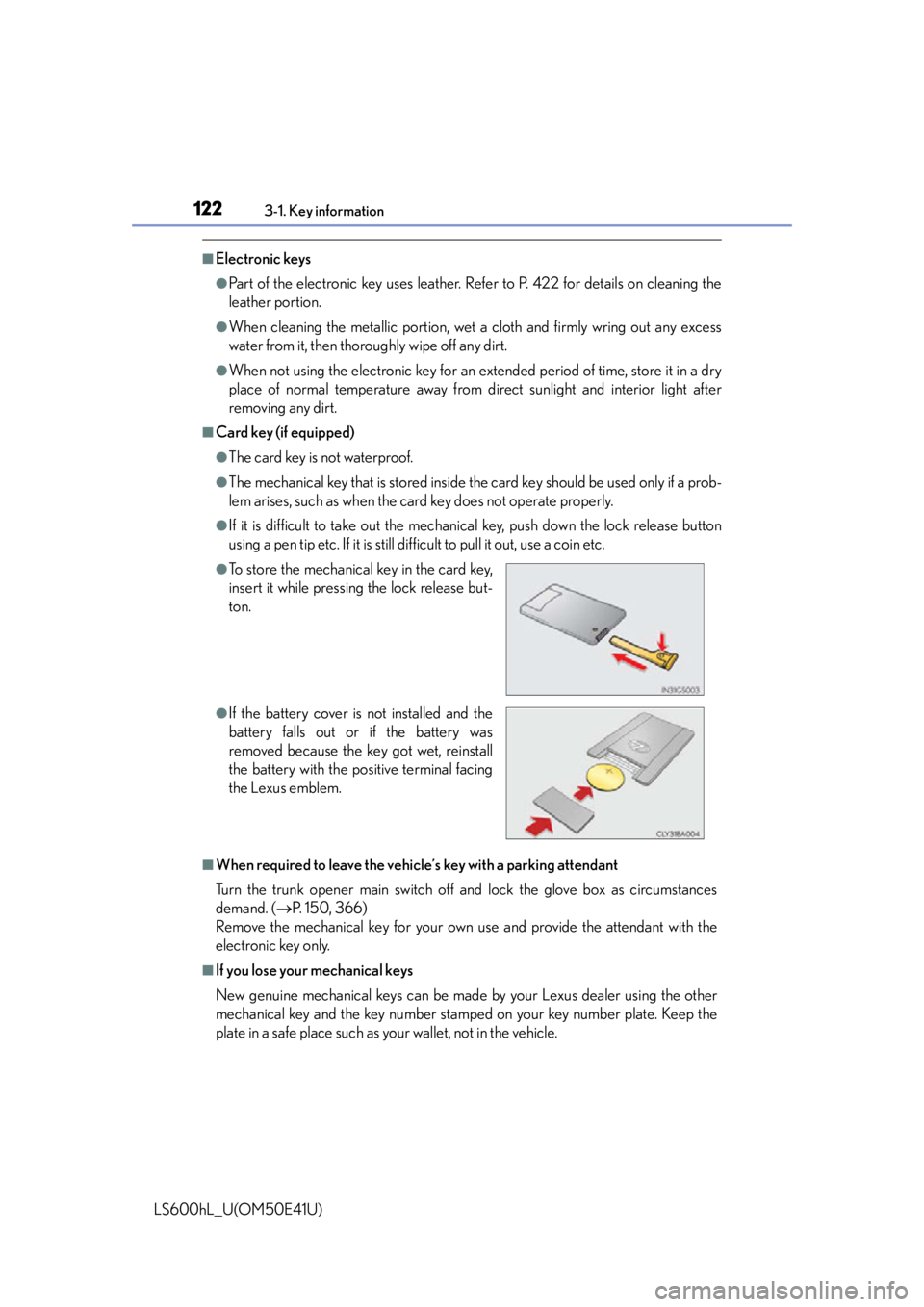
●If it is difficult to take out the mechanic al key, push down the lock release button
using a pen tip etc. If it is still difficult to pull it out, use a coin etc.
■When required to leave the vehicle’s key with a parking attendant
Turn the trunk opener main switch off and lock the glove box as circumstances
demand. ( P. 150, 366)
Remove the mechanical key for your own use and provide the attendant with the
electronic key only.
■If you lose your mechanical keys
New genuine mechanical keys can be made by your Lexus dealer using the other
mechanical key and the key number stamped on your key number plate. Keep the
plate in a safe place such as your wallet, not in the vehicle.
●To store the mechanical key in the card key,
insert it while pressing the lock release but-
ton.
●If the battery cover is not installed and the
battery falls out or if the battery was
removed because the key got wet, reinstall
the battery with the po sitive terminal facing
the Lexus emblem.
Page 125 of 620

1233-1. Key information
3
Operation of each component
LS600hL_U(OM50E41U)
■When riding in an aircraft
When bringing an electronic key onto an aircraft, make sure you do not press any
buttons on the electronic key while inside the aircraft cabin. If you are carrying an
electronic key in your bag etc., ensure that the buttons are not likely to be pressed
accidentally. Pressing a button may cause the electronic key to emit radio waves that
could interfere with the operation of the aircraft.
NOTICE
■To prevent key damage
●Do not drop the keys, subject them to strong shocks or bend them.
●Do not expose the keys to high temp eratures for a long period of time.
●Do not get the keys wet or wash them in an ultrasonic washer etc.
●Do not attach metallic or magnetic materi als to the keys or place the keys close to
such materials.
●Do not disassemble the keys.
●Do not attach a sticker or anything else to the surface of the electronic key.
●Do not place the keys near objects that produce magnetic fields, such as TVs,
audio systems and induction cookers, or medical electrical equipment, such as
low-frequency therapy equipment.
■Handling the electronic keys
●Observe the following to prevent deterioration, changes in shape and damage to
the leather area.
• Do not carry the electronic key together with hard objects, such as other keys or accessories.
• Do not expose the electronic keys to direct sunlight or interior light for
extended periods of time.
• Do not place the electronic key on items made of vinyl, plastic or that contain
wax.
They may stick to the leather surface if the items become warm.
• Do not get the electronic key wet. Even if the electronic gets slightly wet, dry it with a soft cloth and let it dry in the
shade.
• Do not touch the electronic key with hands that have oil, medicine, hand
cream or perfume on them.
• When cleaning, do not use a leather cleane r, solvents or leather filling agents.
●Because the leather portion is dyed, if the electronic key touches clothing while it
has sweat and moisture adhered to it, ther e is a possibility that the clothing may
change color.
Page 126 of 620

1243-1. Key information
LS600hL_U(OM50E41U)
NOTICE
■In case of a smart access system with push-button start malfunction or other key-
related problems
Take your vehicle with all the electronic ke ys provided with your vehicle, including
the card key to your Lexus dealer.
■When an electronic key is lost
If the electronic key remains lost, the risk of vehicle theft increases significantly.
Visit your Lexus dealer immediately with all remaining electronic keys and the card
key that was provided with your vehicle.
■Handling the card key
●Do not apply excess force when inserting the mechanical key into the card key.
Doing so may damage the card key.
●If the battery or card key terminal s get wet, the battery may corrode.
If the key is dropped into water, or if drinking water etc. is spilled on the key,
immediately remove the battery cover an d wipe the battery and terminals. (To
remove the battery cover, lightly grasp and pull it.) If the battery is corroded, have
your Lexus dealer replace the battery.
●Do not crush the battery cover or use a screwdriver to remove the battery cover.
Forcibly removing the battery cover may bend or damage the key.
●If the battery cover is frequently removed, the battery cover may become loose.
●When installing the battery, make sure to check the direction of the battery.
Installing the battery in the wrong direct ion may cause the battery to deplete rap-
idly.
●The surface of the card key may be damaged, or its coating may peel off in the
following situations:
• The card key is carried together with hard objects, such as coins and keys.
• The card key is scraped with a sharp object, such as the tip of a mechanical pencil.
• The surface of the card key is wiped with thinner or benzene.
Page 128 of 620

1263-2. Opening, closing and locking the doors and trunk
LS600hL_U(OM50E41U)
■Operation signals
Doors:
A buzzer sounds and the emergency flashe rs flash to indicate that the doors have
been locked/unlocked. (Locked: Once; Unlocked: Twice)
Tr u n k :
A buzzer sounds to indicate that the trunk has been unlocked.
Windows and moon roof:
A buzzer sounds to indicate that the windows and moon roof are operating.
■Security feature
If a door is not opened within approx imately 60 seconds after the vehicle is
unlocked, the security feature automatically locks the vehicle again.
■Welcome light illumination control
The side marker, parking, tail and license plate lights automatically turn on at night
when the doors are unlocked using the entr y function or wireless remote control if
the headlight switch is in the “AUTO” position.
Page 144 of 620
1423-2. Opening, closing and locking the doors and trunk
LS600hL_U(OM50E41U)
■Operation signals
Doors:
A buzzer sounds and the emergency flashe rs flash to indicate that the doors have
been locked/unlocked. (Locked: once; Unlocked: twice)
Tr u n k :
A buzzer sounds to indicate that the trunk has been opened.
Windows and moon roof:
A buzzer sounds to indicate that the windows and moon roof are operating.
■Welcome light illumination control
P. 1 2 6
■Door lock buzzer
If an attempt to lock the doors is made when a door is not fully closed, a buzzer
sounds continuously for 5 se conds. Fully close the door to stop the buzzer, and lock
the vehicle once more.
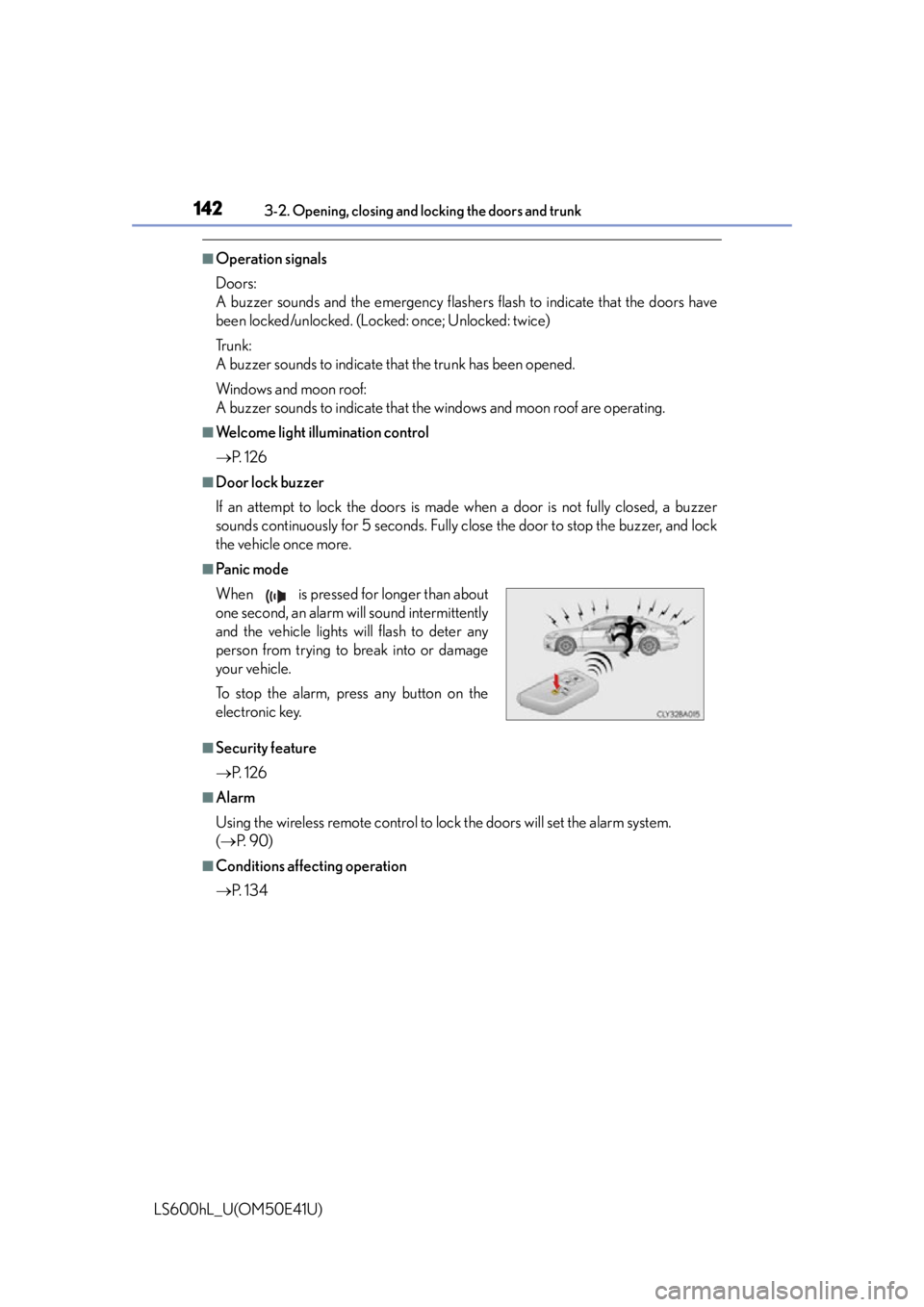
■Pa n i c m o d e
■Security feature
P. 1 2 6
■Alarm
Using the wireless remote control to lo ck the doors will set the alarm system.
( P. 9 0 )
■Conditions affecting operation
P. 1 3 4
When is pressed for longer than about
one second, an alarm will sound intermittently
and the vehicle lights will flash to deter any
person from trying to break into or damage
your vehicle.
To stop the alarm, press any button on the
electronic key.
Page 149 of 620
1473-2. Opening, closing and locking the doors and trunk
3
Operation of each component
LS600hL_U(OM50E41U)
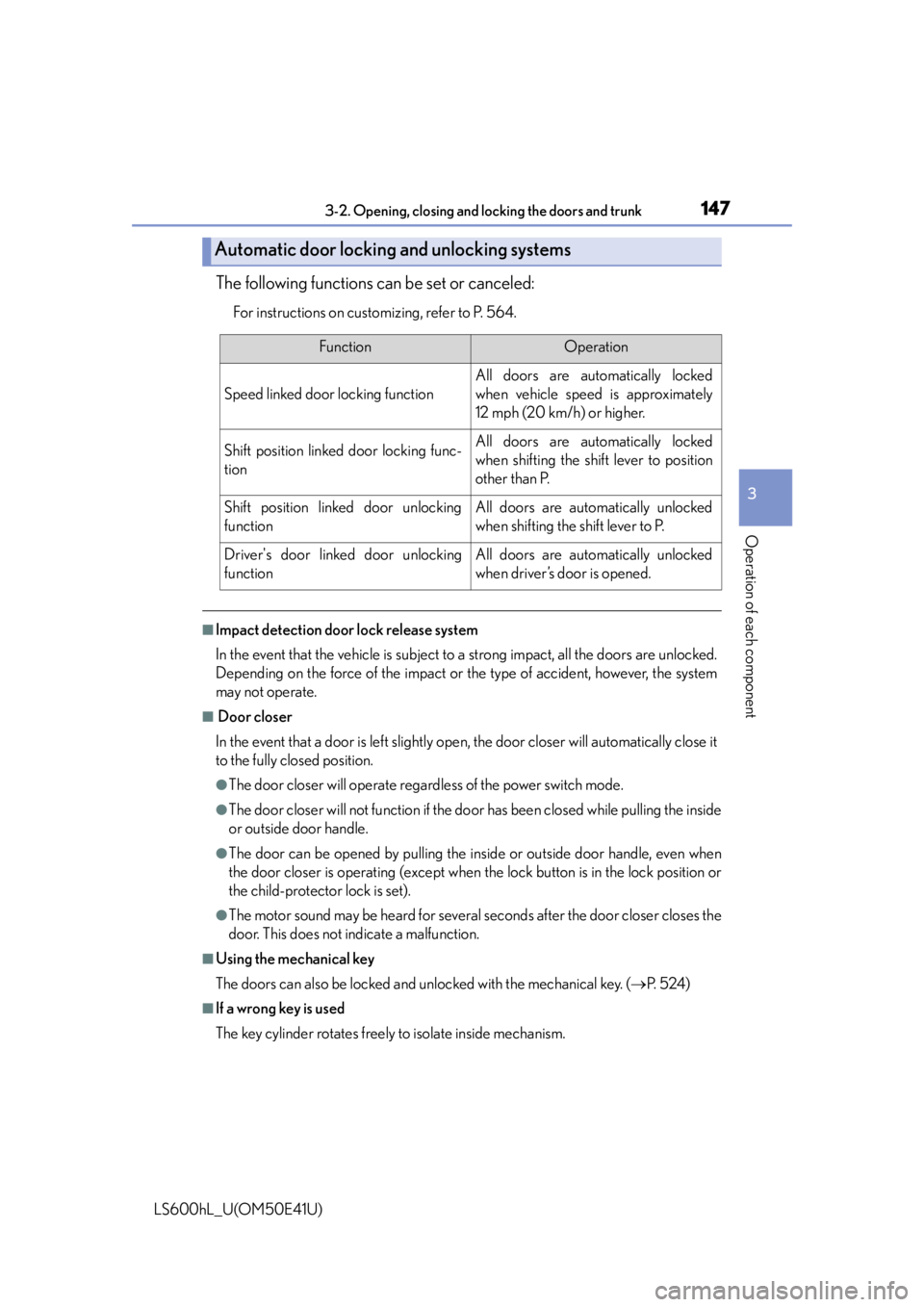
The following functions can be set or canceled:
For instructions on customizing, refer to P. 564.
■Impact detection door lock release system
In the event that the vehicle is subject to a strong impact, all the doors are unlocked.
Depending on the force of the impact or the type of accident, however, the system
may not operate.
■ Door closer
In the event that a door is left slightly open, the door closer will automatically close it
to the fully closed position.
●The door closer will operate regardless of the power switch mode.
●The door closer will not function if the do or has been closed while pulling the inside
or outside door handle.
●The door can be opened by pulling the in side or outside door handle, even when
the door closer is operating (except when the lock button is in the lock position or
the child-protector lock is set).
●The motor sound may be heard for several se conds after the door closer closes the
door. This does not indicate a malfunction.
■Using the mechanical key
The doors can also be locked and unlocked with the mechanical key. ( P. 5 2 4 )
■If a wrong key is used
The key cylinder rotates freely to isolate inside mechanism.
Automatic door locking and unlocking systems
FunctionOperation
Speed linked door locking function
All doors are automatically locked
when vehicle speed is approximately
12 mph (20 km/h) or higher.
Shift position linked door locking func-
tionAll doors are automatically locked
when shifting the shift lever to position
other than P.
Shift position linked door unlocking
functionAll doors are automatically unlocked
when shifting the shift lever to P.
Driver's door linked door unlocking
functionAll doors are automatically unlocked
when driver’s door is opened.
Page 150 of 620

1483-2. Opening, closing and locking the doors and trunk
LS600hL_U(OM50E41U)
■Customization
Settings (e.g. unlocking function using a key) can be changed.
(Customizable features P. 5 6 4 )
CAUTION
■To prevent an accident
Observe the following precautions while driving the vehicle.
Failure to do so may result in a door opening and an occupant throwing out of the
vehicle, resulting in death or serious injury.
●Ensure that all doors are properly closed and locked.
●Do not pull the inside handle of the doors while driving.
Be especially careful for the front doors, as the doors may be opened even if the
inside lock buttons are in locked position.
●Set the rear door child-protector locks when children are seated in the rear seats.
■Door closer
In the event that a door is left slightly open, the door closer will automatically close
it to the fully closed position.
If the child-protector lock is set, the door closer will not stop during operation even
if an attempt is made to open the door from inside the vehicle. Be careful not to
catch fingers or anything else in the door . Failure to do so may result in serious
injury.
NOTICE
■ To prevent door closer malfunction
Do not frequently repeat opening and closing of doors, or apply excessive force to
a door while the door closer is operating.
Page 153 of 620
1513-2. Opening, closing and locking the doors and trunk
3
Operation of each component
LS600hL_U(OM50E41U)
■Trunk lid light/trunk light
The trunk lid light/trunk light turns on when the trunk is opened.
■Trunk easy closer
In the event that the trunk lid is left slightly open, the trunk easy closer will automati-
cally close it to the fully closed position.
■Function to prevent the trunk being locked with the electronic key inside (when all
the doors are locked)
Closing the trunk lid with the electronic key left inside the trunk will sound an alarm.
In this case, the trunk lid can be opened by pressing the button on the trunk lid.
■Overload protection function
The trunk lid will not operate when excessiv e load is present on the top of the trunk
lid.
■Fall-down protection function
While the trunk lid is opening automatically, applying excessive force to it will stop
the opening operation to prevent the trunk lid from rapidly falling down.
■Jam protection function
While the trunk lid is closing automatically, the trunk lid will stop closing and open if
something gets caught.
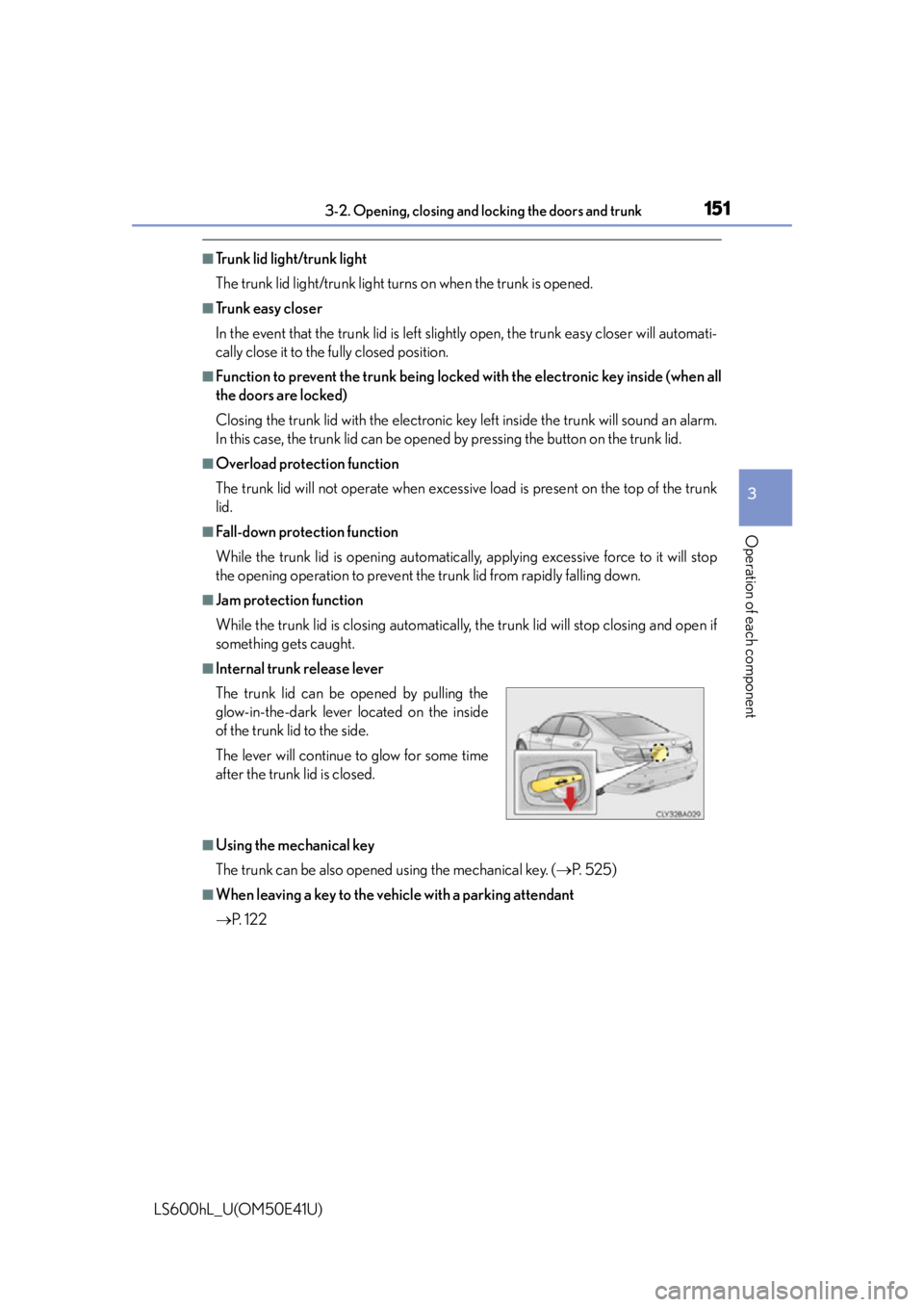
■Internal trunk release lever
■Using the mechanical key
The trunk can be also opened using the mechanical key. ( P. 525)
■When leaving a key to the vehicle with a parking attendant
P. 1 2 2
The trunk lid can be opened by pulling the
glow-in-the-dark lever located on the inside
of the trunk lid to the side.
The lever will continue
to glow for some time
after the trunk lid is closed.
Page 155 of 620
1533-2. Opening, closing and locking the doors and trunk
3
Operation of each component
LS600hL_U(OM50E41U)
CAUTION
■Using the trunk
Observe the following precautions.
Failure to do so may cause parts of the body to be caught, resulting in serious
injury.
●Remove any heavy loads, such as snow and ice, from the trunk lid before opening
it. Failure to do so may cause the trunk lid to suddenly shut again after it is opened.
●When opening or closing the trunk lid, thoroughly check to make sure the sur-
rounding area is safe.
●If anyone is in the vicinity, make sure they are safe and let them know that the
trunk is about to open or close.
●Use caution when opening or closing the trunk lid in windy weather as it may
move abruptly in strong wind.
●Do not attach any accessories other than genuine Lexus parts to the trunk lid.
Such additional weight on the trunk lid may cause the lid to suddenly shut again
after it is opened.
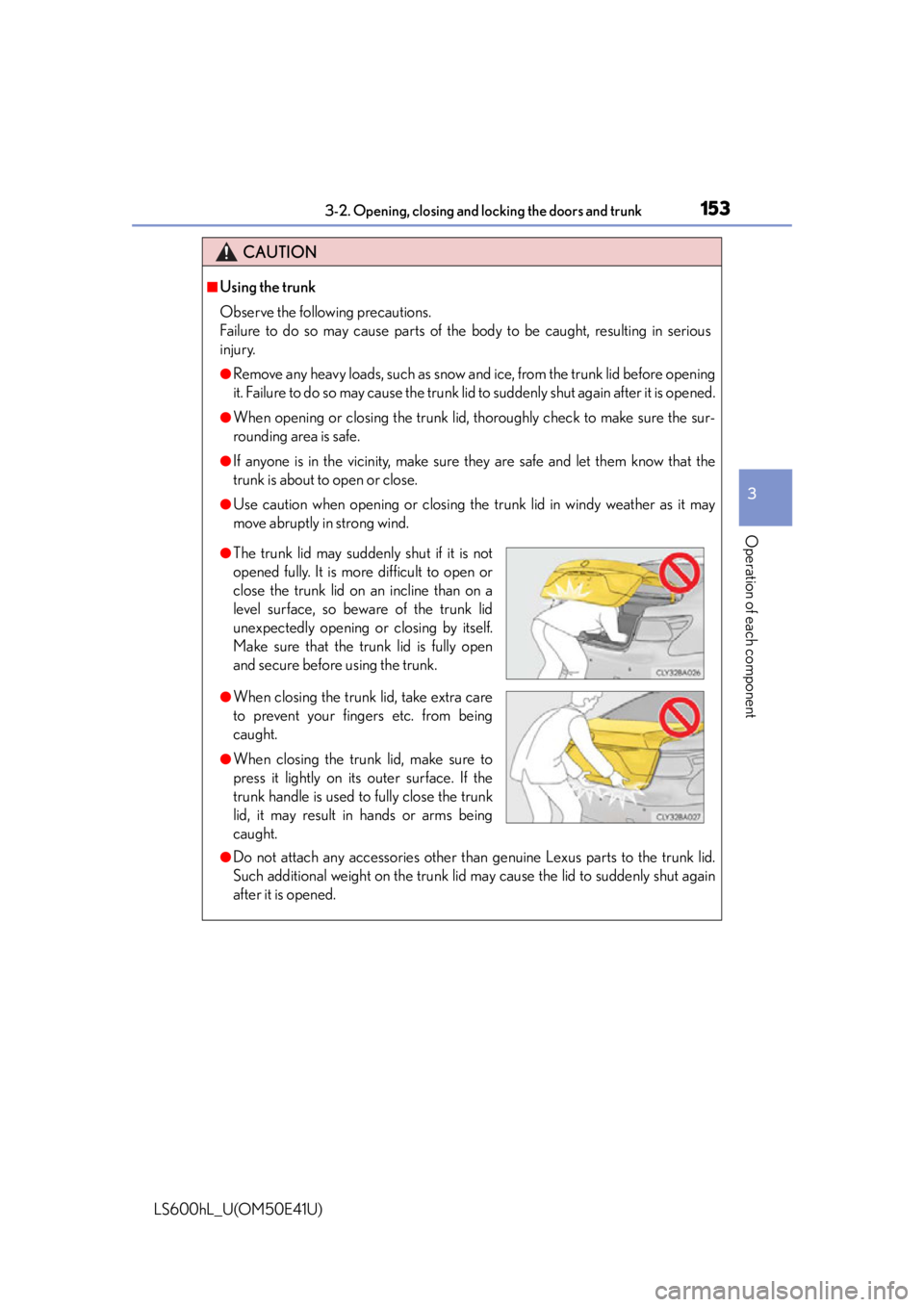
●The trunk lid may suddenly shut if it is not
opened fully. It is more difficult to open or
close the trunk lid on an incline than on a
level surface, so beware of the trunk lid
unexpectedly opening or closing by itself.
Make sure that the trunk lid is fully open
and secure before using the trunk.
●When closing the trunk lid, take extra care
to prevent your fingers etc. from being
caught.
●When closing the trunk lid, make sure to
press it lightly on it s outer surface. If the
trunk handle is used to fully close the trunk
lid, it may result in hands or arms being
caught.