display LEXUS LS600H 2015 Repair Manual
[x] Cancel search | Manufacturer: LEXUS, Model Year: 2015, Model line: LS600H, Model: LEXUS LS600H 2015Pages: 620, PDF Size: 7.66 MB
Page 320 of 620
3184-5. Using the driving support systems
LS600hL_U(OM50E41U)
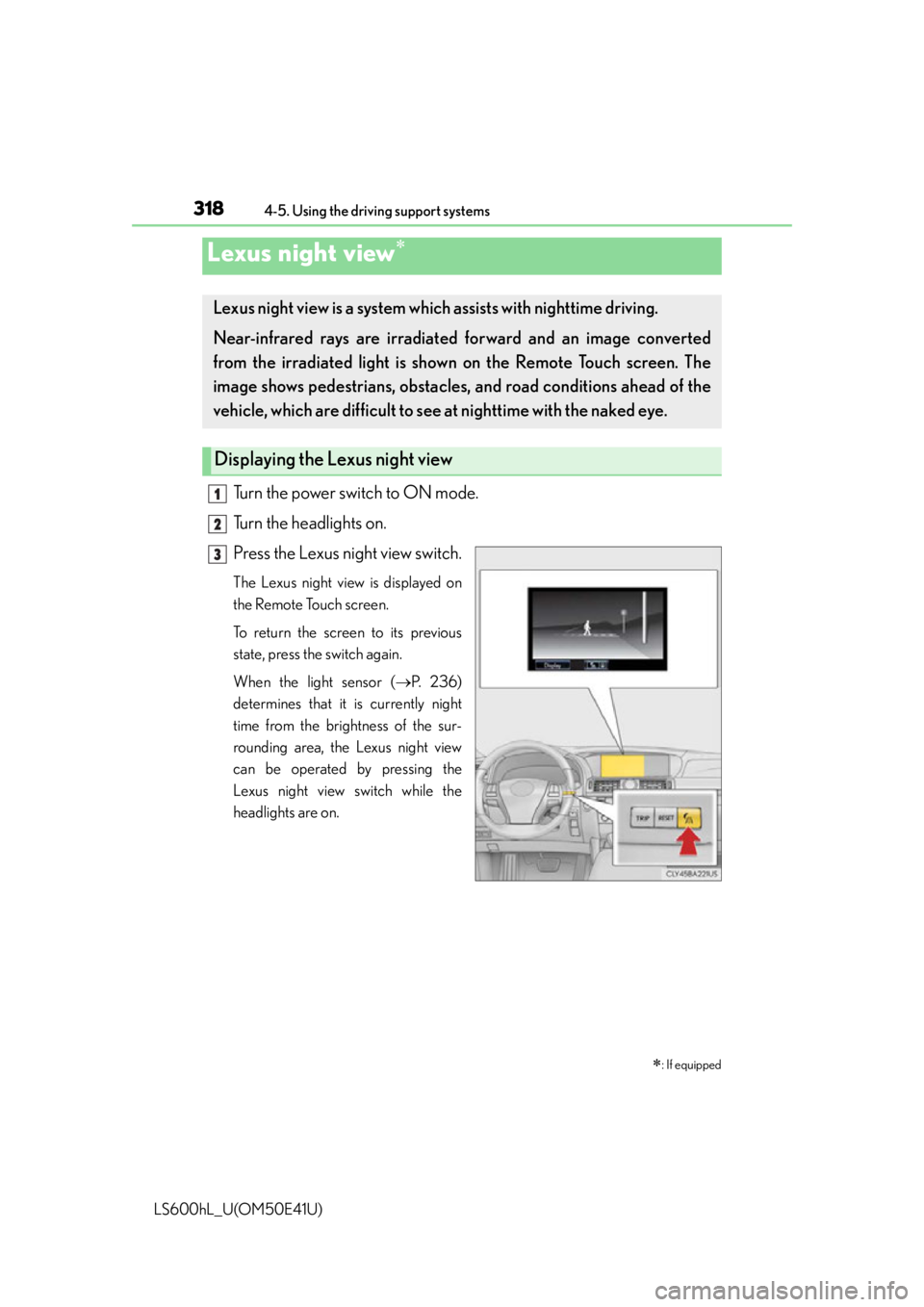
Turn the power switch to ON mode.
Turn the headlights on.
Press the Lexus night view switch.
The Lexus night view is displayed on
the Remote Touch screen.
To return the screen to its previous
state, press the switch again.
When the light sensor (P. 2 3 6 )
determines that it is currently night
time from the brightness of the sur-
rounding area, the Lexus night view
can be operated by pressing the
Lexus night view switch while the
headlights are on.
Lexus night view
: If equipped
Lexus night view is a system which assists with nighttime driving.
Near-infrared rays are irradiated forward and an image converted
from the irradiated light is sh own on the Remote Touch screen. The
image shows pedestrians, obstacles, and road conditions ahead of the
vehicle, which are difficult to see at nighttime with the naked eye.
Displaying the Lexus night view
1
2
3
Page 321 of 620
3194-5. Using the driving support systems
4
Driving
LS600hL_U(OM50E41U)
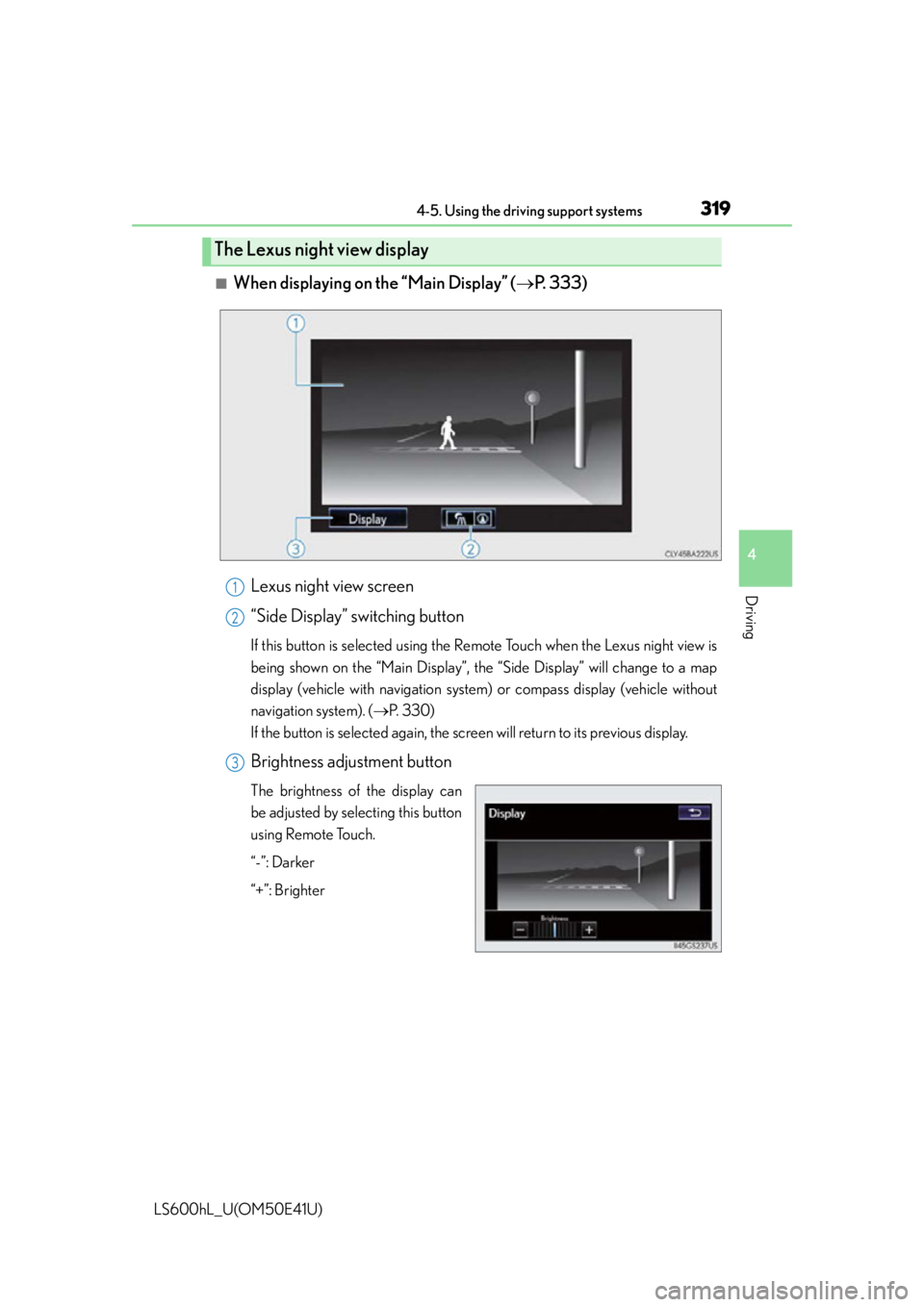
■When displaying on the “Main Display” (P. 3 3 3 )
Lexus night view screen
“Side Display” switching button
If this button is selected using the Re mote Touch when the Lexus night view is
being shown on the “Main Display”, the “Side Display” will change to a map
display (vehicle with navigation system) or compass display (vehicle without
navigation system). ( P. 3 3 0 )
If the button is selected again, the screen will return to its previous display.
Brightness adjustment button
The brightness of the display can
be adjusted by selecting this button
using Remote Touch.
“-”: Darker
“+”: Brighter
The Lexus night view display
1
2
3
Page 322 of 620
3204-5. Using the driving support systems
LS600hL_U(OM50E41U)
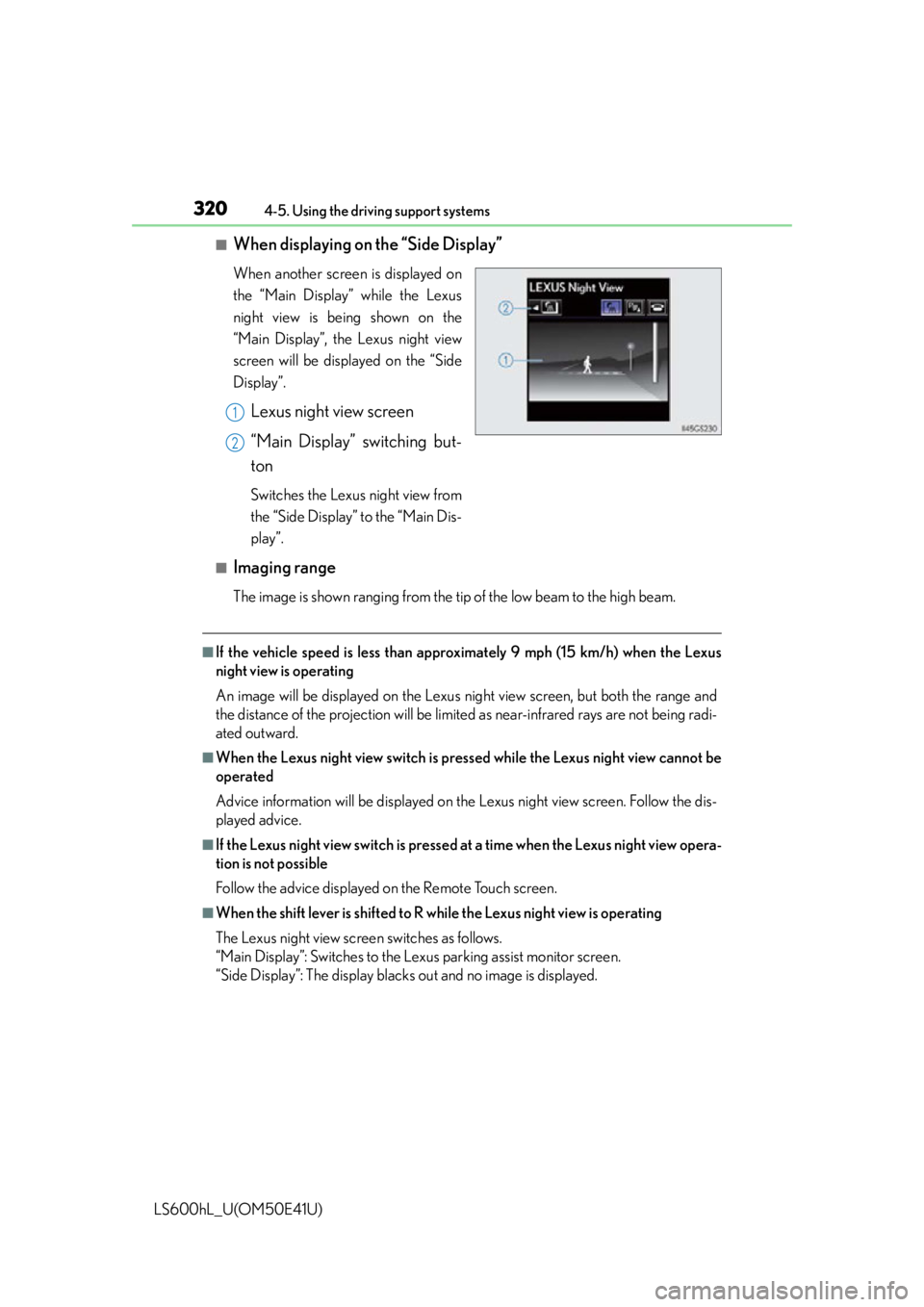
■When displaying on the “Side Display”
When another screen is displayed on
the “Main Display” while the Lexus
night view is being shown on the
“Main Display”, the Lexus night view
screen will be displayed on the “Side
Display”.
Lexus night view screen
“Main Display” switching but-
ton
Switches the Lexus night view from
the “Side Display” to the “Main Dis-
play”.
■Imaging range
The image is shown ranging from the ti p of the low beam to the high beam.
■If the vehicle speed is less than approximately 9 mph (15 km/h) when the Lexus
night view is operating
An image will be displayed on the Lexus night view screen, but both the range and
the distance of the projection will be limi ted as near-infrared rays are not being radi-
ated outward.
■When the Lexus night view switch is pressed while the Lexus night view cannot be
operated
Advice information will be displayed on the Lexus night view screen. Follow the dis-
played advice.
■If the Lexus night view switch is pressed at a time when the Lexus night view opera-
tion is not possible
Follow the advice displayed on the Remote Touch screen.
■When the shift lever is shifted to R wh ile the Lexus night view is operating
The Lexus night view screen switches as follows.
“Main Display”: Switches to the Le xus parking assist monitor screen.
“Side Display”: The display blacks out and no image is displayed.
1
2
Page 323 of 620

3214-5. Using the driving support systems
4
Driving
LS600hL_U(OM50E41U)
CAUTION
■Before using the Lexus night view
Never depend on this system only.
Lexus night view is intended as a supplemental aid to help you see pedestrians and
road conditions ahead of the vehicle. As there are limits to the system, do not rely
solely on the system while in use, and drive safely while observing the following
precautions.
■When using the Lexus night view
Observe the following precautions.
Failure to do so may cause an accident resulting in death or serious injury.
●Never drive while looking at the Lexus night view screen only.
●Do not look continuously at the Lexus night view screen while driving. Pedestri-
ans, objects etc. ahead of the vehicle may be overlooked by the system. The sys-
tem should always be used as a supplemental aid only.
●Lexus night view is designed to help you see objects better when driving in dark-
ness on a road with few curves. Do not use the Lexus night view in well-lit areas or
on roads with many curves or slopes. There may be areas that cannot be dis-
played by the system due to the road conditions (curve size, gradient, etc.)
●Lexus night view may be unable to project some features at an appropriate level
of brightness. Some or all parts of certain features may be dark or difficult to see.
Do not rely solely on the Lexus night view, and drive carefully while checking the
surroundings for safety, as you would with a normal vehicle. Also, the following
features and conditions may not be displayed clearly.
Features that are difficult to display:
• Clothing of a pedestrian made of a certai n kind of material (ex. leather jackets)
• The characters on signs and billboards
• The information on road signs
Conditions in which display is difficult:
• Unfavorable weather conditions such as rain, fog, snowfall, snow storms etc.
• There are large puddles of water on the road surface following rainfall
• The area of the windshield in front of the camera is fogged up, dirty or icy
• The areas around the headlights are covered with ice, snow, mud etc.
• The 12-volt battery voltage is remarkably low
• There are bright lights ahead of the vehicle
Page 331 of 620

329
Interior features5
LS600hL_U(OM50E41U)5-1. Remote Touch screen
Remote Touch/12.3-inch display ......................................... 330
5-2. Lexus Climate Concierge Lexus Climate Concierge ..................................335
5-3. Using the air conditioning system and defogger
Front automatic air conditioning system ...............336
Rear air conditioning system ........................................... 351
Rear window and outside rear view mirror
defoggers .................................. 358
Windshield wiper de-icer..........................................359 5-4. Using the interior lights
Interior lights list .........................360• Interior lights ............................361
• Personal lights ....................... 362
5-5. Using the storage features List of storage features ............ 364• Glove box ............................... 366
• Coin holder ............................ 367
• Door pockets ......................... 367
• Cup holders ...........................368
• Console box........................... 369
• Auxiliary boxes ....................... 371
Trunk features .............................. 373
5-6. Other interior features Sun visors and vanity mirrors .......................................... 376
Clock............................................... 378
Ashtrays ......................................... 379
Cigarette lighters ...................... 380
Power outlets ...............................382
Heated steering wheel ............385
Climate control seats ............... 387
Armrest .......................................... 392
Retractable table ........................ 393
Rear sunshade............................. 395
Rear door sunshades................398
Coat hooks .................................... 401
Assist grips.................................... 402
Garage door opener................ 403
LEXUS Enform Safety Connect ....................................... 410
Page 332 of 620
330
LS600hL_U(OM50E41U)
5-1. Remote Touch screen
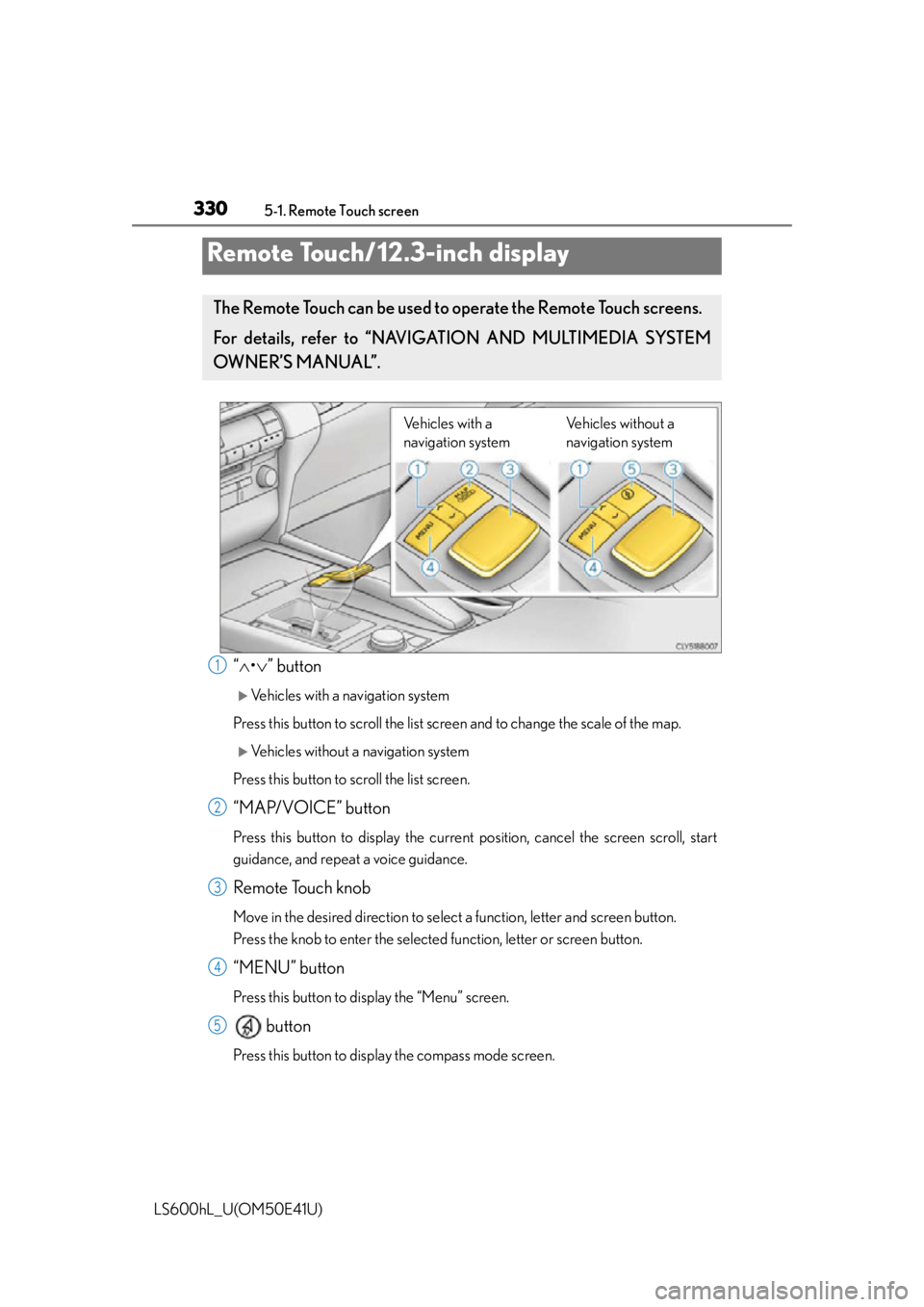
“ • ” button
Vehicles with a navigation system
Press this button to scroll the list sc reen and to change the scale of the map.
Vehicles without a navigation system
Press this button to scroll the list screen.
“MAP/VOICE” button
Press this button to display the current position, cancel the screen scroll, start
guidance, and repeat a voice guidance.
Remote Touch knob
Move in the desired direction to select a function, letter and screen button.
Press the knob to enter the selected function, letter or screen button.
“MENU” button
Press this button to display the “Menu” screen.
button
Press this button to displa y the compass mode screen.
Remote Touch/12.3-inch display
The Remote Touch can be used to operate the Remote Touch screens.
For details, refer to “NAVIGATION AND MULTIMEDIA SYSTEM
OWNER’S MANUAL”.
Vehicles with a
navigation system Vehicles without a
navigation system
1
2
3
4
5
Page 333 of 620
3315-1. Remote Touch screen
5
Interior features
LS600hL_U(OM50E41U)
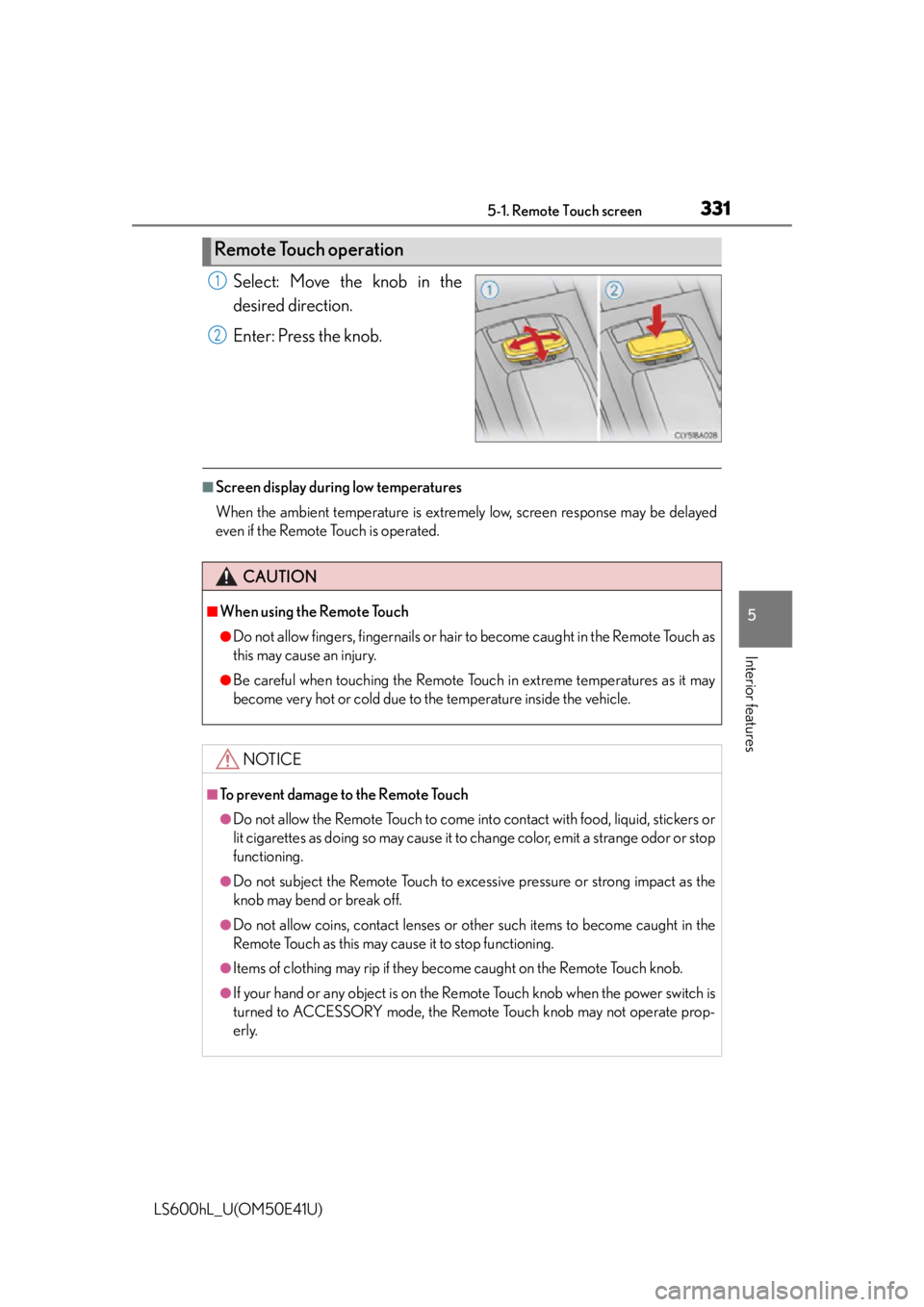
Select: Move the knob in the
desired direction.
Enter: Press the knob.
■Screen display during low temperatures
When the ambient temperature is extremely low, screen response may be delayed
even if the Remote Touch is operated.
Remote Touch operation
1
2
CAUTION
■When using the Remote Touch
●Do not allow fingers, fingernails or hair to become caught in the Remote Touch as
this may cause an injury.
●Be careful when touching the Remote Touch in extreme temperatures as it may
become very hot or cold due to the temperature inside the vehicle.
NOTICE
■To prevent damage to the Remote Touch
●Do not allow the Remote Touch to come into contact with food, liquid, stickers or
lit cigarettes as doing so may cause it to change color, emit a strange odor or stop
functioning.
●Do not subject the Remote Touch to excessive pressure or strong impact as the
knob may bend or break off.
●Do not allow coins, contact lenses or other such items to become caught in the
Remote Touch as this may cau se it to stop functioning.
●Items of clothing may rip if they become caught on the Remote Touch knob.
●If your hand or any object is on the Remote Touch knob when the power switch is
turned to ACCESSORY mode, the Remote Touch knob may not operate prop-
erly.
Page 334 of 620
3325-1. Remote Touch screen
LS600hL_U(OM50E41U)
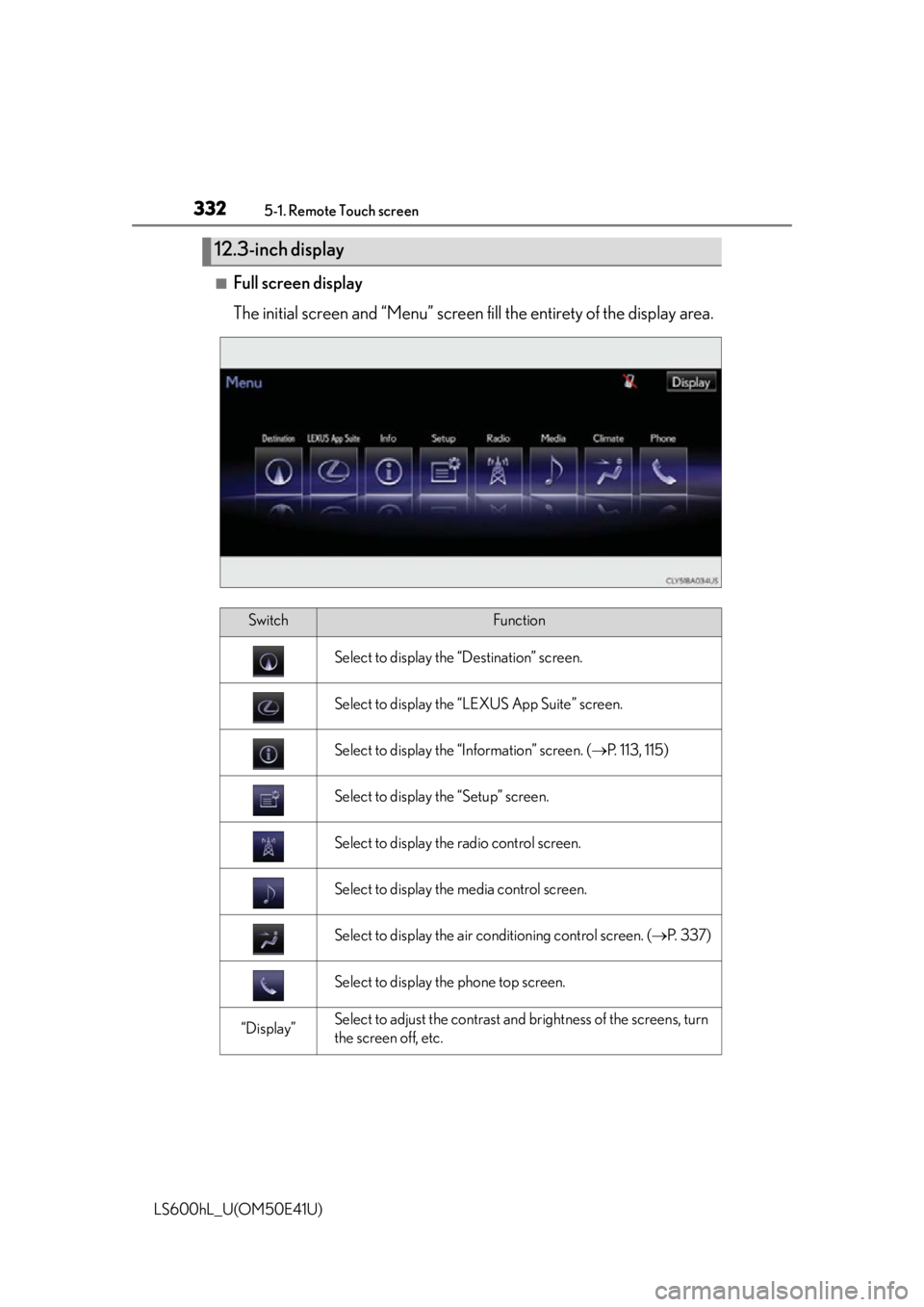
■Full screen display
The initial screen and “Menu” screen fill the entirety of the display area.
12.3-inch display
SwitchFunction
Select to display the “Destination” screen.
Select to display the “LEXUS App Suite” screen.
Select to display the “Information” screen. ( P. 113, 115)
Select to display the “Setup” screen.
Select to display the radio control screen.
Select to display the media control screen.
Select to display the air conditioning control screen. ( P. 3 3 7 )
Select to display the phone top screen.
“Display”Select to adjust the contrast and brightness of the screens, turn
the screen off, etc.
Page 335 of 620
3335-1. Remote Touch screen
5
Interior features
LS600hL_U(OM50E41U)
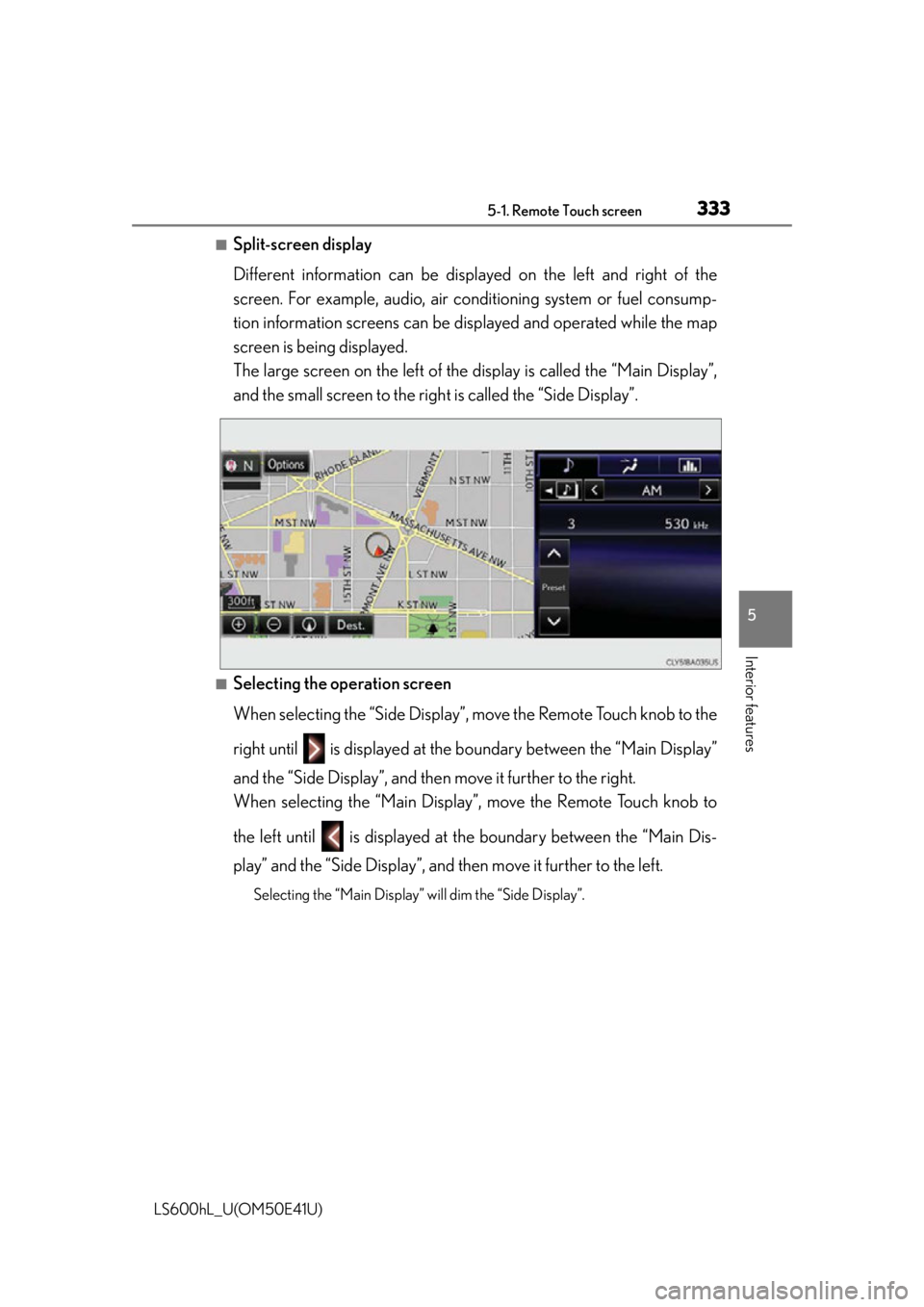
■Split-screen display
Different information can be displayed on the left and right of the
screen. For example, audio, air co nditioning system or fuel consump-
tion information screens can be d isplayed and operated while the map
screen is being displayed.
The large screen on the left of the display is called the “Main Display”,
and the small screen to the righ t is called the “Side Display”.
■Selecting the operation screen
When selecting the “Side Display”, mo ve the Remote Touch knob to the
right until is displayed at the bo undary between the “Main Display”
and the “Side Display”, and then move it further to the right.
When selecting the “Main Display”, move the Remote Touch knob to
the left until is displayed at the boundary between the “Main Dis-
play” and the “Side Display”, and then move it further to the left.
Selecting the “Main Display” will dim the “Side Display”.
Page 336 of 620
3345-1. Remote Touch screen
LS600hL_U(OM50E41U)
■“Side Display”
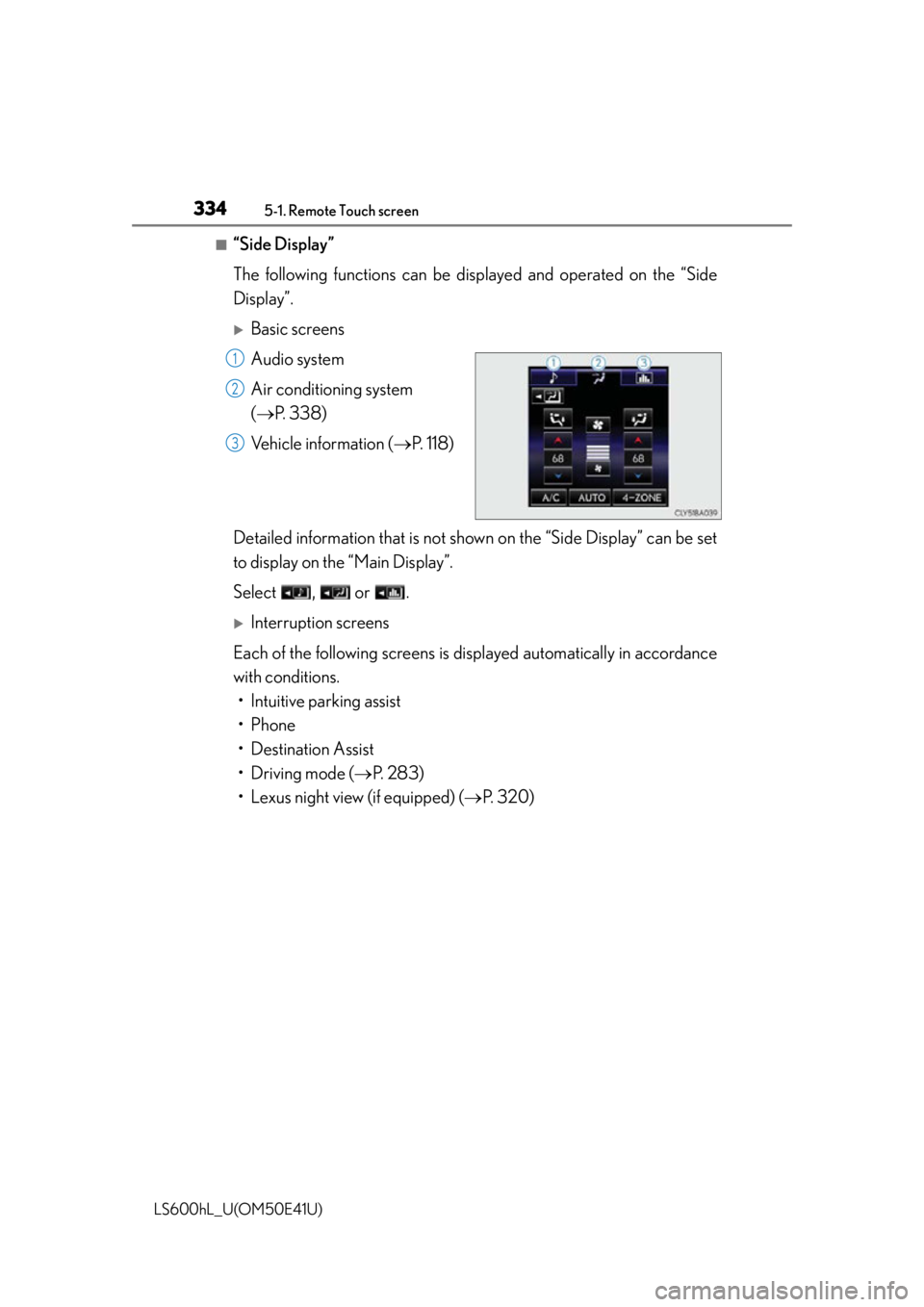
The following functions can be displayed and operated on the “Side
Display”.
Basic screens
Audio system
Air conditioning system
( P. 3 3 8 )
Vehicle information ( P. 118)
Detailed information that is not shown on the “Side Display” can be set
to display on th e “Main Display”.
Select , or .
Interruption screens
Each of the following screens is di splayed automatically in accordance
with conditions. • Intuitive parking assist
•Phone
• Destination Assist
• Driving mode ( P. 283)
• Lexus night view (if equipped) ( P. 320)
1
2
3