display LEXUS LS600H 2015 Service Manual
[x] Cancel search | Manufacturer: LEXUS, Model Year: 2015, Model line: LS600H, Model: LEXUS LS600H 2015Pages: 620, PDF Size: 7.66 MB
Page 233 of 620
2314-2. Driving procedures
4
Driving
LS600hL_U(OM50E41U)
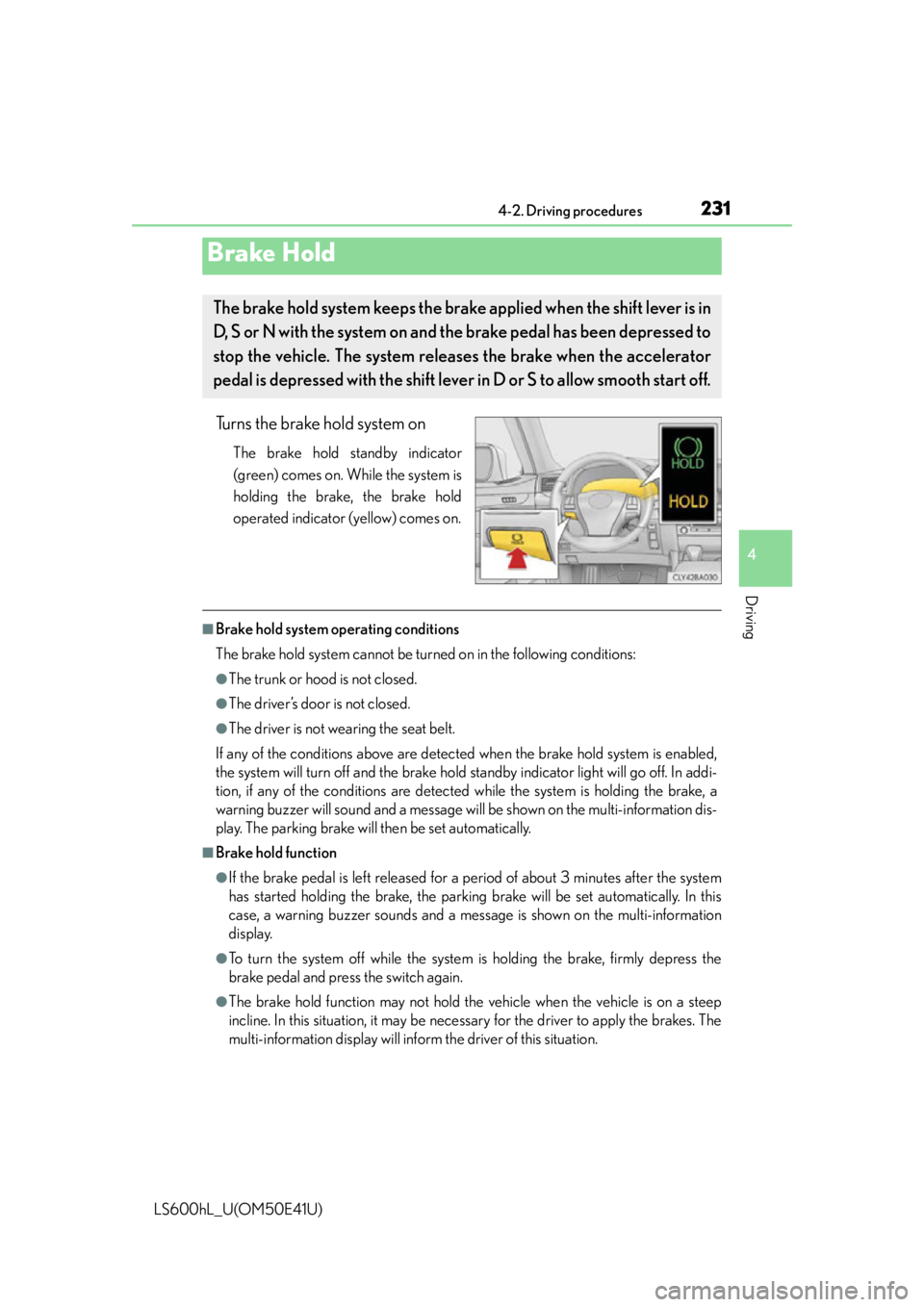
Turns the brake hold system on
The brake hold standby indicator
(green) comes on. While the system is
holding the brake, the brake hold
operated indicator (yellow) comes on.
■Brake hold system operating conditions
The brake hold system cannot be turn ed on in the following conditions:
●The trunk or hood is not closed.
●The driver’s door is not closed.
●The driver is not wearing the seat belt.
If any of the conditions above are detected when the brake hold system is enabled,
the system will turn off and the brake hold standby indicator light will go off. In addi-
tion, if any of the conditions are detected while the system is holding the brake, a
warning buzzer will sound and a message wi ll be shown on the multi-information dis-
play. The parking brake will then be set automatically.
■Brake hold function
●If the brake pedal is left released for a period of about 3 minutes after the system
has started holding the brake, the parking brake will be set automatically. In this
case, a warning buzzer sounds and a message is shown on the multi-information
display.
●To turn the system off while the system is holding the brake, firmly depress the
brake pedal and press the switch again.
●The brake hold function may not hold the vehicle when the vehicle is on a steep
incline. In this situation, it may be nece ssary for the driver to apply the brakes. The
multi-information display will info rm the driver of this situation.
Brake Hold
The brake hold system keeps the brake applied when the shift lever is in
D, S or N with the system on and the brake pedal has been depressed to
stop the vehicle. The system releases the brake when the accelerator
pedal is depressed with the shift lever in D or S to allow smooth start off.
Page 253 of 620
2514-4. Refueling
4
Driving
LS600hL_U(OM50E41U)
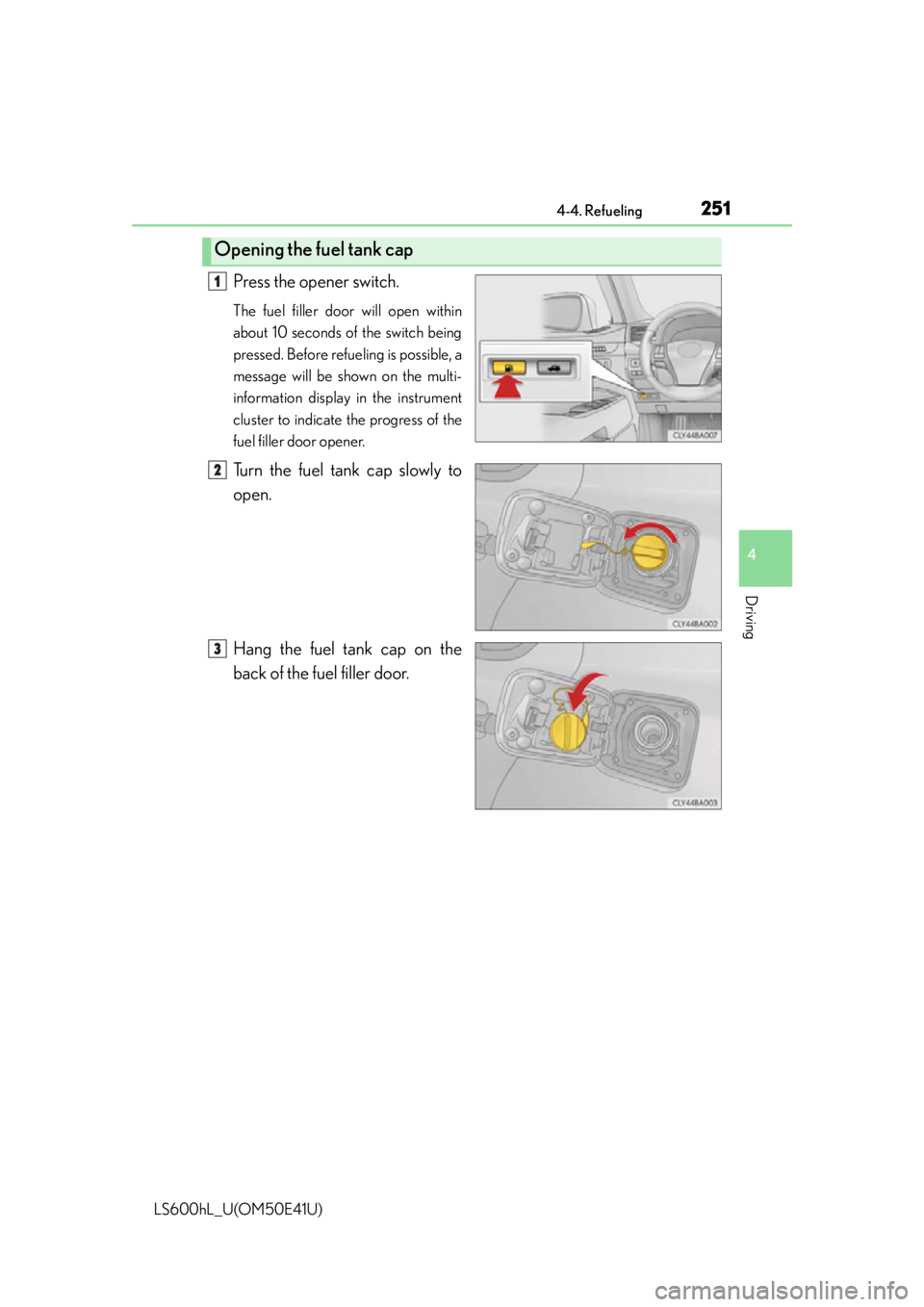
Press the opener switch.
The fuel filler door will open within
about 10 seconds of the switch being
pressed. Before refueling is possible, a
message will be shown on the multi-
information display in the instrument
cluster to indicate the progress of the
fuel filler door opener.
Turn the fuel tank cap slowly to
open.
Hang the fuel tank cap on the
back of the fuel filler door.
Opening the fuel tank cap
1
2
3
Page 259 of 620
2574-5. Using the driving support systems
4
Driving
LS600hL_U(OM50E41U)
Dynamic radar cruise control with full-speed range supplements conven-
tional cruise control with a vehicle-to-vehicle distance control. In vehicle-
to-vehicle distance control mode, th e vehicle automatically accelerates,
decelerates or stops in order to ma intain a set following distance from
vehicles ahead. See cautions on P. 269
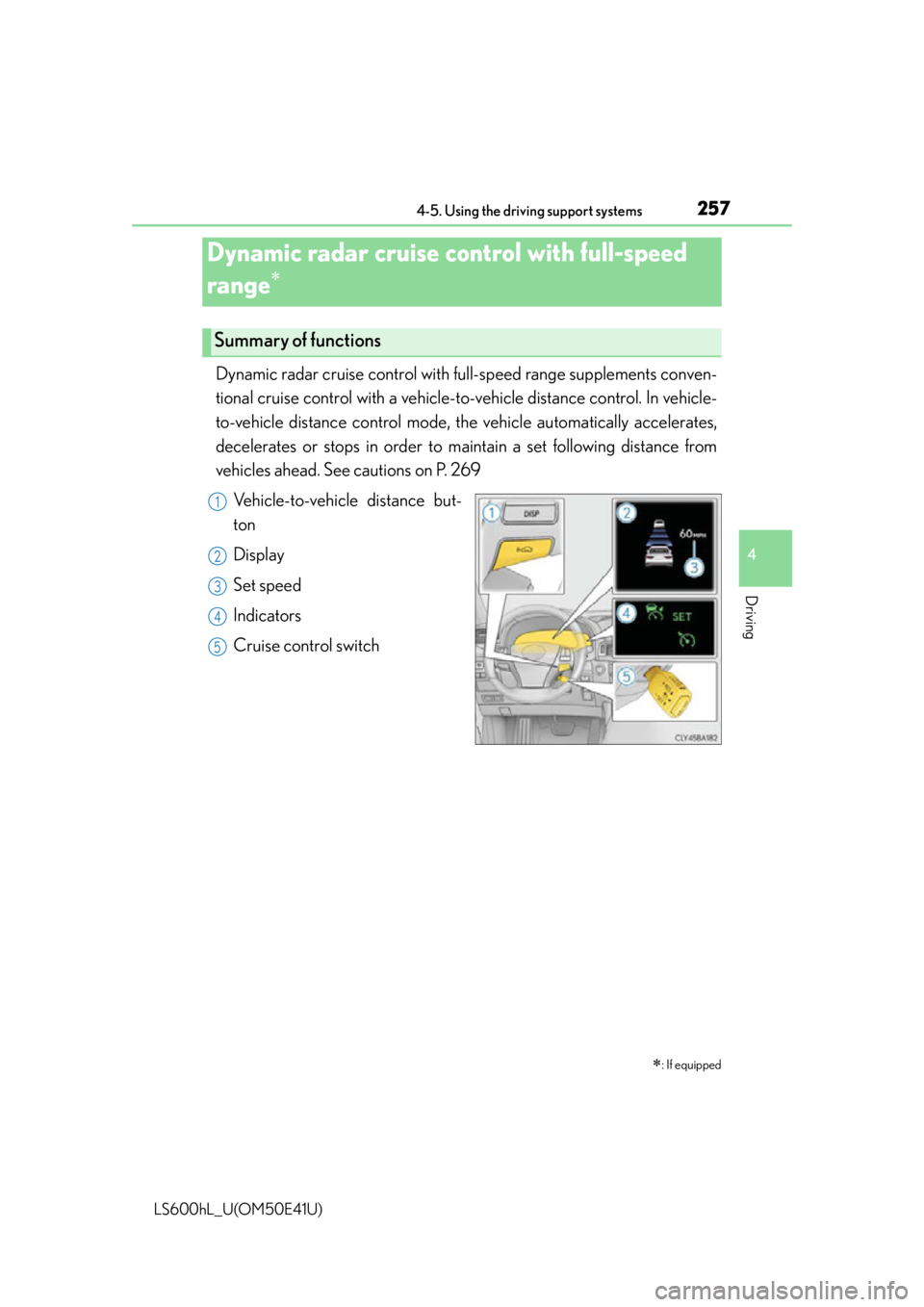
Vehicle-to-vehicle distance but-
ton
Display
Set speed
Indicators
Cruise control switch
Dynamic radar cruise control with full-speed
range
: If equipped
Summary of functions
1
2
3
4
5
Page 260 of 620
2584-5. Using the driving support systems
LS600hL_U(OM50E41U)
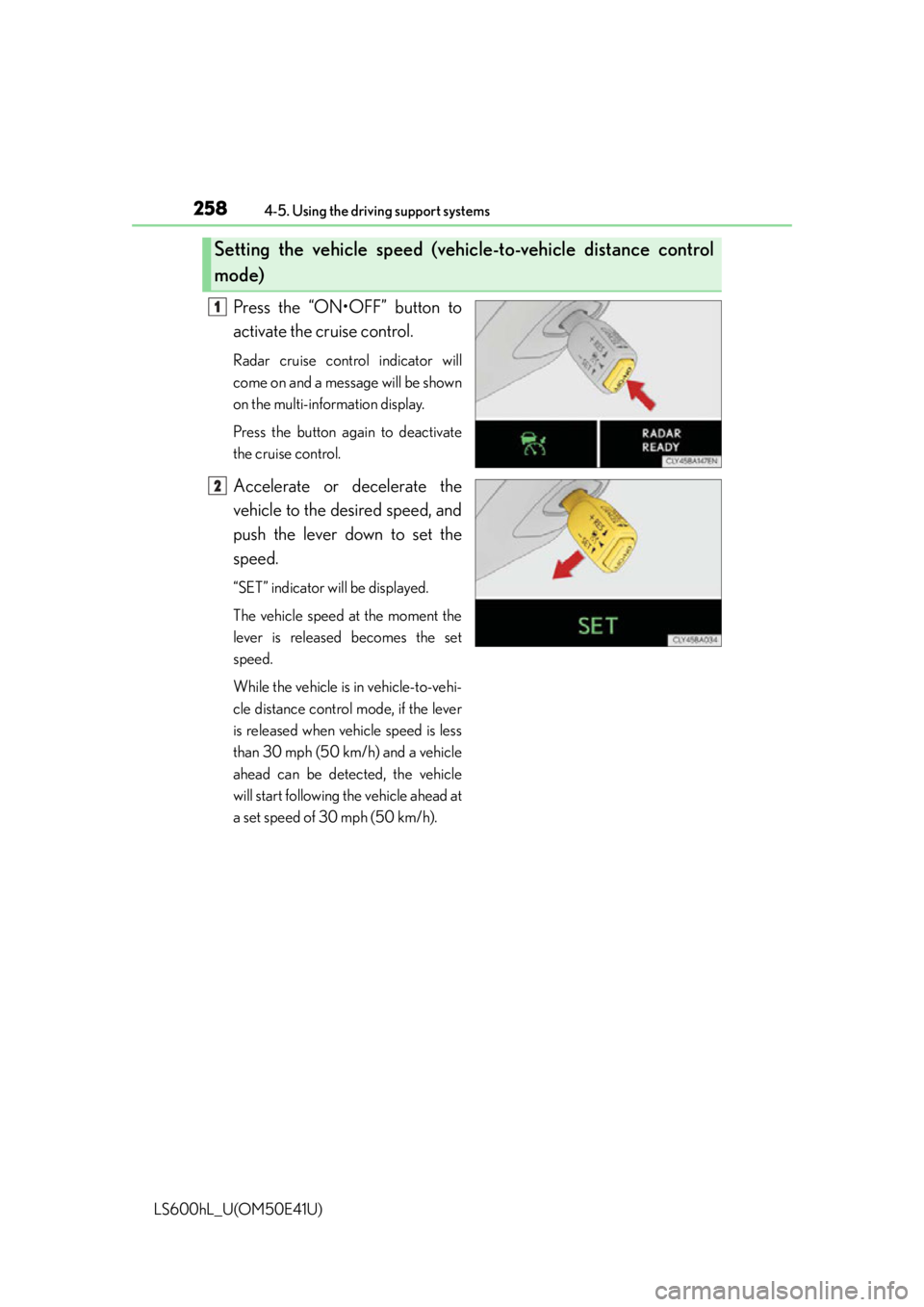
Press the “ON•OFF” button to
activate the cruise control.
Radar cruise control indicator will
come on and a message will be shown
on the multi-information display.
Press the button again to deactivate
the cruise control.
Accelerate or decelerate the
vehicle to the desired speed, and
push the lever down to set the
speed.
“SET” indicator will be displayed.
The vehicle speed at the moment the
lever is released becomes the set
speed.
While the vehicle is in vehicle-to-vehi-
cle distance control mode, if the lever
is released when vehicle speed is less
than 30 mph (50 km/h) and a vehicle
ahead can be detected, the vehicle
will start following the vehicle ahead at
a set speed of 30 mph (50 km/h).
Setting the vehicle speed (vehicle-to-vehicle distance control
mode)
1
2
Page 261 of 620
2594-5. Using the driving support systems
4
Driving
LS600hL_U(OM50E41U)
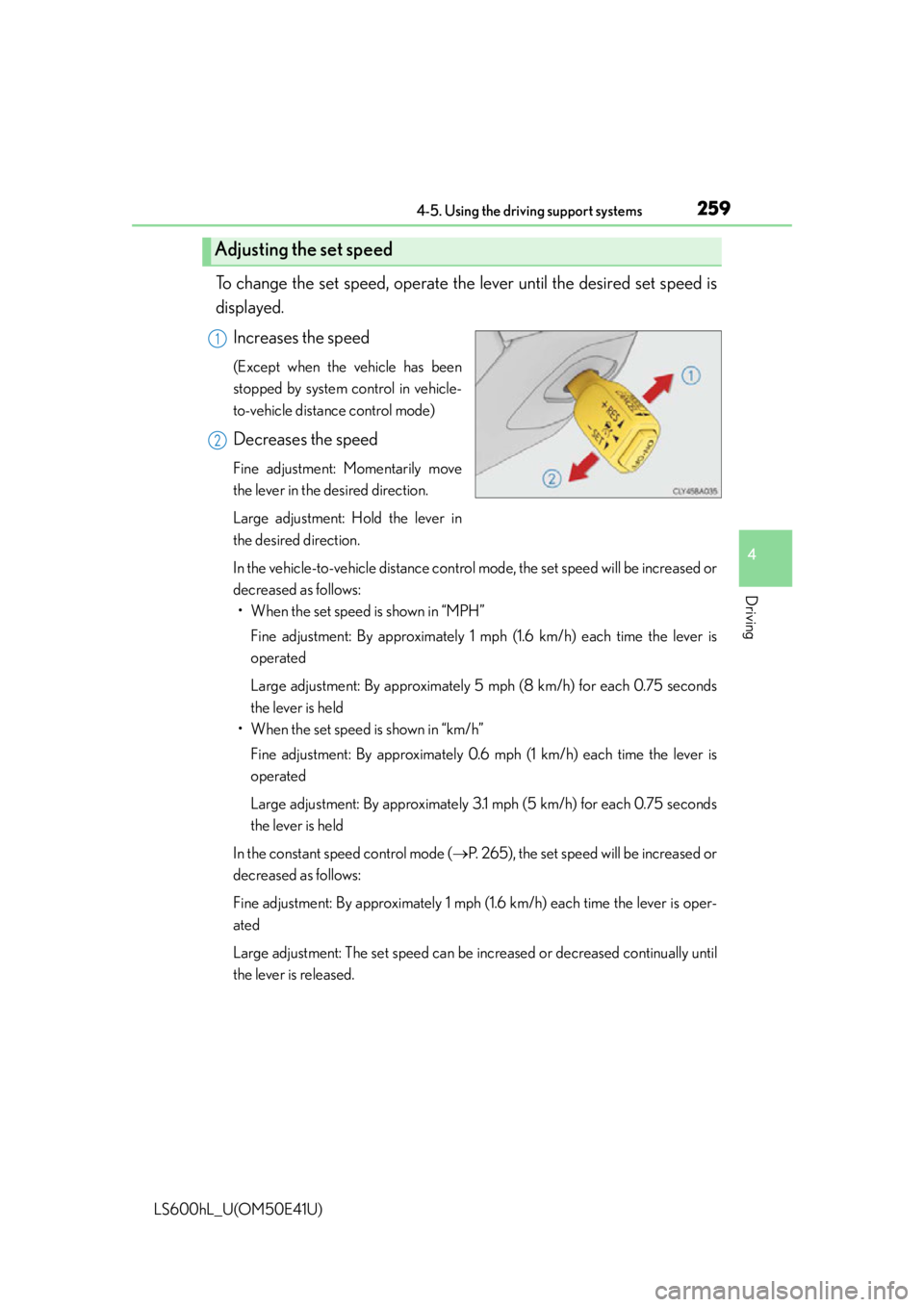
To change the set speed, operate the lever until the desired set speed is
displayed.
Increases the speed
(Except when the vehicle has been
stopped by system control in vehicle-
to-vehicle distance control mode)
Decreases the speed
Fine adjustment: Momentarily move
the lever in the desired direction.
Large adjustment: Hold the lever in
the desired direction.
In the vehicle-to-vehicle distance control mode, the set speed will be increased or
decreased as follows:• When the set speed is shown in “MPH”
Fine adjustment: By approximately 1 mp h (1.6 km/h) each time the lever is
operated
Large adjustment: By approximately 5 mph (8 km/h) for each 0.75 seconds
the lever is held
• When the set speed is shown in “km/h”
Fine adjustment: By approximately 0.6 mph (1 km/h) each time the lever is
operated
Large adjustment: By approximately 3.1 mph (5 km/h) for each 0.75 seconds
the lever is held
In the constant speed control mode ( P. 265), the set speed will be increased or
decreased as follows:
Fine adjustment: By approximately 1 mph (1.6 km/h) each time the lever is oper-
ated
Large adjustment: The set speed can be increased or decreased continually until
the lever is released.
Adjusting the set speed
1
2
Page 262 of 620
2604-5. Using the driving support systems
LS600hL_U(OM50E41U)
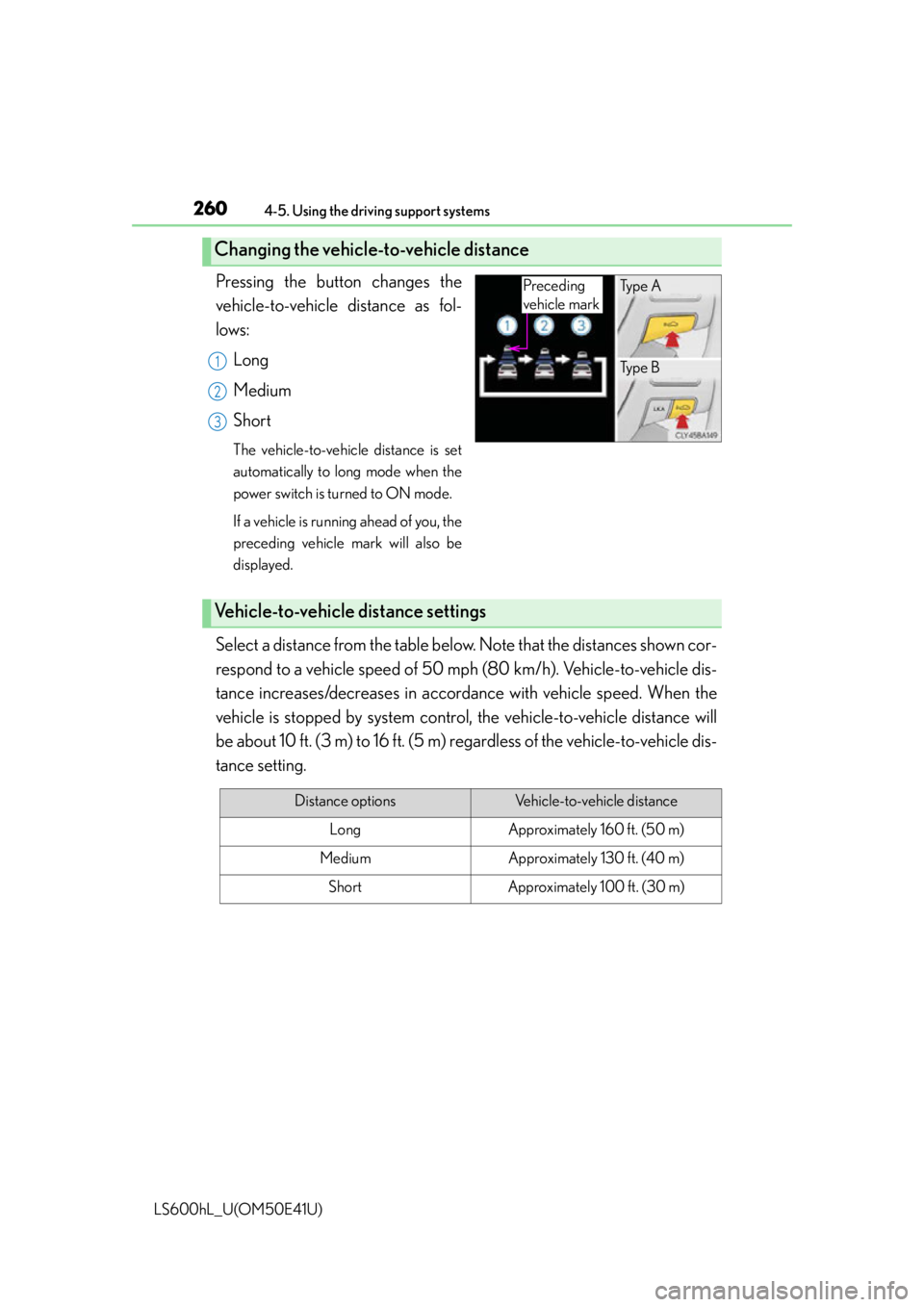
Pressing the button changes the
vehicle-to-vehicle distance as fol-
lows:Long
Medium
Short
The vehicle-to-vehicle distance is set
automatically to lo ng mode when the
power switch is turned to ON mode.
If a vehicle is running ahead of you, the
preceding vehicle mark will also be
displayed.
Select a distance from the table belo w. Note that the distances shown cor-
respond to a vehicle speed of 50 mph (80 km/h). Vehicle-to-vehicle dis-
tance increases/decreases in accordan ce with vehicle speed. When the
vehicle is stopped by system control, the vehicle-to-vehicle distance will
be about 10 ft. (3 m) to 16 ft. (5 m) re gardless of the vehicle-to-vehicle dis-
tance setting.
Changing the vehicle- to-vehicle distance
Preceding
vehicle markTy p e A
Ty p e B
1
2
3
Vehicle-to-vehicle distance settings
Distance optionsVehicle-to-vehicle distance
LongApproximately 160 ft. (50 m)
MediumApproximately 130 ft. (40 m)
ShortApproximately 100 ft. (30 m)
Page 266 of 620
2644-5. Using the driving support systems
LS600hL_U(OM50E41U)
Example of acceleration
When there are no longer any vehicles ahead driving slower than the
set speed
The system accelerates until the set speed is reached. The system then returns to
constant speed cruising.
When your vehicle is too close to a vehicle ahead, and sufficient auto-
matic deceleration via the cruise co ntrol is not possible, the display will
flash and the buzzer will sound to alert the driver. An example of this
would be if another driver cuts in front of you while you are following a
vehicle. Apply the brakes to ensure an appropriate vehicle-to-vehicle dis-
tance.
■Warnings may not occur when
In the following instance s, there is a possibility that the warnings will not
occur:
●When the speed of the vehicle ahea d matches or exceeds your vehi-
cle speed
●When the vehicle ahead is traveling at an extremely slow speed or is
stationary
●Immediately after the cruise control speed was set
●At the instant the accelerator is applied
Approach warning
3
Page 267 of 620
2654-5. Using the driving support systems
4
Driving
LS600hL_U(OM50E41U)
When constant speed control mode is selected, your vehicle will maintain
a set speed without controlling the vehi cle-to-vehicle distance. Select this
mode only when vehicle-to-vehicle distance control mode does not func-
tion correctly due to dirt etc.
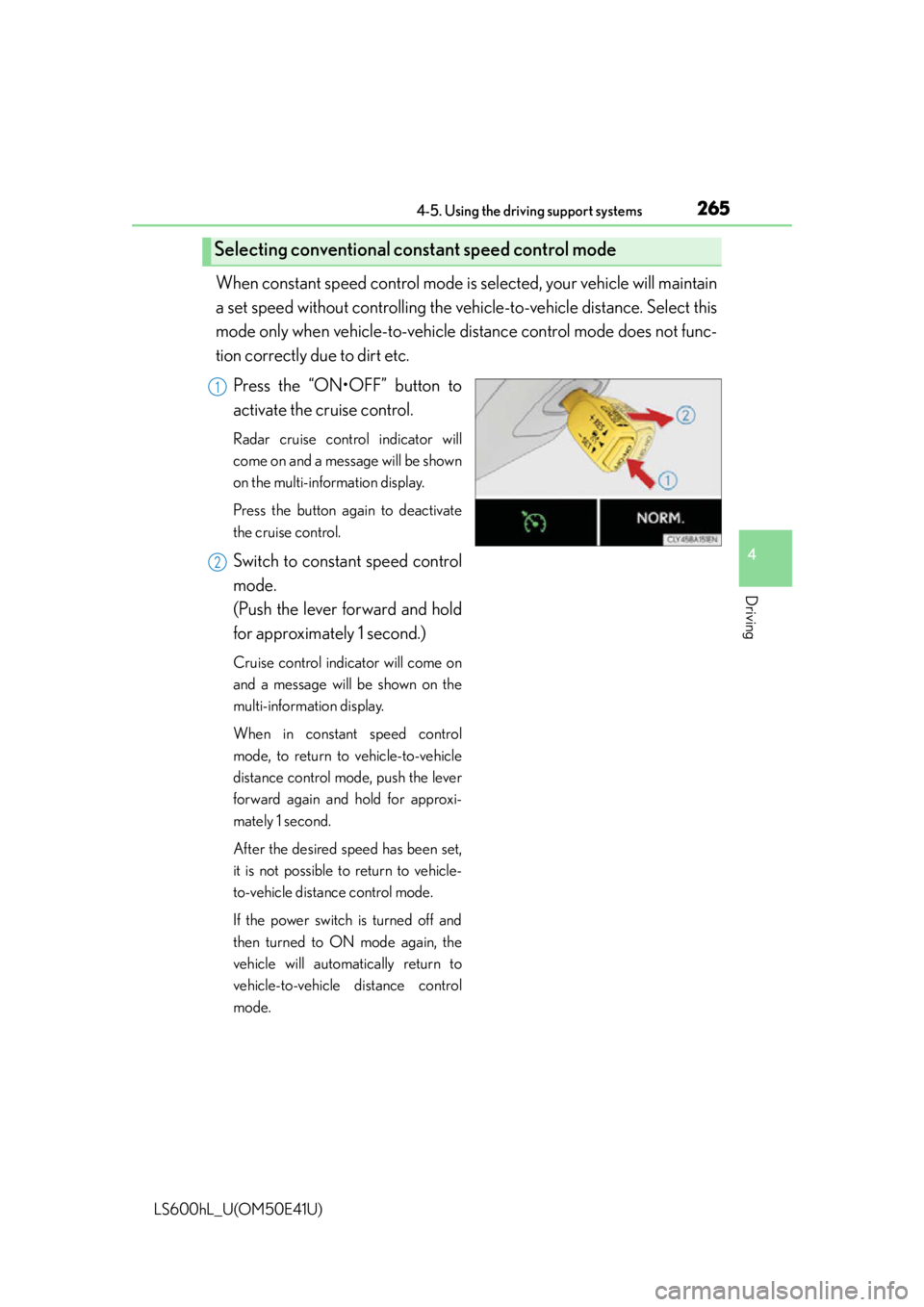
Press the “ON•OFF” button to
activate the cruise control.
Radar cruise control indicator will
come on and a message will be shown
on the multi-information display.
Press the button again to deactivate
the cruise control.
Switch to constant speed control
mode.
(Push the lever forward and hold
for approximately 1 second.)
Cruise control indicator will come on
and a message will be shown on the
multi-information display.
When in constant speed control
mode, to return to vehicle-to-vehicle
distance control mode, push the lever
forward again and hold for approxi-
mately 1 second.
After the desired speed has been set,
it is not possible to return to vehicle-
to-vehicle distance control mode.
If the power switch is turned off and
then turned to ON mode again, the
vehicle will automatically return to
vehicle-to-vehicle distance control
mode.
Selecting conventional constant speed control mode
1
2
Page 279 of 620
2774-5. Using the driving support systems
4
Driving
LS600hL_U(OM50E41U)
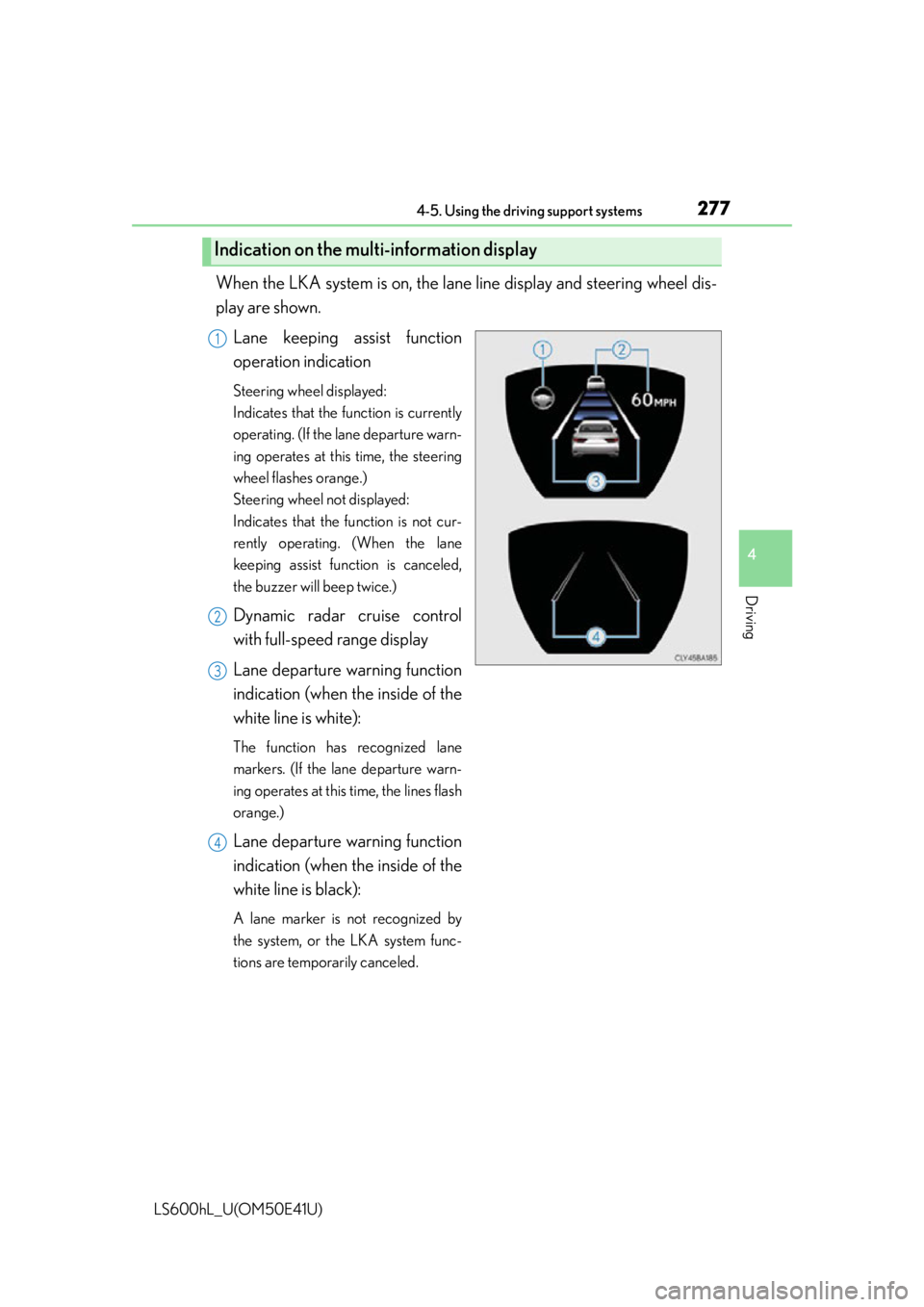
When the LKA system is on, the lane line display and steering wheel dis-
play are shown.Lane keeping assist function
operation indication
Steering wheel displayed:
Indicates that the function is currently
operating. (If the lane departure warn-
ing operates at this time, the steering
wheel flashes orange.)
Steering wheel not displayed:
Indicates that the function is not cur-
rently operating. (When the lane
keeping assist function is canceled,
the buzzer will beep twice.)
Dynamic radar cruise control
with full-speed range display
Lane departure warning function
indication (when the inside of the
white line is white):
The function has recognized lane
markers. (If the lane departure warn-
ing operates at this time, the lines flash
orange.)
Lane departure warning function
indication (when the inside of the
white line is black):
A lane marker is not recognized by
the system, or the LKA system func-
tions are temporarily canceled.
Indication on the multi-information display
1
2
3
4
Page 280 of 620

2784-5. Using the driving support systems
LS600hL_U(OM50E41U)
■Temporary cancelation of the LKA system functions
If any of the following occurs, the LKA system functions will be temporarily canceled.
The functions will resume after the necessary operating conditions have returned.
●The steering wheel is turned as far as necessary to cause the vehicle to change
lanes.
●When the system detects no-handed driving. (The lane keeping assist function will
be temporarily canceled, but the lane departure warning function will continue.)
●The turn signal lever is operated.
●The vehicle speed deviates from the operating range of the LKA system functions.
(The buzzer will beep twice when the lane keeping assist function is being can-
celed.)
●When the lane lines cannot be recognized while driving.
●When the wiper switch is in the high speed position or is set to “AUTO” mode with
the wipers operating at high speed. (The la ne keeping assist function will be tempo-
rarily canceled, but the lane departure warning function will continue.)
●If the vehicle crosses a line for approximately half a minute or more. (The lane keep-
ing assist function will be temporarily canceled, but the lane departure warning
function will continue.)
●When the lane departure warning function is activated.
The lane departure warning function will not operate again for several seconds
after it has been activated, even if the vehicle leaves the lane again.
■The lane departure warning
It may be difficult to feel the sensory warning depending on the road conditions.
■No-handed driving warning
If the steering wheel is not operated for approximately 15 seconds on a straight road
or approximately 5 seconds on a curve, the buzzer will beep twice, indicators on the
multi-information display will flash, and the lane keeping assist function will be tem-
porarily canceled. If you drive the vehicle with your hands lightly touching the steer-
ing wheel, this may also be detected as no-handed driving.