remote control LEXUS LS600H 2017 User Guide
[x] Cancel search | Manufacturer: LEXUS, Model Year: 2017, Model line: LS600H, Model: LEXUS LS600H 2017Pages: 676, PDF Size: 35.25 MB
Page 139 of 676
139
3
Operation of
each component
LS600h/LS600hL_EE(OM50G20E)
3-1. Key information
Keys .................................................. 140
3-2. Opening, closing and
locking the doors
and trunk
Smart entry & start system ...... 149
Wireless remote control............ 171
Doors ................................................176
Trunk ................................................ 180
3-3. Adjusting the seats
Front seats...................................... 187
Power rear seat ........................... 194
Driving position memory ........ 207
Rear seat position memory......212
Head restraints .............................214
3-4. Adjusting the steering
wheel and mirrors
Steering wheel ............................. 218
Inside rear view mirror ..............219
Outside rear view mirrors........221
3-5. Opening, closing the
windows and moon roof
Power windows .......................... 225
Moon roof ..................................... 229
Page 140 of 676
140
LS600h/LS600hL_EE(OM50G20E)
3-1. Key information
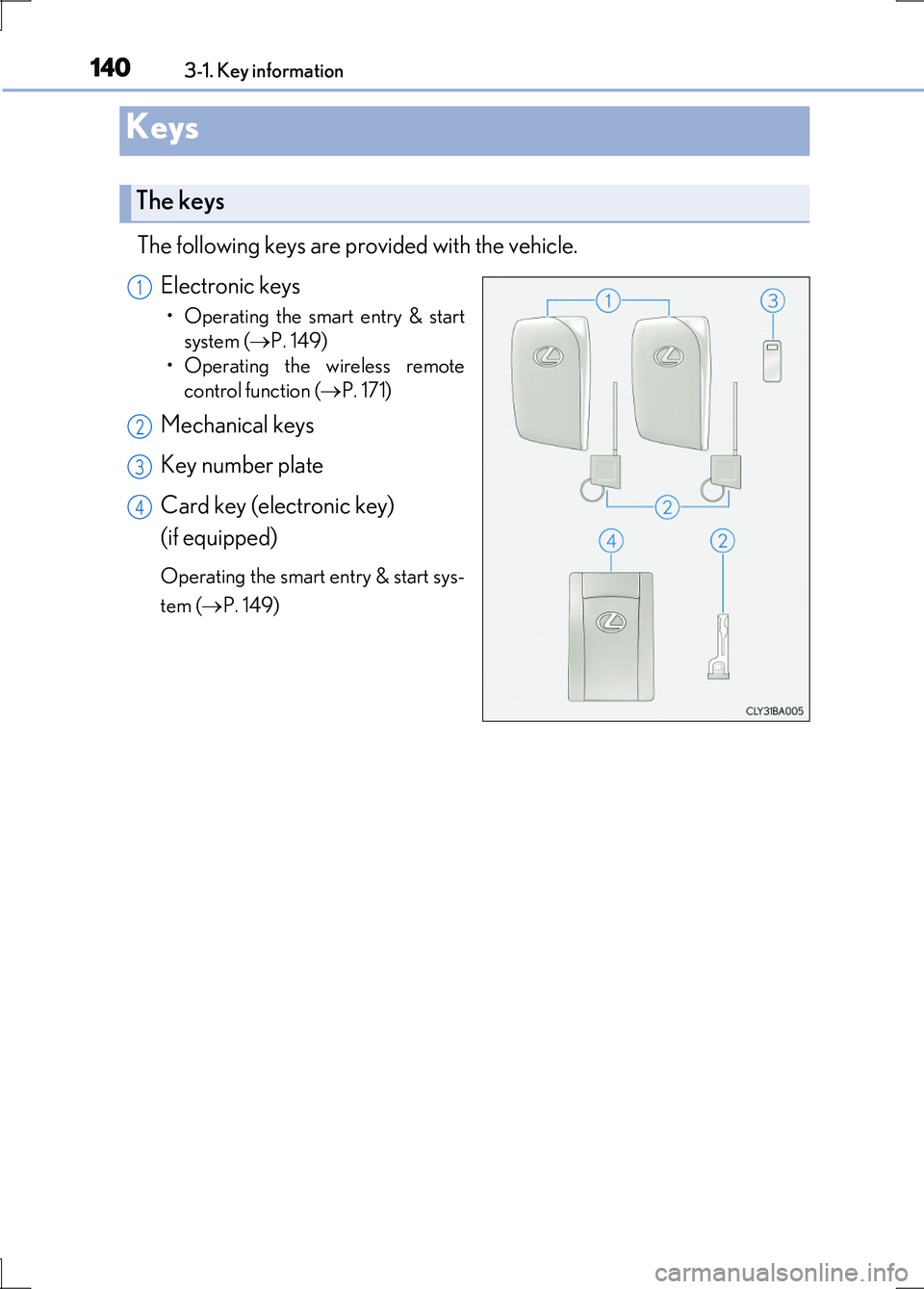
The following keys are provided with the vehicle.
Electronic keys
• Operating the smart entry & start
system ( P. 149)
• Operating the wireless remote
control function ( P. 171)
Mechanical keys
Key number plate
Card key (electronic key)
(if equipped)
Operating the smart entry & start sys-
tem ( P. 149)
Keys
The keys
1
2
3
4
Page 150 of 676
1503-2. Opening, closing and locking the doors and trunk
LS600h/LS600hL_EE(OM50G20E)
■Operation signals
Doors:
The emergency flashers flash to indicate that the doors have been locked/unlocked.
(Locked: Once; Unlocked: Twice)
Windows and moon roof:
A buzzer sounds to indicate that th e windows and moon roof are operating.
■Security feature
If a door is not opened within approximately 30 seconds after the vehicle is
unlocked, the security feature automatically locks the vehicle again.
■Welcome light illumination control
The front position, tail and license plate lights automatically turn on at night when the
doors are unlocked using the entry function or wireless remote control if the head-
light switch is in the “AUTO” position.
Page 151 of 676
1513-2. Opening, closing and locking the doors and trunk
3
Operation of each component
LS600h/LS600hL_EE(OM50G20E)
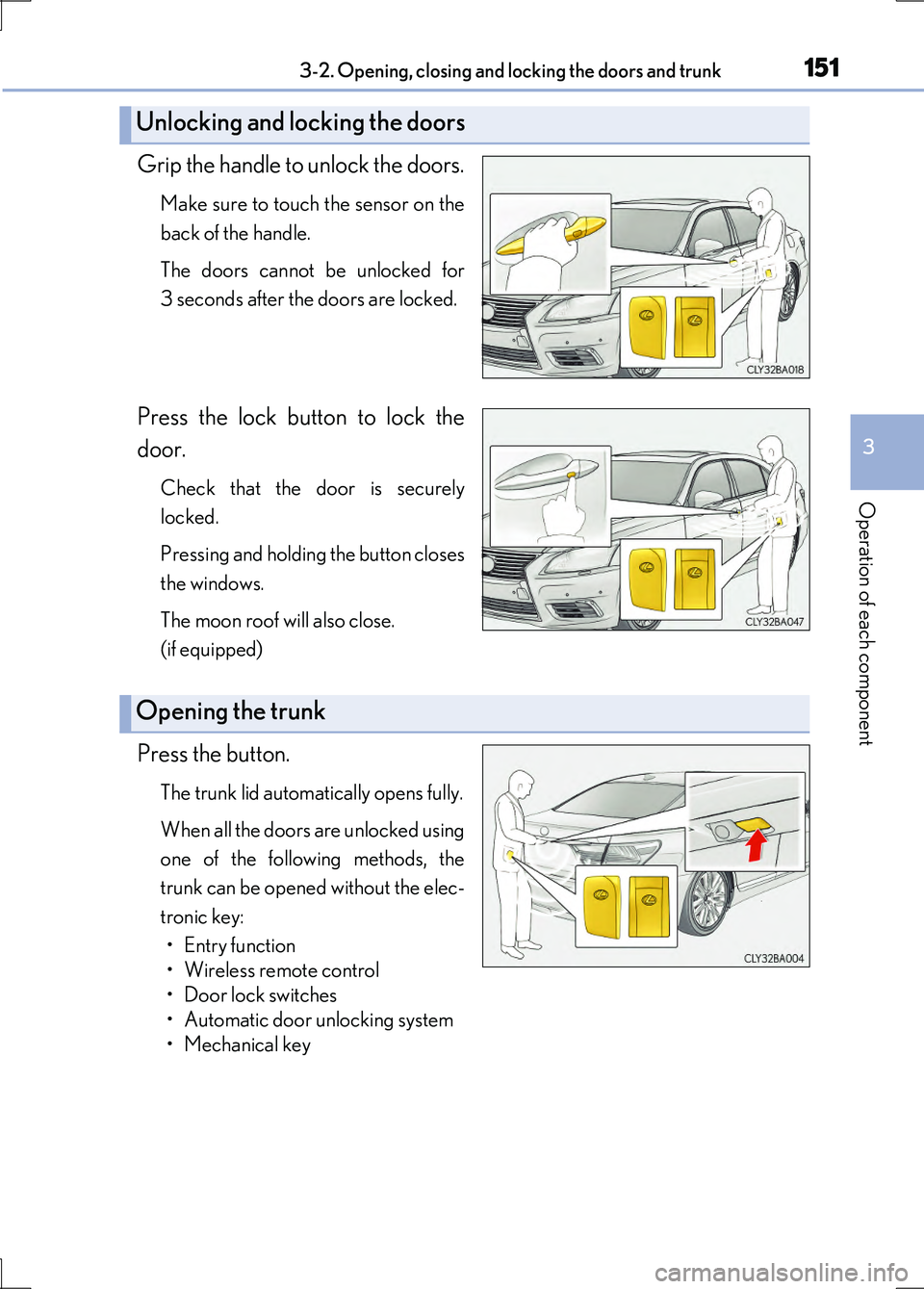
Grip the handle to unlock the doors.
Make sure to touch the sensor on the
back of the handle.
The doors cannot be unlocked for
3 seconds after the doors are locked.
Press the lock button to lock the
door.
Check that the door is securely
locked.
Pressing and holding the button closes
the windows.
The moon roof will also close.
(if equipped)
Press the button.
The trunk lid automatically opens fully.
When all the doors are unlocked using
one of the following methods, the
trunk can be opened without the elec-
tronic key:
• Entry function
• Wireless remote control
• Door lock switches
• Automatic door unlocking system
• Mechanical key
Unlocking and locking the doors
Opening the trunk
Page 157 of 676
1573-2. Opening, closing and locking the doors and trunk
3
Operation of each component
LS600h/LS600hL_EE(OM50G20E)
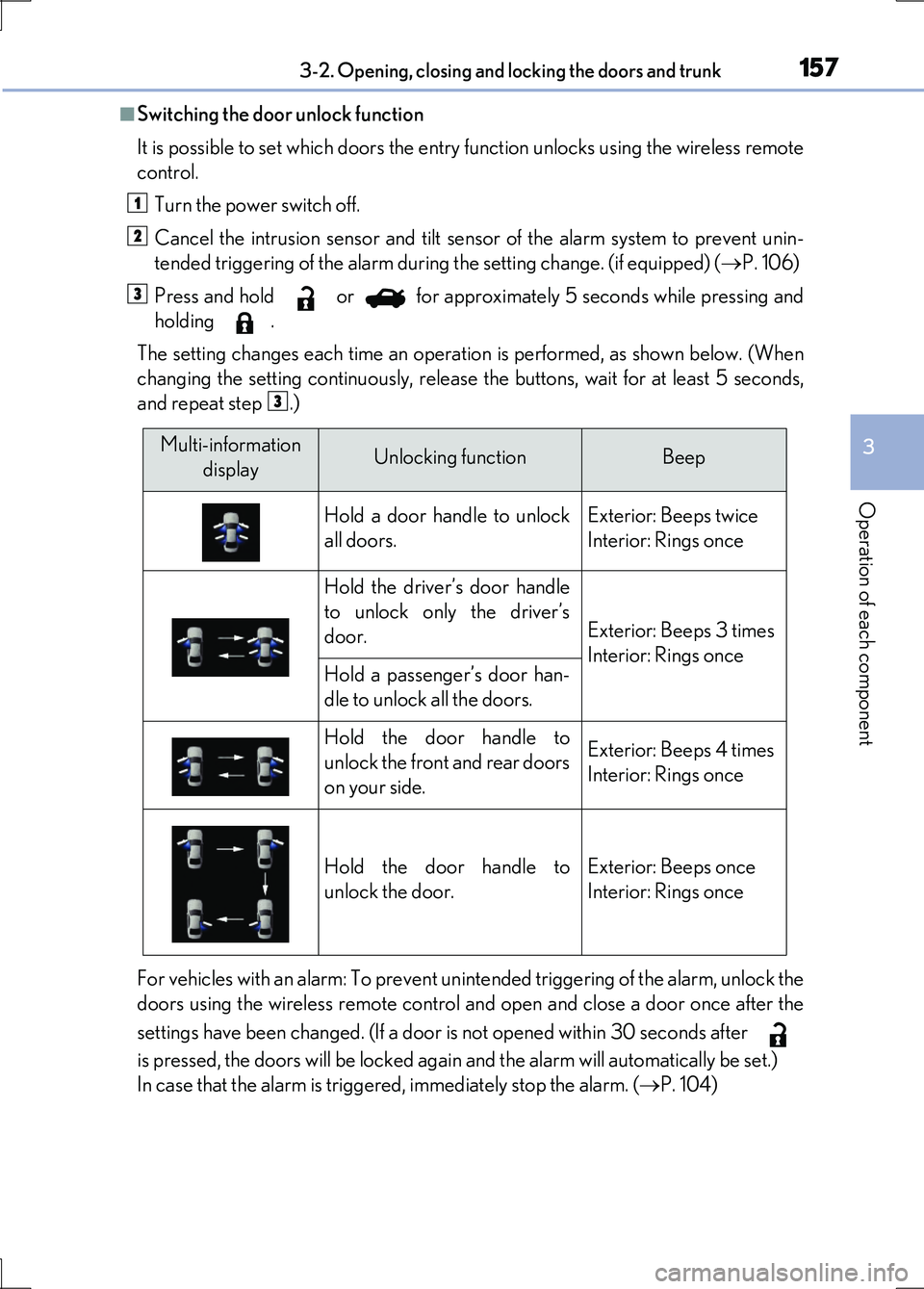
■Switching the door unlock function
It is possible to set which doors the entry function unlocks using the wireless remote
control.
Turn the power switch off.
Cancel the intrusion sensor and tilt sensor of the alarm system to prevent unin-
tended triggering of the alarm during the setting change. (if equipped) ( P. 106)
Press and hold or for approximately 5 seconds while pressing and
holding .
The setting changes each time an operation is performed, as shown below. (When
changing the setting continuously, release the buttons, wait for at least 5 seconds,
and repeat step .)
For vehicles with an alarm: To prevent unintended triggering of the alarm, unlock the
doors using the wireless remote control an d open and close a door once after the
settings have been changed. (If a door is not opened within 30 seconds after
is pressed, the doors will be locked again and the alarm will automatically be set.)
In case that the alarm is triggered, immediately stop the alarm. ( P. 104)
1
2
3
3
Multi-information
displayUnlocking functionBeep
Hold a door handle to unlock
all doors.
Exterior: Beeps twice
Interior: Rings once
Hold the driver’s door handle
to unlock only the driver’s
door.Exterior: Beeps 3 times
Interior: Rings onceHold a passenger’s door han-
dle to unlock all the doors.
Hold the door handle to
unlock the front and rear doors
on your side.
Exterior: Beeps 4 times
Interior: Rings once
Hold the door handle to
unlock the door.
Exterior: Beeps once
Interior: Rings once
Page 158 of 676
1583-2. Opening, closing and locking the doors and trunk
LS600h/LS600hL_EE(OM50G20E)
■Battery-saving function
In the following circumstances, the entry function is disabled in order to prevent the
12-volt battery from discharging and the electronic key battery from depleting.
●When the entry function has not been used for a month or more
●When the electronic key has been left within approximately 2 m (6 ft.) of the vehi-
cle for 10 minutes or more
The system will resume operation when
●The vehicle is locked using the door handle lock switch when carrying the elec-
tronic key on your person.
●The vehicle is locked/unlocked using the wireless remote control function.
( P. 171)
●The vehicle is locked/unlocked using the mechanical key. (P. 603)
Page 159 of 676
1593-2. Opening, closing and locking the doors and trunk
3
Operation of each component
LS600h/LS600hL_EE(OM50G20E)
■Conditions affecting operation
The smart entry & start system uses weak radio waves. In the following situations, the
communication between the electronic key and the vehicle may be affected, pre-
venting the smart entry & start system, wi reless remote control and immobilizer sys-
tem from operating properly. (Ways of coping: P. 603)
●When the electronic key battery is depleted
●Near a TV tower, electric power plant, gas station, radio station, large display, air-
port or other facility that generates strong radio waves or electrical noise
●When carrying a portable radio, cellular phone, cordless phone or other wireless
communication device
●When the electronic key is in contact with, or is covered by the following metallic
objects
• Cards to which aluminum foil is attached
• Cigarette boxes that have aluminum foil inside
• Metallic wallets or bags
•Coins
• Hand warmers made of metal
• Media such as CDs and DVDs
●When multiple electronic keys are in the vicinity
●When other wireless keys (that emit radio waves) are being used nearby
●When carrying the electronic key together with the following devices that emit
radio waves
• Another vehicle’s electronic key or a wireless key that emits radio waves
• Personal computers or personal digital assistants (PDAs)
• Digital audio players
• Portable game systems
●If window tint with a metallic content or metallic objects are attached to the rear
window
Page 160 of 676
1603-2. Opening, closing and locking the doors and trunk
LS600h/LS600hL_EE(OM50G20E)
■Note for the entry function
●Even when the electronic key is within the effective range (detection areas), the
system may not operate properly in the following cases:
• The electronic key is too close to the window or outside door handle, near the
ground, or in a high place when the doors are locked or unlocked.
• The electronic key is near the ground or in a high place, or too close to the rear
bumper center when the trunk is opened.
• The electronic key is on the instrument panel, rear package tray or floor, or in the
door pockets or glove box when the hybrid system is started or power switch
modes are changed.
●Do not leave the electronic key on top of the instrument panel or near the door
pockets when exiting the vehicle. Depending on the radio wave reception condi-
tions, it may be detected by the antenna outside the cabin and the door will
become lockable from the outside, possibly trapping the electronic key inside the
vehicle.
●As long as the electronic key is within the effective range, the doors may be locked
or unlocked by anyone. However, only th e doors detecting the electronic key can
be used to unlock the vehicle.
●Even if the electronic key is not inside the vehicle, it may be possible to start the
hybrid system if the electronic key is near the window.
●The doors may unlock if a large amount of water splashes on the door handle, such
as in the rain or in a car wash when the electronic key is within the effective range.
(The door will automatically be locked after approximately 30 seconds if the doors
are not opened and closed.)
●Gripping the door handle when wearing a glove may not unlock the door.
●If the wireless remote control is used to lock the doors when the electronic key is
near the vehicle, there is a possibility that the door may not be unlocked by the
entry function. (Use the wireless remote control to unlock the doors.)
●A sudden approach to the effective range or door handle may prevent the doors
from being unlocked. In this case, return the door handle to the original position
and check that the doors unlock before pulling the door handle again.
Page 162 of 676
1623-2. Opening, closing and locking the doors and trunk
LS600h/LS600hL_EE(OM50G20E)
■Electronic key battery depletion
●The standard battery life is 1 to 2 years. (The card key battery life is about a year and
a half.)
●If the battery is low, an alarm will sound in the cabin when the hybrid system is
started or stopped. ( P. 154)
●The battery becomes depleted even if the electronic key is not used because the
key always receives radio waves. If the smart entry & start system or the wireless
remote control does not operate, or the detection area becomes smaller, the bat-
tery may be depleted. Replace the battery when necessary. ( P. 532)
●To avoid serious deterioration, do not leave the electronic key within 1 m (3 ft.) of
the following electrical appliances that produce a magnetic field:
•TVs
• Personal computers
• Cellular phones, cordless phones and battery chargers
• Recharging cellular phones or cordless phones
• Table lamps
• Induction cookers
■When the electronic key battery is fully depleted
P. 532
■Customization
Settings (e. g. smart entry & start system) can be changed.
(Customizable features P. 634)
Page 171 of 676
1713-2. Opening, closing and locking the doors and trunk
3
Operation of each component
LS600h/LS600hL_EE(OM50G20E)
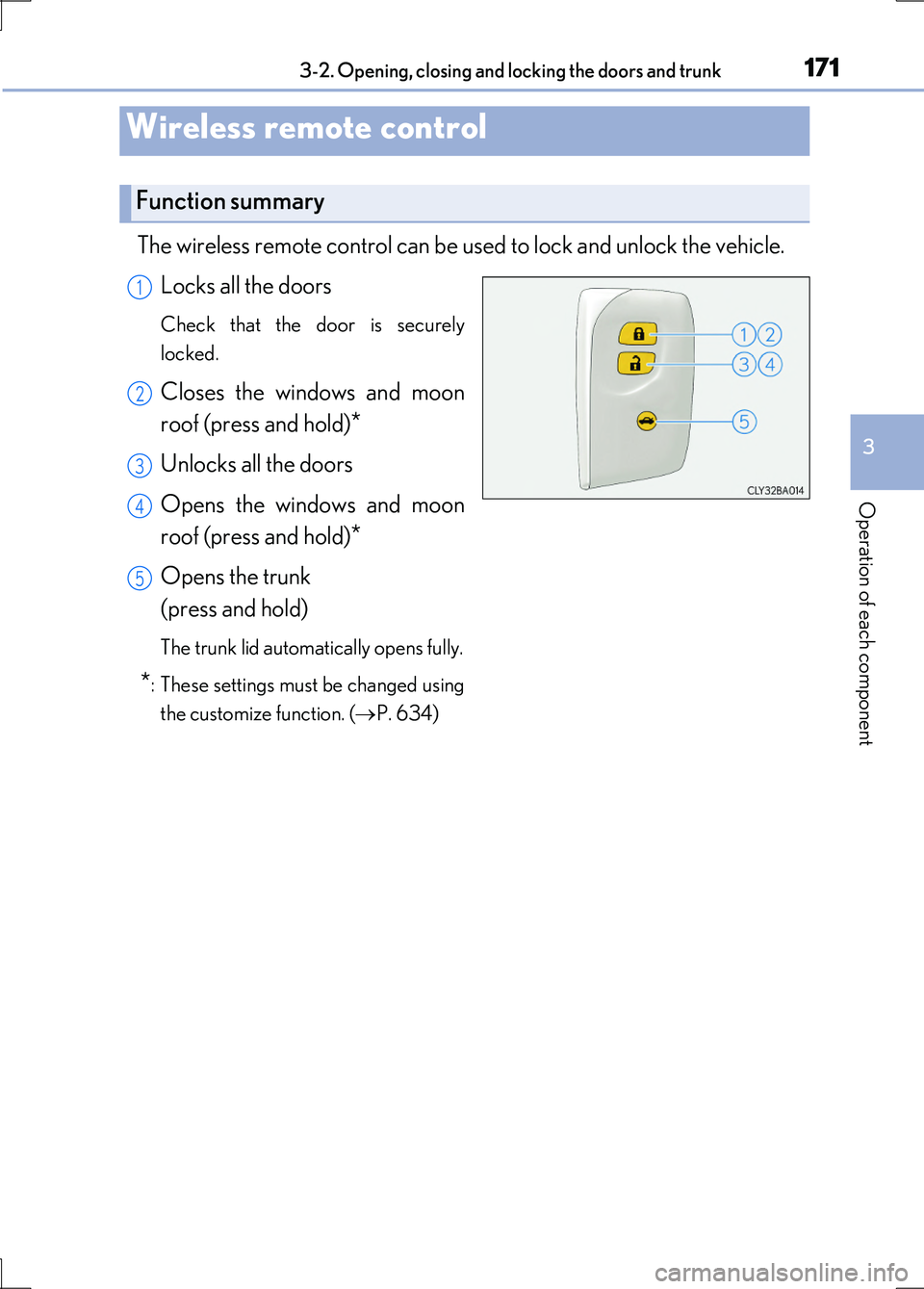
The wireless remote control can be used to lock and unlock the vehicle.
Locks all the doors
Check that the door is securely
locked.
Closes the windows and moon
roof (press and hold)*
Unlocks all the doors
Opens the windows and moon
roof (press and hold)*
Opens the trunk
(press and hold)
The trunk lid automatically opens fully.
*: These settings must be changed using
the customize function. ( P. 634)
Wireless remote control
Function summary
1
2
3
4
5