remote control LEXUS LS600H 2017 Owners Manual
[x] Cancel search | Manufacturer: LEXUS, Model Year: 2017, Model line: LS600H, Model: LEXUS LS600H 2017Pages: 676, PDF Size: 35.25 MB
Page 2 of 676
TABLE OF CONTENTS2
LS600h/LS600hL_EE(OM50G20E)
For your information ...................................8
Reading this manual .................................. 12
How to search ............................................. 13
Pictorial index .............................................. 14
1-1. For safe use
Before driving .................................40
For safety drive............................... 42
Seat belts .......................................... 44
SRS airbags ..................................... 49
Airbag manual on-off
system .............................................. 61
Safety information for
children........................................... 63
Child restraint systems ............... 64
Installing child restraints ............. 74
Exhaust gas precautions ............84
1-2. Hybrid system
Hybrid system features.............. 85
Hybrid system precautions .......89
1-3. Theft deterrent system
Immobilizer system ...................... 96
Double locking system ............. 102
Alarm ............................................... 103
2. Instrument cluster
Warning lights and
indicators ...................................... 110
Gauges and meters .....................115
Multi-information display...........121
Energy monitor/
consumption screen ............... 130
3-1. Key information
Keys .................................................. 140
3-2. Opening, closing and
locking the doors
and trunk
Smart entry & start system ...... 149
Wireless remote control ............ 171
Doors ................................................176
Trunk ................................................180
3-3. Adjusting the seats
Front seats...................................... 187
Power rear seat ........................... 194
Driving position memory ........ 207
Rear seat position memory ..... 212
Head restraints............................. 214
3-4. Adjusting the steering
wheel and mirrors
Steering wheel ............................. 218
Inside rear view mirror.............. 219
Outside rear view mirrors ....... 221
1For safety and security
2Instrument cluster
3Operation of
each component
Page 4 of 676
TABLE OF CONTENTS4
LS600h/LS600hL_EE(OM50G20E)
5-1. Remote Touch screen
Remote Touch ............................ 390
12.3-inch display.........................394
5-2. Lexus Climate Concierge
Lexus Climate Concierge..... 398
5-3. Using the air conditioning
system and defogger
Front automatic air
conditioning system ...............399
Rear air conditioning
system ........................................... 418
Rear window and
outside rear view
mirror defoggers............................ 425
Windshield wiper de-icer .......426
5-4. Using the interior lights
Interior lights list.......................... 427
• Interior lights ..........................428
• Personal lights .......................429
5-5. Using the storage
features
List of storage features ............. 431
• Glove box ...............................433
• Coin holder ............................434
• Door pockets......................... 434
• Cup holders ...........................435
• Console box........................... 437
• Auxiliary boxes .....................439
Trunk features ............................. 442
5-6. Other interior features
Sun visors and vanity
mirrors .........................................445
Clock ............................................... 447
Ashtrays .........................................448
Cigarette lighters ....................... 449
Power outlets ................................ 451
Heated steering wheel ............454
Climate control seats/
seat heaters ...............................456
Armrest ........................................... 461
Retractable table ........................ 462
Rear sunshade............................. 464
Rear door sunshades................468
Coat hooks ................................... 472
Assist grips .................................... 473
5Interior features
Page 20 of 676
20Pictorial index
LS600h/LS600hL_EE(OM50G20E)
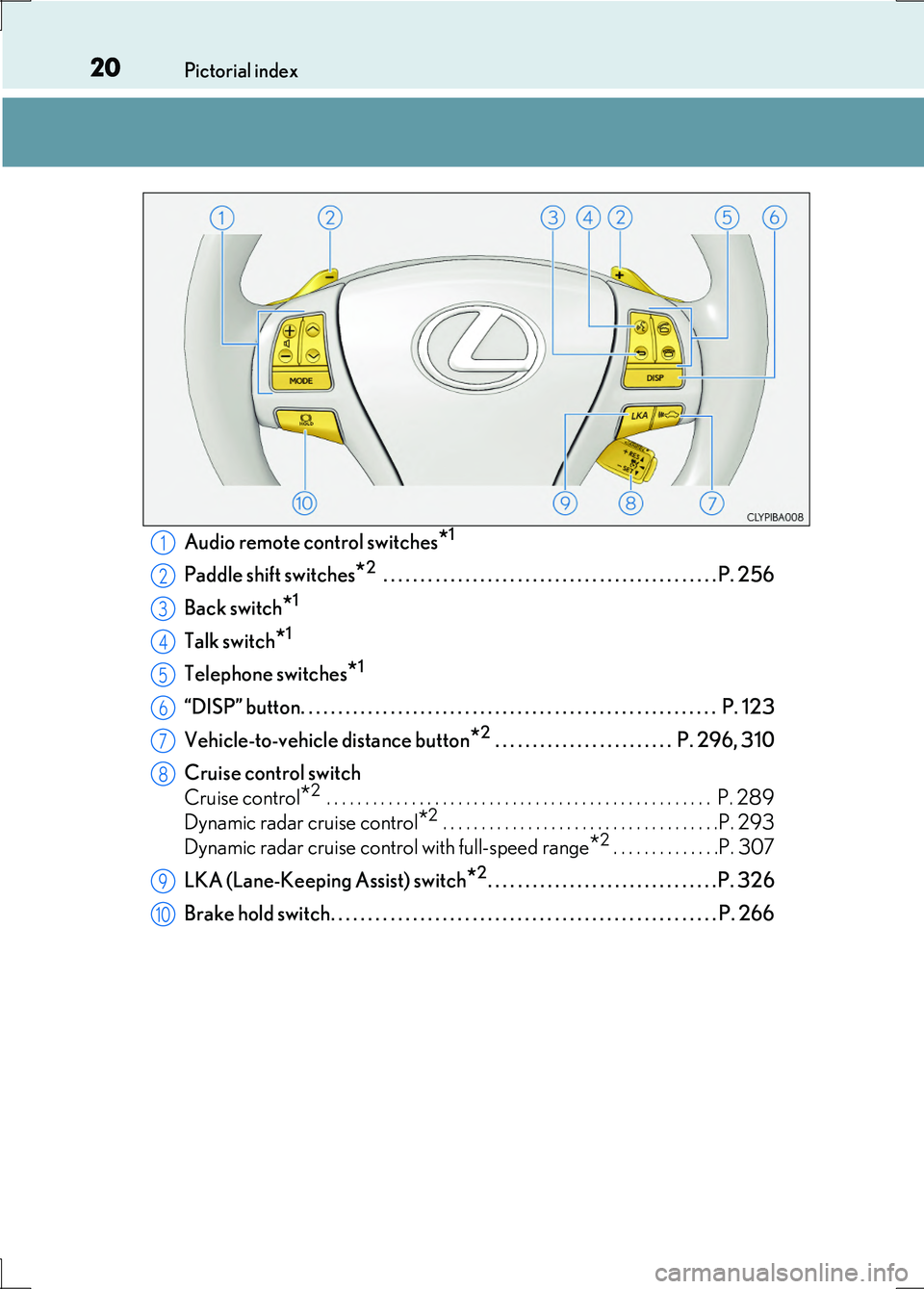
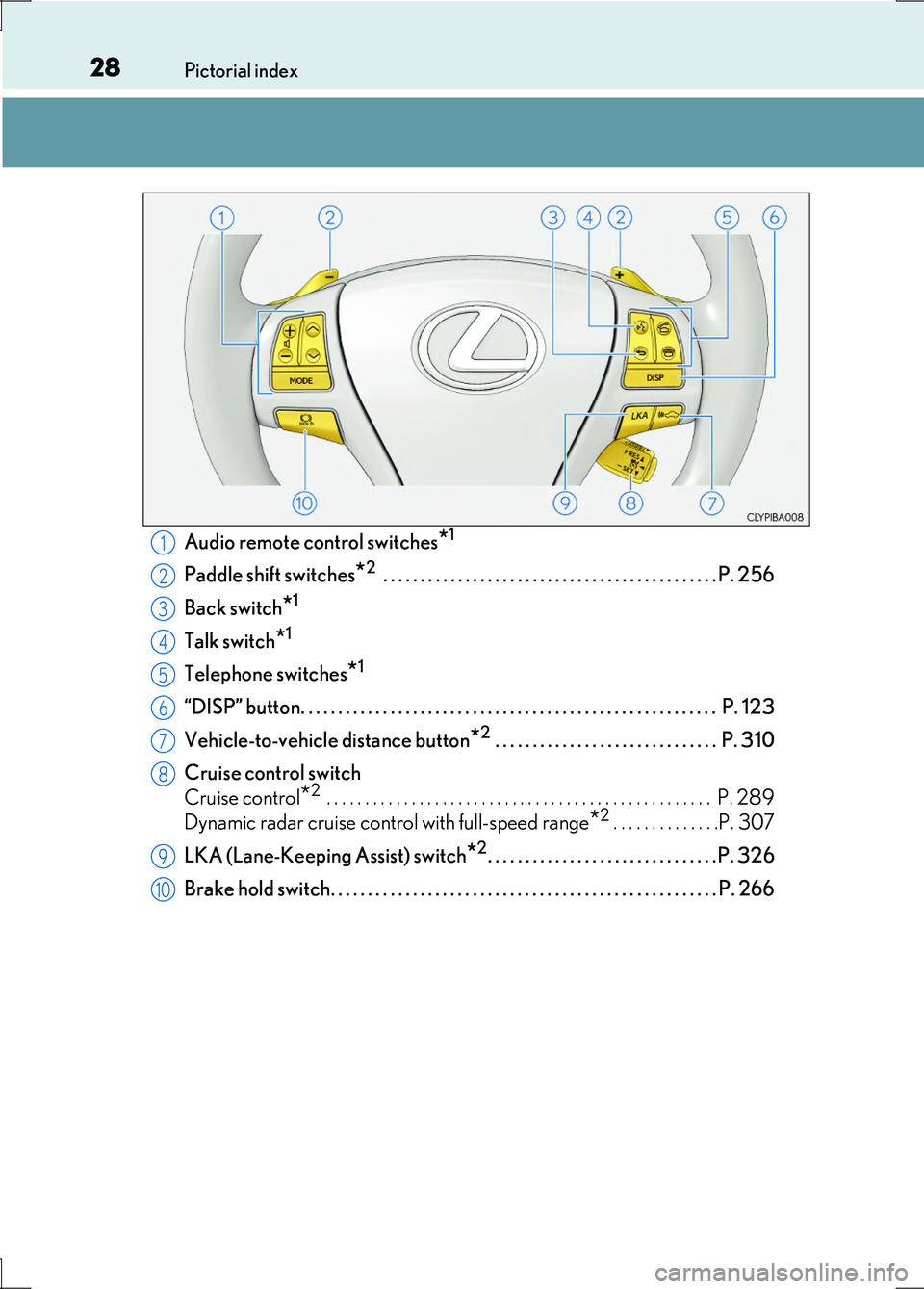
Audio remote control switches*1
Paddle shift switches*2 . . . . . . . . . . . . . . . . . . . . . . . . . . . . . . . . . . . . . . . . . . . . . P. 256
Back switch*1
Talk switch*1
Telephone switches*1
“DISP” button. . . . . . . . . . . . . . . . . . . . . . . . . . . . . . . . . . . . . . . . . . . . . . . . . . . . . . . . P. 123
Vehicle-to-vehicle distance button*2 . . . . . . . . . . . . . . . . . . . . . . . . P. 296, 310
Cruise control switch
Cruise control*2 . . . . . . . . . . . . . . . . . . . . . . . . . . . . . . . . . . . . . . . . . . . . . . . . . . P. 289
Dynamic radar cruise control*2 . . . . . . . . . . . . . . . . . . . . . . . . . . . . . . . . . . . .P. 293
Dynamic radar cruise control with full-speed range*2 . . . . . . . . . . . . . .P. 307
LKA (Lane-Keeping Assist) switch*2. . . . . . . . . . . . . . . . . . . . . . . . . . . . . . . P. 326
Brake hold switch. . . . . . . . . . . . . . . . . . . . . . . . . . . . . . . . . . . . . . . . . . . . . . . . . . . . P. 266
1
2
3
4
5
6
7
8
9
10
Page 21 of 676
21Pictorial index
LS600h/LS600hL_EE(OM50G20E)
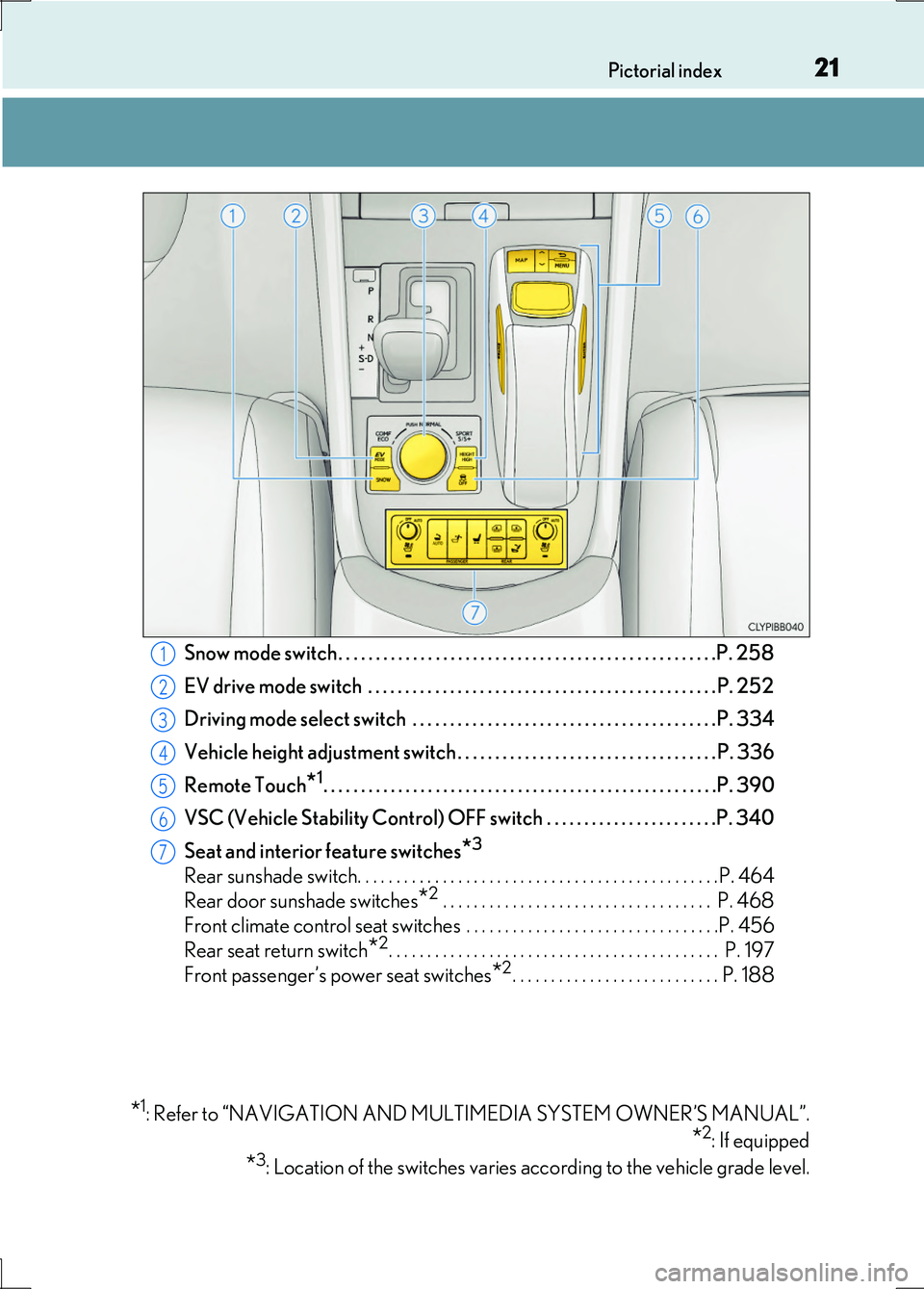
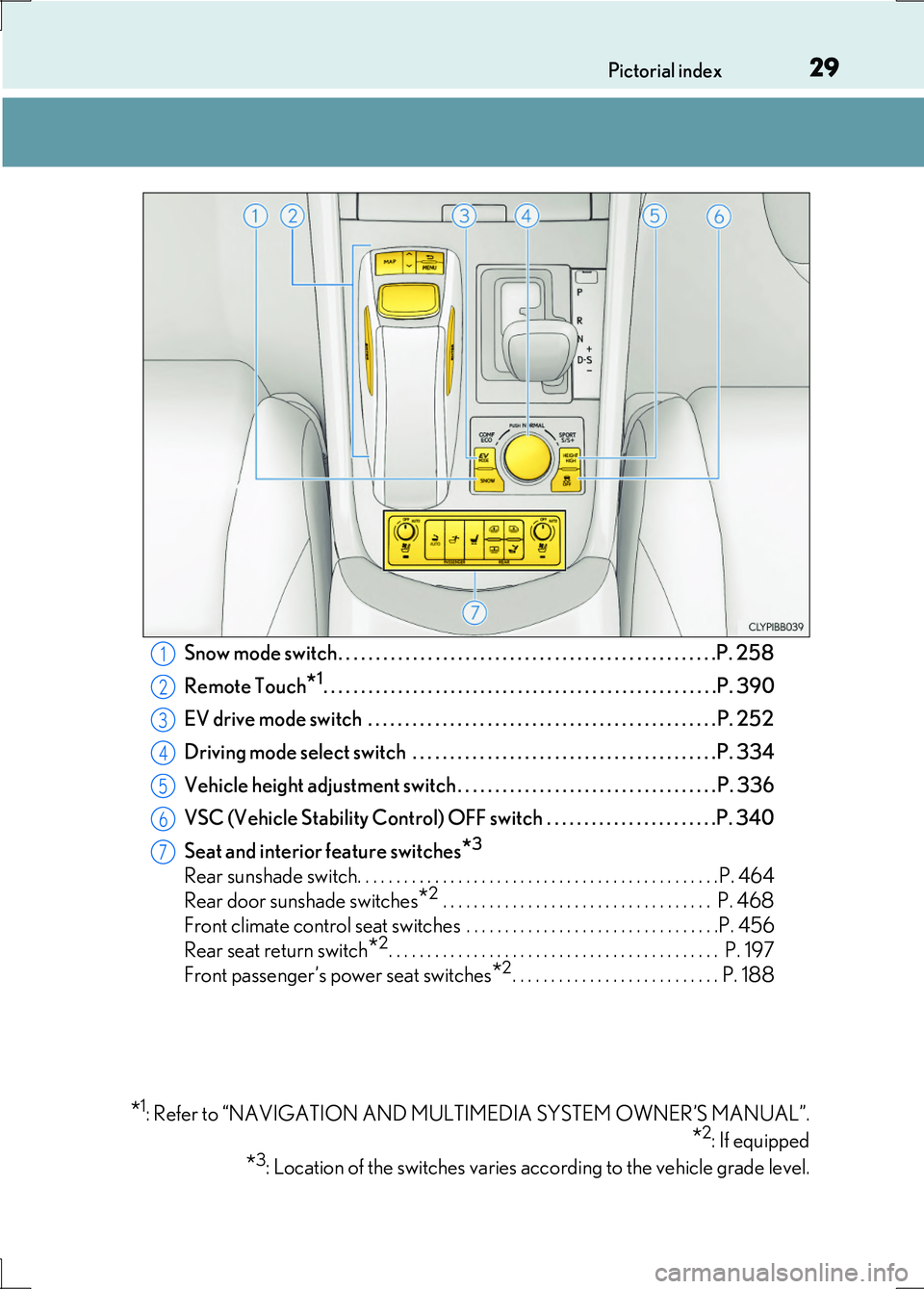
Snow mode switch . . . . . . . . . . . . . . . . . . . . . . . . . . . . . . . . . . . . . . . . . . . . . . . . . . .P. 258
EV drive mode switch . . . . . . . . . . . . . . . . . . . . . . . . . . . . . . . . . . . . . . . . . . . . . . .P. 252
Driving mode select switch . . . . . . . . . . . . . . . . . . . . . . . . . . . . . . . . . . . . . . . . .P. 334
Vehicle height adjustment switch . . . . . . . . . . . . . . . . . . . . . . . . . . . . . . . . . . . P. 336
Remote Touch*1. . . . . . . . . . . . . . . . . . . . . . . . . . . . . . . . . . . . . . . . . . . . . . . . . . . . .P. 390
VSC (Vehicle Stability Control) OFF switch . . . . . . . . . . . . . . . . . . . . . . .P. 340
Seat and interior feature switches*3
Rear sunshade switch. . . . . . . . . . . . . . . . . . . . . . . . . . . . . . . . . . . . . . . . . . . . . . .P. 464
Rear door sunshade switches*2 . . . . . . . . . . . . . . . . . . . . . . . . . . . . . . . . . . . P. 468
Front climate control seat switches . . . . . . . . . . . . . . . . . . . . . . . . . . . . . . . . .P. 456
Rear seat return switch*2. . . . . . . . . . . . . . . . . . . . . . . . . . . . . . . . . . . . . . . . . . . P. 197
Front passenger’s power seat switches*2. . . . . . . . . . . . . . . . . . . . . . . . . . . P. 188
*1: Refer to “NAVIGATION AND MULTIMEDIA SYSTEM OWNER’S MANUAL”.
*2: If equipped
*3: Location of the switches varies according to the vehicle grade level.
1
2
3
4
5
6
7
Page 28 of 676
28Pictorial index
LS600h/LS600hL_EE(OM50G20E) Audio remote control switches
*1
Paddle shift switches*2 . . . . . . . . . . . . . . . . . . . . . . . . . . . . . . . . . . . . . . . . . . . . . P. 256
Back switch
*1
Talk switch*1
Telephone switches*1
“DISP” button. . . . . . . . . . . . . . . . . . . . . . . . . . . . . . . . . . . . . . . . . . . . . . . . . . . . . . . . P. 123
Vehicle-to-vehicle distance button
*2 . . . . . . . . . . . . . . . . . . . . . . . . . . . . . . P. 310
Cruise control switch
Cruise control
*2 . . . . . . . . . . . . . . . . . . . . . . . . . . . . . . . . . . . . . . . . . . . . . . . . . . P. 289
Dynamic radar cruise control with full-speed range
*2 . . . . . . . . . . . . . .P. 307
LKA (Lane-Keeping Assist) switch
*2. . . . . . . . . . . . . . . . . . . . . . . . . . . . . . . P. 326
Brake hold switch. . . . . . . . . . . . . . . . . . . . . . . . . . . . . . . . . . . . . . . . . . . . . . . . . . . . P. 266
1
2
3
4
5
6
7
8
9
10
Page 29 of 676
29Pictorial index
LS600h/LS600hL_EE(OM50G20E)
Snow mode switch . . . . . . . . . . . . . . . . . . . . . . . . . . . . . . . . . . . . . . . . . . . . . . . . . . .P. 258
Remote Touch*1. . . . . . . . . . . . . . . . . . . . . . . . . . . . . . . . . . . . . . . . . . . . . . . . . . . . .P. 390
EV drive mode switch . . . . . . . . . . . . . . . . . . . . . . . . . . . . . . . . . . . . . . . . . . . . . . .P. 252
Driving mode select switch . . . . . . . . . . . . . . . . . . . . . . . . . . . . . . . . . . . . . . . . .P. 334
Vehicle height adjustment switch . . . . . . . . . . . . . . . . . . . . . . . . . . . . . . . . . . . P. 336
VSC (Vehicle Stability Control) OFF switch . . . . . . . . . . . . . . . . . . . . . . .P. 340
Seat and interior feature switches*3
Rear sunshade switch. . . . . . . . . . . . . . . . . . . . . . . . . . . . . . . . . . . . . . . . . . . . . . .P. 464
Rear door sunshade switches*2 . . . . . . . . . . . . . . . . . . . . . . . . . . . . . . . . . . . P. 468
Front climate control seat switches . . . . . . . . . . . . . . . . . . . . . . . . . . . . . . . . .P. 456
Rear seat return switch*2. . . . . . . . . . . . . . . . . . . . . . . . . . . . . . . . . . . . . . . . . . . P. 197
Front passenger’s power seat switches*2. . . . . . . . . . . . . . . . . . . . . . . . . . . P. 188
*1: Refer to “NAVIGATION AND MULTIMEDIA SYSTEM OWNER’S MANUAL”.
*2: If equipped
*3: Location of the switches varies according to the vehicle grade level.
1
2
3
4
5
6
7
Page 102 of 676
1021-3. Theft deterrent system
LS600h/LS600hL_EE(OM50G20E)
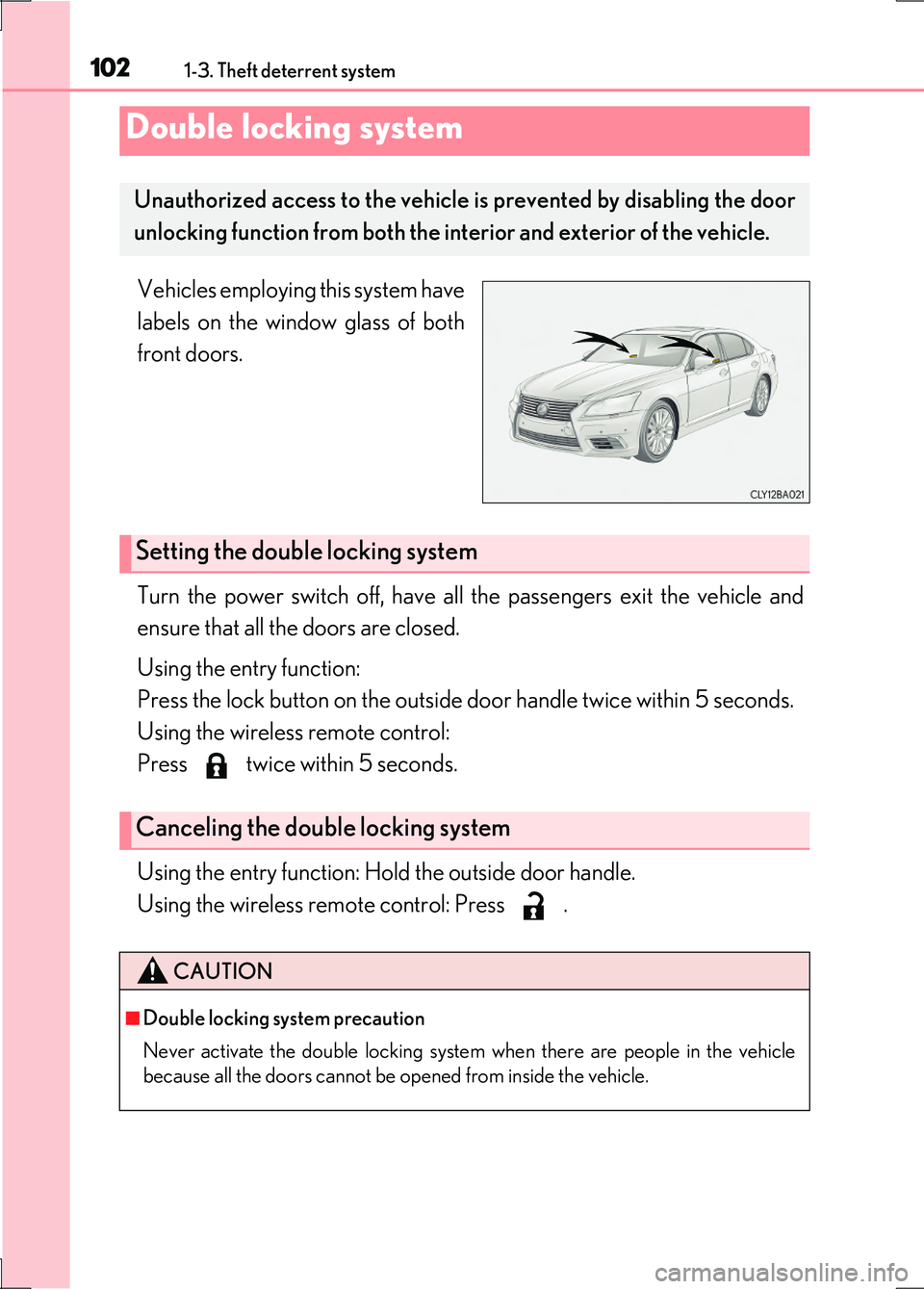
Vehicles employing this system have
labels on the window glass of both
front doors.
Turn the power switch off, have all the passengers exit the vehicle and
ensure that all the doors are closed.
Using the entry function:
Press the lock button on the outside door handle twice within 5 seconds.
Using the wireless remote control:
Press twice within 5 seconds.
Using the entry function: Hold the outside door handle.
Using the wireless remote control: Press .
Double locking system
Unauthorized access to the vehicle is prevented by disabling the door
unlocking function from both the in terior and exterior of the vehicle.
Setting the double locking system
Canceling the double locking system
CAUTION
■Double locking system precaution
Never activate the double locking system when there are people in the vehicle
because all the doors cannot be opened from inside the vehicle.
Page 103 of 676
1031-3. Theft deterrent system
1
For safety and security
LS600h/LS600hL_EE(OM50G20E)
The alarm uses light and sound to give an alert when an intrusion is
detected.
The alarm is triggered in the following situations when the alarm is set:
●A locked door or trunk is unlocked or opened in any way other than
using the entry function or wireless remote control. (The door will lock
again automatically.)
●The hood is opened.
●The intrusion sensor detects something moving inside the vehicle. (An
intruder gets in the vehicle.)
●The tilt sensor detects a change of vehicle inclination.
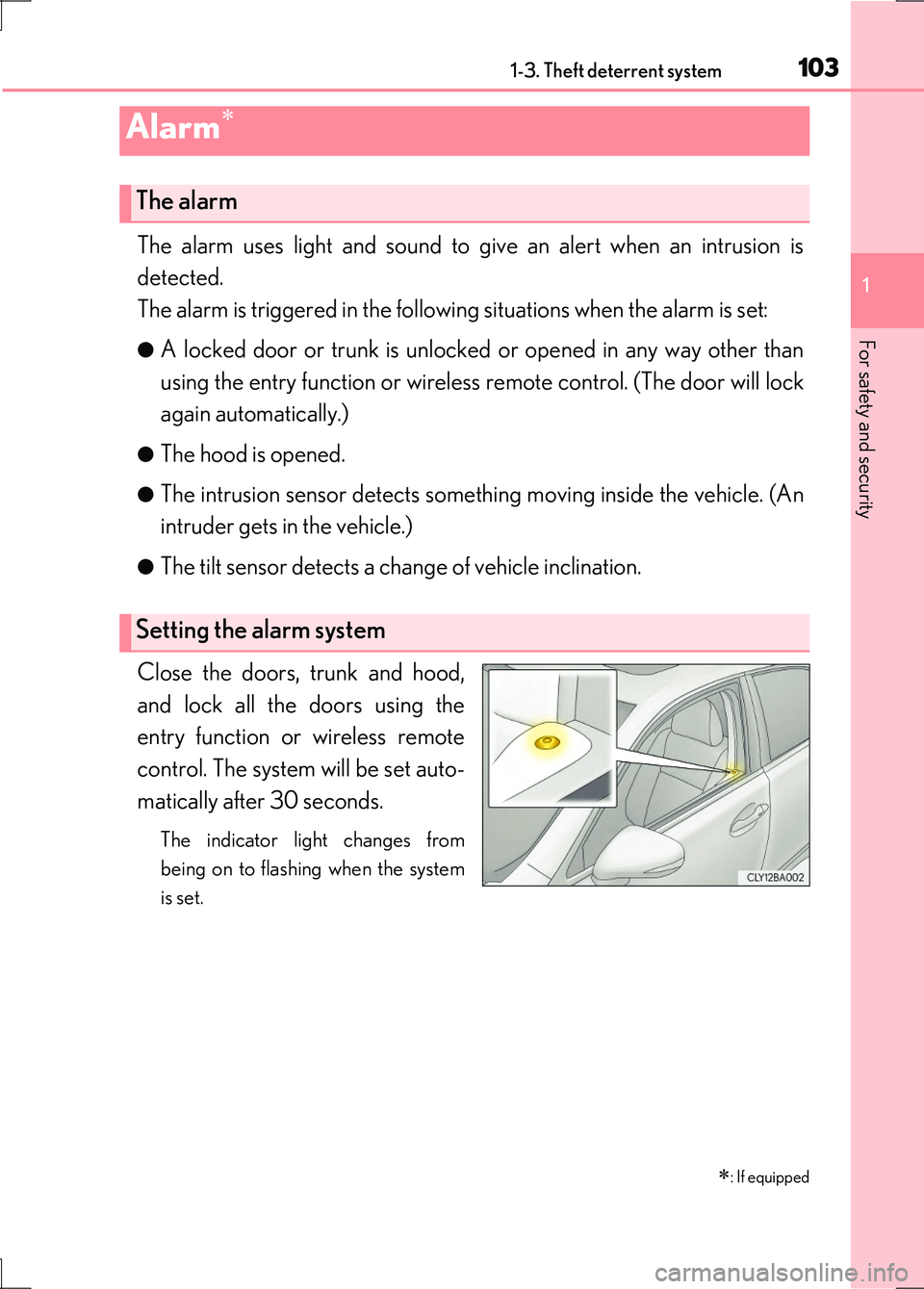
Close the doors, trunk and hood,
and lock all the doors using the
entry function or wireless remote
control. The system will be set auto-
matically after 30 seconds.
The indicator light changes from
being on to flashing when the system
is set.
Alarm
: If equipped
The alarm
Setting the alarm system
Page 104 of 676
1041-3. Theft deterrent system
LS600h/LS600hL_EE(OM50G20E)
Do one of the following to deactivate or stop the alarm:
●Unlock the doors or open the trunk using the entry function or wireless
remote control.
●Start the hybrid system. (The alarm w ill be deactivated or stopped after
a few seconds.)
■System maintenance
The vehicle has a maintenance-free type alarm system.
■Items to check before locking the vehicle
To prevent unexpected triggering of the alarm and vehicle theft, make sure of the fol-
lowing:
●Nobody is in the vehicle.
●The windows and moon roof (if equipped) are closed before the alarm is set.
●No valuables or other personal items are left in the vehicle.
Deactivating or stopping the alarm
Page 107 of 676
1071-3. Theft deterrent system
1
For safety and security
LS600h/LS600hL_EE(OM50G20E)
■Canceling and automatic re-enabling of the intrusion sensor and tilt sensor
●The alarm will still be set even when the intrusion sensor and tilt sensor are can-
celed.
●After the intrusion sensor and tilt sensor are canceled, pressing the power switch
or unlocking the doors using the entry function or wireless remote control will re-
enable the intrusion sensor and tilt sensor.
●The intrusion sensor and tilt sensor will automatically be re-enabled when the
alarm system is deactivated.
■Intrusion sensor detection considerations
The sensor may trigger the alarm in the following situations:
●Places with extreme vibrations or noises, or situations in which the vehicle is subject
to repeated impacts or vibrations:
• When parked in a parking garage
• When the vehicle is transported by a ferry, trailer, train, etc.
• When ice adhering to the vehicle is removed
• When the vehicle is in an automatic or high-pressure car wash
• When in a hail or lightning storm
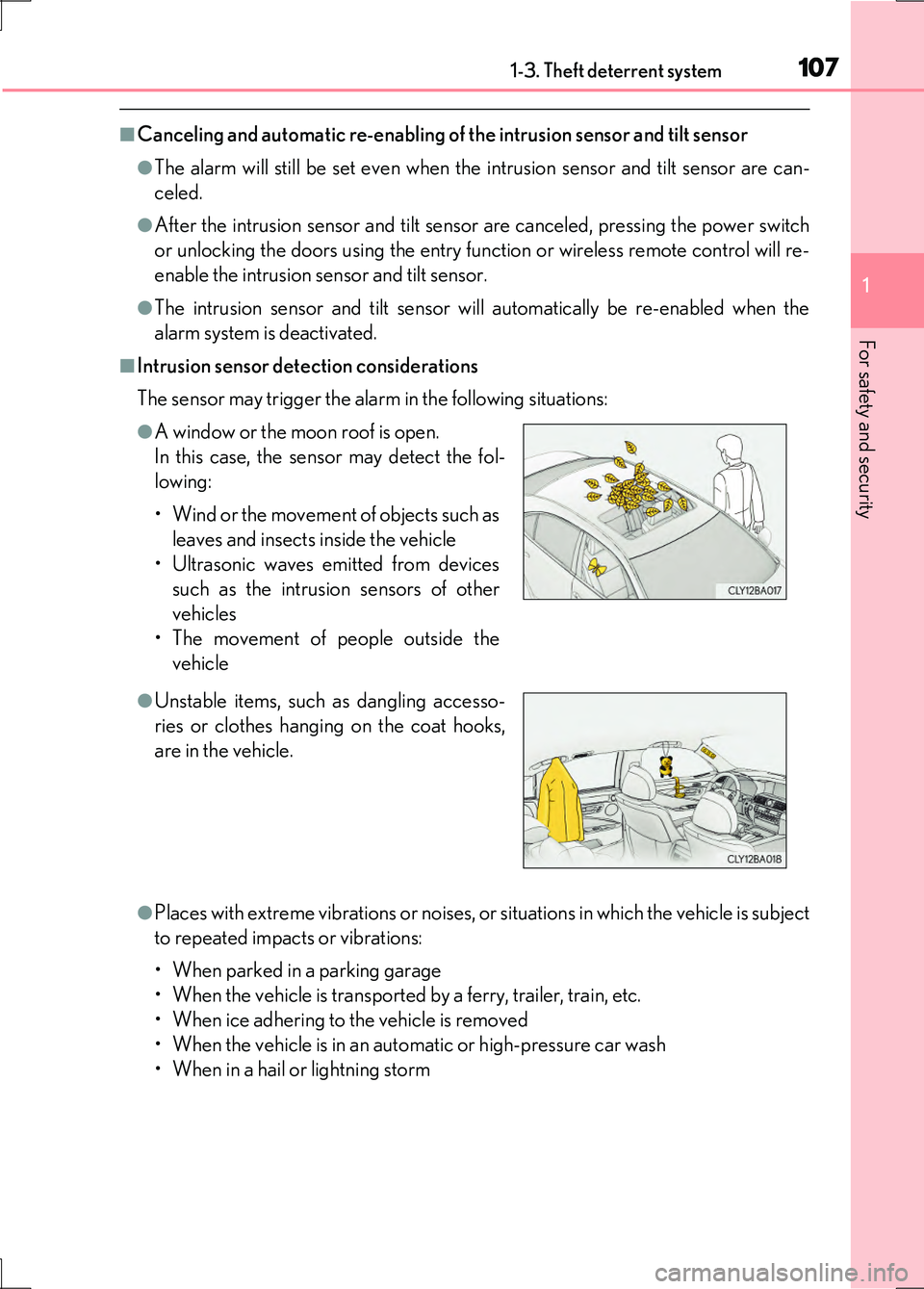
●A window or the moon roof is open.
In this case, the sensor may detect the fol-
lowing:
• Wind or the movement of objects such as
leaves and insects inside the vehicle
• Ultrasonic waves emitted from devices
such as the intrusion sensors of other
vehicles
• The movement of people outside the
vehicle
●Unstable items, such as dangling accesso-
ries or clothes hanging on the coat hooks,
are in the vehicle.