remote control LEXUS LS600H 2017 Owner's Guide
[x] Cancel search | Manufacturer: LEXUS, Model Year: 2017, Model line: LS600H, Model: LEXUS LS600H 2017Pages: 676, PDF Size: 35.25 MB
Page 232 of 676
2323-5. Opening, closing the windows and moon roof
LS600h/LS600hL_EE(OM50G20E)
■Moon roof open warning buzzer
The buzzer sounds and a message is shown on the multi-information display in the
instrument cluster when the power switch is turned off and the driver’s door is
opened with the moon roof open.
■Customization
Settings (e.g. linked door lock operation) can be changed.
(Customizable features P. 634)
CAUTION
Observe the following precautions.
Failure to do so may cause death or serious injury.
■Opening the moon roof
●Do not allow any passengers to put their hands or heads outside the vehicle while
it is moving.
●Do not sit on top of the moon roof.
■Closing the moon roof
●The driver is responsible for moon roof opening and closing operations.
In order to prevent accidental operation, especially by a child, do not let a child
operate the moon roof. It is possible for children and other passengers to have
body parts caught in the moon roof.
●Check to make sure that all passengers do not have any part of their body in a
position where it could be caught when the moon roof is being operated.
●When using the smart entry & start system, wireless remote control or mechani-
cal key and operating the moon roof, operate the moon roof after checking to
make sure that there is no possibility of any passenger having any of their body
parts caught in the moon roof. Also, do not let a child operate moon roof by the
smart entry & start system, wireless remote control or mechanical key. It is possi-
ble for children and other passengers to get caught in the moon roof.
●When exiting the vehicle, turn the power switch off, carry the key and exit the vehicle
along with the child. There may be accidental operation, due to mischief, etc., that may possibly lead to an accident.
■Jam protection function
●Never use any part of your body to intentionally activate the jam protection func-
tion.
●The jam protection function may not work if something gets caught just before
the moon roof fully closes.
Page 245 of 676
2454-1. Before driving
4
Driving
LS600h/LS600hL_EE(OM50G20E)
Cargo and luggage
Take notice of the following information about storage precautions,
cargo capacity and load:
CAUTION
■Things that must not be carried in the trunk
The following things may cause a fire if loaded in the trunk:
●Receptacles containing gasoline
●Aerosol cans
■Storage precautions
Observe the following precautions.
Failure to do so may prevent the pedals from being depressed properly, may block
the driver’s vision, or may result in items hitting the driver or passengers, possibly
causing an accident.
●Stow cargo and luggage in the trunk whenever possible.
●Do not place cargo or luggage in or on the following locations.
• At the feet of the driver
• On the front passenger or rear seats (when stacking items)
• On the package tray
• On the instrument panel
• On the dashboard
• In front of the Remote Touch screen
●Secure all items in the occupant compartment.
■Load and distribution
●Do not overload your vehicle.
●Do not apply loads unevenly.
Improper loading may cause deterioration of steering or braking control which
may cause death or serious injury.
Page 389 of 676
389
5Interior features
LS600h/LS600hL_EE(OM50G20E)
5-1. Remote Touch screen
Remote Touch ............................ 390
12.3-inch display.........................394
5-2. Lexus Climate Concierge
Lexus Climate Concierge..... 398
5-3. Using the air conditioning
system and defogger
Front automatic air
conditioning system ...............399
Rear air conditioning
system ........................................... 418
Rear window and
outside rear view
mirror defoggers .....................425
Windshield wiper de-icer ....... 426
5-4. Using the interior lights
Interior lights list.......................... 427
• Interior lights ..........................428
• Personal lights ....................... 429
5-5. Using the storage
features
List of storage features ............. 431
• Glove box ............................... 433
• Coin holder ............................ 434
• Door pockets......................... 434
• Cup holders ........................... 435
• Console box .......................... 437
• Auxiliary boxes ..................... 439
Trunk features ............................. 442
5-6. Other interior features
Sun visors and vanity
mirrors ......................................... 445
Clock .............................................. 447
Ashtrays .........................................448
Cigarette lighters....................... 449
Power outlets................................ 451
Heated steering wheel ............ 454
Climate control seats/
seat heaters ............................... 456
Armrest............................................461
Retractable table........................ 462
Rear sunshade ............................ 464
Rear door sunshades ............... 468
Coat hooks ................................... 472
Assist grips.................................... 473
Page 393 of 676
3935-1. Remote Touch screen
5
Interior features
LS600h/LS600hL_EE(OM50G20E)
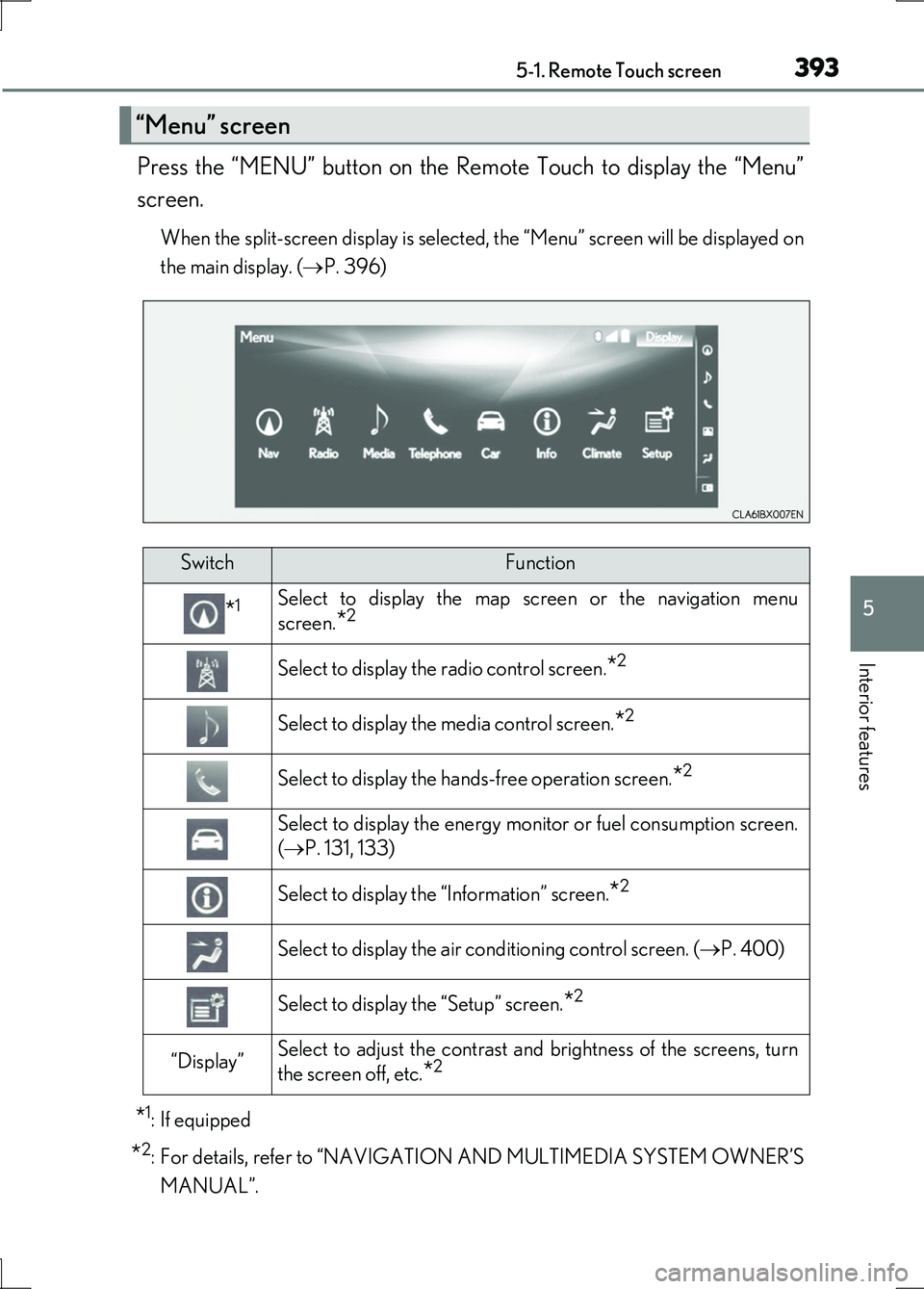
Press the “MENU” button on the Remote Touch to display the “Menu”
screen.
When the split-screen display is selected, the “Menu” screen will be displayed on
the main display. ( P. 396)
*1: If equipped
*2: For details, refer to “NAVIGATION AND MULTIMEDIA SYSTEM OWNER’S
MANUAL”.
“Menu” screen
SwitchFunction
*1Select to display the map screen or the navigation menu
screen.*2
Select to display the radio control screen.*2
Select to display the media control screen.*2
Select to display the hands-free operation screen.*2
Select to display the energy monitor or fuel consumption screen.
( P. 131, 133)
Select to display the “Information” screen.*2
Select to display the air conditioning control screen. (P. 400)
Select to display the “Setup” screen.*2
“Display”Select to adjust the contrast and brightness of the screens, turn
the screen off, etc.*2
Page 394 of 676
3945-1. Remote Touch screen
LS600h/LS600hL_EE(OM50G20E)
■Full screen display
The following functions can be displayed full screen:
•Initial screen
•“Menu” screen ( P. 393)
•Map screen*
•Audio screen*
• Energy monitor or fuel consumption screen ( P. 130)
• Air conditioning control screen ( P. 399)
*: For details, refer to “NAVIGATION AND MULTIMEDIA SYSTEM OWNER’S
MANUAL”.
12.3-inch display
12.3-inch display overview
Page 426 of 676
4265-3. Using the air conditioning system and defogger
LS600h/LS600hL_EE(OM50G20E)
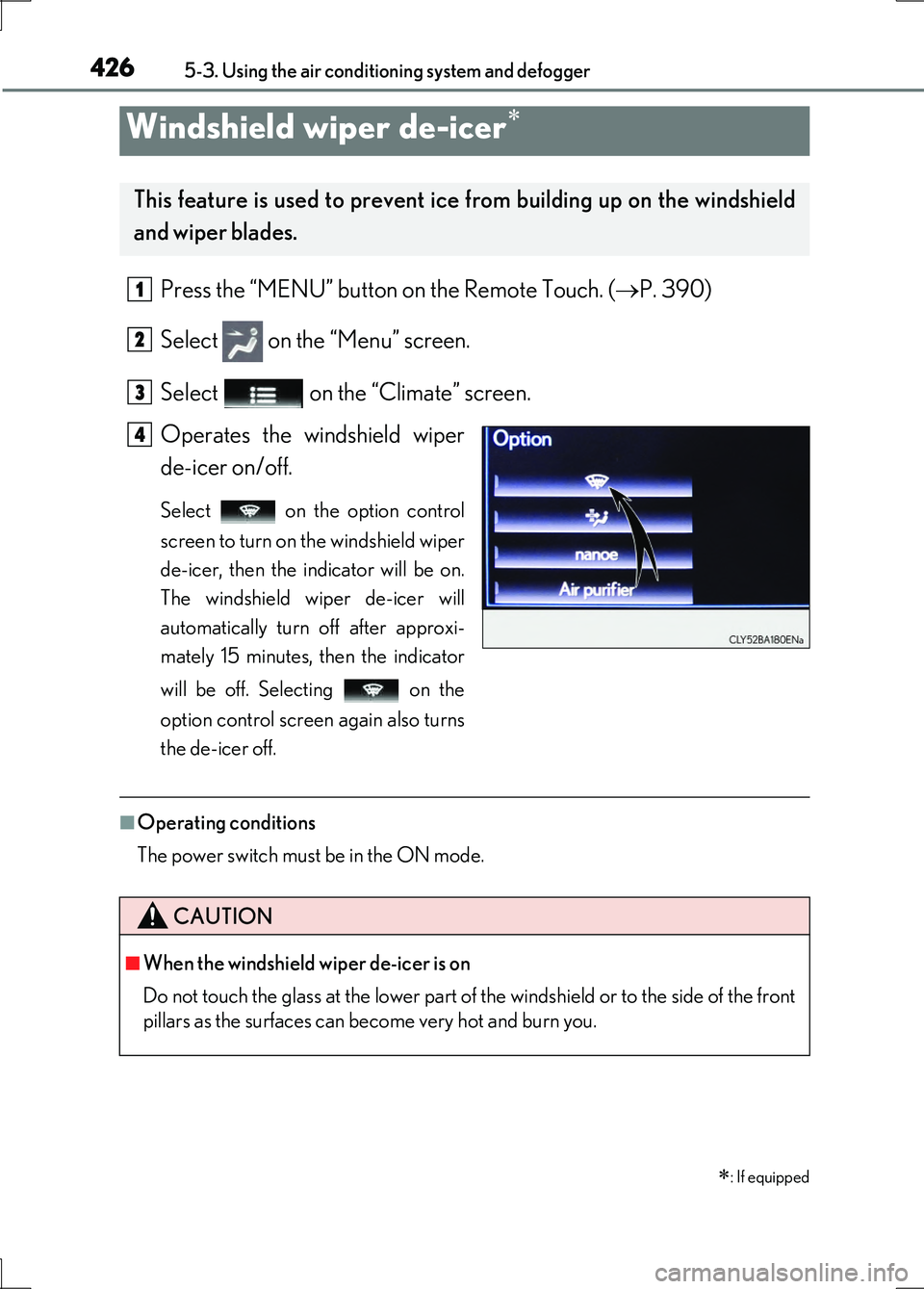
Press the “MENU” button on the Remote Touch. (P. 390)
Select on the “Menu” screen.
Select on the “Climate” screen.
Operates the windshield wiper
de-icer on/off.
Select on the option control
screen to turn on the windshield wiper
de-icer, then the indicator will be on.
The windshield wiper de-icer will
automatically turn off after approxi-
mately 15 minutes, then the indicator
will be off. Selecting on the
option control screen again also turns
the de-icer off.
■Operating conditions
The power switch must be in the ON mode.
Windshield wiper de-icer
: If equipped
This feature is used to prevent ice from building up on the windshield
and wiper blades.
1
2
3
4
CAUTION
■When the windshield wiper de-icer is on
Do not touch the glass at the lower part of the windshield or to the side of the front
pillars as the surfaces can become very hot and burn you.
Page 533 of 676
5336-3. Do-it-yourself maintenance
6
Maintenance and care
LS600h/LS600hL_EE(OM50G20E)
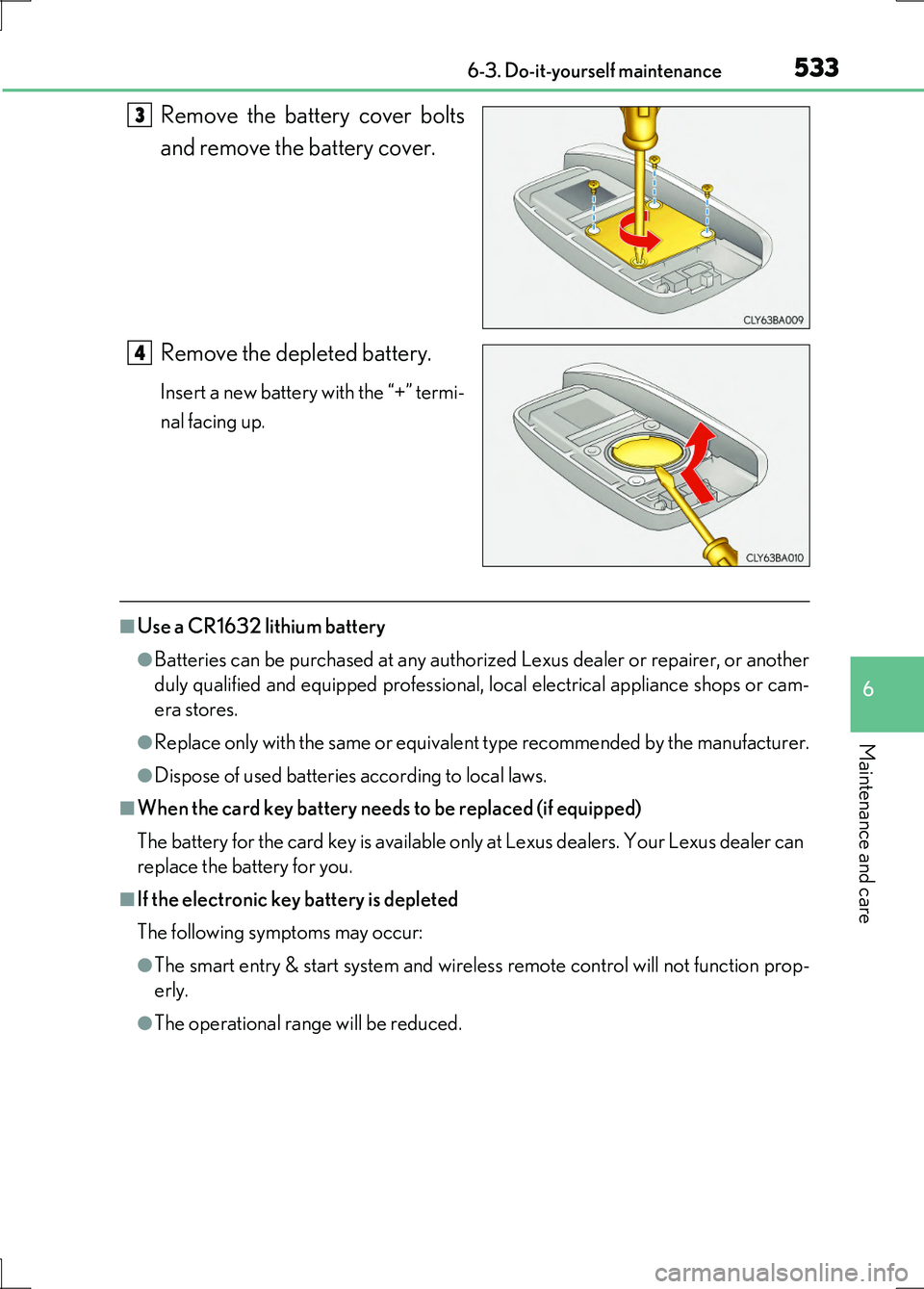
Remove the battery cover bolts
and remove the battery cover.
Remove the depleted battery.
Insert a new battery with the “+” termi-
nal facing up.
■Use a CR1632 lithium battery
●Batteries can be purchased at any authorized Lexus dealer or repairer, or another
duly qualified and equipped professional, local electrical appliance shops or cam-
era stores.
●Replace only with the same or equivalent type recommended by the manufacturer.
●Dispose of used batteries according to local laws.
■When the card key battery needs to be replaced (if equipped)
The battery for the card key is available only at Lexus dealers. Your Lexus dealer can
replace the battery for you.
■If the electronic key battery is depleted
The following symptoms may occur:
●The smart entry & start system and wireless remote control will not function prop-
erly.
●The operational range will be reduced.
3
4
Page 534 of 676
5346-3. Do-it-yourself maintenance
LS600h/LS600hL_EE(OM50G20E)
CAUTION
■Removed battery and other parts
These parts are small and if swallowed by a child, they can cause choking. Keep
away from children. Failure to do so could result in death or serious injury.
■Lithium battery precautions
CAUTION
RISK OF EXPLOSION IF BATTERY IS REPLACED BY AN INCORRECT
TYPE.
DISPOSE OF USED BATTERIES ACCORDING TO THE INSTRUCTIONS
NOTICE
■For normal operation after replacing the battery
Observe the following precautions to prevent accidents:
●Always work with dry hands.
Moisture may cause the battery to rust.
●Do not touch or move any other co mponent inside the remote control.
●Do not bend either of the battery terminals.
Page 603 of 676
6037-2. Steps to take in an emergency
7
When trouble arises
LS600h/LS600hL_EE(OM50G20E)
Use the mechanical key built in to the electronic keys to operate the
doors. ( P. 141)
Vehicles with an alarm: An alarm will sound if the alarm is set when the trunk or
doors are unlocked. ( P. 103)
■Doors
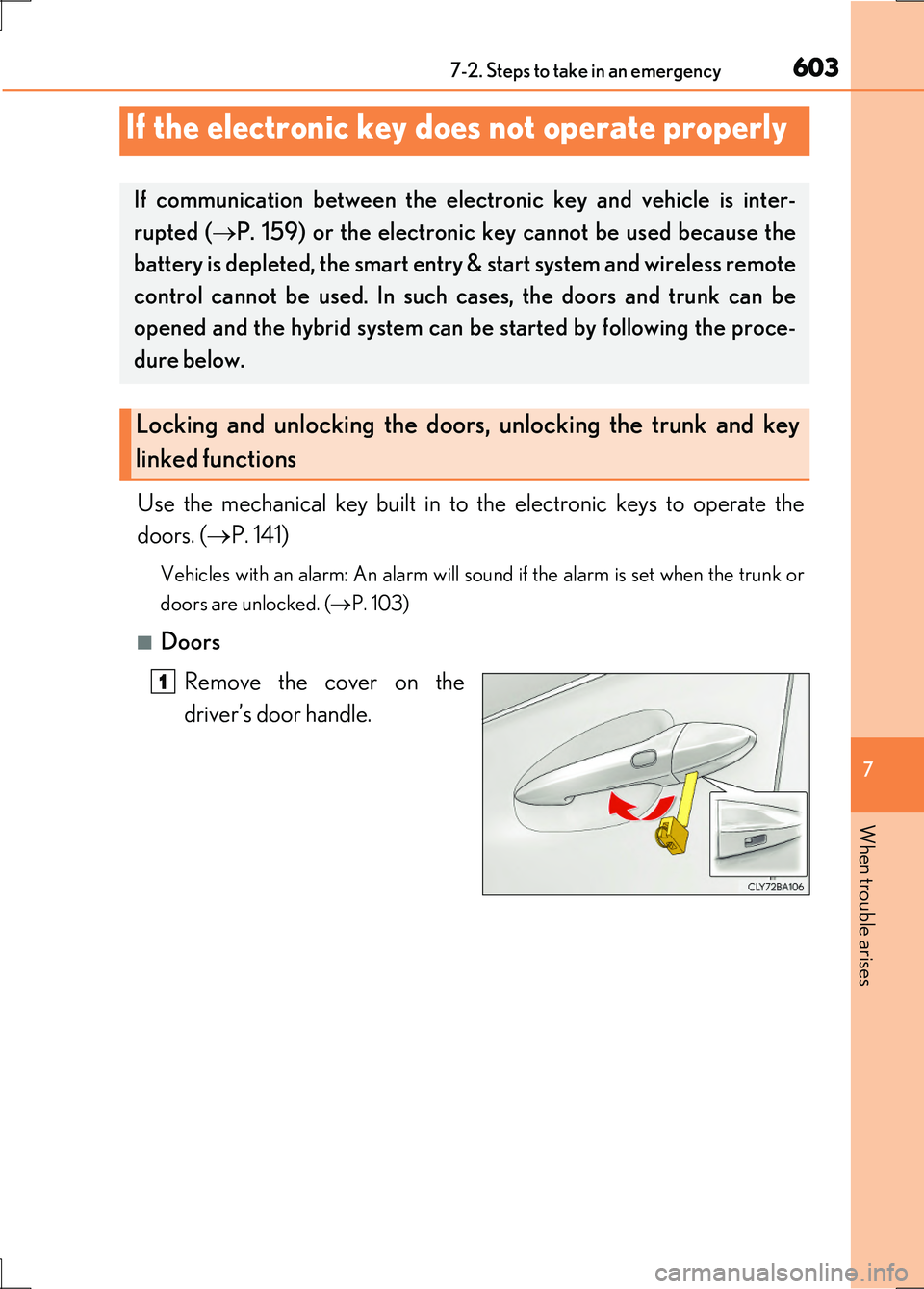
Remove the cover on the
driver’s door handle.
If the electronic key does not operate properly
If communication between the electronic key and vehicle is inter-
rupted ( P. 159) or the electronic key cannot be used because the
battery is depleted, the smart entry & start system and wireless remote
control cannot be used. In such cases, the doors and trunk can be
opened and the hybrid system can be started by following the proce-
dure below.
Locking and unlocking the doors, unlocking the trunk and key
linked functions
1
Page 609 of 676
6097-2. Steps to take in an emergency
7
When trouble arises
LS600h/LS600hL_EE(OM50G20E)
■Starting the hybrid system when the 12-volt battery is discharged
The hybrid system cannot be started by push-starting.
■To prevent 12-volt battery discharge
●Turn off the headlights and the audio system while the hybrid system is off.
●Turn off any unnecessary electrical components when the vehicle is running at a
low speed for an extended period, such as in heavy traffic.
■When the 12-volt battery is removed or discharged
The hybrid system may not start. ( P. 504)
■Charging the 12-volt battery
The electricity stored in the 12-volt battery will discharge gradually even when the
vehicle is not in use, due to natural discharge and the draining effects of certain elec-
trical appliances. If the vehicle is left for a long time, the 12-volt battery may dis-
charge, and the hybrid system may be unable to start. (The 12-volt battery recharges
automatically while the hybrid system is operating.)
■When recharging or replacing the 12-volt battery
In some cases, it may not be possible to unlock the doors using the smart entry &
start system when the 12-volt battery is discharged. Use the wireless remote control
or the mechanical key to lock or unlock the doors.
■If the 12-volt battery is discharged
The information stored in the computer will be deleted.
If the 12-volt battery is discharged, have the vehicle inspected by your Lexus dealer.