brake light LEXUS LS600H 2017 Owner's Manual
[x] Cancel search | Manufacturer: LEXUS, Model Year: 2017, Model line: LS600H, Model: LEXUS LS600H 2017Pages: 676, PDF Size: 35.25 MB
Page 346 of 676
3464-5. Using the driving support systems
LS600h/LS600hL_EE(OM50G20E)
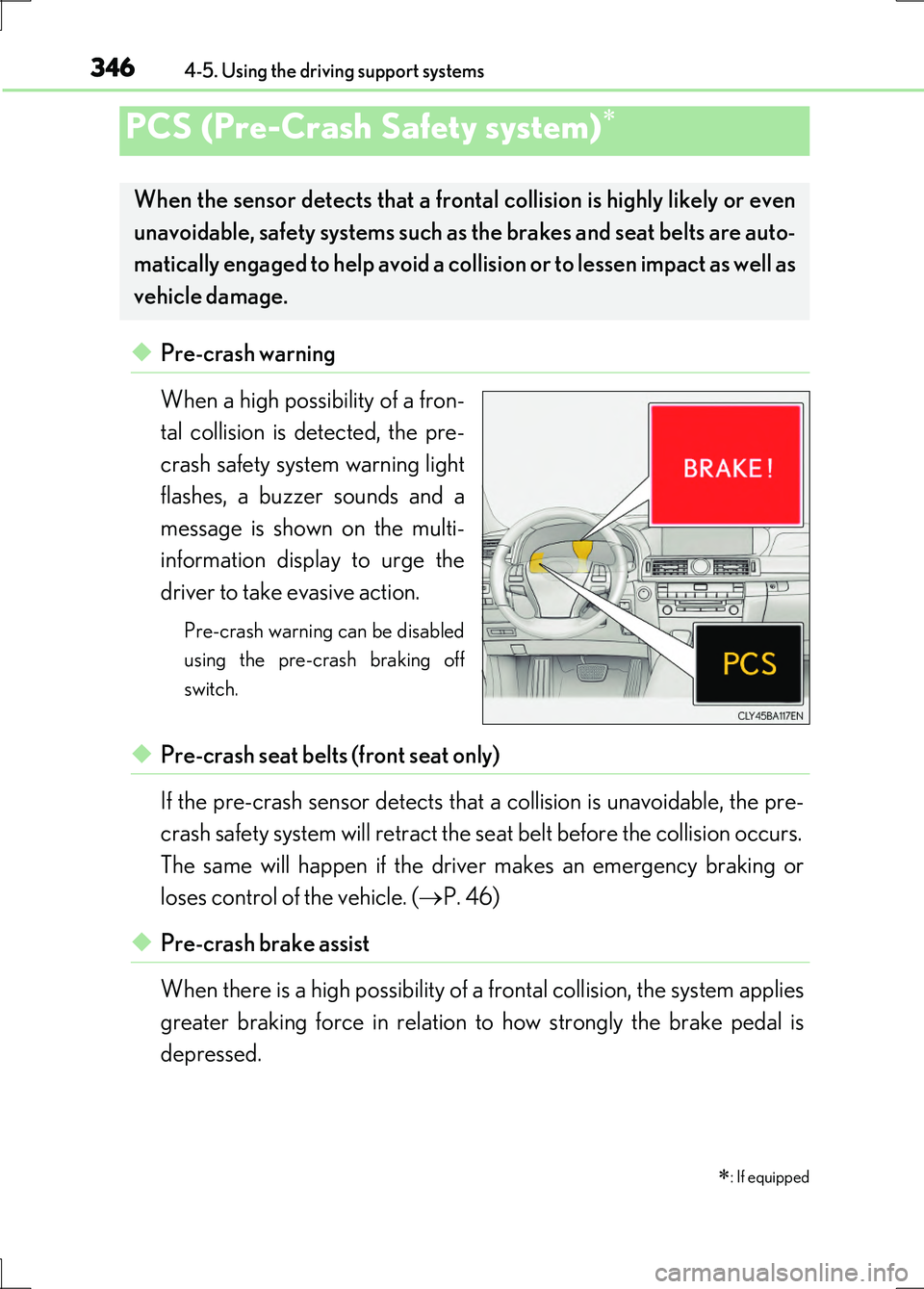
◆Pre-crash warning
When a high possibility of a fron-
tal collision is detected, the pre-
crash safety system warning light
flashes, a buzzer sounds and a
message is shown on the multi-
information display to urge the
driver to take evasive action.
Pre-crash warning can be disabled
using the pre-crash braking off
switch.
◆Pre-crash seat belts (front seat only)
If the pre-crash sensor detects that a collision is unavoidable, the pre-
crash safety system will retract the seat belt before the collision occurs.
The same will happen if the driver makes an emergency braking or
loses control of the vehicle. ( P. 46)
◆Pre-crash brake assist
When there is a high possibility of a frontal collision, the system applies
greater braking force in relation to how strongly the brake pedal is
depressed.
PCS (Pre-Crash Safety system)
: If equipped
When the sensor detects that a frontal collision is highly likely or even
unavoidable, safety systems such as the brakes and seat belts are auto-
matically engaged to help avoid a collision or to lessen impact as well as
vehicle damage.
Page 347 of 676
3474-5. Using the driving support systems
4
Driving
LS600h/LS600hL_EE(OM50G20E)
◆Pre-crash braking
When there is a high possibility of a frontal collision, the system warns
the driver using a warning light, warning display and buzzer. If the sys-
tem determines that a collision is unavoidable, the brakes are automati-
cally applied to help avoid a collision or to reduce the collision speed.
When the vehicle is being stopped by pre-crash braking, the brake will
be engaged for a maximum of 2 seconds and then released automati-
cally. This pre-crash braking can be canceled by depressing the accel-
erator pedal or brake pedal.
Pre-crash braking can be disabled using the pre-crash braking off switch.
◆Suspension control
When there is a high possibility of a frontal collision, the operation of
suspension control helps prevent the front of the vehicle from dropping
when the brakes are applied suddenly.
◆Steering gear control (VGRS) (vehicles with camera sensors)
When the system determines that a collision is unavoidable, the steer-
ing gear ratio is changed to help improve the response to steering
input.
◆Driver monitor system (if equipped)
When the system determines that there is a possibility of a collision, and
either the driver is not facing forward or the driver’s eyes are closed,
pre-crash warnings are given in adva nce to warn the driver. If the sys-
tem determines that the conditions to operate pre-crash alert braking
have been met even when the possibility of a collision increases further,
pre-crash alert braking will operate.
Pre-crash alert braking can be disabled using the pre-crash braking off switch.
Page 352 of 676
3524-5. Using the driving support systems
LS600h/LS600hL_EE(OM50G20E)
■Conditions that may trigger the system even if there is no danger of a collision
In any of the following situations where the frontal area of the radar sensor is inter-
rupted, the radar sensor may detect possibility of a frontal collision and the system
may be activated.
●When passing by an oncoming vehicle in a curve or a turn to the right or the left.
●When rapidly approaching an obstacle ahead (e.g. preceding vehicle, toll gate bar-
rier, etc.)
●When there is a structural object (billboard, low ceiling, fluorescent light, etc.)
above the uphill road ahead
●When driving on a narrow road or through under a low overhead structure (bridge,
tunnel, fly-under, etc.)
●When driving on an uneven road surface
●When there is a metal object, bump, or protrusion on the road surface
●When vehicle front part is raised or lowered depending on loading conditions
●When the direction of radar sensor is misaligned by strong impact applied on an
area around the radar sensor, etc.
●When there is an obstacle (guard rail, etc.) by the roadside at the entrance to a
curve
●When the front of your vehicle is pointing upwards (caused by putting a heavy load
in the trunk etc.)
●When driving through an area filled with steam or smoke
When the system is activated in the situatio ns described above, there is also a possi-
bility that the seat belts will retract quickly and the brakes may be applied with a force
greater than normal. When the seat belt is locked in the retracted position, stop the
vehicle in a safe place, release the seat belt and refasten it.
■Obstacles not detected
The radar sensor cannot detect plastic obstacles such as traffic cones. There may
also be occasions when the sensor cannot detect pedestrians, animals, bicycles,
motorcycles, trees, or snowdrifts.
■A camera sensor cannot detect obstacles in the following situations:
●A camera sensor is directly receiving intense light, such as sunlight.
●Visibility is poor because of bad weather or other reasons.
●The sensor temperature is extremely high.
●The headlights are not turned on in darkness such as at night or in a tunnel.
Page 353 of 676
3534-5. Using the driving support systems
4
Driving
LS600h/LS600hL_EE(OM50G20E)
■Situations in which the pre-crash safety system does not function properly
The system may not function effectively in situations such as the following:
●On roads with sharp bends or uneven surfaces
●If a vehicle suddenly moves in front of your vehicle, such as at an intersection
●If a vehicle suddenly cuts in front of your vehicle, such as when overtaking
●In inclement weather such as heavy rain, fog, snow or sand storms
●If the vehicle is skidding when VSC is not operating
●When an extreme change in vehicle height occurs
●When only part of your vehicle’s front end collides with, or contacts, a vehicle or
object in a frontal collision
●When the radar sensor moves off position due to its surrounding area being sub-
jected to a strong impact
●If an obstacle in front of the vehicle is small
●When the system judges that the driver performed a collision avoidance operation
via the accelerator pedal, brake pedal, or steering wheel
■Automatic cancelation of the pre-crash safety system
When a malfunction occurs due to sensor contamination, etc. that results in the sen-
sors being unable to detect obstacles, the pre-crash safety system will be automati-
cally disabled. In this case, the system will not activate even if there is a collision
possibility.
■When there is a malfunction in the system
The pre-crash safety system warning light will flash and warning messages will be
displayed. ( P. 557, 563)
Page 356 of 676
3564-5. Using the driving support systems
LS600h/LS600hL_EE(OM50G20E)
CAUTION
■Limitations of the pre-crash safety system
The driver is solely responsible for safe driving. Always drive safely, taking care to
observe your surroundings.
Do not use the pre-crash safety system instead of normal braking operations under
any circumstances. This system will not prevent collisions or lessen damage or inju-
ries in all cases. Do not overly rely on this system. Failure to do so may cause an
accident, resulting in death or serious injury.
This system has been designed to help avoid and reduce the impact of collisions.
However, the system operates differently depending on the situation ( P. 350,
352). As a result, the same level of performance may not be expected in all cases.
Also, the pre-crash safety brakes may not operate if the driver is depressing the
brake pedal or turning the steering wheel, as the system will determine such condi-
tions as collision avoidance operations.
■Handling the radar sensor
Observe the following to ensure the pre-crash safety system can function effec-
tively. Otherwise, the system may not function correctly and could result in an acci-
dent.
●Keep the sensor and grille cover clean at all times.
Clean the sensor and grille cover with a soft cloth so you do not mark or damage
them.
●Do not subject the sensor or surrounding area to a strong impact.
If the sensor moves even slightly off position, the system may malfunction. If the
sensor or surrounding area is subject to a strong impact, always have the area
inspected and adjusted by any authorized Lexus dealer or repairer, or another
duly qualified and equipped professional.
●Do not disassemble the sensor.
●Do not attach accessories or stickers to the sensor, grille cover or surrounding
area.
●Do not modify or paint the sensor and grille cover.
●If the radar sensor needs to be replaced, contact any authorized Lexus dealer or
repairer, or another duly qualified and equipped professional.
Page 361 of 676
3614-5. Using the driving support systems
4
Driving
LS600h/LS600hL_EE(OM50G20E)
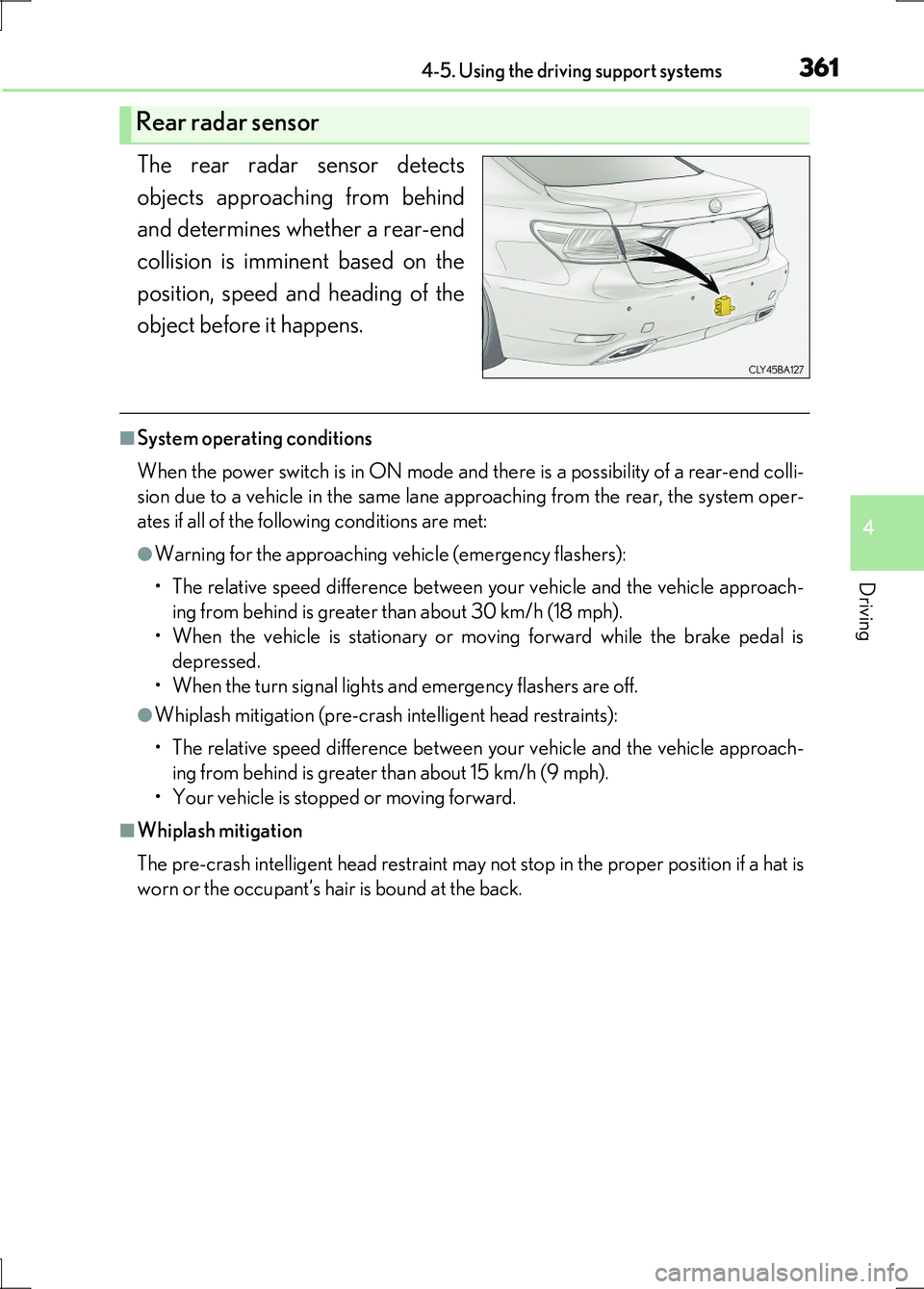
The rear radar sensor detects
objects approaching from behind
and determines whether a rear-end
collision is imminent based on the
position, speed and heading of the
object before it happens.
■System operating conditions
When the power switch is in ON mode and there is a possibility of a rear-end colli-
sion due to a vehicle in the same lane approaching from the rear, the system oper-
ates if all of the following conditions are met:
●Warning for the approaching vehicle (emergency flashers):
• The relative speed difference between your vehicle and the vehicle approach-
ing from behind is greater than about 30 km/h (18 mph).
• When the vehicle is stationary or moving forward while the brake pedal is
depressed.
• When the turn signal lights and emergency flashers are off.
●Whiplash mitigation (pre-crash intelligent head restraints):
• The relative speed difference between your vehicle and the vehicle approach-
ing from behind is greater than about 15 km/h (9 mph).
• Your vehicle is stopped or moving forward.
■Whiplash mitigation
The pre-crash intelligent head restraint may not stop in the proper position if a hat is
worn or the occupant’s hair is bound at the back.
Rear radar sensor
Page 382 of 676
382
LS600h/LS600hL_EE(OM50G20E)
4-6. Driving tips
■Using Eco drive mode
When using Eco drive mode, the torque corresponding to the acceler-
ator pedal depression amount can be generated more smoothly than it
is in normal conditions. In addition, the operation of the air conditioning
system (heating/cooling) will be minimized, improving the fuel econ-
omy. ( P. 334)
■Use of Hybrid System Indicator
The Eco-friendly driving is possible by keeping the indicate of Hybrid
System Indicator within Eco area. ( P. 119)
■When braking the vehicle
Make sure to operate the brakes gently and in good time. A greater
amount of electrical energy can be retained when slowing down.
■Delays
Repeated acceleration and deceleration, as well as long waits at traffic
lights, will lead to bad fuel consumption. Check traffic reports before
leaving and avoid delays as much as possible. When encountering a
delay, gently release the brake peda l to allow the vehicle to move for-
ward slightly while avoiding overuse of the accelerator pedal. Doing so
can help control excessive gasoline consumption.
■Highway driving
Control your speed and keep at a constant speed. Also, before stop-
ping at a toll booth or similar, allow plenty of time to release the acceler-
ator and gently apply the brakes. A greater amount of electrical energy
can be retained when slowing down.
Hybrid vehicle driving tips
For economical and ecological driving, pay attention to the following
points:
Page 385 of 676
3854-6. Driving tips
4
Driving
LS600h/LS600hL_EE(OM50G20E)
Perform the following according to the driving conditions:
●Do not try to forcibly open a window or move a wiper that is frozen.
Pour warm water over the frozen area to melt the ice. Wipe away the
water immediately to prevent it from freezing.
●To ensure proper operation of the climate control system fan, remove
any snow that has accumulated on the air inlet vents in front of the wind-
shield.
●Check for and remove any excess ice or snow that may have accumu-
lated on the exterior lights, vehicle’s roof, chassis, around the tires or on
the brakes.
●Remove any snow or mud from the bottom of your shoes before getting
in the vehicle.
Accelerate the vehicle slowly, keep a safe distance between you and the
vehicle ahead, and drive at a reduced speed suitable to road conditions.
●Park the vehicle and move the shift lever to P without setting the park-
ing brake. The parking brake may free ze up, preventing it from being
released. If the vehicle is parked without setting the parking brake,
make sure to block the wheels.
Failure to do so may be dangerous because it may cause the vehicle to
move unexpectedly, possibly leading to an accident.
●If the vehicle is parked without setting the parking brake, confirm that
the shift lever cannot be moved out of P*.
*: The shift lever will be locked if it is attempted to be shifted from P to any other
position without depressing the brake pedal. If the shift lever can be shifted
from P, there may be a problem with the shift lock system. Have the vehicle
inspected by any authorized Lexus dealer or repairer, or another duly qualified
and equipped professional.
Before driving the vehicle
When driving the vehicle
When parking the vehicle
Page 479 of 676
4796-1. Maintenance and care
6
Maintenance and care
LS600h/LS600hL_EE(OM50G20E)
NOTICE
■To prevent paint deterioration and corrosion on the body and components (alu-
minum wheels etc.)
●Wash the vehicle immediately in the following cases:
• After driving near the sea coast
• After driving on salted roads
• If coal tar or tree sap is present on the paint surface
• If dead insects, insect droppings or bird droppings are present on the paint
surface
• After driving in an area contaminated with soot, oily smoke, mine dust, iron
powder or chemical substances
• If the vehicle becomes heavily soiled with dust or mud
• If liquids such as benzene and gasoline are spilled on the paint surface
●If the paint is chipped or scratched, have it repaired immediately.
●To prevent the wheels from corroding, remove any dirt and store in a place with
low humidity when storing the wheels.
■Cleaning the exterior lights
●Wash carefully. Do not use organic substances or scrub with a hard brush.
This may damage the surfaces of the lights.
●Do not apply wax to the surfaces of the lights.
Wax may cause damage to the lenses.
■When using an automatic car wash
Set the wiper switch to the off position.
If the wiper switch is in “AUTO”, the wipers may operate and the wiper blades may
be damaged.
■When using a high pressure car wash
●When washing the vehicle, do not spray the camera or its surrounding area
directly with a high pressure washer. Shock applied from high pressure water may
cause the device to not operate normally.
●Do not bring the nozzle tip close to boot s (rubber or resin manufactured cover),
connectors or the following parts. The parts may be damaged if they come into
contact with high-pressure water.
• Traction related parts
• Steering parts
• Suspension parts
• Brake parts
Page 488 of 676
4886-3. Do-it-yourself maintenance
LS600h/LS600hL_EE(OM50G20E)
NOTICE
■If you remove the air cleaner filter
Driving with the air cleaner filter removed may cause excessive engine wear due to
dirt in the air.
■If the fluid level is low or high
It is normal for the brake fluid level to go down slightly as the brake pads wear or
when the fluid level in the accumulator is high.
If the reservoir needs frequent refilling, it may indicate a serious problem.