lights LEXUS LS600H 2017 Owner's Manual
[x] Cancel search | Manufacturer: LEXUS, Model Year: 2017, Model line: LS600H, Model: LEXUS LS600H 2017Pages: 676, PDF Size: 35.25 MB
Page 118 of 676
1182. Instrument cluster
LS600h/LS600hL_EE(OM50G20E)
■The meters and display illuminate when
The power switch is in ON mode.
■Instrument panel brightness adjustment
●Meters:
The brightness level of the meters when the surroundings are bright (day mode)
and dark (night mode) can be adjusted individually. However, when in day mode,
adjusting the brightness level will also change the brightness level of night mode.
●Clock, air conditioning temperature display and switch lights:
The brightness level of the clock, air conditioning temperature display and switch
lights are linked with the brightness level of meter night mode.
■Light dimmer control (Changing to night mode)
The brightness level of the meter, clock and air conditioning temperature display
lights will change to night mode only wh en the surroundings are dark and the tail
lights are on.
■Automatic adjustment of the brightness level of the meters
The brightness level of the meters will be adjusted automatically according to the
brightness of the surroundings detected by the light sensor. However, the brightness
level of the meters will not be adjusted automatically in the following conditions.
●Day mode: When the brightness of the meter is adjusted to the brightest manually
●Night mode: When the brightness of the meter is adjusted to the brightest or dark-
est manually
Page 150 of 676
1503-2. Opening, closing and locking the doors and trunk
LS600h/LS600hL_EE(OM50G20E)
■Operation signals
Doors:
The emergency flashers flash to indicate that the doors have been locked/unlocked.
(Locked: Once; Unlocked: Twice)
Windows and moon roof:
A buzzer sounds to indicate that th e windows and moon roof are operating.
■Security feature
If a door is not opened within approximately 30 seconds after the vehicle is
unlocked, the security feature automatically locks the vehicle again.
■Welcome light illumination control
The front position, tail and license plate lights automatically turn on at night when the
doors are unlocked using the entry function or wireless remote control if the head-
light switch is in the “AUTO” position.
Page 219 of 676
2193-4. Adjusting the steering wheel and mirrors
3
Operation of each component
LS600h/LS600hL_EE(OM50G20E)
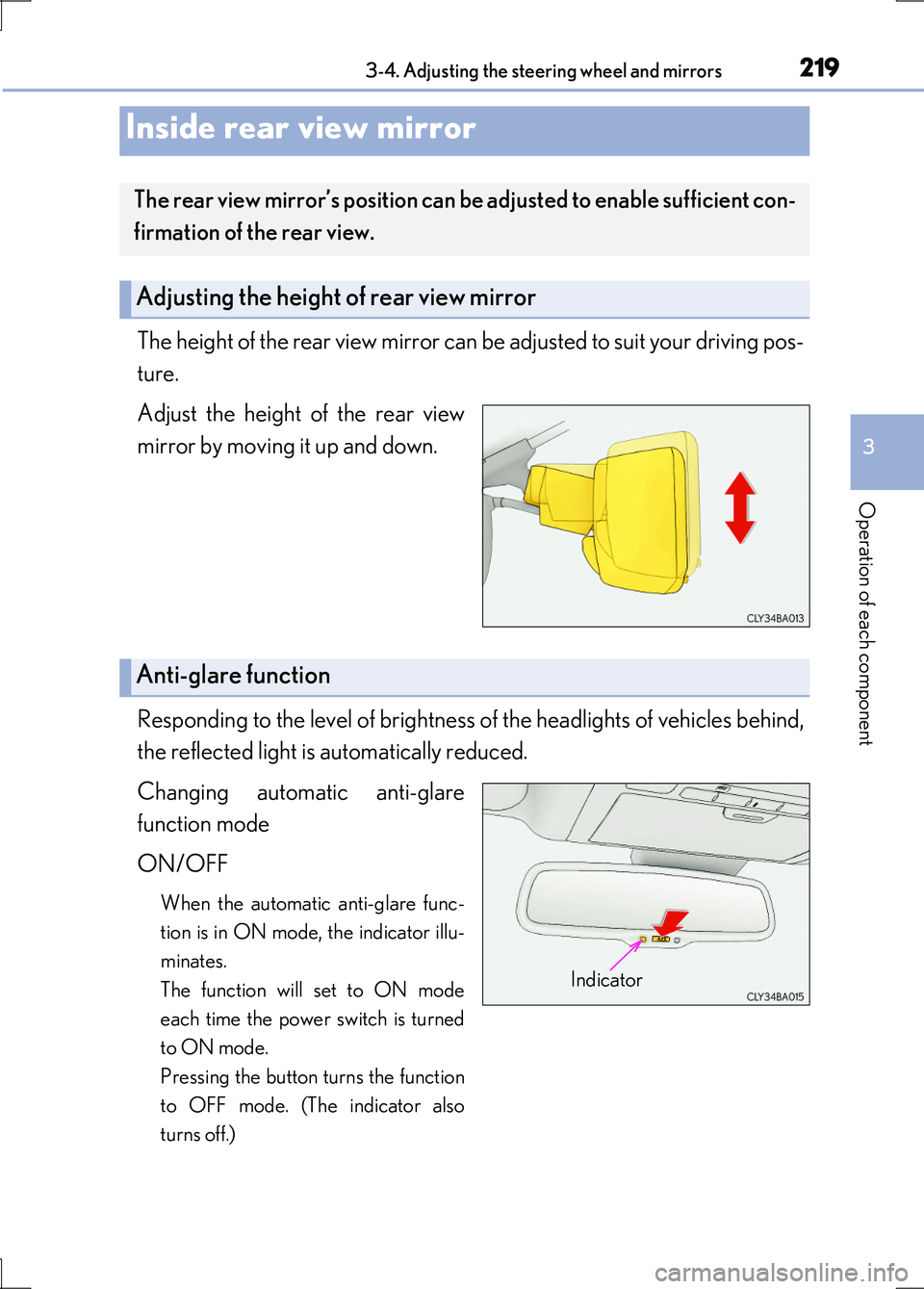
The height of the rear view mirror can be adjusted to suit your driving pos-
ture.
Adjust the height of the rear view
mirror by moving it up and down.
Responding to the level of brightness of the headlights of vehicles behind,
the reflected light is automatically reduced.
Changing automatic anti-glare
function mode
ON/OFF
When the automatic anti-glare func-
tion is in ON mode, the indicator illu-
minates.
The function will set to ON mode
each time the power switch is turned
to ON mode.
Pressing the button turns the function
to OFF mode. (The indicator also
turns off.)
Inside rear view mirror
The rear view mirror’s position can be adjusted to enable sufficient con-
firmation of the rear view.
Adjusting the height of rear view mirror
Anti-glare function
Indicator
Page 233 of 676
233
4Driving
LS600h/LS600hL_EE(OM50G20E)
4-1. Before driving
Driving the vehicle..................... 234
Cargo and luggage ...................245
Trailer towing ............................... 246
4-2. Driving procedures
Power (ignition) switch ............ 247
EV drive mode ............................ 252
Hybrid transmission ..................255
Turn signal lever ......................... 262
Parking brake .............................. 263
Brake Hold.................................... 266
Horn.................................................268
4-3. Operating the lights
and wipers
Headlight switch ......................... 269
AHS (Adaptive High-beam
System)........................................ 273
Fog light switch .......................... 280
Windshield wipers and
washer .......................................... 281
Headlight cleaner switch ........284
4-4. Refueling
Opening the fuel tank cap..... 285
4-5. Using the driving
support systems
Cruise control .............................289
Dynamic radar
cruise control............................ 293
Dynamic radar cruise control
with full-speed range............. 307
LKA
(Lane-Keeping Assist).......... 324
Driving mode select
switch ........................................... 334
Electronically modulated
air suspension ........................... 336
Driving assist systems ..............338
PCS (Pre-Crash Safety
system) ........................................ 346
Rear Pre-Crash Safety
system ..........................................360
BSM
(Blind Spot Monitor) ............. 366
•The Blind Spot Monitor
function ......................................371
• The Rear Crossing Traffic
Alert function......................... 374
Lexus night view ......................... 377
4-6. Driving tips
Hybrid vehicle driving tips .....382
Winter driving tips .....................384
Page 262 of 676
2624-2. Driving procedures
LS600h/LS600hL_EE(OM50G20E)
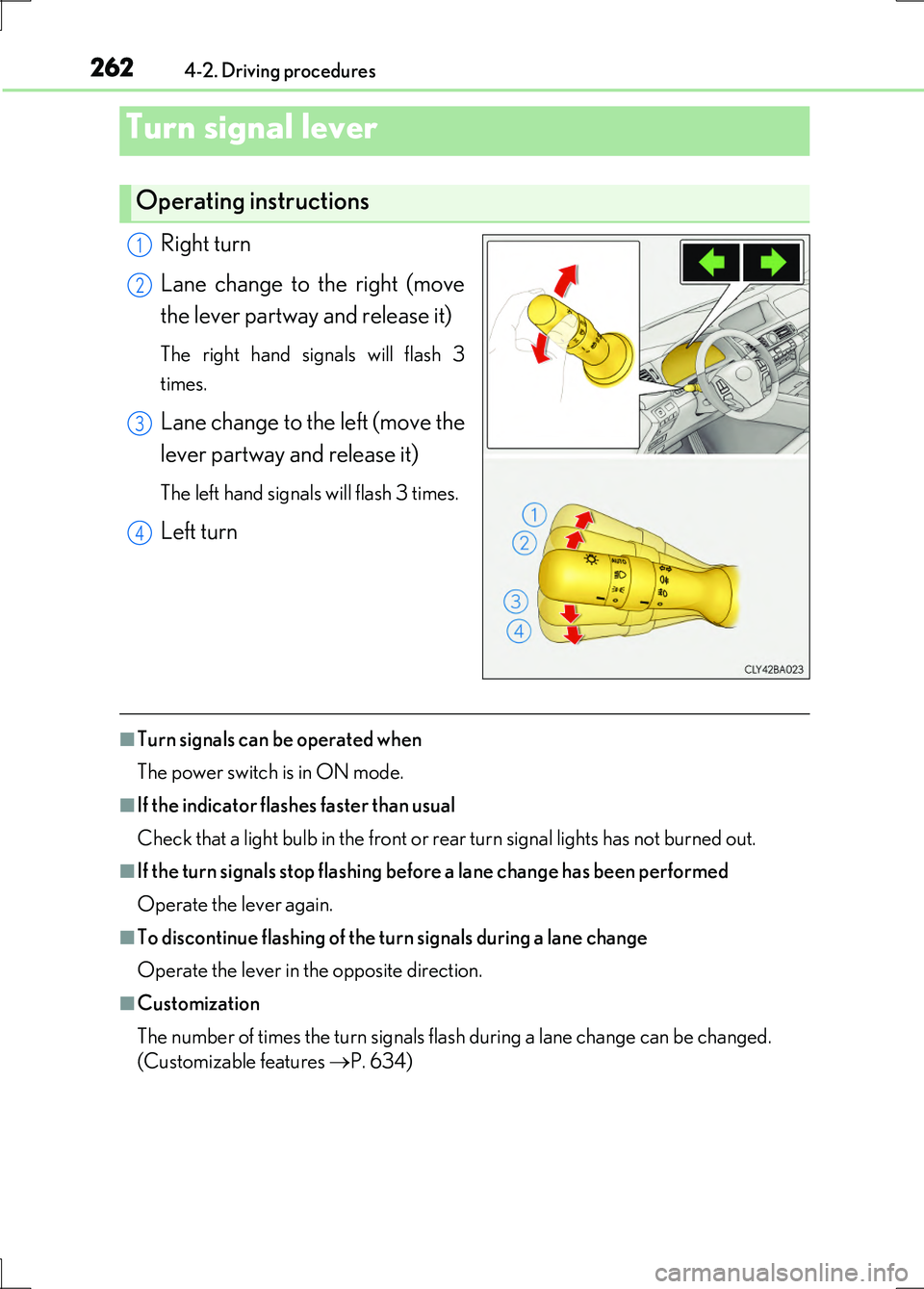
Right turn
Lane change to the right (move
the lever partway and release it)
The right hand signals will flash 3
times.
Lane change to the left (move the
lever partway and release it)
The left hand signals will flash 3 times.
Left turn
■Turn signals can be operated when
The power switch is in ON mode.
■If the indicator flashes faster than usual
Check that a light bulb in the front or rear turn signal lights has not burned out.
■If the turn signals stop flashing befo re a lane change has been performed
Operate the lever again.
■To discontinue flashing of the turn signals during a lane change
Operate the lever in the opposite direction.
■Customization
The number of times the turn signals flash during a lane change can be changed.
(Customizable features P. 634)
Turn signal lever
Operating instructions
1
2
3
4
Page 265 of 676
2654-2. Driving procedures
4
Driving
LS600h/LS600hL_EE(OM50G20E)
■Parking brake indicator light
●Depending on the power switch mode, the parking brake indicator light will come
on and stay on as described below:
ON mode: Comes on until the parking brake is released.
Not in ON mode: Stays on for approximately 15 seconds.
●When the power switch is turned off with the parking brake set, the parking brake
indicator light will stay on for about 15 seconds. This does not indicate a malfunc-
tion.
■Parking brake engaged warning buzzer
A buzzer will sound if the vehicle is driven at a speed of approximately 5 km/h (3
mph) or more with the parking brake engaged.
■When there is a malfunction in the system
Warning lights and/or warning message will turn on or flash. ( P. 555, 563)
Depending on the condition, the parking brake indicator light may flash.
■Usage in winter time
P. 384
NOTICE
■When parking the vehicle
Before you leave the vehicle, set the parking brake, shift the shift lever to P and
make sure that the vehicle does not move.
■When the system malfunctions
Stop the vehicle in a safe place and check the warning messages.
■When the parking brake cannot be released due to a malfunction
Use the parking brake release tool to manually release the parking brake.
( P. 599)
Driving the vehicle with the parking brake set will lead to brake components over-
heating, which may affect braking performance and increase brake wear.
Page 267 of 676
2674-2. Driving procedures
4
Driving
LS600h/LS600hL_EE(OM50G20E)
■When the parking brake is set automatically while the system is holding the brakes
The parking brake will not be released automatically. Release the parking brake by
operating the parking brake switch, making sure that the parking brake indicator
light goes off. ( P. 263)
■When there is a malfunction in the system
Warning lights and/or warning messages will turn on or flash. ( P. 557, 563)
CAUTION
■When the vehicle is on a steep incline
When using the brake hold system on a steep incline exercise caution. The brake
hold function may not hold the vehicle in such a situation.
■When stopped on a slippery road
The system cannot stop the vehicle when the gripping ability of the tires has been
exceeded. Do not use the system when stopped on a slippery road.
NOTICE
■When parking the vehicle
The brake hold system is not designed for use when parking the vehicle for a long
period of time. Turning the power switch off while the system is holding the brake
may release the brake, which would cause the vehicle to move. When operating
the power switch, depress the brake pedal, set the parking brake and shift the shift
lever to P.
Page 269 of 676
269
4
Driving
LS600h/LS600hL_EE(OM50G20E)
4-3. Operating the lights and wipers
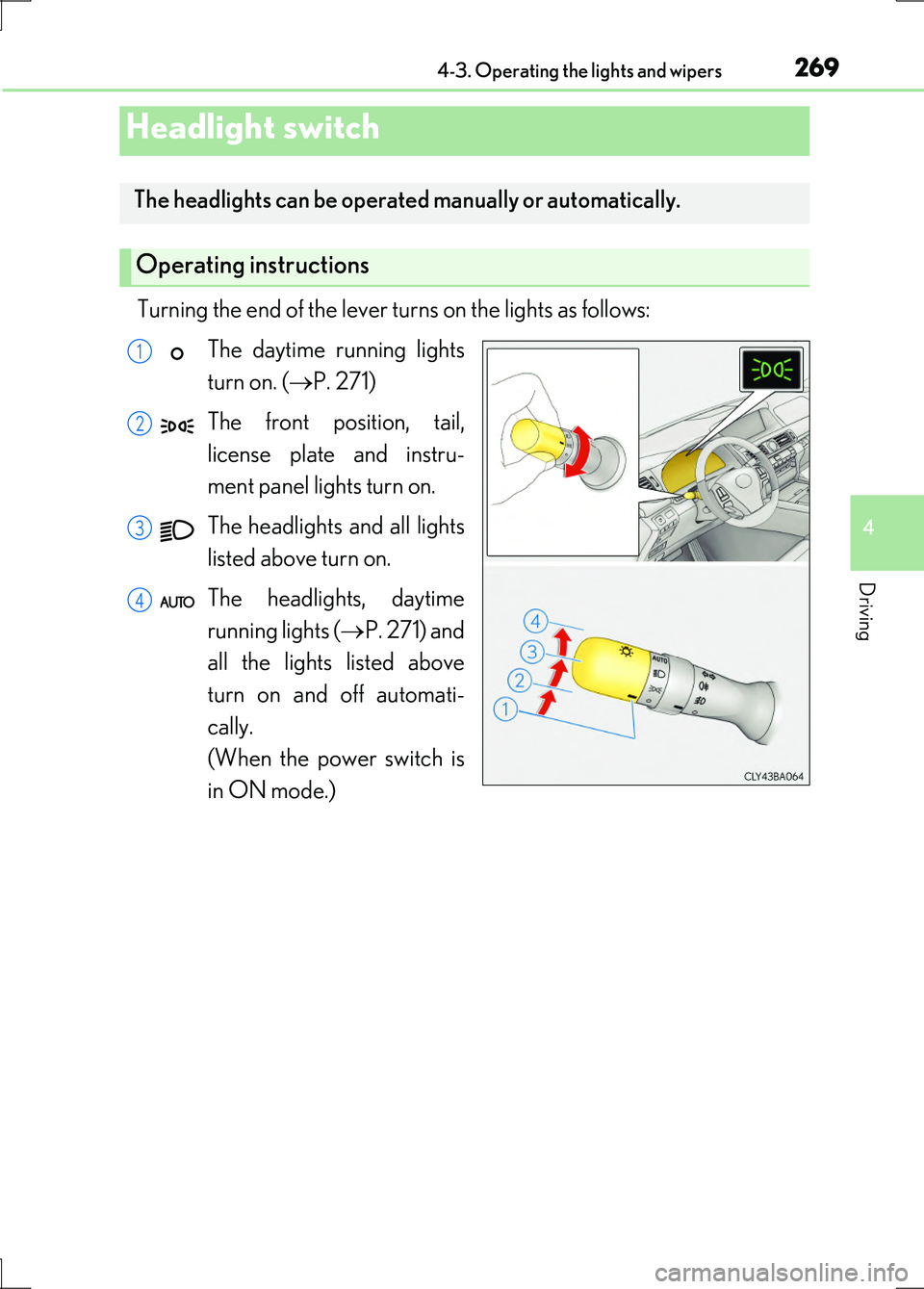
Turning the end of the lever turns on the lights as follows:
The daytime running lights
turn on. ( P. 271)
The front position, tail,
license plate and instru-
ment panel lights turn on.
The headlights and all lights
listed above turn on.
The headlights, daytime
running lights ( P. 271) and
all the lights listed above
turn on and off automati-
cally.
(When the power switch is
in ON mode.)
Headlight switch
The headlights can be operated manually or automatically.
Operating instructions
1
2
3
4
Page 270 of 676
2704-3. Operating the lights and wipers
LS600h/LS600hL_EE(OM50G20E)
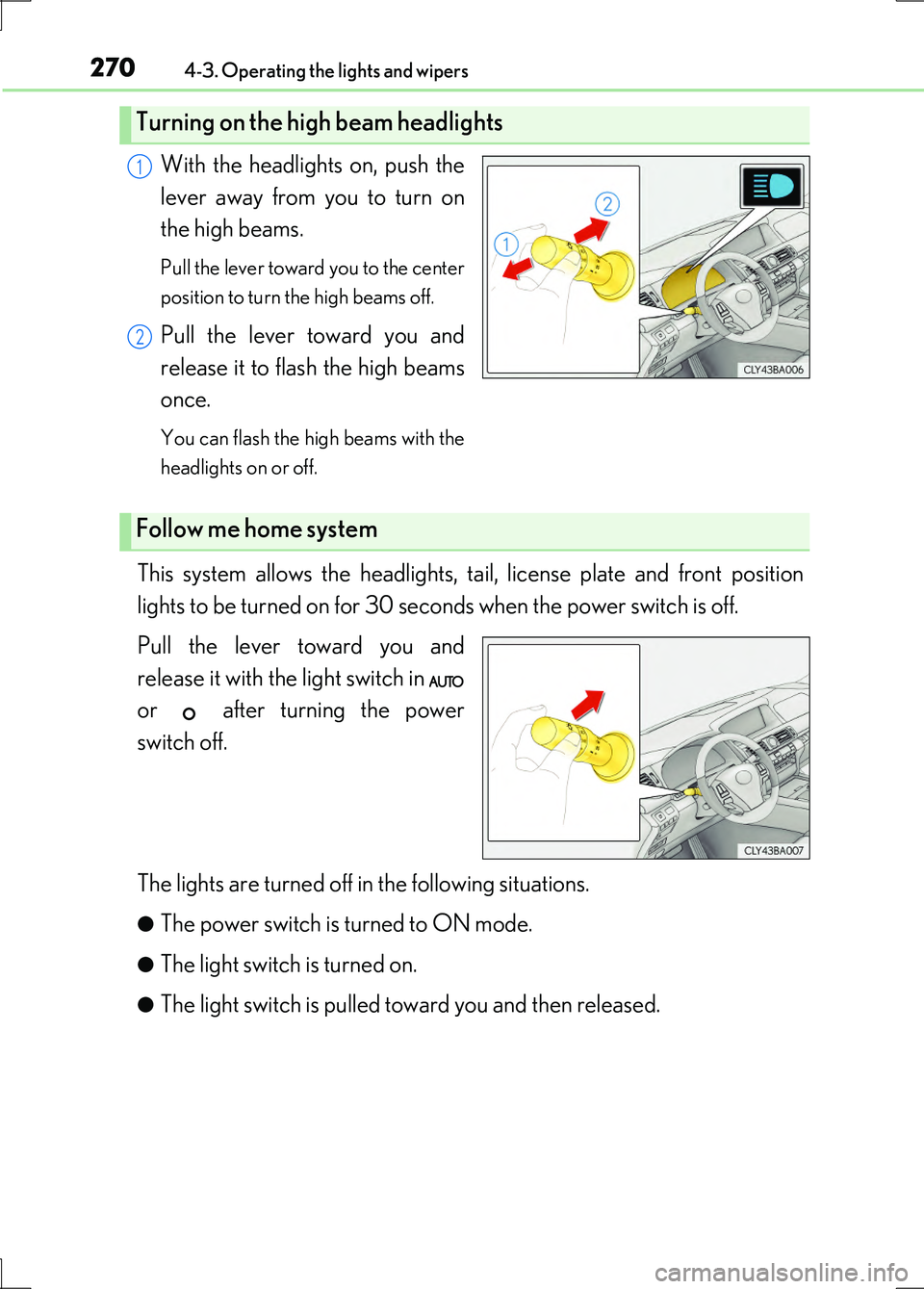
With the headlights on, push the
lever away from you to turn on
the high beams.
Pull the lever toward you to the center
position to turn the high beams off.
Pull the lever toward you and
release it to flash the high beams
once.
You can flash the high beams with the
headlights on or off.
This system allows the headlights, tail, license plate and front position
lights to be turned on for 30 seconds when the power switch is off.
Pull the lever toward you and
release it with the light switch in
or after turning the power
switch off.
The lights are turned off in the following situations.
●The power switch is turned to ON mode.
●The light switch is turned on.
●The light switch is pulled toward you and then released.
Turning on the high beam headlights
1
2
Follow me home system
Page 271 of 676
2714-3. Operating the lights and wipers
4
Driving
LS600h/LS600hL_EE(OM50G20E)
AFS (Adaptive Front-lighting System) secures excellent visibility at inter-
sections and on curves by automatically adjusting the direction of the light
axis of the headlights according to vehicle speed and the degree of the
tire’s angle as controlled by steering input.
AFS operates at speeds of 10 km/h (6 mph) or higher.
■Daytime running light system
To make your vehicle more visible to othe r drivers during daytime driving, the day-
time running lights turn on automatically whenever the hybrid system is started and
the parking brake is released with the headlight switch off or in the position. (Illu-
minate brighter than the front position lights.)
Daytime running lights are not designed for use at night.
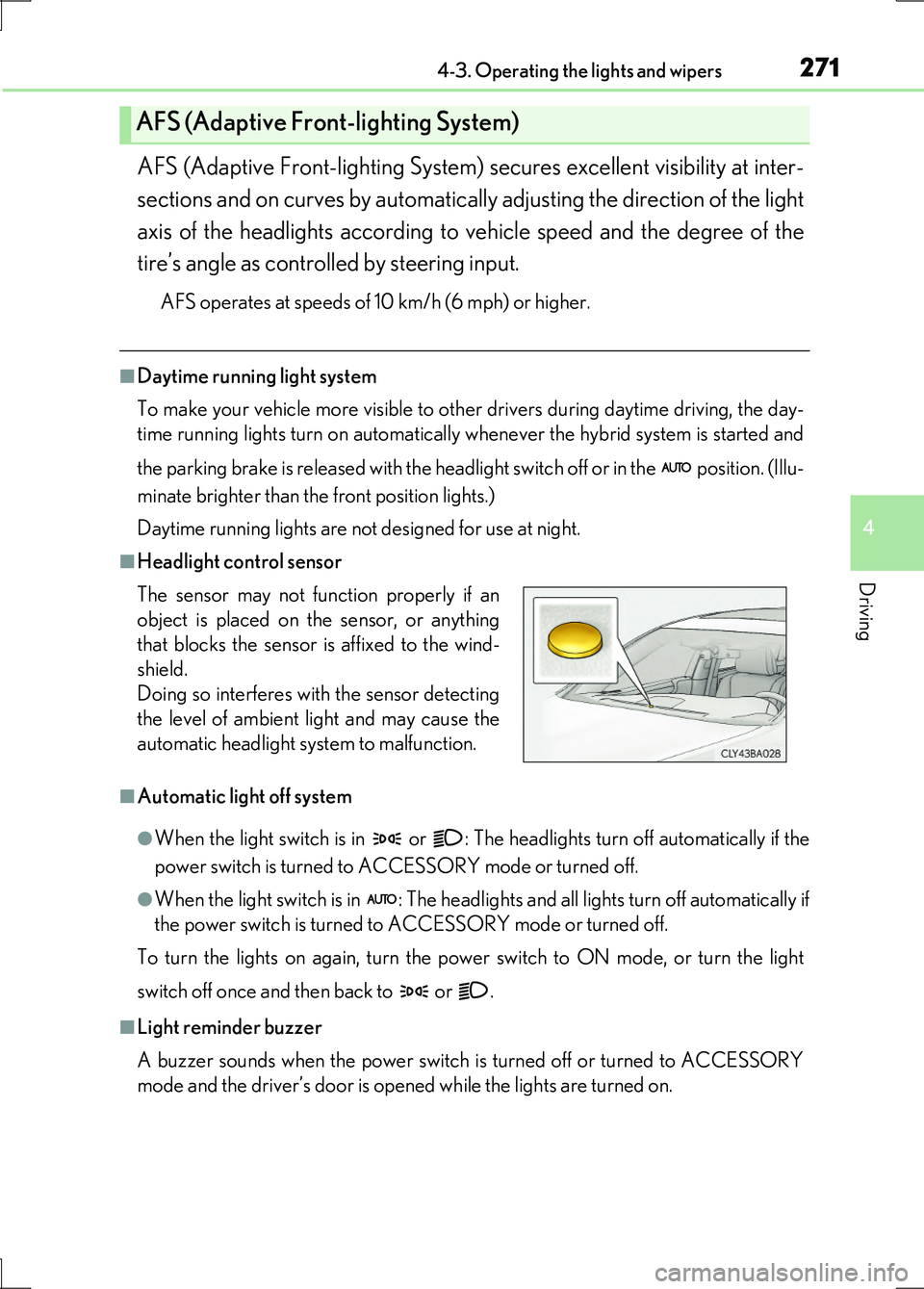
■Headlight control sensor
■Automatic light off system
●When the light switch is in or : The headlights turn off automatically if the
power switch is turned to ACCESSORY mode or turned off.
●When the light switch is in : The headlights and all lights turn off automatically if
the power switch is turned to ACCESSORY mode or turned off.
To turn the lights on again, turn the po wer switch to ON mode, or turn the light
switch off once and then back to or .
■Light reminder buzzer
A buzzer sounds when the power switch is turned off or turned to ACCESSORY
mode and the driver’s door is opened while the lights are turned on.
AFS (Adaptive Front-lighting System)
The sensor may not function properly if an
object is placed on the sensor, or anything
that blocks the sensor is affixed to the wind-
shield.
Doing so interferes with the sensor detecting
the level of ambient light and may cause the
automatic headlight system to malfunction.