lights LEXUS LS600H 2017 Service Manual
[x] Cancel search | Manufacturer: LEXUS, Model Year: 2017, Model line: LS600H, Model: LEXUS LS600H 2017Pages: 676, PDF Size: 35.25 MB
Page 282 of 676
2824-3. Operating the lights and wipers
LS600h/LS600hL_EE(OM50G20E)
■The windshield wiper and washer can be operated when
The power switch is in ON mode.
■Dripping prevention wiper sweep
After washing and the wiper has operated several times, the wipers operate one
more time after a short delay to prevent dripping.
However, the last sweep will not happen if the vehicle is traveling above 170 km/h
(106 mph).
■Effects of vehicle speed on wiper operation
Even when the wipers are not in “AUTO” mode, vehicle speed affects the time until
the drip prevention wiper sweep occurs.
With low speed windshield wiper operation selected, wiper operation will be
switched from low speed to intermittent wiper operation only when the vehicle is sta-
tionary.
(However, when the sensor sensitivity is adjusted to the highest level, the mode can-
not be switched.)
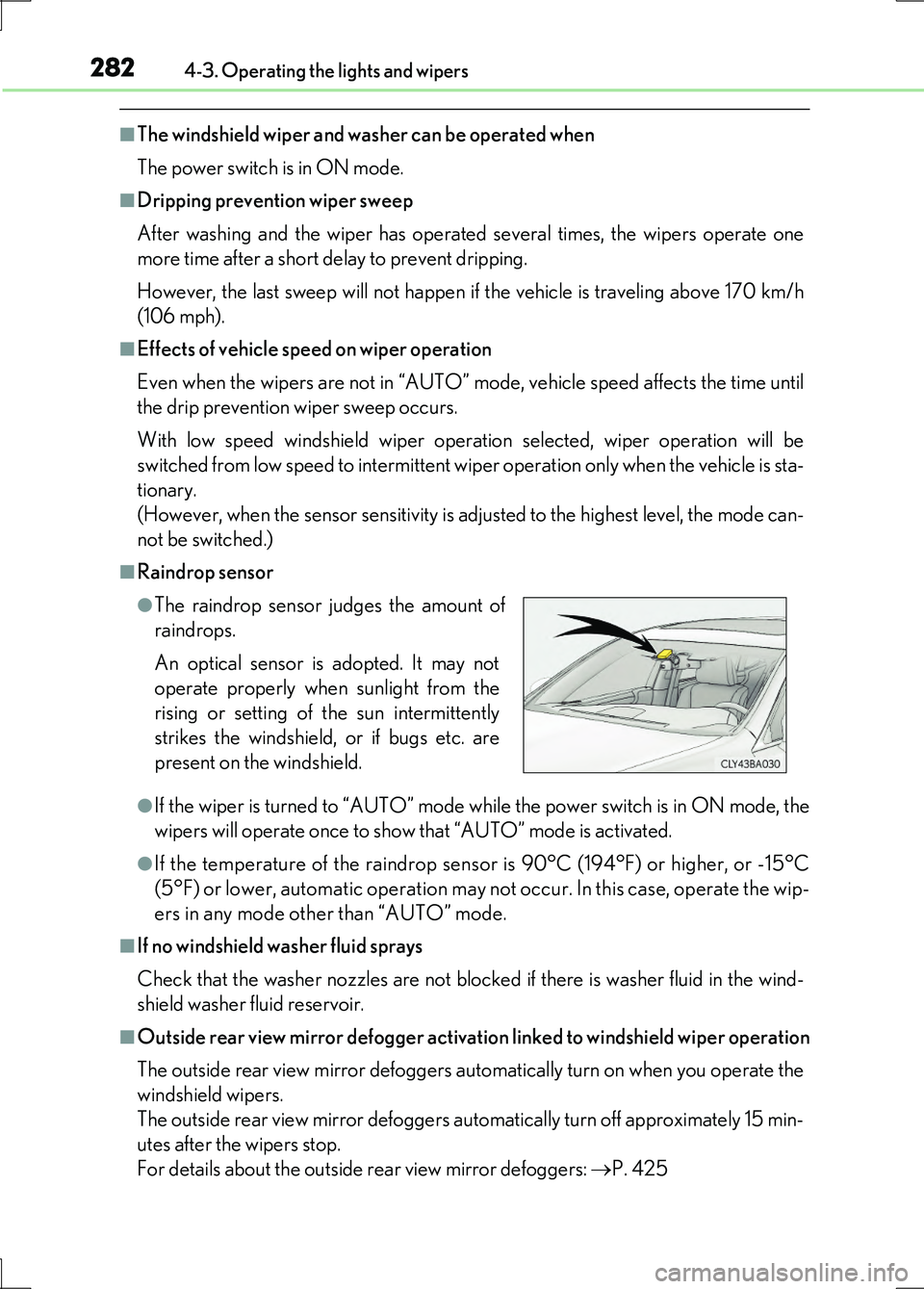
■Raindrop sensor
●If the wiper is turned to “AUTO” mode wh ile the power switch is in ON mode, the
wipers will operate once to show that “AUTO” mode is activated.
●If the temperature of the raindrop sensor is 90°C (194°F) or higher, or -15°C
(5°F) or lower, automatic operation may not occur. In this case, operate the wip-
ers in any mode other than “AUTO” mode.
■If no windshield washer fluid sprays
Check that the washer nozzles are not blocked if there is washer fluid in the wind-
shield washer fluid reservoir.
■Outside rear view mirror defogger activation linked to windshield wiper operation
The outside rear view mirror defoggers automatically turn on when you operate the
windshield wipers.
The outside rear view mirror defoggers automatically turn off approximately 15 min-
utes after the wipers stop.
For details about the outside rear view mirror defoggers: P. 425
●The raindrop sensor judges the amount of
raindrops.
An optical sensor is adopted. It may not
operate properly when sunlight from the
rising or setting of the sun intermittently
strikes the windshield, or if bugs etc. are
present on the windshield.
Page 283 of 676
2834-3. Operating the lights and wipers
4
Driving
LS600h/LS600hL_EE(OM50G20E)
CAUTION
■Caution regarding the use of windshield wipers in “AUTO” mode
The windshield wipers may operate unexpectedly if the sensor is touched or the
windshield is subject to vibration in “AUTO” mode. Take care that your fingers or
anything else do not become caught in the windshield wipers.
■Caution regarding the use of washer fluid
When it is cold, do not use the washer fluid until the windshield becomes warm.
The fluid may freeze on the windshield and cause low visibility. This may lead to an
accident, resulting in death or serious injury.
NOTICE
■When the windshield is dry
Do not use the wipers, as they may damage the windshield.
■When there is no washer fluid spray from the nozzle
Damage to the washer fluid pump may be caused if the lever is pulled toward you
and held continually.
■When a nozzle becomes blocked
In this case, contact any authorized Lexus dealer or repairer, or another duly quali-
fied and equipped professional.
Do not try to clear it with a pin or other object. The nozzle will be damaged.
Page 284 of 676
2844-3. Operating the lights and wipers
LS600h/LS600hL_EE(OM50G20E)
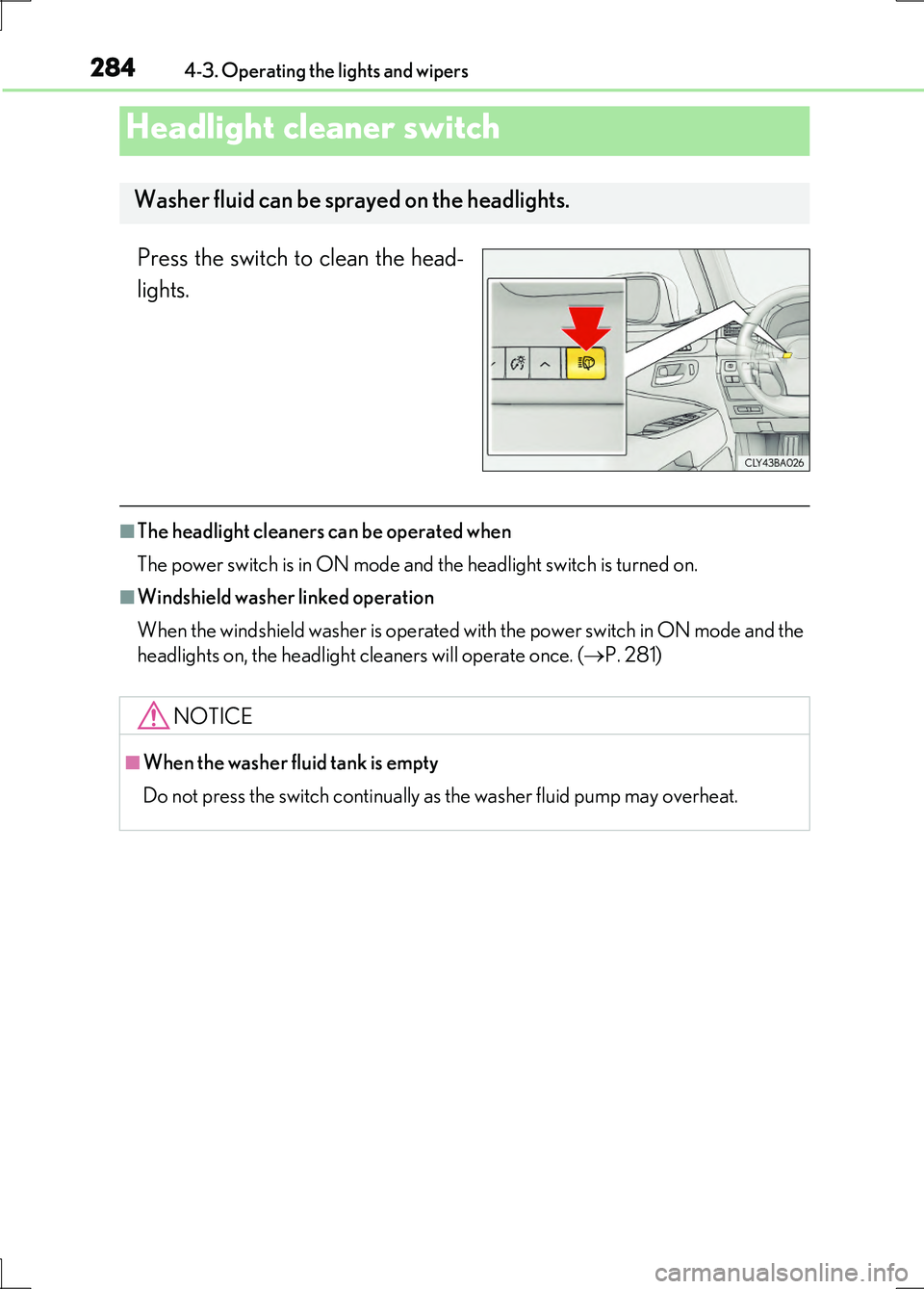
Press the switch to clean the head-
lights.
■The headlight cleaners can be operated when
The power switch is in ON mode and the headlight switch is turned on.
■Windshield washer linked operation
When the windshield washer is operated with the power switch in ON mode and the
headlights on, the headlight cleaners will operate once. ( P. 281)
Headlight cleaner switch
Washer fluid can be sprayed on the headlights.
NOTICE
■When the washer fluid tank is empty
Do not press the switch continually as the washer fluid pump may overheat.
Page 330 of 676
3304-5. Using the driving support systems
LS600h/LS600hL_EE(OM50G20E)
■After the vehicle has been parked in the sun
The LKA system functions may not be available and a warning message ( P. 563)
will be displayed for a while after driving has started. In such cases, turn the LKA sys-
tem off and turn it on again after normal temperature returns. When the temperature
in the cabin decreases and the temperature around the camera sensor ( P. 324)
becomes suitable for its operation, the functions will begin to operate.
■If there are lane markers on only one side of the vehicle
The lane keeping assist function will not operate. Also, the lane departure warning
will not operate for the side on which lane markers could not be recognized.
■Conditions in which the function may not operate correctly
In the following conditions, the LKA system functions may not operate, or it may not
be possible to ensure adequate performance. Also, the camera sensor may be
unable to recognize lane lines causing the lane departure warning function to oper-
ate incorrectly, or the lane keeping assist function may not operate properly. How-
ever, this does not indicate a malfunction.
●When driving through an area with no lane markers, such as a tollbooth, a crossing
or before a ticket checkpoint
●When driving on a sharp curve
●When lanes are extremely narrow or extremely wide
●When the vehicle leans to one side an unusual amount due to a heavy load or
improper tire inflation pressure
●When the following distance between your vehicle and the vehicle ahead is
extremely short
●When the lane markers are yellow (These may be more difficult for the system to
recognize compared to white markers.)
●When the lane markers are broken, “Raised pavement marker” or stones
●When lane markers are obscured or partially obscured by sand, dirt, etc.
●When there are shadows on the road running parallel with lane markers, or if a
shadow covers the lane markers
●When driving on a particularly bright road surface, such as concrete
●When driving on a road surface that is bright due to reflected light
●When driving in a location where the li ght level changes rapidly, such as the
entrance to or exit from a tunnel
●When sunlight or the headlights of oncoming vehicles are shining directly into the
camera lens
●When driving on roads that are branching or merging
Page 331 of 676
3314-5. Using the driving support systems
4
Driving
LS600h/LS600hL_EE(OM50G20E)
●When driving on a road surface that is wet due to rain, previous rainfall, standing
water, etc.
●When the vehicle experiences strong up-and-down motion such as when driving
on an extremely rough road or on a seam in the pavement
●When headlight brightness at nighttime is reduced due to dirt on the lenses, or
when the headlights are misaligned
●When driving with a strong crosswind
●When driving on winding roads or roads that are uneven
●When driving on rough or unpaved roads
■When changing the tires
Depending on the tires used, such as snow tires, etc., sufficient performance may not
be maintainable.
■Warning messages for LKA
Warning messages are used to indicate a system malfunction or to inform the driver
of the need for caution while driving. ( P. 563)
CAUTION
■Before using the LKA system
Do not rely solely on the LKA system. The LKA system does not drive the vehicle
automatically, nor does it reduce the amount of care you need to take. As such, the
driver must always assume full responsibility for understanding his/her
surroundings, for operating the steering wheel to correct the driving line, and for
driving safely.
Inappropriate or negligent driving could lead to an accident.
■To avoid operating the LKA by mistake
Switch the LKA off using the LKA switch when not in use.
Page 332 of 676
3324-5. Using the driving support systems
LS600h/LS600hL_EE(OM50G20E)
CAUTION
■Situations unsuitable for LKA
Do not use LKA in any of the following situations.
Otherwise, the system may not function correctly and could result in an accident.
●When driving with tire chains or similar equipment
●When the tires have been excessively worn, or when the tire inflation pressure is
low
●When there are objects or structures along the roadside that might be misinter-
preted as lane markers (such as guardrails, curb, reflector posts, etc.)
●When driving on snowy roads
●When pavement lane markers are difficult to see due to rain, snow, fog, sand, dirt,
etc.
●When there are visible lines on the pavement from road repairs, or if the remains
of old lane markers are still visible on the road
●When driving on slippery roads, such as those covered with rain, ice or snow
●When driving in a lane other than the driving or passing lanes on a freeway or
highway
●When driving on a road with lane closures due to maintenance, or when driving
in a temporary lane
NOTICE
■To prevent damage to or incorrect operation of the LKA system
●Do not modify the headlights or attach stickers to the surface of the lights.
●Do not modify the suspension.
If any suspension parts need to be replaced, contact any authorized Lexus dealer
or repairer, or another duly qualified and equipped professional.
●Do not install or place anything on the hood or the grille. Also, do not install a
grille guard (bull bars, kangaroo bar etc.).
●Do not modify the sun visor.
If the sun visor needs to be replaced, contact any authorized Lexus dealer or
repairer, or another duly qualified and equipped professional.
●If the windshield needs to be replaced, contact any authorized Lexus dealer or
repairer, or another duly qualified and equipped professional.
Page 339 of 676
3394-5. Using the driving support systems
4
Driving
LS600h/LS600hL_EE(OM50G20E)
◆EPS (Electric Power Steering)
Employs an electric motor to reduce the amount of effort needed to
turn the steering wheel
◆Active stabilizer suspension system (if equipped)
Reduces sway when cornering according to steering wheel movement
and the selected driving mode, in order to maintain a stable vehicle
posture
◆VDIM (Vehicle Dynamics Integrated Management)
Provides integrated control of the ABS, brake assist, TRC, VSC, hill-
start assist control, EPS and VGRS systems
Helps to maintain vehicle stability when swerving on slippery road sur-
faces by controlling the brakes, hybrid system output, steering assist,
and steering ratio
◆PCS (Pre-Crash Safety system) (if equipped)
P. 346
◆Rear Pre-Crash Safety system (if equipped)
P. 360
◆Emergency brake signal
When the brakes are applied suddenly, the stop lights automatically
flash to alert the vehicle behind
◆BSM (Blind Spot Monitor) (if equipped)
P. 366
Page 340 of 676
3404-5. Using the driving support systems
LS600h/LS600hL_EE(OM50G20E)
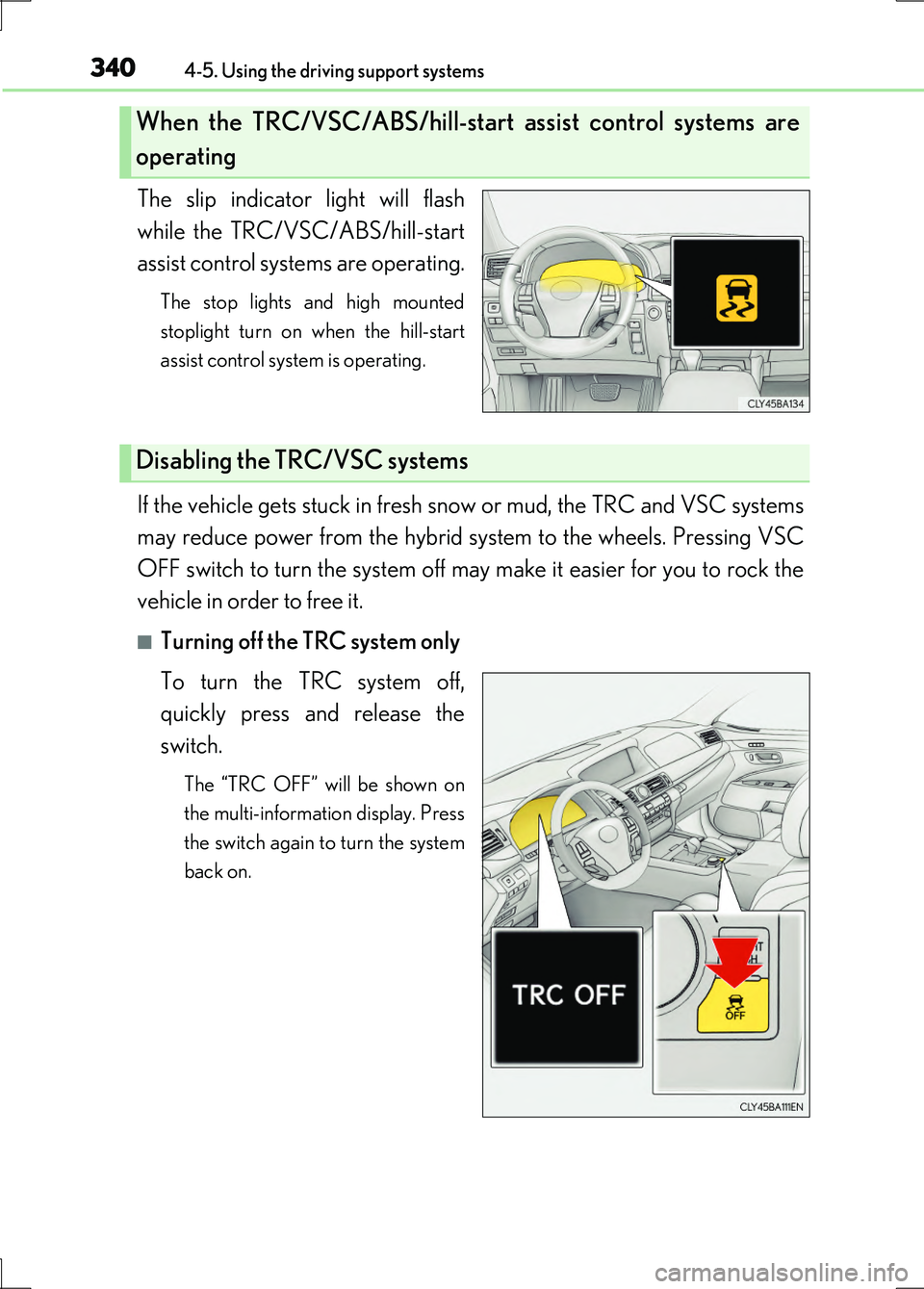
The slip indicator light will flash
while the TRC/VSC/ABS/hill-start
assist control systems are operating.
The stop lights and high mounted
stoplight turn on when the hill-start
assist control system is operating.
If the vehicle gets stuck in fresh snow or mud, the TRC and VSC systems
may reduce power from the hybrid system to the wheels. Pressing VSC
OFF switch to turn the system off may make it easier for you to rock the
vehicle in order to free it.
■Turning off the TRC system only
To turn the TRC system off,
quickly press and release the
switch.
The “TRC OFF” will be shown on
the multi-information display. Press
the switch again to turn the system
back on.
When the TRC/VSC/ABS/hill-start assist control systems are
operating
Disabling the TRC/VSC systems
Page 349 of 676
3494-5. Using the driving support systems
4
Driving
LS600h/LS600hL_EE(OM50G20E)
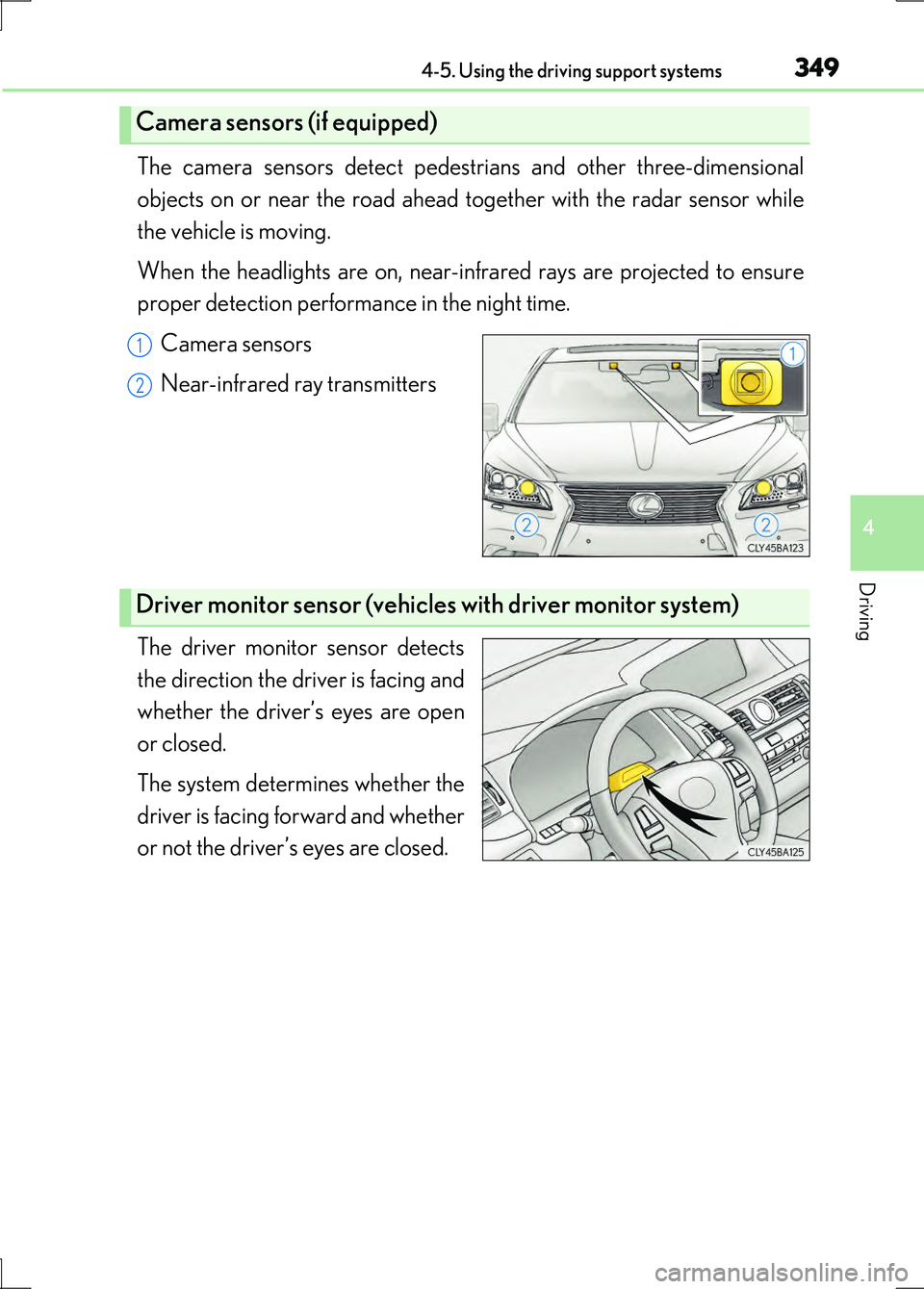
The camera sensors detect pedestrians and other three-dimensional
objects on or near the road ahead to gether with the radar sensor while
the vehicle is moving.
When the headlights are on, near-inf rared rays are projected to ensure
proper detection performance in the night time.
Camera sensors
Near-infrared ray transmitters
The driver monitor sensor detects
the direction the driver is facing and
whether the driver’s eyes are open
or closed.
The system determines whether the
driver is facing forward and whether
or not the driver’s eyes are closed.
Camera sensors (if equipped)
1
2
Driver monitor sensor (vehicles with driver monitor system)
Page 352 of 676
3524-5. Using the driving support systems
LS600h/LS600hL_EE(OM50G20E)
■Conditions that may trigger the system even if there is no danger of a collision
In any of the following situations where the frontal area of the radar sensor is inter-
rupted, the radar sensor may detect possibility of a frontal collision and the system
may be activated.
●When passing by an oncoming vehicle in a curve or a turn to the right or the left.
●When rapidly approaching an obstacle ahead (e.g. preceding vehicle, toll gate bar-
rier, etc.)
●When there is a structural object (billboard, low ceiling, fluorescent light, etc.)
above the uphill road ahead
●When driving on a narrow road or through under a low overhead structure (bridge,
tunnel, fly-under, etc.)
●When driving on an uneven road surface
●When there is a metal object, bump, or protrusion on the road surface
●When vehicle front part is raised or lowered depending on loading conditions
●When the direction of radar sensor is misaligned by strong impact applied on an
area around the radar sensor, etc.
●When there is an obstacle (guard rail, etc.) by the roadside at the entrance to a
curve
●When the front of your vehicle is pointing upwards (caused by putting a heavy load
in the trunk etc.)
●When driving through an area filled with steam or smoke
When the system is activated in the situatio ns described above, there is also a possi-
bility that the seat belts will retract quickly and the brakes may be applied with a force
greater than normal. When the seat belt is locked in the retracted position, stop the
vehicle in a safe place, release the seat belt and refasten it.
■Obstacles not detected
The radar sensor cannot detect plastic obstacles such as traffic cones. There may
also be occasions when the sensor cannot detect pedestrians, animals, bicycles,
motorcycles, trees, or snowdrifts.
■A camera sensor cannot detect obstacles in the following situations:
●A camera sensor is directly receiving intense light, such as sunlight.
●Visibility is poor because of bad weather or other reasons.
●The sensor temperature is extremely high.
●The headlights are not turned on in darkness such as at night or in a tunnel.