display LEXUS LS600H 2017 Manual Online
[x] Cancel search | Manufacturer: LEXUS, Model Year: 2017, Model line: LS600H, Model: LEXUS LS600H 2017Pages: 676, PDF Size: 35.25 MB
Page 393 of 676
3935-1. Remote Touch screen
5
Interior features
LS600h/LS600hL_EE(OM50G20E)
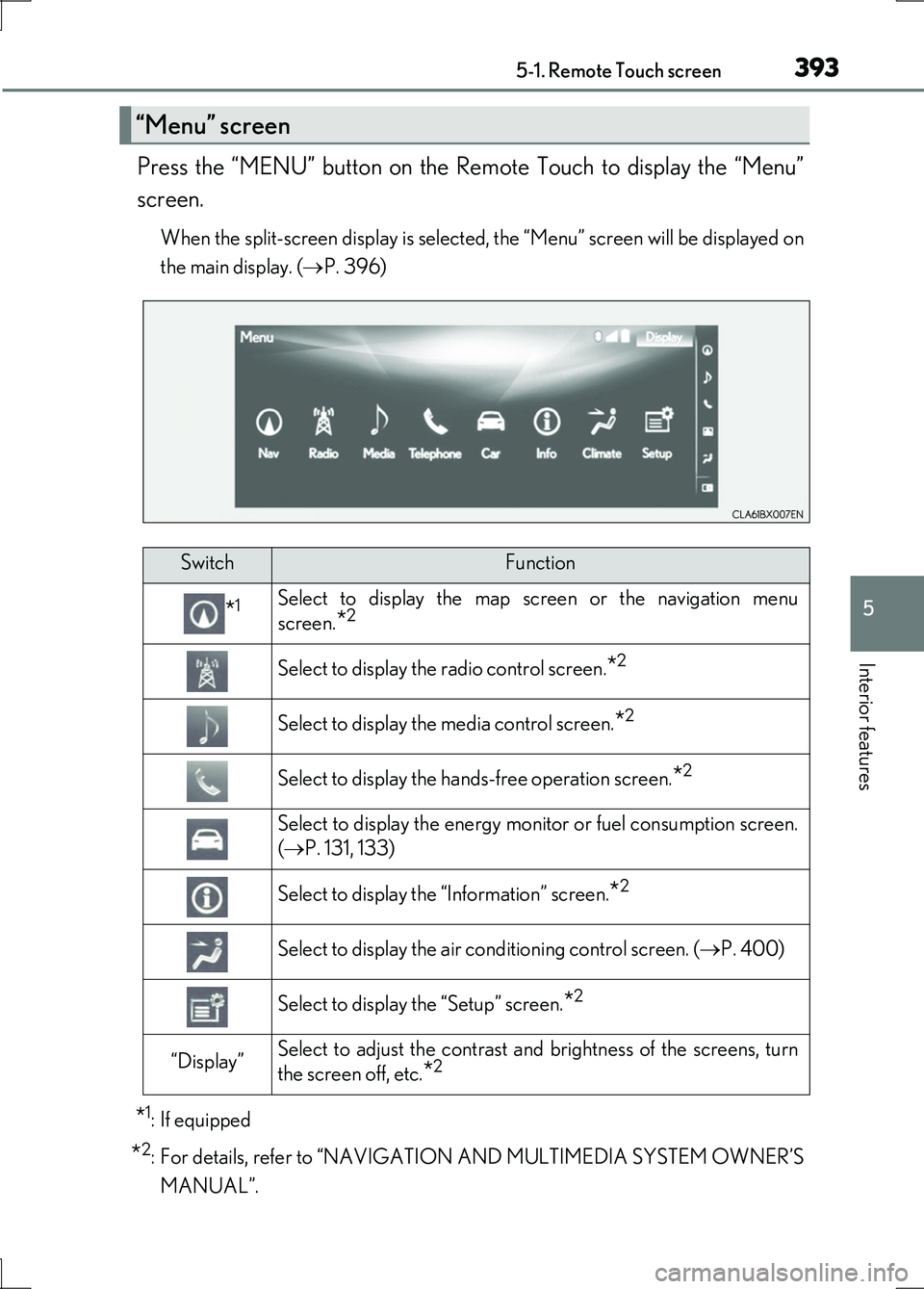
Press the “MENU” button on the Remote Touch to display the “Menu”
screen.
When the split-screen display is selected, the “Menu” screen will be displayed on
the main display. ( P. 396)
*1: If equipped
*2: For details, refer to “NAVIGATION AND MULTIMEDIA SYSTEM OWNER’S
MANUAL”.
“Menu” screen
SwitchFunction
*1Select to display the map screen or the navigation menu
screen.*2
Select to display the radio control screen.*2
Select to display the media control screen.*2
Select to display the hands-free operation screen.*2
Select to display the energy monitor or fuel consumption screen.
( P. 131, 133)
Select to display the “Information” screen.*2
Select to display the air conditioning control screen. (P. 400)
Select to display the “Setup” screen.*2
“Display”Select to adjust the contrast and brightness of the screens, turn
the screen off, etc.*2
Page 394 of 676
3945-1. Remote Touch screen
LS600h/LS600hL_EE(OM50G20E)
■Full screen display
The following functions can be displayed full screen:
•Initial screen
•“Menu” screen ( P. 393)
•Map screen*
•Audio screen*
• Energy monitor or fuel consumption screen ( P. 130)
• Air conditioning control screen ( P. 399)
*: For details, refer to “NAVIGATION AND MULTIMEDIA SYSTEM OWNER’S
MANUAL”.
12.3-inch display
12.3-inch display overview
Page 395 of 676
3955-1. Remote Touch screen
5
Interior features
LS600h/LS600hL_EE(OM50G20E)
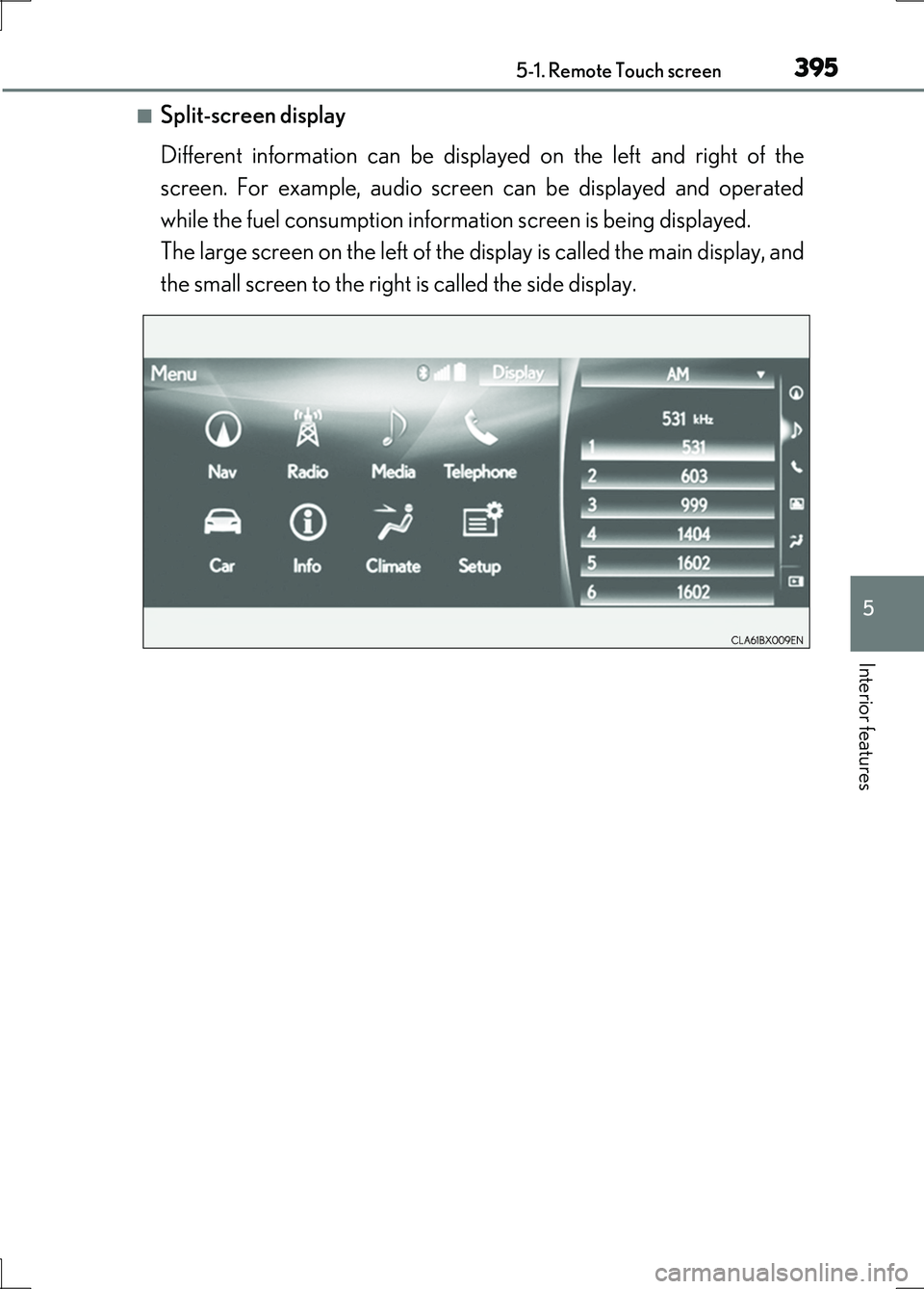
■Split-screen display
Different information can be displayed on the left and right of the
screen. For example, audio screen can be displayed and operated
while the fuel consumption information screen is being displayed.
The large screen on the left of the display is called the main display, and
the small screen to the right is called the side display.
Page 396 of 676
3965-1. Remote Touch screen
LS600h/LS600hL_EE(OM50G20E)
■Selecting the operation screen
When selecting the main display, move the Remote Touch knob to the
left. When selecting the side display, move the Remote Touch knob to
the right.
■ Main display
For details about the functions and operation of the main display, refer
to the respective section and “NAVIGATION AND MULTIMEDIA
SYSTEM OWNER’S MANUAL”.
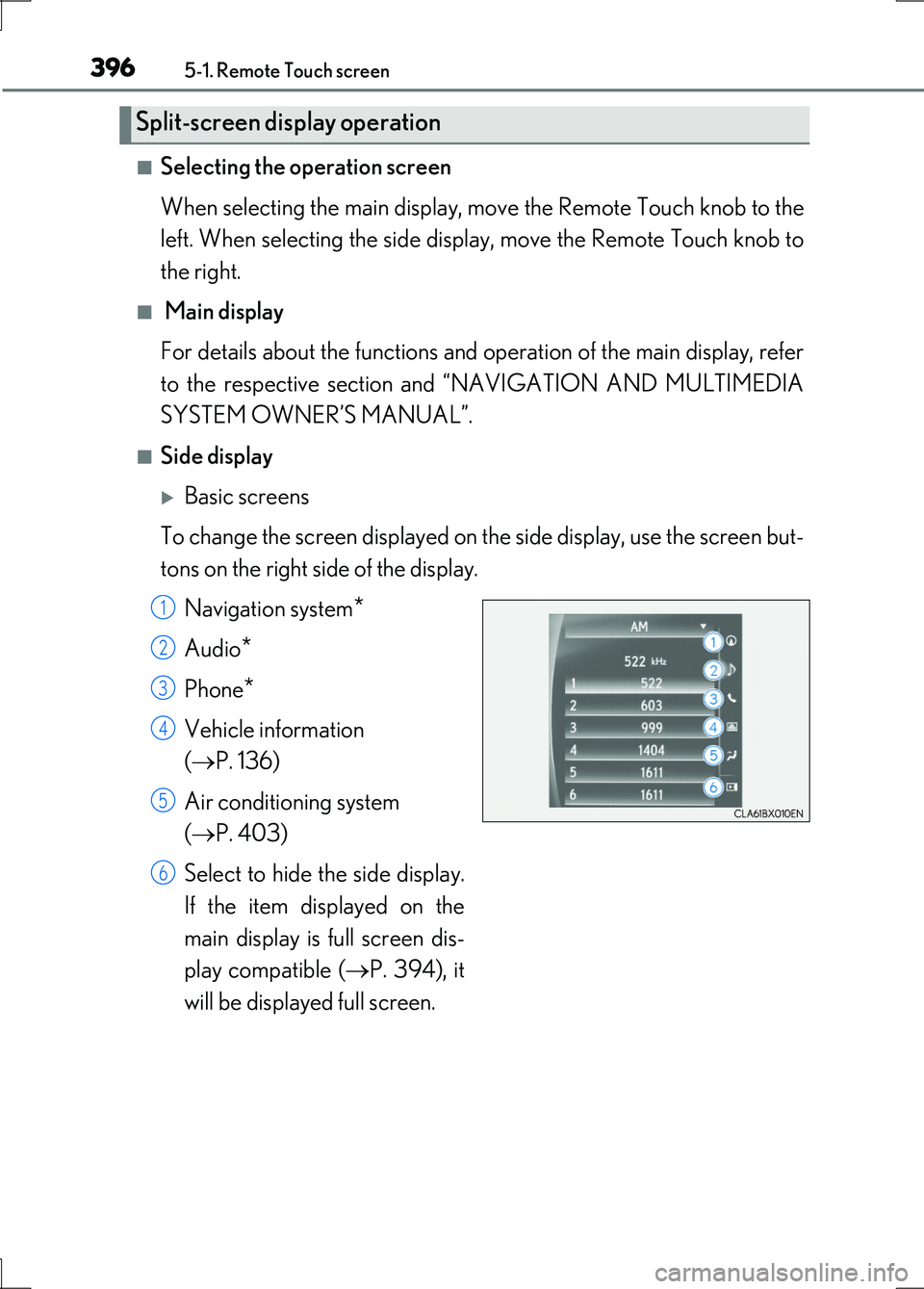
■Side display
Basic screens
To change the screen displayed on th e side display, use the screen but-
tons on the right side of the display.
Navigation system*
Audio*
Phone*
Vehicle information
( P. 136)
Air conditioning system
( P. 403)
Select to hide the side display.
If the item displayed on the
main display is full screen dis-
play compatible ( P. 394), it
will be displayed full screen.
Split-screen display operation
1
2
3
4
5
6
Page 397 of 676
3975-1. Remote Touch screen
5
Interior features
LS600h/LS600hL_EE(OM50G20E)
Interruption screens
Each of the following screens is displayed automatically in accordance
with conditions.
• Lexus parking assist-sensor
•Phone*
• Driving mode
• Lexus night view (if equipped) ( P. 379)
*: For details, refer to “NAVIGATION AND MULTIMEDIA SYSTEM OWNER’S
MANUAL”.
Page 399 of 676
399
5
Interior features
LS600h/LS600hL_EE(OM50G20E)
5-3. Using the air conditioning system and defogger
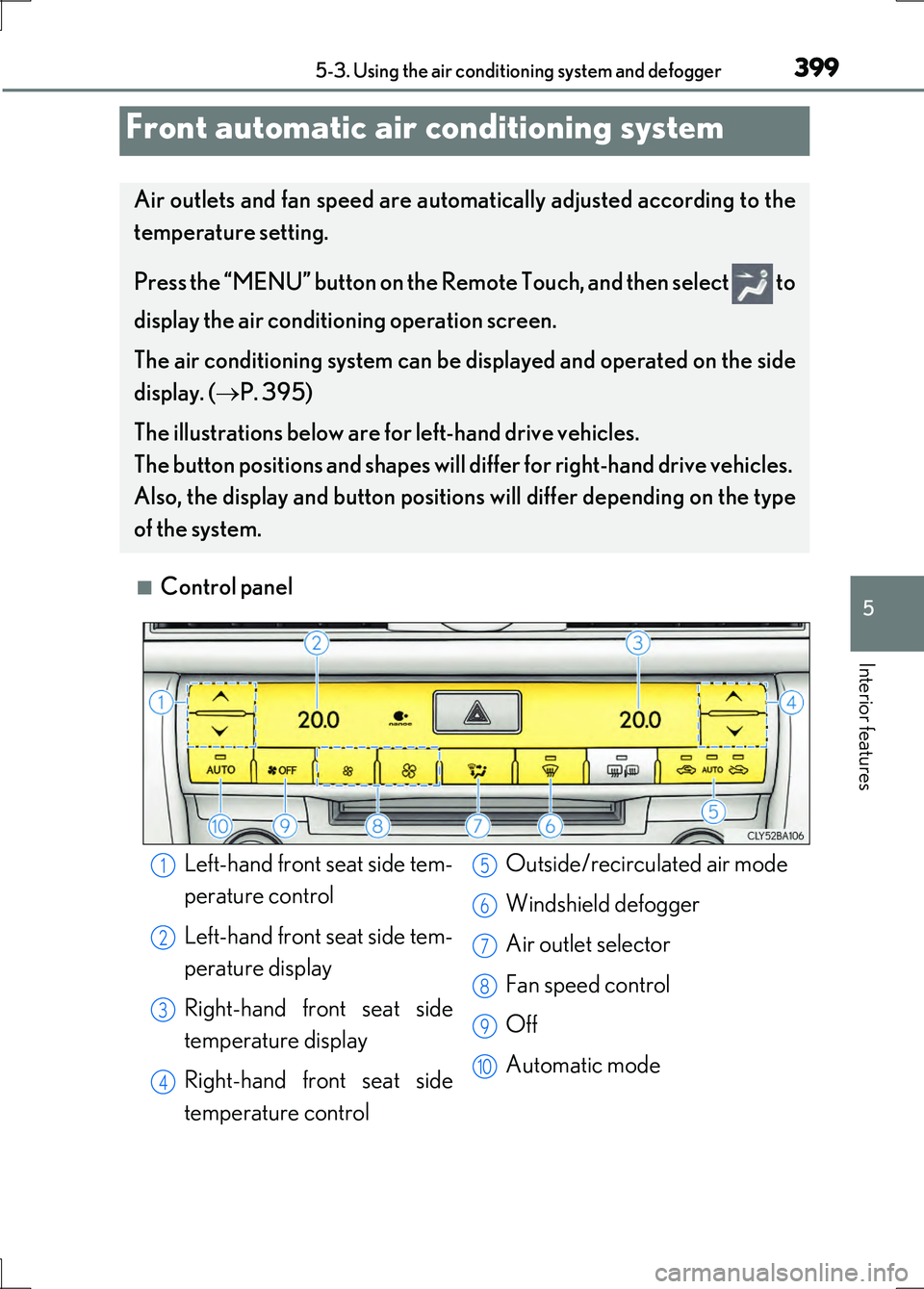
■Control panel
Front automatic air conditioning system
Air outlets and fan speed are automatically adjusted according to the
temperature setting.
Press the “MENU” button on the Remo te Touch, and then select to
display the air conditioning operation screen.
The air conditioning system can be displayed and operated on the side
display. ( P. 395)
The illustrations below are for left-hand drive vehicles.
The button positions and shapes will differ for right-hand drive vehicles.
Also, the display and button positions will differ depending on the type
of the system.
Left-hand front seat side tem-
perature control
Left-hand front seat side tem-
perature display
Right-hand front seat side
temperature display
Right-hand front seat side
temperature control
Outside/recirculated air mode
Windshield defogger
Air outlet selector
Fan speed control
Off
Automatic mode
1
2
3
4
5
6
7
8
9
10
Page 400 of 676
4005-3. Using the air conditioning system and defogger
LS600h/LS600hL_EE(OM50G20E)
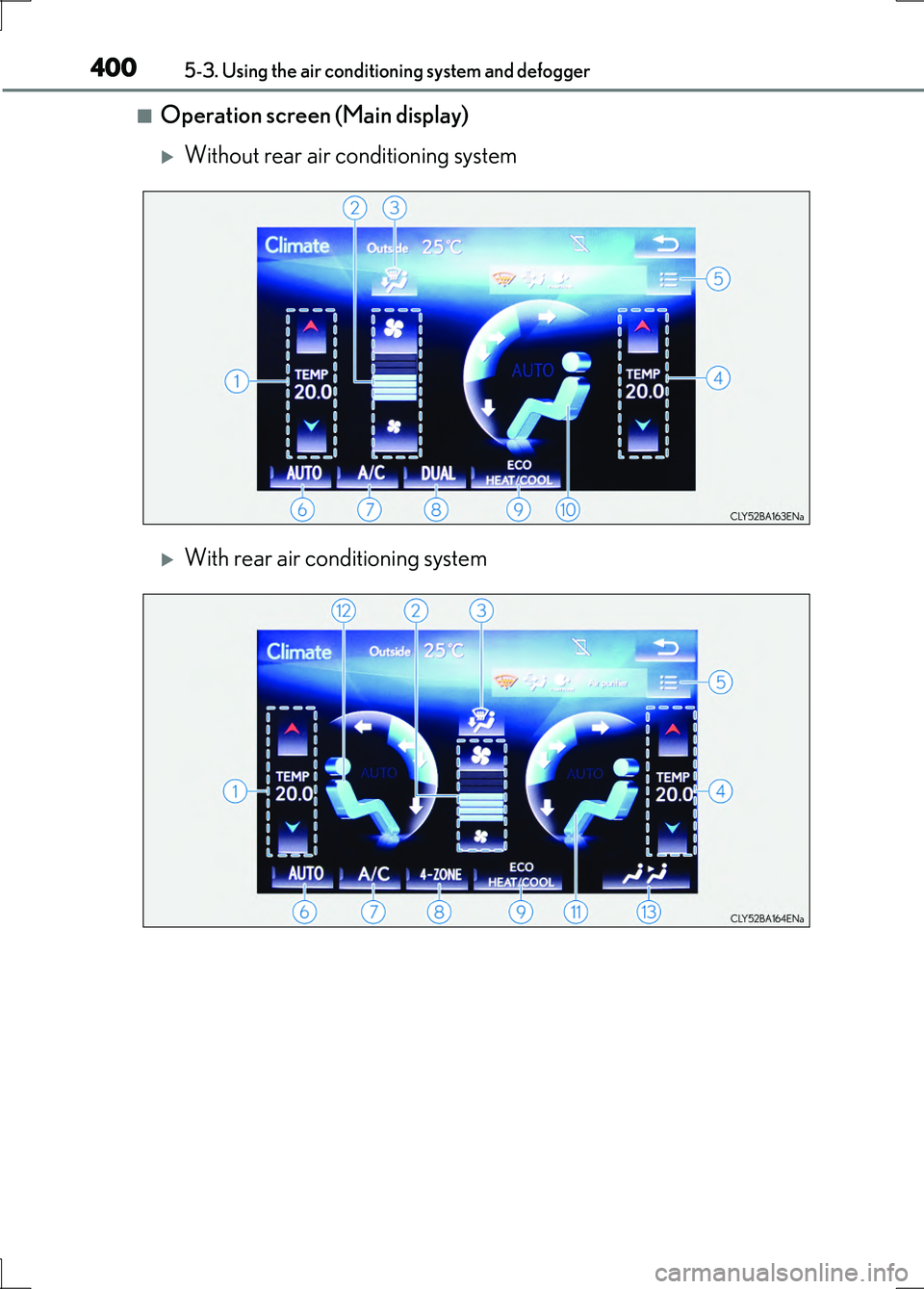
■Operation screen (Main display)
Without rear air conditioning system
With rear air conditioning system
Page 403 of 676
4035-3. Using the air conditioning system and defogger
5
Interior features
LS600h/LS600hL_EE(OM50G20E)
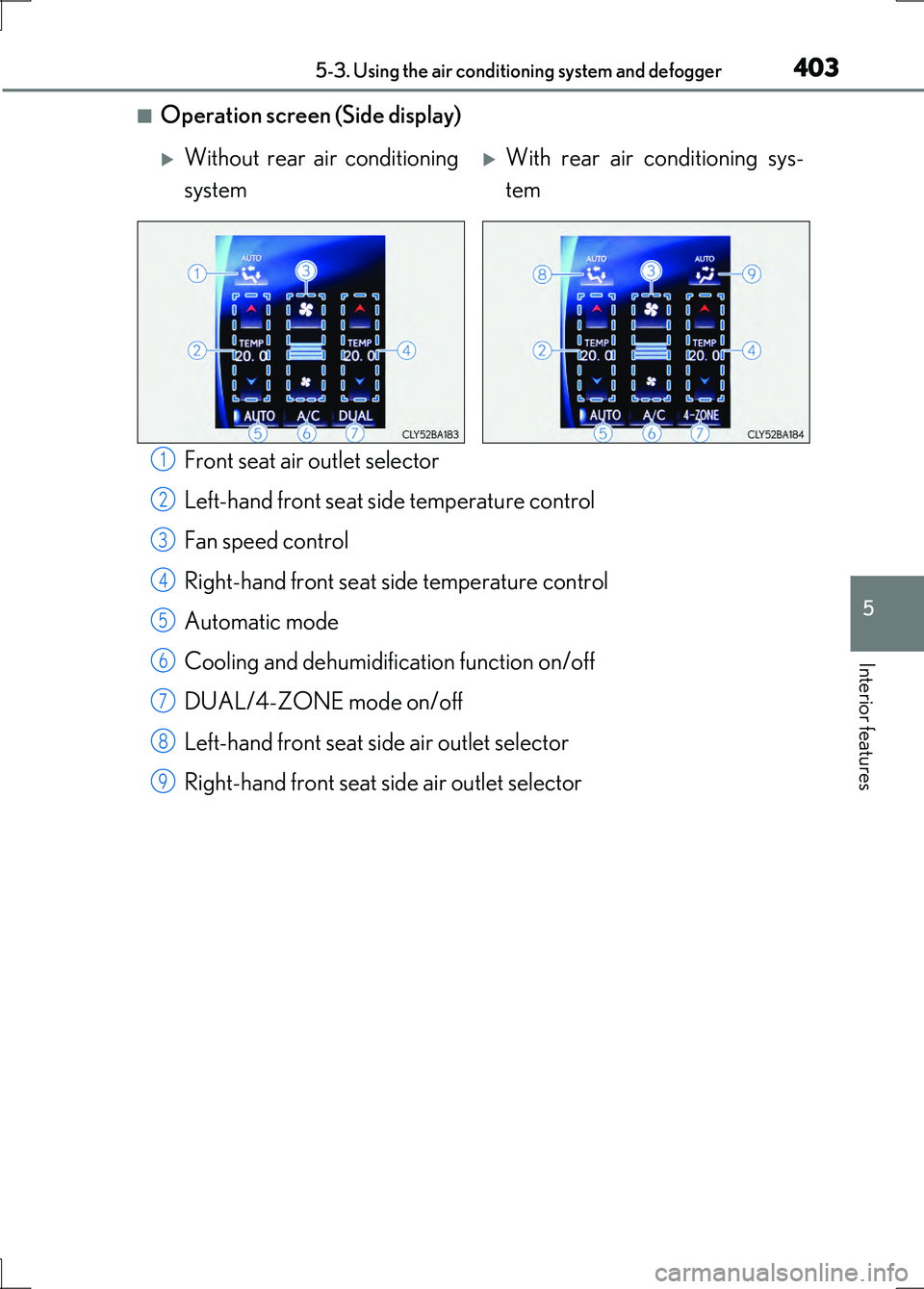
■Operation screen (Side display)
Front seat air outlet selector
Left-hand front seat side temperature control
Fan speed control
Right-hand front seat side temperature control
Automatic mode
Cooling and dehumidification function on/off
DUAL/4-ZONE mode on/off
Left-hand front seat side air outlet selector
Right-hand front seat si de air outlet selector
Without rear air conditioning
system
With rear air conditioning sys-
tem
1
2
3
4
5
6
7
8
9
Page 412 of 676
4125-3. Using the air conditioning system and defogger
LS600h/LS600hL_EE(OM50G20E)
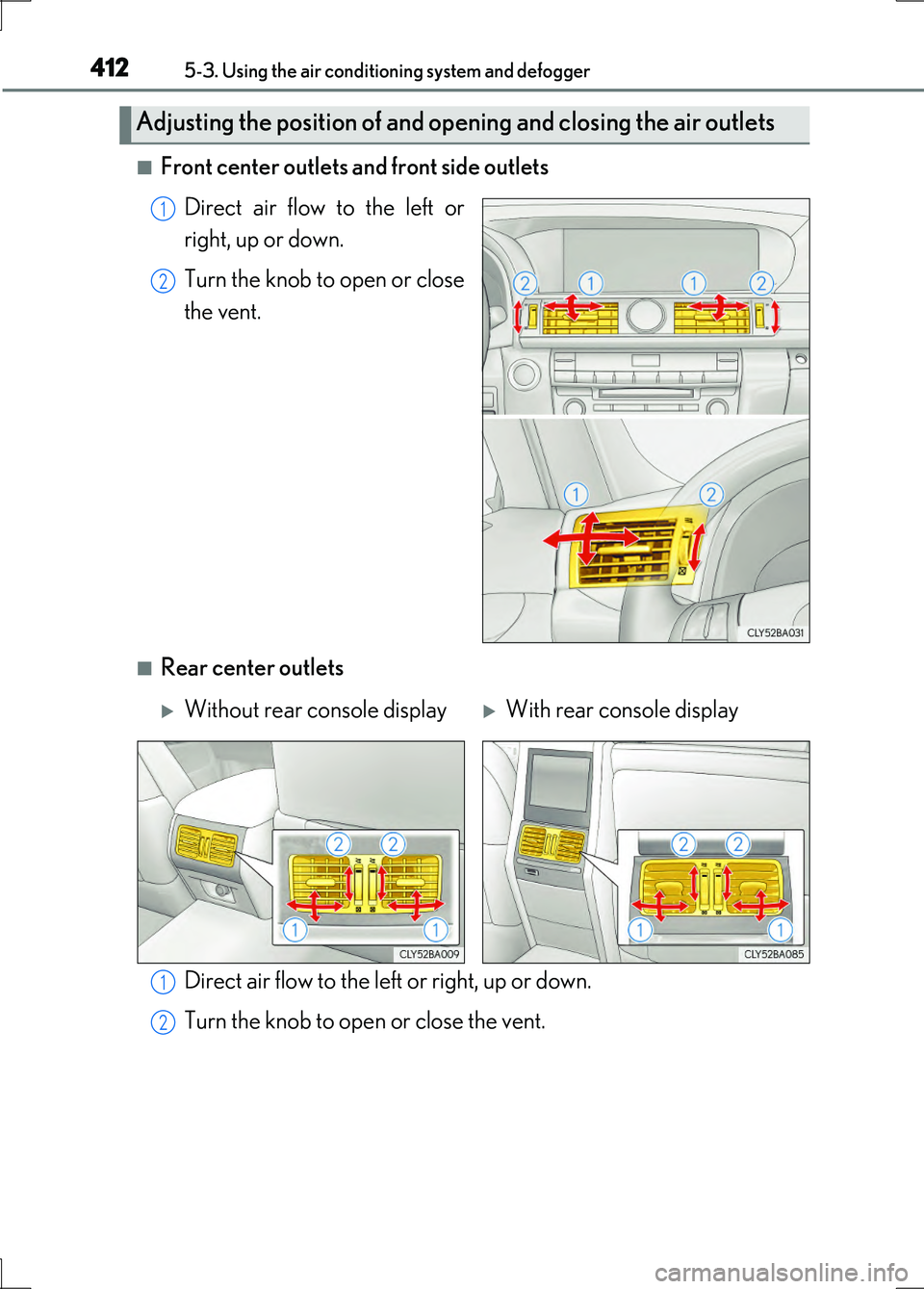
■Front center outlets and front side outlets
Direct air flow to the left or
right, up or down.
Turn the knob to open or close
the vent.
■Rear center outlets
Direct air flow to the left or right, up or down.
Turn the knob to open or close the vent.
Adjusting the position of and opening and closing the air outlets
1
2
Without rear console displayWith rear console display
1
2
Page 415 of 676
4155-3. Using the air conditioning system and defogger
5
Interior features
LS600h/LS600hL_EE(OM50G20E)
■When the hybrid battery cooling system operates
●If the hybrid battery cooling system operates when the air conditioning is off, a
message will be shown on the multi-information display and the air conditioning will
automatically turn on. ( P. 121)
●The sound of the air flow may change when cool air flows from the rear roof vents
or the air purifier is in operation. This occurs when the hybrid battery is being
cooled and does not indicate a malfunction.
■Automatic mode for air intake control
In automatic mode, the system detects exhaust gas and other pollutants and auto-
matically switches between outside air and recirculated air modes.
When the dehumidification function is off, and the fan is operating, turning automatic
mode on will activate the dehumidification function.
■Pollen removal mode
●In order to prevent the windshield from fogging up when the outside air is cold, the
following may occur:
• Outside air mode does not switch to (recirculated air) mode.
• The dehumidification function operates.
• The operation cancels after approximately 1 minute.
●In rainy weather, the windows may fog up. Press .
●In extremely humid weather, the windows may fog up.
●The pollens are filtered out even if the pollen removal mode is turned off.
■Air purifier (with rear air conditioning system)
The air purifier will turn on when turning the rear air conditioning system on.
■When the outside temperature falls to nearly 0 C (32F)
The dehumidification function may not operate even when “A/C” is selected.