display LEXUS LS600H 2017 Repair Manual
[x] Cancel search | Manufacturer: LEXUS, Model Year: 2017, Model line: LS600H, Model: LEXUS LS600H 2017Pages: 676, PDF Size: 35.25 MB
Page 328 of 676
3284-5. Using the driving support systems
LS600h/LS600hL_EE(OM50G20E)
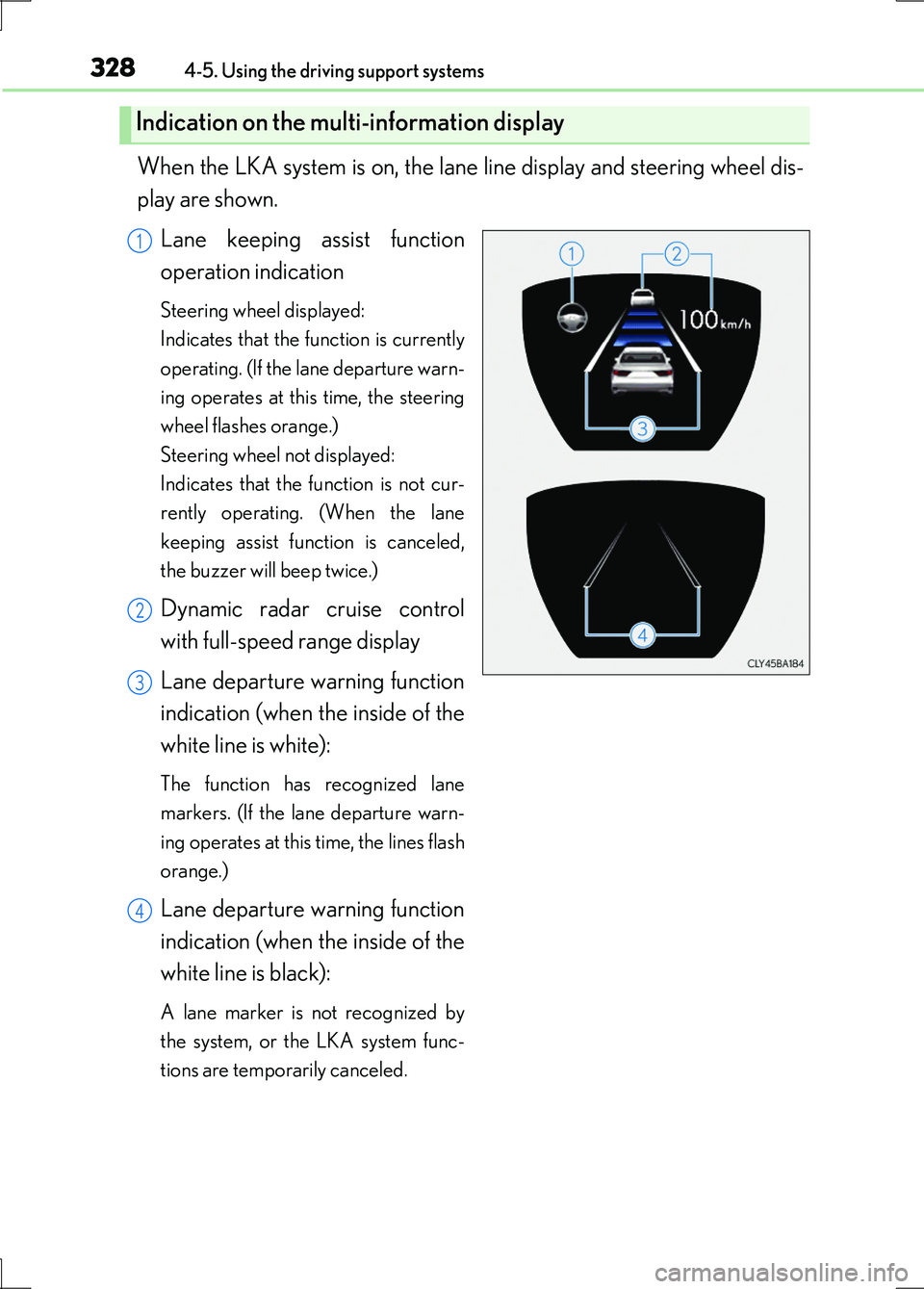
When the LKA system is on, the lane line display and steering wheel dis-
play are shown.
Lane keeping assist function
operation indication
Steering wheel displayed:
Indicates that the function is currently
operating. (If the lane departure warn-
ing operates at this time, the steering
wheel flashes orange.)
Steering wheel not displayed:
Indicates that the function is not cur-
rently operating. (When the lane
keeping assist function is canceled,
the buzzer will beep twice.)
Dynamic radar cruise control
with full-speed range display
Lane departure warning function
indication (when the inside of the
white line is white):
The function has recognized lane
markers. (If the lane departure warn-
ing operates at this time, the lines flash
orange.)
Lane departure warning function
indication (when the inside of the
white line is black):
A lane marker is not recognized by
the system, or the LKA system func-
tions are temporarily canceled.
Indication on the multi-information display
1
2
3
4
Page 329 of 676
3294-5. Using the driving support systems
4
Driving
LS600h/LS600hL_EE(OM50G20E)
■Temporary cancelation of the LKA system functions
If any of the following occurs, the LKA system functions will be temporarily canceled.
The functions will resume after the necessary operating conditions have returned.
●The steering wheel is turned as far as necessary to cause the vehicle to change
lanes.
●When the system detects no-handed driving. (The lane keeping assist function will
be temporarily canceled, but the lane departure warning function will continue.)
●The turn signal lever is operated.
●The vehicle speed deviates from the operating range of the LKA system functions.
(The buzzer will beep twice when the lane keeping assist function is being
canceled.)
●When the lane lines cannot be recognized while driving. (The buzzer will beep
twice when the lane keeping assist function is being canceled.)
●When the wiper switch is in the high spee d position or is set to “AUTO” mode with
the wipers operating at high speed. (The lane keeping assist function will be tempo-
rarily canceled, but the lane departure warning function will continue.)
●If the vehicle crosses a line for approximately half a minute or more. (The lane keep-
ing assist function will be temporarily canceled, but the lane departure warning
function will continue.)
●When the lane departure warning function is activated.
The lane departure warning function will not operate again for several seconds
after it has been activated, even if the vehicle leaves the lane again.
■The lane departure warning
It may be difficult to feel the sensory warning depending on the road conditions.
■No-handed driving warning
If the steering wheel is not operated for approximately 15 seconds on a straight road
or approximately 5 seconds on a curve, the buzzer will beep twice, indicators on the
multi-information display will flash, and the lane keeping assist function will be tem-
porarily canceled. If you drive the vehicle with your hands lightly touching the steer-
ing wheel, this may also be detected as no-handed driving.
Page 330 of 676
3304-5. Using the driving support systems
LS600h/LS600hL_EE(OM50G20E)
■After the vehicle has been parked in the sun
The LKA system functions may not be available and a warning message ( P. 563)
will be displayed for a while after driving has started. In such cases, turn the LKA sys-
tem off and turn it on again after normal temperature returns. When the temperature
in the cabin decreases and the temperature around the camera sensor ( P. 324)
becomes suitable for its operation, the functions will begin to operate.
■If there are lane markers on only one side of the vehicle
The lane keeping assist function will not operate. Also, the lane departure warning
will not operate for the side on which lane markers could not be recognized.
■Conditions in which the function may not operate correctly
In the following conditions, the LKA system functions may not operate, or it may not
be possible to ensure adequate performance. Also, the camera sensor may be
unable to recognize lane lines causing the lane departure warning function to oper-
ate incorrectly, or the lane keeping assist function may not operate properly. How-
ever, this does not indicate a malfunction.
●When driving through an area with no lane markers, such as a tollbooth, a crossing
or before a ticket checkpoint
●When driving on a sharp curve
●When lanes are extremely narrow or extremely wide
●When the vehicle leans to one side an unusual amount due to a heavy load or
improper tire inflation pressure
●When the following distance between your vehicle and the vehicle ahead is
extremely short
●When the lane markers are yellow (These may be more difficult for the system to
recognize compared to white markers.)
●When the lane markers are broken, “Raised pavement marker” or stones
●When lane markers are obscured or partially obscured by sand, dirt, etc.
●When there are shadows on the road running parallel with lane markers, or if a
shadow covers the lane markers
●When driving on a particularly bright road surface, such as concrete
●When driving on a road surface that is bright due to reflected light
●When driving in a location where the li ght level changes rapidly, such as the
entrance to or exit from a tunnel
●When sunlight or the headlights of oncoming vehicles are shining directly into the
camera lens
●When driving on roads that are branching or merging
Page 334 of 676
3344-5. Using the driving support systems
LS600h/LS600hL_EE(OM50G20E)
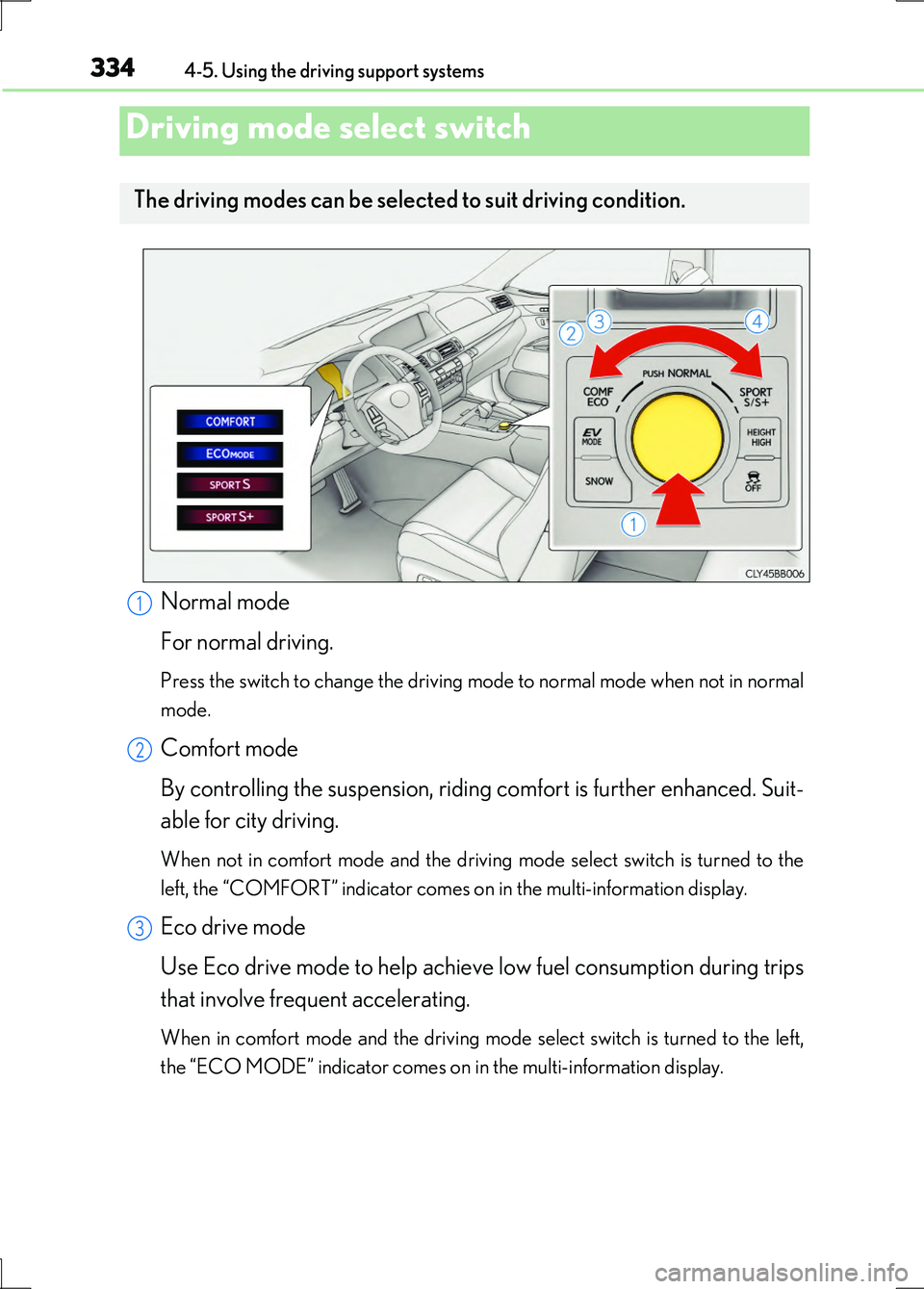
Normal mode
For normal driving.
Press the switch to change the driving mode to normal mode when not in normal
mode.
Comfort mode
By controlling the suspension, riding comfort is further enhanced. Suit-
able for city driving.
When not in comfort mode and the driving mode select switch is turned to the
left, the “COMFORT” indicator comes on in the multi-information display.
Eco drive mode
Use Eco drive mode to help achieve low fuel consumption during trips
that involve frequent accelerating.
When in comfort mode and the driving mode select switch is turned to the left,
the “ECO MODE” indicator comes on in the multi-information display.
Driving mode select switch
The driving modes can be selected to suit driving condition.
1
2
3
Page 335 of 676
3354-5. Using the driving support systems
4
Driving
LS600h/LS600hL_EE(OM50G20E)
Sport mode
• SPORT S mode
Assists acceleration response by controlling the hybrid system. Suit-
able for when powerful acceleration is desirable.
When not in SPORT S mode and the driv ing mode select switch is turned to
the right, the “SPORT S” indicator comes on in the multi-information display,
and the Hybrid System Indicator changes to the tachometer. ( P. 115)
• SPORT S+ mode
Helps to ensure steering performance and driving stability by simul-
taneously controlling the steering and suspension in addition to the
hybrid system. Suitable for sporty driving.
When in SPORT S mode and the driving mo de select switch is turned to the
right, the “SPORT S+” indicator comes on in the multi-information display.
■Operation of the air conditioni ng system in Eco drive mode
Eco drive mode controls the heating/cooling operations and fan speed of the air
conditioning system to enhance fuel efficiency ( P. 399). To improve air condition-
ing performance, adjust the fan speed or turn off Eco drive mode.
■Sport mode automatic deactivation
Sport mode is automatically deactivated if the power switch is turned off after driving
in sport mode.
■Driving mode pop-up display
When the driving mode is changed, the selected driving mode will be temporarily
displayed on the side display. ( P. 396)
4
Page 340 of 676
3404-5. Using the driving support systems
LS600h/LS600hL_EE(OM50G20E)
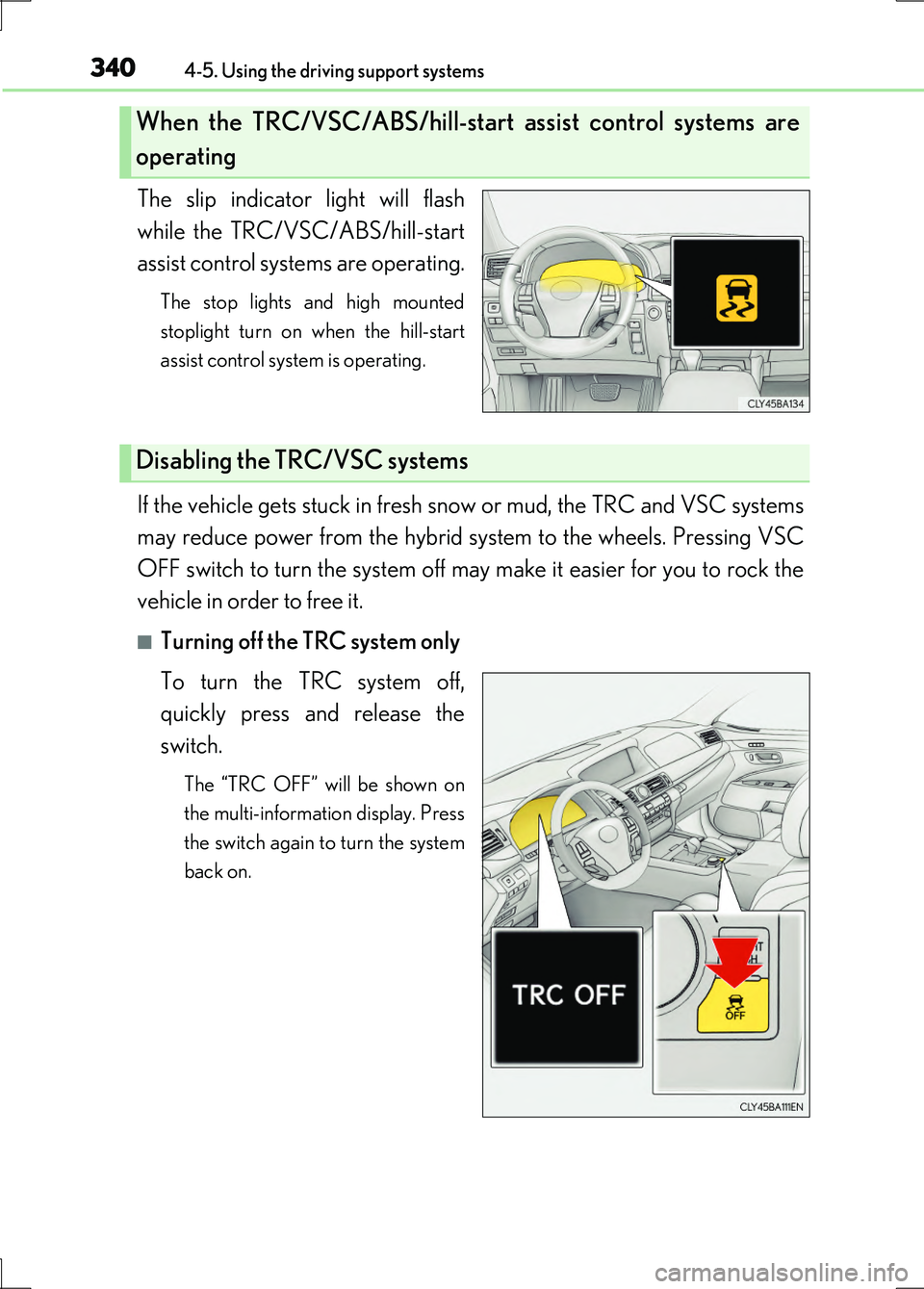
The slip indicator light will flash
while the TRC/VSC/ABS/hill-start
assist control systems are operating.
The stop lights and high mounted
stoplight turn on when the hill-start
assist control system is operating.
If the vehicle gets stuck in fresh snow or mud, the TRC and VSC systems
may reduce power from the hybrid system to the wheels. Pressing VSC
OFF switch to turn the system off may make it easier for you to rock the
vehicle in order to free it.
■Turning off the TRC system only
To turn the TRC system off,
quickly press and release the
switch.
The “TRC OFF” will be shown on
the multi-information display. Press
the switch again to turn the system
back on.
When the TRC/VSC/ABS/hill-start assist control systems are
operating
Disabling the TRC/VSC systems
Page 341 of 676
3414-5. Using the driving support systems
4
Driving
LS600h/LS600hL_EE(OM50G20E)
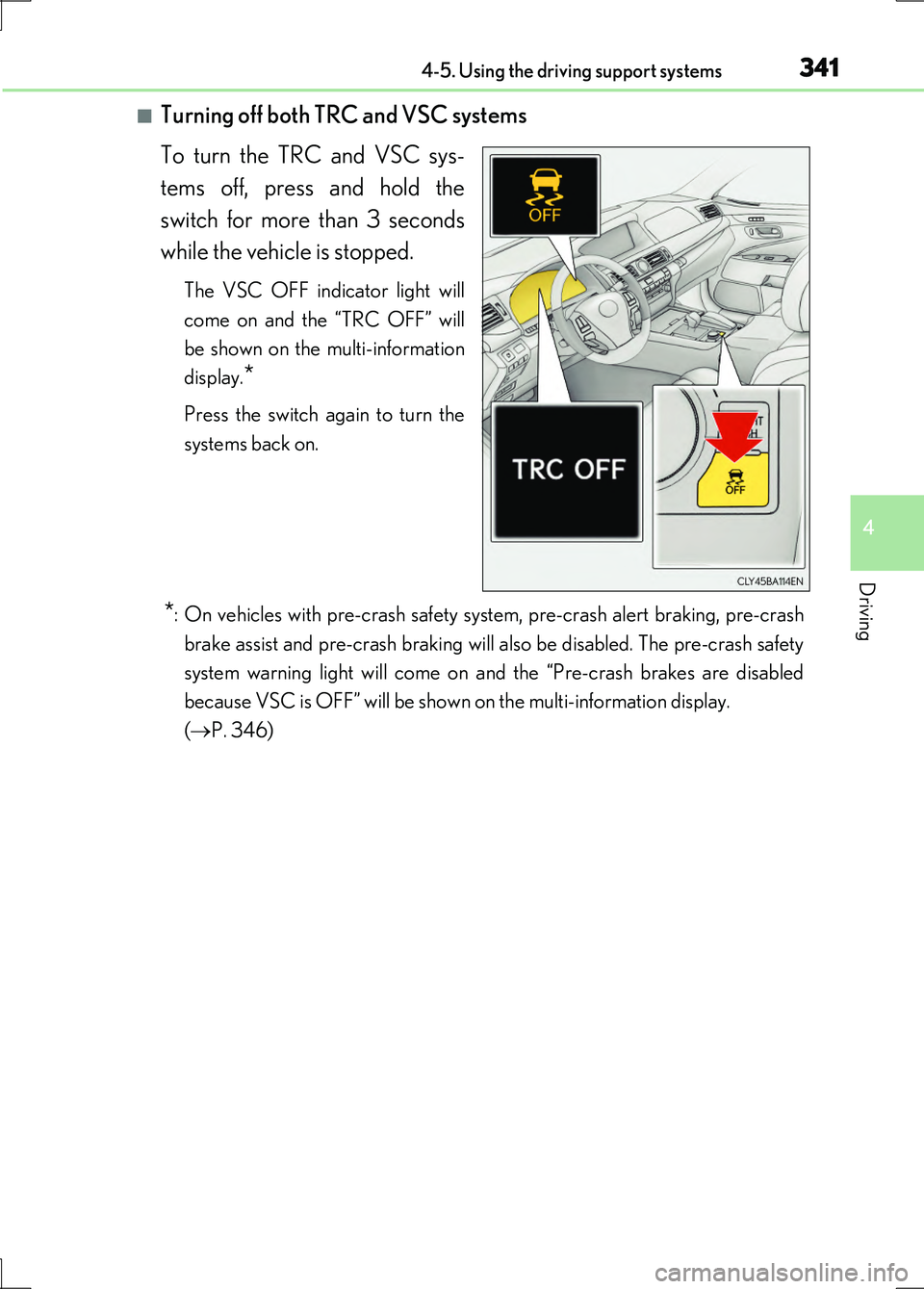
■Turning off both TRC and VSC systems
To turn the TRC and VSC sys-
tems off, press and hold the
switch for more than 3 seconds
while the vehicle is stopped.
The VSC OFF indicator light will
come on and the “TRC OFF” will
be shown on the multi-information
display.*
Press the switch again to turn the
systems back on.
*: On vehicles with pre-crash safety system, pre-crash alert braking, pre-crash
brake assist and pre-crash braking will also be disabled. The pre-crash safety
system warning light will come on and the “Pre-crash brakes are disabled
because VSC is OFF” will be shown on the multi-information display.
( P. 346)
Page 343 of 676
3434-5. Using the driving support systems
4
Driving
LS600h/LS600hL_EE(OM50G20E)
■Reactivation of the TRC system linked to vehicle speed
When only the TRC system is turned off, the TRC system will turn on when vehicle
speed increases. However, when both TRC and VSC systems are turned off, the sys-
tems will not turn on even when vehicle speed increases.
■Reduced effectiveness of the EPS system
The effectiveness of the EPS system is reduced to prevent the system from overheat-
ing when there is frequent steering input over an extended period of time. The steer-
ing wheel may feel heavy as a result.* Should this occur, refrain from excessive
steering input or stop the vehicle and turn the hybrid system off. The EPS system
should return to normal within 10 minutes.
*: If the LKA (Lane-Keeping Assist) system cannot operate in this case, a warning
message will be shown on the multi-information display.
■Operating conditions of emergency brake signal
When the following three conditions are met, the emergency brake signal will oper-
ate:
●The emergency flashers are off.
●Actual vehicle speed is over 55 km/h (35 mph).
●The brake pedal is depressed in a manner that cause the system to judge from the
vehicle deceleration that this is a sudden braking operation.
■Automatic system cancelation of emergency brake signal
The emergency brake signal will turn o ff in any of the following situations:
●The emergency flashers are turned on.
●The brake pedal is released.
●The system judges from the vehicle deceleration that is not a sudden braking oper-
ation.
Page 346 of 676
3464-5. Using the driving support systems
LS600h/LS600hL_EE(OM50G20E)
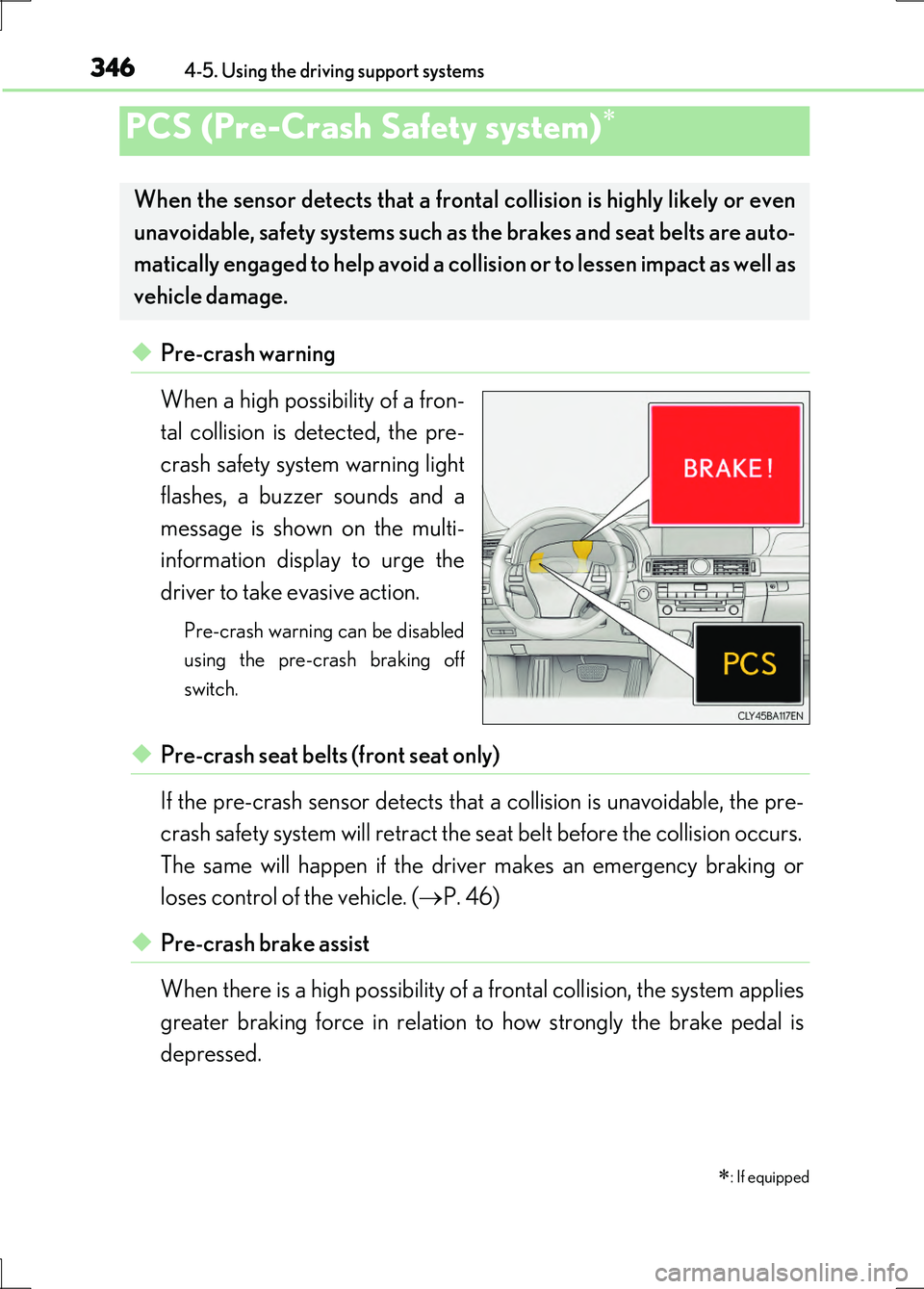
◆Pre-crash warning
When a high possibility of a fron-
tal collision is detected, the pre-
crash safety system warning light
flashes, a buzzer sounds and a
message is shown on the multi-
information display to urge the
driver to take evasive action.
Pre-crash warning can be disabled
using the pre-crash braking off
switch.
◆Pre-crash seat belts (front seat only)
If the pre-crash sensor detects that a collision is unavoidable, the pre-
crash safety system will retract the seat belt before the collision occurs.
The same will happen if the driver makes an emergency braking or
loses control of the vehicle. ( P. 46)
◆Pre-crash brake assist
When there is a high possibility of a frontal collision, the system applies
greater braking force in relation to how strongly the brake pedal is
depressed.
PCS (Pre-Crash Safety system)
: If equipped
When the sensor detects that a frontal collision is highly likely or even
unavoidable, safety systems such as the brakes and seat belts are auto-
matically engaged to help avoid a collision or to lessen impact as well as
vehicle damage.
Page 347 of 676
3474-5. Using the driving support systems
4
Driving
LS600h/LS600hL_EE(OM50G20E)
◆Pre-crash braking
When there is a high possibility of a frontal collision, the system warns
the driver using a warning light, warning display and buzzer. If the sys-
tem determines that a collision is unavoidable, the brakes are automati-
cally applied to help avoid a collision or to reduce the collision speed.
When the vehicle is being stopped by pre-crash braking, the brake will
be engaged for a maximum of 2 seconds and then released automati-
cally. This pre-crash braking can be canceled by depressing the accel-
erator pedal or brake pedal.
Pre-crash braking can be disabled using the pre-crash braking off switch.
◆Suspension control
When there is a high possibility of a frontal collision, the operation of
suspension control helps prevent the front of the vehicle from dropping
when the brakes are applied suddenly.
◆Steering gear control (VGRS) (vehicles with camera sensors)
When the system determines that a collision is unavoidable, the steer-
ing gear ratio is changed to help improve the response to steering
input.
◆Driver monitor system (if equipped)
When the system determines that there is a possibility of a collision, and
either the driver is not facing forward or the driver’s eyes are closed,
pre-crash warnings are given in adva nce to warn the driver. If the sys-
tem determines that the conditions to operate pre-crash alert braking
have been met even when the possibility of a collision increases further,
pre-crash alert braking will operate.
Pre-crash alert braking can be disabled using the pre-crash braking off switch.