display LEXUS LS600H 2017 Workshop Manual
[x] Cancel search | Manufacturer: LEXUS, Model Year: 2017, Model line: LS600H, Model: LEXUS LS600H 2017Pages: 676, PDF Size: 35.25 MB
Page 293 of 676
2934-5. Using the driving support systems
4
Driving
LS600h/LS600hL_EE(OM50G20E)
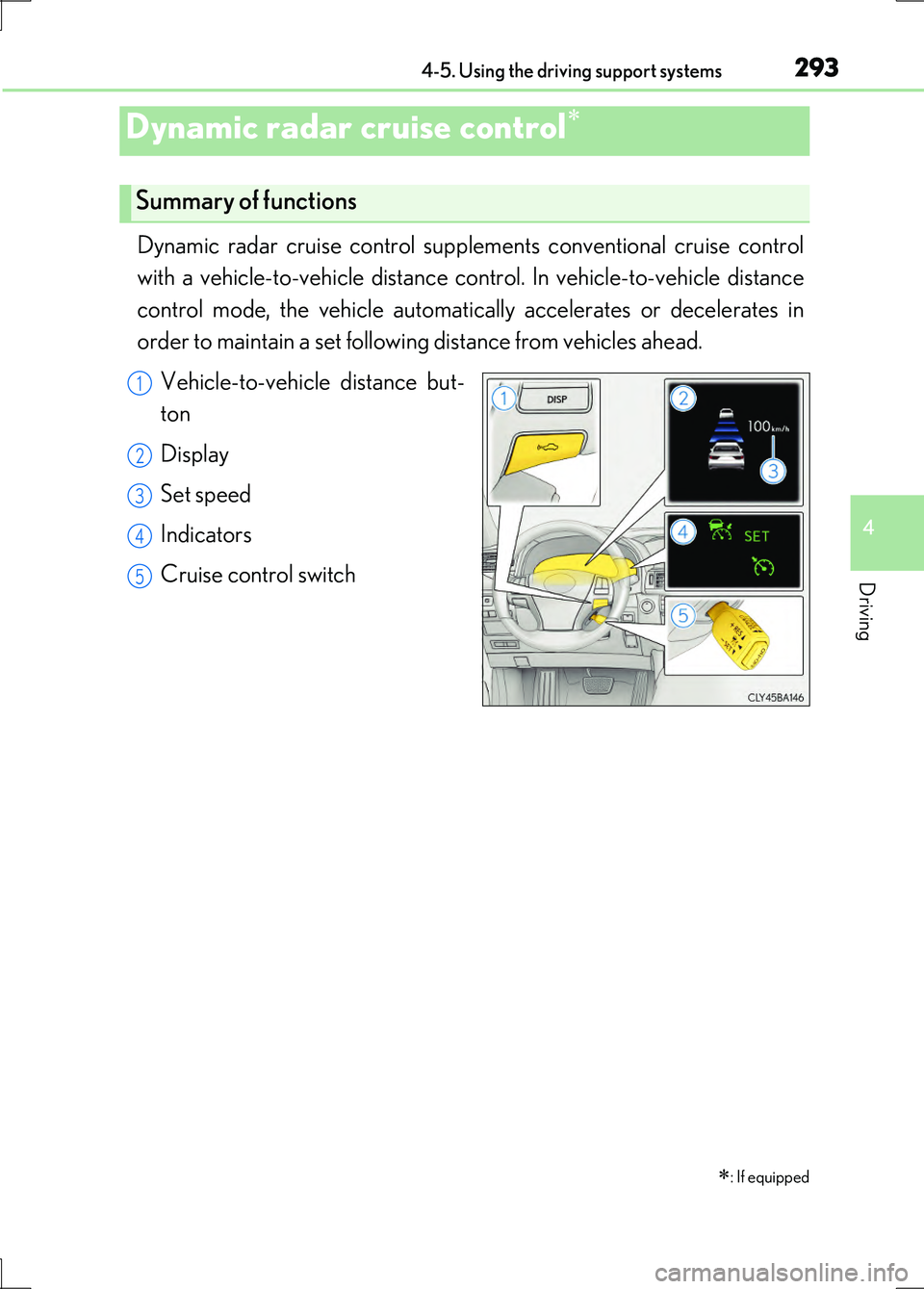
Dynamic radar cruise control supplements conventional cruise control
with a vehicle-to-vehicle distance co ntrol. In vehicle-to-vehicle distance
control mode, the vehicle automatically accelerates or decelerates in
order to maintain a set following distance from vehicles ahead.
Vehicle-to-vehicle distance but-
ton
Display
Set speed
Indicators
Cruise control switch
Dynamic radar cruise control
: If equipped
Summary of functions
1
2
3
4
5
Page 294 of 676
2944-5. Using the driving support systems
LS600h/LS600hL_EE(OM50G20E)
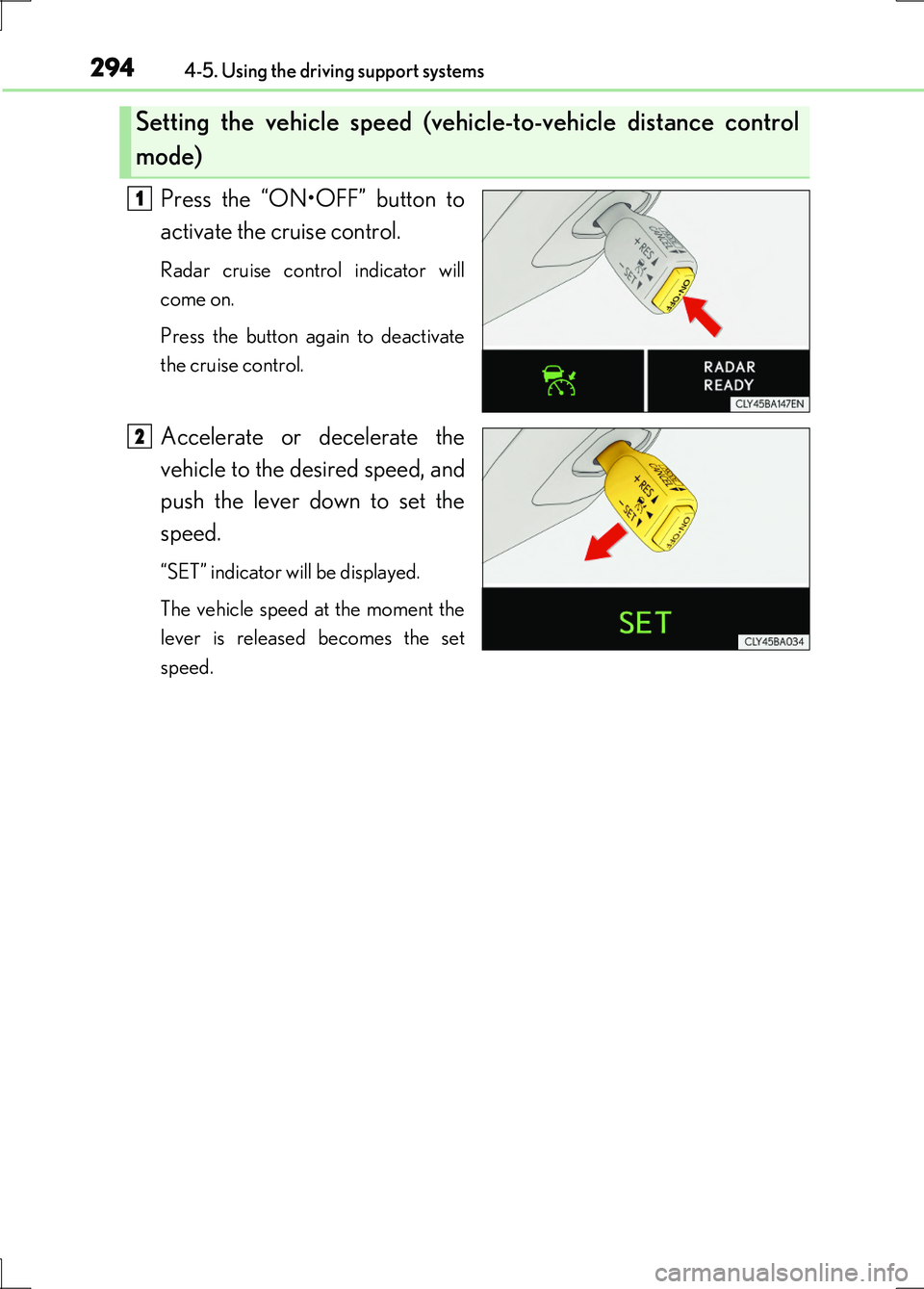
Press the “ON•OFF” button to
activate the cruise control.
Radar cruise control indicator will
come on.
Press the button again to deactivate
the cruise control.
Accelerate or decelerate the
vehicle to the desired speed, and
push the lever down to set the
speed.
“SET” indicator will be displayed.
The vehicle speed at the moment the
lever is released becomes the set
speed.
Setting the vehicle speed (vehicle-to-vehicle distance control
mode)
1
2
Page 295 of 676
2954-5. Using the driving support systems
4
Driving
LS600h/LS600hL_EE(OM50G20E)
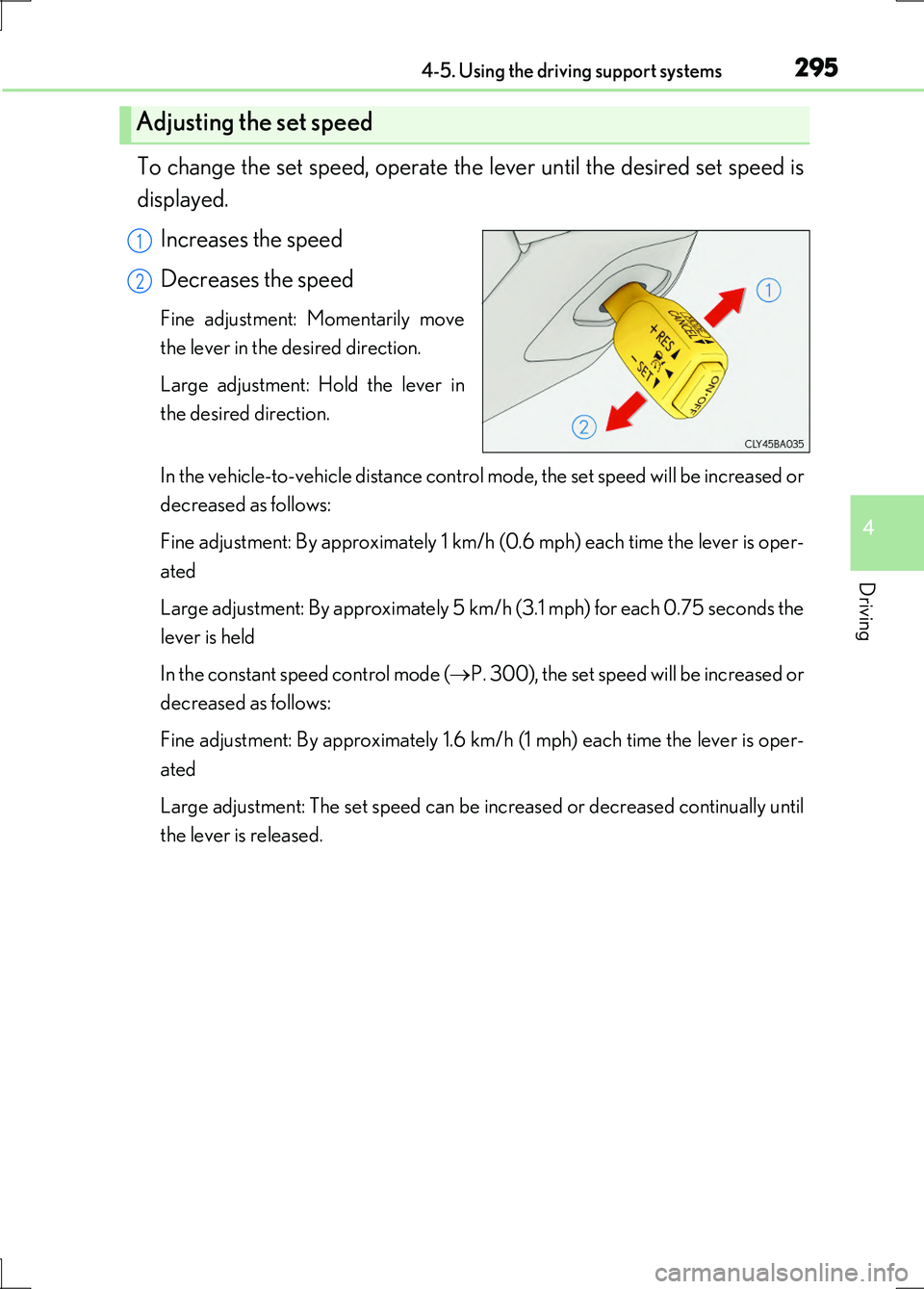
To change the set speed, operate the lever until the desired set speed is
displayed.
Increases the speed
Decreases the speed
Fine adjustment: Momentarily move
the lever in the desired direction.
Large adjustment: Hold the lever in
the desired direction.
In the vehicle-to-vehicle distance control mode, the set speed will be increased or
decreased as follows:
Fine adjustment: By approximately 1 km/h (0.6 mph) each time the lever is oper-
ated
Large adjustment: By approximately 5 km/h (3.1 mph) for each 0.75 seconds the
lever is held
In the constant speed control mode ( P. 300), the set speed will be increased or
decreased as follows:
Fine adjustment: By approximately 1.6 km/h (1 mph) each time the lever is oper-
ated
Large adjustment: The set speed can be increased or decreased continually until
the lever is released.
Adjusting the set speed
1
2
Page 296 of 676
2964-5. Using the driving support systems
LS600h/LS600hL_EE(OM50G20E)
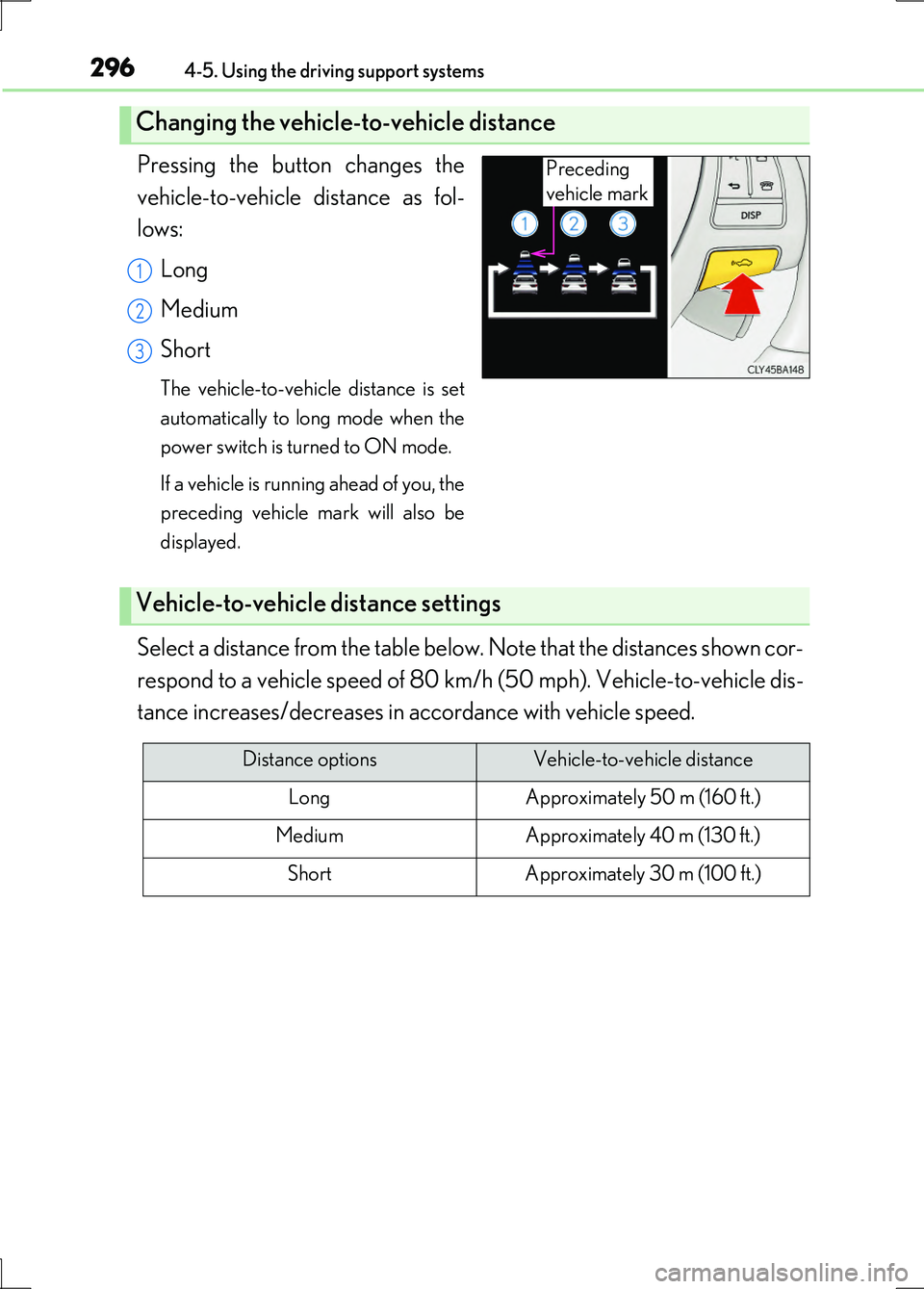
Pressing the button changes the
vehicle-to-vehicle distance as fol-
lows:
Long
Medium
Short
The vehicle-to-vehicle distance is set
automatically to long mode when the
power switch is turned to ON mode.
If a vehicle is running ahead of you, the
preceding vehicle mark will also be
displayed.
Select a distance from the table below. Note that the distances shown cor-
respond to a vehicle speed of 80 km/h (50 mph). Vehicle-to-vehicle dis-
tance increases/decreases in accordance with vehicle speed.
Changing the vehicle-to-vehicle distance
Preceding
vehicle mark
1
2
3
Vehicle-to-vehicle distance settings
Distance optionsVehicle-to-vehicle distance
LongApproximately 50 m (160 ft.)
MediumApproximately 40 m (130 ft.)
ShortApproximately 30 m (100 ft.)
Page 299 of 676
2994-5. Using the driving support systems
4
Driving
LS600h/LS600hL_EE(OM50G20E)
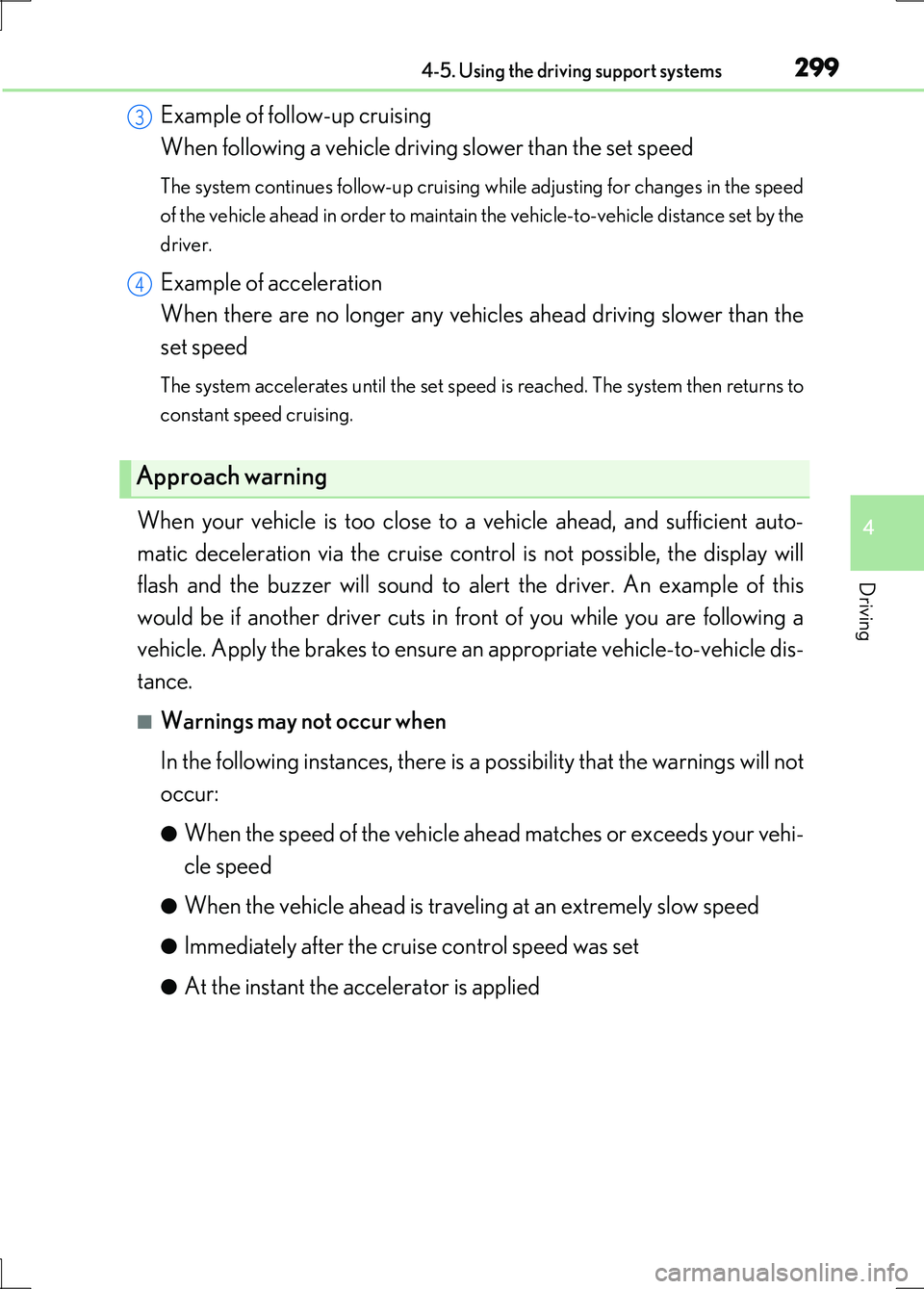
Example of follow-up cruising
When following a vehicle driving slower than the set speed
The system continues follow-up cruising while adjusting for changes in the speed
of the vehicle ahead in order to maintain the vehicle-to-vehicle distance set by the
driver.
Example of acceleration
When there are no longer any vehicles ahead driving slower than the
set speed
The system accelerates until the set speed is reached. The system then returns to
constant speed cruising.
When your vehicle is too close to a vehicle ahead, and sufficient auto-
matic deceleration via the cruise control is not possible, the display will
flash and the buzzer will sound to alert the driver. An example of this
would be if another driver cuts in front of you while you are following a
vehicle. Apply the brakes to ensure an appropriate vehicle-to-vehicle dis-
tance.
■Warnings may not occur when
In the following instances, there is a possibility that the warnings will not
occur:
●When the speed of the vehicle ahead matches or exceeds your vehi-
cle speed
●When the vehicle ahead is traveling at an extremely slow speed
●Immediately after the cruise control speed was set
●At the instant the accelerator is applied
Approach warning
3
4
Page 307 of 676
3074-5. Using the driving support systems
4
Driving
LS600h/LS600hL_EE(OM50G20E)
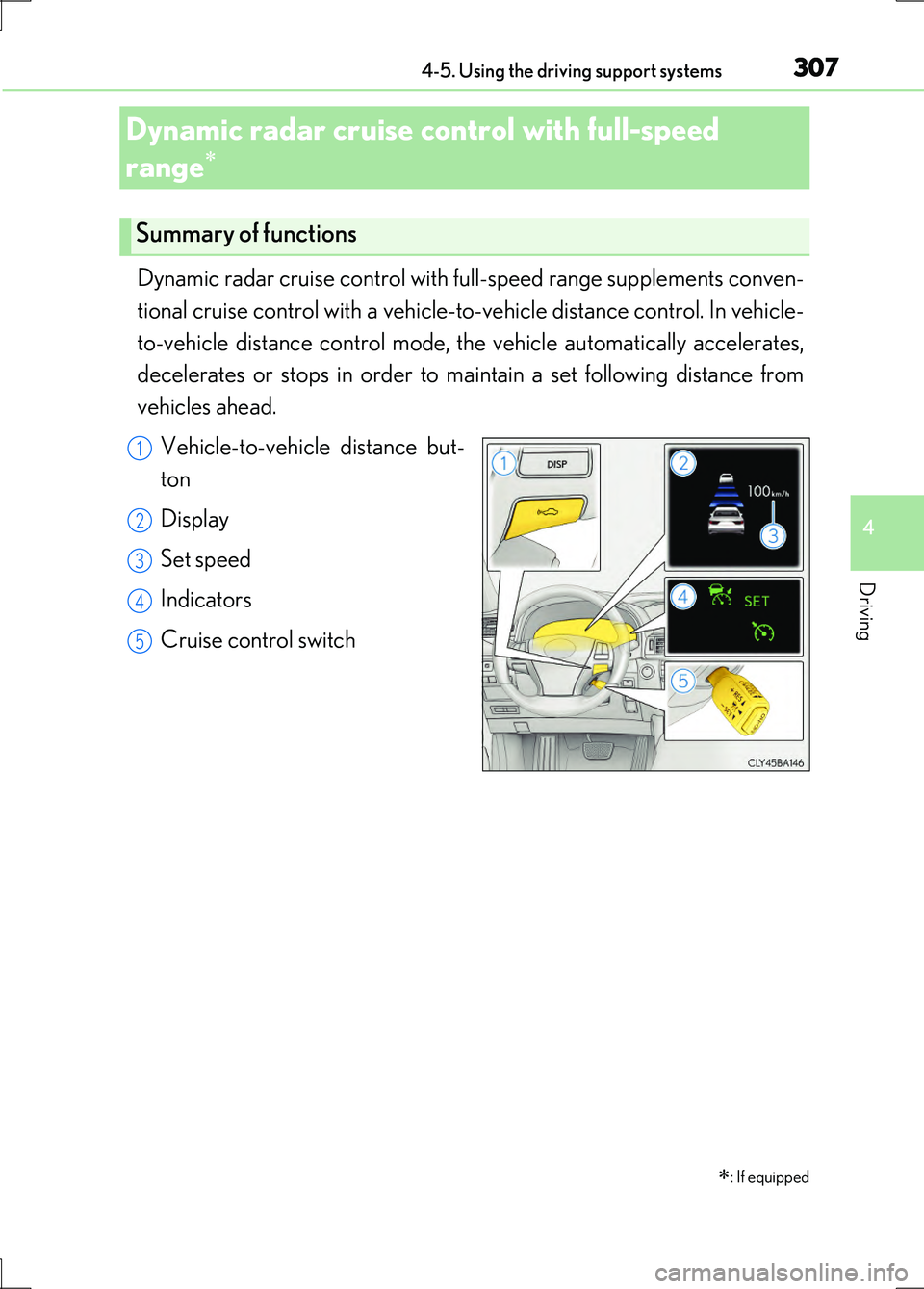
Dynamic radar cruise control with full-speed range supplements conven-
tional cruise control with a vehicle-to-vehicle distance control. In vehicle-
to-vehicle distance control mode, the vehicle automatically accelerates,
decelerates or stops in order to maintain a set following distance from
vehicles ahead.
Vehicle-to-vehicle distance but-
ton
Display
Set speed
Indicators
Cruise control switch
Dynamic radar cruise control with full-speed
range
: If equipped
Summary of functions
1
2
3
4
5
Page 308 of 676
3084-5. Using the driving support systems
LS600h/LS600hL_EE(OM50G20E)
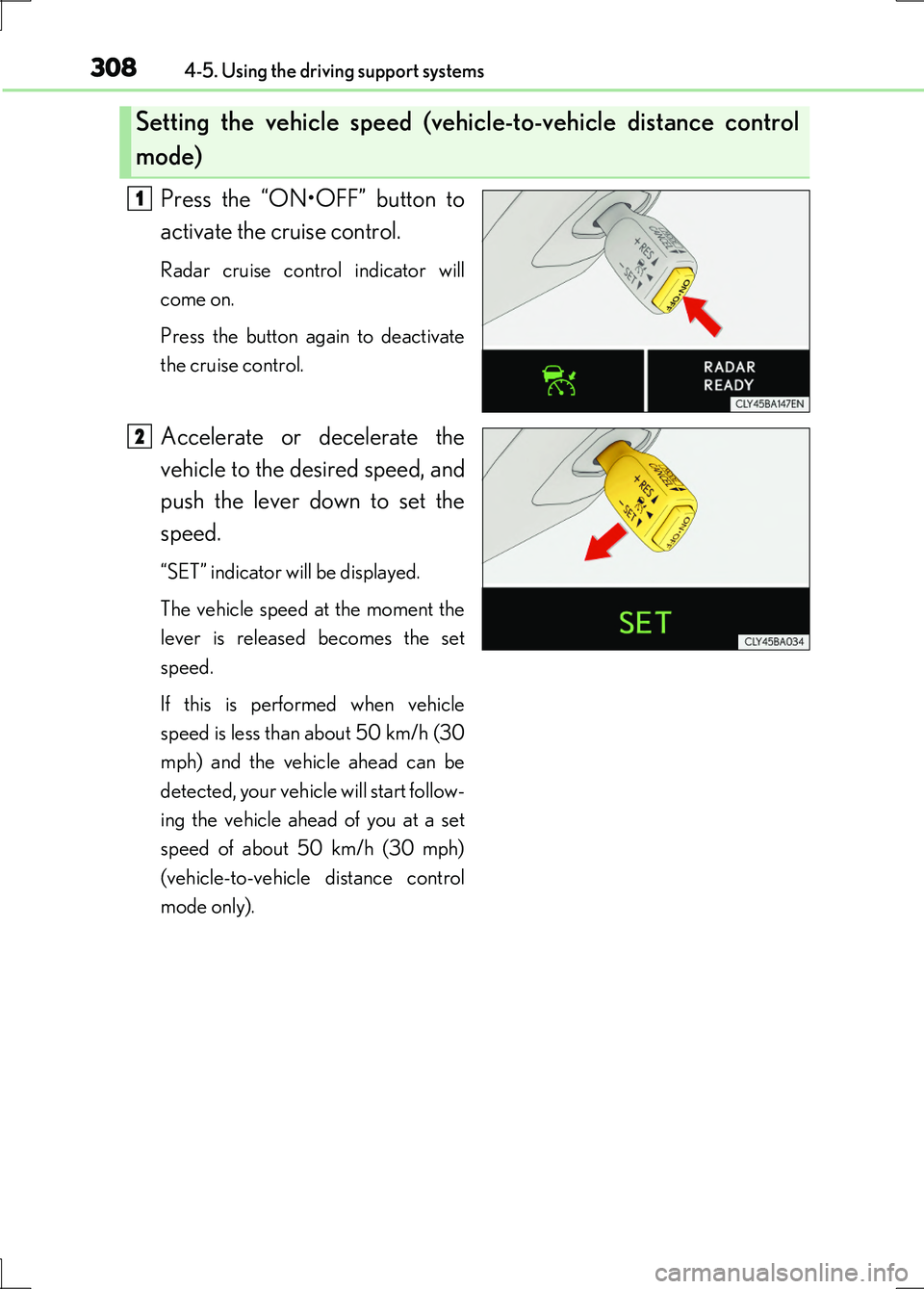
Press the “ON•OFF” button to
activate the cruise control.
Radar cruise control indicator will
come on.
Press the button again to deactivate
the cruise control.
Accelerate or decelerate the
vehicle to the desired speed, and
push the lever down to set the
speed.
“SET” indicator will be displayed.
The vehicle speed at the moment the
lever is released becomes the set
speed.
If this is performed when vehicle
speed is less than about 50 km/h (30
mph) and the vehicle ahead can be
detected, your vehicle will start follow-
ing the vehicle ahead of you at a set
speed of about 50 km/h (30 mph)
(vehicle-to-vehicle distance control
mode only).
Setting the vehicle speed (vehicle-to-vehicle distance control
mode)
1
2
Page 309 of 676
3094-5. Using the driving support systems
4
Driving
LS600h/LS600hL_EE(OM50G20E)
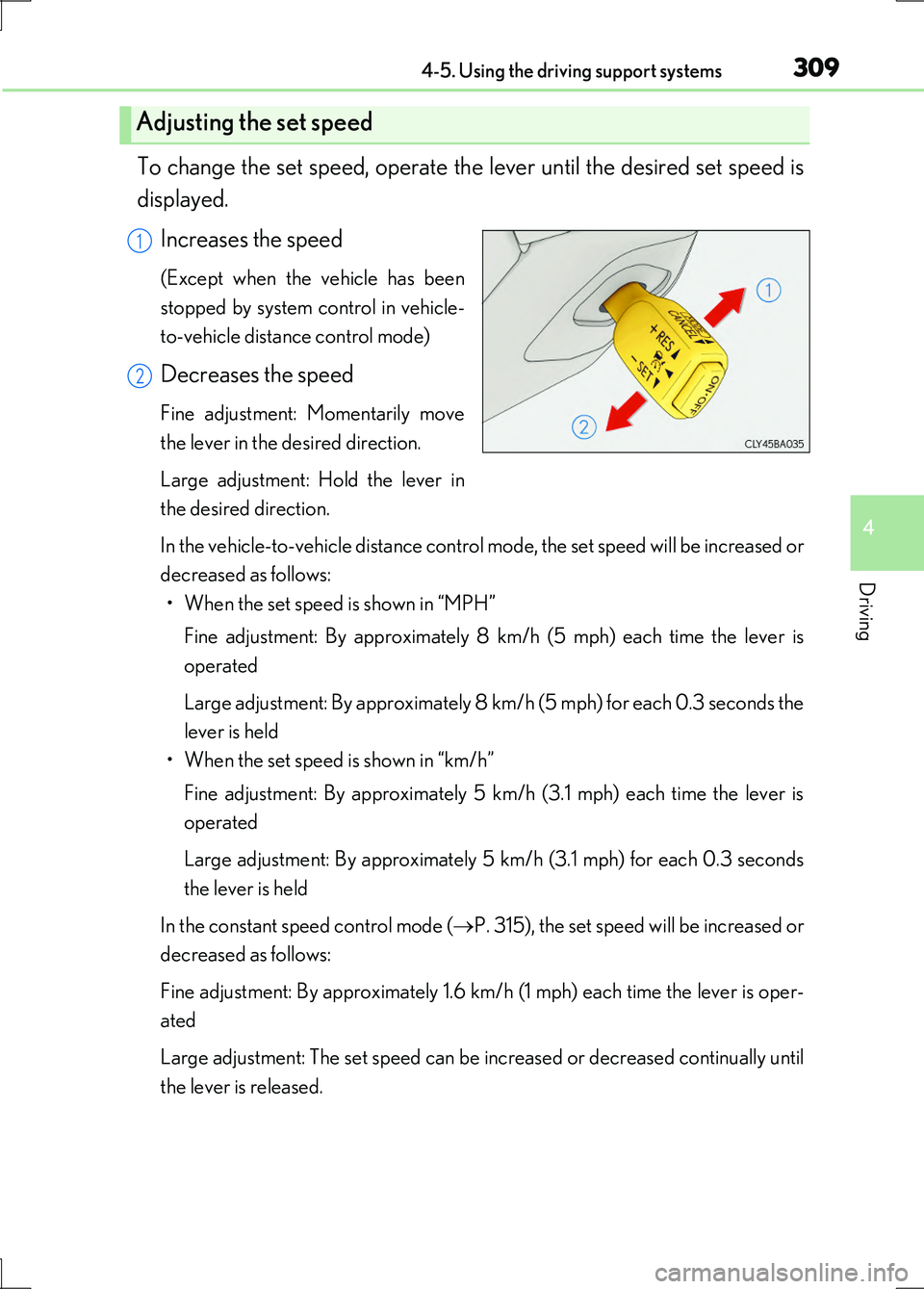
To change the set speed, operate the lever until the desired set speed is
displayed.
Increases the speed
(Except when the vehicle has been
stopped by system control in vehicle-
to-vehicle distance control mode)
Decreases the speed
Fine adjustment: Momentarily move
the lever in the desired direction.
Large adjustment: Hold the lever in
the desired direction.
In the vehicle-to-vehicle distance control mode, the set speed will be increased or
decreased as follows: • When the set speed is shown in “MPH”
Fine adjustment: By approximately 8 km/h (5 mph) each time the lever is
operated
Large adjustment: By approximately 8 km/h (5 mph) for each 0.3 seconds the
lever is held
• When the set speed is shown in “km/h”
Fine adjustment: By approximately 5 km/h (3.1 mph) each time the lever is
operated
Large adjustment: By approximately 5 km/h (3.1 mph) for each 0.3 seconds
the lever is held
In the constant speed control mode ( P. 315), the set speed will be increased or
decreased as follows:
Fine adjustment: By approximately 1.6 km/h (1 mph) each time the lever is oper-
ated
Large adjustment: The set speed can be increased or decreased continually until
the lever is released.
Adjusting the set speed
1
2
Page 310 of 676
3104-5. Using the driving support systems
LS600h/LS600hL_EE(OM50G20E)
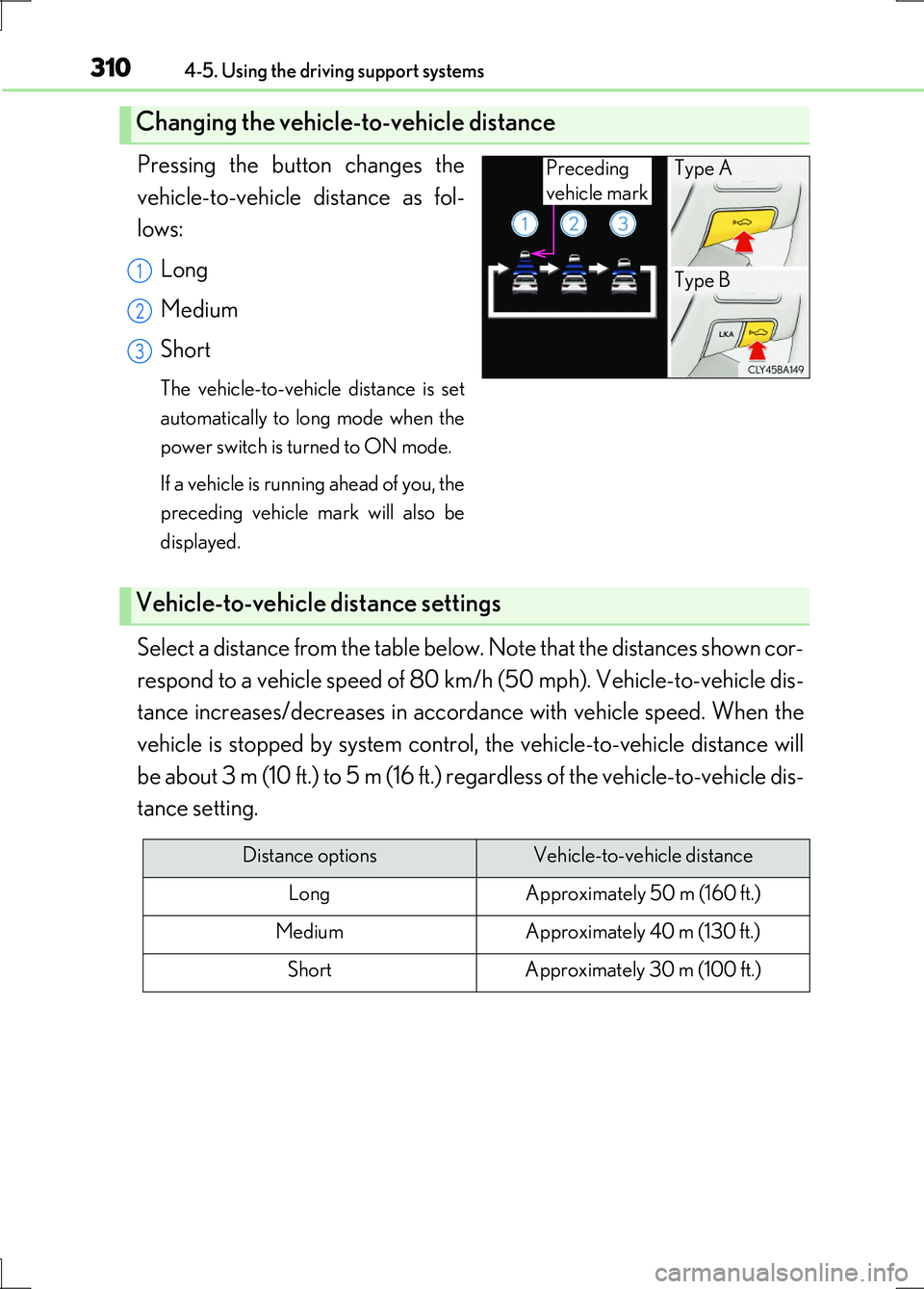
Pressing the button changes the
vehicle-to-vehicle distance as fol-
lows:
Long
Medium
Short
The vehicle-to-vehicle distance is set
automatically to long mode when the
power switch is turned to ON mode.
If a vehicle is running ahead of you, the
preceding vehicle mark will also be
displayed.
Select a distance from the table below. Note that the distances shown cor-
respond to a vehicle speed of 80 km/h (50 mph). Vehicle-to-vehicle dis-
tance increases/decreases in accorda nce with vehicle speed. When the
vehicle is stopped by system control, the vehicle-to-vehicle distance will
be about 3 m (10 ft.) to 5 m (16 ft.) regardless of the vehicle-to-vehicle dis-
tance setting.
Changing the vehicle-to-vehicle distance
Preceding
vehicle mark
Type A
Type B1
2
3
Vehicle-to-vehicle distance settings
Distance optionsVehicle-to-vehicle distance
LongApproximately 50 m (160 ft.)
MediumApproximately 40 m (130 ft.)
ShortApproximately 30 m (100 ft.)
Page 314 of 676
3144-5. Using the driving support systems
LS600h/LS600hL_EE(OM50G20E)
Example of acceleration
When there are no longer any vehicles ahead driving slower than the
set speed
The system accelerates until the set speed is reached. The system then returns to
constant speed cruising.
When your vehicle is too close to a vehicle ahead, and sufficient auto-
matic deceleration via the cruise control is not possible, the display will
flash and the buzzer will sound to alert the driver. An example of this
would be if another driver cuts in front of you while you are following a
vehicle. Apply the brakes to ensure an appropriate vehicle-to-vehicle dis-
tance.
■Warnings may not occur when
In the following instances, there is a possibility that the warnings will not
occur:
●When the speed of the vehicle ahead matches or exceeds your vehi-
cle speed
●When the vehicle ahead is traveling at an extremely slow speed
●Immediately after the cruise control speed was set
●At the instant the accelerator is applied
Approach warning
3