lock LEXUS LX570 2014 Owners Manual
[x] Cancel search | Manufacturer: LEXUS, Model Year: 2014, Model line: LX570, Model: LEXUS LX570 2014Pages: 956, PDF Size: 16.4 MB
Page 367 of 956
3672-5. Driving information
2
When driving
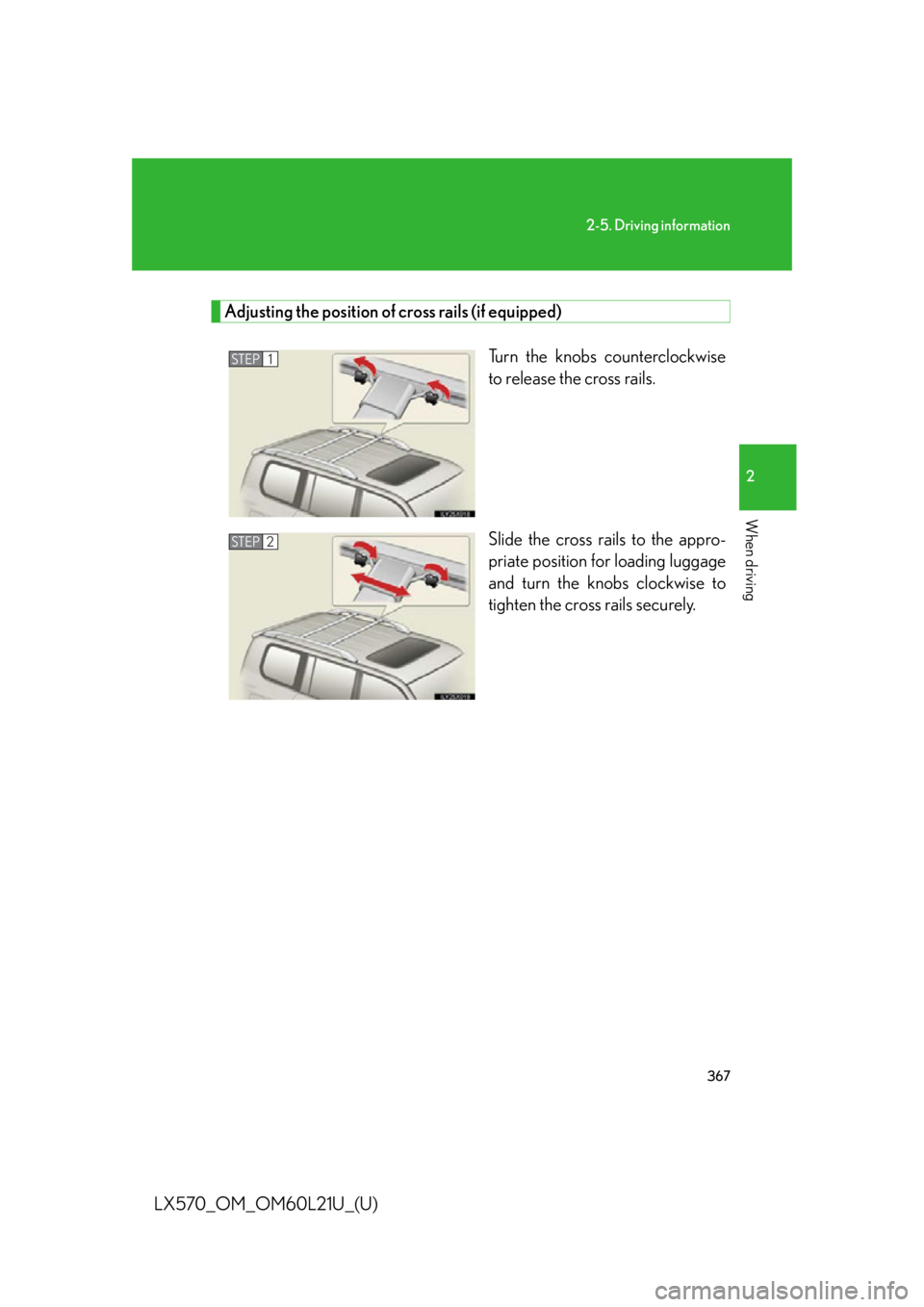
LX570_OM_OM60L21U_(U) Adjusting the position of cross rails (if equipped)
Turn the knobs counterclockwise
to release the cross rails.
Slide the cross rails to the appro-
priate position for loading luggage
and turn the knobs clockwise to
tighten the cross rails securely.STEP 1
STEP 2
Page 370 of 956

3702-5. Driving information
LX570_OM_OM60L21U_(U) CAUTION■
Things that must not be carri ed in the luggage compartment
The following things may cause a fire if loaded in the luggage compartment. ●
Receptacles containing gasoline ●
Aerosol cans■
Storage precautions
Observe the following precautions.
Failing to do so may result in death or serious injury. ●
Stow cargo and luggage in the lugga ge compartment whenever possible.●
Do not stack anything in the luggage compartment higher than the seatbacks.
Such items may be thrown about and possib ly injure people in the vehicle during
sudden braking, sudden swerving or in an accident. ●
Do not place cargo or luggage in or on the following locations as the items may
get under the brake or accelerator pedal and prevent the pedals from being
depressed properly, block the driver’s vision, or hit the driver or passengers,
causing an accident.
•Driver’s feet
• Front passenger or rear seats (when stacking items)
•Instrument panel
•Dashboard
• Auxiliary box or tray that has no lid ●
Secure all items in the occupant compartment, as they may shift and injure some-
one during sudden braking, sudd en swerving or an accident.●
When you fold down the rear seats, long items should not be placed directly
behind the front seats. ●
Never allow anyone to ride in the luggage compartment. It is not designed for
passengers. They should ride in their seat s with their seat belt s properly fastened.
Otherwise, they are much more likely to suffer death or serious injury, in the
event of sudden braking, sudd en swerving or an accident.
Page 372 of 956
3722-5. Driving information
LX570_OM_OM60L21U_(U) CAUTION■
Cross rail adjustment
Make sure the cross rails are locked securely by pushing forward and rearward
them.
Failure to do so may cause an accident or serious injury in the event of emergency
braking or a collision.
NOTICE■
Cross rail adjustment
Do not remove the cross rail stoppers, or the moon roof may be damage when it is
tilted. ■
When loading the luggage
Be careful not to scratch the surface of the moon roof.
Page 387 of 956
3872-5. Driving information
2
When driving
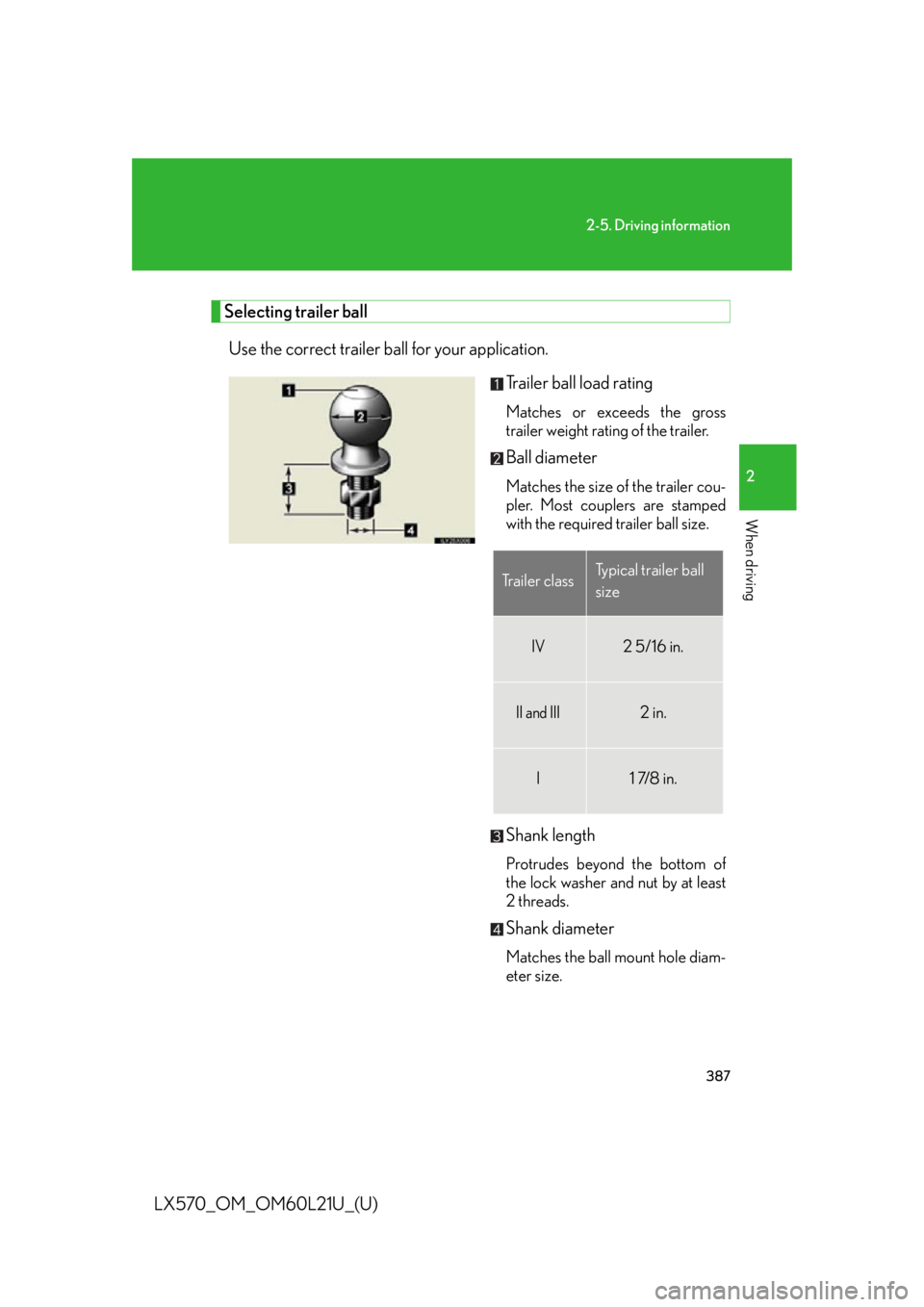
LX570_OM_OM60L21U_(U) Selecting trailer ball
Use the correct trailer ball for your application.
Trailer ball load rating Matches or exceeds the gross
trailer weight rating of the trailer.
Ball diameter Matches the size of the trailer cou-
pler. Most couplers are stamped
with the required trailer ball size.
Shank length Protrudes beyond the bottom of
the lock washer and nut by at least
2 threads.
Shank diameter Matches the ball mount hole diam-
eter size.Trailer class Typical trailer ball
size
IV 2 5/16 in.
II and III 2 in.
I 1 7/8 in.
Page 393 of 956
3932-5. Driving information
2
When driving
LX570_OM_OM60L21U_(U) ● Always place wheel bloc ks under both the vehi cle’s and the trailer’s
wheels when parking. Apply the pa rking brake firmly, and put the
transmission in “P”. Avoi d parking on a slope, bu t if unavoidable, do so
only after performing the following:
Apply the brakes and keep them applied.
Have someone place wheel blocks under both the vehicle’s and
trailer’s wheels.
When the wheel blocks are in pl ace, release the brakes slowly
until the blocks absorb the load.
Apply the parking brake firmly.
Shift into “P” and turn off the engine.
● When restarting after parking on a slope:
With the transmission in “P”, start the engine. Be su re to keep the
brake pedal pressed.
Shift into “D” or “R” (if reversing).
Release the parking brake and br ake pedal, and slowly pull or
back away from the wheel blocks. Stop and apply the brakes.
Have someone retrieve the blocks. STEP 1
STEP 2
STEP 3
STEP 4
STEP 5
STEP 1
STEP 2
STEP 3
STEP 4
Page 412 of 956
4123-1. Using the touch screen
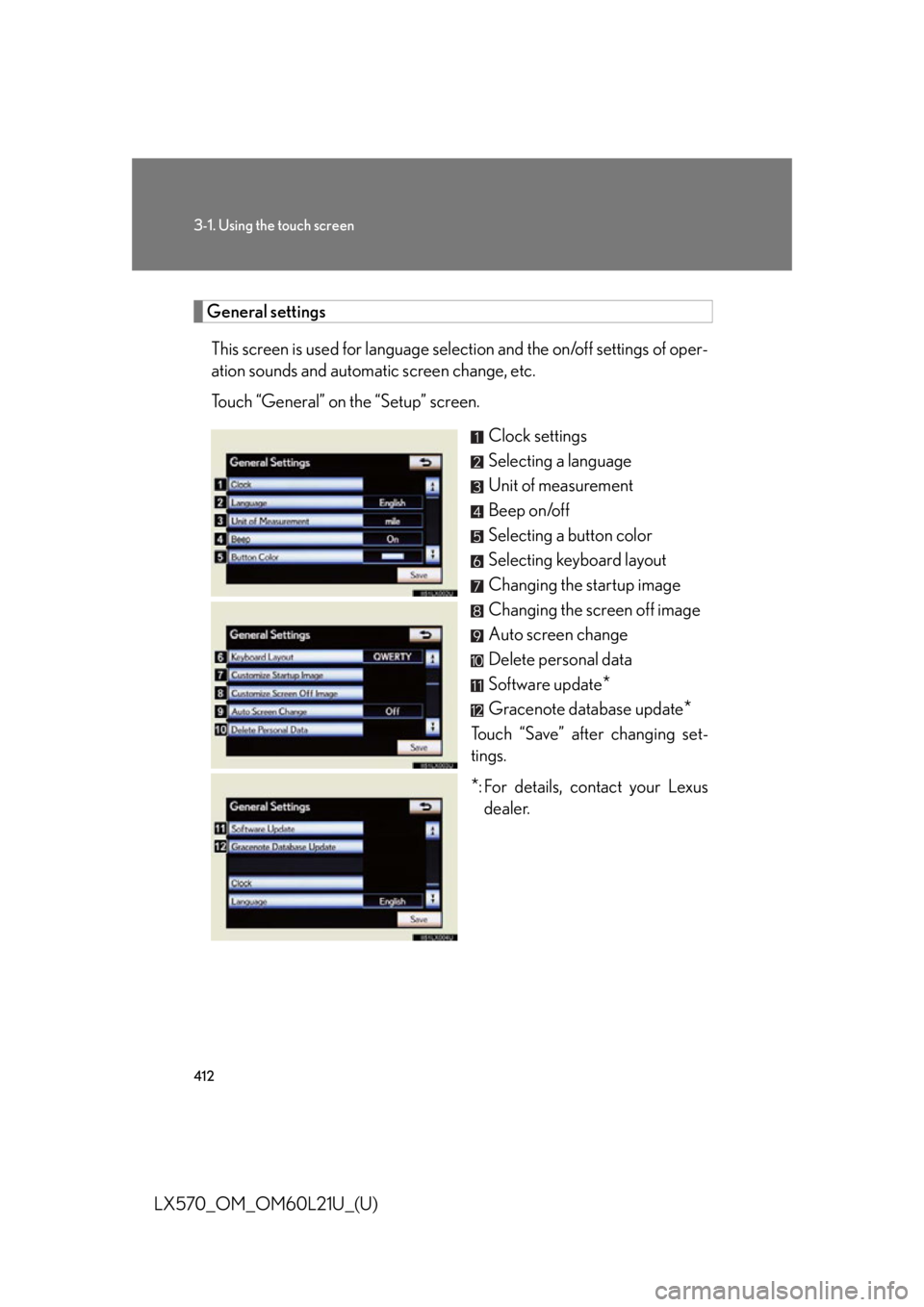
LX570_OM_OM60L21U_(U) General settings
This screen is used for language selection and the on/off settings of oper-
ation sounds and automatic screen change, etc.
Touch “General” on the “Setup” screen.
Clock settings
Selecting a language
Unit of measurement
Beep on/off
Selecting a button color
Selecting keyboard layout
Changing the startup image
Changing the screen off image
Auto screen change
Delete personal data
Software update
*Gracenote database update
*Touch “Save” after changing set-
tings.
* : For details, contact your Lexus
dealer.
Page 413 of 956

4133-1. Using the touch screen
3
Interior features
LX570_OM_OM60L21U_(U) ■ Clock settings
Used for changing time zones, the on/off settings of daylight saving
time and automatic adjustment of the clock.
Touch “Clock” on the “General Settings” screen.
Touch the items to be set.
Time zone
Daylight saving time
Automatic adjustment of the
clock
Manual clock setting
Touch “Save”.
● Time zone
A time zone can be selected and GMT can be set.
Touch “Time Zone”.STEP 1
STEP 2
STEP 3
STEP 1
Page 414 of 956
4143-1. Using the touch screen
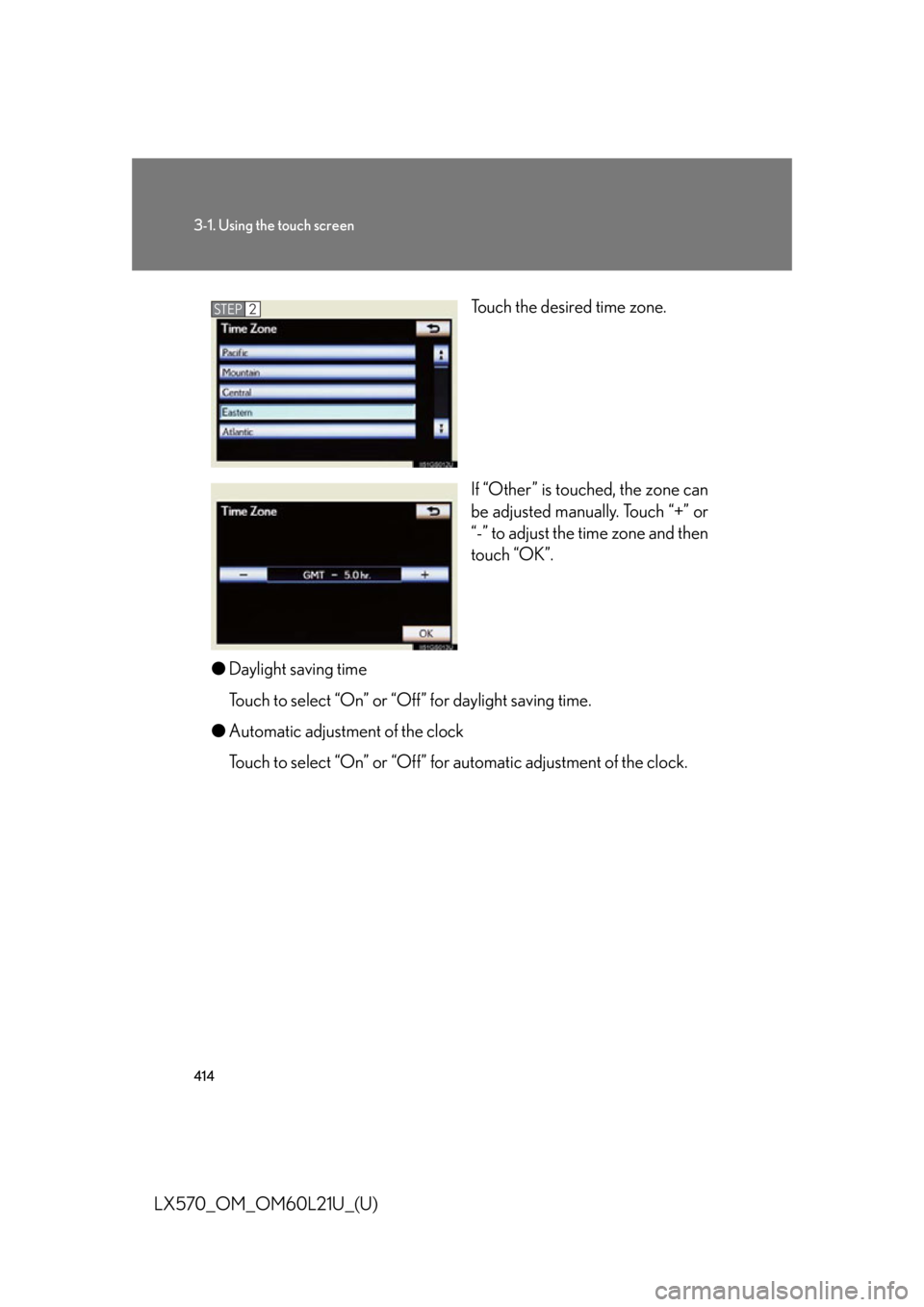
LX570_OM_OM60L21U_(U) Touch the desired time zone.
If “Other” is touched, the zone can
be adjusted manually. Touch “+” or
“-” to adjust the time zone and then
touch “OK”.
● Daylight saving time
Touch to select “On” or “O ff” for daylight saving time.
● Automatic adjustment of the clock
Touch to select “On” or “Off” for automatic adjustment of the clock. STEP 2
Page 415 of 956
4153-1. Using the touch screen
3
Interior features
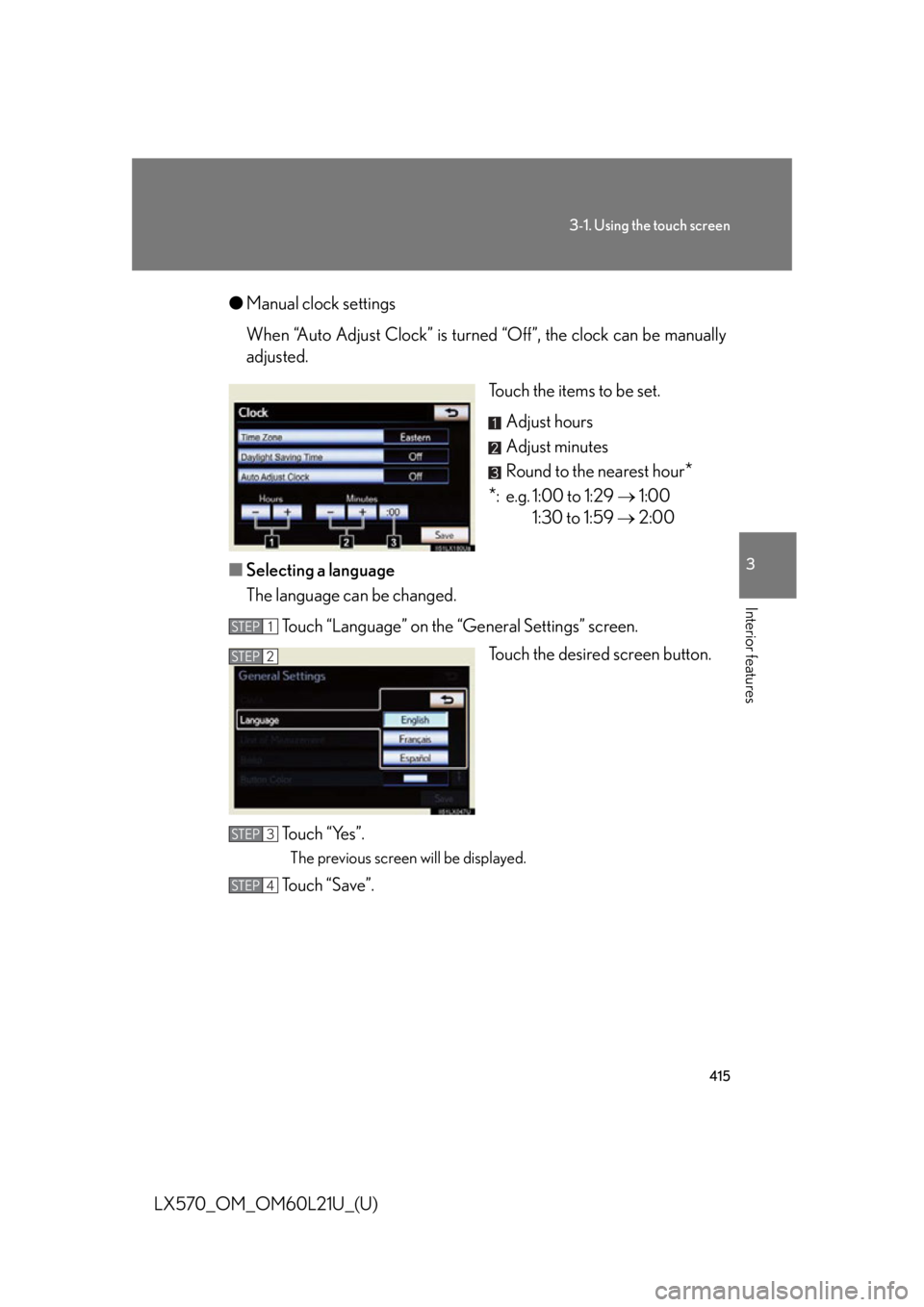
LX570_OM_OM60L21U_(U) ● Manual clock settings
When “Auto Adjust Clock” is turned “Off”, the clock can be manually
adjusted.
Touch the items to be set.
Adjust hours
Adjust minutes
Round to the nearest hour
*
* : e.g. 1:00 to 1:29 1:00
1:30 to 1:59 2:00
■ Selecting a language
The language can be changed.
Touch “Language” on the “General Settings” screen.
Touch the desired screen button.
To u c h “ Ye s ” . The previous screen will be displayed.
Touch “Save”. STEP 1
STEP 2
STEP 3
STEP 4
Page 450 of 956

4503-2. Using the air conditio ning system and defogger
LX570_OM_OM60L21U_(U) CAUTION■
To prevent the windshield from fogging up
Do not use during cool air operation in extremely humid weather. The differ-
ence between the temperature of the outside air and that of the windshield can
cause the outer surface of the windshield to fog up, blocking your vision.
NOTICE■
To prevent battery discharge
Do not leave the air conditioning system on longer than necessary when the engine
is stopped.