lock LEXUS LX570 2014 Owners Manual
[x] Cancel search | Manufacturer: LEXUS, Model Year: 2014, Model line: LX570, Model: LEXUS LX570 2014Pages: 956, PDF Size: 16.4 MB
Page 499 of 956
4993-3. Using the audio system
3
Interior features
LX570_OM_OM60L21U_(U) ■
XM Radio Services — Legal Disclaimers and Warnings
Fees and Taxes — Subscription fee, taxes, one time activation fee, and other fees
may apply. Subscription fee is consumer only. All fees and programming subject to
change. Subscriptions subject to Customer Agreement available at
www.siriusxm.com (U.S.A.) or www.xmradio.ca (Canada). XM service only
available in the 48 contiguous United States and Canada
* .
* : Canada — some deterioration of service may occur in extreme northern lati-
tudes. This is beyond the control of XM Satellite Radio.
Explicit Language Notice — Channels with frequent explicit language are indicated
with an “XL” preceding the channel name. Channel blocking is available for XM
Satellite Radio receivers by notifying XM at;
U.S.A. Customers:
Visit.www.siriusxm.com or calling 1-877-515-3987
Canadian Customers:
Visit w w w.xmradio.ca or calling 1-877-438-9677
It is prohibited to copy, decompile, di sassemble, reverse engineer, hack, manipu-
late, or otherwise make available any te chnology or software incorporated in
receivers compatible with the XM Satell ite Radio System or that support the XM
website, the Online Service or any of its content. Furthermore, the AMBE ®
voice
compression software included in this product is protected by intellectual property
rights including patent righ ts, copyrights, and trade secrets of Digital Voice Sys-
tems, Inc.
Note: this applies to XM receivers only and not XM Ready devices. ■
Receiving XM ®
Satellite Radio
Radio ID
You will need the radio ID when activating XM ®
service or reporting a problem. If
“CH 000” is selected using the “TUNE•SCROLL” knob, the ID code, which is 8
alphanumeric characters, will be displayed. If another channel is selected, the ID
code will no longer be displayed. The channel (000) alternates between displaying
the radio ID and the specific radio code.
Page 506 of 956
5063-3. Using the audio system
LX570_OM_OM60L21U_(U) Selecting, fast forwarding or rewinding a track (Audio CD)
■ Selecting a track
Press “ ” or “ ” on the “PRST•TRACK” button or turn the
“TUNE•SCROLL” knob to select the desired track number.
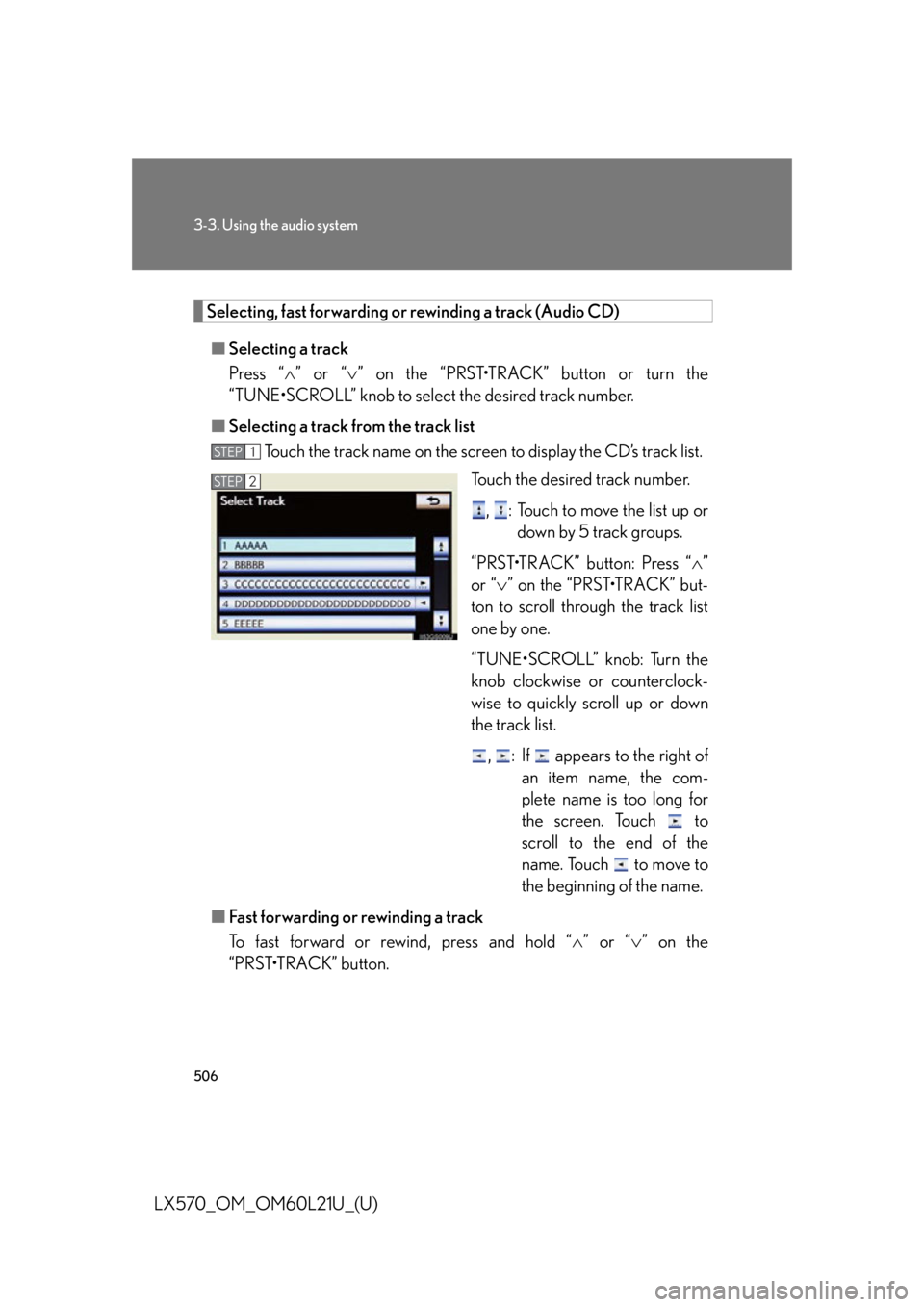
■ Selecting a track from the track list
Touch the track name on the screen to display the CD’s track list.
Touch the desired track number.
, : Touch to move the list up or
down by 5 track groups.
“PRST•TRACK” button: Press “ ”
or “ ” on the “PRST•TRACK” but-
ton to scroll through the track list
one by one.
“TUNE•SCROLL” knob: Turn the
knob clockwise or counterclock-
wise to quickly scroll up or down
the track list.
, : If appears to the right of
an item name, the com-
plete name is too long for
the screen. Touch to
scroll to the end of the
name. Touch to move to
the beginning of the name.
■ Fast forwarding or rewinding a track
To fast forward or rewind, press and hold “ ” or “ ” on the
“PRST•TRACK” button. STEP 1
STEP 2
Page 507 of 956

5073-3. Using the audio system
3
Interior features
LX570_OM_OM60L21U_(U) Selecting a folder (MP3/WMA discs)
■ Selecting a folder
To u c h “ >
” or “ <
” on the screen to select the next/previous folder.
■ Selecting a folder from the folder list
Touch the folder name on the sc reen to display the following
folder list screen.
Touch the desired folder number
to display the folder’s file list. From
the file list, select the desired file
number.
, : Touch to move the list up or
down by 5 folder groups.
“TUNE•SCROLL” knob: Turn the
knob clockwise or counterclock-
wise to quickly scroll up or down
the folder list.
, : If appears to the right of
an item name, the com-
plete name is too long for
the screen. Touch to
scroll to the end of the
name. Touch to move to
the beginning of the name.STEP 1
STEP 2
Page 508 of 956
5083-3. Using the audio system
LX570_OM_OM60L21U_(U) Selecting, fast forwarding or rewinding a file (MP3/WMA discs)
■ Selecting a file
Press “ ” or “ ” on the “PRST•TRACK” button or turn the
“TUNE•SCROLL” knob to select the desired file number.
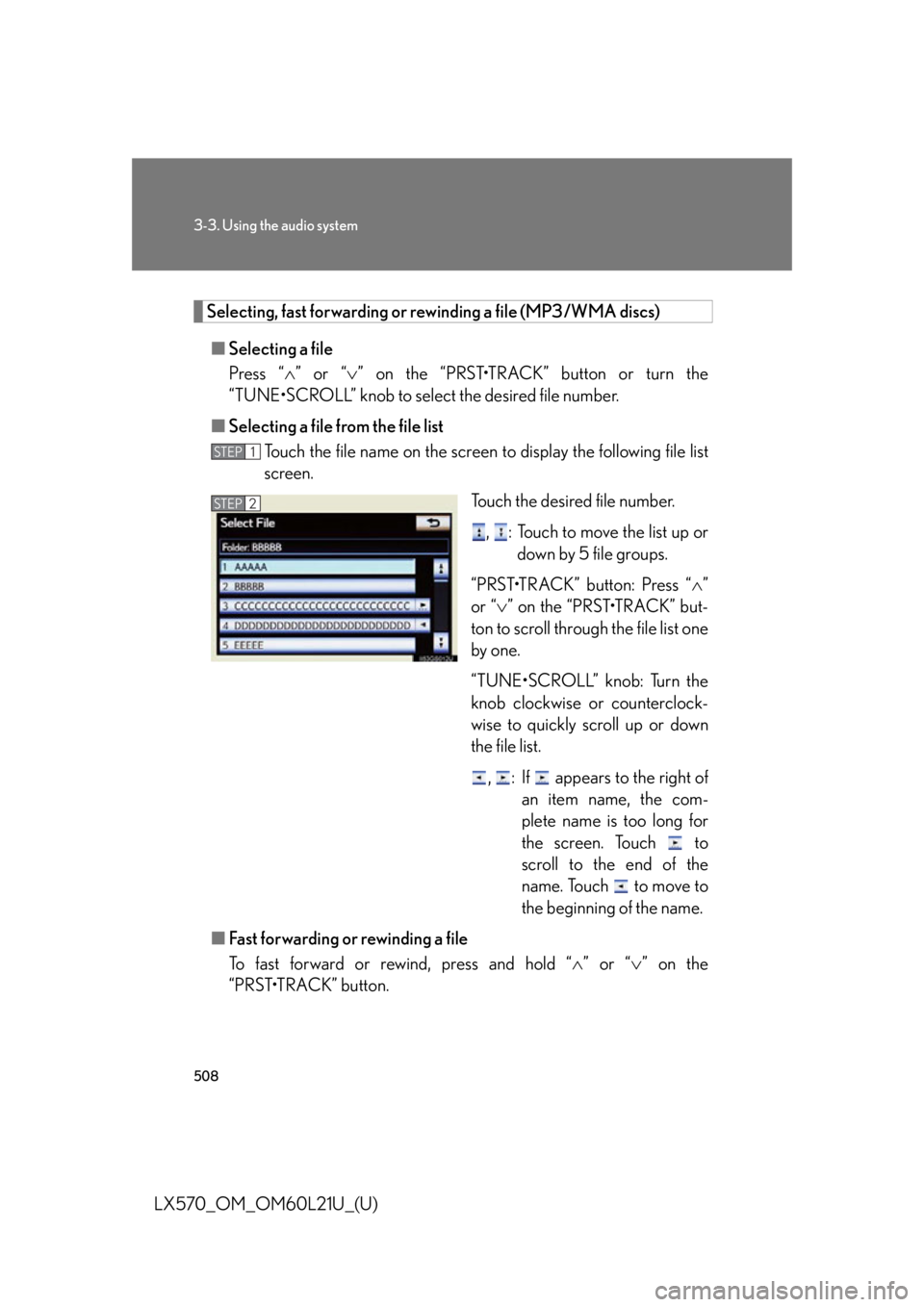
■ Selecting a file from the file list
Touch the file name on the screen to display the following file list
screen.
Touch the desired file number.
, : Touch to move the list up or
down by 5 file groups.
“PRST•TRACK” button: Press “ ”
or “ ” on the “PRST•TRACK” but-
ton to scroll through the file list one
by one.
“TUNE•SCROLL” knob: Turn the
knob clockwise or counterclock-
wise to quickly scroll up or down
the file list.
, : If appears to the right of
an item name, the com-
plete name is too long for
the screen. Touch to
scroll to the end of the
name. Touch to move to
the beginning of the name.
■ Fast forwarding or rewinding a file
To fast forward or rewind, press and hold “ ” or “ ” on the
“PRST•TRACK” button. STEP 1
STEP 2
Page 520 of 956
5203-3. Using the audio system
LX570_OM_OM60L21U_(U) ■ Setting audio language
Touch “Audio Language” on the “DVD Settings” screen.
Touch the desired language to be heard on the “Audio Language”
screen. If you cannot find the desired language, touch “Other” and input the
desired language code. ( P. 5 2 2 )
■ Setting subtitle language
Touch “Subtitle Language” on the “DVD Settings” screen.
Touch the desired language to be read on the “Subtitle
Language” screen. If you cannot find the desired language, touch “Other” and input the
desired language code. ( P. 5 2 2 )
■ Setting menu language
Touch “Menu Language” on th e “DVD Settings” screen.
Touch the desired language to be read on the “Menu Language”
screen. If you cannot find the desired language, touch “Other” and input the
desired language code. ( P. 5 2 2 )
■ Setting angle mark
If the DVD has angle options, you can turn the angle mark on or off.
Touch “Angle Mark” on the “DVD Settings” screen.
Select “On” or “Off”.
■ Parental lock
Touch “Parental Lock” on the “DVD Settings” screen.
Input the 4-digit pers onal code on the “Key Code” screen.If you enter wrong numbers, to uch to delete the numbers.
Select a parental level (1-8) on the “Select Restriction Level”
screen. ( P. 5 2 8 )STEP 1
STEP 2
STEP 1
STEP 2
STEP 1
STEP 2
STEP 1
STEP 2
STEP 1
STEP 2
STEP 3
Page 524 of 956

5243-3. Using the audio system
LX570_OM_OM60L21U_(U) Setup operation from the rear seat (vehicles with rear seat entertain-
ment system)
Touch “Play” to cancel this setup
operation from the rear seat. This screen appears when a rear
passenger setting selects the setup
menu.Code Language Code Language Code Language
2023 Tw i 2209 Vietnamese 2515 Yo r u b a
2111 Ukrainian 2215 Vo l a p ü k 2621 Zulu
2118 Urdu 2315 Wo l o f
2126 Uzbek 2408 Xhosa
■
When a rear passenger selects set up menu
Follow the directions on the warning screen that is displayed.
Under the same condition, the rear passenger can cancel the set up operation from
the front seat. ■
Rear system lock
P. 5 7 8■
Error messages
If “Region Code Error” is displayed, check if the region code printed on the DVD
matches the player’s region code.
If a different message is displayed: P. 5 2 5
Page 542 of 956
5423-3. Using the audio system
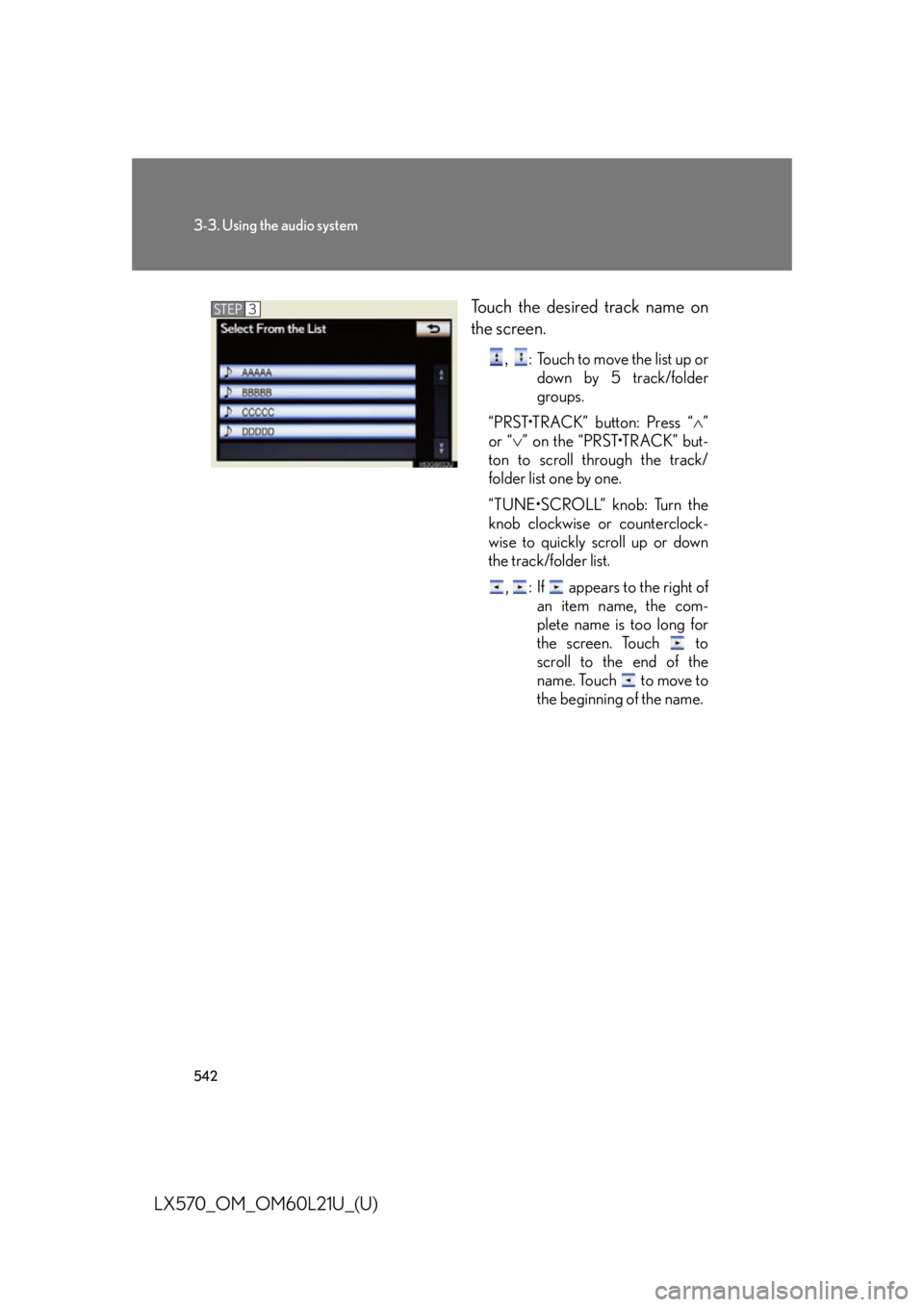
LX570_OM_OM60L21U_(U) Touch the desired track name on
the screen. ,
: Touch to move the list up or
down by 5 track/folder
groups.
“PRST•TRACK” button: Press “ ”
or “ ” on the “PRST•TRACK” but-
ton to scroll through the track/
folder list one by one.
“TUNE•SCROLL” knob: Turn the
knob clockwise or counterclock-
wise to quickly scroll up or down
the track/folder list.
, : If appears to the right of
an item name, the com-
plete name is too long for
the screen. Touch to
scroll to the end of the
name. Touch to move to
the beginning of the name.STEP 3
Page 543 of 956

5433-3. Using the audio system
3
Interior features
LX570_OM_OM60L21U_(U) Selecting, fast forwarding or rewinding a track
■ On the audio top screen
Turn the “TUNE•SCROLL” knob or press “ ” or “ ” on the
“PRST•TRACK” button to select the desired track number.
■ On the track list screen
Touch the track name on the
screen to display the track list
screen.
Touch the desired track number. ,
: Touch to move the list up or down by 5 track groups.
“PRST•TRACK” button: Press “
” or “
” on the “PRST•TRACK” button
to scroll through the track list one by one.
“TUNE•SCROLL” knob: Turn the knob clockwise or counterclockwise
to quickly scroll up or down the track list.
, : If appears to the right of an item name, the complete name is
too long for the screen. Touch to scroll to the end of the
name. Touch to move to the beginning of the name.
■ Fast forwarding and rewinding a track
Press and hold “ ” or “ ” on the “PRST•TRACK”
button to fast forward
or rewind. STEP 1
STEP 2
Page 551 of 956

5513-3. Using the audio system
3
Interior features
LX570_OM_OM60L21U_(U) Touch the desired tab and select
the desired folder, artist or album. Character screen buttons, “ABC”,
“DEF” etc., allow a direct jump to
list entries that begin with the same
letter as the character button.
Each time the same character
screen button is touched, the list
starting with the subsequent char-
acter is displayed. ,
: Touch to move the list up or
down by 5 folder/artist/
album groups.
“TUNE
• SCROLL” knob: Turn the
knob clockwise or counterclock-
wise to quickly scroll up or down
the folder/artist/album list.
, : If appears to the right of
an item name, the com-
plete name is too long for
the screen. Touch to
scroll to the end of the
name. Touch to move to
the beginning of the name.STEP 2
Page 552 of 956

5523-3. Using the audio system
LX570_OM_OM60L21U_(U) Selecting, fast forwarding or rewinding a file/track
■ Selecting one file/track at a time
Turn the “TUNE•SCROLL” knob or press “ ” or “ ” on the
“PRST•TRACK” button to select the desired file/track.
■ Selecting a file/track from the list
Touch the file/track name on the screen to display the following
file/track list screen.
Touch the desired file/track num-
ber. ,
: Touch to move the list up or
down by 5 file/track
groups.
“PRST•TRACK” button: Press “ ”
or “ ” on the “PRST•TRACK” but-
ton to scroll through the file/track
list one by one.
“TUNE•SCROLL” knob: Turn the
knob clockwise or counterclock-
wise to quickly scroll up or down
the file/track list.
, : If appears to the right of
an item name, the com-
plete name is too long for
the screen. Touch to
scroll to the end of the
name. Touch to move to
the beginning of the name.
■ Fast forwarding or rewinding a file/track
To fast forward or rewind, press and hold “ ” or “ ” on the
“PRST•TRACK” button. STEP 1
STEP 2