Sound system LEXUS LX570 2014 User Guide
[x] Cancel search | Manufacturer: LEXUS, Model Year: 2014, Model line: LX570, Model: LEXUS LX570 2014Pages: 956, PDF Size: 16.4 MB
Page 121 of 956
1211-6. Theft deterrent system
1
Before driving
LX570_OM_OM60L21U_(U) ■
When the battery is disconnected
Be sure to cancel the alarm system.
If the battery is disconnected before can celing the alarm, the system may be trig-
gered when the battery is reconnected. ■
Alarm-operated door lock ●
When the alarm is operating, the door s are locked automatically to prevent
intruders. ●
Do not leave the key inside the vehicle when the alarm is operating, and make
sure the key is not inside the vehicle when recharging or replacing the battery.■
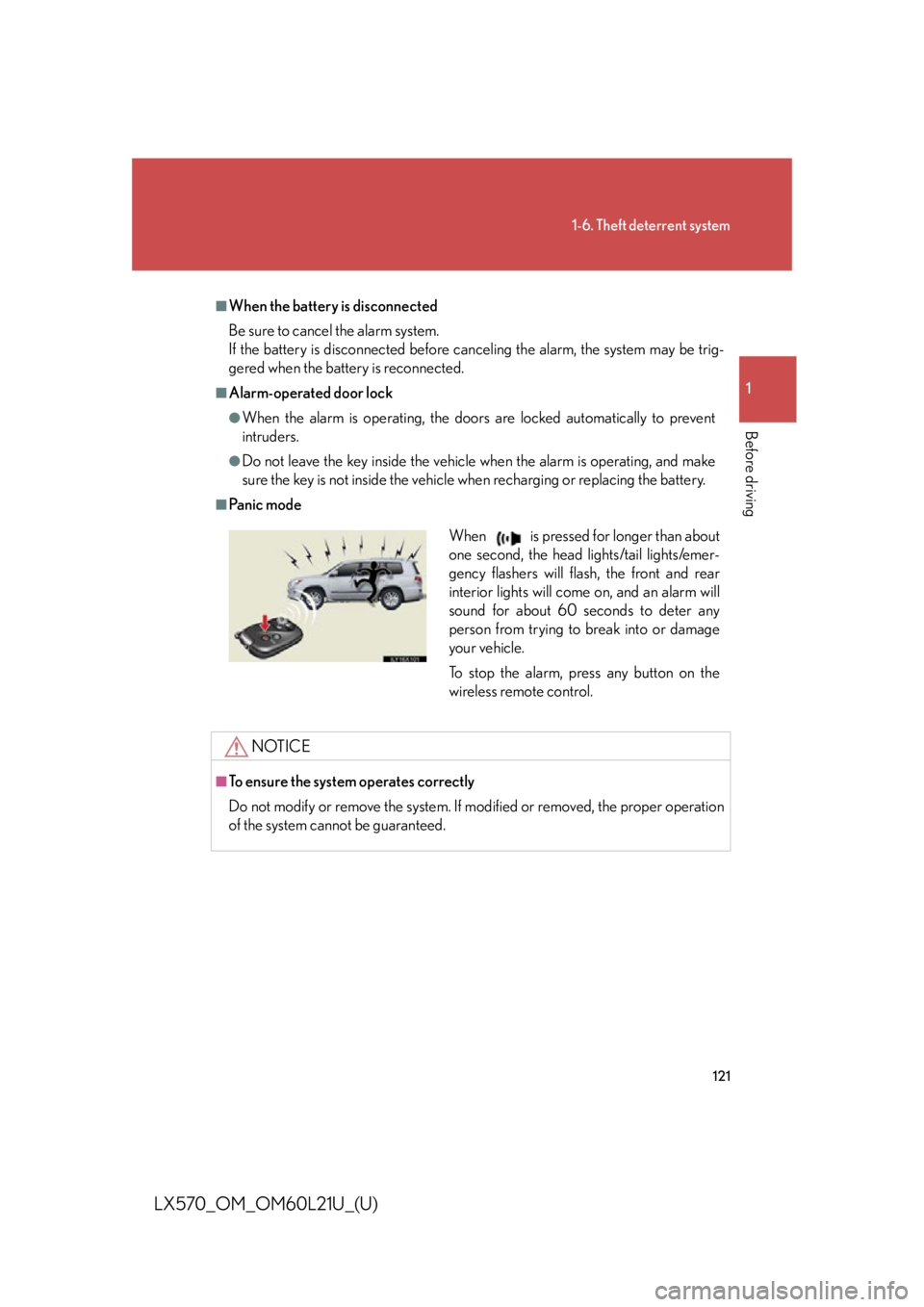
Pa n i c m o d e
NOTICE■
To ensure the system operates correctly
Do not modify or remove the system. If mo dified or removed, the proper operation
of the system cannot be guaranteed. When is pressed for longer than about
one second, the head lights/tail lights/emer-
gency flashers will flash, the front and rear
interior lights will come on, and an alarm will
sound for about 60 seconds to deter any
person from trying to break into or damage
your vehicle.
To stop the alarm, press any button on the
wireless remote control.
Page 167 of 956

1672-1. Driving procedures
2
When driving
LX570_OM_OM60L21U_(U) ■
When turning off the engine
Emission system operating sounds may cont inue for a short time after the engine is
turned off. This is not a malfunction, and helps to ensure optimal performance of the
emission system.
CAUTION■
When starting the vehicle
Always keep your foot on the brake pedal while stopped with the engine running.
This prevents the vehicle from creeping. ■
When driving the vehicle ●
Do not drive if you are unfamiliar with the location of the brake and accelerator
pedals to avoid depressing the wrong pedal.
• Accidentally depressing the accelerato r pedal instead of the brake pedal will
result in sudden acceleration that may le ad to an accident that could result in
death or serious injury.
• When backing up, you may twist your bo dy around, leading to a difficulty in
operating the pedals. Make sure to operate the pedals properly.
• Make sure to keep a correct driving posture even when moving the vehicle
only slightly, allowing you to depress the brake and accelerator pedals prop-
erly.
• Depress the brake pedal using your right foot. Depressing the brake pedal
using your left foot may delay response in an emergency, resulting in an acci-
dent.
Page 240 of 956
2402-4. Using other driving systems
LX570_OM_OM60L21U_(U) Example of follow-up cruising
When following a vehicle driving slower than the set speed The system continues follow-up cruising while adjusting for changes in the
speed of the vehicle ahead in order to maintain the vehicle-to-vehicle dis-
tance set by the driver.
Example of acceleration
When there are no longer any vehicl es ahead driving slower than the
set speed The system accelerates until the set speed is reached. The system then
returns to constant speed cruising.
Approach warning
When your vehicle is too close to a vehicle ahead, and sufficient auto-
matic deceleration via th e cruise control is not po ssible, the display will
flash and the buzzer will sound to al ert the driver. An example of this
would be if another driver cuts in fron t of you while you are following a
vehicle. Apply the brakes to ensure appropriate vehicle-to-vehicle dis-
tance.
■ Warnings may not occur when
In the following instances, there is a possibility that the warnings will not
occur:
● When the speed of the vehicle ahead matches or exceeds your
vehicle speed
● When the vehicle ahead is traveling at an extremely slow speed
● Immediately after the cruise control speed was set
● At the instant the accelerator is applied
Page 249 of 956

2492-4. Using other driving systems
2
When driving
LX570_OM_OM60L21U_(U) Intuitive parking assist
: If equippedThe distance from your vehicle to nearby obstacles when parallel parking
or maneuvering into a garage is measured by the sensors and communi-
cated via the multi-information display, touch screen and a buzzer. Always
check the surrounding area when using this system.
■ Sensor types
Front corner sensors
Rear corner sensors
Rear center sensors
■ Intuitive parking assist switch
Turns the Intuitive parking assist
on/off. When on, the indicator light
comes on and the buzzer
sounds to inform the driver that
the system is operational.
To turn the system off, press the
switch again.
Page 253 of 956

2532-4. Using other driving systems
2
When driving
LX570_OM_OM60L21U_(U) ■ Buzzer operation and distance to an obstacle
A beep sounds when the corner se nsors and rear center sensors are
operating.
● The buzzer beeps faster as the ve hicle approaches an obstacle.
When the vehicle comes within the following distance of the obsta-
cle, the buzzer sounds continuously:
• Front corner sensors: Approximately 0.8 ft. (25 cm)
• Rear corner sensors: Approximately 1.0 ft. (30 cm)
• Rear center sensors: Approximately 1.6 ft. (50 cm)
● When 2 or more obstacles are detected simultaneously, the buzzer
system responds to the nearest obst acle. If one or both come within
the above distances, the beep will repeat a long tone, followed by
fast beeps.
● You can change the volume of the warning beeps. ( P. 255)
Page 258 of 956

2582-4. Using other driving systems
LX570_OM_OM60L21U_(U) ●
The shape of the obstacle may prevent th e sensor from detecting it. Pay particu-
lar attention to the following obstacles:
• Wires, fences, ropes, etc.
• Cotton, snow and other materi als that absorb sound waves
• Sharply-angled objects
•Low obstacles
• Tall obstacles with upper sections projec ting outwards in the direction of your
vehicle●
The following situations may occur during use.
• Depending on the shape of the obstacle and other factors, the detection dis-
tance may shorten, or dete ction may be impossible.
• Obstacles may not be detected if they are too close to the sensor
• There will be a short delay between obstacle detection and display. Even at
slow speeds, there is a possibility that the obstacle will come within the sen-
sor’s detection areas before the display is shown and the warning beep
sounds.
• Thin posts or objects lower than the sensor may not be detected for collision
when approached, even if they have been detected once.
• It might be difficult to hear beeps due to the volume of audio system or air
flow noise of air conditioning system.■
If a message is displayed on the multi-information display
P. 8 3 2■
Certification (Canada only)
This ISM device complies with Canadian ICES-001.
Page 259 of 956

2592-4. Using other driving systems
2
When driving
LX570_OM_OM60L21U_(U) CAUTION■
When using the intuitive parking assist
Observe the following precautions.
Failing to do so may result in the vehicle being unable to be driven safely and possi-
bly cause an accident. ●
Do not use the sensor at speeds in excess of 6 mph (10 km/h). ●
The sensors’ detection areas and reaction times are limited. When moving for-
ward or reversing, check the areas surrounding the vehicle (especially the sides
of the vehicle) for safety, and drive slowly, using the brake to control the vehicle’s
speed. ●
Do not install accessories within the sensors’ detection areas.
NOTICE■
When using intuitive parking assist
In the following situations, the system may not function correctly due to a sensor
malfunction etc. Have the vehicle checked by your Lexus dealer. ●
A beep does not sound when you turn the main switch on. ●
The intuitive parking assist operation disp lay flashes, and a beep sounds when no
obstacles are detected. ●
If the area around a sensor collides wi th something, or is subjected to strong
impact. ●
If the bumper collides with something. ●
If the display shows continuously without a beep. ●
If a display error occurs, first check the sensor.
If the error occurs even if there is no ice, snow or mud on the sensor, it is likely that
the sensor is malfunctioning.■
Notes when washing the vehicle
Do not apply intensive bursts of water or steam to the sensor area.
Doing so may result in the sensor malfunctioning.
Page 272 of 956
2722-4. Using other driving systems
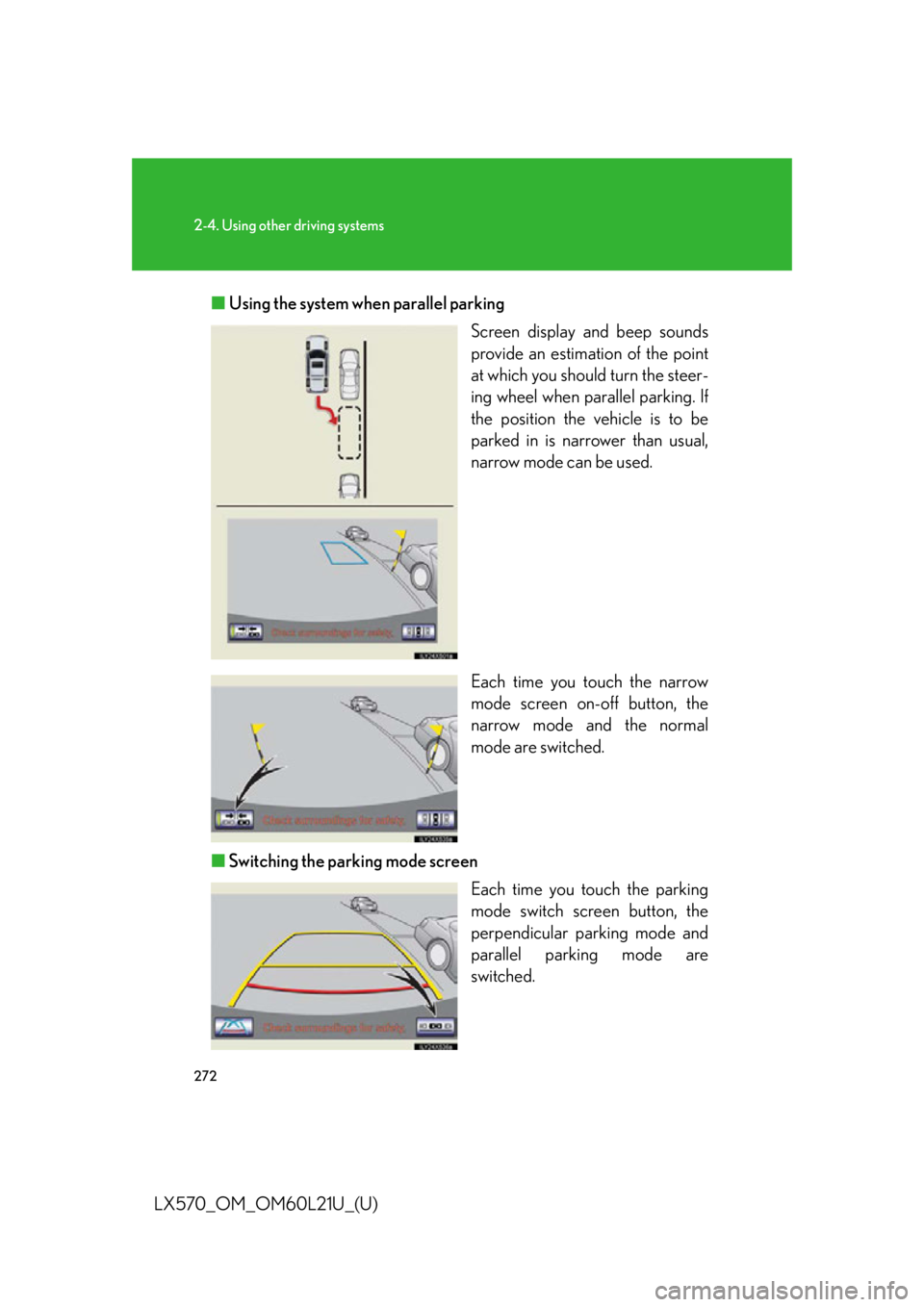
LX570_OM_OM60L21U_(U) ■ Using the system when parallel parking
Screen display and beep sounds
provide an estimation of the point
at which you should turn the steer-
ing wheel when parallel parking. If
the position the vehicle is to be
parked in is narrower than usual,
narrow mode can be used.
Each time you touch the narrow
mode screen on-off button, the
narrow mode and the normal
mode are switched.
■ Switching the parking mode screen
Each time you touch the parking
mode switch screen button, the
perpendicular parking mode and
parallel parking mode are
switched.
Page 321 of 956

3212-4. Using other driving systems
2
When driving
LX570_OM_OM60L21U_(U) Conditions for changing the vehicle height mode
Some modes may not be selectable depending on the vehicle speed
when the four-wheel drive control swit ch is in the “H4” position. Refer to
the following table.
Easy access mode
You can select this mode for easy
access and easy loading of the
vehicle.
If the “ENGINE START STOP” switch is turned to OFF within 30 seconds after
the vehicle stops while this mode is on, the vehicle height is lowered automati-
cally.
When the vehicle begins to lower a beep will sound twice, and while the vehicle
is lowering the indicator light will flash to alert the driver and surrounding people
that the vehicle is lowering. Low mode Normal mode High mode
Under 7 mph (12 km/h) Ye s Ye s Ye s
7 mph (12 km/h) to
18 mph (30 km/h) No Ye s Ye s
18 mph (30 km/h) or over No Ye s No
Page 326 of 956

3262-4. Using other driving systems
LX570_OM_OM60L21U_(U) ■
Propeller shaft noise
If the vehicle height is adjusted on a slope, or with the shift lever in a position other
than “P” or “N” while the vehicle is stopped, you may hear a sound caused by the
expansion and contraction of the propeller shaft. This does no t indicate a malfunc-
tion. ■
4-Wheel AHC failure warning
If a malfunction occurs in the 4-Wheel AHC, normal mode is automatically
selected. However, the system may not sw itch to normal mode depending on the
location of the malfunction.
The warning message is displayed on th e multi-information display, and the 4-
Wheel AHC cannot be activated until the malfunction is corrected.
Stop the engine and start it again. If th e warning message turns off, the system is
operating correctly. If the warning messag e continues to be displayed, have the
vehicle checked at your Lexus dealer as soon as possible.