Sound system LEXUS LX570 2014 Owner's Manual
[x] Cancel search | Manufacturer: LEXUS, Model Year: 2014, Model line: LX570, Model: LEXUS LX570 2014Pages: 956, PDF Size: 16.4 MB
Page 333 of 956

3332-4. Using other driving systems
2
When driving
LX570_OM_OM60L21U_(U) ■
If the low speed four-wheel drive indicator light or the center differential lock
indicator light blinks ●
If the low speed four-wheel drive indicator light continues to blink when using
the four-wheel drive control switch, stop the vehicle completely, move the shift
lever to “N” and operate the switch again. ●
If the shift lever is moved before the low speed four-wheel drive indicator turns
on/off, the transfer mode may not be shifted completely. The transfer mode dis-
engages both the front and rear driveshafts from the powertrain and allows the
vehicle to move regardless of the shift po sition. (At this time, the indicator blinks
and the buzzer sounds.)
Therefore, the vehicle is free to roll even if the automatic transmission is in “P”.
You or someone else could be seriously injured. You must complete the shifting of
the transfer mode.
To complete the shifting, stop the vehicle completely, return the shift lever to “N”,
and confirm that the shift was completed (the indicator turns on/off). ●
If the engine coolant temperature is too low, the four-wheel drive control system
may not be able to shift. When the engine is warmer operate the switch again.
If the low speed four-wheel drive indicator light or the center differential lock indi-
cator light continues to blink even after attempting the above, there may be a mal-
function in the engine, the brake system or the four-wheel drive system. In this case,
you may not be able to shif t between “H4” and “L4”, and the center differential lock
may not be operable. Have the vehicle inspected by your Lexus dealer immediately.
Page 334 of 956
3342-4. Using other driving systems
LX570_OM_OM60L21U_(U) CAUTION■
While driving
Never move the four-wheel drive control switch if the wheels have lost traction.
Doing so may cause an accident resu lting in death or serious injury.■
When the vehicle is parked
If the shift lever is moved before the low speed four-wheel drive indicator turns on/
off, the transfer mode may not be shifte d completely. The transfer mode disengages
both the front and rear driveshafts from the powertrain and allows the vehicle to
move regardless of the shift position. (A t this time, the indicator blinks and the
buzzer sounds.)
Therefore, the vehicle is free to roll even if the automatic transmission is in “P”. You
or someone else could be se riously injured. You must complete the shifting of the
transfer mode. ( P. 3 3 0 )
NOTICE■
To prevent damage to the center differential ●
For normal driving on dry and hard surface roads, unlock the center differential.●
Unlock the center differential after the wheels are out of the ditch or off the slip-
pery or bumpy surface. ●
Do not push the center differential lock/u nlock switch when the vehicle is turning
or when its wheels are spinni ng freely off the ground.
Page 339 of 956

3392-4. Using other driving systems
2
When driving
LX570_OM_OM60L21U_(U) ■
The Crawl Control and Turn Assist function can be operated when
Crawl Control ●
The engine is running. ●
The shift lever is in any gear other than “P” or “N”. ●
The four-wheel drive control switch is in “L4”. ●
The driver’s door is closed.
Tu r n A s s i s t f u n c t i o n ●
Crawl Control is operating. ●
The center differential is not locked. ●
The accelerator and brake are not being operated. ●
The shift lever is in any gear other than “P”, “R” or “N”.●
The steering wheel is turned very far.■
Automatic system cancelation
Crawl Control
In the following situations, the buzzer will sound intermittently and Crawl Control
will be canceled automatically. In this event, the Crawl Control indicator will flash
and then go off, the Turn Assist indicator will go off (if the Turn Assist function is in
use), and a message stating that Crawl Co ntrol has been turned off will be dis-
played on the multi-information display for several seconds. ●
When the shift lever is moved to “P” or “N”. ●
When the four-wheel drive control switch is in “H4”. ●
When the driver’s door is opened.
Tu r n A s s i s t f u n c t i o n
When the center differential is locked, th e buzzer will sound intermittently and the
Turn Assist function will be canceled automatically. In this event, the Turn Assist indi-
cator will go off, and a message stating that the Turn Assist function has been turned
off will be displayed on the multi-information display for several seconds.
Page 340 of 956

3402-4. Using other driving systems
LX570_OM_OM60L21U_(U) ■
Function limitations
Crawl Control ●
In the following situations, brake control can be used to drive downhill at a con-
stant speed. However, engine control is not available when driving uphill at a
constant speed.
• When switched to second start mode. ●
In the following situation, engine control and brake control will stop temporarily.
In this event, the Crawl Control indicator will flash.
• When the vehicle speed exceeds approximately 15 mph (25 km/h).
Tu r n A s s i s t f u n c t i o n
In the following situations, the Turn Assist fu nction will stop temporarily. In this event,
the Turn Assist indicator will flash. ●
When the vehicle speed exceeds approximately 6 mph (10 km/h).●
When the shift lever is moved to “R”.■
When the Crawl Control system is operated continuously ●
If Crawl Control is used continuously for a long time, the buzzer will sound, a
malfunction notification will be displaye d on the multi-information display, the
Crawl Control indicator will go off, and Crawl Control will be temporarily inop-
erable as a result of the brake system over heating. In this event, stop the vehicle
immediately in a safe place, and allow the brake system to cool down sufficiently
until the “TRAC OFF” on the multi-inform ation display goes off. (In the mean-
time, normal driving is possible.) ●
If Crawl Control is used continuously for a long time, the buzzer will sound, the
system will be temporarily canceled, and a malfunction notification will be dis-
played on the multi-information display as a result of the automatic transmission
system overheating. Stop the vehicle in a safe place until the display goes off.
Page 341 of 956
3412-4. Using other driving systems
2
When driving
LX570_OM_OM60L21U_(U) ■
Sounds and vibrations caused by the Crawl Control system ●
A sound may be heard from the engi ne compartment when the engine is
started or just after the vehicle begins to move. This sound does not indicate that
a malfunction has occurred in Crawl Control system. ●
Either of the following conditions may occur when the Crawl Control system is
operating. None of these are indicators that a malfunction has occurred.
• Vibrations may be felt through the vehicle body and steering.
• A motor sound may be heard after the vehicle comes to a stop.■
When there is a malfunction in the system
Warning lights and/or warnin g messages will turn on. ( P. 8 2 2 , 8 4 7 )
CAUTION■
When using Crawl Control and Turn Assist function
Do not rely solely on the Crawl Control an d Turn Assist function. This function does
not extend the vehicle’s performance limitations. Always thoroughly check the road
conditions, and drive safely. ■
These conditions may cause the system not to operate properly
When driving on the following surfaces, th e system may not be able to maintain a
fixed low speed, which may result in an accident: ●
Extremely steep inclines. ●
Extremely uneven surfaces. ●
Snow-covered roads, or other slippery surfaces.
NOTICE■
When using Turn Assist function
The Turn Assist function is a function to assist turning performance when driving off
road. The function may be less effective on paved road surfaces.
Page 346 of 956
3462-4. Using other driving systems
LX570_OM_OM60L21U_(U) ■
When the vehicle is stuck
Switching the transfer and differential
For the operation of the following functions, refer to the following pages. ●
Four-wheel drive system ( P. 3 3 0 )●
Center differential lock ( P. 3 3 0 )■
When the brake system operates continuously
The brake system may overheat. In this case, a buzzer will sound, the “TRAC OFF”
will be displayed on the multi-information display, and Multi-terrain Select will be
temporarily inoperable. In this event, stop the vehicle immediately in a safe place,
and allow the brake system to cool down sufficiently. (There is no problem with con-
tinuing normal driving.)
After a short time, the message on the multi-information display will go off, and you
will be able to use Multi-terrain Select. ■
When there is a malfunction in the system
The slip indicator light will come on. Have the vehicle inspected by your Lexus
dealer immediately.
CAUTION■
When using the Multi-terrain Select
Observe the following precautions to avoid an accident that could result in death or
serious injuries: ●
There is a chance that the selected mode may not be the most appropriate in
terms of road conditions such as pitch, slipperiness, undulation, etc. ( P. 3 4 3 )●
Multi-terrain Select is not intended to expand the limits of the vehicle. Check the
road conditions thoroughly beforehand, and drive safely and carefully.
NOTICE■
Precaution for use
The Multi-terrain Select is intended for use during off-road driving. Do not use the
system at any other time.
Page 350 of 956

3502-4. Using other driving systems
LX570_OM_OM60L21U_(U) ■
When the message is displayed on the multi-information display showing that
TRAC has been disabled even if the VSC OFF switch has not been pressed
Active TRAC, hill-start assist control, Cr awl Control cannot be operated. Contact
your Lexus dealer. ■
Automatic reactivation of Active TRAC, VSC and Trailer Sway Control
Turning the “ENGINE START STOP” switch off after turning off the Active TRAC
and VSC systems will auto matically re-e nable them.■
Automatic Active TRAC reactivation
If only the Active TRAC system is turned off, the Active TRAC system will turn on
when vehicle speed increases. ■
Automatic Active TRAC, VSC and Trailer Sway Control reactivation
If the Active TRAC, VSC and Trailer Sway Control are turned off, the systems will
not turn on even when vehicle speed increases. ■
If the brake system overheats
The brake system may overheat. In this case, a buzzer will sound, and the “TRAC
OFF” will be displayed on th e multi-information display, and Active TRAC and hill-
start assist control will be temporarily inop erable. In this event, stop the vehicle
immediately in a safe place, and allow the brake system to cool down sufficiently
until the “TRAC OFF” on the multi-informatio n display goes off. (There is no prob-
lem with continuing normal driving.)
Page 351 of 956

3512-4. Using other driving systems
2
When driving
LX570_OM_OM60L21U_(U) ■
Sounds and vibrations caused by the Multi Terrain ABS, brake assist, Active
TRAC, VSC, Trailer Sway Control, hill-start assist control and VGRS ●
A sound may be heard from the engi ne compartment when the engine is
started or just after the vehicle begins to move. This sound does not indicate that
a malfunction has occurred in any of these systems. ●
Any of the following conditions may occur when the above systems are operat-
ing. None of these indicates that a malfunction has occurred.
• Vibrations may be felt through the vehicle body and steering.
• A motor sound may be heard after the vehicle comes to a stop.
• The brake pedal may pulsate slightly after the Multi Terrain ABS is activated.
• The brake pedal may move down slightly after the Multi Terrain ABS is acti-
vated.■
Hill-start assist control is operational when ●
The shift lever is in “D” or “S”. ●
The brake pedal is not depressed.■
VGRS is disabled in the following situations ●
During stopping or the st eering wheel has been moved for a long time while
driving at lower speeds. ●
After the engine is restarted at less than -22°F (-30°C). ●
If you disconnect the battery with the steering wheel turned, the center position
of the steering wheel could be slightly and temporary changed. To initialize the
VGRS, drive for a short while.
Page 483 of 956
4833-3. Using the audio system
3
Interior features
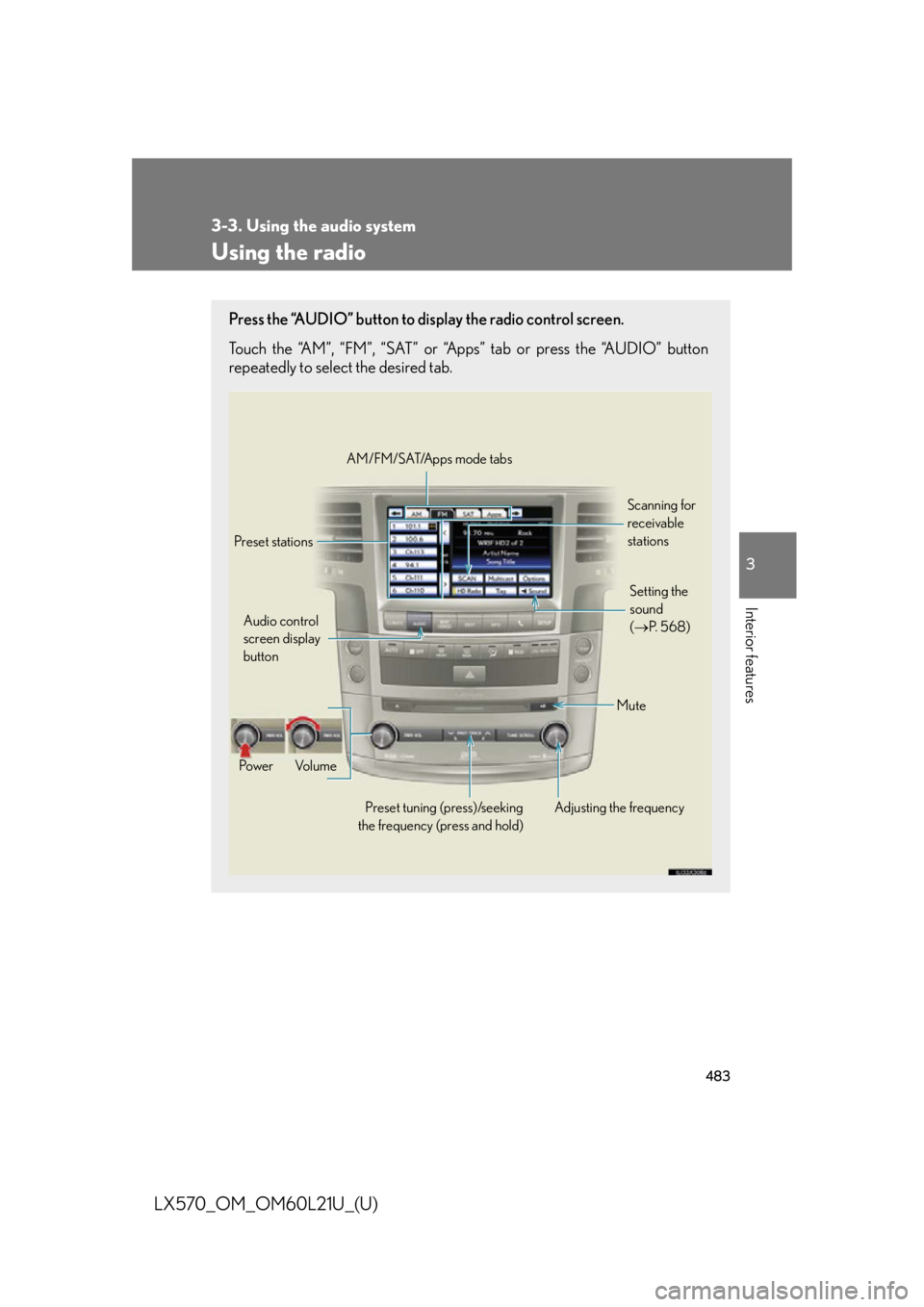
LX570_OM_OM60L21U_(U) Using the radio Press the “AUDIO” button to display the radio control screen.
Touch the “AM”, “FM”, “SAT” or “Apps” tab or press the “AUDIO” button
repeatedly to select the desired tab.
Audio control
screen display
button
Po w e r Vo l u m e
Preset tuning (press)/seeking
the frequency (press and hold) Adjusting the frequency AM/FM/SAT/Apps mode tabs
Preset stations Scanning for
receivable
stations
Mute Setting the
sound
( P. 5 6 8 )
Page 487 of 956
4873-3. Using the audio system
3
Interior features
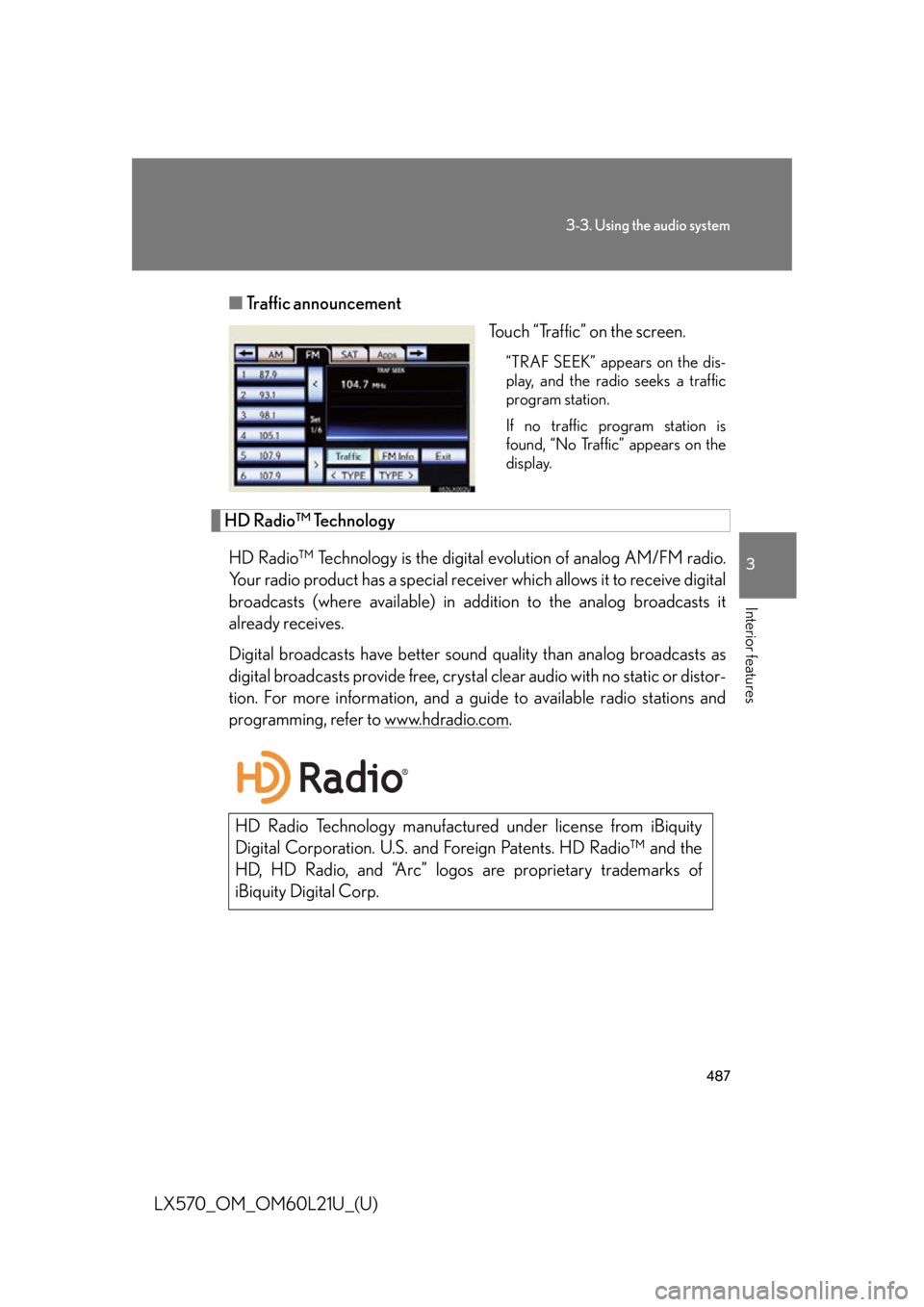
LX570_OM_OM60L21U_(U) ■ Traffic announcement
Touch “Traffic” on the screen. “TRAF SEEK” appears on the dis-
play, and the radio seeks a traffic
program station.
If no traffic program station is
found, “No Traffic” appears on the
display.
HD Radio™ Technology
HD Radio™ Technology is the digital evolution of analog AM/FM radio.
Your radio product has a special receiv er which allows it to receive digital
broadcasts (where available) in addi tion to the analog broadcasts it
already receives.
Digital broadcasts have better sound quality than analog broadcasts as
digital broadcasts provide free, crystal clear audio with no static or distor-
tion. For more information, and a guid e to available ra dio stations and
programming, refer to www.hdradio.com .
HD Radio Technology manufactured under license from iBiquity
Digital Corporation. U.S. and Fo reign Patents. HD Radio™ and the
HD, HD Radio, and “Arc” logos are proprietary trademarks of
iBiquity Digital Corp.