clock LEXUS LX570 2014 User Guide
[x] Cancel search | Manufacturer: LEXUS, Model Year: 2014, Model line: LX570, Model: LEXUS LX570 2014Pages: 956, PDF Size: 16.4 MB
Page 543 of 956

5433-3. Using the audio system
3
Interior features
LX570_OM_OM60L21U_(U) Selecting, fast forwarding or rewinding a track
■ On the audio top screen
Turn the “TUNE•SCROLL” knob or press “ ” or “ ” on the
“PRST•TRACK” button to select the desired track number.
■ On the track list screen
Touch the track name on the
screen to display the track list
screen.
Touch the desired track number. ,
: Touch to move the list up or down by 5 track groups.
“PRST•TRACK” button: Press “
” or “
” on the “PRST•TRACK” button
to scroll through the track list one by one.
“TUNE•SCROLL” knob: Turn the knob clockwise or counterclockwise
to quickly scroll up or down the track list.
, : If appears to the right of an item name, the complete name is
too long for the screen. Touch to scroll to the end of the
name. Touch to move to the beginning of the name.
■ Fast forwarding and rewinding a track
Press and hold “ ” or “ ” on the “PRST•TRACK”
button to fast forward
or rewind. STEP 1
STEP 2
Page 551 of 956

5513-3. Using the audio system
3
Interior features
LX570_OM_OM60L21U_(U) Touch the desired tab and select
the desired folder, artist or album. Character screen buttons, “ABC”,
“DEF” etc., allow a direct jump to
list entries that begin with the same
letter as the character button.
Each time the same character
screen button is touched, the list
starting with the subsequent char-
acter is displayed. ,
: Touch to move the list up or
down by 5 folder/artist/
album groups.
“TUNE
• SCROLL” knob: Turn the
knob clockwise or counterclock-
wise to quickly scroll up or down
the folder/artist/album list.
, : If appears to the right of
an item name, the com-
plete name is too long for
the screen. Touch to
scroll to the end of the
name. Touch to move to
the beginning of the name.STEP 2
Page 552 of 956

5523-3. Using the audio system
LX570_OM_OM60L21U_(U) Selecting, fast forwarding or rewinding a file/track
■ Selecting one file/track at a time
Turn the “TUNE•SCROLL” knob or press “ ” or “ ” on the
“PRST•TRACK” button to select the desired file/track.
■ Selecting a file/track from the list
Touch the file/track name on the screen to display the following
file/track list screen.
Touch the desired file/track num-
ber. ,
: Touch to move the list up or
down by 5 file/track
groups.
“PRST•TRACK” button: Press “ ”
or “ ” on the “PRST•TRACK” but-
ton to scroll through the file/track
list one by one.
“TUNE•SCROLL” knob: Turn the
knob clockwise or counterclock-
wise to quickly scroll up or down
the file/track list.
, : If appears to the right of
an item name, the com-
plete name is too long for
the screen. Touch to
scroll to the end of the
name. Touch to move to
the beginning of the name.
■ Fast forwarding or rewinding a file/track
To fast forward or rewind, press and hold “ ” or “ ” on the
“PRST•TRACK” button. STEP 1
STEP 2
Page 562 of 956

5623-3. Using the audio system
LX570_OM_OM60L21U_(U) Selecting, fast forwarding or rewinding a track
■ Selecting one track at a time
Turn the “TUNE•SCROLL” knob or press “ ” or “ ” on the
“PRST•TRACK” button to select the desired track.
■ Selecting a track from the list
Touch the track name on the screen to display the following track
list screen.
Touch the desired track number. ,
: Touch to move the list up or
down by 5 track groups.
“PRST•TRACK” button: Press “ ”
or “ ” on the “PRST•TRACK” but-
ton to scroll through the track list
one by one.
“TUNE•SCROLL” knob: Turn the
knob clockwise or counterclock-
wise to quickly scroll up or down
the track list.
, : If appears to the right of
an item name, the com-
plete name is too long for
the screen. Touch to
scroll to the end of the
name. Touch to move to
the beginning of the name.
■ Fast forwarding or rewinding a track
To fast forward or rewind, press and hold “ ” or “ ” on the
“PRST•TRACK” button. STEP 1
STEP 2
Page 577 of 956

5773-4. Using the rear se at entertainment system
3
Interior features
LX570_OM_OM60L21U_(U) Headphone jacks
To listen to the rear audio, open the
cover and use headphones.
To use the headphones
Connect them to the jack.
To adjust the volume
Turn the knob clockwise to
increase the volume. Turn the
knob counterclockwise to
decrease the volume.
Changing the source
Press the “SOURCE”, button to
display the audio source selection
screen.
Turning on the audio source
selection screen
Selecting an icon
Inputting the selected icon
Select an audio source.STEP 1
STEP 2
Page 707 of 956
7053-8. Other interior features
3
Interior features
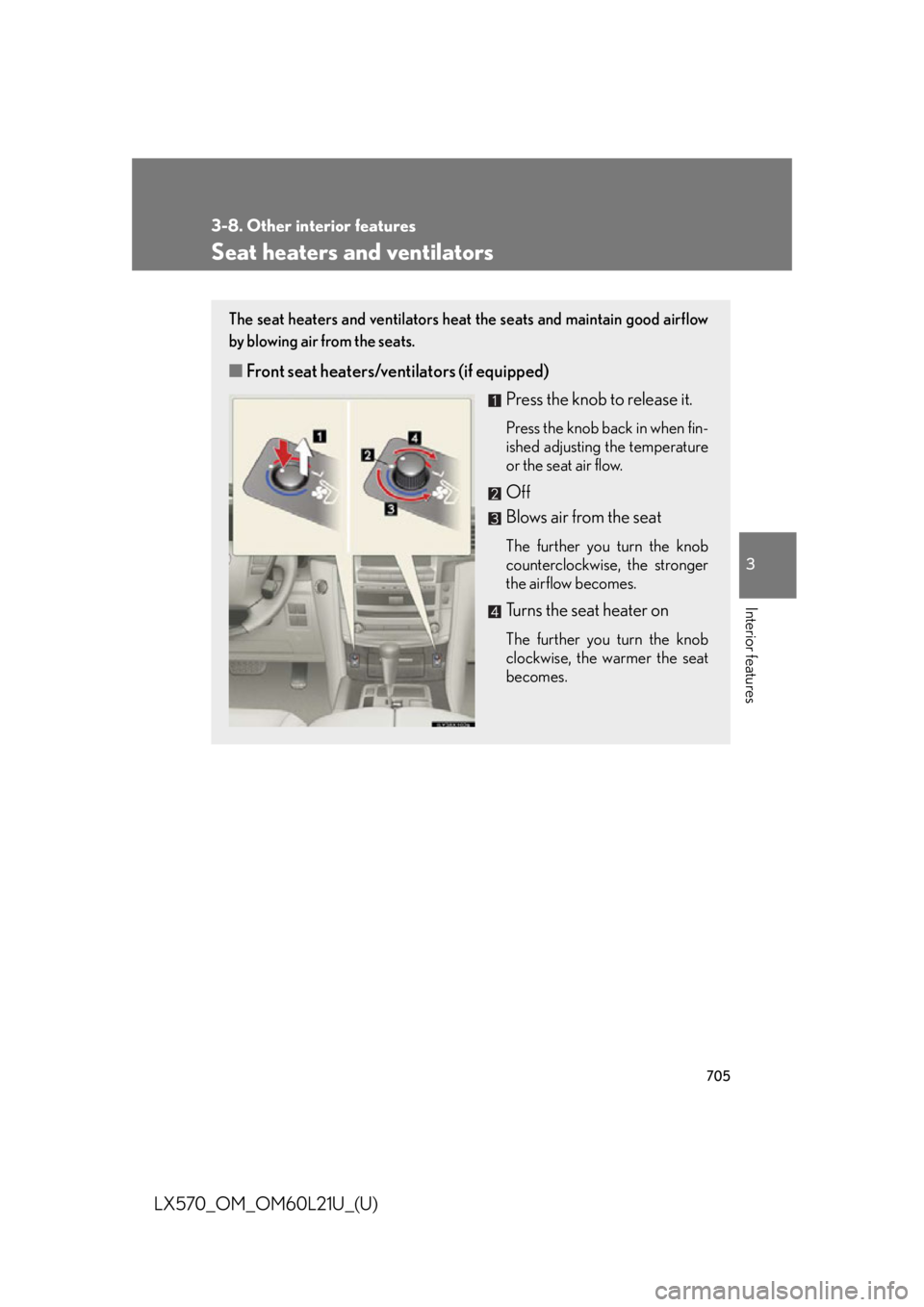
LX570_OM_OM60L21U_(U) Seat heaters and ventilators The seat heaters and ventilators heat the seats and maintain good airflow
by blowing air from the seats.
■ Front seat heaters/ventilators (if equipped)
Press the knob to release it. Press the knob back in when fin-
ished adjusting the temperature
or the seat air flow.
Off
Blows air from the seat The further you turn the knob
counterclockwise, the stronger
the airflow becomes.
Turns the seat heater on The further you turn the knob
clockwise, the warmer the seat
becomes.
Page 708 of 956
7063-8. Other interior features
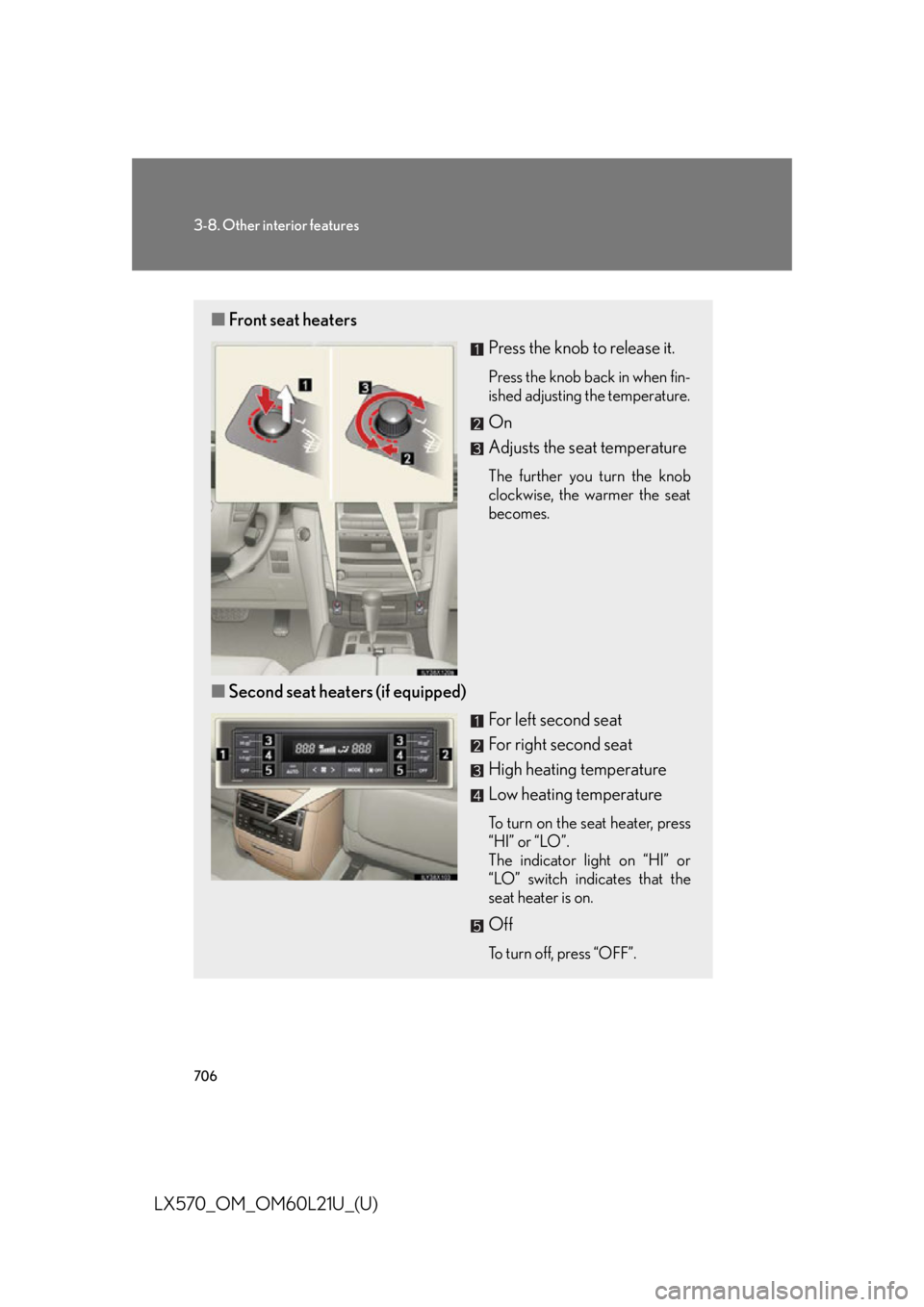
LX570_OM_OM60L21U_(U) ■ Front seat heaters
Press the knob to release it. Press the knob back in when fin-
ished adjusting the temperature.
On
Adjusts the seat temperature The further you turn the knob
clockwise, the warmer the seat
becomes.
■ Second seat heaters (if equipped)
For left second seat
For right second seat
High heating temperature
Low heating temperature To turn on the seat heater, press
“HI” or “LO”.
The indicator light on “HI” or
“LO” switch indicates that the
seat heater is on.
Off To turn off, press “OFF”.
Page 753 of 956
7514-3. Do-it-yourself maintenance
4
Maintenance and care
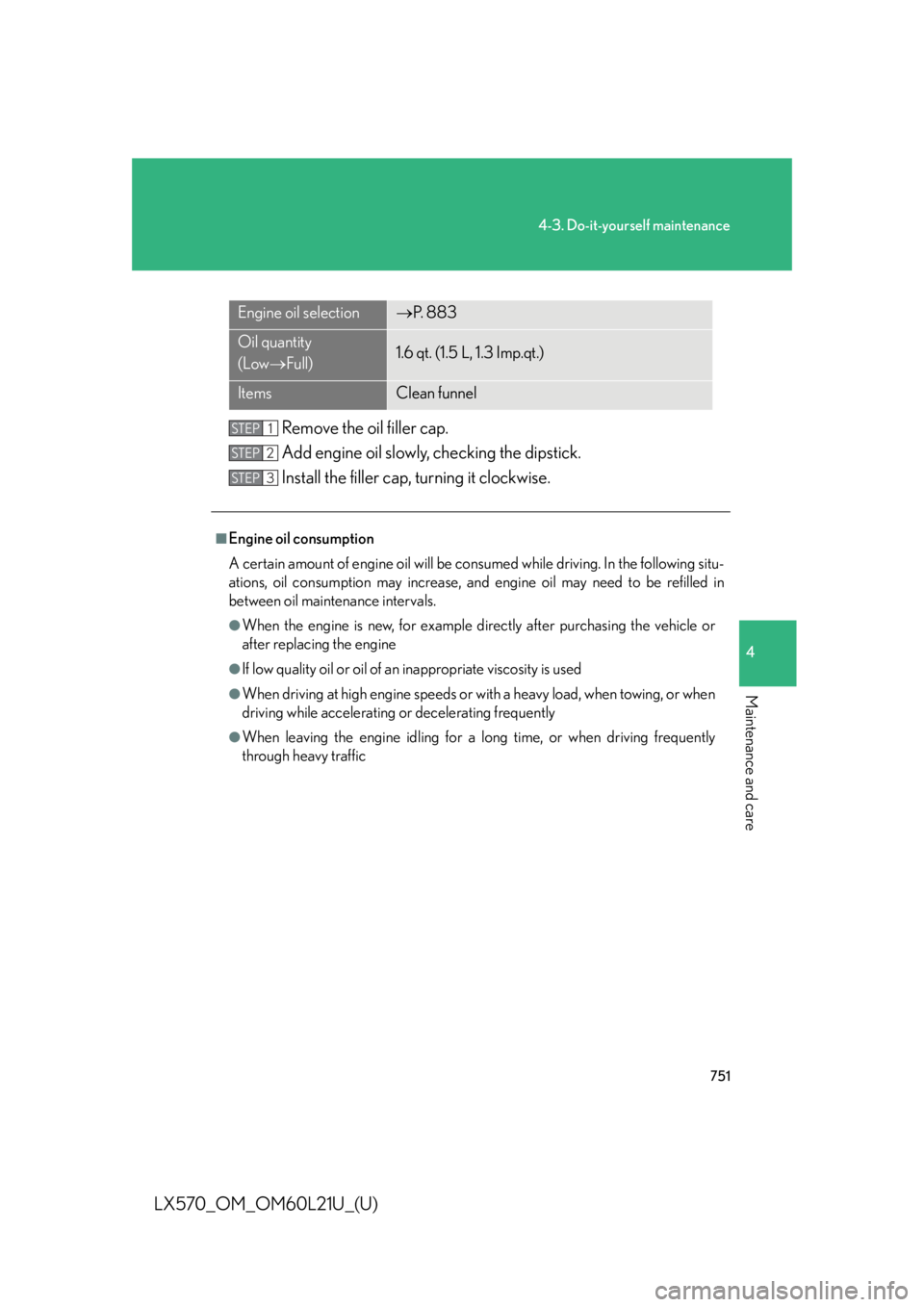
LX570_OM_OM60L21U_(U) Remove the oil filler cap.
Add engine oil slowly, checking the dipstick.
Install the filler cap, turning it clockwise.Engine oil selection P. 8 8 3
Oil quantity
(Low Full) 1.6 qt. (1.5 L, 1.3 Imp.qt.)
Items Clean funnel
■
Engine oil consumption
A certain amount of engine oil will be consumed while driving. In the following situ-
ations, oil consumption may increase, and engine oil may need to be refilled in
between oil maintenance intervals. ●
When the engine is new, for example di rectly after purchasing the vehicle or
after replacing the engine ●
If low quality oil or oil of an inappropriate viscosity is used ●
When driving at high engi ne speeds or with a heavy load, when towing, or when
driving while accelerating or decelerating frequently ●
When leaving the engine id ling for a long time, or when driving frequently
through heavy traffic STEP 1
STEP 2
STEP 3
Page 759 of 956
7574-3. Do-it-yourself maintenance
4
Maintenance and care
LX570_OM_OM60L21U_(U) Power steering fluid
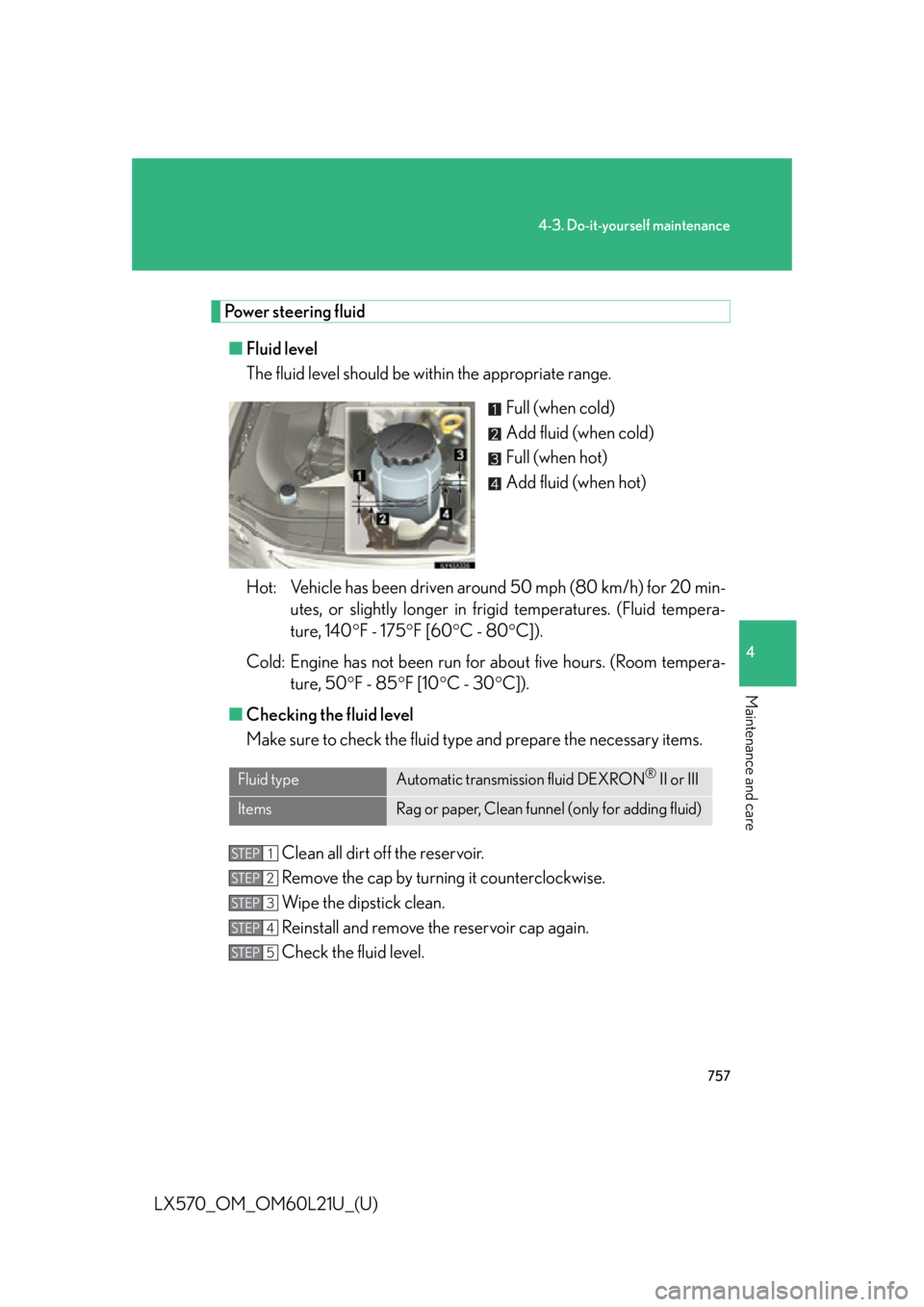
■ Fluid level
The fluid level should be within the appropriate range.
Full (when cold)
Add fluid (when cold)
Full (when hot)
Add fluid (when hot)
Hot: Vehicle has been driven arou nd 50 mph (80 km/h) for 20 min-
utes, or slightly longer in frigid temperatures. (Fluid tempera-
ture, 140 F - 175 F [60 C - 80 C]).
Cold: Engine has not been run for about five hours. (Room tempera-
ture, 50 F - 85 F [10 C - 30 C]).
■ Checking the fluid level
Make sure to check the fluid type and prepare the necessary items.
Clean all dirt off the reservoir.
Remove the cap by turning it counterclockwise.
Wipe the dipstick clean.
Reinstall and remove the reservoir cap again.
Check the fluid level.Fluid type Automatic transmission fluid DEXRON ®
II or III
Items Rag or paper, Clean funnel (only for adding fluid)STEP 1
STEP 2
STEP 3
STEP 4
STEP 5
Page 792 of 956

7904-3. Do-it-yourself maintenance
LX570_OM_OM60L21U_(U) 48 ECU-B1 5 A Smart access system with push-button
start, overhead module, yaw rate & G
sensor, tilt and telescopic steering,
meter, cool box, gateway ECU, steer-
ing sensor, VGRS
49 DOME1 10 A Illuminated entry system, power third
seat switch, power back door switch,
clock
50 HEAD LH 15 A Headlight high beam (left)
51 HEAD LL 15 A Headlight low beam (left)
52 INJ 10 A Injector, ignition system
53 MET 5 A Meter
54 IGN 10 A Circuit open, SRS airbag system,
gateway ECU, smart access system
with push-button start, ABS, VSC,
steering lock system, GBS
55 DRL 5 A Daytime running light
56 HEAD RH 15 A Headlight high beam (right)
57 HEAD RL 15 A Headlight low beam (right)
58 EFI NO.2 7. 5 A Air injection system, air flow meter
59 RR A/C NO.2 7. 5 A No circuit
60 DEF NO.2 5 A Outside rear view mirror defoggers
61 SPARE 5 A Spare fuse
62 SPARE 15 A Spare fuse
63 SPARE 30 A Spare fuseFuse Ampere Circuit