radio LEXUS LX570 2014 Owner's Manual
[x] Cancel search | Manufacturer: LEXUS, Model Year: 2014, Model line: LX570, Model: LEXUS LX570 2014Pages: 956, PDF Size: 16.4 MB
Page 488 of 956
4883-3. Using the audio system
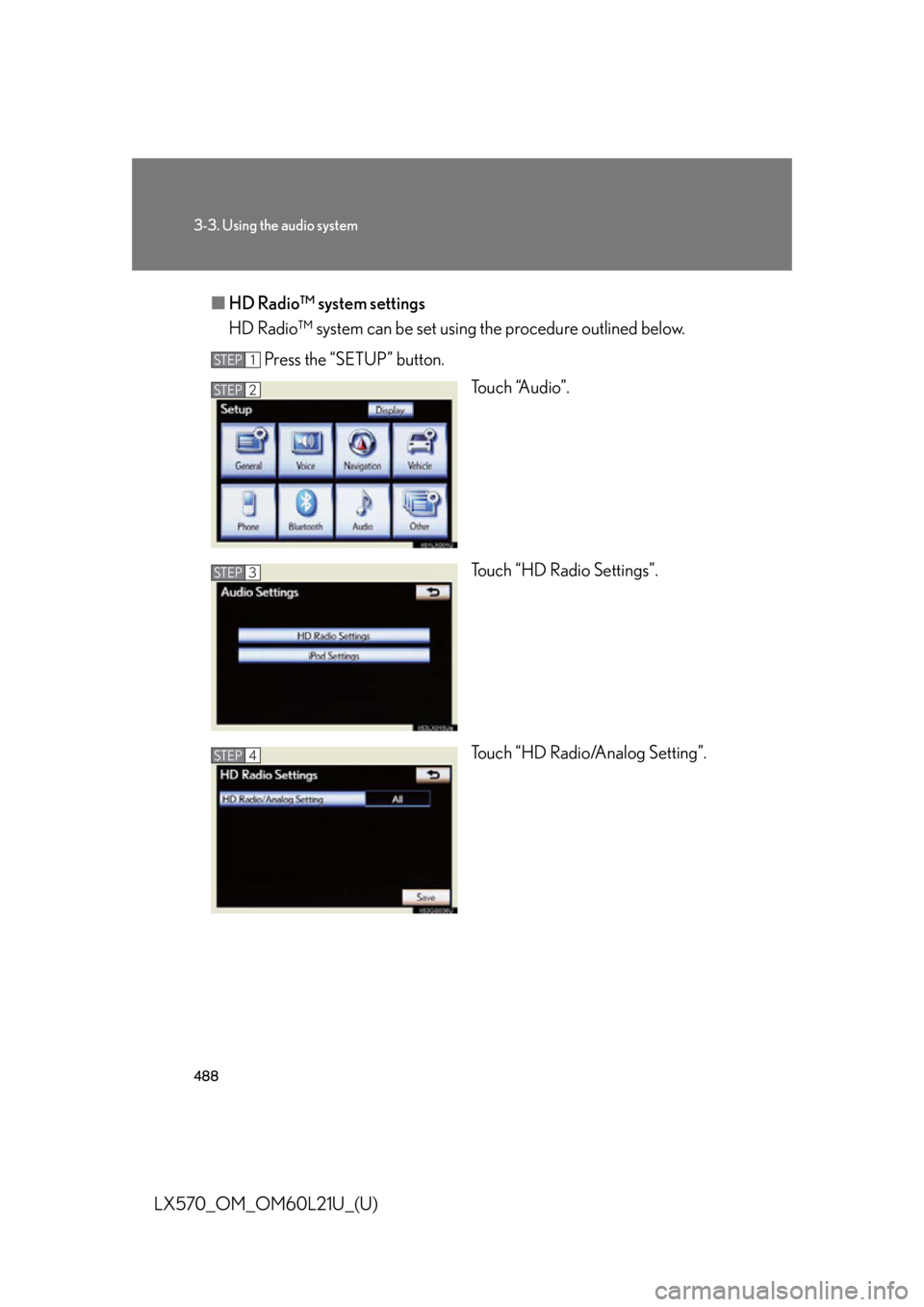
LX570_OM_OM60L21U_(U) ■ HD Radio™ system settings
HD Radio™ system can be set using the procedure outlined below.
Press the “SETUP” button.
To u c h “A u d i o ” .
Touch “HD Radio Settings”.
Touch “HD Radio/Analog Setting”.STEP 1
STEP 2
STEP 3
STEP 4
Page 489 of 956
4893-3. Using the audio system
3
Interior features
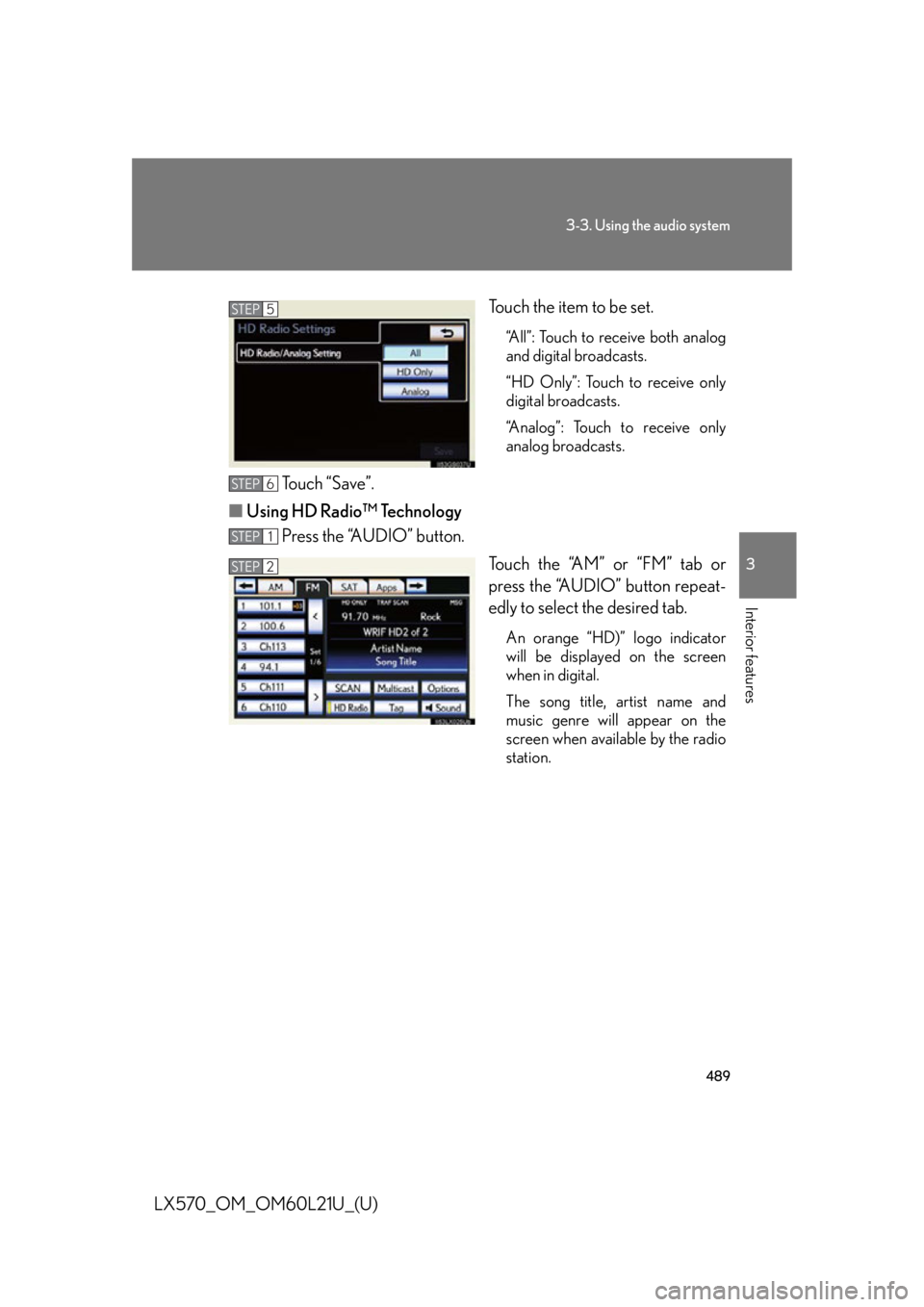
LX570_OM_OM60L21U_(U) Touch the item to be set. “All”: Touch to receive both analog
and digital broadcasts.
“HD Only”: Touch to receive only
digital broadcasts.
“Analog”: Touch to receive only
analog broadcasts.
Touch “Save”.
■ Using HD Radio™ Technology
Press the “AUDIO” button.
Touch the “AM” or “FM” tab or
press the “AUDIO” button repeat-
edly to select the desired tab. An orange “HD)” logo indicator
will be displayed on the screen
when in digital.
The song title, artist name and
music genre will appear on the
screen when available by the radio
station.STEP 5
STEP 6
STEP 1
STEP 2
Page 490 of 956
4903-3. Using the audio system
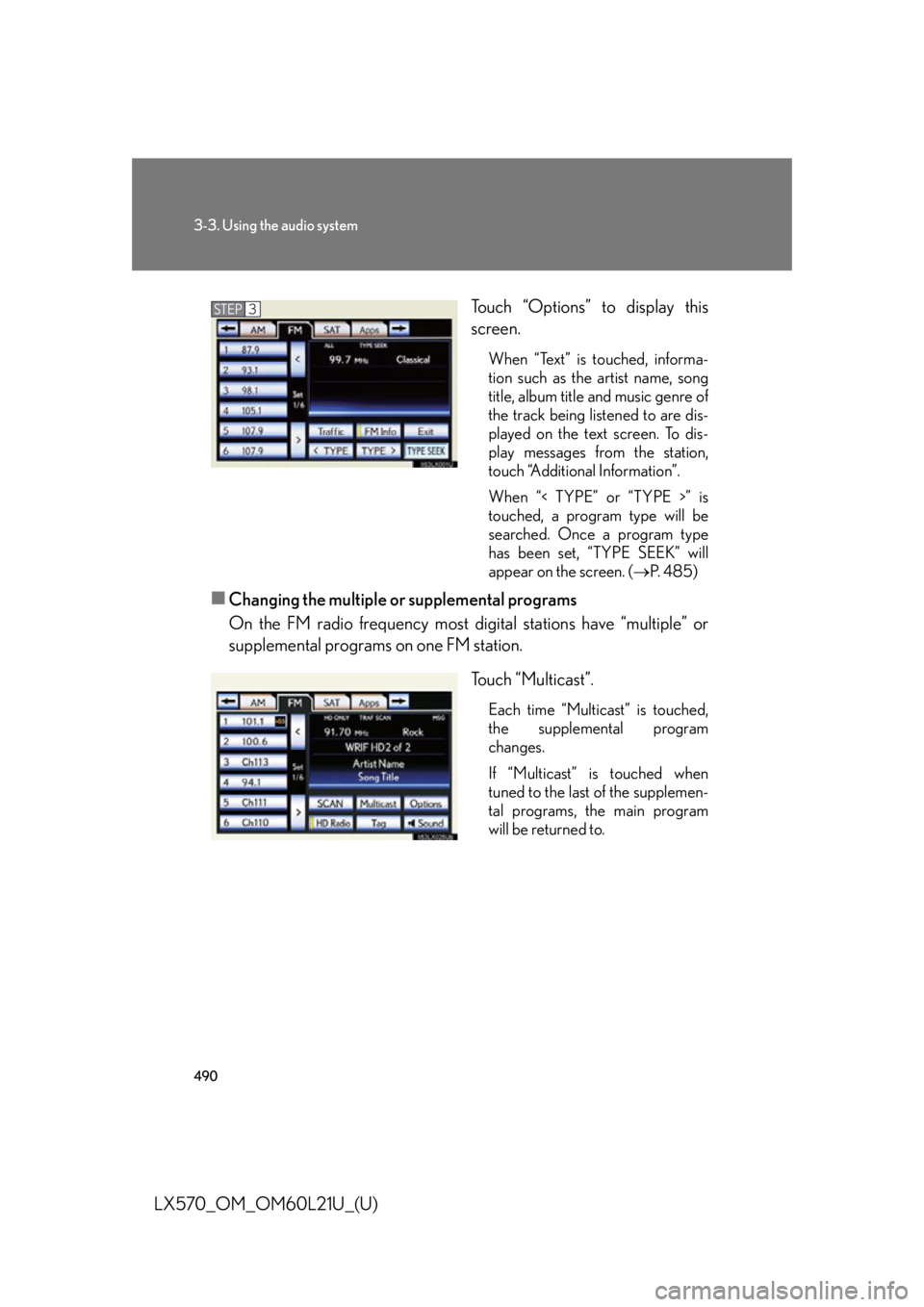
LX570_OM_OM60L21U_(U) Touch “Options” to display this
screen. When “Text” is touched, informa-
tion such as the artist name, song
title, album title and music genre of
the track being listened to are dis-
played on the text screen. To dis-
play messages from the station,
touch “Additional Information”.
When “< TYPE” or “TYPE >” is
touched, a program type will be
searched. Once a program type
has been set, “TYPE SEEK” will
appear on the screen. ( P. 4 8 5 )
■
Changing the multiple or supplemental programs
On the FM radio frequency most di gital stations have “multiple” or
supplemental programs on one FM station.
Touch “Multicast”. Each time “Multicast” is touched,
the supplemental program
changes.
If “Multicast” is touched when
tuned to the last of the supplemen-
tal programs, the main program
will be returned to.STEP 3
Page 491 of 956
4913-3. Using the audio system
3
Interior features
LX570_OM_OM60L21U_(U) ■ Preserving tag information
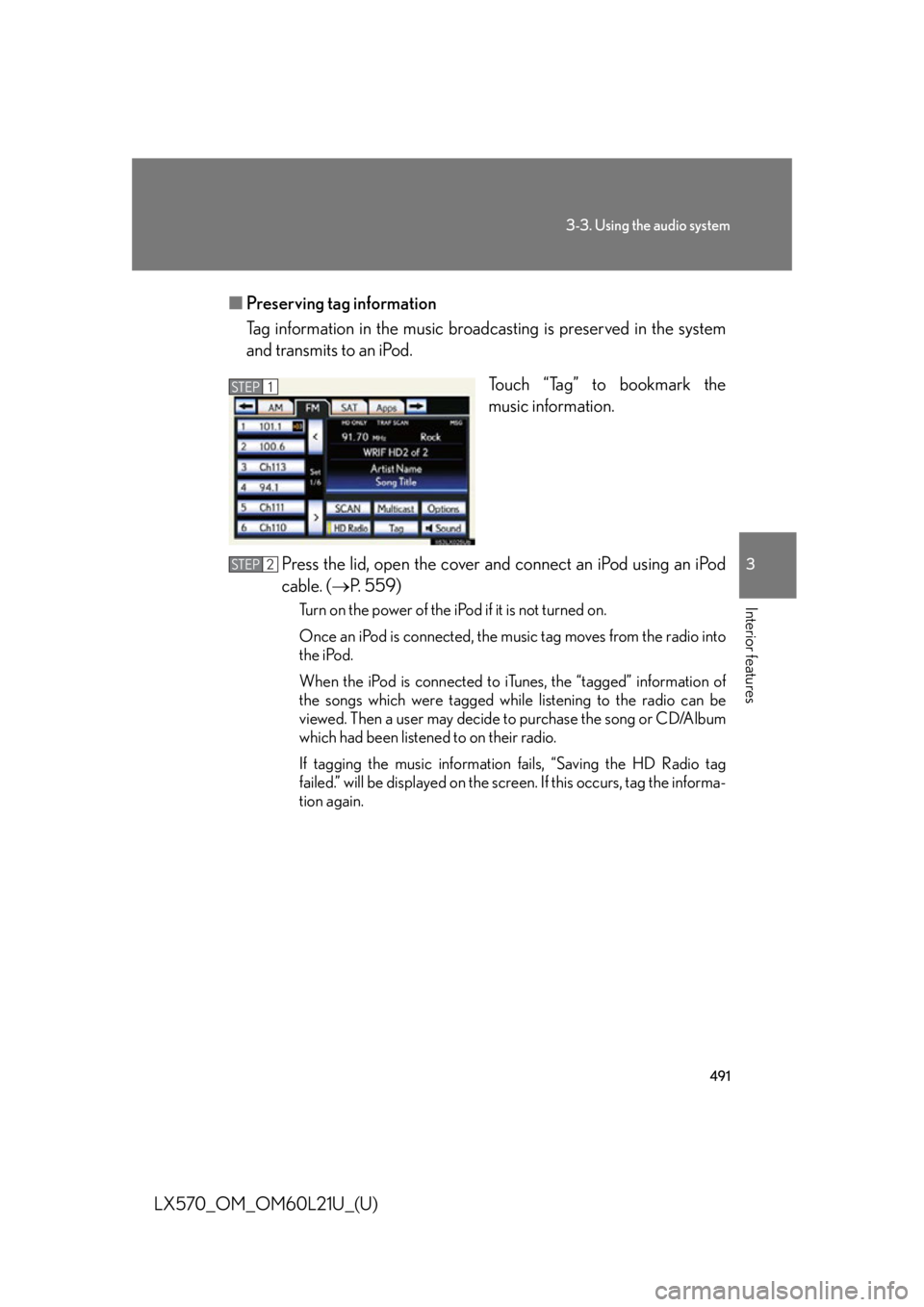
Tag information in the music broadcasting is preserved in the system
and transmits to an iPod.
Touch “Tag” to bookmark the
music information.
Press the lid, open the cover and connect an iPod using an iPod
cable. ( P. 559)Turn on the power of the iPod if it is not turned on.
Once an iPod is connected, the music tag moves from the radio into
the iPod.
When the iPod is connected to iTunes, the “tagged” information of
the songs which were tagged while listening to the radio can be
viewed. Then a user may decide to purchase the song or CD/Album
which had been listened to on their radio.
If tagging the music information fails, “Saving the HD Radio tag
failed.” will be displayed on the screen. If this occurs, tag the informa-
tion again.STEP 1STEP 1
STEP 2
Page 492 of 956
4923-3. Using the audio system
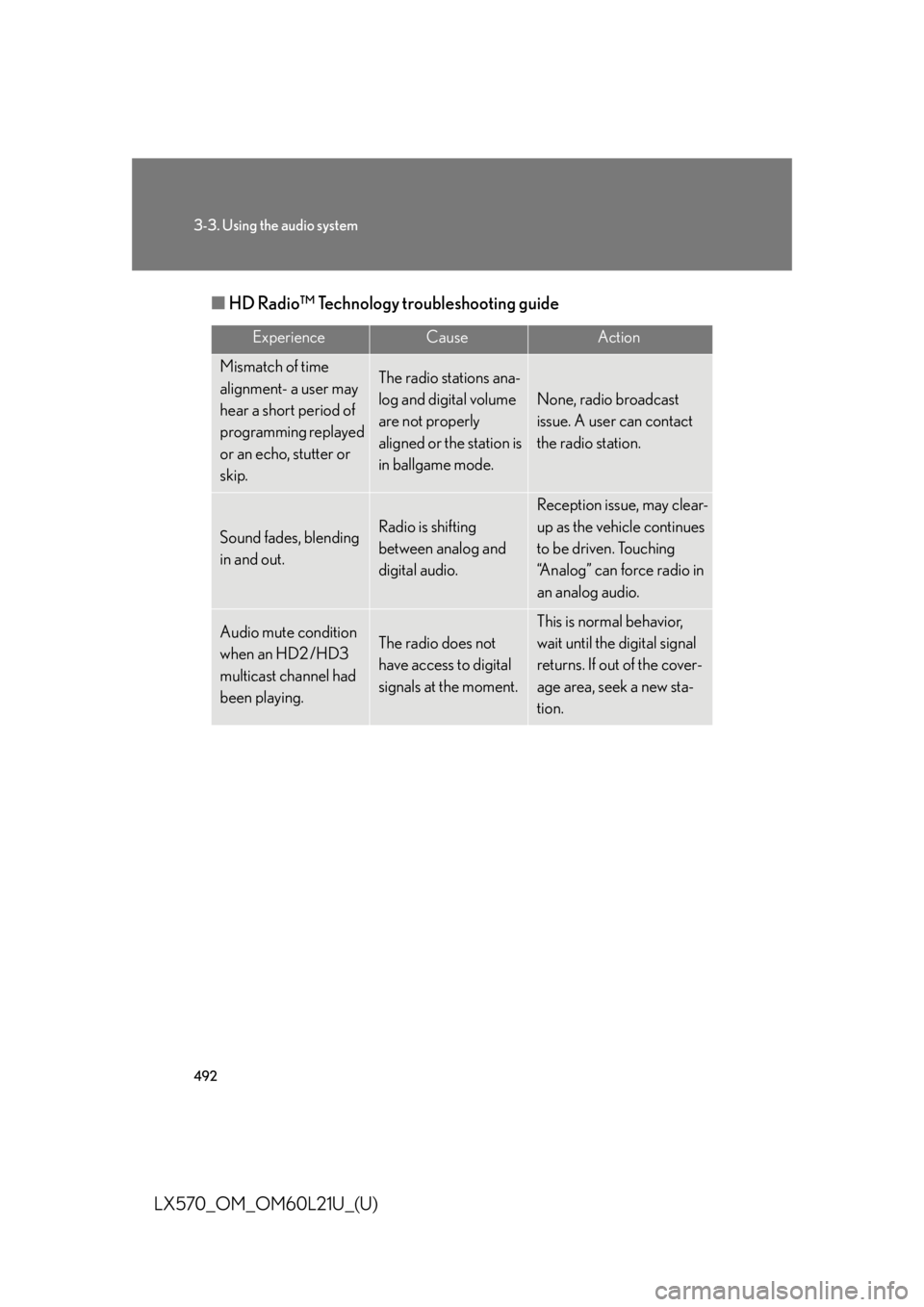
LX570_OM_OM60L21U_(U) ■ HD Radio™ Technology troubleshooting guide Experience Cause Action
Mismatch of time
alignment- a user may
hear a short period of
programming replayed
or an echo, stutter or
skip. The radio stations ana-
log and digital volume
are not properly
aligned or the station is
in ballgame mode. None, radio broadcast
issue. A user can contact
the radio station.
Sound fades, blending
in and out. Radio is shifting
between analog and
digital audio. Reception issue, may clear-
up as the vehicle continues
to be driven. Touching
“Analog” can force radio in
an analog audio.
Audio mute condition
when an HD2 /HD3
multicast channel had
been playing. The radio does not
have access to digital
signals at the moment. This is normal behavior,
wait until the digital signal
returns. If out of the cover-
age area, seek a new sta-
tion.
Page 493 of 956
4933-3. Using the audio system
3
Interior features
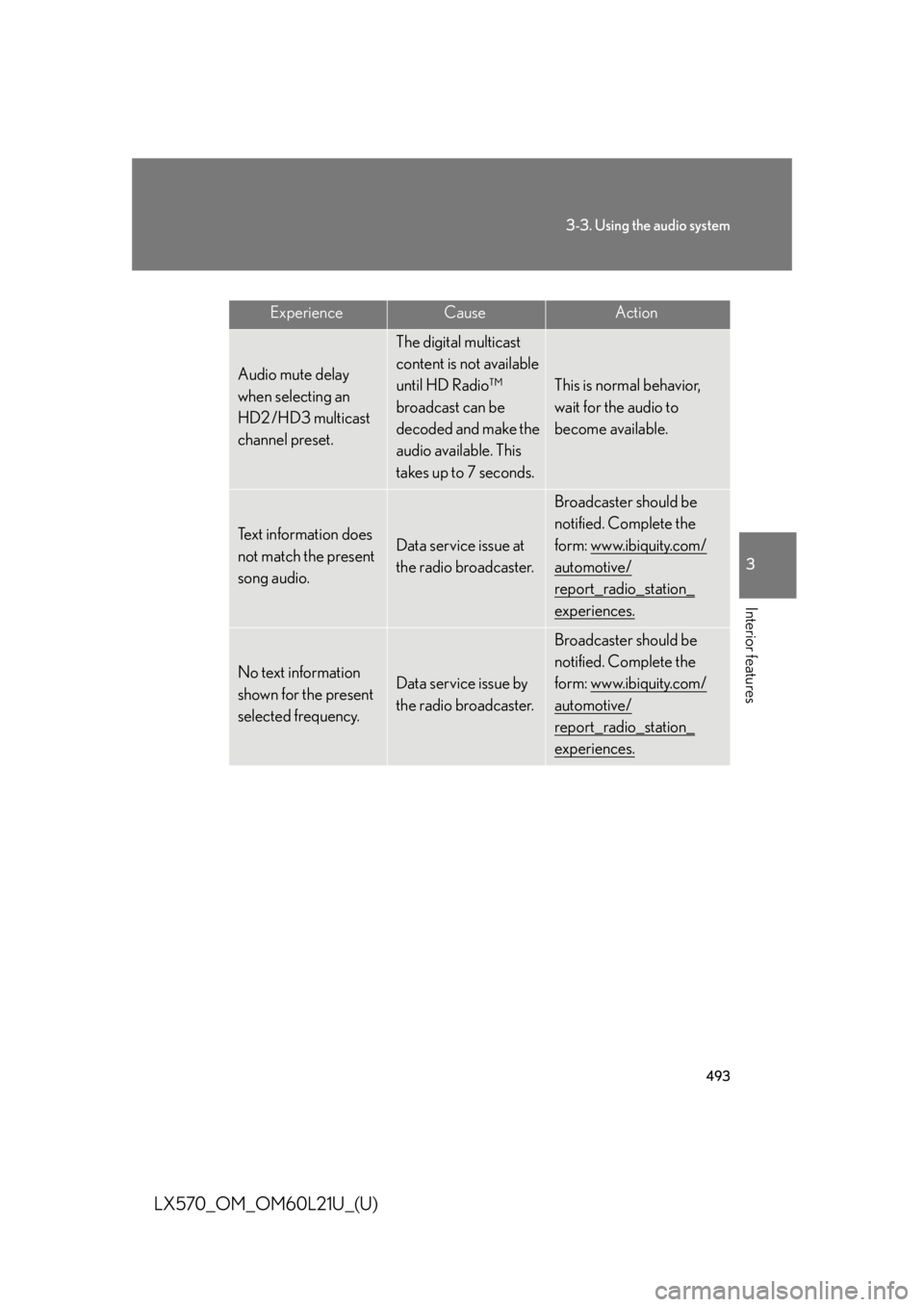
LX570_OM_OM60L21U_(U) Experience Cause Action
Audio mute delay
when selecting an
HD2 /HD3 multicast
channel preset. The digital multicast
content is not available
until HD Radio™
broadcast can be
decoded and make the
audio available. This
takes up to 7 seconds. This is normal behavior,
wait for the audio to
become available.
Text information does
not match the present
song audio. Data service issue at
the radio broadcaster. Broadcaster should be
notified. Complete the
form: www.ibiquity.com/
automotive/
report_radio_station_
experiences.
No text information
shown for the present
selected frequency. Data service issue by
the radio broadcaster. Broadcaster should be
notified. Complete the
form: www.ibiquity.com/
automotive/
report_radio_station_
experiences.
Page 494 of 956
4943-3. Using the audio system
LX570_OM_OM60L21U_(U) XM ®
Satellite Radio
■ Receiving XM ®
Satellite Radio
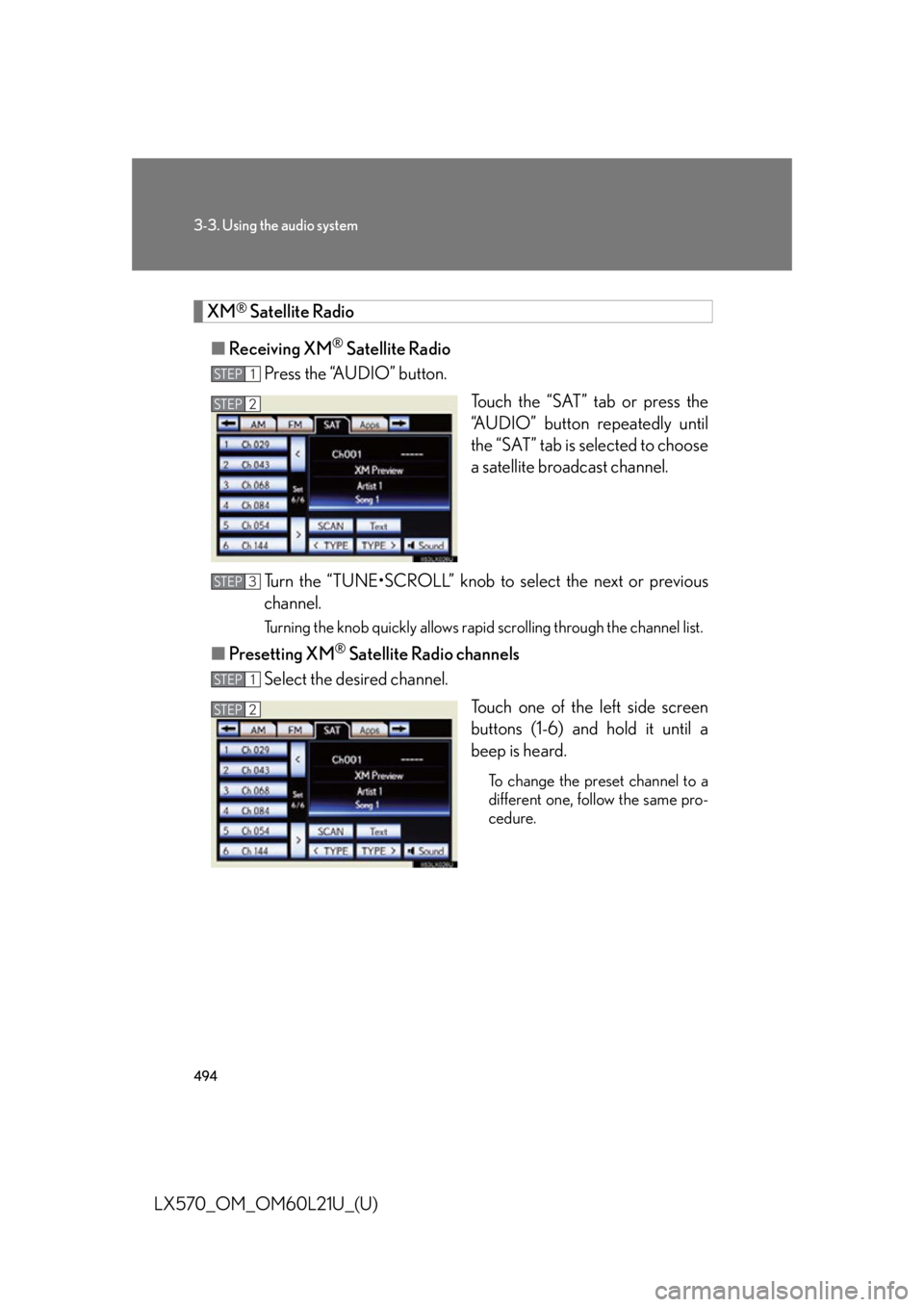
Press the “AUDIO” button.
Touch the “SAT” tab or press the
“AUDIO” button repeatedly until
the “SAT” tab is selected to choose
a satellite broadcast channel.
Turn the “TUNE•SCROLL” knob to select the next or previous
channel. Turning the knob quickly allows rapid scrolling through the channel list.
■ Presetting XM ®
Satellite Radio channels
Select the desired channel.
Touch one of the left side screen
buttons (1-6) and hold it until a
beep is heard. To change the preset channel to a
different one, follow the same pro-
cedure.STEP 1
STEP 2STEP 2
STEP 3
STEP 1
STEP 2STEP 2
Page 495 of 956
4953-3. Using the audio system
3
Interior features
LX570_OM_OM60L21U_(U) ■ Changing the channel category
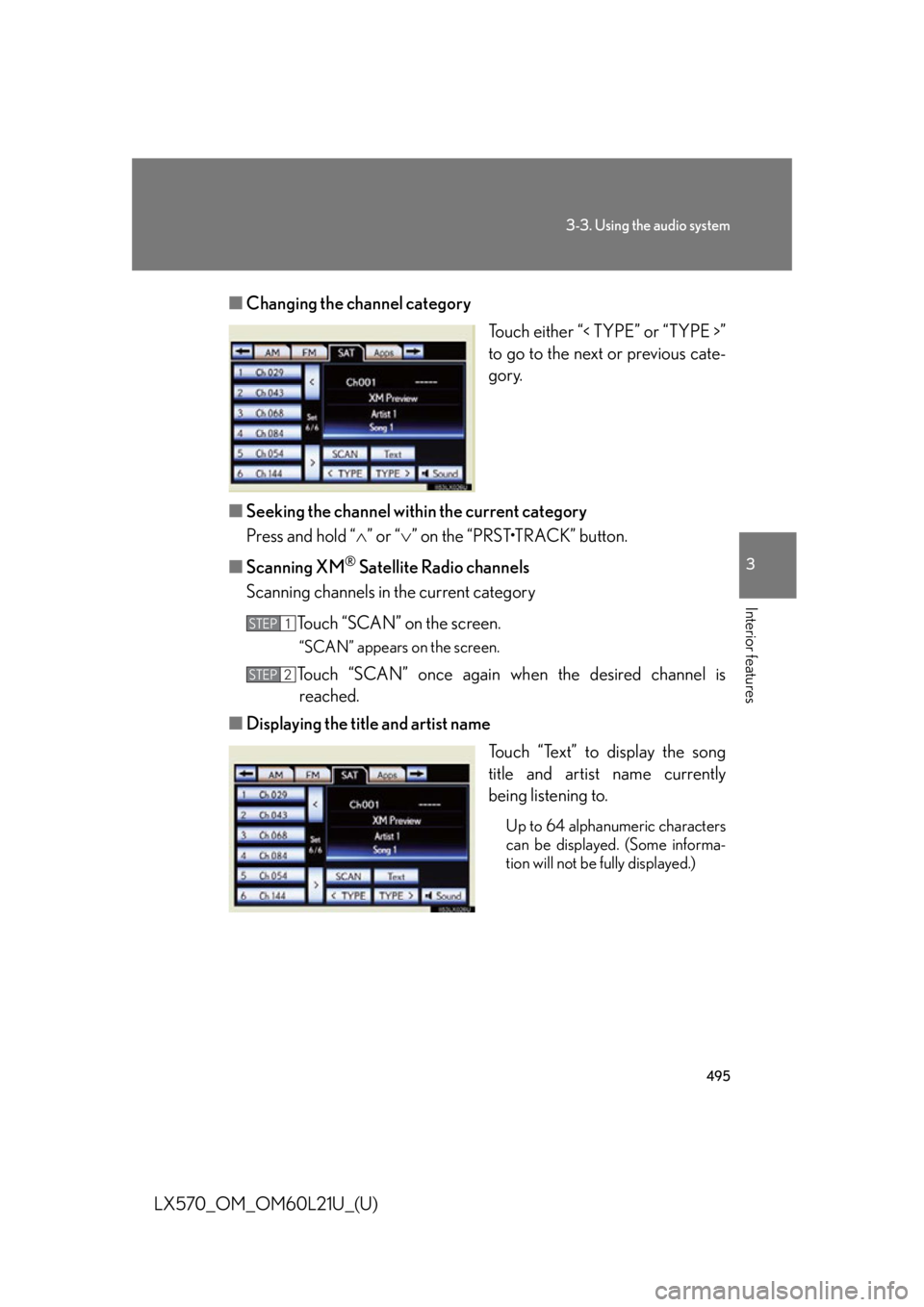
Touch either “< TYPE” or “TYPE >”
to go to the next or previous cate-
gory.
■ Seeking the channel within the current category
Press and hold “ ” or “ ” on the “PRST•TRACK” button.
■ Scanning XM ®
Satellite Radio channels
Scanning channels in the current category
Touch “SCAN” on the screen. “SCAN” appears on the screen.
Touch “SCAN” once again wh en the desired channel is
reached.
■ Displaying the title and artist name
Touch “Text” to display the song
title and artist name currently
being listening to. Up to 64 alphanumeric characters
can be displayed. (Some informa-
tion will not be fully displayed.)STEP 1
STEP 2
Page 496 of 956
4963-3. Using the audio system
LX570_OM_OM60L21U_(U) Internet radio broadcast (vehicles with the navigation system)
One of Apps’ features is the ability to listen to internet radio. In order to
use this service, an Apps compat ible phone and the navigation system
need to be set. For details, ref er to the “Navigation System Owner’s
Manual”.
Press the “AUDIO” button.
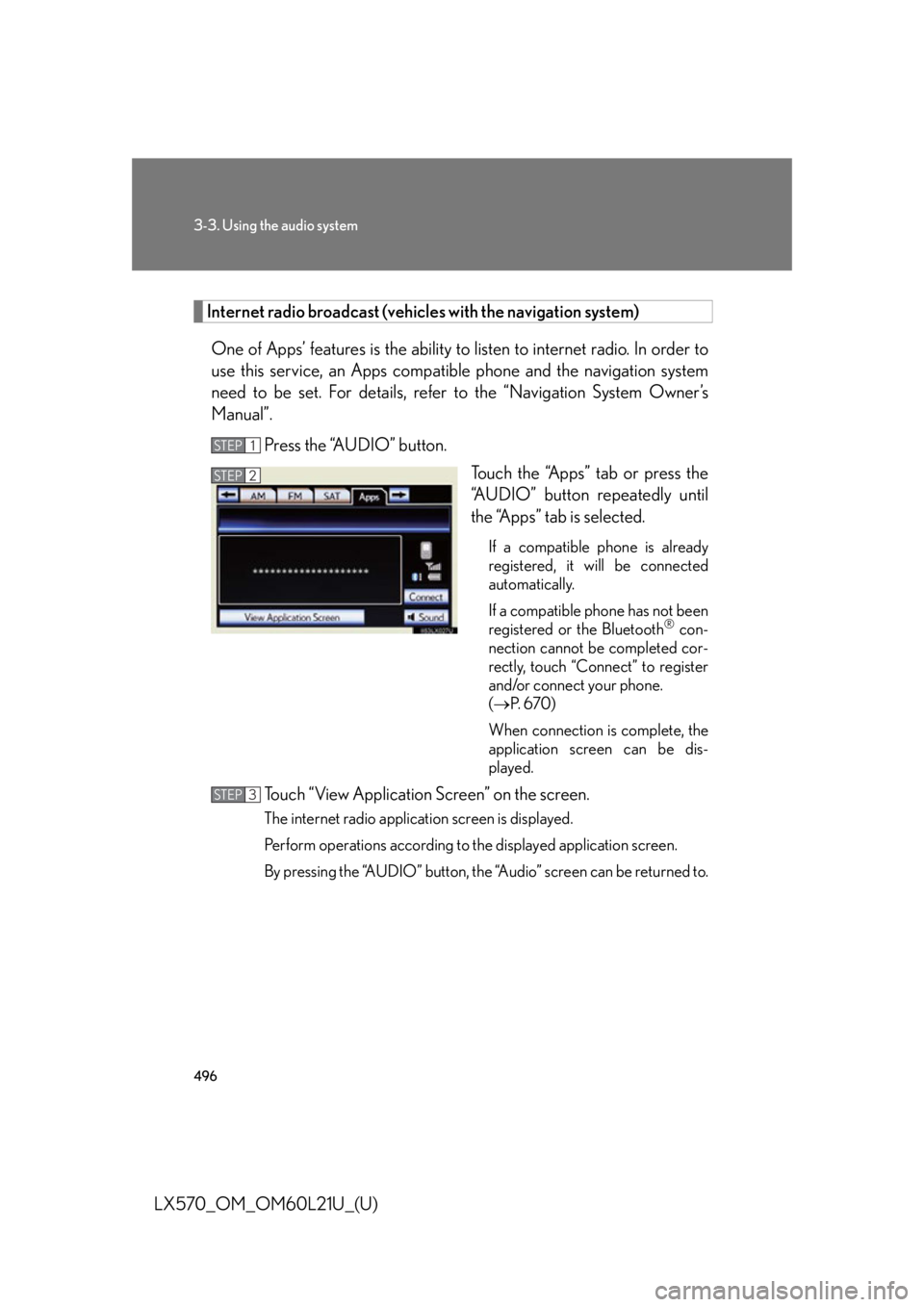
Touch the “Apps” tab or press the
“AUDIO” button repeatedly until
the “Apps” tab is selected. If a compatible phone is already
registered, it will be connected
automatically.
If a compatible phone has not been
registered or the Bluetooth ®
con-
nection cannot be completed cor-
rectly, touch “Connect” to register
and/or connect your phone.
( P. 6 7 0 )
When connection is complete, the
application screen can be dis-
played.
Touch “View Application Screen” on the screen. The internet radio application screen is displayed.
Perform operations according to the displayed application screen.
By pressing the “AUDIO” button, the “Audio” screen can be returned to.STEP 1
STEP 2
STEP 3
Page 497 of 956
4973-3. Using the audio system
3
Interior features
LX570_OM_OM60L21U_(U) Silencing the sound
Press .
Press the button again to turn the system back on. ■
If you touch
The display returns to the previous screen. ■
When the battery is disconnected
All preset stations are erased. ■
Reception sensitivity ●
Cargo loaded on the roof luggage carrier, especially metal objects, may
adversely affect the reception of XM ®
Satellite Radio.●
Maintaining perfect radio reception at all times is difficult due to the continually
changing position of the an tenna, differences in signal strength and surrounding
objects, such as trains, transmitters, etc. ●
The radio antenna is mounted inside the rear quarter window. To maintain clear
radio reception, do not attach metallic window tinting or other metallic objects
to the antenna wire mounted inside the rear quarter window.