door lock LEXUS LX570 2014 Repair Manual
[x] Cancel search | Manufacturer: LEXUS, Model Year: 2014, Model line: LX570, Model: LEXUS LX570 2014Pages: 956, PDF Size: 16.4 MB
Page 807 of 956
8054-3. Do-it-yourself maintenance
4
Maintenance and care
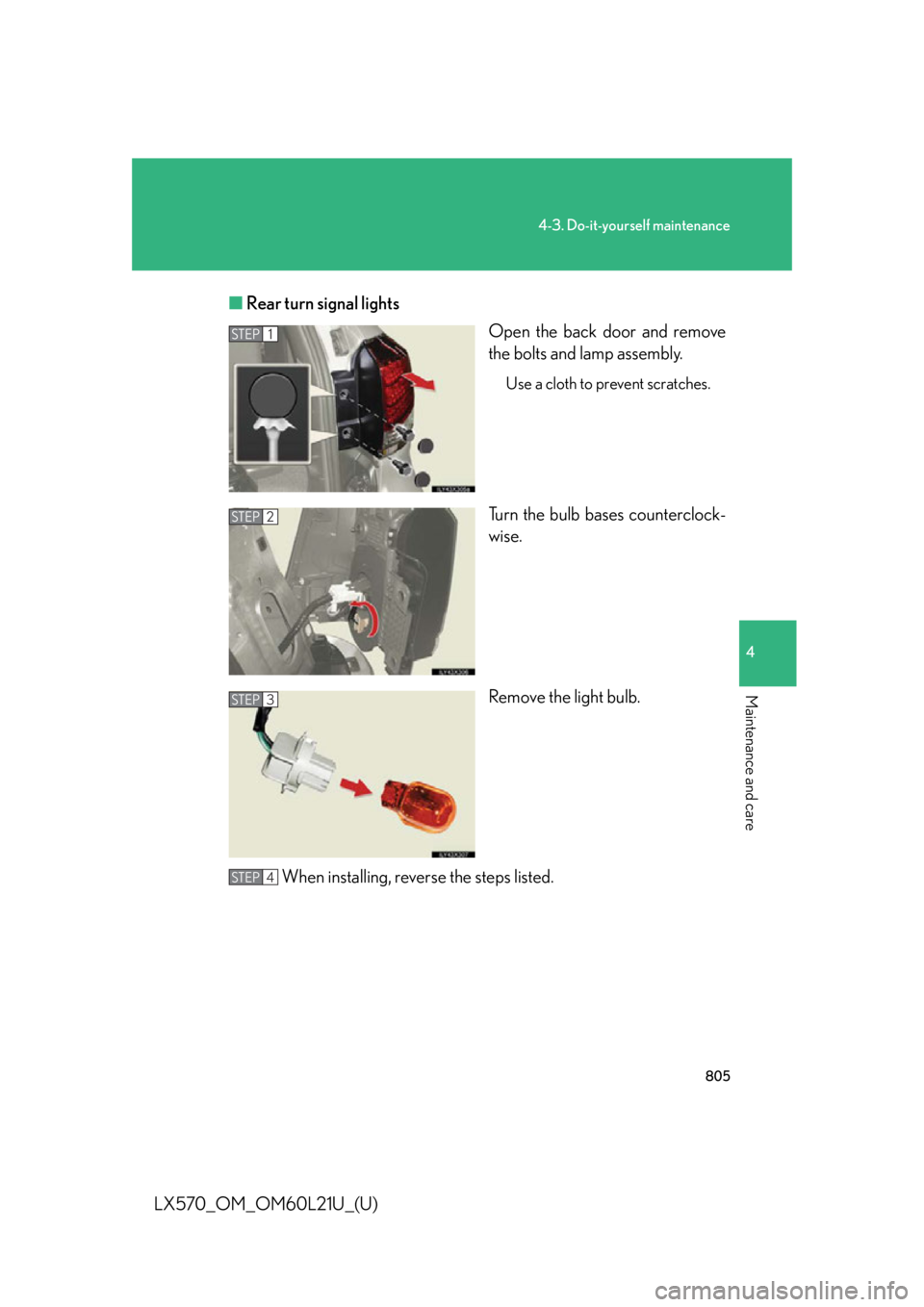
LX570_OM_OM60L21U_(U) ■ Rear turn signal lights
Open the back door and remove
the bolts and lamp assembly. Use a cloth to prevent scratches.
Turn the bulb bases counterclock-
wise.
Remove the light bulb.
When installing, rever se the steps listed.STEP 1
STEP 2
STEP 3
STEP 4
Page 847 of 956

5
When trouble arises
8455-2. Steps to take in an emergency
LX570_OM_OM60L21U_(U) Once
(Flashes) •When the doors
were unlocked
with the
mechanical key
and then the
“ENGINE
START STOP”
switch was
pressed, the
electronic key
could not be
detected in the
vehicle.
• The electronic
key could not be
detected in the
vehicle even
after the
“ENGINE
START STOP”
switch was
pressed two
consecutive
times. Touch the elec-
tronic key to the
“ENGINE START
STOP” switch
while depressing
the brake pedal.Interior
buzzer Exterior
buzzerWa r n i n g m e s s a g e Details Correction
procedure
Page 848 of 956

8465-2. Steps to take in an emergency
LX570_OM_OM60L21U_(U) Once The electronic key
has a low battery. Replace the elec-
tronic key battery.
( P. 7 8 0 )
Once
(Flashes) A door was
opened and
closed with the
“ENGINE START
STOP” switch
turned off and
then the
“ENGINE START
STOP” switch was
put in ACCES-
SORY mode
twice without the
engine being
started. Press the
“ENGINE START
STOP” switch
while depressing
the brake pedal.
Once
(Flashes) The steering lock
could not be
released within 3
seconds of the
“ENGINE START
STOP” switch
being pressed. Press the
“ENGINE START
STOP” switch
while depressing
the brake pedal
and moving the
steering wheel left
and right.Interior
buzzer Exterior
buzzerWa r n i n g m e s s a g e Details Correction
procedure
Page 869 of 956

5
When trouble arises
8675-2. Steps to take in an emergency
LX570_OM_OM60L21U_(U) If the electronic key do es not operate properly
Locking and unlocking the doors and key linked functions
Using the mechanical key ( P. 3 1 )
in order to perform the following
operations.
Locks all doors
Closes the windows/moon roof
(turn and hold)
*Unlocks the door
Turning the key rearward
unlocks the driver’s door. Turn-
ing the key once again unlocks
the other doors.
Opens the windows/moon roof
(turn and hold)
*
* : This setting must be customized
at your Lexus dealer.If communication between the electron ic key and vehicle is interrupted
( P. 39) or the electronic key cannot be used because the battery is
depleted, the smart access system with push-button start and wireless
remote control cannot be used. In such cases, the doors can be opened or
the engine can be started by following the procedure below.
Page 871 of 956

5
When trouble arises
8695-2. Steps to take in an emergency
LX570_OM_OM60L21U_(U) ■
Stopping the engine
Shift the shift lever to “P” and press th e “ENGINE START STOP” switch as you nor-
mally do when stopping the engine. ■
Replacing the key battery
As this above procedure is a temporary measure, it is recommended that the elec-
tronic key battery be replaced immediately when the battery depletes. ( P. 7 8 0 )■
Changing “ENGINE START STOP” switch modes
Within 10 seconds of the buzzer sounding, release the brake pedal and press the
“ENGINE START STOP” switch.
The engine does not start and modes will be changed each time the switch is
pressed. ( P. 1 76 )■
Alarm
Using the mechanical key to lock the doors will not set the alarm system.
If a door is unlocked using the mechanical key when the alarm system is set, the
alarm may be triggered. ( P. 1 1 9 )
Page 873 of 956

5
When trouble arises
8715-2. Steps to take in an emergency
LX570_OM_OM60L21U_(U) ■
Starting the engine when the battery is discharged
The engine cannot be started by push-starting. ■
Avoiding a discharged battery ●
Turn off the headlights and the audio system while the engine is off. ●
Turn off any unnecessary electrical compon ents when the vehicle is running at a
low speed for an extended period, such as in heavy traffic, etc.■
Charging the battery
The electricity stored in the battery will discharge gradually even when the vehicle
is not in use, due to natural discharge and the draining effects of certain electrical
appliances. If the vehicle is left for a long time, the battery may discharge, and the
engine may be unable to start. (The battery recharges automatically during driving.) ■
When the battery is removed or discharged ●
The power back door must be initialized. ( P. 6 0 )●
Make sure the key is not inside the vehicle when recharging or replacing the
battery. The key may be locked in the vehicle if the alarm is activated. ( P. 1 2 0 )Start the engine of the second vehicle. Increase the engine
speed slightly and maintain at that level for approximately 5
minutes to recharge the battery of your vehicle.
Open and close any of the do ors with the “ENGINE START
STOP” switch off.
Maintain the engine speed of th e second vehicle and turn the
“ENGINE START STOP” switch to IGNITION ON mode,
then start the vehicle’s engine.
Once the vehicle’s engine ha s started, remove the jumper
cables in the exact reverse ord er in which they were con-
nected.
Once the engine starts, have the vehicle checked at your Lexus dealer,
as soon as possible. STEP 3
STEP 4
STEP 5
STEP 6
Page 911 of 956
9076-2. Customization
6
Vehicle specifications
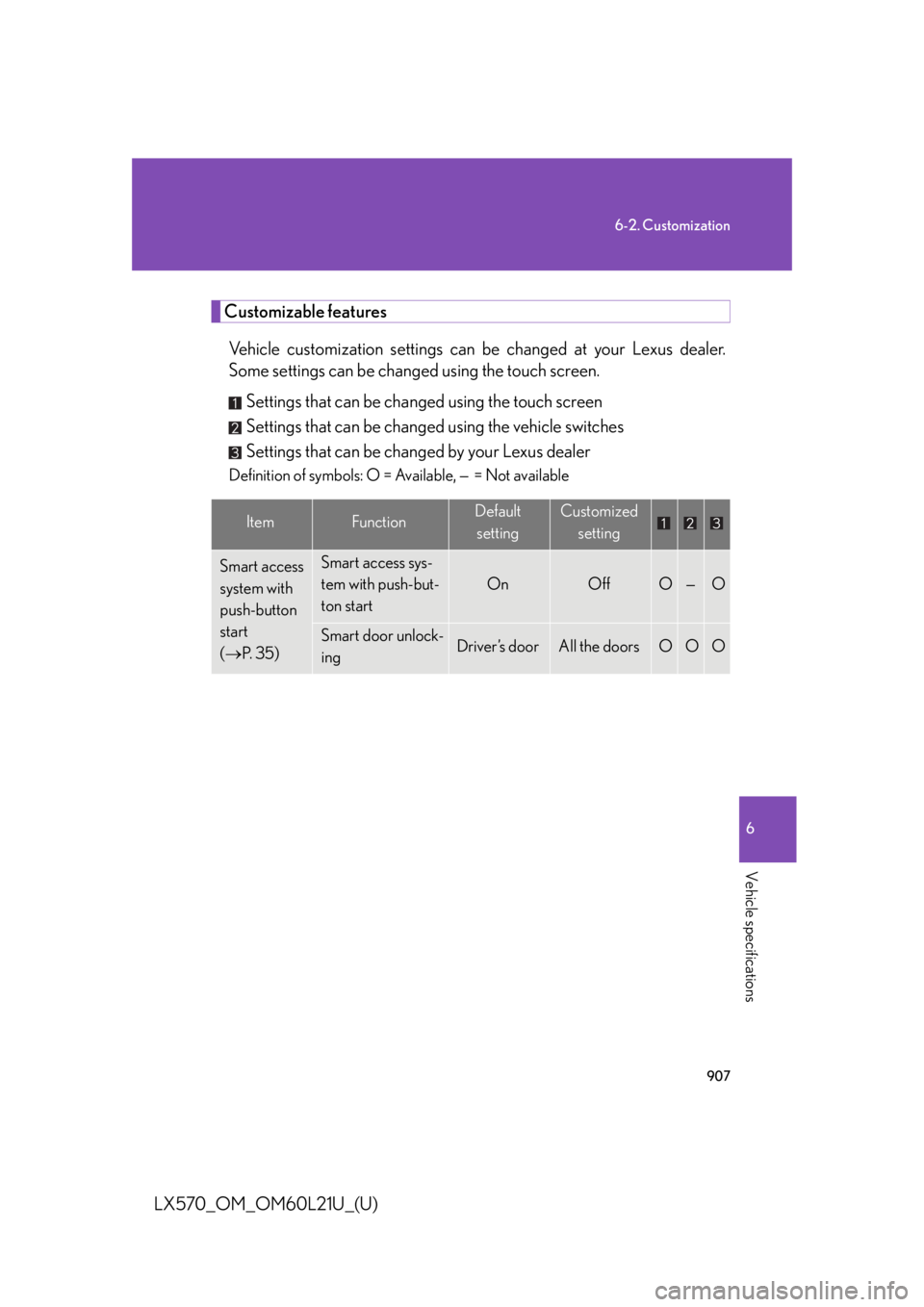
LX570_OM_OM60L21U_(U) Customizable features
Vehicle customization settings can be changed at your Lexus dealer.
Some settings can be changed using the touch screen.
Settings that can be changed using the touch screen
Settings that can be changed using the vehicle switches
Settings that can be changed by your Lexus dealer Definition of symbols: O = Available, — = Not available
Item Function Default
setting Customized
setting
Smart access
system with
push-button
start
( P. 3 5 ) Smart access sys-
tem with push-but-
ton start On Off O — O
Smart door unlock-
ing Driver’s door All the doors O O O
Page 912 of 956

9086-2. Customization
LX570_OM_OM60L21U_(U) Wireless
remote
control
( P. 4 8 ) Wireless remote
control On Off — — O
Open door warn-
ing function (when
locking the vehicle) On Off — — O
Unlocking opera-
tion Driver’s door
unlocked in
one step, all
doors
unlocked in
two steps All doors
unlocked in
one step O — O
Adjust the volume
of confirmation
buzzer sounds
when the vehicle is
locked or unlocked 7 Off
O — O
1 to 6
Power back door
operation Push and hold One short
push — — O
Push twice — — O
Off — — O
Smart access
system with
push-button
start
( P. 3 5 )
and wireless
remote
control
( P. 4 8 ) Operation signal
(Emergency flash-
ers) On Off O — O
Ti m e e l a p s e d
before automatic
door lock function
is activated if door
is not opened after
being unlocked 60 seconds Off
O — O30 seconds
120 secondsItem Function Default
setting Customized
setting
Page 913 of 956
9096-2. Customization
6
Vehicle specifications
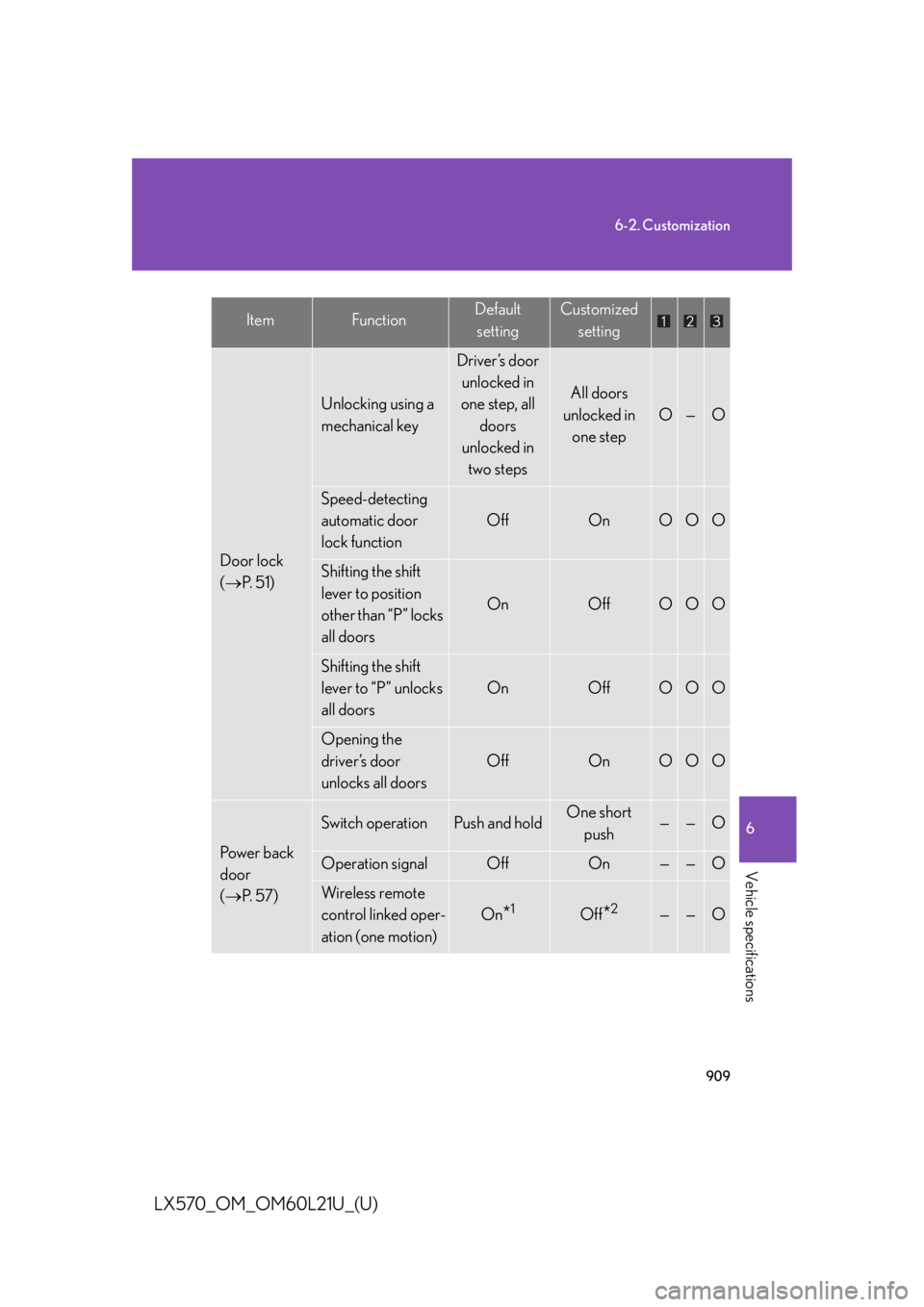
LX570_OM_OM60L21U_(U) Door lock
( P. 5 1 ) Unlocking using a
mechanical key Driver’s door
unlocked in
one step, all
doors
unlocked in
two steps All doors
unlocked in
one step O — O
Speed-detecting
automatic door
lock function Off On O O O
Shifting the shift
lever to position
other than “P” locks
all doors On Off O O O
Shifting the shift
lever to “P” unlocks
all doors On Off O O O
Opening the
driver’s door
unlocks all doors Off On O O O
Power back
door
( P. 5 7 ) Switch operation Push and hold One short
push — — O
Operation signal Off On — — O
Wireless remote
control linked oper-
ation (one motion) On
* 1
Off
* 2
— — OItem Function Default
setting Customized
setting
Page 916 of 956

9126-2. Customization
LX570_OM_OM60L21U_(U) Illumination
( P. 6 8 2 ) Time period before
the interior lights
turn off 15 seconds Off
O — O7. 5 s e c o n d s
30 seconds
Time period before
the exterior lights
turn off 15 seconds Off
O — O7. 5 s e c o n d s
30 seconds
Operation after the
“ENGINE START
STOP” switch is
turned off On Off — — O
Operation when
the doors are
unlocked On Off — — O
Operation when
you approach the
vehicle with the
electronic key on
your person (when
the interior light
switch is door posi-
tion) On Off — — O
Shift lever light On Off — — O
Footwell lights On Off — — OItem Function Default
setting Customized
setting