steering LEXUS LX570 2014 Manual Online
[x] Cancel search | Manufacturer: LEXUS, Model Year: 2014, Model line: LX570, Model: LEXUS LX570 2014Pages: 956, PDF Size: 16.4 MB
Page 306 of 956
3062-4. Using other driving systems
LX570_OM_OM60L21U_(U) Using the side monitor
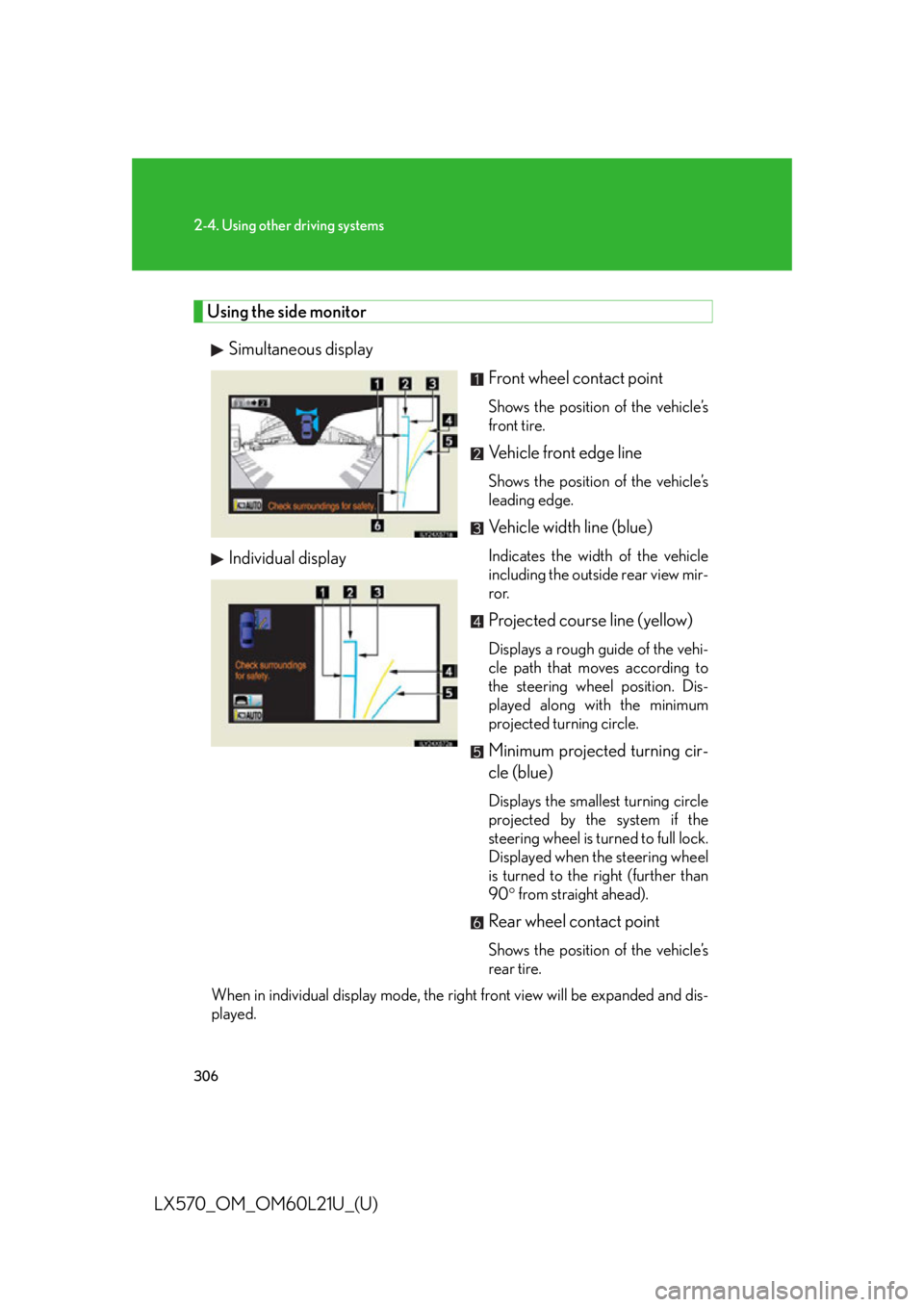
Simultaneous display
Individual display Front wheel contact point Shows the position of the vehicle’s
front tire.
Vehicle front edge line Shows the position of the vehicle’s
leading edge.
Vehicle width line (blue) Indicates the width of the vehicle
including the outside rear view mir-
ror.
Projected course line (yellow) Displays a rough guide of the vehi-
cle path that moves according to
the steering wheel position. Dis-
played along with the minimum
projected turning circle.
Minimum projected turning cir-
cle (blue) Displays the smallest turning circle
projected by the system if the
steering wheel is turned to full lock.
Displayed when the steering wheel
is turned to the right (further than
90 from straight ahead).
Rear wheel contact point Shows the position of the vehicle’s
rear tire.
When in individual display mode, the ri ght front view will be expanded and dis-
played.
Page 310 of 956
3102-4. Using other driving systems
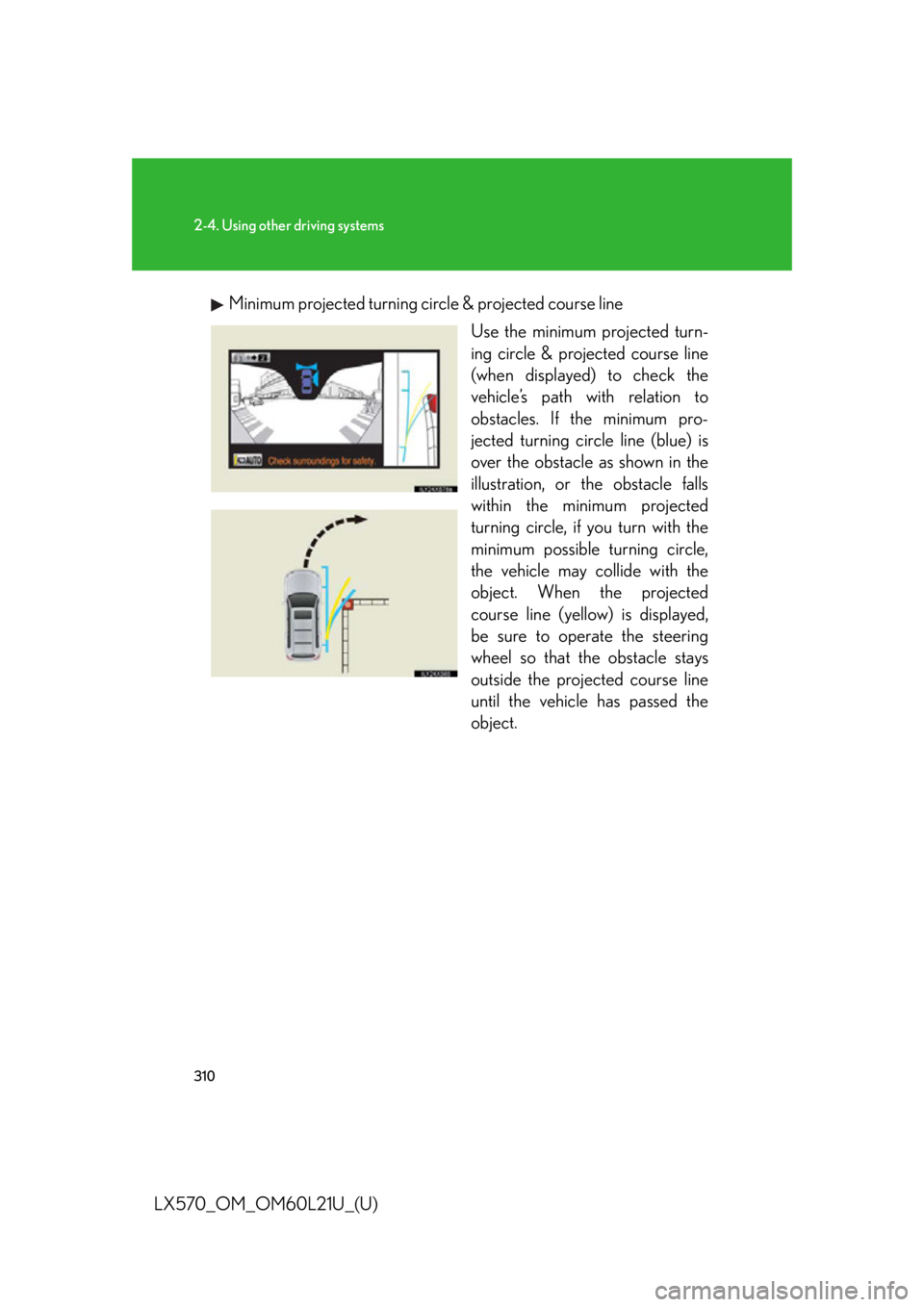
LX570_OM_OM60L21U_(U) Minimum projected turning circ le & projected course line
Use the minimum projected turn-
ing circle & projected course line
(when displayed) to check the
vehicle’s path with relation to
obstacles. If the minimum pro-
jected turning circle line (blue) is
over the obstacle as shown in the
illustration, or the obstacle falls
within the minimum projected
turning circle, if you turn with the
minimum possible turning circle,
the vehicle may collide with the
object. When the projected
course line (yellow) is displayed,
be sure to operate the steering
wheel so that the obstacle stays
outside the projec ted course line
until the vehicle has passed the
object.
Page 311 of 956
3112-4. Using other driving systems
2
When driving
LX570_OM_OM60L21U_(U) If the battery is disconnected
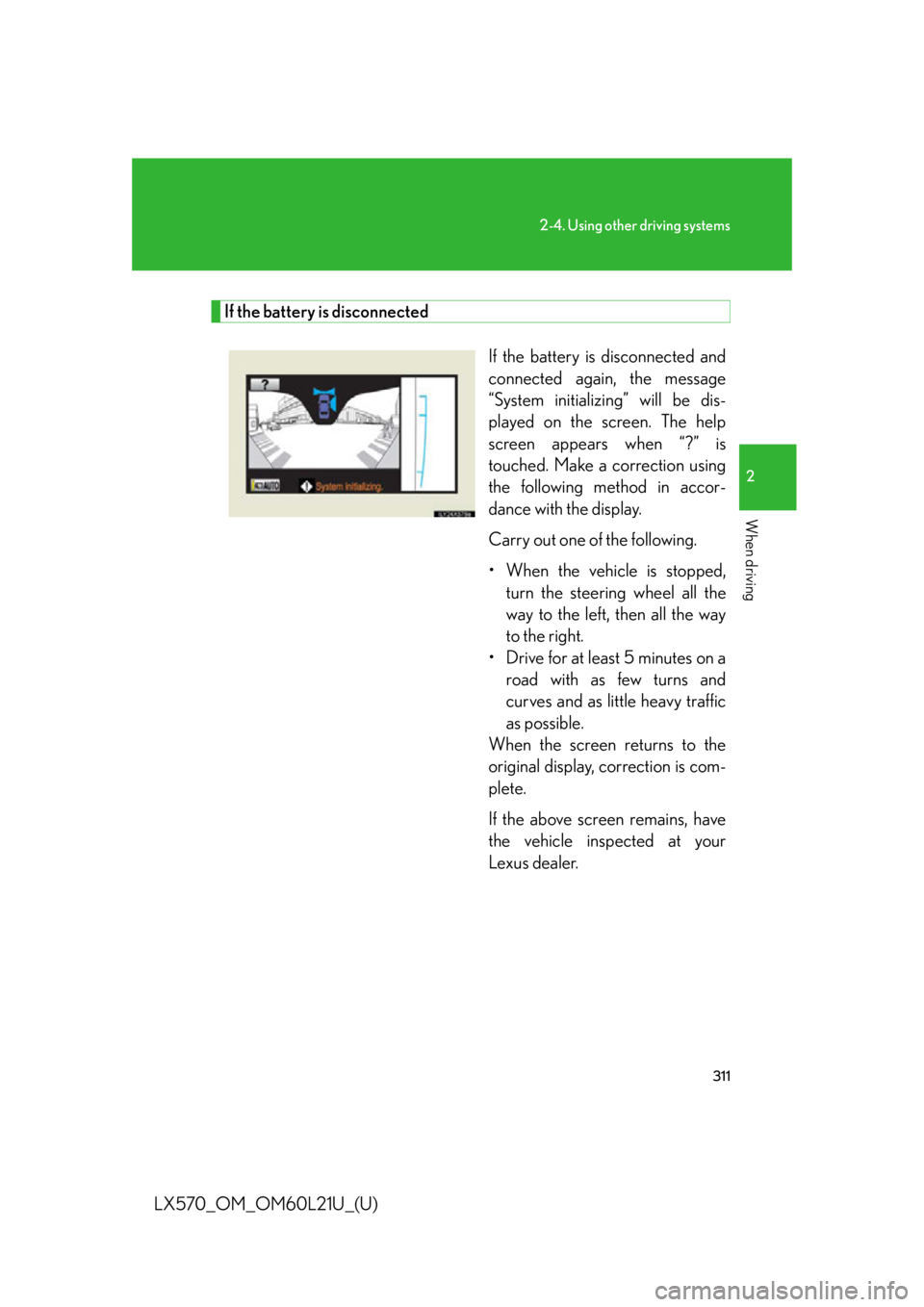
If the battery is disconnected and
connected again, the message
“System initializing” will be dis-
played on the screen. The help
screen appears when “?” is
touched. Make a correction using
the following method in accor-
dance with the display.
Carry out one of the following.
• When the vehicle is stopped,
turn the steering wheel all the
way to the left, then all the way
to the right.
• Drive for at least 5 minutes on a
road with as few turns and
curves and as little heavy traffic
as possible.
When the screen returns to the
original display, correction is com-
plete.
If the above screen remains, have
the vehicle inspected at your
Lexus dealer.
Page 317 of 956

3172-4. Using other driving systems
2
When driving
LX570_OM_OM60L21U_(U) NOTICE■
When a solid object is close by
■
When using the wide view front & side monitor
Even if an obstacle is no longer visible on the side monitor, do not turn the steering
wheel further in the direction the vehicle is turning until the vehicle has moved com-
pletely past the obstacle. If the steering wh eel is turned to full lock, the vehicle will
turn in the smallest possible turning circle, and may collide with the obstacle. The screen’s guide lines are designed for level
surfaces (road surface etc.) or flat walls etc.
When driving near the obstacle, the obstacle
may be displayed as outside the projected
course line, and it may seem that there is no
danger of a collision, however any sections
protruding from the wall may project over the
course line and the vehicle may actually col-
lide with the obstacle.
In cases such as this were the projected
course line passes clos e to obstacles, always
visually check the surroundings for safety.
Protruding section of wall
Wall displayed on screen
Page 325 of 956
3252-4. Using other driving systems
2
When driving
LX570_OM_OM60L21U_(U) ■
In the following cases the 4-Wheel AHC will not operate ●
The brake pedal has been depressed for a few seconds or longer while the vehi-
cle is stopped. ●
Vehicle height control has not been frequently used. ●
The suspension fluid temperature is lower than -22°F (-30°C). ●
There is ice on the suspension. ●
Driving on bumpy roads which may cause the suspension to fully elongate. ●
If the steering wheel is abruptly turned more than 3/4 of a revolution with the
center differential lock system activated.■
Cold weather operation
It may take longer for the vehicle height to change if the suspension fluid tempera-
ture drops below 5°F (-15°C).
The 4-Wheel AHC does not operate when the suspension fluid temperature drops
below -22°F (-30°C). ●
In this case, even if the height select switch is pressed, the vehicle height will not
change. Once the vehicle has been driven for a short time and the suspension
fluid has been warmed to within normal operating limits, the 4-Wheel AHC will
begin operating and the vehicle height wi ll automatically change to the selected
mode. ●
When the suspension fluid is around -22°F (-30°C), the vehicle height may not
be able to be raised, even if the 4-Wheel AHC is operating. In this case, pull the
height select switch to “ ” then push to “ ” after driving for a short time longer
to select the desired vehicle height.■
Parking and stopping tips ●
If you immediately stop the engine after off-road driving, the vehicle height may
gradually lower. When parking, make su re there is nothing under the vehicle
that may come in contact with the underbody. The vehicle will return to the set
height when the engine is started. ●
The vehicle height may change as the temperature changes when the engine is
stopped. The vehicle will return to the set height when the engine is started.
Page 337 of 956
3372-4. Using other driving systems
2
When driving
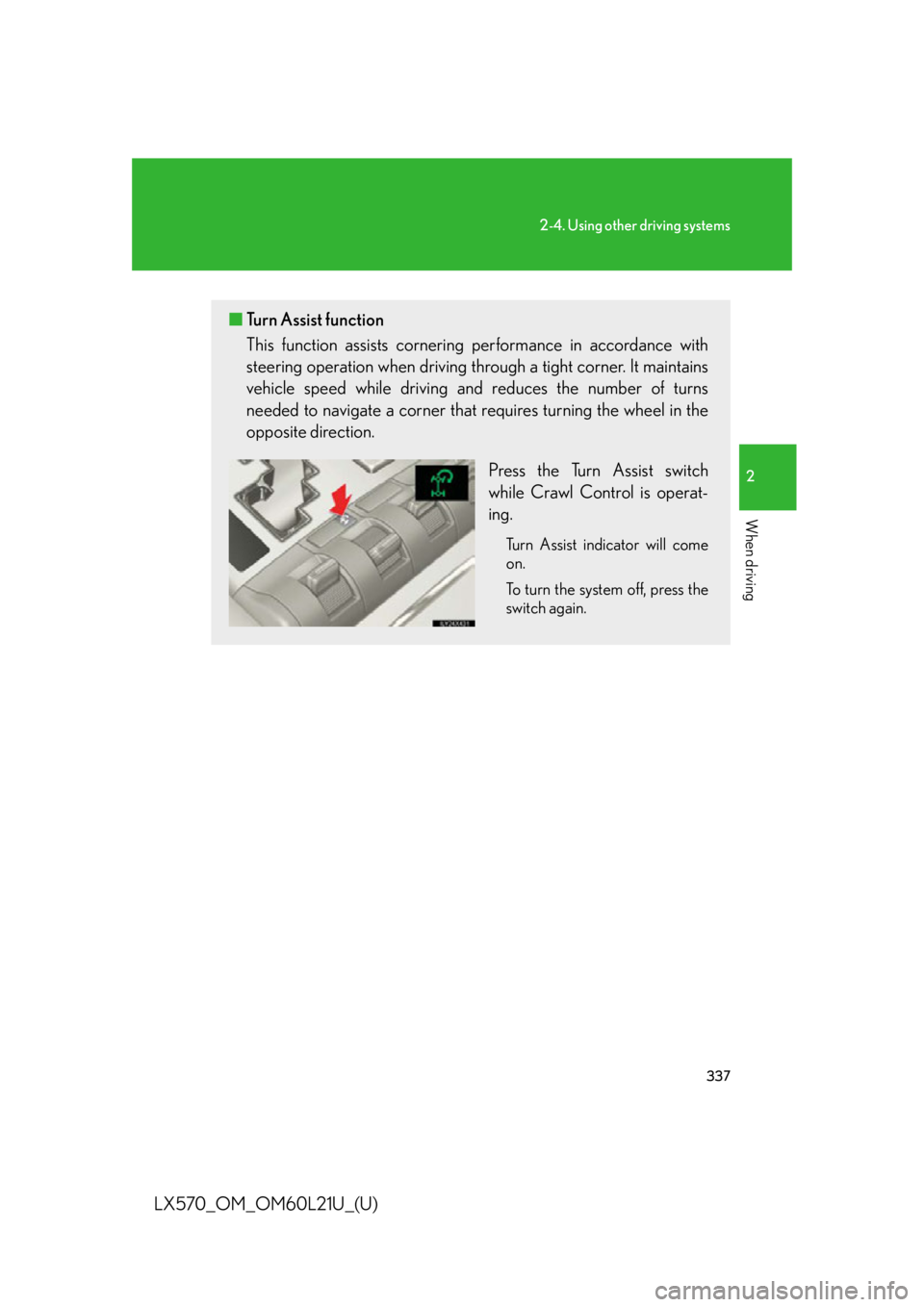
LX570_OM_OM60L21U_(U) ■ Turn Assist function
This function assists cornering performance in accordance with
steering operation when driving th rough a tight corner. It maintains
vehicle speed while driving an d reduces the number of turns
needed to navigate a corner that requires turning the wheel in the
opposite direction.
Press the Turn Assist switch
while Crawl Control is operat-
ing. Turn Assist indicator will come
on.
To turn the system off, press the
switch again.
Page 339 of 956

3392-4. Using other driving systems
2
When driving
LX570_OM_OM60L21U_(U) ■
The Crawl Control and Turn Assist function can be operated when
Crawl Control ●
The engine is running. ●
The shift lever is in any gear other than “P” or “N”. ●
The four-wheel drive control switch is in “L4”. ●
The driver’s door is closed.
Tu r n A s s i s t f u n c t i o n ●
Crawl Control is operating. ●
The center differential is not locked. ●
The accelerator and brake are not being operated. ●
The shift lever is in any gear other than “P”, “R” or “N”.●
The steering wheel is turned very far.■
Automatic system cancelation
Crawl Control
In the following situations, the buzzer will sound intermittently and Crawl Control
will be canceled automatically. In this event, the Crawl Control indicator will flash
and then go off, the Turn Assist indicator will go off (if the Turn Assist function is in
use), and a message stating that Crawl Co ntrol has been turned off will be dis-
played on the multi-information display for several seconds. ●
When the shift lever is moved to “P” or “N”. ●
When the four-wheel drive control switch is in “H4”. ●
When the driver’s door is opened.
Tu r n A s s i s t f u n c t i o n
When the center differential is locked, th e buzzer will sound intermittently and the
Turn Assist function will be canceled automatically. In this event, the Turn Assist indi-
cator will go off, and a message stating that the Turn Assist function has been turned
off will be displayed on the multi-information display for several seconds.
Page 341 of 956
3412-4. Using other driving systems
2
When driving
LX570_OM_OM60L21U_(U) ■
Sounds and vibrations caused by the Crawl Control system ●
A sound may be heard from the engi ne compartment when the engine is
started or just after the vehicle begins to move. This sound does not indicate that
a malfunction has occurred in Crawl Control system. ●
Either of the following conditions may occur when the Crawl Control system is
operating. None of these are indicators that a malfunction has occurred.
• Vibrations may be felt through the vehicle body and steering.
• A motor sound may be heard after the vehicle comes to a stop.■
When there is a malfunction in the system
Warning lights and/or warnin g messages will turn on. ( P. 8 2 2 , 8 4 7 )
CAUTION■
When using Crawl Control and Turn Assist function
Do not rely solely on the Crawl Control an d Turn Assist function. This function does
not extend the vehicle’s performance limitations. Always thoroughly check the road
conditions, and drive safely. ■
These conditions may cause the system not to operate properly
When driving on the following surfaces, th e system may not be able to maintain a
fixed low speed, which may result in an accident: ●
Extremely steep inclines. ●
Extremely uneven surfaces. ●
Snow-covered roads, or other slippery surfaces.
NOTICE■
When using Turn Assist function
The Turn Assist function is a function to assist turning performance when driving off
road. The function may be less effective on paved road surfaces.
Page 347 of 956
3472-4. Using other driving systems
2
When driving
LX570_OM_OM60L21U_(U) Driving assist systems To help enhance driving safety and performance, the following systems
operate automatically in response to various driving situations. Be aware,
however, that these systems are supplementary and should not be relied
upon too heavily when operating the vehicle.
■ Multi Terrain ABS (Anti-lock Brake System) Helps to prevent wheel lock when the brakes are applied suddenly, or if
the brakes are applied while driving on a slippery road surface, or in off-
road conditions (such as rough roads, sand and mud).
■ Brake assist Generates an increased level of braking force after the brake pedal is
depressed, when the system detects a panic stop situation.
■ VSC (Vehicle Stability Control) Helps the driver to control skidding when swerving suddenly or turning on
slippery road surfaces.
■ Active TRAC (Traction Control) Helps to maintain drive power and prevent the 4 wheels from spinning
when starting the vehicle or accelerating on slippery roads.
■ Hill-start assist control Helps to prevent the vehicle from rolling backwards when starting on an
incline or slippery slope.
■ VGRS (Variable Gear Ratio Steering) Helps to adjust the wheel turning angle in accordance with the vehicle
speed and steering wheel movement.
■ PCS (Pre-Collision System) (if equipped) P. 3 5 5
Page 351 of 956

3512-4. Using other driving systems
2
When driving
LX570_OM_OM60L21U_(U) ■
Sounds and vibrations caused by the Multi Terrain ABS, brake assist, Active
TRAC, VSC, Trailer Sway Control, hill-start assist control and VGRS ●
A sound may be heard from the engi ne compartment when the engine is
started or just after the vehicle begins to move. This sound does not indicate that
a malfunction has occurred in any of these systems. ●
Any of the following conditions may occur when the above systems are operat-
ing. None of these indicates that a malfunction has occurred.
• Vibrations may be felt through the vehicle body and steering.
• A motor sound may be heard after the vehicle comes to a stop.
• The brake pedal may pulsate slightly after the Multi Terrain ABS is activated.
• The brake pedal may move down slightly after the Multi Terrain ABS is acti-
vated.■
Hill-start assist control is operational when ●
The shift lever is in “D” or “S”. ●
The brake pedal is not depressed.■
VGRS is disabled in the following situations ●
During stopping or the st eering wheel has been moved for a long time while
driving at lower speeds. ●
After the engine is restarted at less than -22°F (-30°C). ●
If you disconnect the battery with the steering wheel turned, the center position
of the steering wheel could be slightly and temporary changed. To initialize the
VGRS, drive for a short while.