remote control LEXUS LX570 2014 Owners Manual
[x] Cancel search | Manufacturer: LEXUS, Model Year: 2014, Model line: LX570, Model: LEXUS LX570 2014Pages: 956, PDF Size: 16.4 MB
Page 2 of 956

TABLE OF CONTENTS Index
2
LX570_OM_OM60L21U_(U) 1-1. Key information
Keys ..................................................... 30
1-2. Opening, closing and
locking the doors
Smart access system with
push-button start .......................... 35
Wireless remote control .............. 48
Side doors ........................................... 51
Back door ........................................... 56
1-3. Adjustable components
(seats, mirrors, steering
wheel)
Front seats .......................................... 67
Rear seats ............................................. 71
Driving position memory
system .............................................. 83
Head restraints................................. 87
Seat belts ............................................. 91
Steering wheel................................ 100
Anti-glare inside rear view
mirror .............................................. 102
Outside rear view mirrors ......... 104 1-4. Opening and closing the
windows and moon roof
Power windows.............................. 107
Moon roof ......................................... 110
1-5. Refueling
Opening the fuel tank cap........... 114
1-6. Theft deterrent system
Engine immobilizer system ......... 117
Alarm.................................................... 119
1-7. Safety information
Correct driving posture ............. 122
SRS airbags ..................................... 124
Front passenger occupant
classification system .................. 138
Child restraint sy stems ............... 144
Installing child restraints ............. 1491
Before drivingFor information regarding the navigation system, refer to the “Navigation System
Owner’s Manual”.
Page 16 of 956
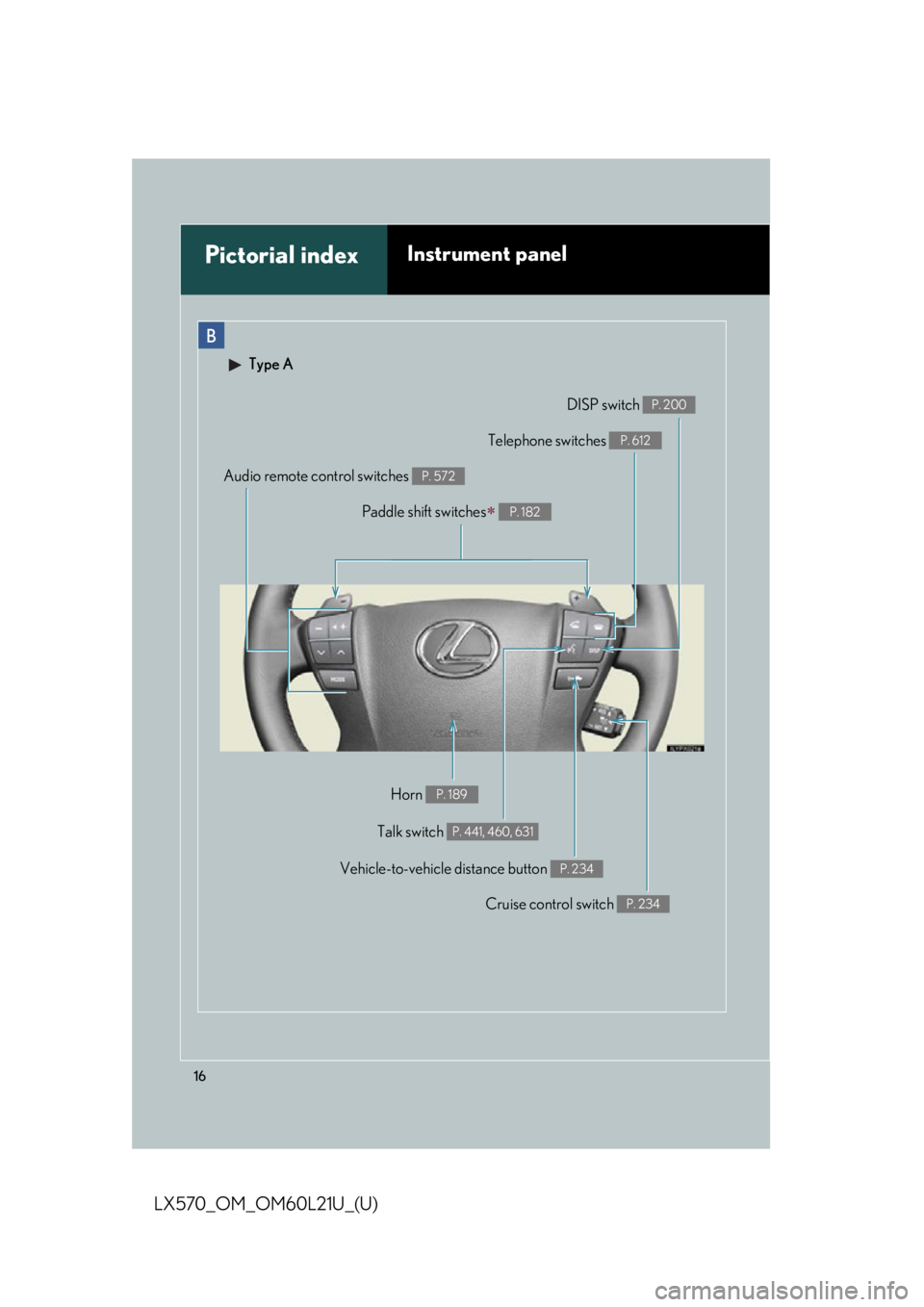
16
LX570_OM_OM60L21U_(U) B
Pictorial index Instrument panel Type A
Cruise control switch P. 234DISP switch P. 200
Talk switch P. 441, 460, 631Telephone switches P. 612
Audio remote control switches P. 572
Vehicle-to-vehicle distance button P. 234
Horn P. 189Paddle shift switches
P. 182
Page 17 of 956
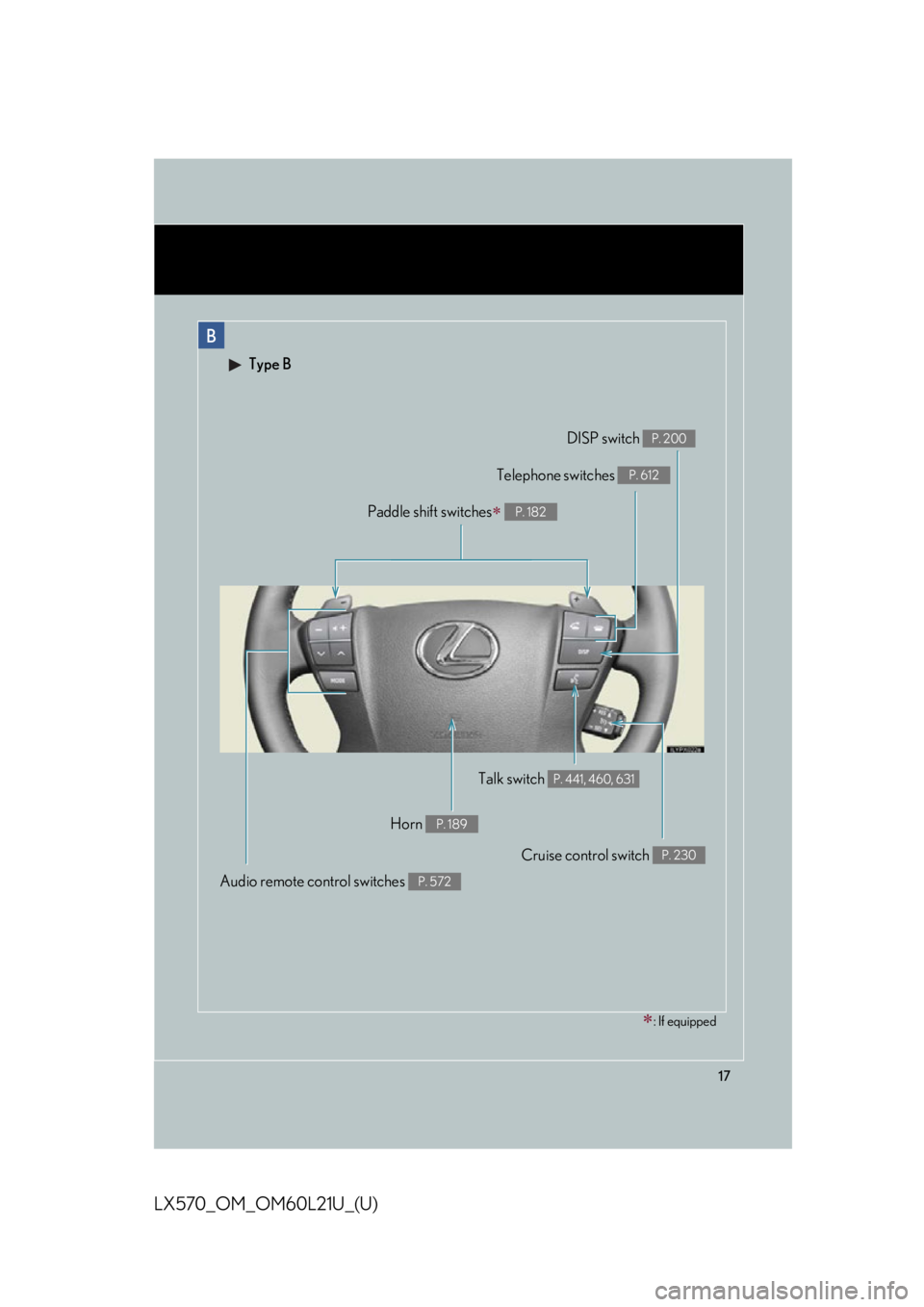
17
LX570_OM_OM60L21U_(U) B Type B
Cruise control switch P. 230
Talk switch P. 441, 460, 631
Audio remote control switches P. 572
Horn P. 189
: If equippedDISP switch P. 200
Telephone switches P. 612
Paddle shift switches
P. 182
Page 26 of 956

26
LX570_OM_OM60L21U_(U) ● Disclosure of the EDR data
Lexus will not disclose the data recorded in an EDR to a third party except when:
• An agreement from the vehicle’s owner (or the lessee for a leased vehicle) is
obtained
• In response to an official request by the police, a court of law or a government
agency
• For use by Lexus in a lawsuit
However, if necessary, Lexus may:
• Use the data for research on vehicle safety performance
• Disclose the data to a third party for research purposes without disclosing infor-
mation about the specific vehicle or vehicle owner
Scrapping of your Lexus The SRS airbag and seat belt pretensioner devices in your Lexus contain explosive
chemicals. If the vehicle is scrapped with the airbags and seat belt pretensioners left
as they are, this may cause an accident such as fire. Be sure to have the systems of
the SRS airbag and seat belt pretensioner removed and disposed of by a qualified
service shop or by your Lexus deal er before you scrap your vehicle.
Perchlorate Material Special handling may apply, See www.dtsc.ca.gov/hazardouswaste/perchlorate.
Your vehicle has components that may contain perchlorate. These components
may include airbag, seat belt pretensioners, and wireless remote control batteries.
Page 29 of 956
Before driving
1
29
LX570_OM_OM60L21U_(U) 1-1. Key information
Keys .............................................. 30
1-2. Opening, closing and
locking the doors
Smart access system with
push-button start .................... 35
Wireless remote control ........ 48
Side doors..................................... 51
Back door .................................... 56
1-3. Adjustable components
(seats, mirrors, steering
wheel)
Front seats ................................... 67
Rear seats ..................................... 71
Driving position memory
system ....................................... 83
Head restraints .......................... 87
Seat belts ...................................... 91
Steering wheel ......................... 100
Anti-glare inside rear view
mirror ....................................... 102
Outside rear view
mirrors ..................................... 104 1-4. Opening and closing the
windows and moon roof
Power windows ........................ 107
Moon roof .................................. 110
1-5. Refueling
Opening the fuel tank
cap ............................................. 114
1-6. Theft deterrent system
Engine immobilizer
system........................................ 117
Alarm........................................... 119
1-7. Safety information
Correct driving posture ....... 122
SRS airbags .............................. 124
Front passenger occupant
classification system............ 138
Child restraint systems ......... 144
Installing child restraints....... 149
Page 30 of 956
30
LX570_OM_OM60L21U_(U) 1-1. Key information
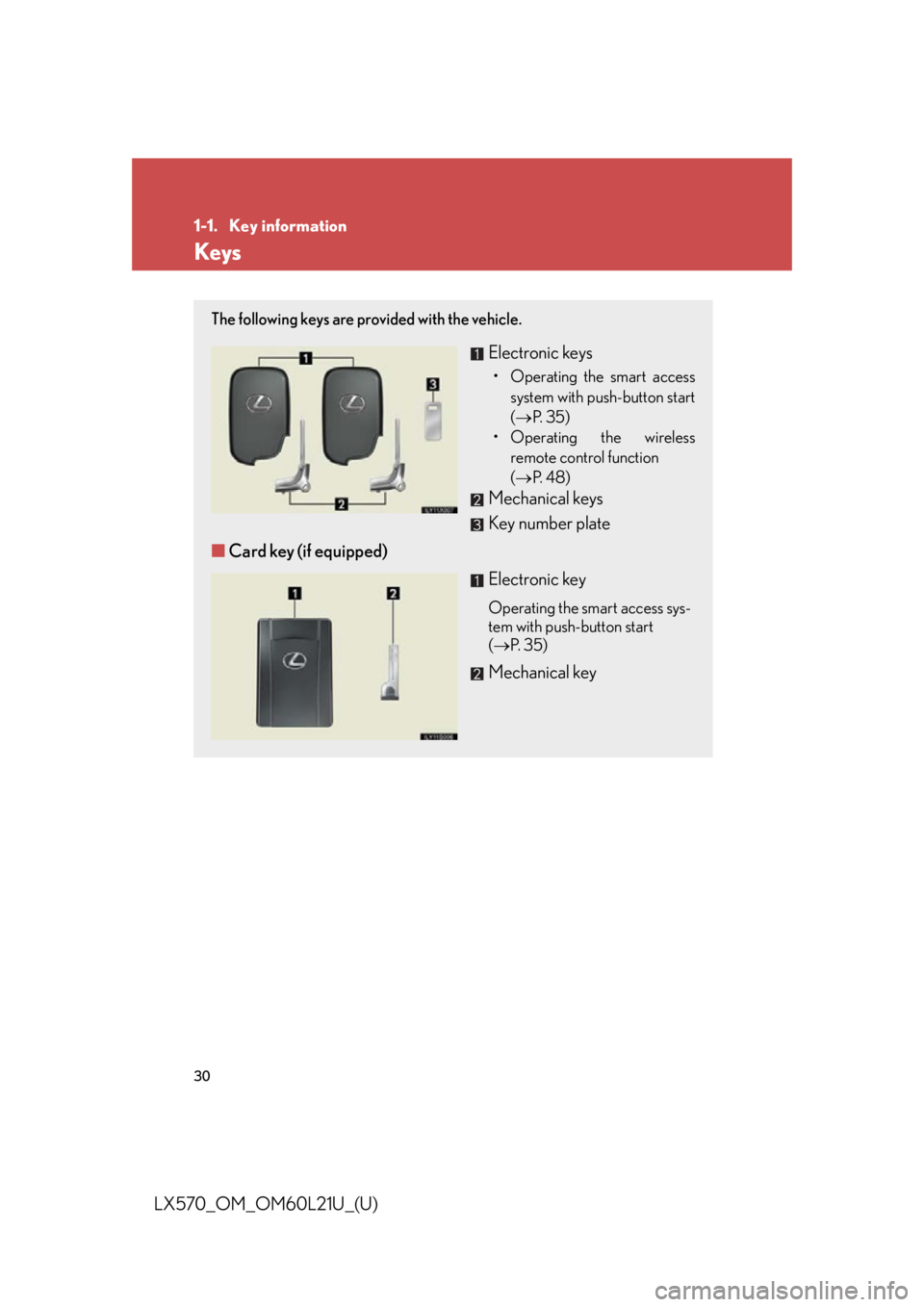
Keys The following keys are provided with the vehicle.
Electronic keys • Operating the smart access
system with push-button start
( P. 3 5 )
• Operating the wireless
remote control function
( P. 4 8 )
Mechanical keys
Key number plate
■ Card key (if equipped)
Electronic key Operating the smart access sys-
tem with push-button start
( P. 3 5 )
Mechanical key
Page 39 of 956

391-2. Opening, closing and locking the doors
1
Before driving
LX570_OM_OM60L21U_(U) ■
Conditions affecting operation
The smart access system with push-button start uses weak radio waves. In the fol-
lowing situations, the communication between the electronic key and the vehicle
may be affected, preventing the smart access system with push-button start, wire-
less remote control and engine immobilizer system from operating properly.
(Ways of coping: P. 8 6 7 )●
When the electronic key battery is depleted ●
Near a TV tower, electric power plant, gas station, radio station, large display,
airport or other facility that generates strong radio waves or electrical noise●
When carrying a portable radio, cellular phone, cordless phone or other wire-
less communication devices ●
When the electronic key is in contact wi th, or is covered by the following metal-
lic object
• Card to which aluminum foil is attached
• Cigarette boxes that have aluminum foil inside
• Metallic wallets or bags
•Coins
• Hand warmers made of metal
• Media such as CDs and DVDs ●
When multiple electronic keys are in the vicinity ●
When other wireless keys (that emit radio waves) are being used nearby●
When carrying or using the electronic key together with the following devices
that emit radio waves
• Another vehicle’s electronic key or a wireless key that emits radio waves
• Personal computers or person al digital assistants (PDAs)
• Digital audio players
• Portable game systems ●
If window tint with a metallic content or metallic objects are attached to the rear
window
Page 40 of 956
401-2. Opening, closing and locking the doors
LX570_OM_OM60L21U_(U) ■
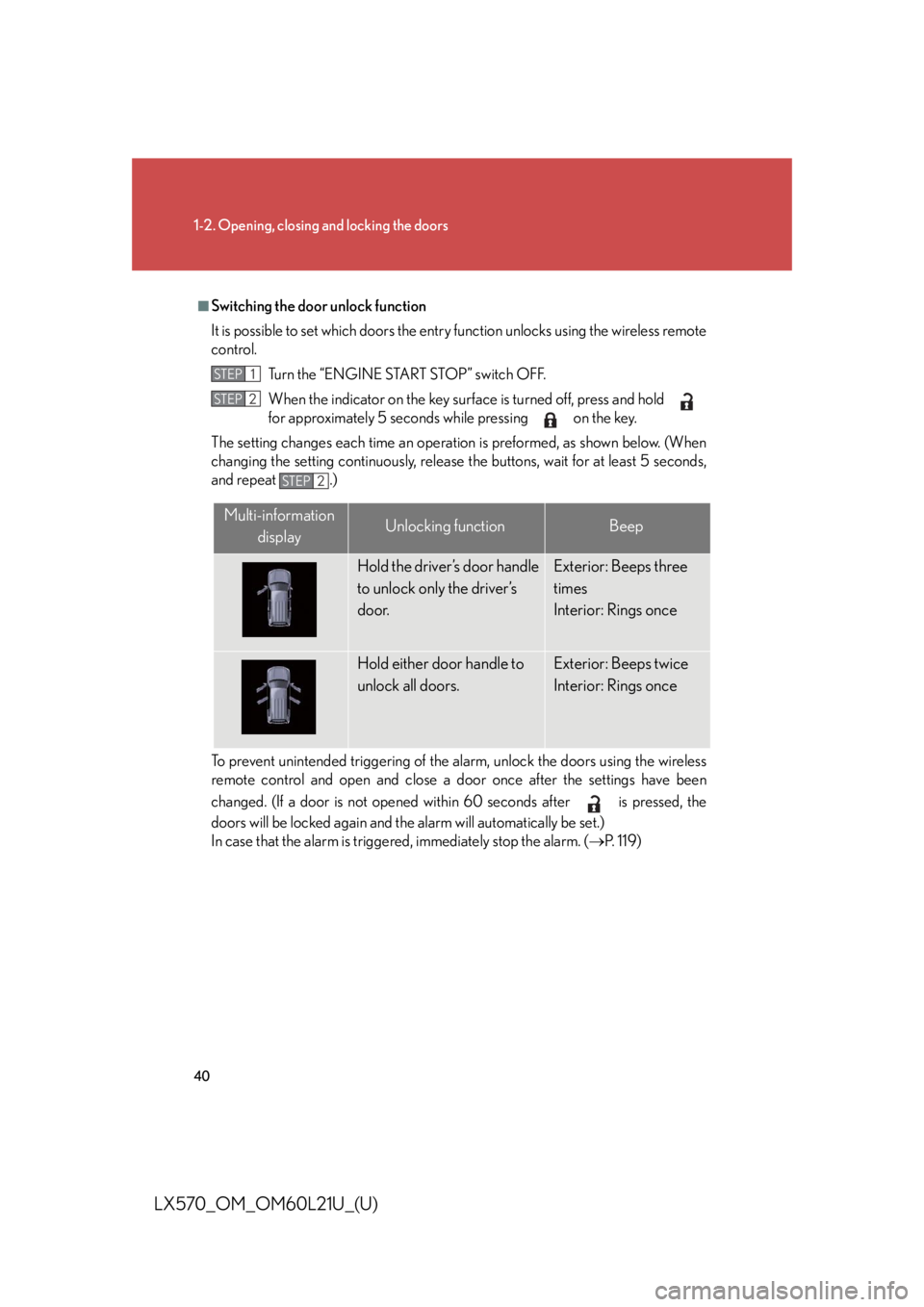
Switching the door unlock function
It is possible to set which doors the entr y function unlocks using the wireless remote
control.
Turn the “ENGINE START STOP” switch OFF.
When the indicator on the key surfac e is turned off, press and hold
for approximately 5 seconds while pressing on the key.
The setting changes each time an operation is preformed, as shown below. (When
changing the setting continuously, release the buttons, wait for at least 5 seconds,
and repeat .)
To prevent unintended triggering of the alarm, unlock the doors using the wireless
remote control and open and close a do or once after the settings have been
changed. (If a door is not opened with in 60 seconds after is pressed, the
doors will be locked again and the alarm will automatically be set.)
In case that the alarm is triggere d, immediately stop the alarm. ( P. 1 1 9 )STEP 1
STEP 2
STEP 2
Multi-information
display Unlocking function Beep
Hold the driver’s door handle
to unlock only the driver’s
door. Exterior: Beeps three
times
Interior: Rings once
Hold either door handle to
unlock all doors. Exterior: Beeps twice
Interior: Rings once
Page 41 of 956

411-2. Opening, closing and locking the doors
1
Before driving
LX570_OM_OM60L21U_(U) ■
Battery-saving function
In the following circumstances, the entry func tion is disabled in order to prevent the
vehicle and electronic key batteries from discharging. ●
When the entry function has not been used for 2 weeks or more ●
When the electronic key has been left within approximately 3 ft. (1 m) of the
vehicle for 10 minutes or more
The system will resume operation when... ●
The vehicle is locked using th e door handle lock switch.●
The vehicle is locked/unlocked using the wireless remote control function
( P. 48) or the mechanical key. ( P. 8 6 7 )■
Electronic key battery depletion ●
The standard battery life is 1 to 2 years.
(The card key battery life is about a year and a half.) ●
If the battery becomes low, an alarm will sound in the cabin when the engine
stops. ( P. 4 3 )●
The battery becomes depleted even if the electronic key is not used because
the key always receives radio waves. If the smart access system with push-but-
ton start or the wireless remote control function does not operate, or the detec-
tion area becomes smaller, the battery may be depleted. Replace the battery
when necessary. ( P. 7 8 0 )●
To avoid serious deterioration, do not leave the electronic key within 3 ft. (1 m) of
the following electrical appliances that produce a magnetic field:
•TVs
• Personal computers
• Cellular phones, cordless phones and battery chargers
• Recharging cellular phones or cordless phones
• Induction cookers
• Table lamps
Page 42 of 956

421-2. Opening, closing and locking the doors
LX570_OM_OM60L21U_(U) ■
To operate the system properly
Make sure to carry the electronic key wh en operating the system. Do not get the
electronic key too close to the vehicle when operating the system from the outside
of the vehicle.
Depending on the position and holding condition of the electronic key, the key may
not be detected corr ectly and the system may not operate properly. (The alarm may
go off accidentally, or the door lock prevention may not function.) ■
Note for the entry function ●
Even when the electronic key is within the effective range (detection areas), the
system may not operate properly in the following cases:
• The electronic key is too close to the window or outside door handle, near the
ground, or in a high place when the doors are locked or unlocked.
• The electronic key is near the ground or in a high place, or too close to the
rear bumper center when the back door is locked or unlocked.
• The electronic key is on the instrument panel, floor or in the glove box when
the engine is started or “ENGINE ST ART STOP” switch modes are changed.●
Do not leave the electronic key on top of the instrument panel or near the door
pockets when exiting the vehicle. Depending on the radio wave reception con-
ditions, it may be detected by the an tenna outside the cabin and the door will
become lockable from the outside, poss ibly trapping the electronic key inside
the vehicle. ●
As long as the electronic key is within the effective range, the doors may be
locked or unlocked by anyone. ●
Even if the electronic key is not inside th e vehicle, it may be possible to start the
engine if the electronic key is near the window. ●
The doors may unlock if a large amount of water splashes on the door handle,
such as in the rain or in a car wash. (The doors will automatically be locked after
approximately 60 seconds if the doors are not opened and closed.)●
Gripping the door handle when wearing a glove may not unlock the door. ●
If the wireless remote control is used to lock the doors when the electronic key
is near the vehicle, there is a possibility that the door may not be unlocked by the
entry function. (Use the wireless re mote control to unlock the doors.)●
A sudden approach to the effective range or door handle operation may pre-
vent the doors from being unlocked. In this case, return the door handle to the
original position and check that the d oors unlock before pulling the door han-
dle.