light LEXUS LX570 2015 Owners Manual
[x] Cancel search | Manufacturer: LEXUS, Model Year: 2015, Model line: LX570, Model: LEXUS LX570 2015Pages: 960, PDF Size: 11.33 MB
Page 701 of 960
6993
Interior features
LX570_OM_OM60L96U_(U) 3-8. Other interior features
Cool box
: If equipped■
While the cool box is on
The front air conditioning system cannot be turned off. ■
When the outside temperature is 32°F (0°C) or below
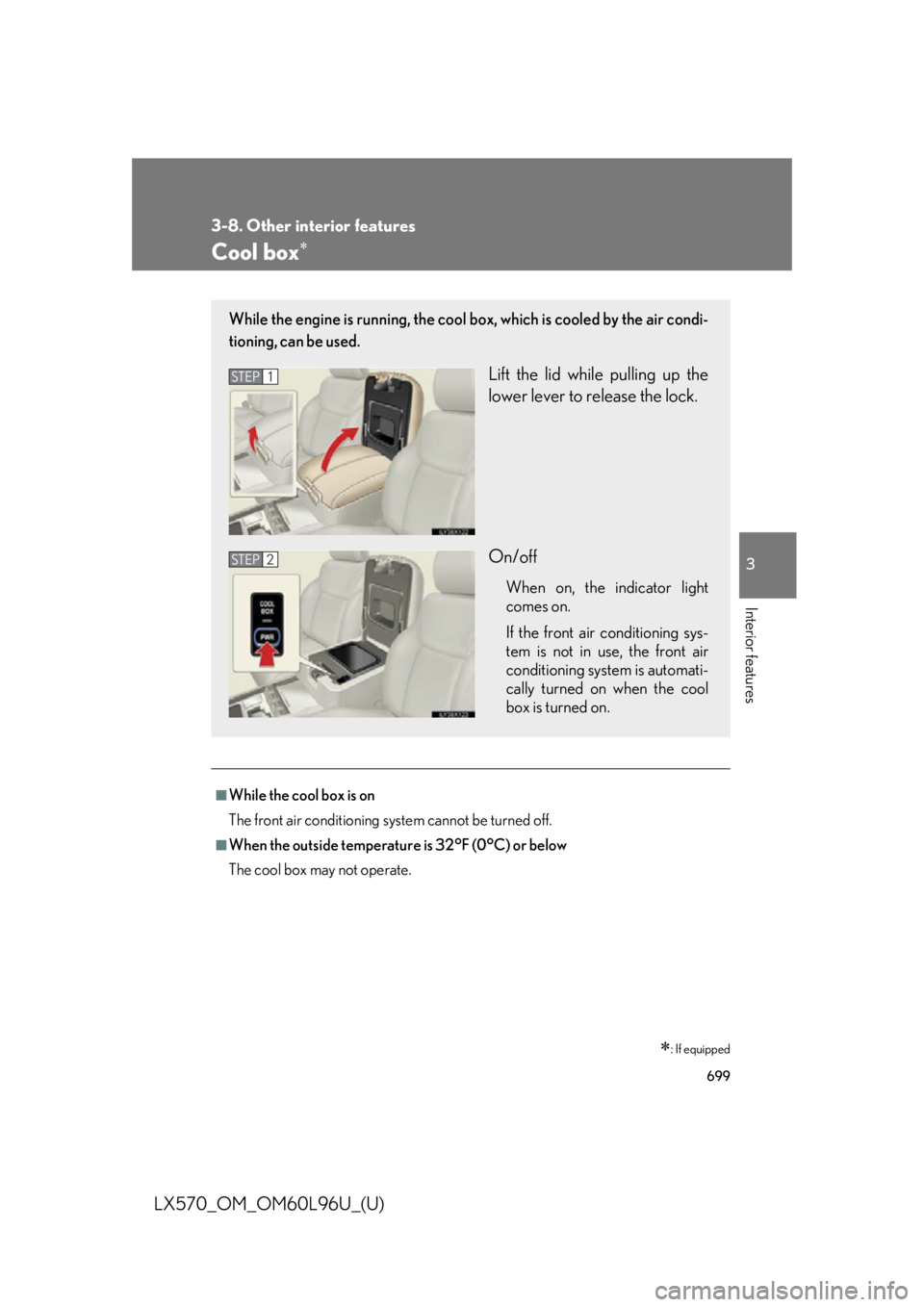
The cool box may not operate.While the engine is running, the cool bo x, which is cooled by the air condi-
tioning, can be used.
Lift the lid while pulling up the
lower lever to release the lock.
On/off When on, the indicator light
comes on.
If the front air conditioning sys-
tem is not in use, the front air
conditioning system is automati-
cally turned on when the cool
box is turned on.STEP 1
STEP 2
Page 704 of 960
7023-8. Other interior features
LX570_OM_OM60L96U_(U) Vanity mirrors
NOTICE■
To prevent battery discharge
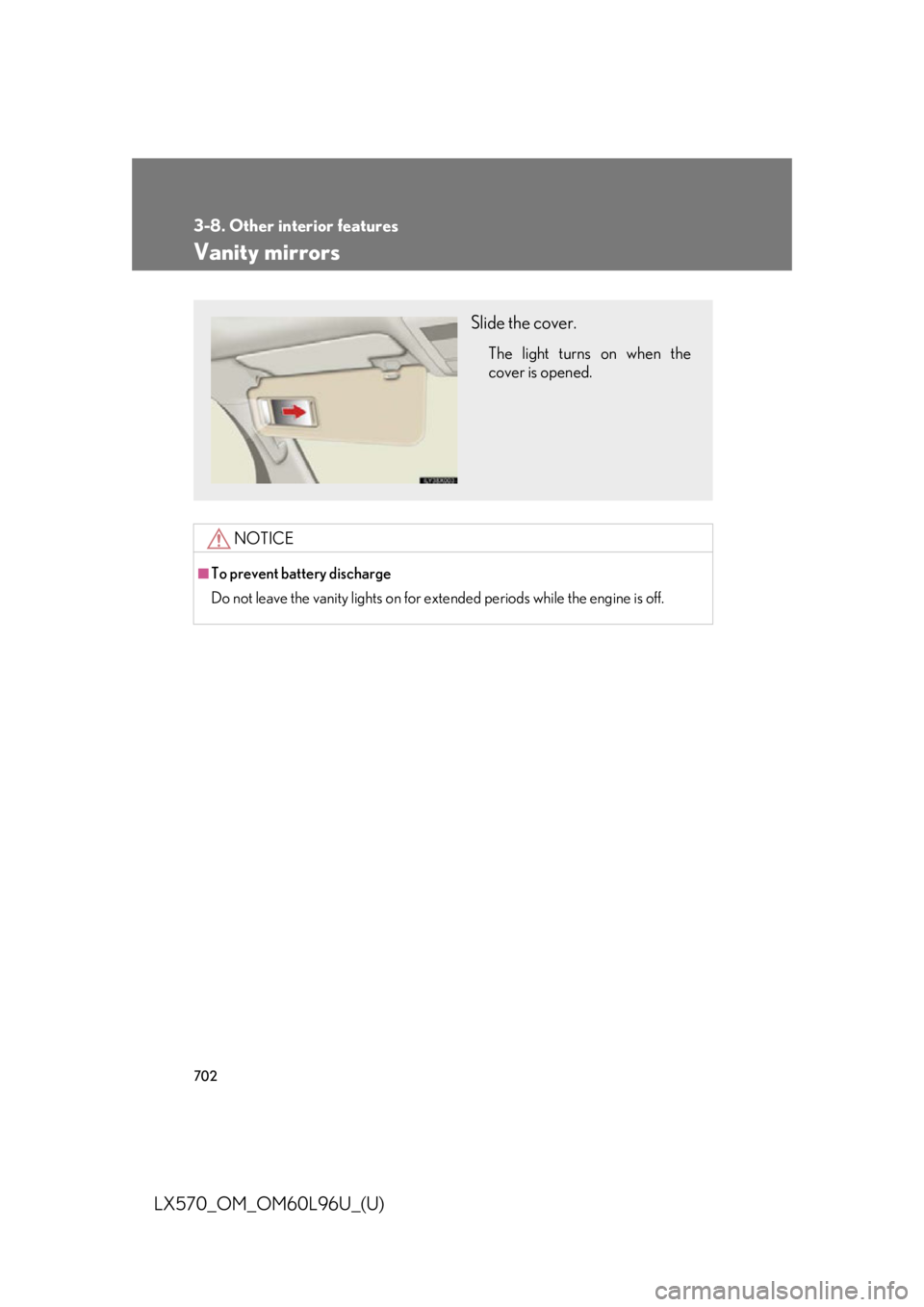
Do not leave the vanity lights on for extended periods while the engine is off. Slide the cover. The light turns on when the
cover is opened.
Page 706 of 960

7043-8. Other interior features
LX570_OM_OM60L96U_(U) Cigarette lighter ■
The cigarette lighter can be used when
The “ENGINE START STOP” switch is in ACCESSORY or IGNITION ON
mode.
CAUTION■
To avoid burns or fires ●
Do not touch the metal parts of the cigarette lighter. ●
Do not hold the cigarette lighter down. It could overheat and cause a fire. ●
Do not insert anything other than the cigarette lighter into the outlet. Push the front part of the lid to
open, and push the cigarette
lighter down. The cigarette lighter will pop up
when it is ready for use.
Page 709 of 960

7073-8. Other interior features
3
Interior features
LX570_OM_OM60L96U_(U) Heated steering wheel
: If equipped■
The heated steering wheel can be used when
The “ENGINE START STOP” switch is in IGNITION ON mode. ■
Timer
The heated steering wheel will automatically turn off after about 30 minutes. ■
If the indicator light flashes
Press the switch to turn the heated steering wheel off and then press the switch
again. If the indicator light still flashes, a malfunction may be occurring. Turn the
heated steering wheel off and have the vehicle inspected by your Lexus dealer.The heated steering wheel can be used to heat the leather portion of the
steering wheel.
On/Off The indicator light comes on
when the heater is operating.
Page 712 of 960
7103-8. Other interior features
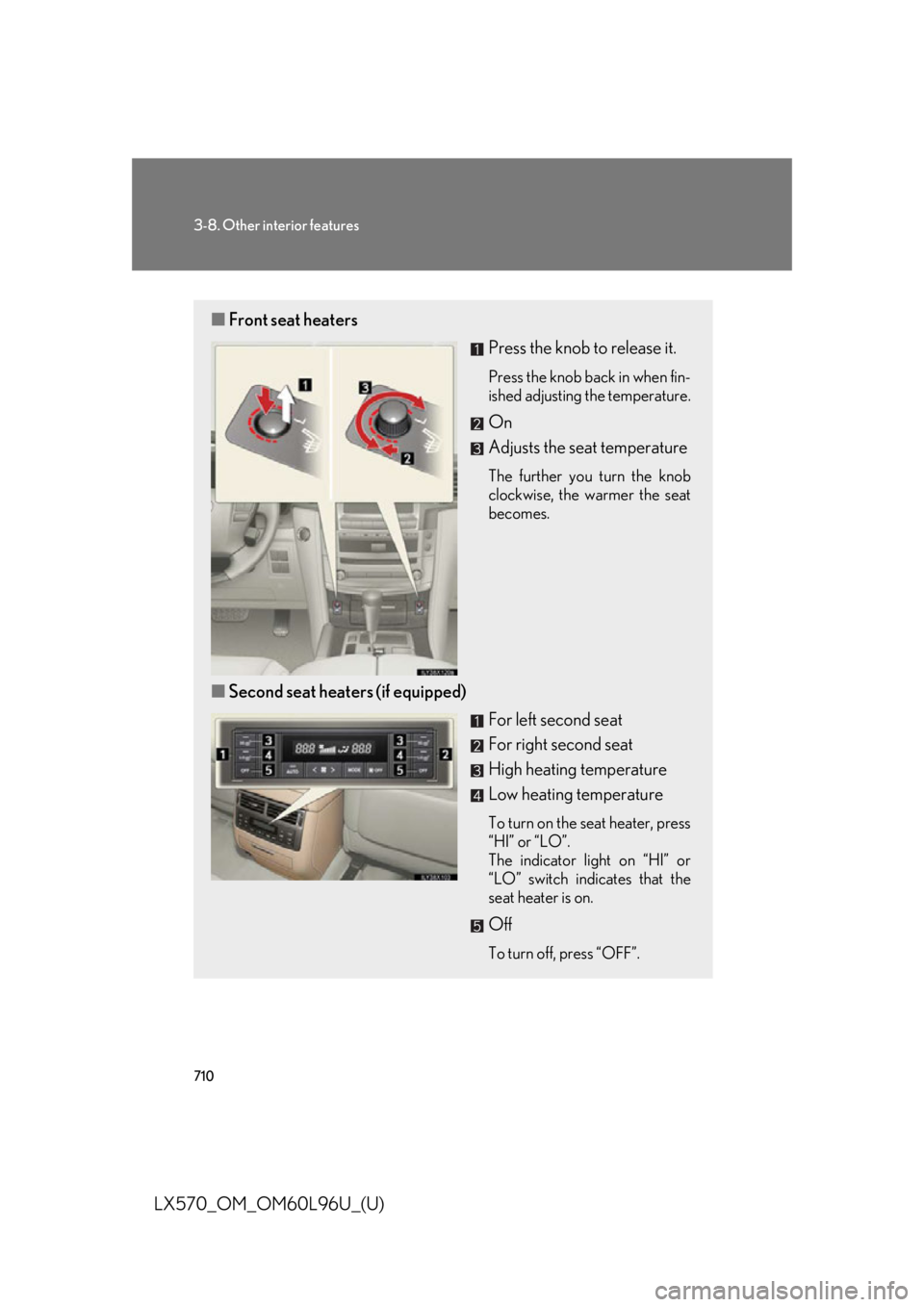
LX570_OM_OM60L96U_(U) ■ Front seat heaters
Press the knob to release it. Press the knob back in when fin-
ished adjusting the temperature.
On
Adjusts the seat temperature The further you turn the knob
clockwise, the warmer the seat
becomes.
■ Second seat heaters (if equipped)
For left second seat
For right second seat
High heating temperature
Low heating temperature To turn on the seat heater, press
“HI” or “LO”.
The indicator light on “HI” or
“LO” switch indicates that the
seat heater is on.
Off To turn off, press “OFF”.
Page 720 of 960

7183-8. Other interior features
LX570_OM_OM60L96U_(U) Garage door opener The garage door opener (HomeLink ®
Universal Transceiver) is manufactured
under license from HomeLink ®
.
Programming HomeLink ®
(for U.S.A. owners)
The HomeLink ®
compatible transceiver in your vehicle has 3 buttons
which can be programmed to operate 3 different devices. Refer to the
programming method below appropriate for the device.
Indicator
ButtonsThe garage door opener can be pr ogrammed to operate garage doors,
gates, entry doors, door locks, home lighting systems, security systems, and
other devices.
Page 721 of 960

7193-8. Other interior features
3
Interior features
LX570_OM_OM60L96U_(U) ■ Programming HomeLink ®
Point the remote control transmit-
ter for the device 1 to 3 in. (25 to
75 mm) from the HomeLink ®
but-
tons. Keep the HomeLink ®
indicator
light in view while programming.
Press and hold one of the
HomeLink ®
buttons and the trans-
mitter button. When the
HomeLink ®
indicator light
changes from a slow to a rapid
flash, you can release both buttons. If the HomeLink ®
indicator light
comes on but does not flash,
flashes rapidly for 2 seconds and
remains lit, the HomeLink ®
button
is already programmed. Use the
other buttons or follow the “Repro-
gramming a HomeLink ®
button”
instructions. ( P. 723)STEP 1
STEP 2
Page 722 of 960

7203-8. Other interior features
LX570_OM_OM60L96U_(U) Test the HomeLink ®
operation by
pressing the newly programmed
button. If a HomeLink ®
button has been
programmed for a garage door,
check to see if the garage door
opens and closes. If the garage
door does not operate, see if your
remote control transmitter is of the
rolling code type. Press and hold
the programmed HomeLink ®
but-
ton. The remote control transmitter
is of the rolling code type if the
HomeLink ®
indicator light flashes
rapidly for 2 seconds and then
remains lit. If your transmitter is of
the rolling code type, proceed to
the heading “Programming a roll-
ing code system”.
Repeat the steps above to program another device for each of
the remaining HomeLink ®
buttons.STEP 3
STEP 4
Page 724 of 960
7223-8. Other interior features
LX570_OM_OM60L96U_(U) ■ Programming an entry gate (for U .S.A. owners)/Programming all
devices in the Canadian market
Place your transmitter 1 to 3 in. (25 to 75 mm) away from the sur-
face of the HomeLink ®
.Keep the HomeLink ®
indicator light in view while programming.
Press and hold the selected HomeLink ®
button.
Repeatedly press and release (cycle) the device’s remote control
button for two seconds each until step 4 is completed.
When the indicator light on the HomeLink ®
compatible trans-
ceiver starts to flash rapidly, release the buttons.
Test the operation of the HomeLink ®
by pressing the newly pro-
grammed button. Check to see if the gate/device operates cor-
rectly.
Repeat the steps above to program another device for each of
the remaining HomeLink ®
buttons.
■ Programming other devices
To program other devices such as home security systems, home door
locks or lighting, contact yo ur Lexus dealer for assistance.
■ Reprogramming a button
The individual HomeLink ®
buttons cannot be erased but can be
reprogrammed. To reprogram a butto n, follow the “Reprogramming a
HomeLink ®
button” instructions.STEP 1
STEP 2
STEP 3
STEP 4
STEP 5
STEP 6
Page 725 of 960
7233-8. Other interior features
3
Interior features
LX570_OM_OM60L96U_(U) Operating HomeLink ®
Press the appropriate HomeLink ®
button. The HomeLink ®
indicator
light should come on. The HomeLink ®
compatible transceiver in your vehicle continues to send a
signal for up to 20 seconds as long as the button is pressed.
Reprogramming a HomeLink ®
button
Press and hold the desired HomeLink ®
button. After 20 seconds, the
HomeLink ®
indicator light will start flash ing slowly. Next, while still press-
ing and holding the HomeLink ®
button, press and hold the button on the
transmitter until the HomeLink ®
indicator light changes from a slow to a
rapid flash.
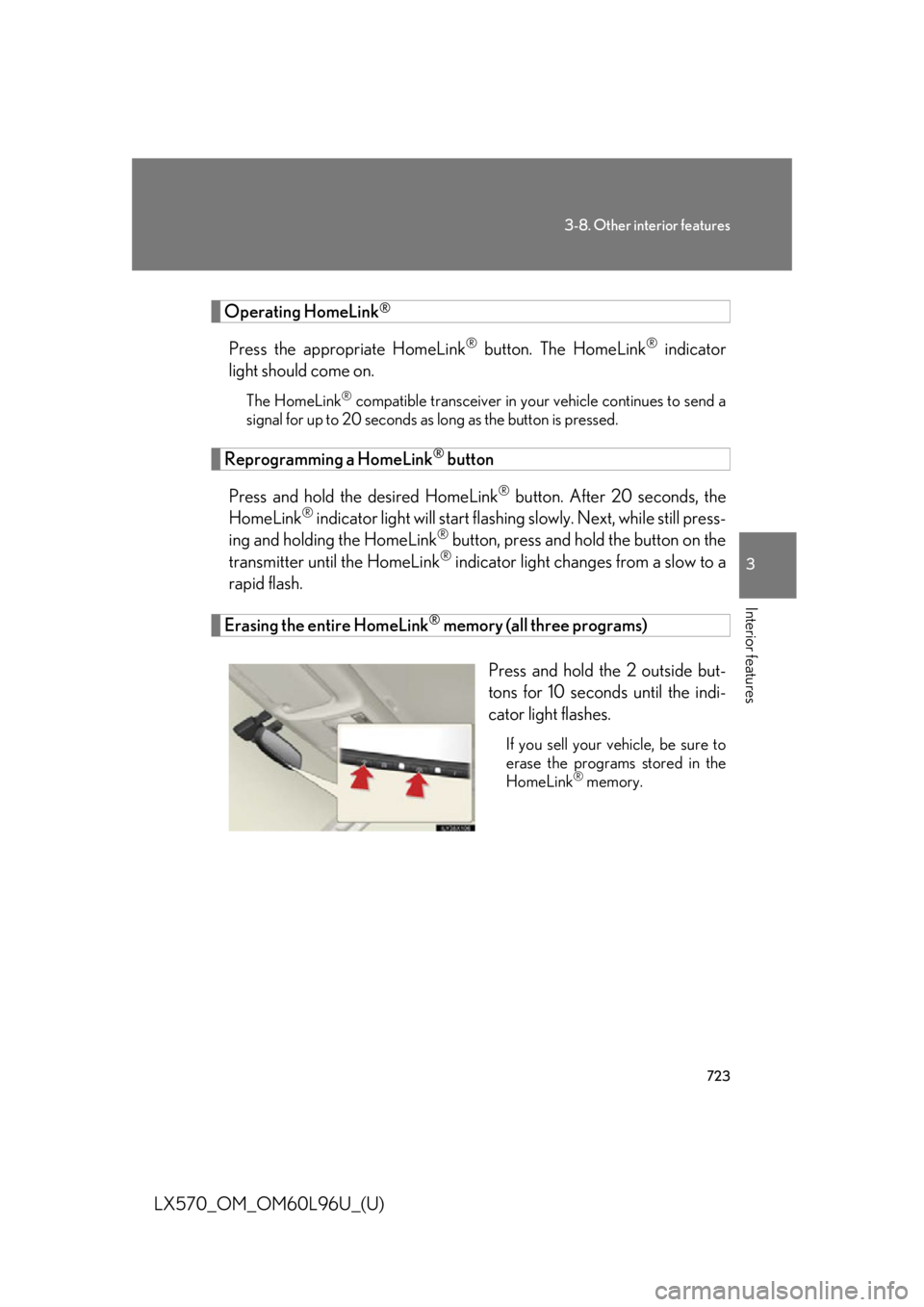
Erasing the entire HomeLink ®
memory (all three programs)
Press and hold the 2 outside but-
tons for 10 seconds until the indi-
cator light flashes. If you sell your vehicle, be sure to
erase the programs stored in the
HomeLink ®
memory.