air condition LEXUS LX570 2015 User Guide
[x] Cancel search | Manufacturer: LEXUS, Model Year: 2015, Model line: LX570, Model: LEXUS LX570 2015Pages: 960, PDF Size: 11.33 MB
Page 140 of 960
1401-7. Safety information
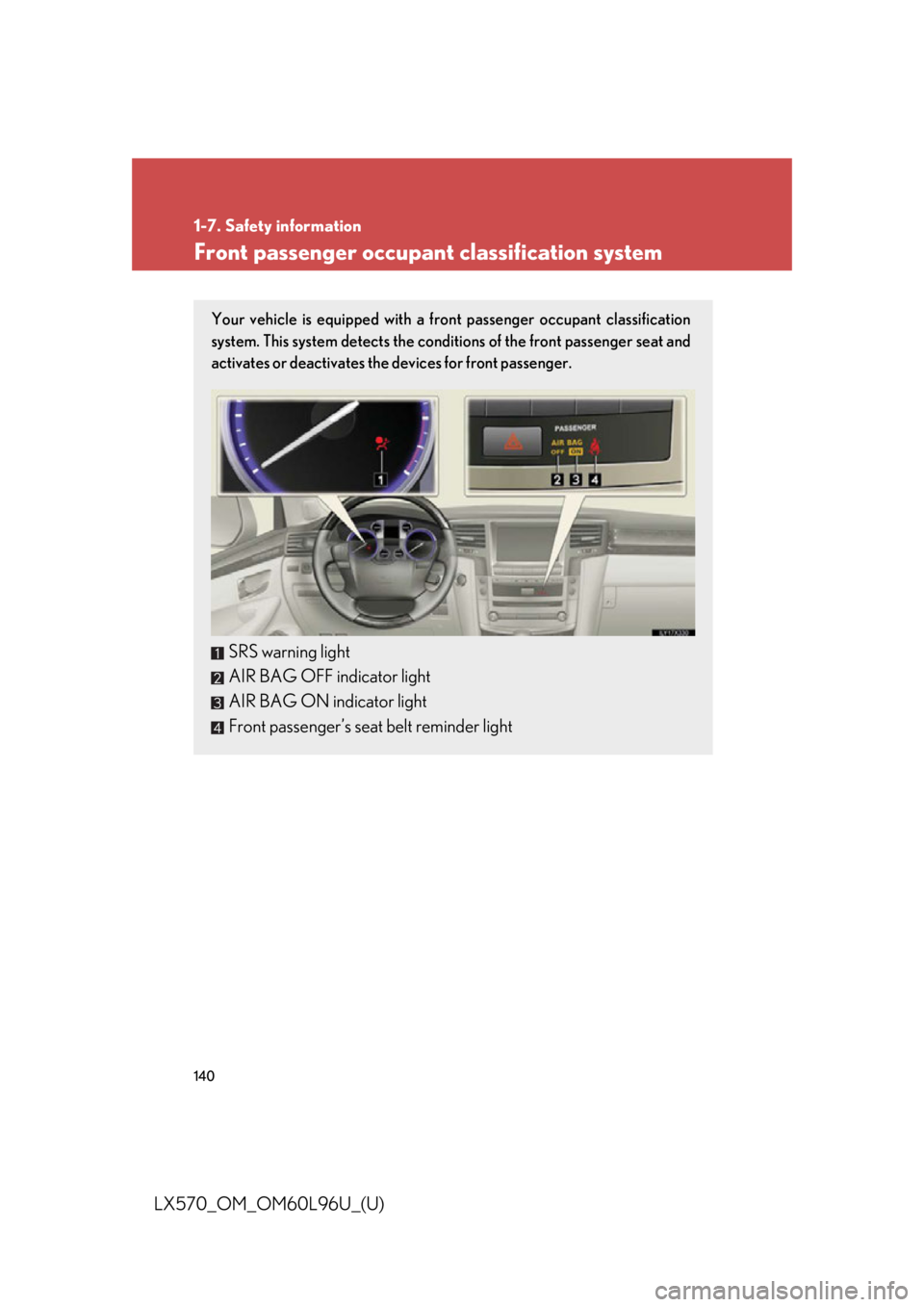
LX570_OM_OM60L96U_(U) Front passenger occupant classification system Your vehicle is equipped with a fron t passenger occupant classification
system. This system detects the conditions of the front passenger seat and
activates or deactivates the devices for front passenger.
SRS warning light
AIR BAG OFF indicator light
AIR BAG ON indicator light
Front passenger’s seat belt reminder light
Page 141 of 960

1411-7. Safety information
1
Before driving
LX570_OM_OM60L96U_(U) Condition and operation in the front passenger occupant classification
system
■ Adult
* 1
■ Child
* 3
or child restraint system
* 4Indicator/
warning light AIR BAG ON and AIR BAG OFF
indicator lights “AIR BAG
ON”
SRS warning light Off
Front passenger’s seat belt reminder light
Flashing
* 2
Devices Front passenger airb ag and knee airbag
ActivatedSide airbag in the front passenger seat
Curtain shield airbag
on the front passenger side
Front passenger’s seat belt pretensioner
Indicator/
warning light AIR BAG ON and AIR BAG OFF
indicator lights “AIR BAG
OFF”
* 5
SRS warning light Off
Front passenger’s seat belt reminder light
Flashing
* 2
Devices Front passenger airbag and knee airbag Deactivated
Side airbag in the front passenger seat
ActivatedCurtain shield airbag
on the front passenger side
Front passenger’s seat belt pretensioner
Page 259 of 960

2592-4. Using other driving systems
2
When driving
LX570_OM_OM60L96U_(U) ■
Sensor detection information ●
The sensor’s detection areas are limited to the areas around the vehicle’s front
corner and rear bumpers. ●
Certain vehicle conditions and the surrounding environment may affect the
ability of the sensor to correctly detect obstacles. Particular instances where
this may occur are listed below.
• There is dirt, snow or ice on the sens or. (Wiping the sensors will resolve this
problem.)
• The sensor is frozen. (Thawing the area will resolve this problem.)
In especially cold weather, if a sensor is frozen the screen may show an
abnormal display, or obstacles may not be detected.
• The sensor is covered in any way.
• The vehicle is leaning considerably to one side.
• On an extremely bumpy road, on an incline, on gravel, or on grass
• The vicinity of the vehicle is noisy due to vehicle horns, motorcycle engines,
air brakes of large vehicles, or other loud noises producing ultrasonic waves.
• There is another vehicle equipped with parking assist sensor s in the vicinity.
• The sensor is coated with a sheet of spray or heavy rain.
• The vehicle is equipped with a fender pole or wireless antenna.
• Towing hook is installed.
• The bumper or sensor receives a strong impact.
• The vehicle is approaching a tall or curved curb.
• In harsh sunlight or intense cold weather
• The area directly under the bumpers is not detected.
• If obstacles draw too close to the sensor.
• A non-genuine Lexus suspension (low ered suspension etc.) is installed.
• People may not be detected if they are wearing certain types of clothing.
In addition to the examples above, there are instances in which, because of their
shape, signs and other objects may be ju dged by the sensor to be closer than
they are.
Page 260 of 960

2602-4. Using other driving systems
LX570_OM_OM60L96U_(U) ●
The shape of the obstacle may prevent the sensor from detecting it. Pay partic-
ular attention to the following obstacles:
• Wires, fences, ropes, etc.
• Cotton, snow and other materi als that absorb sound waves
• Sharply-angled objects
• Low obstacles
• Tall obstacles with upper sections projec ting outwards in the direction of your
vehicle●
The following situations may occur during use.
• Depending on the shape of the obstacle and other factors, the detection dis-
tance may shorten, or detection may be impossible.
• Obstacles may not be detected if they are too close to the sensor
• There will be a short delay between obstacle detection and display. Even at
slow speeds, there is a possibility that the obstacle will come within the sen-
sor’s detection areas before the di splay is shown and the warning beep
sounds.
• Thin posts or objects lower than the se nsor may not be dete cted for collision
when approached, even if they have been detected once.
• It might be difficult to hear beeps due to the volume of audio system or air
flow noise of air conditioning system.■
If a message is displayed on the multi-information display
P. 837■
Certification (Canada only)
This ISM device complies with Canadian ICES-001.
Page 377 of 960
3772-5. Driving information
2
When driving
LX570_OM_OM60L96U_(U) ■ Before driving the vehicle
Perform the following according to the driving conditions.
● Do not try to forcibly open a window or mo ve a wiper that is fro-
zen. Pour warm water over the froz en area to melt the ice. Wipe
away the water immediately to prevent it from freezing.
● To ensure proper operation of the climate control system fan,
remove any snow that has accumula ted on the air inlet vents in
front of the windshield.
● Check for and remove any exce ss ice or snow that may have
accumulated on the exterior lights, vehicle’s roof, chassis, around
the tires or on the brakes.
● Remove any snow or mud from the bottom of your shoes before
getting in the vehicle.
■ When driving the vehicle
Accelerate the vehicle slowly, k eep a safe distance between you
and the vehicle ahead, and drive at a reduced speed suitable to road
conditions.
■ When parking the vehicle
Park the vehicle and move the shift lever to “P” without setting the
parking brake. The parking brake may freeze up, preventing it from
being released. If necessary, bl ock the wheels to prevent inadvert-
ent sliding or creeping.
Page 394 of 960

3942-5. Driving information
LX570_OM_OM60L96U_(U) ● Avoid jerky starts or sudden acceleration.
● Avoid jerky steering and sharp turn s, and slow down before making a
turn.
● Note that when making a turn, the trailer wheels will be closer than the
vehicle wheels to the inside of th e turn. Compensate by making a
wider than normal turning radius.
● Slow down before making a turn, in crosswinds, on wet or slippery sur-
faces, etc.
Increasing vehicle speed can destabilize the trailer.
● Take care when passing other vehi cles. Passing requires considerable
distance. After passing a vehicle, do not forget the length of your
trailer, and be sure you have plenty of room before changing lanes.
● To maintain engine braking efficie ncy and charging system perfor-
mance when using engine braking, do not put the transmission in “D”.
If in the S mode, the transmission shift range position must be in 5 or
lower.
● Instability happens more frequently when descending steep or long
downhill grades. Before descending , slow down and downshift. Do not
make sudden downshifts while desc ending steep or long downhill
grades.
● Avoid holding the brake pedal down too long or applying the brakes
too frequently. This could cause the brakes to overheat and result in
reduced braking efficiency.
● Due to the added load of the trail er, your vehicle’ s engine may over-
heat on hot days (at temperatures over 85°F [30°C]) when driving up
a long or steep grade. If the engine coolant temperature gauge indi-
cates overheating, immediately turn off the air conditioning (if in use),
pull your vehicle off the road and stop in a safe spot. ( P. 878)
Page 402 of 960
402
LX570_OM_OM60L96U_(U) 3-1. Using the touch screen
Touch screen .......................... 404
Set up screen ........................... 412
Information screen................ 429
Voice command system ....... 431
Mobile Assistant .................... 442
3-2. Using the air conditioning
system and defogger
Front air conditioning
system .................................... 444
Rear air conditioning
system .................................... 456
Rear window and outside
rear view mirror
defoggers .............................. 460
Windshield wiper de-icer ..... 461 3-3. Using the audio system
Audio system type.................. 462
Using the radio........................ 487
Using the CD/
DVD player ........................... 507
Playing an audio CD and
MP3/WMA discs .............. 509
Playing DVD video ................. 515
CD/DVD player and DVD
video disc information........ 529
Listening to Bluetooth ®
audio......................................... 541
Listening to a
USB memory ....................... 552
Listening to an iPod ............... 562
Optimal use of the audio/
video system ......................... 572
Using the AUX port .............. 574
Using the steering wheel
audio switches ...................... 576
3-4. Using the rear seat
entertainment system
Rear seat entertainment
system features .................... 579
Using the radio........................ 587
Using the radio (internet
radio broadcast) ................. 589
Playing an audio CD/
CD text .................................. 590Interior features
3
Page 404 of 960

404
LX570_OM_OM60L96U_(U) 3-1. Using the touch screen
Touch screen By touching the screen with your fi nger, you can control the audio system
and air conditioning system, and adjust the screen display etc.
Button Page
“CLIMATE” P. 444
“AUDIO” P. 462
“MAP VOICE”/”DEST” Navigation System Owner’s Manual
“INFO” P. 429/
Navigation System Owner’s Manual
P. 616
“SETUP” P. 412
Page 425 of 960
4253-1. Using the touch screen
3
Interior features
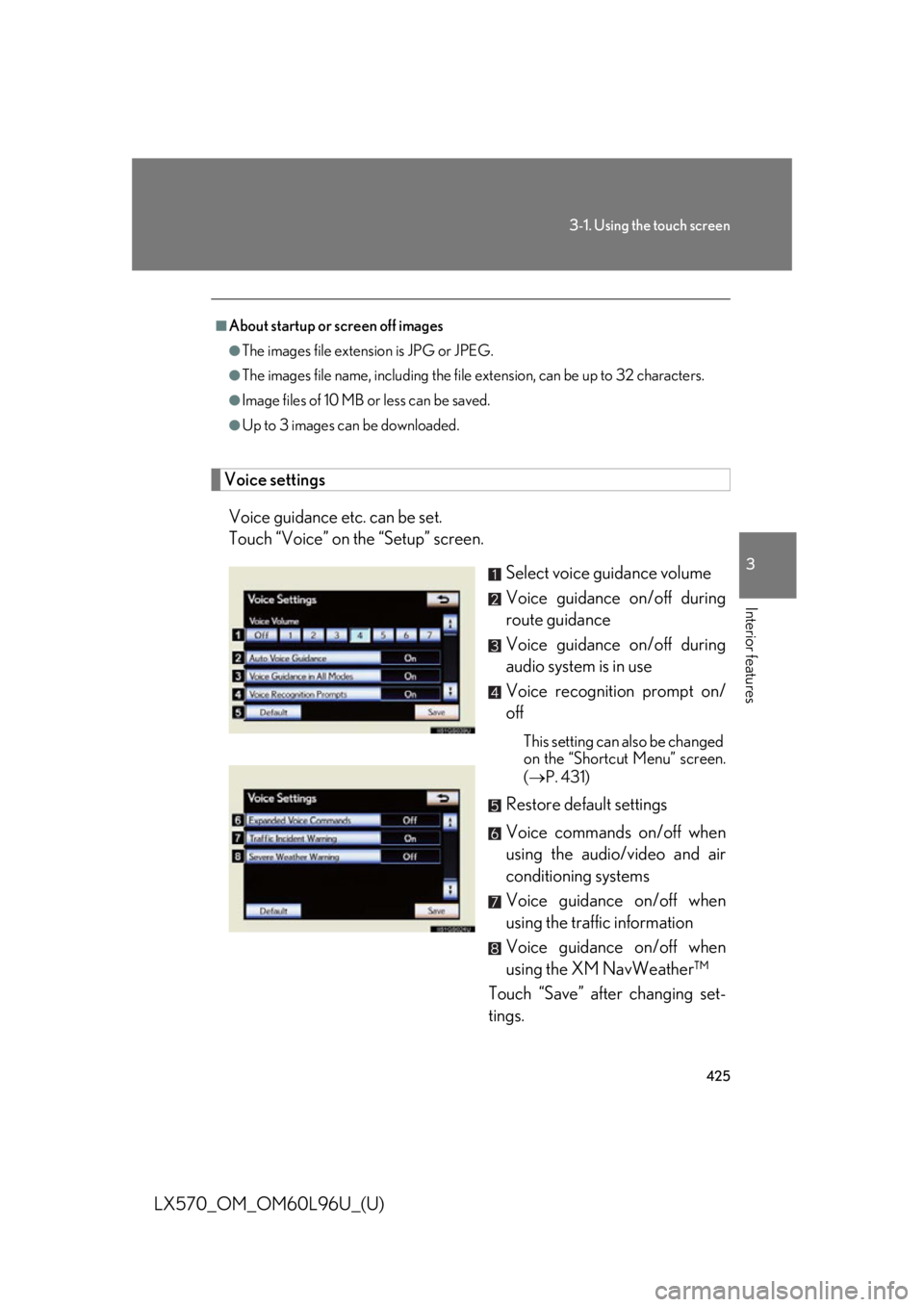
LX570_OM_OM60L96U_(U) Voice settings
Voice guidance etc. can be set.
Touch “Voice” on th e “Setup” screen.
Select voice guidance volume
Voice guidance on/off during
route guidance
Voice guidance on/off during
audio system is in use
Voice recognition prompt on/
off This setting can also be changed
on the “Shortcut Menu” screen.
( P. 431)
Restore default settings
Voice commands on/off when
using the audio/video and air
conditioning systems
Voice guidance on/off when
using the traffic information
Voice guidance on/off when
using the XM NavWeather™
Touch “Save” after changing set-
tings.■
About startup or screen off images ●
The images file extension is JPG or JPEG. ●
The images file name, including the file extension, can be up to 32 characters.●
Image files of 10 MB or less can be saved.●
Up to 3 images can be downloaded.
Page 431 of 960

4313-1. Using the touch screen
3
Interior features
LX570_OM_OM60L96U_(U) Voice command system
Voice command system operation
■ Voice command system operation
Press or . After the “Shortcut Menu” screen ha s been displayed, voice guidance
will commence.
Voice guidance for the voice command system can be skipped by
pressing
or .The voice command system enables th e navigation, audio/video, hands-
free and air conditioning systems to be operated using voice commands.
For details of the navigation syst em, refer to the “Navigation System
Owner’s Manual”.
■ Talk switch Press
or .To cancel, press and hold
or .
■ Microphone
STEP 1