air condition LEXUS LX570 2015 Owners Manual
[x] Cancel search | Manufacturer: LEXUS, Model Year: 2015, Model line: LX570, Model: LEXUS LX570 2015Pages: 960, PDF Size: 11.33 MB
Page 1 of 960

TABLE OF CONTENTS
1
LX570_OM_OM60L96U_(U) 1
Before driving Adjusting and operating features such as door locks, mirrors,
and steering column
2
When driving Driving, stopping and safe-driving information
3
Interior features Air conditioning and audio systems, as well as other interior
features for a comfortable driving experience
4
Maintenance
and care Cleaning and protecting your vehicle, performing do-it-
yourself maintenance, and maintenance information
5
When trouble
arises What to do if the vehicle needs to be towed, gets a flat tire, or
is involved in an accident
6
Vehicle
specifications Detailed vehicle information
7
For owners Reporting safety defects for U. S. owners, and seat belt and
SRS airbag instructions for Canadian owners
Index Alphabetical listing of inform ation contained in this manual
Page 4 of 960

TABLE OF CONTENTS Index
4
LX570_OM_OM60L96U_(U) 3-1. Using the touch screen
Touch screen ................................ 404
Set up screen .................................. 412
Information screen ...................... 429
Voice command system............. 431
Mobile Assistant ........................... 442
3-2. Using the air conditioning
system and defogger
Front air conditioning
system ............................................ 444
Rear air conditioning
system ............................................ 456
Rear window and outside
rear view mirror
defoggers .................................... 460
Windshield wiper de-icer .......... 461
3-3. Using the audio system
Audio system type ....................... 462
Using the radio .............................. 487
Using the CD/DVD player...... 507
Playing an audio CD and
MP3/WMA discs .................... 509
Playing DVD video....................... 515
CD/DVD player and DVD
video disc information ............. 529 Listening to Bluetooth ®
audio ................................................ 541
Listening to a
USB memory .............................. 552
Listening to an iPod ..................... 562
Optimal use of the audio/
video system................................ 572
Using the AUX port ................... 574
Using the steering wheel
audio switches ............................ 576
3-4. Using the rear seat
entertainment system
Rear seat entertainment
system features .......................... 579
Using the radio .............................. 587
Using the radio (internet
radio broadcast) ....................... 589
Playing an audio CD/
CD text ......................................... 590
Playing WMA/MP3 discs ........ 591
Playing a Bluetooth ®
audio .............................................. 593
Playing a USB memory ............. 596
Playing iPod................................... 598
Playing DVD video..................... 600
DVD player and DVD video
disc information ........................ 609
Using the video mode ................... 6113
Interior features
Page 6 of 960

TABLE OF CONTENTS Index
6
LX570_OM_OM60L96U_(U) 4-1. Maintenance and care
Cleaning and protecting the
vehicle exterior .......................... 734
Cleaning and protecting the
vehicle interior............................ 737
4-2. Maintenance
Maintenance
requirements............................... 740
General maintenance ................ 743
Emission inspection and
maintenance (I/M)
programs ...................................... 746
4-3. Do-it-yourself maintenance
Do-it-yourself service
precautions .................................. 747
Hood.................................................. 750
Engine compartment................... 751
Tires ................................................... 766
Tire inflation pressure ................. 775
Wheels.............................................. 779
Air conditioning filter ................... 781
Electronic key battery ................ 784
Checking and
replacing fuses ........................... 786
Light bulbs ...................................... 803 5-1. Essential information
Emergency flashers...................... 816
If your vehicle needs to be
towed............................................... 817
If you think something is
wrong ............................................. 824
Fuel pump shut off system ....... 825
5-2. Steps to take in an emergency
If a warning light turns on or a
warning buzzer sounds... ...... 826
If a warning message is
displayed ....................................... 837
If you have a flat tire.................... 854
If the engine will not start ......... 868
If the shift lever cannot be
shifted from “P” ......................... 870
If you lose your keys ..................... 871
If the electronic key does not
operate properly ....................... 872
If the battery is discharged ....... 875
If your vehicle overheats .......... 878
If the vehicle becomes
stuck................................................. 881
If your vehicle has to
be stopped in an
emergency .................................. 8834
Maintenance and care 5
When trouble arises
Page 10 of 960
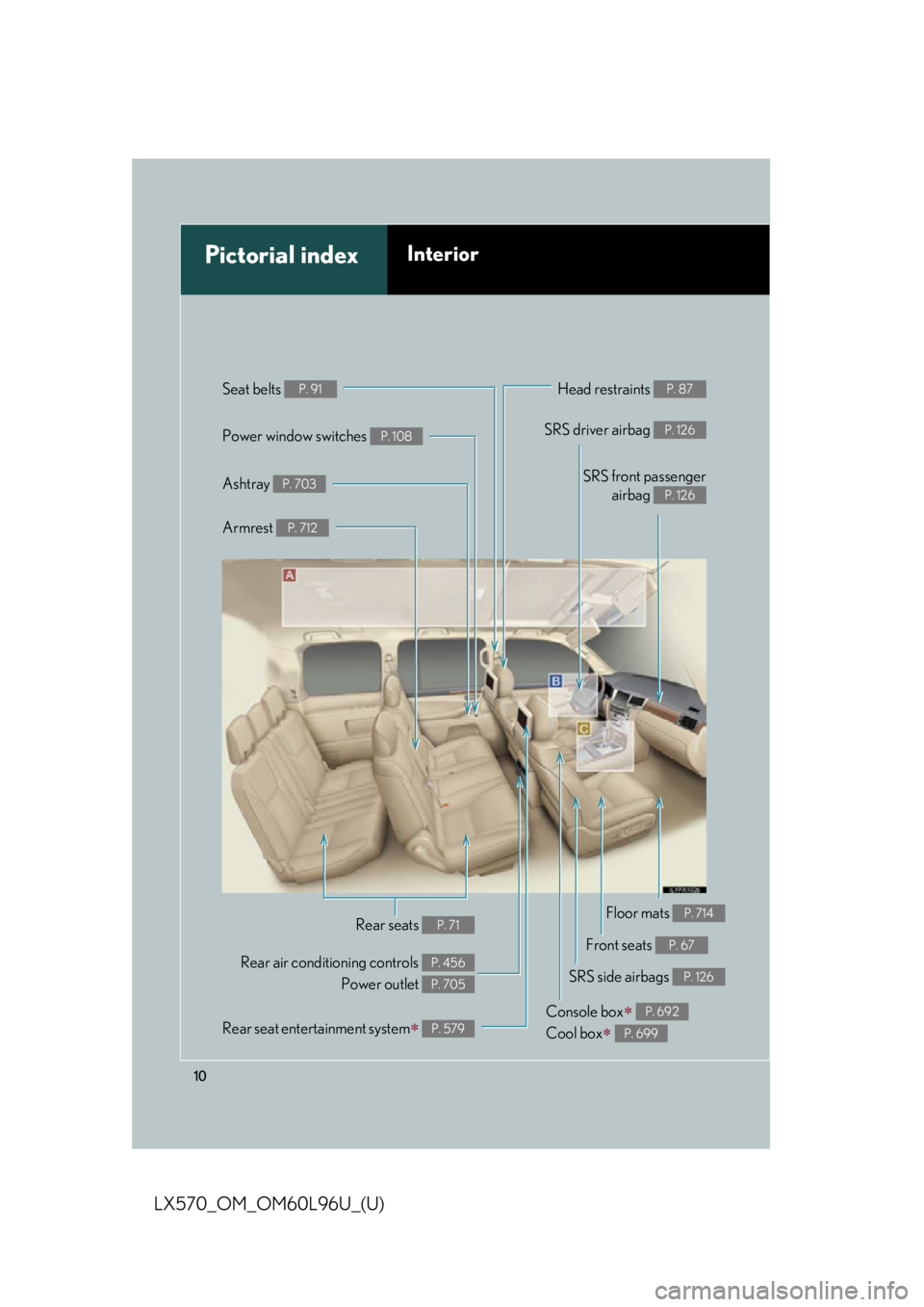
10
LX570_OM_OM60L96U_(U) Power window switches P. 108
Pictorial index Interior Seat belts P. 91
SRS front passenger
airbag P. 126
SRS driver airbag P. 126
Head restraints P. 87
Console box
Cool box
P. 692
P. 699Armrest P. 712
Front seats P. 67
SRS side airbags P. 126
Rear air conditioning controls
Power outlet P. 456
P. 705
Rear seats P. 71Ashtray P. 703
Floor mats P. 714
Rear seat entertainment system
P. 579
Page 15 of 960

15
LX570_OM_OM60L96U_(U) A
Air conditioning
system P. 444
Front passenger’s
seat belt reminder
light P. 829
Clock P. 415
Audio system P. 462
Emergency flasher switch P. 816Rear window and
outside rear view
mirror defoggers P. 460 Touch screen P. 404
Navigation system
*
Front passenger AIR BAG
ON and OFF indicator P. 140
* : Refer to “Navigation Sy stem Owner’s Manual”.
Page 25 of 960

25
LX570_OM_OM60L96U_(U) Event data recorder This vehicle is equipped with an event data recorder (EDR). The main purpose of an
EDR is to record, in certain crash or near crash-like situations, such as an air bag
deployment or hitting a road obstacle, data that will assist in understanding how a
vehicle’s systems performed. The EDR is desi gned to record data related to vehicle
dynamics and safety systems for a short peri od of time, typically 30 seconds or less.
The EDR in this vehicle is designed to record such data as:
• How various systems in your vehicle were operating;
• Whether or not the driver and passenger safety belts were buckled/fastened;
• How far (if at all) the driver was depressing the accelerator and/or brake pedal;
and,
• How fast the vehicle was traveling.
These data can help provide a better understanding of the circumstances in which
crashes and injuries occur.
NOTE: EDR data are recorded by your vehicle only if a nontrivial crash situation
occurs; no data are recorded by the ED R under normal driving conditions and no
personal data (e.g., name, gender, age, and crash locat ion) are reco rded. However,
other parties, such as law enforcement, could combine the EDR data with the type
of personally identifying data routinel y acquired during a crash investigation.
To read data recorded by an EDR, special equipment is required, and access to the
vehicle or the EDR is needed. In addition to the vehicle manufacturer, other parties,
such as law enforcement, that have the special equipment, can read the information
if they have access to the vehicle or the EDR.
Page 40 of 960

401-2. Opening, closing and locking the doors
LX570_OM_OM60L96U_(U) ■
Conditions affecting operation
The smart access system with push-button start uses weak radio waves. In the fol-
lowing situations, the commu nication between the electr onic key and the vehicle
may be affected, preventing the smart acce ss system with push -button start, wire-
less remote control and en gine immobilizer system from operating properly.
(Ways of coping: P. 872)●
When the electronic key battery is depleted ●
Near a TV tower, electric power plant, gas station, radio st ation, large display,
airport or other facility that generates strong radio waves or electrical noise●
When carrying a portable ra dio, cellular phone, cordless phone or other wire-
less communication devices ●
When the electronic key is in contact with, or is covered by the following metal-
lic object
• Card to which aluminum foil is attached
• Cigarette boxes that have aluminum foil inside
• Metallic wallets or bags
•Coins
• Hand warmers made of metal
• Media such as CDs and DVDs ●
When multiple electronic keys are in the vicinity ●
When other wireless keys (that emit radio waves) are being used nearby ●
When carrying or using the electronic key together with the following devices
that emit radio waves
• Another vehicle’s electronic key or a wireless key that emits radio waves
• Personal computers or personal digital assistants (PDAs)
• Digital audio players
• Portable game systems ●
If window tint with a metallic content or metallic objects are attached to the rear
window
Page 130 of 960

1301-7. Safety information
LX570_OM_OM60L96U_(U) ■
SRS airbag deployment conditions (SRS front airbags) ●
The SRS front airbag will deploy in the event of an impact that exceeds the set
threshold level (the level of force corresponding to an approximately 12 - 18 mph
[20 - 30 km/h] frontal collision with a fix ed wall that does not move or deform).
However, this threshold velocity will be considerably higher in the following situa-
tions:
• If the vehicle strikes an object, such as a parked vehicle or sign pole, which
can move or deform on impact
• If the vehicle is involved in an underride collision, such as a collision in which
the front of the vehicle “underrides”, or goes under, the bed of a truck●
Depending on the type of collision, it is possible that only the seat belt preten-
sioners will activate. ●
The SRS front airbags for the front passeng er will not activate if there is not a
passenger sitting in the front passenger seat. However, the front airbags for the
front passenger may deploy if luggage is pu t in the seat, even if the seat is unoc-
cupied.■
SRS airbag deployment conditions (SRS side airbags and SRS curtain shield air-
bags) ●
The SRS side airbags and SRS curtain shield airbags will deploy in the event of
an impact that exceeds the set threshold level (the level of force corresponding
to the impact force produced by an ap proximately 3300 lb. [1500 kg] vehicle
colliding with the vehicle cabin from a direction perpendicular to the vehicle
orientation at an approx imate speed of 12 - 18 mph [20 - 30 km/h]).●
The SRS curtain shield airbags will depl oy in the event of vehicle rollover.
Page 131 of 960
1311-7. Safety information
1
Before driving
LX570_OM_OM60L96U_(U) ■
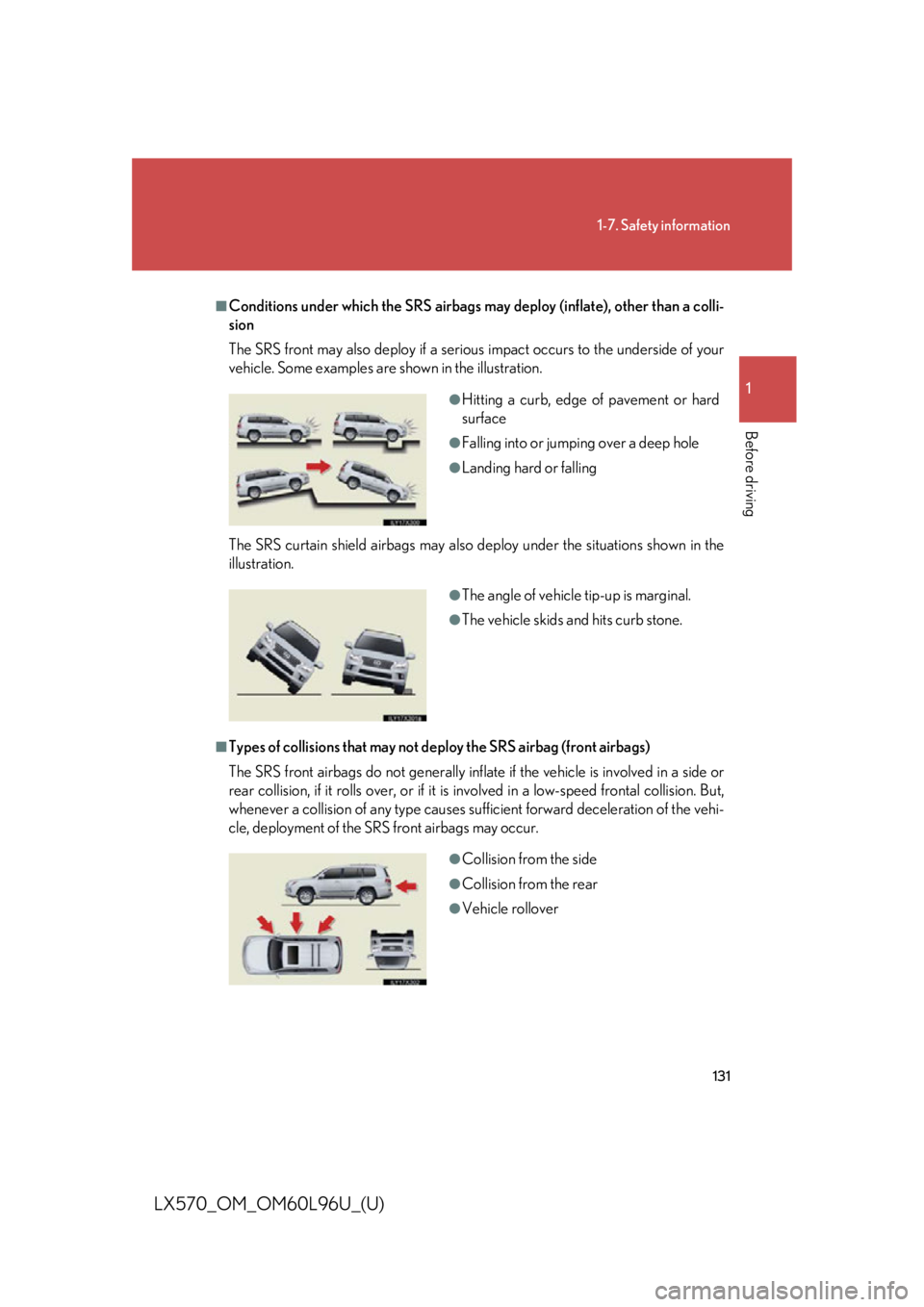
Conditions under which the SRS airbags may deploy (inflate), other than a colli-
sion
The SRS front may also deploy if a serious impact occurs to the underside of your
vehicle. Some examples are shown in the illustration.
The SRS curtain shield airbags may also deploy under the situations shown in the
illustration.
■
Types of collisions that may not de ploy the SRS airbag (front airbags)
The SRS front airbags do not generally inflate if the vehicle is involved in a side or
rear collision, if it rolls over, or if it is involved in a low-speed frontal collision. But,
whenever a collision of any type causes sufficient forward deceleration of the vehi-
cle, deployment of the SRS front airbags may occur. ●
Hitting a curb, edge of pavement or hard
surface ●
Falling into or jumping over a deep hole ●
Landing hard or falling
●
The angle of vehicle tip-up is marginal. ●
The vehicle skids and hits curb stone.
●
Collision from the side ●
Collision from the rear ●
Vehicle rollover
Page 139 of 960

1391-7. Safety information
1
Before driving
LX570_OM_OM60L96U_(U) Deactivating the curtain shield airbags in a vehicle rollover
ON/OFF (hold for a few seconds) The RSCA OFF indicator turns on
(only when the “ENGINE START
STOP” switch is in IGNITION ON
mode.)
The roll sensing function for the
curtain shield airbags and seat belt
pretensioners will turn back on
automatically each time the
“ENGINE START STOP” switch is
turned to IGNITION ON mode.■
This switch only should be used
In a situation where the inflation is not desired (such as during extreme off road
driving). ■
Operating conditions when the RSCA OFF indicator is on ●
The curtain shield airbag and seat belt pr etensioner will not activate in a vehicle
rollover. ●
The curtain shield airbag will activate in a severe side impact. ●
The pretensioner will activate in a severe frontal collision.
CAUTION■
While normal driving
Make sure the RSCA OFF indicator is not turned on. If it is left on, the curtain shield
airbag will not activate in th e event of an accident, which may result in death or seri-
ous injury.