wheel LEXUS LX570 2015 Repair Manual
[x] Cancel search | Manufacturer: LEXUS, Model Year: 2015, Model line: LX570, Model: LEXUS LX570 2015Pages: 960, PDF Size: 11.33 MB
Page 179 of 960

1792-1. Driving procedures
2
When driving
LX570_OM_OM60L96U_(U) ■
Operation of the “ENG INE START STOP” switch
When operating the “ENGINE START STOP ” switch, one short, firm press is
enough. If the switch is pressed improp erly, the engine may not start or the
“ENGINE START STOP” switch mode may not change. It is not necessary to press
and hold the switch. ■
When the steering lock cannot be released
■
If the engine does not start
The engine immobilizer system may not have been deactivated. ( P. 119)
Contact your Lexus dealer. ■
When the “ENGINE START STOP” switch indicator flashes in amber
The system may be malfunctioning. Have the vehicle inspected by your Lexus
dealer immediately. ■
Auto power off function
If the vehicle is left in ACCESSORY mode for more than 20 minutes with the shift
lever in P, the “ENGINE START STOP” switch will automatically turn off. However,
this function cannot entirely prevent battery discharge. Do not leave the vehicle
with the “ENGINE START STOP” switch in ACCESSORY mode for long periods
of time when the engine is not running. ■
Electronic key battery depletion
P. 42■
When the electronic key battery is discharged
P. 872■
Conditions affecting operation
P. 40 The green indicator light on the “ENGINE
START STOP” switch will flash and a mes-
sage will be shown on the multi-information
display. Press the “ENGINE START STOP”
switch again while turning the steering wheel
left and right.
Page 197 of 960

1972-2. Instrument cluster
2
When driving
LX570_OM_OM60L96U_(U) ■ Indicators
The indicators inform the driver of the operating state of the vehi-
cle’s various systems. Turn signal indicator
( P. 189) Crawl Control indicator
( P. 337)
Headlight high beam indi-
cator ( P. 210) Roll sensing of curtain
shield airbags off indica-
tor ( P. 139)(U.S.A.)
Headlight indicator
( P. 208) “PWR” mode indicator
( P. 183)(Canada)
Tail light indicator
( P. 209) Automatic transmission
second start indicator
( P. 183)
Fog light indicator
( P. 220) Low speed four-wheel
drive indicator light
( P. 332)
“AFS OFF” indicator
( P. 210) Center differential lock
indicator ( P. 332)
Cruise control indicator
( P. 232, 236) Security indicator
( P. 119 121)(if equipped)
Intuitive parking assist
indicator ( P. 251) Easy access mode
indicator ( P. 323)* 1
* 1
* 1
* 1
Page 200 of 960

2002-2. Instrument cluster
LX570_OM_OM60L96U_(U) Multi-information display The multi-information display presents the driver with a variety of driving-
related data including the current outside air temperature.
● Trip information ( P. 202)Displays driving range, fuel consumpt ion and other cruising related infor-
mation.
● Outside temperature display ( P. 202)
● Speedometer ( P. 203)
● Turn-by-turn navigation ( P. 206)
● Front tire angle ( P. 204)
● Tire inflation pressure ( P. 205)
● Intuitive parking assist display (if equipped) ( P. 251)Automatically displayed when using Intuitive parking assist.
● 4-Wheel AHC display ( P. 320)
Page 249 of 960
2492-4. Using other driving systems
2
When driving
LX570_OM_OM60L96U_(U) CAUTION■
When the radar sensor may not be correctly detecting the vehicle ahead
Apply the brakes as necessary when any of the following types of vehicles are in
front of you.
As the sensor may not be able to correctly detect these types of vehicles, the
approach warning ( P. 242) will not be activated, and a fatal or serious accident
may result: ●
Vehicles that cut in suddenly ●
Vehicles traveling at low speeds ●
Vehicles that are not moving ●
Vehicles with small rear ends (trailers with no load on board etc.) ●
Motorcycles traveling in the same lane■
Conditions under which the vehicle-to-veh icle distance control may not function
correctly
Apply the brakes as necessary in the following conditions as the radar sensor may
not be able to correctly detect vehicles ahead, and a fatal or serious accident may
result: ●
When water or snow thrown up by the surrounding vehicles hinders the function-
ing of the sensor ●
When your vehicle is pointing upwards (caused by a heavy load in the luggage
compartment, etc.) ●
When the road curves or when the lanes are narrow ●
When steering wheel operation or your position in the lane is unstable●
When the vehicle ahead of you decelerates suddenly
Page 272 of 960
2722-4. Using other driving systems
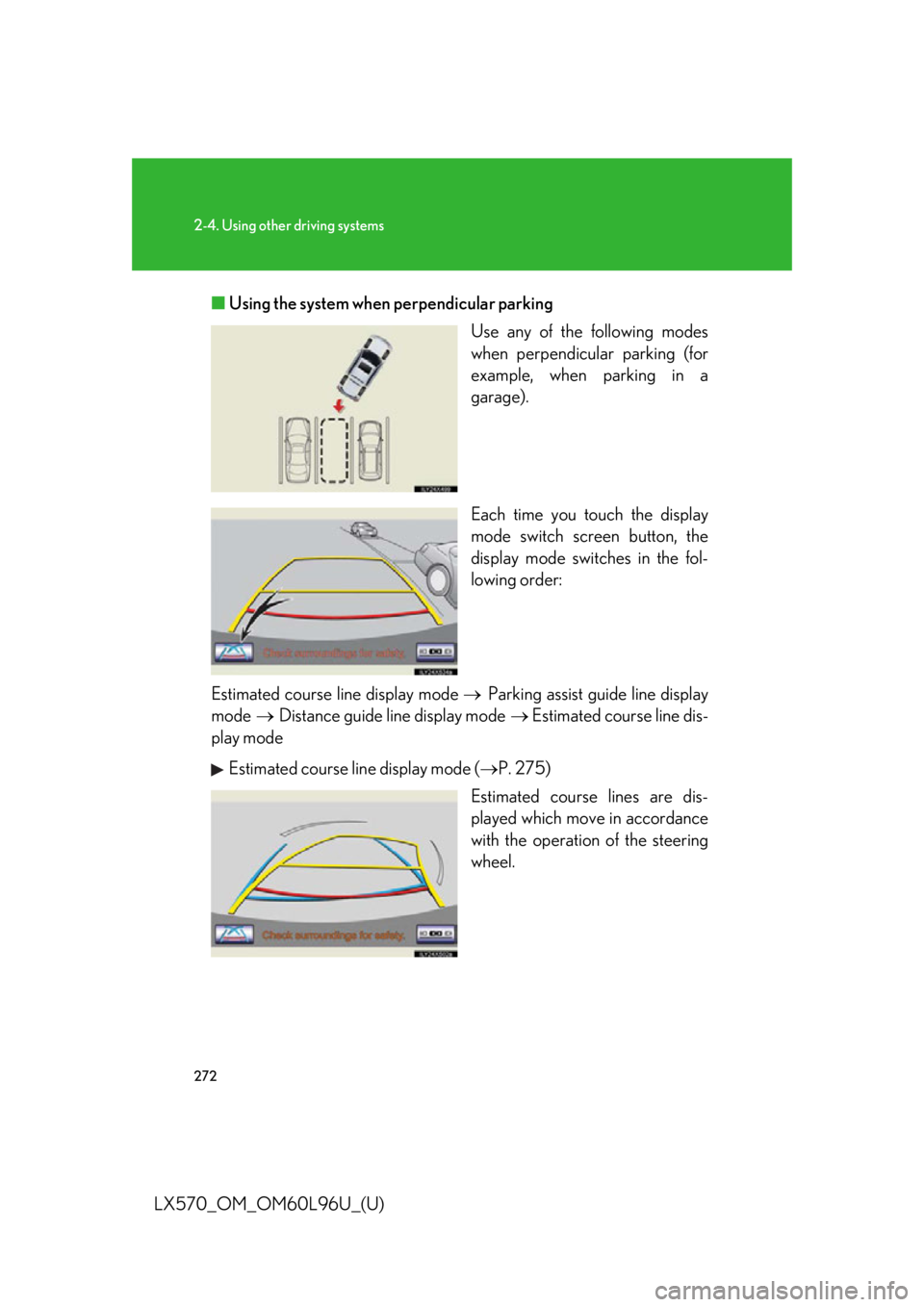
LX570_OM_OM60L96U_(U) ■ Using the system when perpendicular parking
Use any of the following modes
when perpendicular parking (for
example, when parking in a
garage).
Each time you touch the display
mode switch screen button, the
display mode switches in the fol-
lowing order:
Estimated course line display mode Parking assist guide line display
mode Distance guide line display mode Estimated course line dis-
play mode
Estimated course line display mode ( P. 275)
Estimated course lines are dis-
played which mo ve in accordance
with the operation of the steering
wheel.
Page 274 of 960
2742-4. Using other driving systems
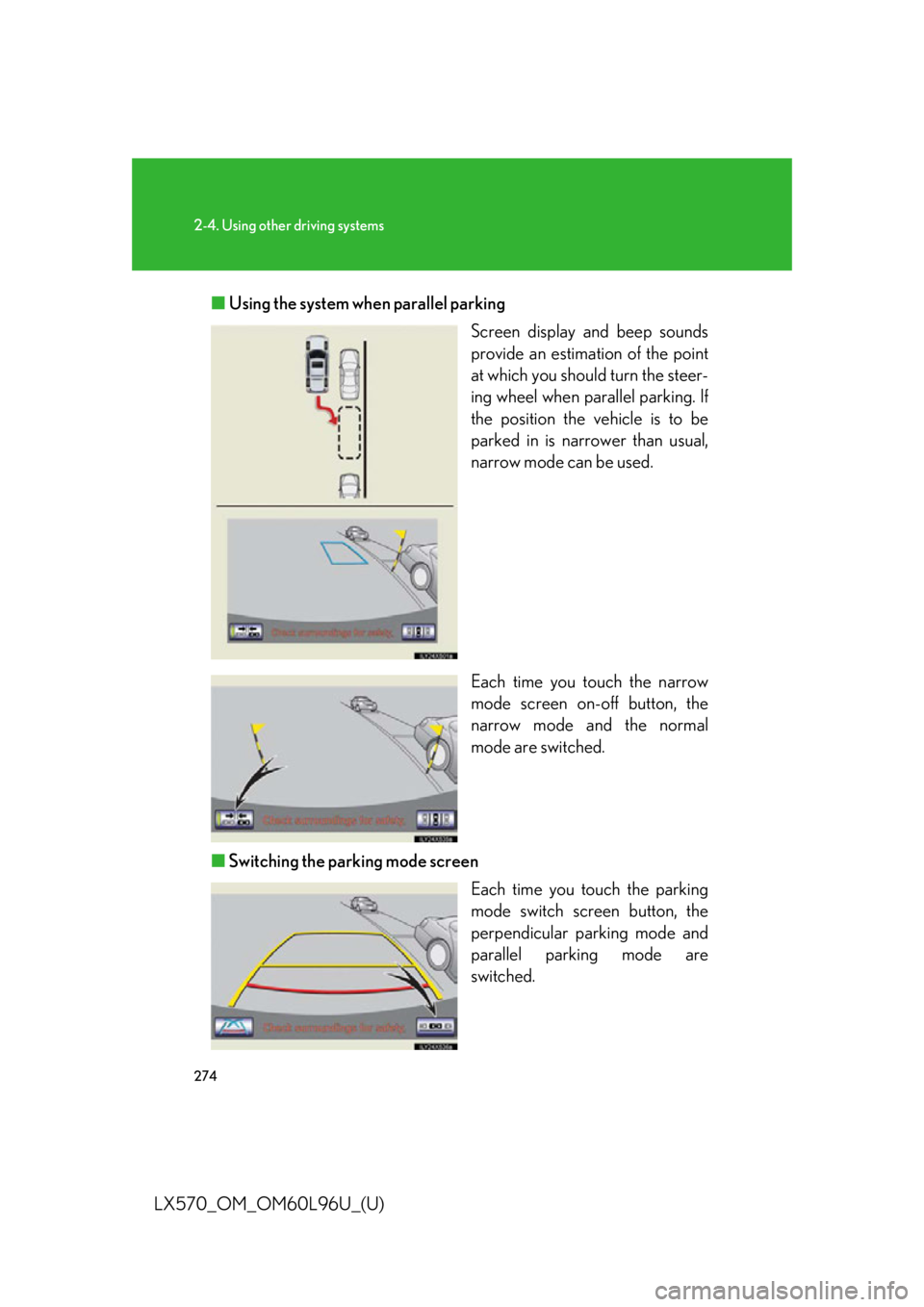
LX570_OM_OM60L96U_(U) ■ Using the system when parallel parking
Screen display and beep sounds
provide an estimation of the point
at which you should turn the steer-
ing wheel when parallel parking. If
the position the vehicle is to be
parked in is narrower than usual,
narrow mode can be used.
Each time you touch the narrow
mode screen on-off button, the
narrow mode and the normal
mode are switched.
■ Switching the parking mode screen
Each time you touch the parking
mode switch screen button, the
perpendicular parking mode and
parallel parking mode are
switched.
Page 275 of 960

2752-4. Using other driving systems
2
When driving
LX570_OM_OM60L96U_(U) Perpendicular parking (estimated course line display mode)
■ Screen description
Vehicle width extension guide line The line indicates a guide path when the vehicle is being backed straight up.
The displayed width is wider than the actual vehicle width.
The line aligns with the estimated co urse lines when the steering wheel is
straight.
Estimated course lines The lines show an estimated course when the steering wheel is turned.
Distance guide line The line moves, together with the estimated course lines, in sync with the
steering wheel. The line shows points ap proximately 1.5 ft. (0.5 m) (red) and
approximately 3 ft. (1 m) (yellow) from the center of the edge of the bumper.
Distance guide line The line shows distance behind the vehi cle, a point approximately 1.5 ft. (0.5
m) (blue) from the edge of the bumper.
Page 276 of 960
2762-4. Using other driving systems
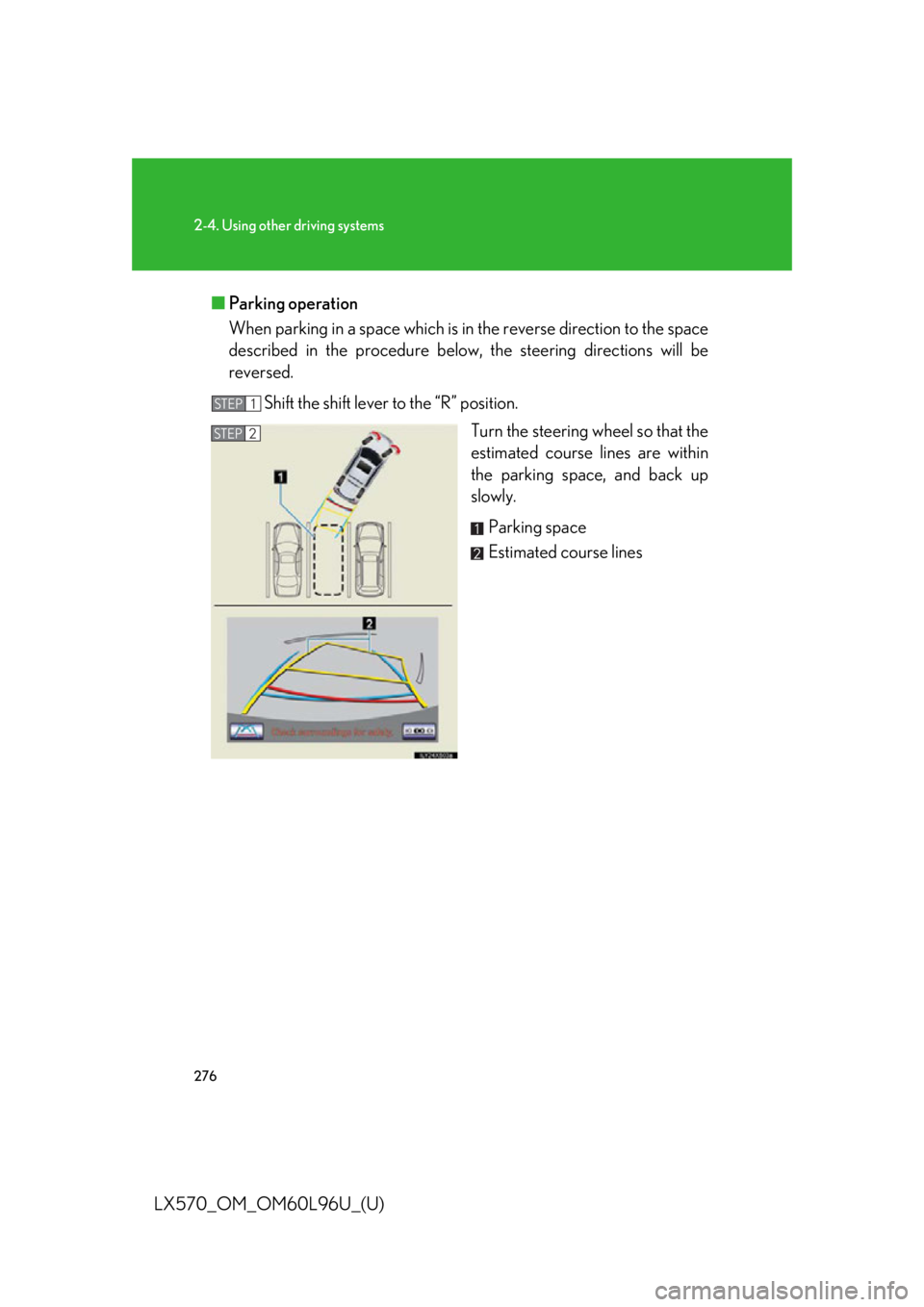
LX570_OM_OM60L96U_(U) ■ Parking operation
When parking in a spac e which is in the reverse di rection to the space
described in the procedure below, the steering directions will be
reversed.
Shift the shift lever to the “R” position.
Turn the steering wheel so that the
estimated course lines are within
the parking space, and back up
slowly.
Parking space
Estimated course linesSTEP 1
STEP 2
Page 277 of 960

2772-4. Using other driving systems
2
When driving
LX570_OM_OM60L96U_(U) When the rear position of the vehi-
cle has entered the parking space,
turn the steering wheel so that the
vehicle width ex tension guide lines
are within the left and right dividing
lines of the parking space.
Vehicle width extension guide
line
Once the vehicle width extensi on guide lines and the parking
space lines are paralle l, straighten the s teering wheel and back
up slowly until the vehicle ha s completely entered the parking
space.
Stop the vehicle in an appropriate place, and finish parking. STEP 3
STEP 4
STEP 5
Page 278 of 960

2782-4. Using other driving systems
LX570_OM_OM60L96U_(U) Perpendicular parking (parking as sist guide line display mode)
■ Screen description
Vehicle width extension guide lines
These lines indicate a guide path when the vehicle is being backed
straight up. The displayed width is wider than the actual vehicle width.
Parking assist guide lines
These lines indicate the path of the smallest turn po ssible behind the
vehicle.
These lines also indicate the approximate position of the steering
wheel when parking.
Distance guide line
This line indicates po ints approximately 1.5 ft. (0.5 m) (red) behind the
rear bumper of your vehicle.