key battery LEXUS LX570 2016 User Guide
[x] Cancel search | Manufacturer: LEXUS, Model Year: 2016, Model line: LX570, Model: LEXUS LX570 2016Pages: 632, PDF Size: 10.34 MB
Page 153 of 632
LX570_OM_OM60N01U_(U) 1533-3. Adjusting the seats
3
Operation of each component ■
To stop the position recall operation part-way through
Perform any of the following: ●
Press the “SET” button. ●
Press button “1”, “2” or “3”. ●
Operate any of the seat adjustment switch es (only cancels seat position recall).●
Operate the tilt and telescopic steering co ntrol switch (only ca ncels steering wheel
position recall). ■
Operating the driving position memory after turning the engine switch off
Recorded seat positions can be activated up to 180 seconds after the driver’s door is
opened and another 60 seconds after it is closed again. ■
If the battery is disconnected
The memorized positions must be reset beca use the computer’s memory is erased when
the battery is disconnected.
Each electronic key can be registered to recall your preferred driving position.■
Registering procedure
Record your driving position to button “1”, “2” or “3” before performing the
following:
Carry only the key you want to regist er, and then close the driver’s door.
If 2 or more keys are in the vehicle, the driving position cannot be recorded
properly.
Check that the shift lever is in P.
Turn the engine switch to IGNITION ON mode.
Recall the driving position that you want to record.
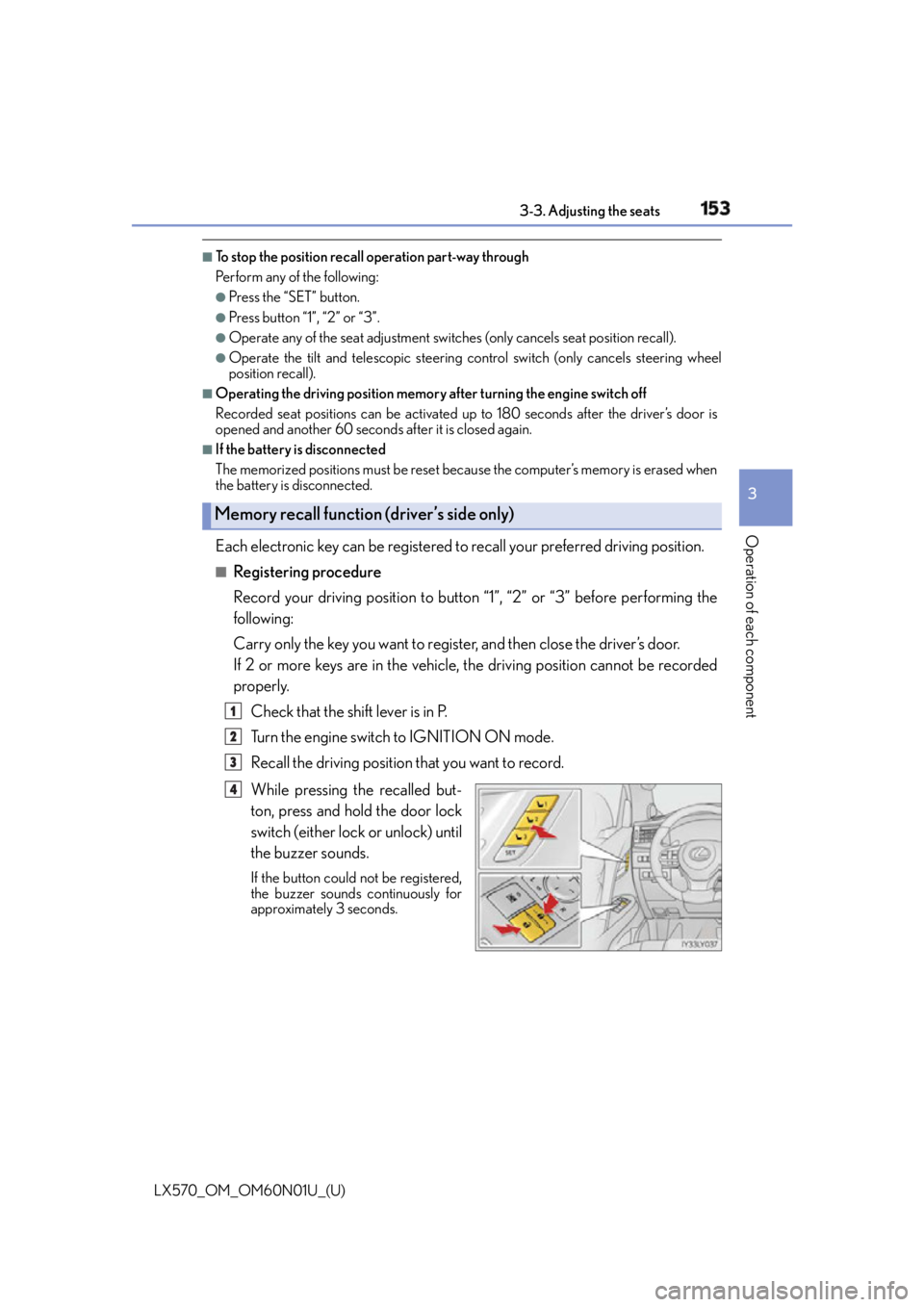
While pressing the recalled but-
ton, press and hold the door lock
switch (either lock or unlock) until
the buzzer sounds. If the button could not be registered,
the buzzer sounds continuously for
approximately 3 seconds.Memory recall function (driver’s side only) 1
2
3
4
Page 166 of 632

166
LX570_OM_OM60N01U_(U) 3-5. Opening, closing the windows and moon roof■
When the window cannot be opened or closed
When the jam protection function or catch protection function operates unusually and
the door window cannot be open ed or closed, perform the fo llowing operations with the
power window switch of that door. ●
Stop the vehicle. With the engine switch in IGNITION ON mode, within 4 seconds of
the jam protection function or catch protecti on function activating, continuously oper-
ate the power window switch in the one-to uch closing direction or one-touch opening
direction so that the door wind ow can be opened and closed.●
If the door window cannot be opened and closed even when performing the above
operations, perform the following proc edure for function initialization.
Turn the engine switch to IGNITION ON mode.
Pull and hold the power window switch in the one-touch closing direction and com-
pletely close the door window.
Release the power window switch for a mo ment and then resume pulling and hold-
ing the switch in the one-touch closing direction for approximately 4 seconds.
Press and hold the power window switch in the one-touch opening direction. After
the door window is complete ly opened, continue holding the switch for an additional
1 second or more.
Pull and hold the power window switch in the one-touch closing direction again.
After the door window is completely clos ed, continue holding the switch for a fur-
ther 1 second or more.
If you release the switch while the window is moving, start again from the beginning.
If the window reverses and cannot be fully cl osed or opened, have the vehicle inspected
by your Lexus dealer. ■
When the battery is disconnected
The window lock switch is disabled. If nece ssary, press the window lock switch after
reconnecting the battery. ■
Door lock linked window operation ●
The power windows can be opened an d closed using the mechanical key.
* ( P. 5 5 0 )●
The power windows can be opened us ing the wireless remote control.
* ( P. 1 1 5 )
* : These settings must be cust omized at your Lexus dealer.■
Power windows open warning buzzer
The buzzer sounds and a message is shown on the multi-information display in the instru-
ment cluster when the engine switch is turned off and the driver’s door is opened with the
power windows open. ■
Customization
Settings (e.g. linked door lock operation) can be changed.
(Customizable features: P. 585) 1
2
3
4
5
Page 207 of 632
LX570_OM_OM60N01U_(U) 2074-2. Driving procedures
4
Driving If the engine is stopped with the shift le ver in a position other than P, the engine
switch will not be turned off but inst ead be turned to ACCESSORY mode. Per-
form the following procedure to turn the switch off:
Check that the parking brake is set.
Shift the shift lever to P.
Check that “Turn Off Vehicle” is displayed on the multi-information display
and then press the engine switch once.
Check that “Turn Off Vehicle” on the multi-information display is off. ■
Auto power off function
If the vehicle is left in ACCESSORY mode for more than 20 minutes or IGNITION ON
mode (the engine is not running) for more than an hour with the shift lever in P, the engine
switch will automatically turn off. However, this function cannot en tirely prevent battery
discharge. Do not leave the vehicle with the engine switch in ACCESSORY or IGNI-
TION ON mode for long periods of ti me when the engine is not running.■
Operation of the engine switch ●
When operating the engine switch, one short, firm press is enough. If the switch is
pressed improperly, the engine may not start or the engine switch mode may not
change. It is not necessary to press and hold the switch. ●
If attempting to restart the engine immediat ely after turning the engine switch off, the
engine may not start in some cases. After turning the engine off, please wait a few sec-
onds before restarting the engine. ■
Electronic key battery depletion
P. 112 ■
Conditions affe cting operation
P. 1 3 4 ■
Note for the entry function
P. 1 3 5 ■
If the engine does not start ●
The engine immobilizer system may not have been deactivated. ( P. 76 )
Contact your Lexus dealer. ●
Check that the shift lever is securely set in P. The engine may not start if the shift lever is
displaced out of P.
A message will be displayed on the multi-information display. ■
Steering lock
After turning the engine switch off and opening and closing the doors, the steering wheel
will be locked due to the stee ring lock function. Operating the engine switch again auto-
matically cancels the steering lock.When stopping the engine with the shift lever in a position other than P1
2
3
4
Page 208 of 632
208
LX570_OM_OM60N01U_(U) 4-2. Driving procedures■
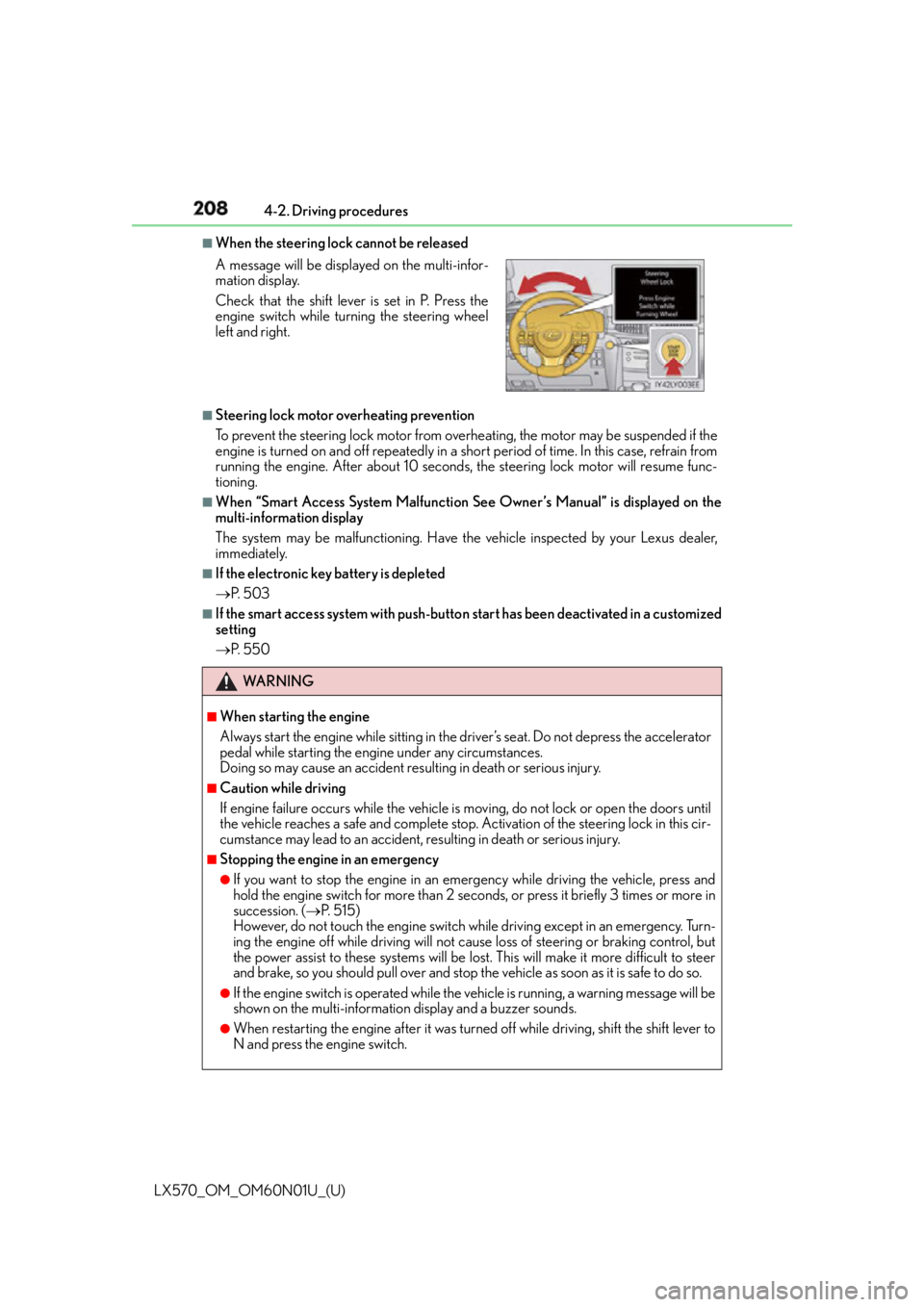
When the steering lock cannot be released
■
Steering lock motor overheating prevention
To prevent the steering lock motor from overheating, the motor may be suspended if the
engine is turned on and off repeatedly in a sh ort period of time. In this case, refrain from
running the engine. After about 10 seconds, the steering lock motor will resume func-
tioning. ■
When “Smart Access System Malfunction See Owner’s Manual” is displayed on the
multi-information display
The system may be malfunctioning. Have the vehicle inspected by your Lexus dealer,
immediately. ■
If the electronic key battery is depleted
P. 5 0 3 ■
If the smart access system with push-butto n start has been deactivated in a customized
setting
P. 5 5 0A message will be displayed on the multi-infor-
mation display.
Check that the shift lever is set in P. Press the
engine switch while turning the steering wheel
left and right.
WA R N I N G ■
When starting the engine
Always start the engine while sitting in the driver’s seat. Do not depress the accelerator
pedal while starting the engine under any circumstances.
Doing so may cause an accident resu lting in death or serious injury.■
Caution while driving
If engine failure occurs while the vehicle is moving, do not lock or open the doors until
the vehicle reaches a safe and complete stop. Activation of the steering lock in this cir-
cumstance may lead to an accident, re sulting in death or serious injury.■
Stopping the engine in an emergency ●
If you want to stop the engine in an emergency while driving the vehicle, press and
hold the engine switch for more than 2 seco nds, or press it briefly 3 times or more in
succession. ( P. 5 1 5 )
However, do not touch the engine switch while driving except in an emergency. Turn-
ing the engine off while driving will not cause loss of steering or braking control, but
the power assist to these systems will be lost . This will make it more difficult to steer
and brake, so you should pull over and stop th e vehicle as soon as it is safe to do so.●
If the engine switch is operated while the vehicle is running, a warning message will be
shown on the multi-information display and a buzzer sounds.●
When restarting the engine after it was turn ed off while driving, shift the shift lever to
N and press the engine switch.
Page 421 of 632
LX570_OM_OM60N01U_(U) 4215-4. Using the interior lights
5
Interior features ■
Illuminated entry system
The lights automatically turn on/off according to engine switch mode, the presence of the
electronic key, whether the doors are locked/unlocked, and whether the doors are
open/closed. ■
To prevent battery discharge
If the interior lights remain on when the engine switch is turned off, the lights will go off
automatically after 20 minutes: ■
Customization
Settings (e.g. adjust the time elapsed before the interior light s automatically turn off) can
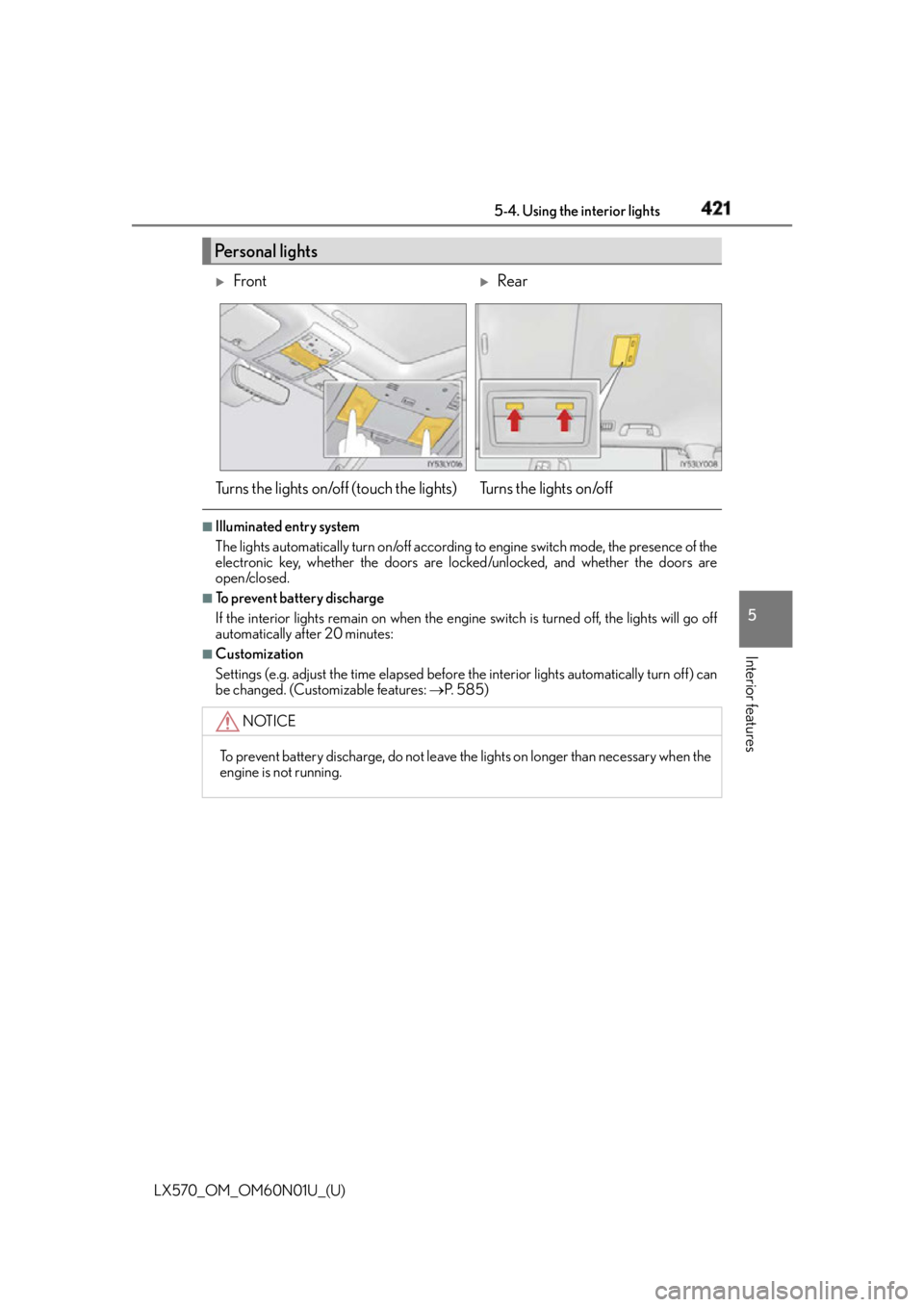
be changed. (Customizable features: P. 5 8 5 )Personal lights
Front
Rear
Turns the lights on/off (touch the lights) Turns the lights on/off
NOTICE
To prevent battery discharge, do not leave the lights on longer than necessary when the
engine is not running.
Page 442 of 632

442
LX570_OM_OM60N01U_(U) 5-6. Using the other interior features
WA R N I N G ■
Conditions in which the function may not operate correctly
In the following conditions, it may not operate correctly ●
The portable device is fully charged ●
There is foreign matter between the charge area and portable device ●
The temperature of the portable device gets higher from charging ●
The charging surface of the portable device is facing up ●
The placement of the portable device is out of alignment with the charge area●
Near a TV tower, electric power plant, gas st ation, radio station, large display, airport
or other facility that generates strong radio waves or electrical noise ●
When the electronic key is in contact with , or is covered by the following metallic
objects
• Cards to which aluminum foil is attached
• Cigarette boxes that have aluminum foil inside
• Metallic wallets or bags
•Coins
•Hand warmers made of metal
• Media such as CDs and DVDs ●
When other wireless keys (that emit radio waves) are being used nearby
In addition, excluding the above-mentioned, when the charger does not perform nor-
mally or the operation indicator light is flashi ng continuously, it is considered that the
wireless charger is malfunctioning. Contact your Lexus dealer. ■
To prevent failure or damage to data ●
Do not bring magnetic cards, such as credit cards, or magnetic recording media, etc.,
close to the charger while charging, otherw ise, data may disapp ear under the influ-
ence of magnetism. Also, do not bring pr ecision instruments such as wrist watches,
etc., close to the charger, as such objects may break. ●
Do not leave portable devices in the cab in. The temperature inside the cabin may
become high, when under the sun, and cause damage to the device.■
To prevent battery discharge
When the engine is stopped, do not use the wireless charger for a long time.
Page 457 of 632

457
LX570_OM_OM60N01U_(U) 6Maintenance and care 6-1. Maintenance and care
Cleaning and protecting
the vehicle exterior................. 458
Cleaning and protecting
the vehicle interior ....................461
6-2. Maintenance
Maintenance
requirements............................. 464
General maintena nce .............. 466
Emission inspection and
maintenance (I/M)
programs .................................... 469
6-3. Do-it-yourself maintenance
Do-it-yourself service
precautions ................................ 470
Hood ................................................472
Engine compartment ................473
Tires ..................................................486
Tire inflation pressure ............... 495
Wheels ........................................... 499
Air conditioning filter ................ 501
Electronic key battery ..............503
Checking and replacing
fuses ............................................. 505
Light bulbs.................................... 508
Page 483 of 632
LX570_OM_OM60N01U_(U) 4836-3. Do-it-yourself maintenance
6
Maintenance and care ■
Before recharging
When recharging, the battery produces hydrogen gas which is flammable and explosive.
Therefore, observe the following before recharging: ●
If recharging with the battery installed on the vehicle, be sure to disconnect the ground
cable. ●
Make sure the engine switch on the charger is off when connecting and disconnecting
the charger cables to the battery. ■
After recharging/reconnecting the battery
The engine may not start. Follow the proc edure below to initialize the system.
Shift the shift lever to P.
Open and close any of the doors.
Restart the engine. ●
Unlocking the doors using the smart access system with push-button start may not be
possible immediately after reconnecting the battery. If this happens, use the wireless
remote control or the mechanical key to lock/unlock the doors. ●
Start the engine with the engine switch in ACCESSORY mode. The engine may not
start with the engine switch turned off. However, the engine will operate normally from
the second attempt. ●
The engine switch mode is recorded by the vehicle. If the battery is reconnected, the
vehicle will return the engine switch mode to the status it was in before the battery was
disconnected. Make sure to turn off the en gine before disconnect the battery. Take
extra care when connecting the battery if the engine switch mode prior to discharge is
unknown.
If the engine will not start even after mult iple attempts, contac t your Lexus dealer.
WA R N I N G ■
Chemicals in the battery
Batteries contain poisonous and corrosive sulfuric acid and may produce hydrogen
gas which is flammable and explosive. To reduce the risk of death or serious injury, take
the following precautions while working on or near battery: ●
Do not cause sparks by touching the battery terminals with tools. ●
Do not smoke or light a match near the battery. ●
Avoid contact with eyes, skin and clothes. ●
Never inhale or swallow electrolyte. ●
Wear protective safety glasses when working near the battery.●
Keep children away from the battery. ■
Where to safely charge the battery
Always charge the battery in an open area. Do not charge the battery in a garage or
closed room where there is not sufficient ventilation. 1
2
3
Page 503 of 632
503
LX570_OM_OM60N01U_(U) 6-3. Do-it-yourself maintenance
6
Maintenance and care
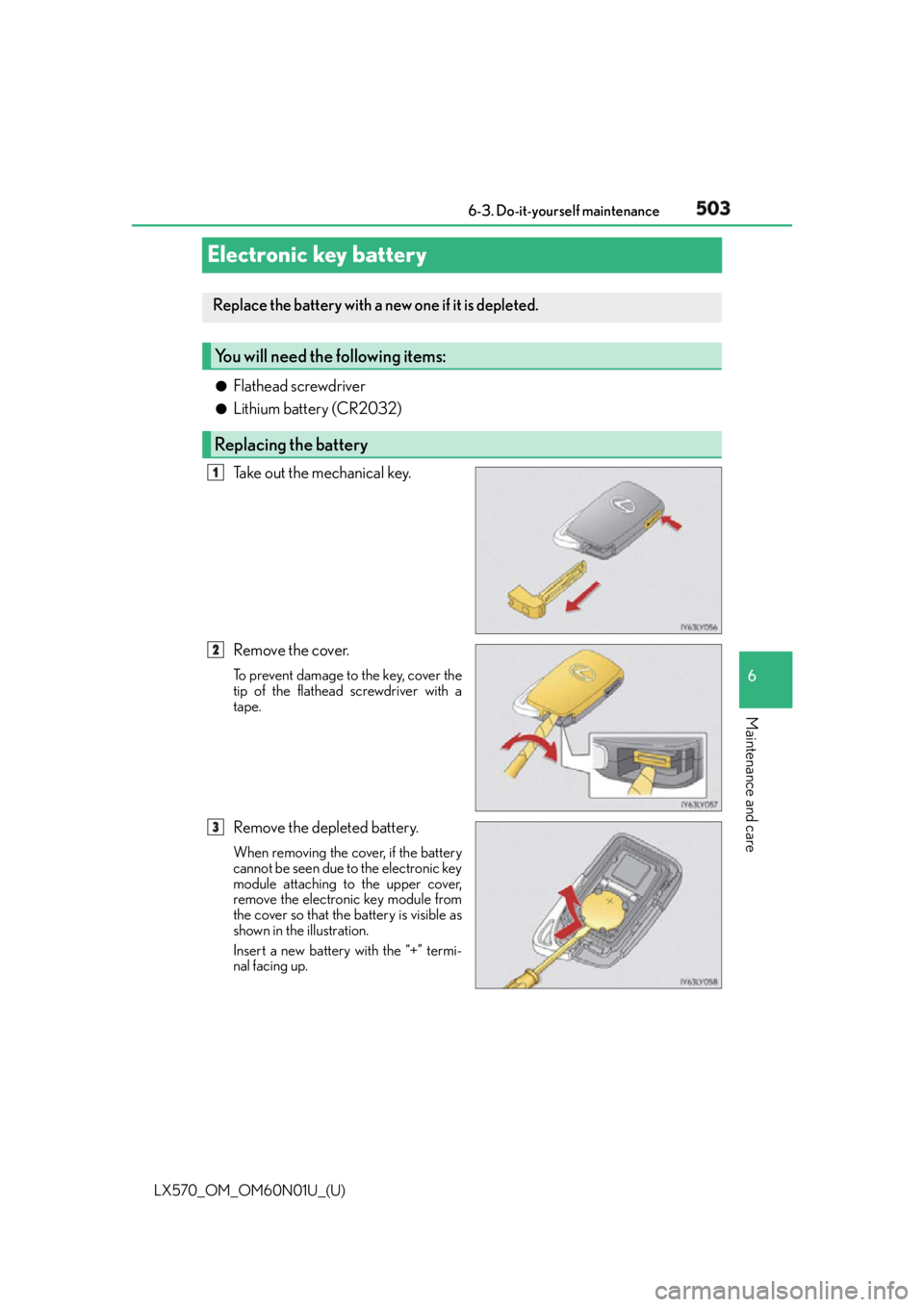
Electronic key battery ●
Flathead screwdriver ●
Lithium battery (CR2032)
Take out the mechanical key.
Remove the cover. To prevent damage to the key, cover the
tip of the flathead screwdriver with a
tape.
Remove the depleted battery. When removing the cover, if the battery
cannot be seen due to the electronic key
module attaching to the upper cover,
remove the electronic key module from
the cover so that the battery is visible as
shown in the illustration.
Insert a new battery with the “+” termi-
nal facing up.Replace the battery with a new one if it is depleted.
You will need the following items:
Replacing the battery 1
2
3
Page 504 of 632
504
LX570_OM_OM60N01U_(U) 6-3. Do-it-yourself maintenance■
Use a CR2032 lithium battery ●
Batteries can be purchased at your Lexus dealer, local electrical appliance shops or
camera stores. ●
Replace only with the same or equivalent type recommended by the manufacturer. ●
Dispose of used batteries according to the local laws. ■
When the card key battery needs to be replaced
The battery for the card key is available only at Lexus dealers. Your Lexus dealer can
replace the battery for you. ■
If the electronic key battery is depleted
The following symptoms may occur: ●
The smart access system with push-button start and wireless remote control will not
function properly. ●
The operational range will be reduced.
WA R N I N G ■
Removed battery and other parts
These parts are small and if swallowed by a child, they can cause choking. Keep away
from children. Failure to do so could result in death or serious injury.
NOTICE ■
For normal operation afte r replacing the battery
Observe the following precautions to prevent accidents: ●
Always work with dry hands.
Moisture may cause the battery to rust. ●
Do not touch or move any other component inside the remote control. ●
Do not bend either of the battery terminals.