battery LEXUS LX570 2016 Owner's Manual
[x] Cancel search | Manufacturer: LEXUS, Model Year: 2016, Model line: LX570, Model: LEXUS LX570 2016Pages: 632, PDF Size: 10.34 MB
Page 166 of 632

166
LX570_OM_OM60N01U_(U) 3-5. Opening, closing the windows and moon roof■
When the window cannot be opened or closed
When the jam protection function or catch protection function operates unusually and
the door window cannot be open ed or closed, perform the fo llowing operations with the
power window switch of that door. ●
Stop the vehicle. With the engine switch in IGNITION ON mode, within 4 seconds of
the jam protection function or catch protecti on function activating, continuously oper-
ate the power window switch in the one-to uch closing direction or one-touch opening
direction so that the door wind ow can be opened and closed.●
If the door window cannot be opened and closed even when performing the above
operations, perform the following proc edure for function initialization.
Turn the engine switch to IGNITION ON mode.
Pull and hold the power window switch in the one-touch closing direction and com-
pletely close the door window.
Release the power window switch for a mo ment and then resume pulling and hold-
ing the switch in the one-touch closing direction for approximately 4 seconds.
Press and hold the power window switch in the one-touch opening direction. After
the door window is complete ly opened, continue holding the switch for an additional
1 second or more.
Pull and hold the power window switch in the one-touch closing direction again.
After the door window is completely clos ed, continue holding the switch for a fur-
ther 1 second or more.
If you release the switch while the window is moving, start again from the beginning.
If the window reverses and cannot be fully cl osed or opened, have the vehicle inspected
by your Lexus dealer. ■
When the battery is disconnected
The window lock switch is disabled. If nece ssary, press the window lock switch after
reconnecting the battery. ■
Door lock linked window operation ●
The power windows can be opened an d closed using the mechanical key.
* ( P. 5 5 0 )●
The power windows can be opened us ing the wireless remote control.
* ( P. 1 1 5 )
* : These settings must be cust omized at your Lexus dealer.■
Power windows open warning buzzer
The buzzer sounds and a message is shown on the multi-information display in the instru-
ment cluster when the engine switch is turned off and the driver’s door is opened with the
power windows open. ■
Customization
Settings (e.g. linked door lock operation) can be changed.
(Customizable features: P. 585) 1
2
3
4
5
Page 207 of 632

LX570_OM_OM60N01U_(U) 2074-2. Driving procedures
4
Driving If the engine is stopped with the shift le ver in a position other than P, the engine
switch will not be turned off but inst ead be turned to ACCESSORY mode. Per-
form the following procedure to turn the switch off:
Check that the parking brake is set.
Shift the shift lever to P.
Check that “Turn Off Vehicle” is displayed on the multi-information display
and then press the engine switch once.
Check that “Turn Off Vehicle” on the multi-information display is off. ■
Auto power off function
If the vehicle is left in ACCESSORY mode for more than 20 minutes or IGNITION ON
mode (the engine is not running) for more than an hour with the shift lever in P, the engine
switch will automatically turn off. However, this function cannot en tirely prevent battery
discharge. Do not leave the vehicle with the engine switch in ACCESSORY or IGNI-
TION ON mode for long periods of ti me when the engine is not running.■
Operation of the engine switch ●
When operating the engine switch, one short, firm press is enough. If the switch is
pressed improperly, the engine may not start or the engine switch mode may not
change. It is not necessary to press and hold the switch. ●
If attempting to restart the engine immediat ely after turning the engine switch off, the
engine may not start in some cases. After turning the engine off, please wait a few sec-
onds before restarting the engine. ■
Electronic key battery depletion
P. 112 ■
Conditions affe cting operation
P. 1 3 4 ■
Note for the entry function
P. 1 3 5 ■
If the engine does not start ●
The engine immobilizer system may not have been deactivated. ( P. 76 )
Contact your Lexus dealer. ●
Check that the shift lever is securely set in P. The engine may not start if the shift lever is
displaced out of P.
A message will be displayed on the multi-information display. ■
Steering lock
After turning the engine switch off and opening and closing the doors, the steering wheel
will be locked due to the stee ring lock function. Operating the engine switch again auto-
matically cancels the steering lock.When stopping the engine with the shift lever in a position other than P1
2
3
4
Page 208 of 632
208
LX570_OM_OM60N01U_(U) 4-2. Driving procedures■
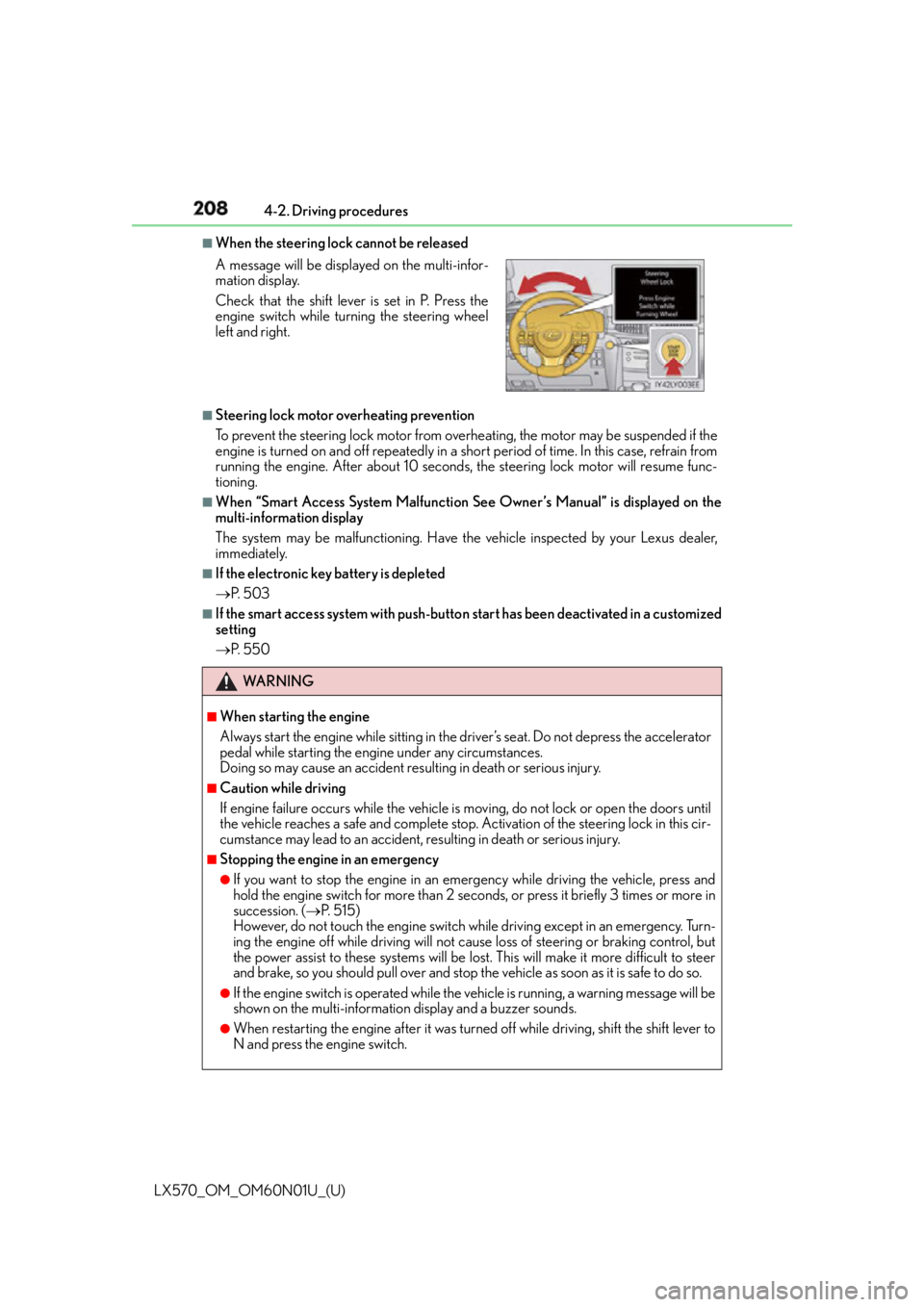
When the steering lock cannot be released
■
Steering lock motor overheating prevention
To prevent the steering lock motor from overheating, the motor may be suspended if the
engine is turned on and off repeatedly in a sh ort period of time. In this case, refrain from
running the engine. After about 10 seconds, the steering lock motor will resume func-
tioning. ■
When “Smart Access System Malfunction See Owner’s Manual” is displayed on the
multi-information display
The system may be malfunctioning. Have the vehicle inspected by your Lexus dealer,
immediately. ■
If the electronic key battery is depleted
P. 5 0 3 ■
If the smart access system with push-butto n start has been deactivated in a customized
setting
P. 5 5 0A message will be displayed on the multi-infor-
mation display.
Check that the shift lever is set in P. Press the
engine switch while turning the steering wheel
left and right.
WA R N I N G ■
When starting the engine
Always start the engine while sitting in the driver’s seat. Do not depress the accelerator
pedal while starting the engine under any circumstances.
Doing so may cause an accident resu lting in death or serious injury.■
Caution while driving
If engine failure occurs while the vehicle is moving, do not lock or open the doors until
the vehicle reaches a safe and complete stop. Activation of the steering lock in this cir-
cumstance may lead to an accident, re sulting in death or serious injury.■
Stopping the engine in an emergency ●
If you want to stop the engine in an emergency while driving the vehicle, press and
hold the engine switch for more than 2 seco nds, or press it briefly 3 times or more in
succession. ( P. 5 1 5 )
However, do not touch the engine switch while driving except in an emergency. Turn-
ing the engine off while driving will not cause loss of steering or braking control, but
the power assist to these systems will be lost . This will make it more difficult to steer
and brake, so you should pull over and stop th e vehicle as soon as it is safe to do so.●
If the engine switch is operated while the vehicle is running, a warning message will be
shown on the multi-information display and a buzzer sounds.●
When restarting the engine after it was turn ed off while driving, shift the shift lever to
N and press the engine switch.
Page 209 of 632

LX570_OM_OM60N01U_(U) 2094-2. Driving procedures
4
Driving NOTICE ■
To prevent battery discharge ●
Do not leave the engine switch in AC CESSORY or IGNITION ON mode for long
periods of time without the engine running. ●
If “ACCESSORY” or “IGNITION ON” is disp layed on the multi-information display,
the engine switch is not off. When exiting the vehicle, always check that the engine
switch is off. ●
Do not stop the engine when the shift lever is in a position other than P. If the engine is
stopped in another shift lever position, the engine switch will not be turned off but
instead be turned to ACCESSORY mode. If the vehicle is left in ACCESSORY
mode, battery discharge may occur. ■
When starting the engine ●
Do not race a cold engine. ●
If the engine becomes difficult to start or stalls frequently, have your vehicle checked
by your Lexus dealer immediately. ■
Symptoms indicating a malfun ction with the engine switch
If the engine switch seems to be operating somewhat differently than usual, such as the
switch sticking slightly, there may be a malf unction. Contact your Lexus dealer immedi-
ately.
Page 223 of 632

LX570_OM_OM60N01U_(U) 2234-3. Operating the lights and wipers
4
Driving ■
Automatic headlight leveling system
The level of the headlights is automatically ad justed according to the number of passen-
gers and the loading condition of the vehicle to ensure that the headlights do not inter-
fere with other road users. ■
We l c o m e l i g h t i n g
If the headlight switch is turned to and the surrounding area is dark, unlocking the
doors using the smart access system with pu sh-button start or wireless remote control
will turn the parking lights and tail lights on automatically. ■
If the automatic headlight leveling system warning light flashes
It may indicate a malfunction in the system. Contact your Lexus dealer. ■
Light reminder buzzer
A buzzer sounds when the engine switch is turned off or turned to ACCESSORY mode
and the driver’ door is opened while the tail lights remain on.■
Customization
Settings (e.g. light sensor sensitivity) can be changed.
(Customizable features: P. 585)
NOTICE ■
To prevent battery discharge
Do not leave the lights on longer than ne cessary when the engine is not running.
Page 230 of 632
230
LX570_OM_OM60N01U_(U) 4-3. Operating the lights and wipers
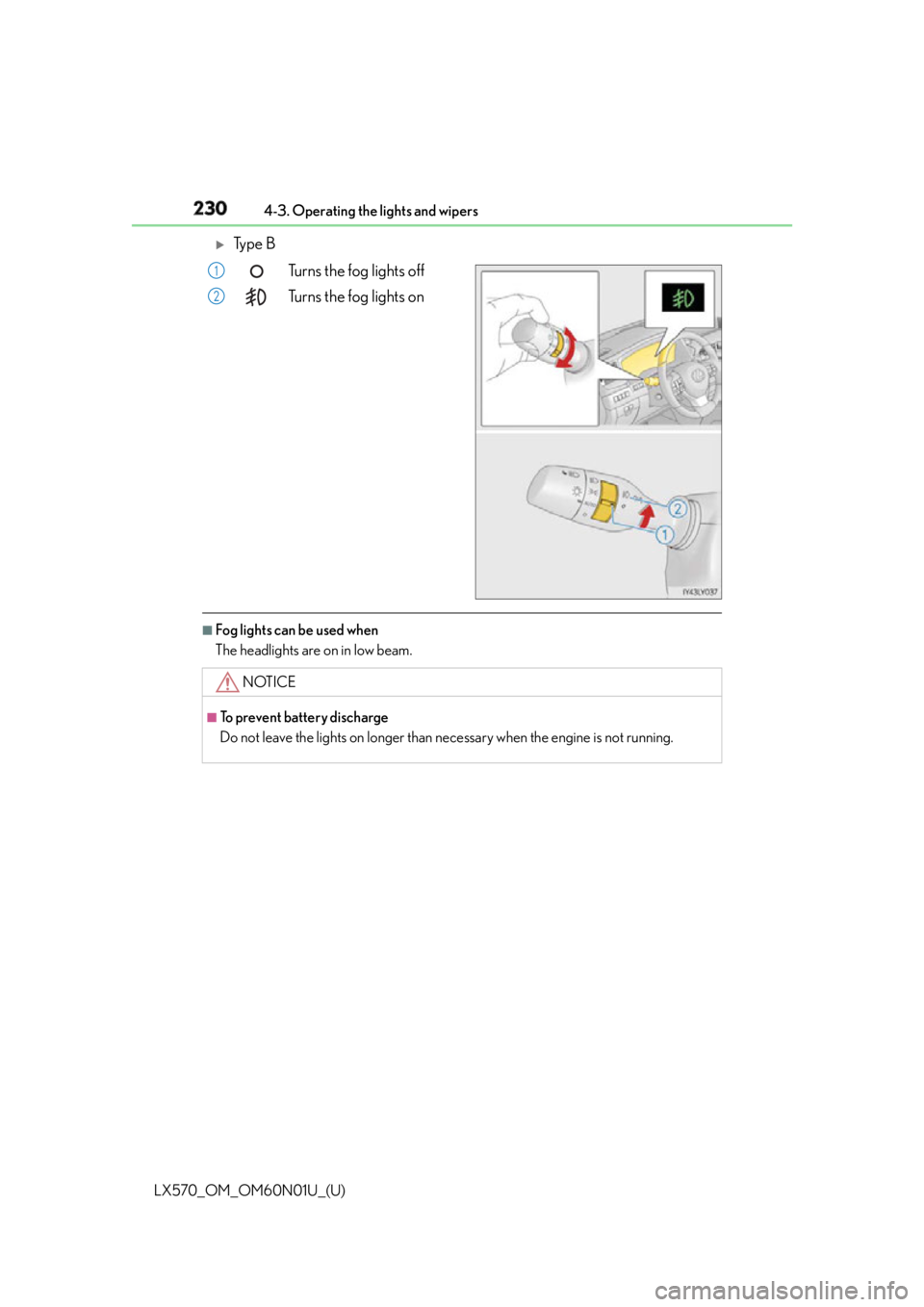
Ty p e B
Turns the fog lights off
Turns the fog lights on
■
Fog lights can be used when
The headlights are on in low beam. 1
2
NOTICE ■
To prevent battery discharge
Do not leave the lights on longer than ne cessary when the engine is not running.
Page 255 of 632

LX570_OM_OM60N01U_(U) 2554-5. Using the driving support systems
4
Driving ■
Operational conditions
For vehicles sold in regions where the pede strian detection function and pre-collision
braking function are available
* 4
The pre-collision system is enabled and the sy stem determines that the possibility of a
frontal collision with a vehicle or pedestrian is high.
Each function is operationa l at the following speeds:●
Pre-collision warning:
• Vehicle speed is approximately 7 mph (1 0 km/h) or more. (For detecting a pedes-
trian, vehicle speed is between approxim ately 7 and 50 mph (10 and 80 km/h).)
• The relative speed between your vehicl e and the vehicle or pedestrian ahead is
approximately 7 mph (10 km/h) or more. ●
Pre-collision brake assist:
• Vehicle speed is approximately 19 mph (3 0 km/h) or more. (For detecting a pedes-
trian, vehicle speed is between approxim ately 19 and 50 mph (30 and 80 km/h).)
• The relative speed between your vehicl e and the vehicle or pedestrian ahead is
approximately 19 mph (30 km/h) or more. ●
Pre-collision braking:
• Vehicle speed is approximately 7 mph (1 0 km/h) or more. (For detecting a pedes-
trian, vehicle speed is between approxim ately 7 and 50 mph (10 and 80 km/h).)
• The relative speed between your vehicl e and the vehicle or pedestrian ahead is
approximately 7 mph (10 km/h) or more.
The system may not operate in the following situations: ●
If a battery terminal has be en disconnected and reconnected and then the vehicle has
not been driven for a certain amount of time ●
If the shift lever is in R ●
If VSC is disabled (only the pre-collision warning function will be operational) ●
If the PCS warning light is flashing or illuminated
Page 256 of 632

256
LX570_OM_OM60N01U_(U) 4-5. Using the driving support systems
For vehicles sold in regions where the pede strian detection function is not available
and the pre-collision braking function is available
* 4
The pre-collision system is enabled and the sy stem determines that the possibility of a
frontal collision with a vehicle is high.
Each function is operationa l at the following speeds:●
Pre-collision warning:
• Vehicle speed is approximately 10 mph (15 km/h) or more.
• The relative speed between your vehicl e and the vehicle or pedestrian ahead is
approximately 7 mph (10 km/h) or more. ●
Pre-collision brake assist:
• Vehicle speed is approximately 19 mph (30 km/h) or more.
• The relative speed between your vehicl e and the vehicle or pedestrian ahead is
approximately 19 mph (30 km/h) or more. ●
Pre-collision braking:
• Vehicle speed is approximately 10 mph (15 km/h) or more.
• The relative speed between your vehicl e and the vehicle or pedestrian ahead is
approximately 7 mph (10 km/h) or more.
The system may not operate in the following situations: ●
If a battery terminal has be en disconnected and reconnected and then the vehicle has
not been driven for a certain amount of time ●
If the shift lever is in R ●
If VSC is disabled (only the pre-collision warning function will be operational) ●
If the PCS warning light is flashing or illuminated
For vehicles sold in regions where the pede strian detection function and pre-collision
braking function are not available
* 4
The pre-collision system is enabled and the sy stem determines that the possibility of a
frontal collision with a vehicle is high.
Each function is operationa l at the following speeds:●
Pre-collision warning:
• Vehicle speed is approximately 10 mph (15 km/h) or more.
• The relative speed between your vehicl e and the vehicle or pedestrian ahead is
approximately 7 mph (10 km/h) or more. ●
Pre-collision brake assist:
• Vehicle speed is approximately 19 mph (30 km/h) or more.
• The relative speed between your vehicl e and the vehicle or pedestrian ahead is
approximately 19 mph (30 km/h) or more.
The system may not operate in the following situations: ●
If a battery terminal has be en disconnected and reconnected and then the vehicle has
not been driven for a certain amount of time ●
If the shift lever is in R ●
If VSC is disabled (only the pre-collision warning function will be operational) ●
If the PCS warning light is flashing or illuminated
* 4
: Depending on the region in which the vehicle was sold, the pedestrian detection func-
tion and pre-collision braking function may not be available.
Page 364 of 632
364
LX570_OM_OM60N01U_(U) 4-5. Using the driving support systems
The projected course lines move even thou gh the steering wheel is straight (vehi-
cle width extension guide lines and pr ojected course lines are not aligned)
There is a malfunction in the signals being
output by the steering sensor Have the vehicle inspected by your Lexus
dealer.
Guide lines are not displayed
The back door is open Close the back door.
If this does not resolve the symptom, have
the vehicle inspected by your Lexus
dealer.
“!” is displayed
The battery is disconnected and recon-
nected Turn the steering whee l fully to right and
left.
If this does not resolve the symptom, have
the vehicle inspected by your Lexus
dealer.
There is a malfunction in the Multi-terrain
Monitor Have the vehicle inspected by your Lexus
dealer.
NOTICE ■
How to use the camera ●
The Multi-terrain Monitor system may not operate properly in the following cases.
• If the front or the rear of the vehicle or the outside rear view mirror has been hit,
the camera’s position and mounting angle may have changed.
• As the camera has a water proof construction, do not detach, disassemble or
modify it. This may cause incorrect operation.
• Do not strongly rub the camera lens. If th e camera lens is scratched, it cannot
transmit a clear image.
• Do not allow organic solvent, car wax, window cleaner or glass coat to adhere to
the camera. If this happens, wipe it off as soon as possible.
• If the temperature changes rapidly, such as when hot water is poured on the vehi-
cle in cold weather, the system may not operate normally.
• When washing the vehicle, do not apply intensive bursts of water to the camera or
camera area. Doing so may result in the camera malfunctioning.
• When the camera is used under fluorescen t lights, sodium light or mercury light
etc., the lights and the illuminate d areas may appear to flicker.
• The camera can be damaged by flying rocks and other debris. ●
Do not expose the camera to strong impact as this could cause a malfunction. If this
happens, have the vehicle inspected by your Lexus dealer as soon as possible. Likely cause Solution
Page 381 of 632

LX570_OM_OM60N01U_(U) 3814-5. Using the driving support systems
4
Driving ■
Automatic Active TRAC reactivation
If only the Active TRAC system is turned off, the Active TRAC system will turn on when
vehicle speed increases. ■
Automatic Active TRAC, VSC and Trailer Sway Control reactivation
If the Active TRAC, VSC and Trailer Sway Control are turned off, the systems will not
turn on even when vehicle speed increases. ■
If the brake system overheats
The brake system may overheat. In this cas e, a buzzer will sound, and the TRAC OFF
indicator will flash, and Active TRAC and hill- start assist control will be temporarily inop-
erable. In this event, stop the vehicle immediately in a safe place, and allow the brake sys-
tem to cool down sufficiently until the TR AC OFF indicator goes off. (There is no
problem with continuing normal driving.) ■
Sounds and vibrations caused by the Mult i Terrain ABS, brake assist, Active TRAC,
VSC, Trailer Sway Control, hill-start assist control and VGRS ●
A sound may be heard from the engine compartment when the engine is started or just
after the vehicle begins to move. This sound does not indicate that a malfunction has
occurred in any of these systems. ●
Any of the following condit ions may occur when the above systems are operating.
None of these indicates that a malfunction has occurred.
• Vibrations may be felt through the vehicle body and steering.
• A motor sound may be heard after the vehicle comes to a stop.
• The brake pedal may pulsate slightly af ter the Multi Terrain ABS is activated.
• The brake pedal may move down slightly after the Multi Terrain ABS is activated. ■
Hill-start assist cont rol is operational when●
The shift lever is in D or S. ●
The brake pedal is not depressed. ■
VGRS is disabled in the following situations ●
During stopping or the steering wheel has been moved for a long time while driving at
lower speeds. ●
After the engine is restarted at less than -22°F (-30°C). ●
If you disconnect the battery with the steeri ng wheel turned, the center position of the
steering wheel could be slightly and tempor ary changed. To initialize the VGRS, drive
for a short while.