lock LEXUS LX570 2016 Owners Manual
[x] Cancel search | Manufacturer: LEXUS, Model Year: 2016, Model line: LX570, Model: LEXUS LX570 2016Pages: 632, PDF Size: 8.94 MB
Page 316 of 632
316
LX570_OM_OM60N01U_(U)4-5. Using the driving support systems
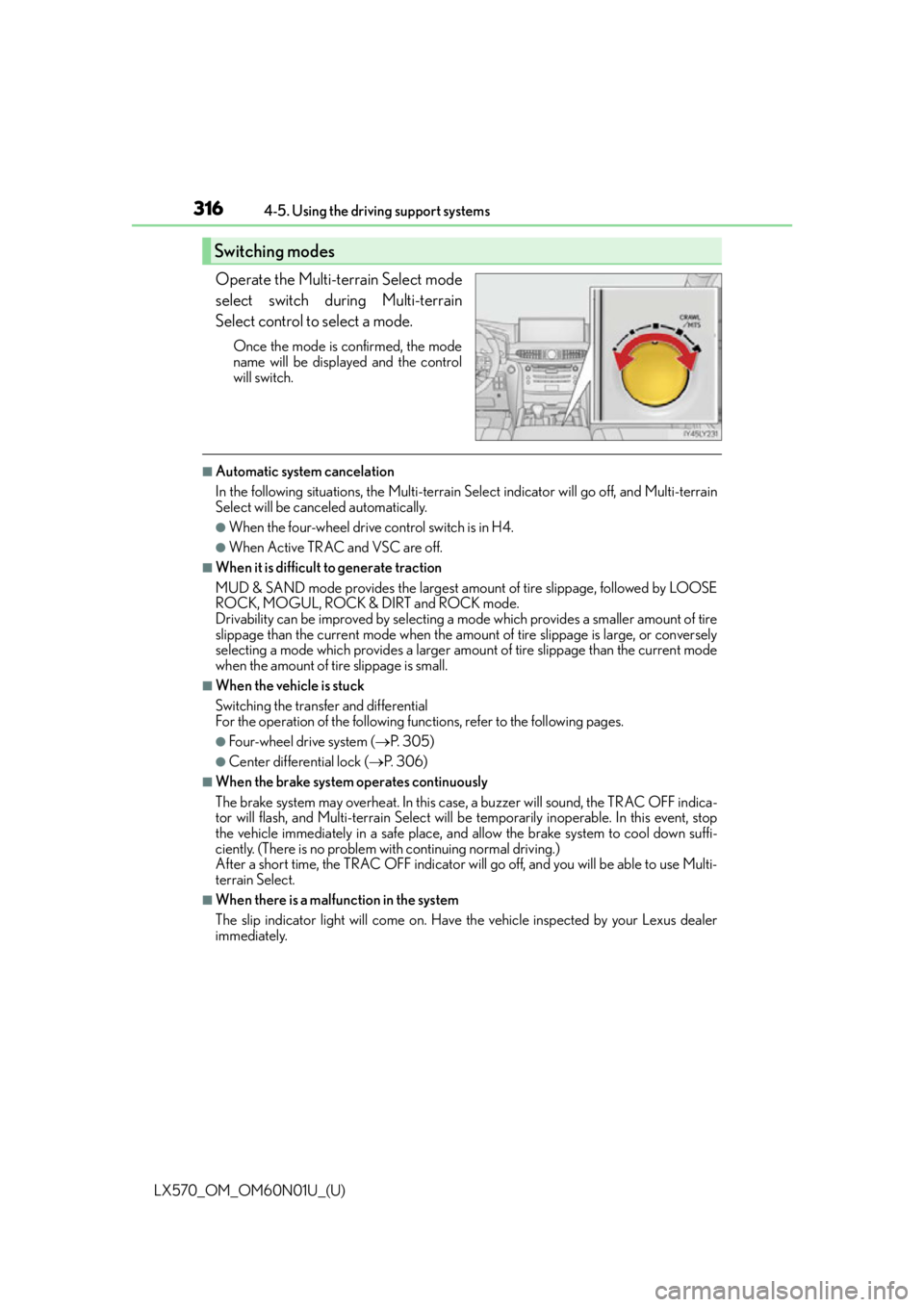
Operate the Multi-terrain Select mode
select switch during Multi-terrain
Select control to select a mode.
Once the mode is confirmed, the mode
name will be displayed and the control
will switch.
■Automatic system cancelation
In the following situations, the Multi-terrain Se
lect indicator will go off, and Multi-terrain
Select will be canceled automatically.
●When the four-wheel drive control switch is in H4.
●When Active TRAC and VSC are off.
■When it is difficult to generate traction
MUD & SAND mode provides the largest amount of tire slippage, followed by LOOSE
ROCK, MOGUL, ROCK & DIRT and ROCK mode.
Drivability can be improved by selecting a mo de which provides a smaller amount of tire
slippage than the current mode when the amount of tire slippage is large, or conversely
selecting a mode which provides a larger amou nt of tire slippage than the current mode
when the amount of ti re slippage is small.
■When the vehicle is stuck
Switching the transfer and differential
For the operation of the following functions, refer to the following pages.
●Four-wheel drive system ( P. 3 0 5 )
●Center differential lock ( P. 3 0 6 )
■When the brake system operates continuously
The brake system may overheat. In this case, a buzzer will sound, the TRAC OFF indica-
tor will flash, and Multi-terrain Select will be temporarily inoperable. In this event, stop
the vehicle immediately in a safe place, and allow the brake system to cool down suffi-
ciently. (There is no problem wi th continuing normal driving.)
After a short time, the TRAC OFF indicator will go off, and you will be able to use Multi-
terrain Select.
■When there is a malfunction in the system
The slip indicator light will come on. Have the vehicle inspected by your Lexus dealer
immediately.
Switching modes
Page 379 of 632
379
LX570_OM_OM60N01U_(U)4-5. Using the driving support systems
4
Driving
Driving assist systems
◆Multi Terrain ABS (Anti-lock Brake System)
Helps to prevent wheel lock when the brakes are applied suddenly, or if the brakes are
applied while driving on a slippery road su
rface, or in off-road conditions (such as
rough roads, sand and mud)
◆Brake assist
Generates an increased leve l of braking force after the brake pedal is depressed
when the system detects a panic stop situation
◆VSC (Vehicle Stability Control)
Helps the driver to control skidding when swerving suddenly or turning on slippery
road surfaces
◆Active TRAC (Traction Control)
Helps to maintain drive power and prevent the 4 wheels from spinning when starting
the vehicle or accelerating on slippery roads, or in off-road conditions
◆Hill-start assist control
Helps to reduce the backward movement of the vehicle when starting on an incline or
slippery slope
◆AVS (Adaptive Variable Suspension system)
By independently controlling the damping force of the shock absorbers for each of
the 4 wheels according to the road and dr iving conditions, this system helps riding
comfort with superior stee ring stability, and helps good vehicle posture. When
SPORT S+ mode is selected by the drivin g mode select switches, the damping force
is suitable for sporty driving. ( P. 2 8 6 )
◆VGRS (Variable Gear Ratio Steering)
Helps to adjust the wheel turning angle in accordance with the vehicle speed and
steering wheel movement.
◆Trailer Sway Control
Helps the driver to control trailer sway by selectively applying brake pressure for indi-
vidual wheels and reducing engine to rque when trailer sway is detected.
Trailer Sway Control is part of the VSC system and will not operate if VSC turned off
or experiences a malfunction.
To help enhance driving safety and performance, the following systems oper-
ate automatically in response to various driving situations. Be aware, however,
that these systems are supplementary and should not be relied upon too
heavily when operating the vehicle.
Page 385 of 632

LX570_OM_OM60N01U_(U)
3854-6. Driving tips
4
Driving
Accelerate the vehicle slowly, keep a safe distance between you and the vehicle
ahead, and drive at a reduced speed suitable to road conditions.
Park the vehicle and move the shift lever to P without setting the parking brake.
The parking brake may freeze up, preventing it from being released. If necessary,
block the wheels to prevent in advertent sliding or creeping.
When the parking brake is in automatic mode, release the parking brake after shifting
the shift lever to P. (P. 2 1 7 )
Vehicles with 20-inch tires
Use the correct tire chain size when mounting the snow chains.
Chain size is regulated for each tire size.
Side chain
(0.20 in. [5 mm] in diameter)
Cross chain
(0.25 in. [6.3 mm] in diameter)
Vehicles with 21-inch tires
Tire chains cannot be mounted.
Snow tires should be used instead.
Regulations regarding the use of tire chains vary depending on location and type
of road. Always check local regulations before installing chains.
■Tire chain installation
Observe the following precautions wh en installing and removing chains:
●Install and remove tire chains in a safe location.
●Install tire chains on the rear tires. Do not install tire chains on the front tires.
●Install tire chains on rear tires as tightly as possible. Retighten chains after driving 1 /4 -
1 /2 mile (0.5 - 1.0 km).
●Install tire chains following the instru ctions provided with the tire chains.
When driving the vehicle
When parking the vehicle
Selecting tire chains
1
2
Regulations on the use of tire chains
Page 391 of 632

LX570_OM_OM60N01U_(U)
3914-6. Driving tips
4
Driving
NOTICE
■To prevent the water damage
Take all necessary safety measures to ensure that water damage to the engine or other
components does not occur.
●Water entering the engine air intake will cause severe engine damage.
●Water entering the automatic transmission will cause deterioration in shift quality,
locking up of your transmission accompan ied by vibration, and ultimately damage.
●Water can wash the grease from wheel be arings, causing rusting and premature fail-
ure, and may also enter the differentials, tr ansmission and transfer case, reducing the
gear oil’s lubricating qualities.
■When you drive through water
If driving through water, such as when crossing shallow streams, first check the depth of
the water and the bottom of the riverbed for firmness. Drive slowly and avoid deep
water.
■Inspection after off-road driving
●Sand and mud that has accumulated in brake drums and around brake discs may
affect braking efficiency and may damage brake system components.
●Always perform a maintenance inspection after each day of off-road driving that has
taken you through rough terr ain, sand, mud, or water. For scheduled maintenance
information, refer to the “Warranty and Services Guide”, “Owner’s Manual Supple-
ment” or “Scheduled Maintenance”.
Page 393 of 632

393
LX570_OM_OM60N01U_(U)
5Interior features
5-1. Remote Touch screenRemote Touch/12.3-inch display ..........................................394
5-2. Lexus Climate Concierge Lexus Climate Concierge ..... 400
5-3. Using the air conditioning system and defogger
Front automatic air conditioning system ................ 401
Rear air conditioning system ........................................... 412
Heated steering wheel/seat heaters/seat ventilators.......... 415 5-4. Using the interior lights
Interior lights list .......................... 419• Interior lights .......................... 420
• Personal lights .........................421
5-5. Using the storage features List of storage features ............ 422• Glove box ............................... 423
• Console box........................... 423
• Overhead console .............. 424
• Cup holders ........................... 425
• Bottle holders ........................ 426
• Card holder............................ 426
• Auxiliary boxes ......................427
Luggage compartment features........................................ 429
5-6. Using the other interior features
Other interior features ............. 431 • Cool box ................................... 431
• Sun visors ................................ 432
• Vanity mirrors ........................ 432
• Clock ........................................ 433
• Power outlets ......................... 434
• Wireless charger.................. 436
• Armrest .................................... 443
• Rear door sunshades ......... 444
• Coat hooks ............................. 444
• Assist grips.............................. 445
Garage door opener................ 446
LEXUS Enform Safety Connect ........................................451
Page 410 of 632
4105-3. Using the air conditioning system and defogger
LX570_OM_OM60N01U_(U)
■When the outside temperature is low
The dehumidification function may not operate even when is selected.
■Micro dust and pollen filter
●In order to prevent the windows from fogging up when the outside air is cold, the fol-
lowing may occur.
• Outside air mode does not switch to recirculated air mode.
• The air conditioning system operates automatically.
• The operation cancels after 1 minute.
●In rainy weather, the windows may fog up. Press .
■The rear window defogger, outside rear view mirror defogger and windshield wiper de-
icer can be operated when
The engine switch is in IGNITION ON mode.
■When the windshield wiper de-icer is on
The windshield wiper de-icer will automatically turn off after approximately 15 minutes.
■Ventilation and air conditioning odors
●To let fresh air in, set the air conditioning system to the outside air mode.
●During use, various odors from inside and outside the vehicle may enter into and accu-
mulate in the air conditioning system. This may then cause odor to be emitted from the
vents.
●To reduce potential odors from occurring:
• It is recommended that the air conditioning system be set to outside air mode prior to turning the vehicle off.
• The start timing of the blower may be dela yed for a short period of time immediately
after the air conditioning system is started in automatic mode.
■Air conditioning filter
P. 5 0 1
■Customization
Settings (e.g. Exhaust gas sensor sensitivity) can be changed.
(Customizable features: P. 585)
WA R N I N G
■To prevent the windshield from fogging up
●Do not use during cool air operation in extremely humid weather. The differ-
ence between the temperature of the outside air and that of the windshield can cause
the outer surface of the windshield to fog up, blocking your vision.
■To prevent burns
●Do not touch the rear view mirror surfaces when the outside rear view mirror defog-
gers are on.
●Do not touch the glass at lower part of the wi ndshield or to the side of the front pillars
when the windshield wiper de-icer is on.
Page 421 of 632

LX570_OM_OM60N01U_(U)
4215-4. Using the interior lights
5
Interior features
■Illuminated entry system
The lights automatically turn on/off according to engine switch mode, the presence of the
electronic key, whether the doors are locked/unlocked, and whether the doors are
open/closed.
■To prevent battery discharge
If the interior lights remain on when the engine switch is turned off, the lights will go off
automatically after 20 minutes:
■Customization
Settings (e.g. adjust the time elapsed before the interior light s automatically turn off) can
be changed. (Customizable features: P. 5 8 5 )
Personal lights
Front Rear
Turns the lights on/off (touch the lights) Turns the lights on/off
NOTICE
To prevent battery discharge, do not leave the lights on longer than necessary when the
engine is not running.
Page 423 of 632
LX570_OM_OM60N01U_(U)
4235-5. Using the storage features
5
Interior features
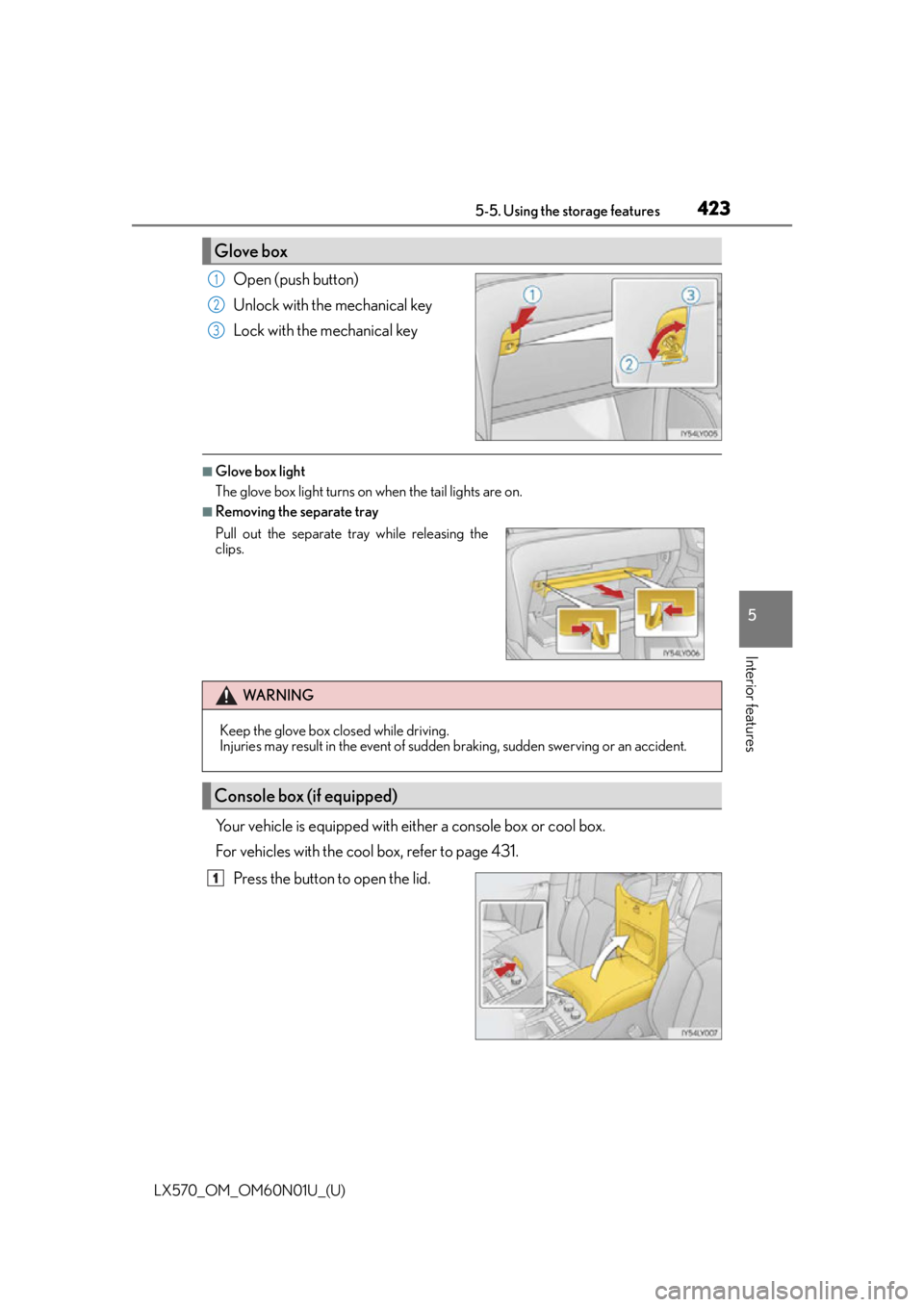
Open (push button)
Unlock with the mechanical key
Lock with the mechanical key
■Glove box light
The glove box light turns on when the tail lights are on.
■Removing the separate tray
Your vehicle is equipped with either a console box or cool box.
For vehicles with the cool box, refer to page 431.Press the button to open the lid.
Glove box
1
2
3
Pull out the separate tr ay while releasing the
clips.
WA R N I N G
Keep the glove box closed while driving.
Injuries may result in the event of sudden braking, sudden swerving or an accident.
Console box (if equipped)
1
Page 428 of 632
428
LX570_OM_OM60N01U_(U)5-5. Using the storage features
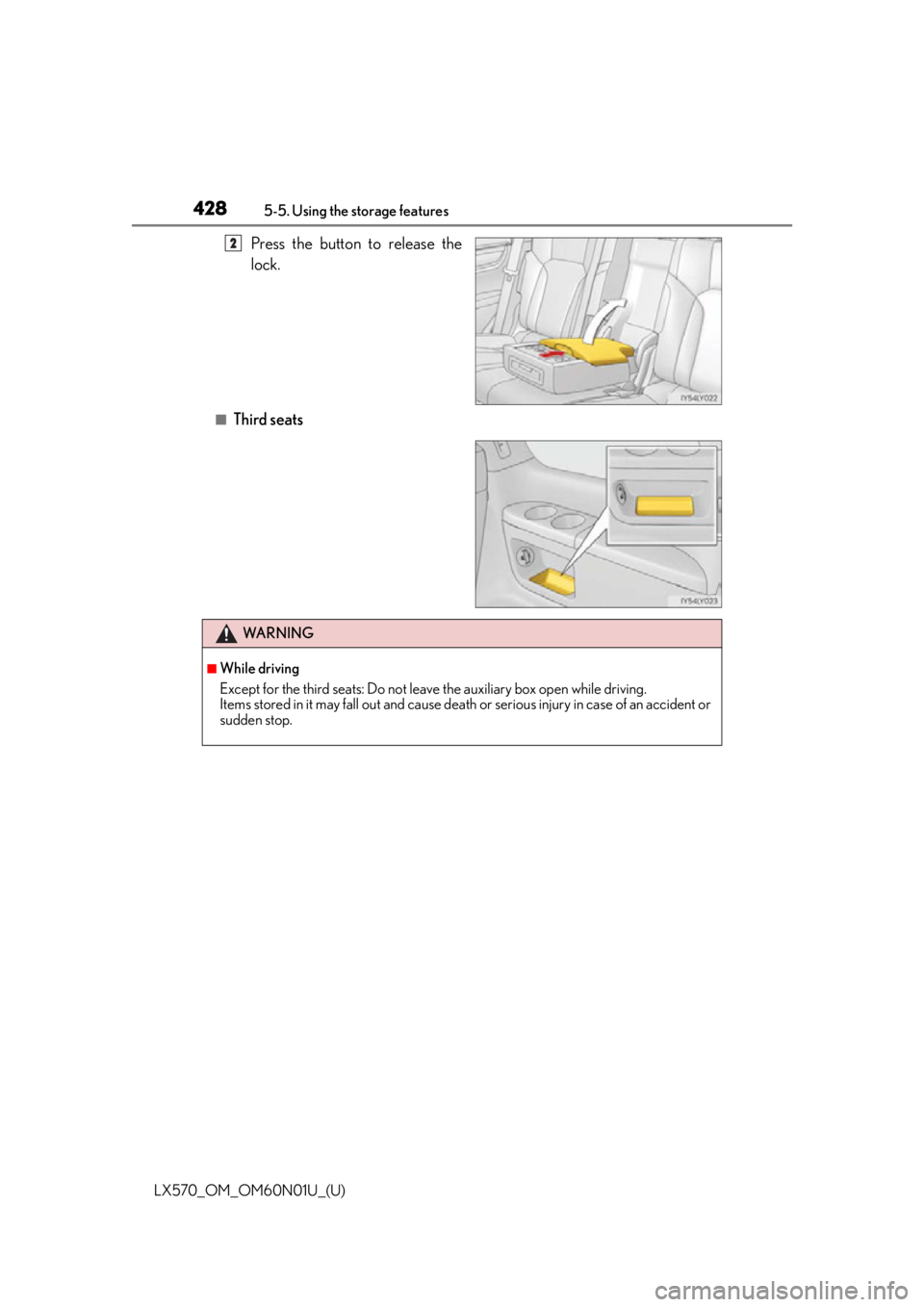
Press the button to release the
lock.
■Third seats
2
WA R N I N G
■While driving
Except for the third seats: Do not leav
e the auxiliary box open while driving.
Items stored in it may fall out and cause death or serious injury in case of an accident or
sudden stop.
Page 433 of 632
LX570_OM_OM60N01U_(U)
4335-6. Using the other interior features
5
Interior features
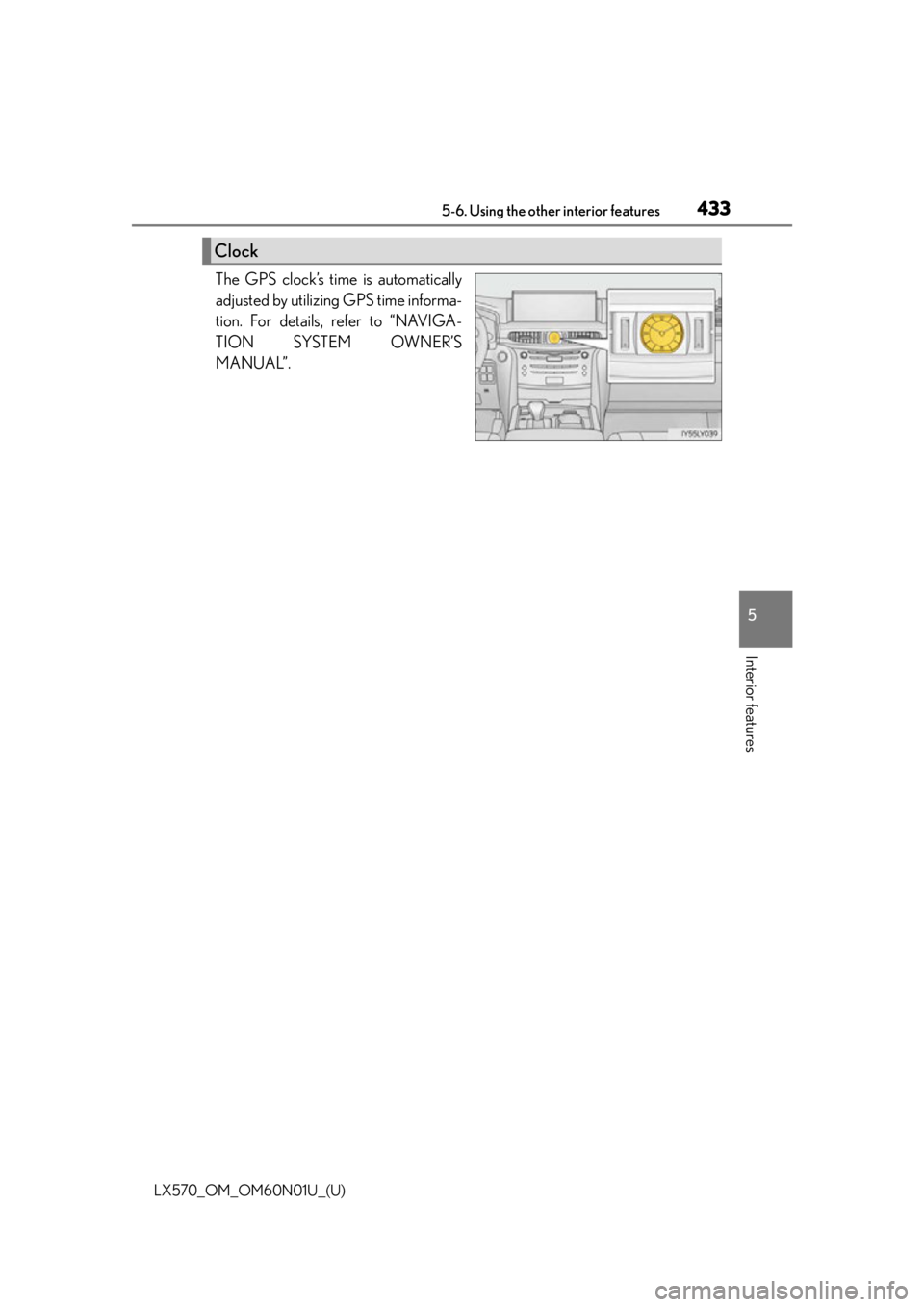
The GPS clock’s time is automatically
adjusted by utilizing GPS time informa-
tion. For details, refer to “NAVIGA-
TION SYSTEM OWNER’S
MANUAL”.
Clock