lock LEXUS LX570 2016 Owners Manual
[x] Cancel search | Manufacturer: LEXUS, Model Year: 2016, Model line: LX570, Model: LEXUS LX570 2016Pages: 632, PDF Size: 8.94 MB
Page 446 of 632
446
LX570_OM_OM60N01U_(U)5-6. Using the other interior features
Garage door opener
The garage door opener (HomeLink® Universal Transceiver) is manufactured under
license from HomeLink®.
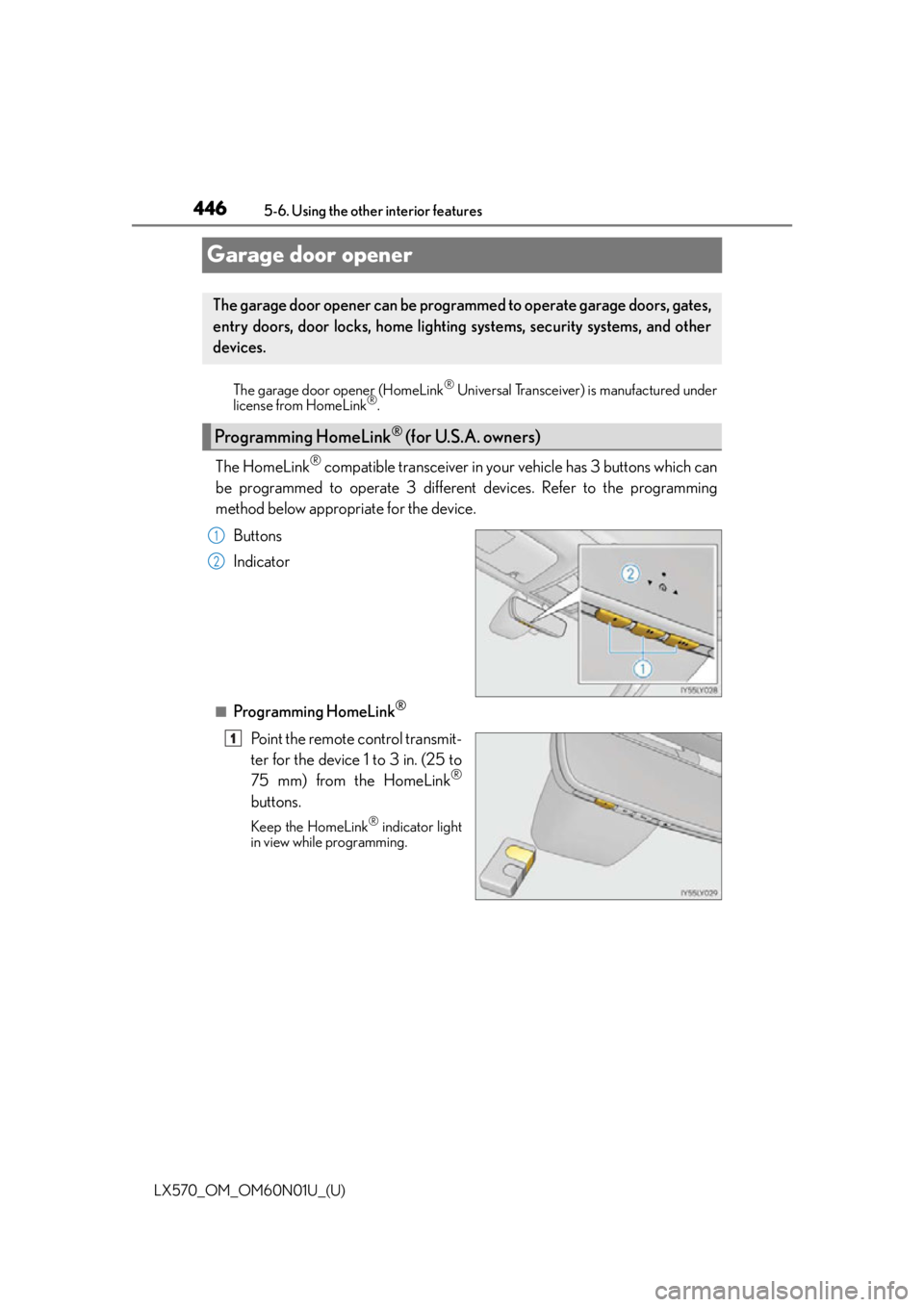
The HomeLink® compatible transceiver in your vehicle has 3 buttons which can
be programmed to operate 3 different devices. Refer to the programming
method below appropriate for the device.
Buttons
Indicator
■Programming HomeLink®
Point the remote control transmit-
ter for the device 1 to 3 in. (25 to
75 mm) from the HomeLink
®
buttons.
Keep the HomeLink® indicator light
in view while programming.
The garage door opener can be programmed to operate garage doors, gates,
entry doors, door locks, home lighting systems, security systems, and other
devices.
Programming HomeLink® (for U.S.A. owners)
1
2
1
Page 449 of 632
LX570_OM_OM60N01U_(U)
4495-6. Using the other interior features
5
Interior features
■Programming other devices
To program other devices such as home security systems, home door locks or
lighting, contact your Lexu s dealer for assistance.
■Reprogramming a button
The individual HomeLink
® buttons cannot be erased but can be repro-
grammed. To reprogram a button, fo llow the “Reprogramming a HomeLink®
button” instructions.
Press the appropriate HomeLink
® button. The HomeLink® indicator light
should come on.
The HomeLink® compatible transceiver in your vehi cle continues to send a signal for
up to 20 seconds as long as the button is pressed.
Press and hold the desired HomeLink® button. After 20 seconds, the
HomeLink® indicator light will start flashing slowly. Next, while still pressing and
holding the HomeLink® button, press and hold the button on the transmitter
until the HomeLink® indicator light changes from a slow to a rapid flash.
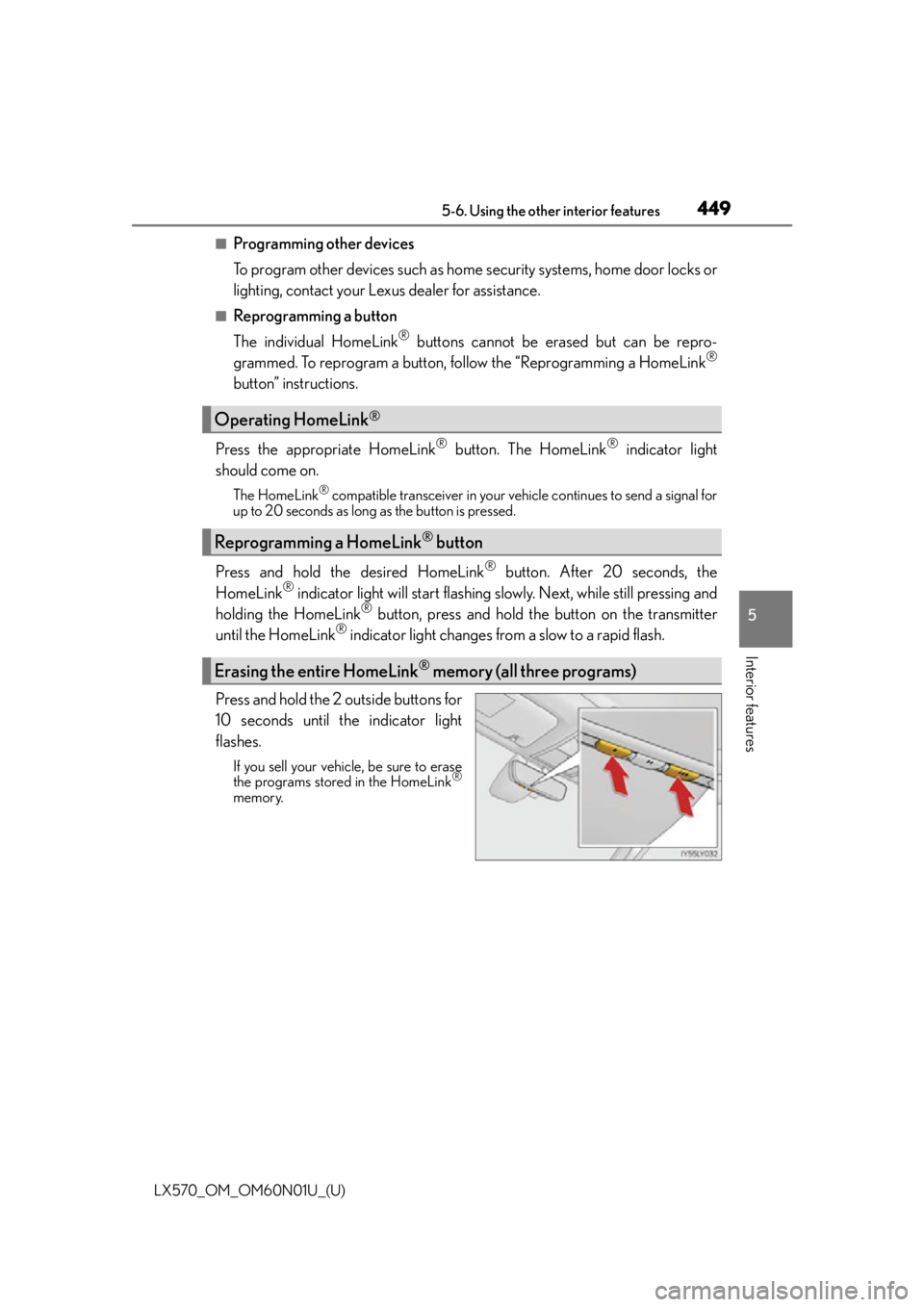
Press and hold the 2 outside buttons for
10 seconds until the indicator light
flashes.
If you sell your vehicle, be sure to erase
the programs stored in the HomeLink®
memory.
Operating HomeLink®
Reprogramming a HomeLink® button
Erasing the entire HomeLink® memory (all three programs)
Page 459 of 632
LX570_OM_OM60N01U_(U)
4596-1. Maintenance and care
6
Maintenance and care
■Notes for a smart access system with push-button start
●If the door handle becomes wet while the electronic key is within the effective range,
the door may lock and unlock repeatedly. Place the key in a position 6 ft. (2 m) or more
separate from the vehicle while the vehicle is being washed. (Take care to ensure that
the key is not stolen.)
●If the electronic key is insi de the vehicle and a door handle becomes wet during a car
wash, a message may be shown on the mult i-information display and a buzzer will
sound outside the vehicle. To turn off the alarm, lock all the doors.
WA R N I N G
■When washing the vehicle
Do not apply water to the inside of the en gine compartment. Doing so may cause the
electrical components etc. to catch fire.
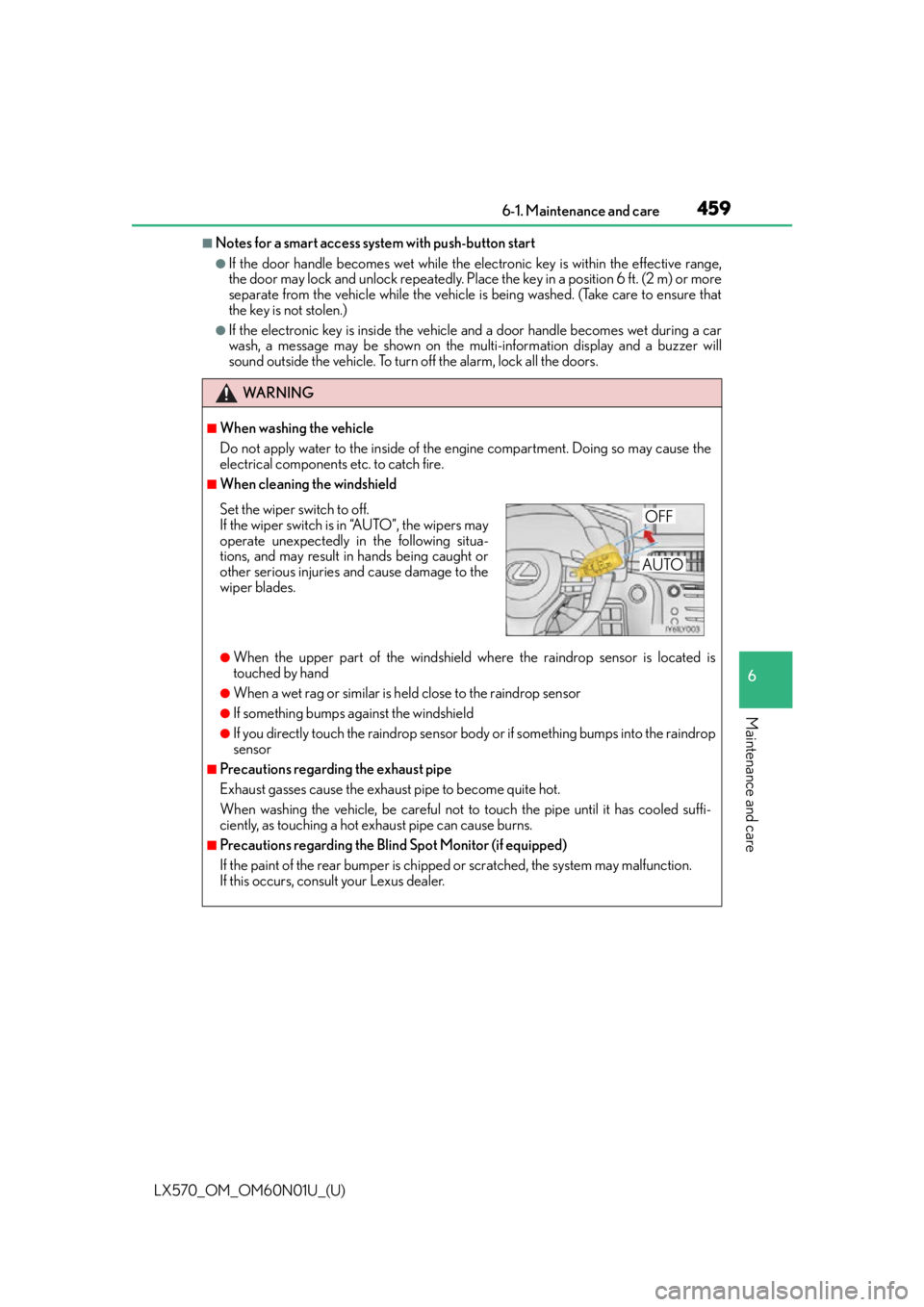
■When cleaning the windshield
●When the upper part of the windshield where the raindrop sensor is located is
touched by hand
●When a wet rag or similar is held close to the raindrop sensor
●If something bumps against the windshield
●If you directly touch the raindrop sensor body or if something bumps into the raindrop
sensor
■Precautions regarding the exhaust pipe
Exhaust gasses cause the exhaust pipe to become quite hot.
When washing the vehicle, be careful not to touch the pipe until it has cooled suffi-
ciently, as touching a hot exhaust pipe can cause burns.
■Precautions regarding the Blin d Spot Monitor (if equipped)
If the paint of the rear bumper is chipped or scratched, the system may malfunction.
If this occurs, consult your Lexus dealer.
Set the wiper switch to off.
If the wiper switch is in “A U T O ” , t h e w i p e r s m a y
operate unexpectedly in the following situa-
tions, and may result in hands being caught or
other serious injuries and cause damage to the
wiper blades.OFF
AUTO
Page 467 of 632
LX570_OM_OM60N01U_(U)
4676-2. Maintenance
6
Maintenance and care
Vehicle interior
ItemsCheck points
Accelerator pedal• The accelerator pedal should move smoothly (without uneven pedal effort or catching).
Automatic transmission
“Park” mechanism• When parked on a slope and the shift lever is in P, isthe vehicle securely stopped?
Brake pedal
• Does the brake pedal move smoothly?
• Does the brake pedal have appropriate clearance
from the floor? ( P. 5 6 8 )
• Does the brake pedal have the correct amount of
free play? ( P. 5 6 8 )
Brakes
• The vehicle should not pull to one side when the
brakes are applied.
• The brakes should work effectively.
• The brake pedal should not feel spongy.
• The brake pedal should not get too close to the floor when the brakes are applied.
Head restraints• Do the head restraints move smoothly and lock
securely?
Indicators/buzzers• Do the indicators and buzzers function properly?
Lights• Do all the lights come on?
Seat belts•Do the seat belt s operate smoothly?
• The seat belts should not be damaged.
Seats• Do the seat controls operate properly?
Steering wheel
• Does the steering wheel rotate smoothly?
• Does the steering wheel have the correct amount of free play?
• There should not be an y strange sounds coming
from the steering wheel.
Page 468 of 632

468
LX570_OM_OM60N01U_(U)6-2. Maintenance
Vehicle exterior
ItemsCheck points
Doors• Do the doors operate smoothly?
Engine hood• Does the engine hood lock system work properly?
Fluid leaks• There should not be any si
gns of fluid leakage after
the vehicle has been parked.
Ti r e s
• Is the tire inflation pressure correct?
• The tires should not be damaged or excessively worn.
• Have the tires been rotated according to the mainte- nance schedule?
• The wheel nuts should not be loose.
Windshield wipers/rear
window wiper
• The wiper blades should no t show any signs of crack-
ing, splitting, wear, contamination or deformation.
• The wiper blades should clear the windshield/rear
window without streaking or skipping.
WA R N I N G
■If the engine is running
Turn off the engine and ensure that there is adequate ventilation before performing
maintenance checks.
Page 472 of 632
472
LX570_OM_OM60N01U_(U)6-3. Do-it-yourself maintenance
Hood
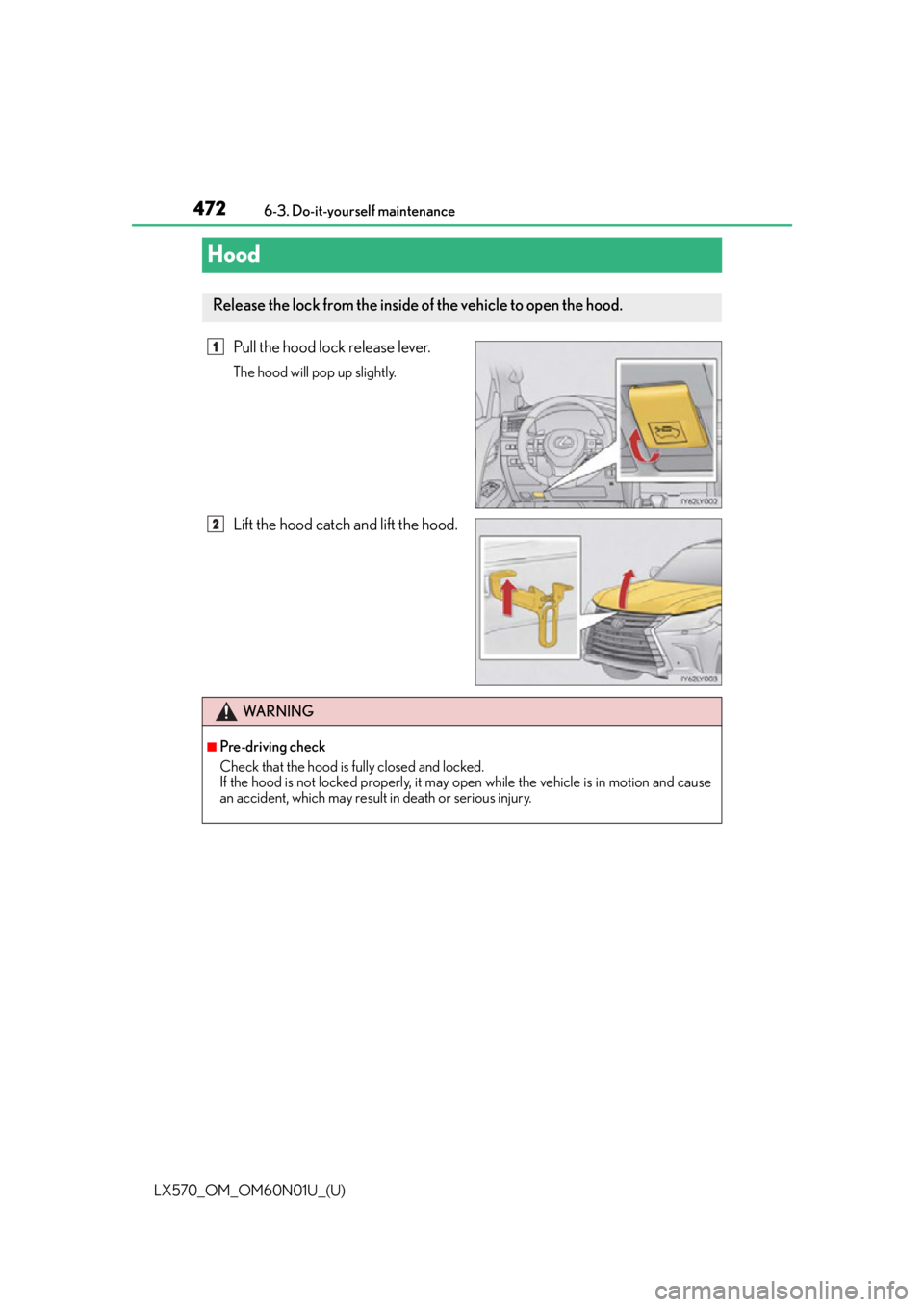
Pull the hood lock release lever.
The hood will pop up slightly.
Lift the hood catch and lift the hood.
Release the lock from the inside of the vehicle to open the hood.
1
2
WA R N I N G
■Pre-driving check
Check that the hood is fully closed and locked.
If the hood is not locked properly, it may open while the vehicle is in motion and cause
an accident, which may result in death or serious injury.
Page 476 of 632

476
LX570_OM_OM60N01U_(U)6-3. Do-it-yourself maintenance
■Adding engine oil
If the oil level is below or near the
low level mark, add engine oil of the
same type as already in the engine.
Make sure to check the oil type and prepare the items needed before adding
oil.
Remove the oil filler cap by turning it counterclockwise.
Add engine oil slowly, checking the dipstick.
Install the oil filler cap by turning it clockwise.
■Engine oil consumption
A certain amount of engine oil will be consum ed while driving. In the following situations,
oil consumption may increase, and engine o il may need to be refilled in between oil
maintenance intervals.
●When the engine is new, for example directly after purchasing the vehicle or after
replacing the engine
●If low quality oil or oil of an inappropriate viscosity is used
●When driving at high engine speeds or with a heavy load, when towing, or when driving
while accelerating or de celerating frequently
●When leaving the engine idling for a long time, or when driving frequently through
heavy traffic
■After changing the engine oil
The engine oil maintenance da ta should be reset. Perform the following procedures:
Press or of the meter control switches, select .
Press or of the meter control switch es, select “Oil Maintenance” and then
press .
Select the “Yes” and press .
A message is displayed on the multi-information display.
Engine oil selection P. 5 6 4
Oil quantity (Low Full)1.6 qt. (1.5 L, 1.3 Imp.qt.)
ItemsClean funnel
1
2
3
1
2
3
4
Page 481 of 632

LX570_OM_OM60N01U_(U)
4816-3. Do-it-yourself maintenance
6
Maintenance and care
■Fluid level
The fluid level should be within the appropriate range.Full (when cold)
Add fluid (when cold)
Full (when hot)
Add fluid (when hot)
Hot: The vehicles has been driven around 50 mph (80 km/h) for 20 min- utes, or slightly longer in frigid temperatures.
(Fluid temperature, 140 F - 175 F [60 C - 80 C]).
Cold: The engine has not been run for about 5 hours. (Room temperature, 50 F - 85 F [10 C - 30 C]).
■Checking the fluid level
Make sure to check the fluid type and prepare the necessary items.
Clean all dirt off the reservoir.
Remove the cap by turnin g it counterclockwise.
Wipe the dipstick clean.
Reinstall the cap and remove it again.
Check the fluid level.
Power steering fluid
1
2
3
4
Fluid typeAutomatic transmission fluid DEXRON® II or III
ItemsRag or paper, clean funnel (only for adding fluid)
1
2
3
4
5
Page 483 of 632
LX570_OM_OM60N01U_(U)
4836-3. Do-it-yourself maintenance
6
Maintenance and care
■Before recharging
When recharging, the battery produces hydrogen gas which is flammable and explosive.
Therefore, observe the following before recharging:
●If recharging with the battery installed on the vehicle, be sure to disconnect the ground
cable.
●Make sure the engine switch on the charger is off when connecting and disconnecting
the charger cables to the battery.
■After recharging/reconnecting the battery
The engine may not start. Follow the procedure below to initialize the system.
Shift the shift lever to P.
Open and close any of the doors.
Restart the engine.
●Unlocking the doors using the smart access system with push-button start may not be
possible immediately after reconnecting the battery. If this happens, use the wireless
remote control or the mechanical key to lock/unlock the doors.
●Start the engine with the engine switch in ACCESSORY mode. The engine may not
start with the engine switch turned off. However, the engine will operate normally from
the second attempt.
●The engine switch mode is recorded by the vehicle. If the battery is reconnected, the
vehicle will return the engine switch mode to the status it was in before the battery was
disconnected. Make sure to turn off the en gine before disconnect the battery. Take
extra care when connecting the battery if the engine switch mode prior to discharge is
unknown.
If the engine will not start even after mult iple attempts, contact your Lexus dealer.
WA R N I N G
■Chemicals in the battery
Batteries contain poisonous and corrosive sulfuric acid and may produce hydrogen
gas which is flammable and explosive. To reduce the risk of death or serious injury, take
the following precautions while working on or near battery:
●Do not cause sparks by touching the battery terminals with tools.
●Do not smoke or light a match near the battery.
●Avoid contact with eyes, skin and clothes.
●Never inhale or swallow electrolyte.
●Wear protective safety glasses when working near the battery.
●Keep children away from the battery.
■Where to safely charge the battery
Always charge the battery in an open area. Do not charge the battery in a garage or
closed room where there is not sufficient ventilation.
1
2
3
Page 509 of 632
LX570_OM_OM60N01U_(U)
5096-3. Do-it-yourself maintenance
6
Maintenance and care
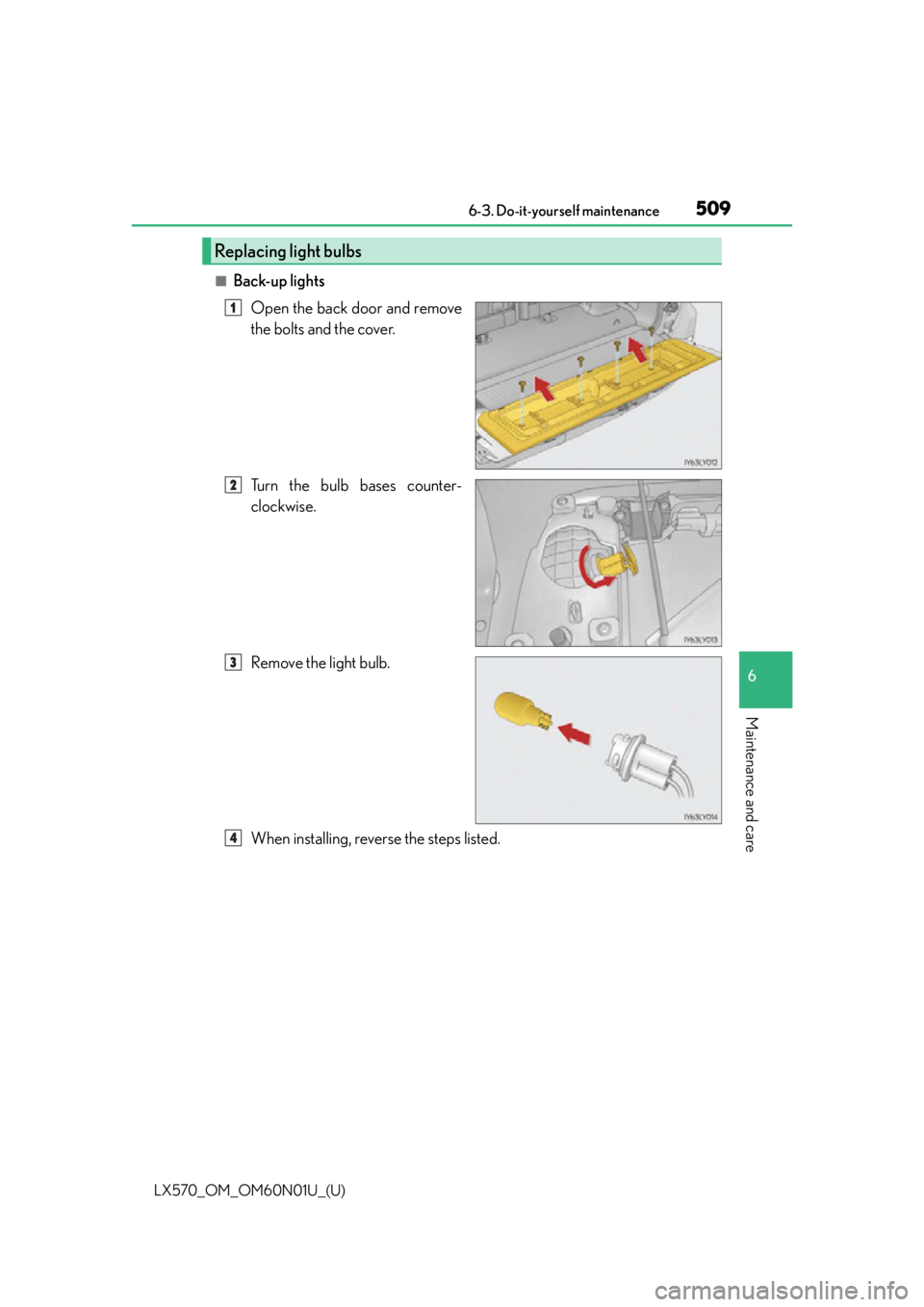
■Back-up lightsOpen the back door and remove
the bolts and the cover.
Turn the bulb bases counter-
clockwise.
Remove the light bulb.
When installing, reverse the steps listed.
Replacing light bulbs
1
2
3
4