light LEXUS LX570 2016 Owners Manual
[x] Cancel search | Manufacturer: LEXUS, Model Year: 2016, Model line: LX570, Model: LEXUS LX570 2016Pages: 632, PDF Size: 8.94 MB
Page 262 of 632

262
LX570_OM_OM60N01U_(U)4-5. Using the driving support systems
■If the PCS warning light flashes and a warnin
g message is displayed on the multi-infor-
mation display
The pre-collision system may be temporarily unavailable or there may be a malfunction
in the system.
●In the following situations, the warning light will turn off, the message will disappear and
the system will become operational when normal operating conditions return:
• When the radar sensor or camera sensor or the area around either sensor is hot, such as in the sun
• When the radar sensor or camera sensor or the area around either sensor is cold,
such as in an extremely cold environment
• When the radar sensor or front grille embl em is dirty or covered with snow, etc.
• If the camera sensor is obst ructed, such as when the hood is open or a sticker is
attached to the windshield near the camera sensor
●If the PCS warning light continues to flash or the warning message does not disappear,
the system may be malfunctioning. Have the vehicle inspected by your Lexus dealer
immediately.
■If VSC is disabled
●If VSC is disabled ( P. 380), the pre-collision brake as sist and pre-collision braking
functions are also disabled.
●The PCS warning light will turn on and “V SC Turned Off Pre-collision Brake System
Unavailable” will be displayed on the multi-information display.
Page 265 of 632
LX570_OM_OM60N01U_(U)
2654-5. Using the driving support systems
4
Driving
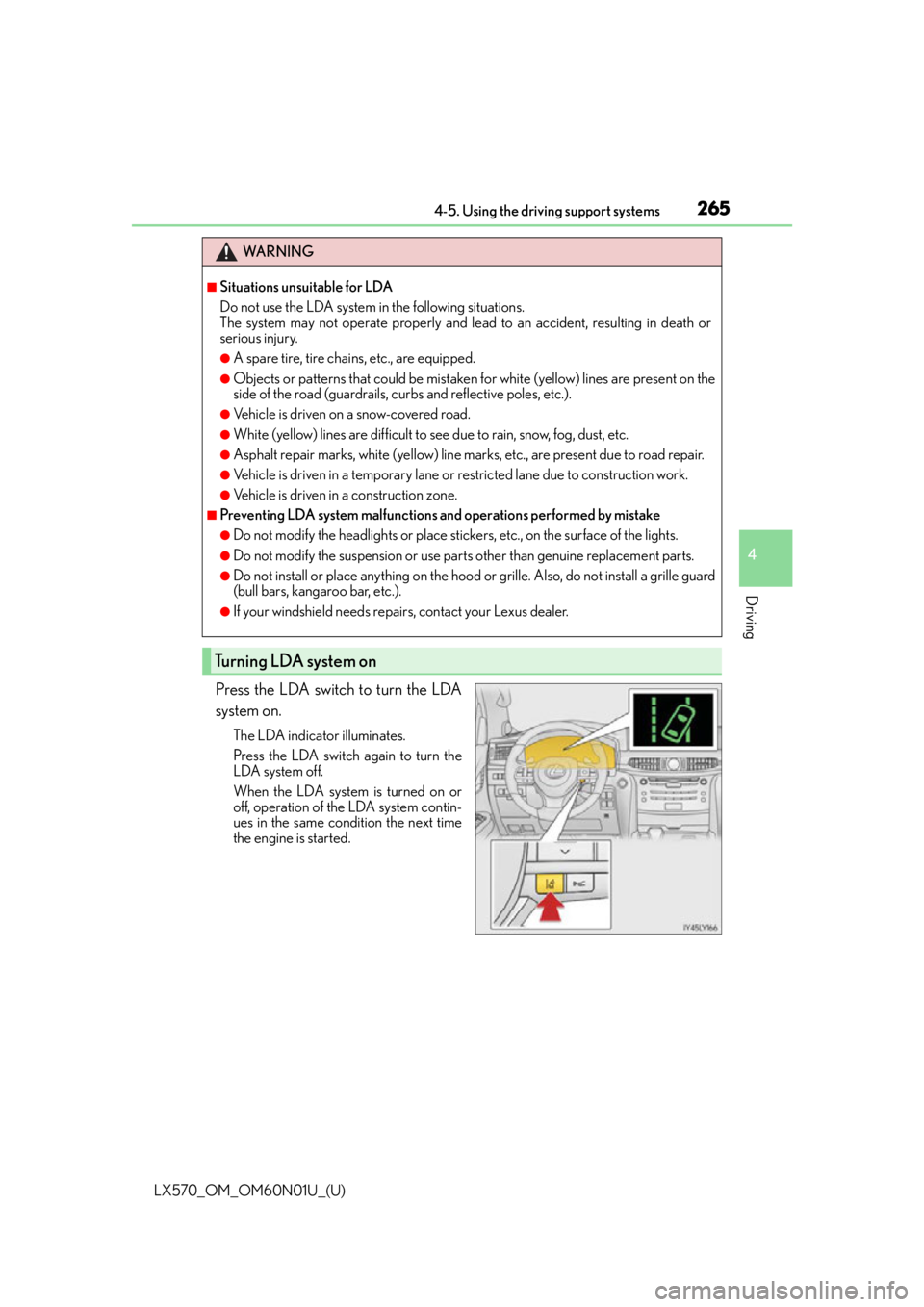
Press the LDA switch to turn the LDA
system on.
The LDA indicator illuminates.
Press the LDA switch again to turn the
LDA system off.
When the LDA system is turned on or
off, operation of the LDA system contin-
ues in the same condition the next time
the engine is started.
WA R N I N G
■Situations unsuitable for LDA
Do not use the LDA system in the following situations.
The system may not operate properly and lead to an accident, resulting in death or
serious injury.
●A spare tire, tire chains, etc., are equipped.
●Objects or patterns that could be mistaken for white (yellow) lines are present on the
side of the road (guardrails, cu rbs and reflective poles, etc.).
●Vehicle is driven on a snow-covered road.
●White (yellow) lines are difficult to see due to rain, snow, fog, dust, etc.
●Asphalt repair marks, white (yellow) line marks, etc., are present due to road repair.
●Vehicle is driven in a temporary lane or restricted lane due to construction work.
●Vehicle is driven in a construction zone.
■Preventing LDA system malfunctions and operations performed by mistake
●Do not modify the headlights or place stickers, etc., on the surface of the lights.
●Do not modify the suspension or use pa rts other than genuine replacement parts.
●Do not install or place anything on the hood or grille. Also, do not install a grille guard
(bull bars, kangaroo bar, etc.).
●If your windshield needs repairs, contact your Lexus dealer.
Turning LDA system on
Page 268 of 632

268
LX570_OM_OM60N01U_(U)4-5. Using the driving support systems
■Conditions in which functions may not operate properly
In the following situations, the camera sensor
may not detect white (yellow) lines and var-
ious functions may not operate normally.
●There are shadows on the road that run paralle l with, or cover, the white (yellow) lines.
●The vehicle is driven in an area without white (yellow) lines, such as in front of a tollgate
or checkpoint, or at an intersection, etc.
●The white (yellow) lines are cracked, “Botts’ dots”, “Raised pavement marker” or stones
are present.
●The white (yellow) lines cannot be seen or are difficult to see due to sand, etc.
●The vehicle is driven on a road surface that is wet due to rain, puddles, etc.
●The traffic lines are yellow (which may be more difficult to recognize than lines that are
white).
●The white (yellow) lines cross over a curb, etc.
●The vehicle is driven on a brig ht surface, such as concrete.
●The vehicle is driven on a surface that is bright due to reflected light, etc.
●The vehicle is driven in an area where the brightness changes suddenly, such as at the
entrances and exits of tunnels, etc.
●Light from the headlights of an oncoming vehicle, the sun, etc., enters the camera.
●The vehicle is driven where the road diverges, merges, etc.
●The vehicle is driven on a slope.
●The vehicle is driven on a road which tilts left or right, or a winding road.
●The vehicle is driven on an unpaved or rough road.
●The vehicle is driven around a sharp curve.
●The traffic lane is excessively narrow or wide.
●The vehicle is extremely tilted due to carry ing heavy luggage or having improper tire
pressure.
●The distance to the preceding vehicle is extremely short.
●The vehicle is moving up and down a large am ount due to road conditions during driv-
ing (poor roads or road seams).
●The headlight lenses are dirty an d emit a faint amount of light at night, or the beam axis
has deviated.
●The vehicle is struck by a crosswind.
●The vehicle has just changed lane s or crossed an intersection.
Page 274 of 632
274
LX570_OM_OM60N01U_(U)4-5. Using the driving support systems
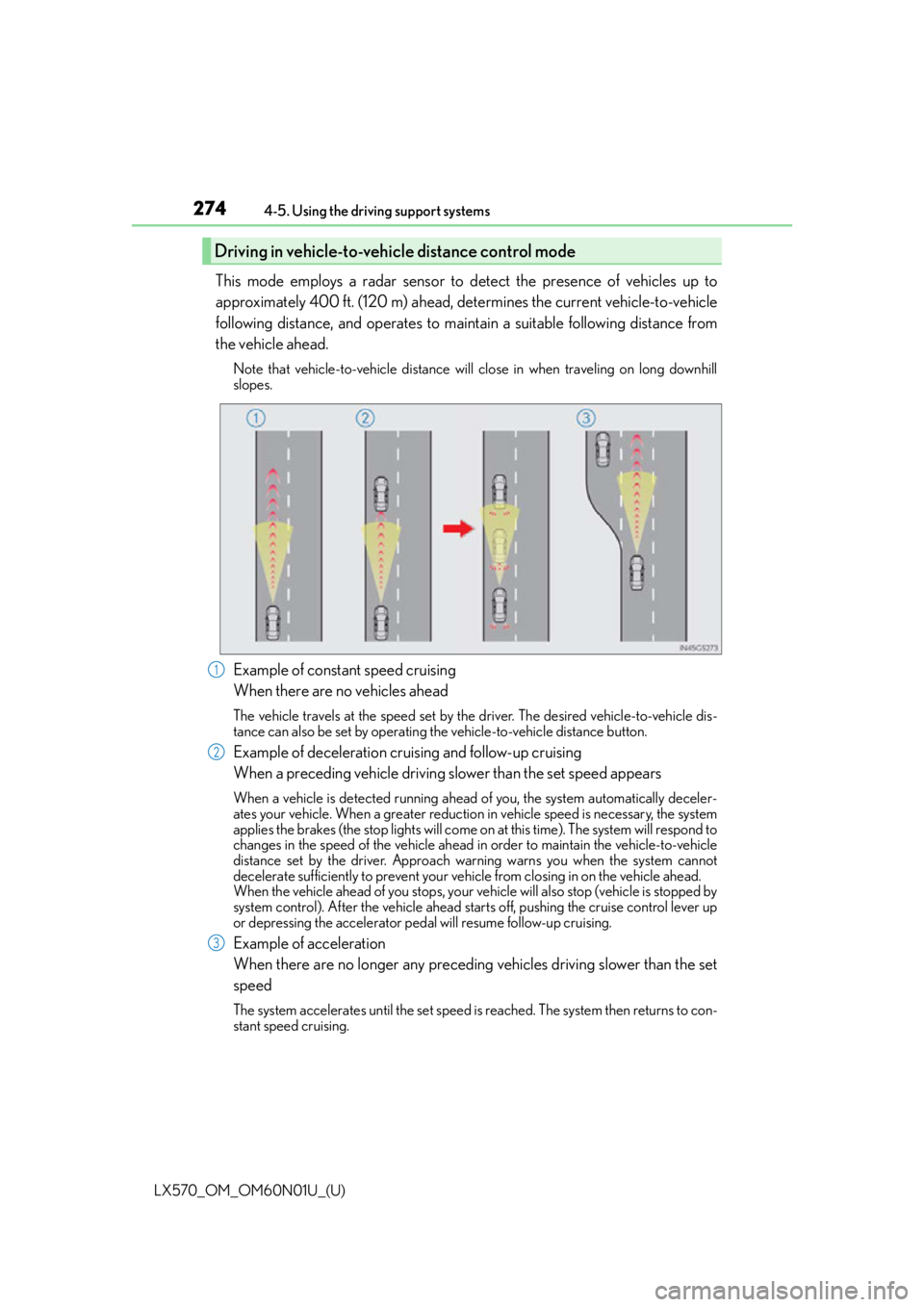
This mode employs a radar sensor to detect the presence of vehicles up to
approximately 400 ft. (120 m) ahead, determines the current vehicle-to-vehicle
following distance, and operates to main
tain a suitable following distance from
the vehicle ahead.
Note that vehicle-to-vehicle distance will close in when traveling on long downhill
slopes.
Example of constant speed cruising
When there are no vehicles ahead
The vehicle travels at the speed set by the driver. The desired vehicle-to-vehicle dis-
tance can also be set by operating th e vehicle-to-vehicle distance button.
Example of deceleration cruising and follow-up cruising
When a preceding vehicle driving slower than the set speed appears
When a vehicle is detected running ahead of you, the system automatically deceler-
ates your vehicle. When a greater reduction in vehicle speed is necessary, the system
applies the brakes (the stop lights will come on at this time). The system will respond to
changes in the speed of the vehicle ahead in order to maintain the vehicle-to-vehicle
distance set by the driver. Approach wa rning warns you when the system cannot
decelerate sufficiently to prevent your ve hicle from closing in on the vehicle ahead.
When the vehicle ahead of you stops, your ve hicle will also stop (vehicle is stopped by
system control). After the vehicle ahead starts off, pushing the cruise control lever up
or depressing the accelerator peda l will resume follow-up cruising.
Example of acceleration
When there are no longer any preceding vehicles driving slower than the set
speed
The system accelerates until the set speed is reached. The system then returns to con-
stant speed cruising.
Driving in vehicle-to-vehicle distance control mode
1
2
3
Page 289 of 632
289
LX570_OM_OM60N01U_(U)4-5. Using the driving support systems
4
Driving
Intuitive parking assist
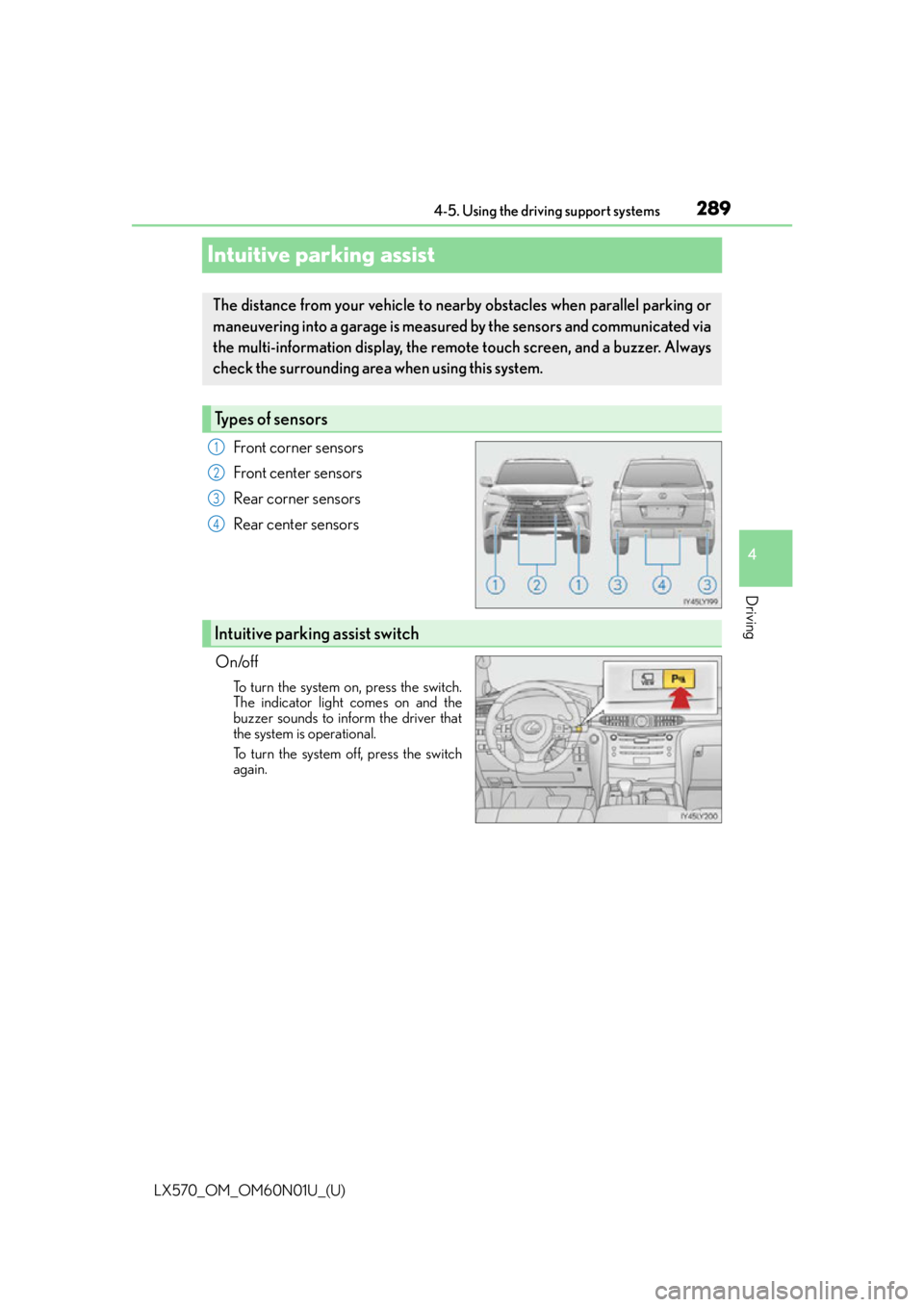
Front corner sensors
Front center sensors
Rear corner sensors
Rear center sensors
On/off
To turn the system on, press the switch.
The indicator light comes on and the
buzzer sounds to inform the driver that
the system is operational.
To turn the system off, press the switch
again.
The distance from your vehicle to near by obstacles when parallel parking or
maneuvering into a garage is measure d by the sensors and communicated via
the multi-information display, the remo te touch screen, and a buzzer. Always
check the surrounding area when using this system.
Types of sensors
1
2
3
4
Intuitive parking assist switch
Page 294 of 632

294
LX570_OM_OM60N01U_(U)4-5. Using the driving support systems
■The intuitive parking assist can be operated when
●Front corner sensors:
• The engine switch is in IGNITION ON mode.
• The shift lever is in a position other than P.
• The vehicle speed is less than approximately 6 mph (10 km/h).
(At any speed when the shift lever is in R)
●Front center sensors:
• The engine switch is in IGNITION ON mode.
• The shift lever is in a position other than P or R.
• The vehicle speed is less than about 6 mph (10 km/h).
●Rear corner and rear center sensors:
• The engine switch is in IGNITION ON mode.
• The shift lever is in R.
■Intuitive parking assist display
When an obstacle is detected while the re ar view monitor system, Lexus parking assist
monitor or Multi-terrain Monitor is in use, the warning indicator will appear in the upper
corner of the screen even if the display setting has been set to off.
■Sensor detectio n information
●The sensor’s detection areas are limited to the areas around the vehicle’s bumper.
●Certain vehicle conditions and the surround ing environment may affect the ability of a
sensor to correctly detect an obstacle. Particular instances where this may occur are
listed below.
• There is dirt, snow or ice on the sensor . (Wiping the sensors will resolve this prob-
lem.)
• The sensor is frozen. (Thawing th e area will resolve this problem.)
In especially cold weather, if a sensor is frozen the screen may show an abnormal
display, or obstacles may not be detected.
• The sensor is covered in any way.
• The vehicle is leaning co nsiderably to one side.
• On an extremely bumpy road, on an incline, on gravel, or on grass.
• The vicinity of the vehicle is noisy due to vehicle horns, motorcycle engines, air brakes of large vehicles, or other loud noises producing ultrasonic waves.
• There is another vehicle equipped with parking assist sensors in the vicinity.
• The sensor is coated with a sheet of spray or heavy rain.
• The vehicle is equipped with a fender pole or wireless antenna.
• The bumper or sensor receives a strong impact.
• The vehicle is approaching a tall or curved curb.
• In harsh sunlight or intense cold weather.
• The area directly under the bumpers is not detected.
• If obstacles draw too close to the sensor.
• A non-genuine Lexus suspension (low ered suspension etc.) is installed.
• People may not be detected if they are wearing certain types of clothing.
In addition to the examples above, there are instances in which, because of their shape,
signs and other objects may be judged by a sensor to be closer than they are.
Page 299 of 632

LX570_OM_OM60N01U_(U)
2994-5. Using the driving support systems
4
Driving
Some modes may not be selectable depending on the vehicle speed when the
four-wheel drive control switch is in the H4 position. Refer to the following table.
You can select this mode for easy
access and easy loading of the vehicle.
If the engine switch is turned to OFF
within 30 seconds after the vehicle
stops while this mode is on, the vehicle
height is lowered automatically.
When the vehicle begins to lower a
beep will sound twice, and while the
vehicle is lowering the indicator light
will flash to alert the driver and sur-
rounding people that the vehicle is low-
ering.
The indicator light stops blin king, and comes on continuously to indicate that the
shift is completed.
Easy access mode is available if the following conditions have been met:
●The vehicle height mode is in normal mode.
●The vehicle is stopped on a flat surface.
●The shift lever is in P.
●The side door and the back door are not opened, with the vehicle stopped and
the engine switch is turned to off.
The following method will cancel the vehicle lowering operation and raise the
vehicle again:
●Press the height control OFF switch.
●Push the height select switch to “ ”.
Conditions for changing the vehicle height mode
Low modeNormal modeHigh mode
Under 7 mph (12 km/h)Ye sYe sYe s
7 mph (12 km/h) to
18 mph (30 km/h)NoYe sYe s
18 mph (30 km/h) or overNoYe sNo
Easy access mode
Page 301 of 632

LX570_OM_OM60N01U_(U)
3014-5. Using the driving support systems
4
Driving
■Extra high mode
If the vehicle becomes stuck or the Crawl Control system requests the vehicle height be
raised, extra high mode may be automatically selected when the vehicle height is in high
mode with the four-wheel drive control switch in the L4 position.
The vehicle height is raised to 0.8 in. (20 mm) higher than the high mode height, or
slightly higher.
●Extra high mode will change back to high mode when:
• The vehicle speed exceeds 6 mph (10 km/h)
• The four-wheel drive control switch is shifted to H4.
●If you pull the height select switch to “ ” when in extra high mode, normal mode is
selected.
●Extra high mode cannot be manually selected.
■Tu r n i n g o f f t h e h e i g h t c o n t r o l
●The system will remain off until the height co ntrol “OFF” switch is pushed again, even if
the engine switch is turned off.
●Even if the system is turned off, the system will intervene automatically if the vehicle
speed exceeds the following.
• 18 mph (30 km/h) with high or low mode
• 50 mph (80 km/h) with normal mode
■Automatic leveling function
The vehicle is adjusted to a fixed height for each mode, regardless of the number of
occupants and the luggage load.
●However the vehicle cannot be raised if the vehicle load exceeds the following limits:
• Up to 4 occupants
* plus approximately 661 lb. (300 kg) in the normal mode
• Up to 4 occupants
* plus approximately 441 lb. (200 kg) in the high mode
*: average weight 150 lb. (68 kg) per person
●If the vehicle height cannot be raised when in the normal mode, and “LO” appears on
the display, the vehicle is loaded too heavily. Take extra care when driving in this condi-
tion.
If the vehicle height cannot be raised even after unloading the vehicle, pull the height
select switch to “ ” then push to “ ”. If the vehicle height st ill cannot be raised, turn the
ignition off then on again, then try once more.
■When the vehicle is stopped during driving
The activation of the automatic leveling func tion may cause the vehicle height to change.
This is not a malfunction.
■If the vehicle height does not change
If the vehicle is loaded too heavily, or the undercarriage has come into contact with the
road surface, the vehicle height cannot be raised/lowered.
Page 304 of 632

304
LX570_OM_OM60N01U_(U)4-5. Using the driving support systems
NOTICE
■When parking in areas with limited overhead height
After leaving the vehicle or unloading the luggage, the vehicle height may be slightly
higher than normal. Take care wh
en overhead height is limited.
■To avoid damage to the vehicle
●Normal mode will be switched to automatically even if the vehicle is started off in low
mode. Take care when over head height is limited.
●Do not select the low mode when driving on bumpy roads, as the underbody of the
vehicle may contact the road surface.
●When traveling on bumpy roads or through water, or when towing, turn off easy
access mode.
■Avoid rapid changes to the vehicle height
As the pump may overheat. Leave at a few seconds between selections when changing
the vehicle height mode.
Page 306 of 632
306
LX570_OM_OM60N01U_(U)4-5. Using the driving support systems
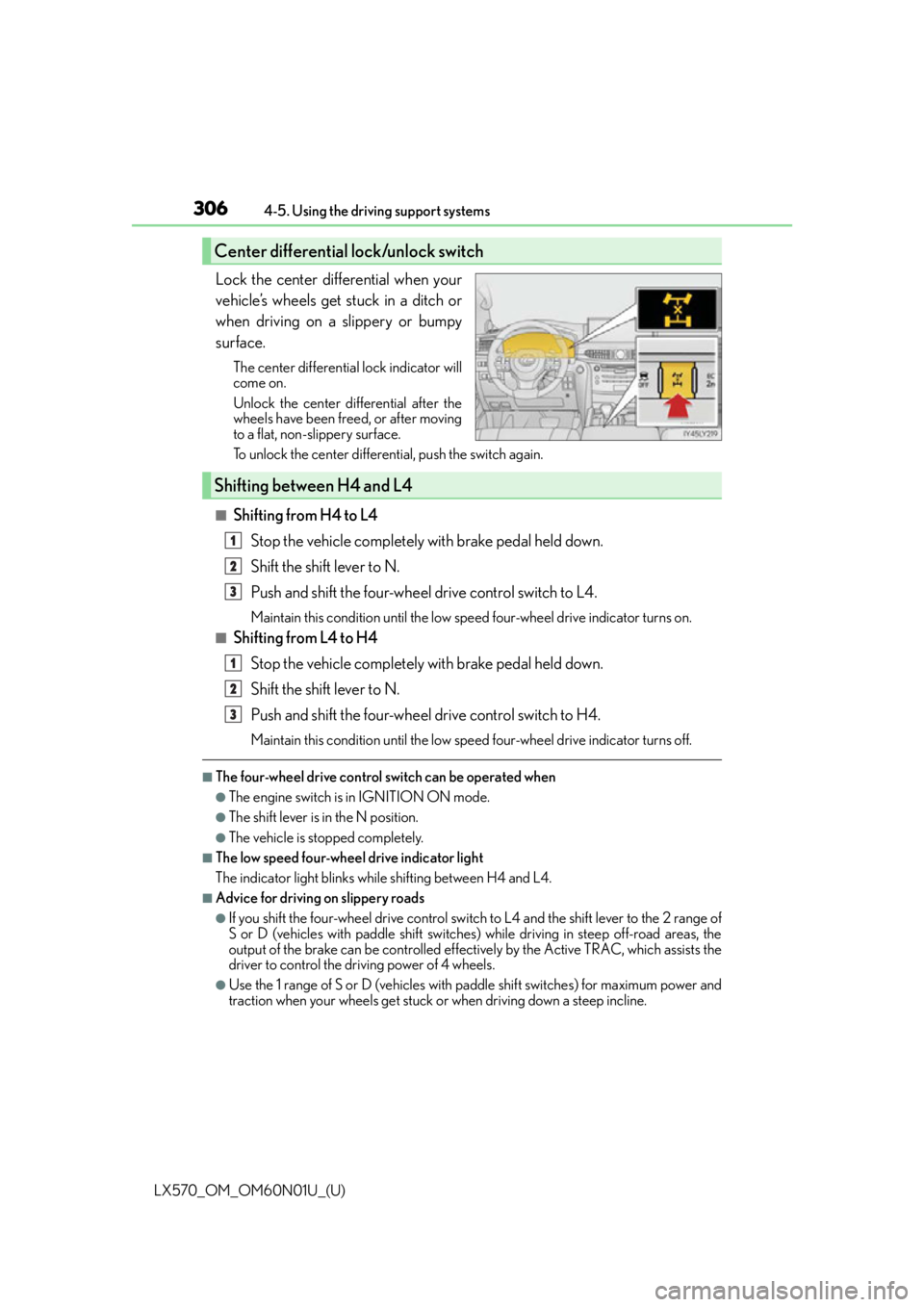
Lock the center differential when your
vehicle’s wheels get stuck in a ditch or
when driving on a slippery or bumpy
surface.
The center differential lock indicator will
come on.
Unlock the center differential after the
wheels have been freed, or after moving
to a flat, non-slippery surface.
To unlock the center differential, push the switch again.
■Shifting from H4 to L4
Stop the vehicle completely with brake pedal held down.
Shift the shift lever to N.
Push and shift the four-wheel drive control switch to L4.
Maintain this condition until the low sp eed four-wheel drive indicator turns on.
■Shifting from L4 to H4
Stop the vehicle completely with brake pedal held down.
Shift the shift lever to N.
Push and shift the four-wheel drive control switch to H4.
Maintain this condition until the low sp eed four-wheel drive indicator turns off.
■The four-wheel drive control switch can be operated when
●The engine switch is in IGNITION ON mode.
●The shift lever is in the N position.
●The vehicle is stopped completely.
■The low speed four-wheel drive indicator light
The indicator light blinks while shifting between H4 and L4.
■Advice for driving on slippery roads
●If you shift the four-wheel drive control switch to L4 and the shift lever to the 2 range of
S or D (vehicles with paddle shift switches) while driving in steep off-road areas, the
output of the brake can be controlled effectively by the Active TRAC, which assists the
driver to control the driving power of 4 wheels.
●Use the 1 range of S or D (vehicles with pa ddle shift switches) for maximum power and
traction when your wheels get stuck or when driving down a steep incline.
Center differential lock/unlock switch
Shifting between H4 and L4
1
2
3
1
2
3