light LEXUS LX570 2016 Owners Manual
[x] Cancel search | Manufacturer: LEXUS, Model Year: 2016, Model line: LX570, Model: LEXUS LX570 2016Pages: 632, PDF Size: 8.94 MB
Page 422 of 632
422
LX570_OM_OM60N01U_(U)5-5. Using the storage features
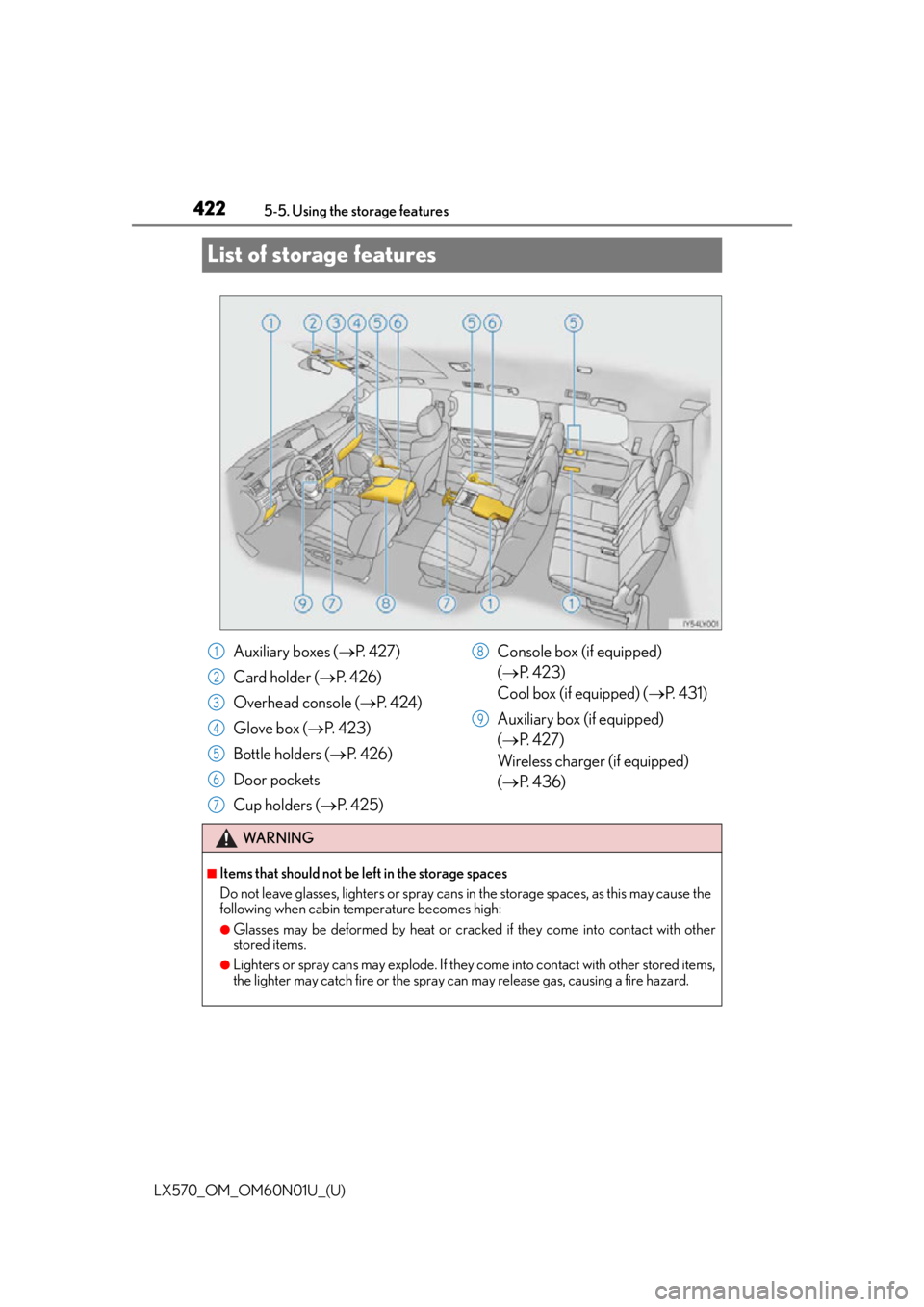
List of storage features
Auxiliary boxes (
P. 4 2 7 )
Card holder ( P. 4 2 6 )
Overhead console ( P. 4 2 4 )
Glove box ( P. 4 2 3 )
Bottle holders ( P. 4 2 6 )
Door pockets
Cup holders ( P. 4 2 5 ) Console box (if equipped)
(
P. 4 2 3 )
Cool box (if equipped) ( P. 4 3 1 )
Auxiliary box (if equipped)
( P. 4 2 7 )
Wireless charger (if equipped)
( P. 4 3 6 )
WA R N I N G
■Items that should not be left in the storage spaces
Do not leave glasses, lighters or spray cans in the storage spaces, as this may cause the
following when cabin temperature becomes high:
●Glasses may be deformed by heat or cracked if they come into contact with other
stored items.
●Lighters or spray cans may explode. If they come into contact with other stored items,
the lighter may catch fire or the spray can may release gas, causing a fire hazard.
1
2
3
4
5
6
7
8
9
Page 423 of 632
LX570_OM_OM60N01U_(U)
4235-5. Using the storage features
5
Interior features
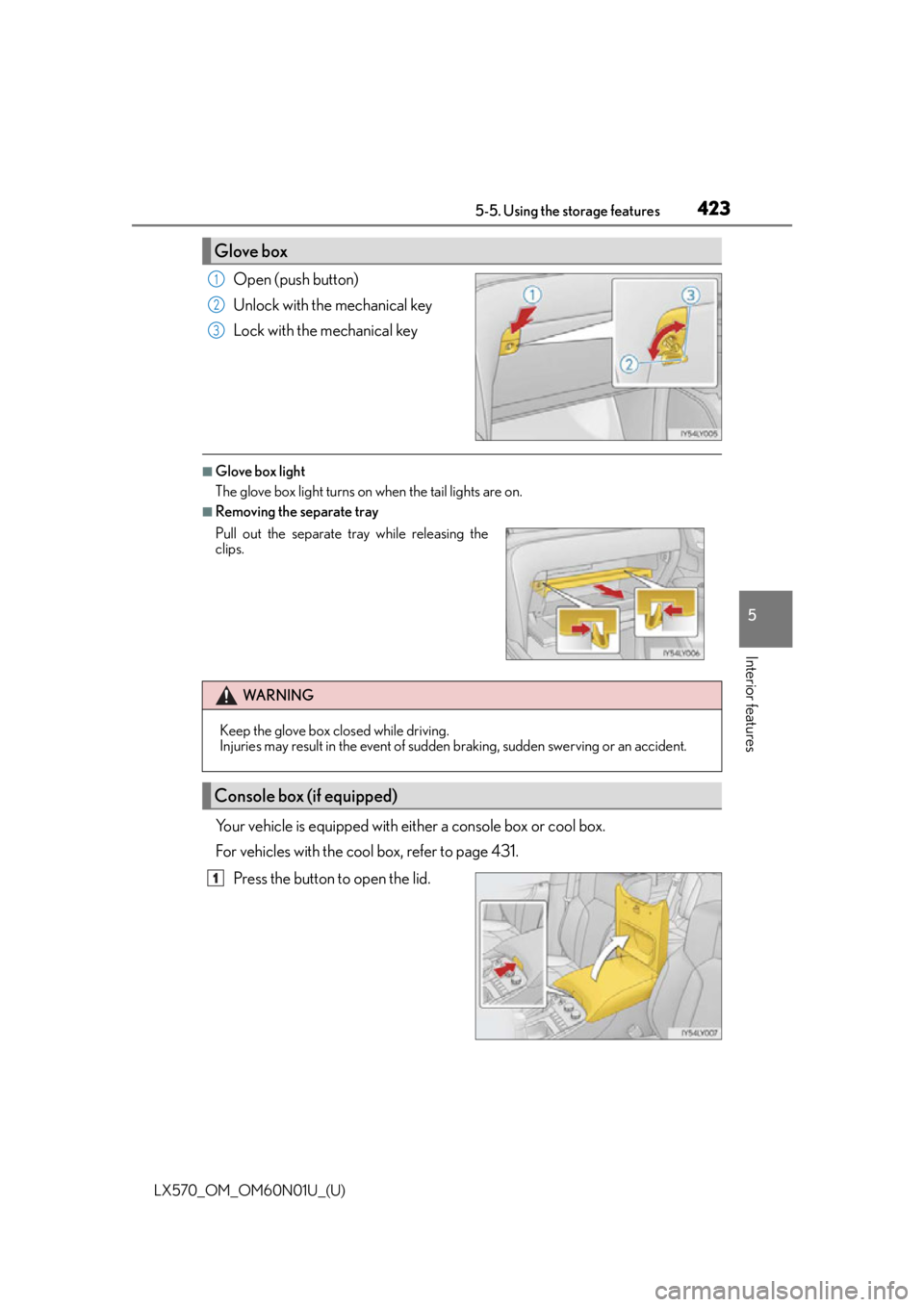
Open (push button)
Unlock with the mechanical key
Lock with the mechanical key
■Glove box light
The glove box light turns on when the tail lights are on.
■Removing the separate tray
Your vehicle is equipped with either a console box or cool box.
For vehicles with the cool box, refer to page 431.Press the button to open the lid.
Glove box
1
2
3
Pull out the separate tr ay while releasing the
clips.
WA R N I N G
Keep the glove box closed while driving.
Injuries may result in the event of sudden braking, sudden swerving or an accident.
Console box (if equipped)
1
Page 431 of 632
431
LX570_OM_OM60N01U_(U)5-6. Using the other interior features
5
Interior features
Other interior features
While the engine is running, the cool box,
which is cooled by the air conditioning,
can be used.
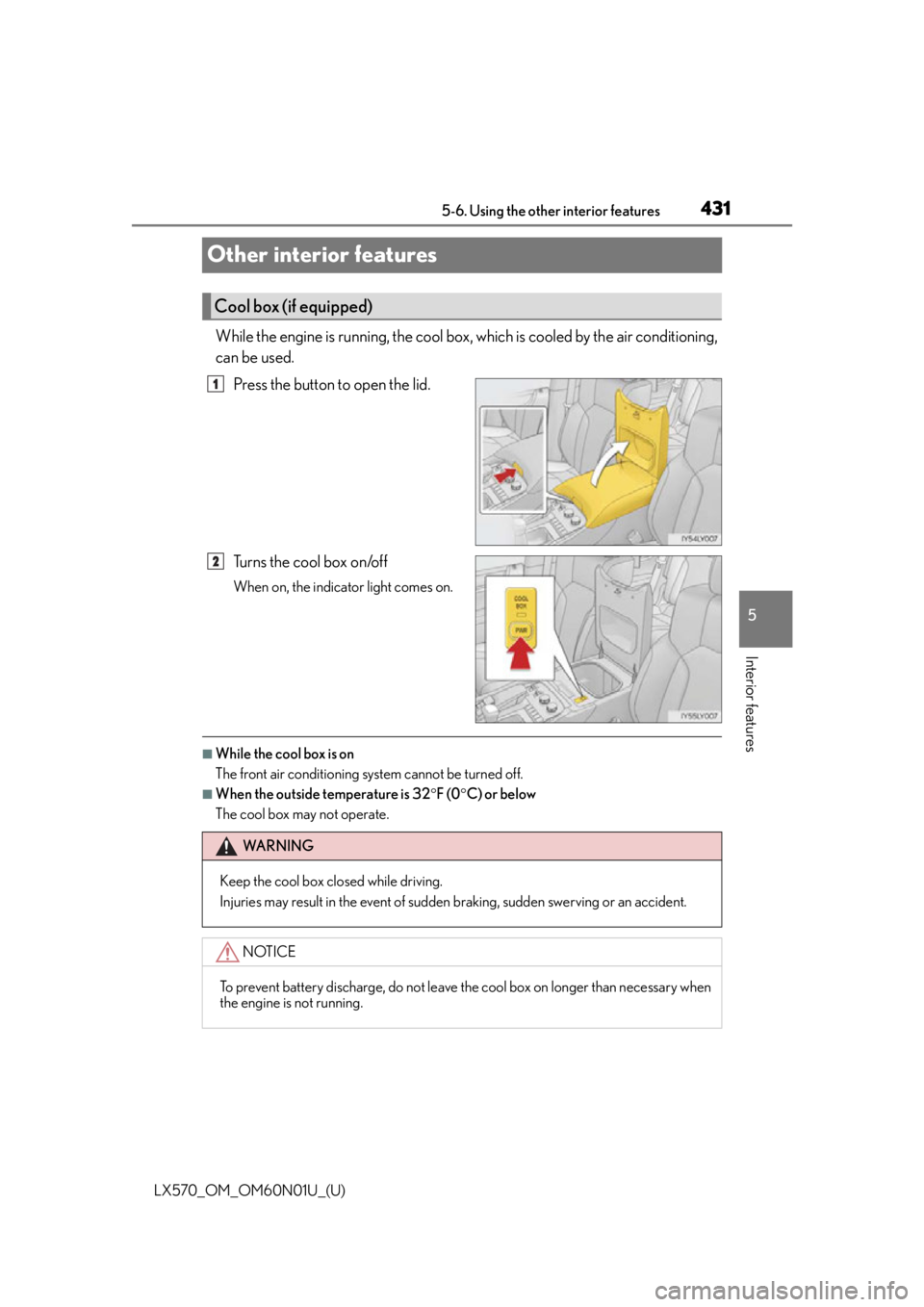
Press the button to open the lid.
Tu r n s t h e c o o l b o x o n /o f f
When on, the indicator light comes on.
■While the cool box is on
The front air conditioning system cannot be turned off.
■When the outside temperature is 32 F (0 C) or below
The cool box may not operate.
Cool box (if equipped)
1
2
WA R N I N G
Keep the cool box closed while driving.
Injuries may result in the event of sudden braking, sudden swerving or an accident.
NOTICE
To prevent battery discharge, do not leave the cool box on longer than necessary when
the engine is not running.
Page 432 of 632
432
LX570_OM_OM60N01U_(U)5-6. Using the other interior features
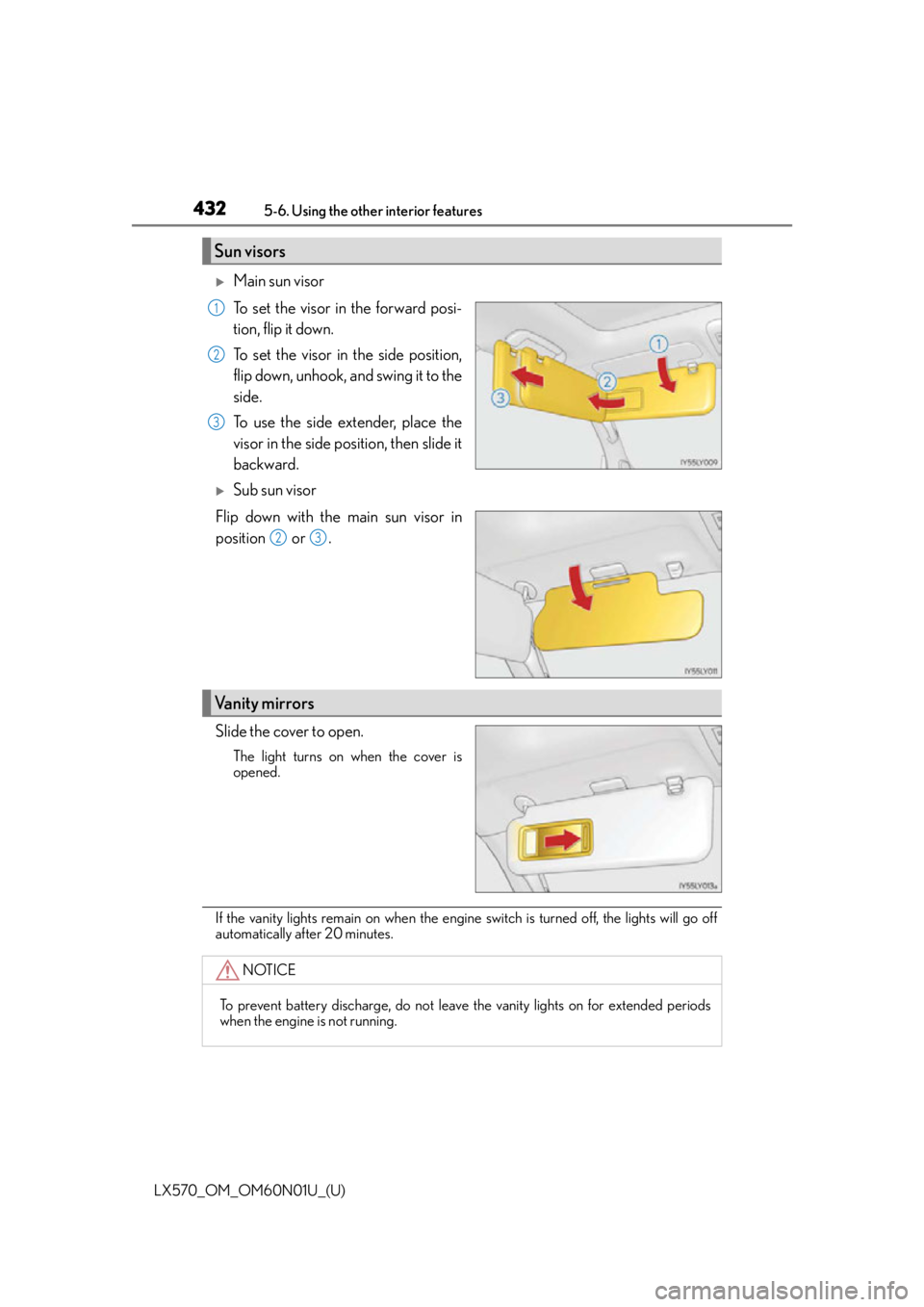
Main sun visor
To set the visor in the forward posi-
tion, flip it down.
To set the visor in the side position,
flip down, unhook, and swing it to the
side.
To use the side extender, place the
visor in the side position, then slide it
backward.
Sub sun visor
Flip down with the main sun visor in
position or .
Slide the cover to open.
The light turns on when the cover is
opened.
If the vanity lights remain on when the engine switch is turned off, the lights will go off
automatically after 20 minutes.
Sun visors
1
2
3
23
Vanity mirrors
NOTICE
To prevent battery discharge, do not leave the vanity lights on for extended periods
when the engine is not running.
Page 436 of 632
436
LX570_OM_OM60N01U_(U)5-6. Using the other interior features
A portable device can be charged by ju
st placing Qi standard wireless charge
compatible portable devices according to the Wireless Power Consortium, such
as smart phones and mobile batteries, etc., on the charge area.
This function cannot be used with port able devices that are larger than the
charging area. Also, depending on the portable device, it may not operate as
normal. Please read the operation manual for portable devices to be used.
■The “Qi” symbol
The “Qi” symbol is a trademark of the Wireless Power Consortium.
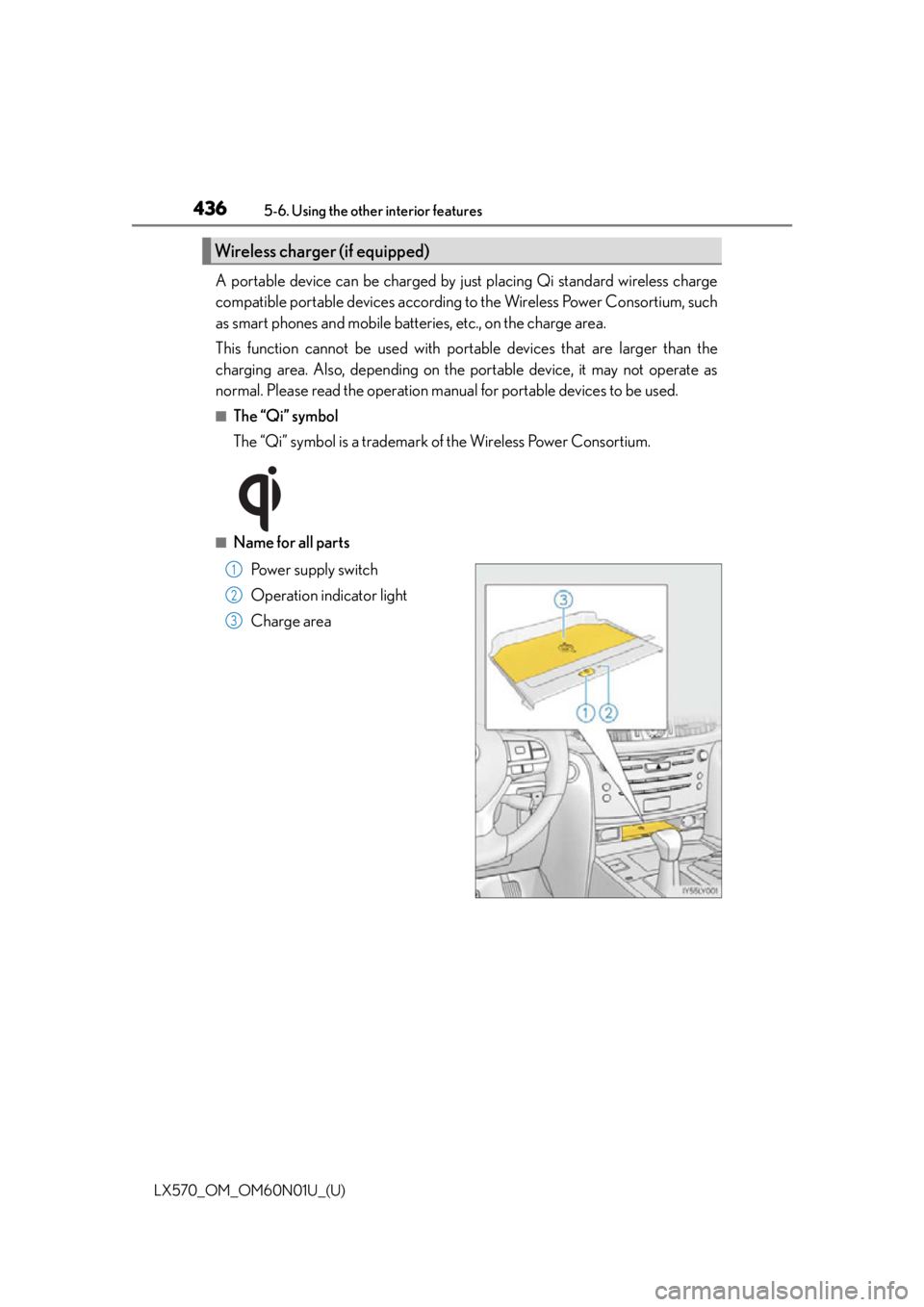
■Name for all parts
Power supply switch
Operation indicator light
Charge area
Wireless charger (if equipped)
1
2
3
Page 437 of 632
LX570_OM_OM60N01U_(U)
4375-6. Using the other interior features
5
Interior features
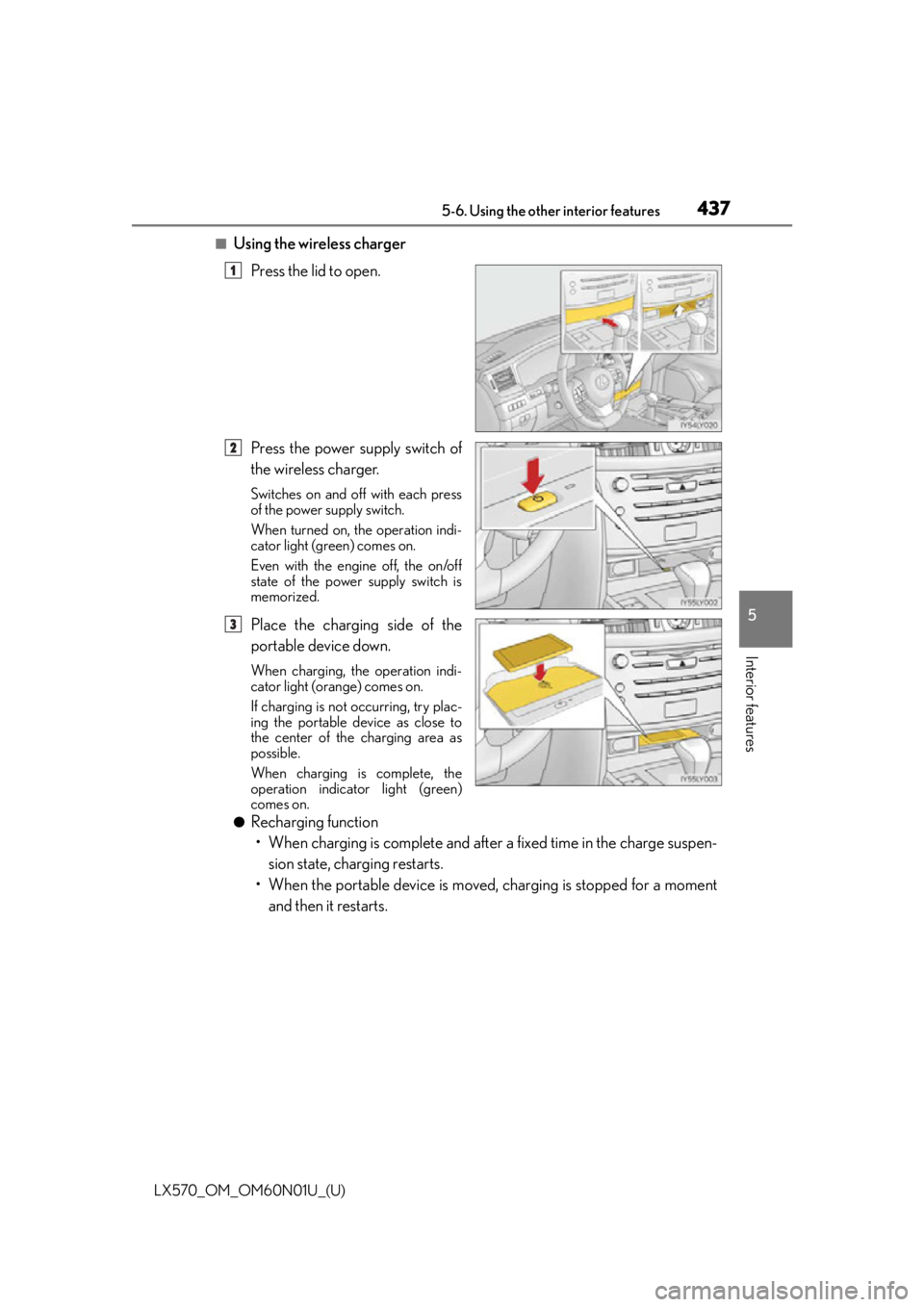
■Using the wireless chargerPress the lid to open.
Press the power supply switch of
the wireless charger.
Switches on and off with each press
of the power supply switch.
When turned on, the operation indi-
cator light (green) comes on.
Even with the engine off, the on/off
state of the power supply switch is
memorized.
Place the charging side of the
portable device down.
When charging, the operation indi-
cator light (orange) comes on.
If charging is not occurring, try plac-
ing the portable device as close to
the center of the charging area as
possible.
When charging is complete, the
operation indicator light (green)
comes on.
●Recharging function• When charging is complete and after a fixed time in the charge suspen- sion state, charging restarts.
• When the portable device is moved, charging is stopped for a moment and then it restarts.
1
2
3
Page 438 of 632
438
LX570_OM_OM60N01U_(U)5-6. Using the other interior features
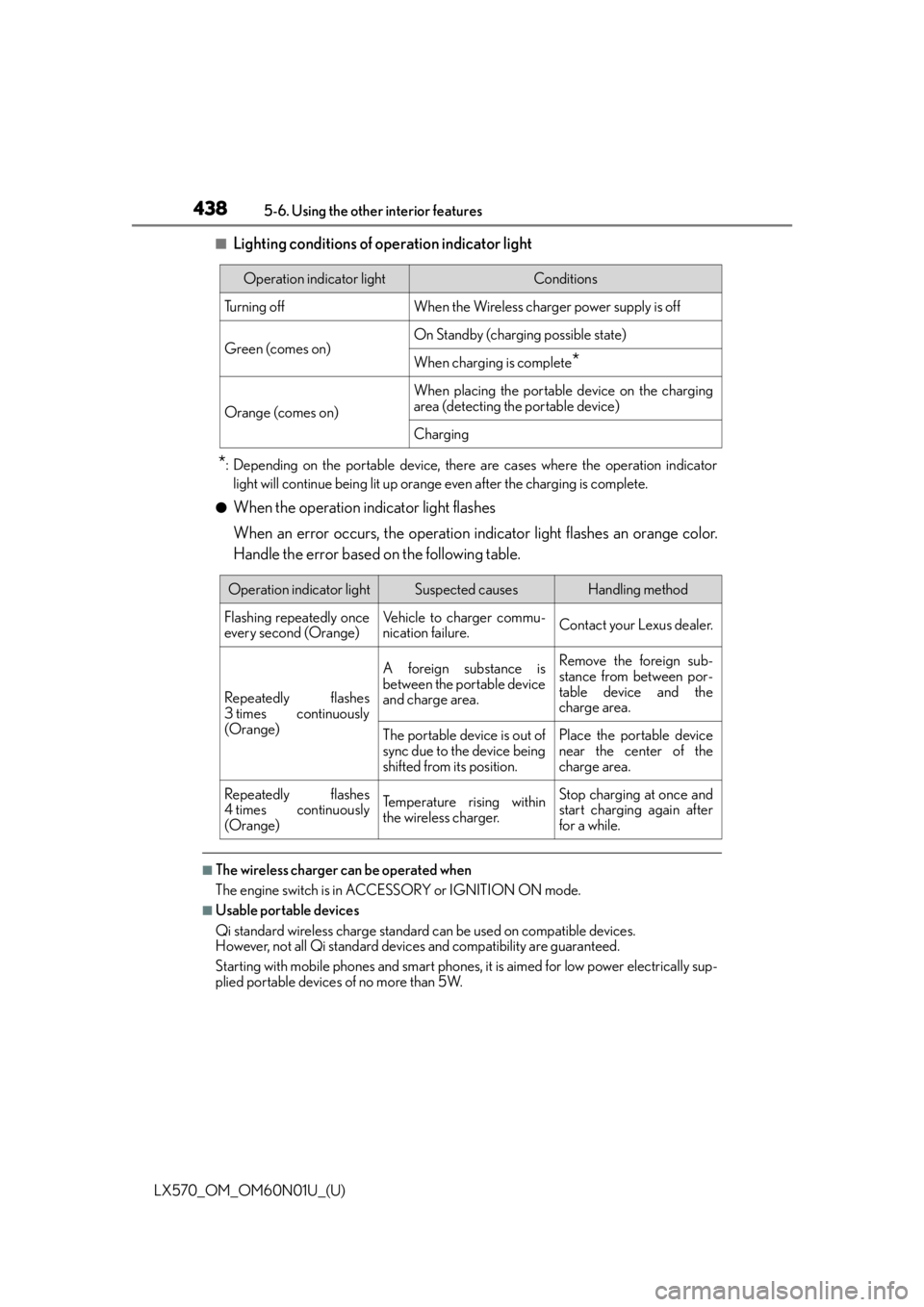
■Lighting conditions of operation indicator light
*: Depending on the portable device, there are cases where the operation indicator
light will continue being lit up orange even after the charging is complete.
●When the operation indicator light flashes
When an error occurs, the operation in dicator light flashes an orange color.
Handle the error based on the following table.
■The wireless charger can be operated when
The engine switch is in ACCESSORY or IGNITION ON mode.
■Usable portable devices
Qi standard wireless charge standard can be used on compatible devices.
However, not all Qi standard devi ces and compatibility are guaranteed.
Starting with mobile phones and smart phones , it is aimed for low power electrically sup-
plied portable devices of no more than 5W.
Operation indicator lightConditions
Tu r n i n g o f fWhen the Wireless charger power supply is off
Green (comes on)On Standby (charging possible state)
When charging is complete*
Orange (comes on)
When placing the portable device on the charging
area (detecting the portable device)
Charging
Operation indicator lightSuspected causesHandling method
Flashing repeatedly once
every second (Orange)Vehicle to charger commu-
nication failure.Contact your Lexus dealer.
Repeatedly flashes
3 times continuously
(Orange)
A foreign substance is
between the portable device
and charge area.Remove the foreign sub-
stance from between por-
table device and the
charge area.
The portable device is out of
sync due to the device being
shifted from its position.Place the portable device
near the center of the
charge area.
Repeatedly flashes
4 times continuously
(Orange)Te m p e r a t u r e r i s i n g w i t h i n
the wireless charger.Stop charging at once and
start charging again after
for a while.
Page 439 of 632
LX570_OM_OM60N01U_(U)
4395-6. Using the other interior features
5
Interior features
■When covers and accessories are attached to portable devices
Do not charge in situations where cover and accessories not able to handle Qi are
attached to the portable devi ce. Depending on the type of cover and accessory, it may
not be possible to charge. When charging is not performed even with the portable
device placed on the charge area, remove the cover and accessories.
■While charging, noise enters the AM radio
Turn off the wireless charger and confirm th at the noise has decreased. If the noise
decreases, continuously pushing the power supply switch of the wireless charger for 2
seconds, the frequency of the charger can be changed and the noise can be reduced.
Also, on that occasion, the operation indicator light will flash orange 2 times.
■Important points of the wireless charger
●If the electronic key cannot be detected within the vehicle interior, charging cannot be
done. When the door is opened and closed , charging may be temporarily suspended.
●When charging, the wireless charging device and portable device will get warmer,
however this is not a malfunction.
When a portable device gets warm while charging, charging may stop due to the pro-
tection function on the portable device side . In this case, when the temperature of the
portable device drops significantly, charge again.
■Operation sounds
When the power supply is turned on, while se arching for the portable device a sound will
be produced, however this is not a malfunction.
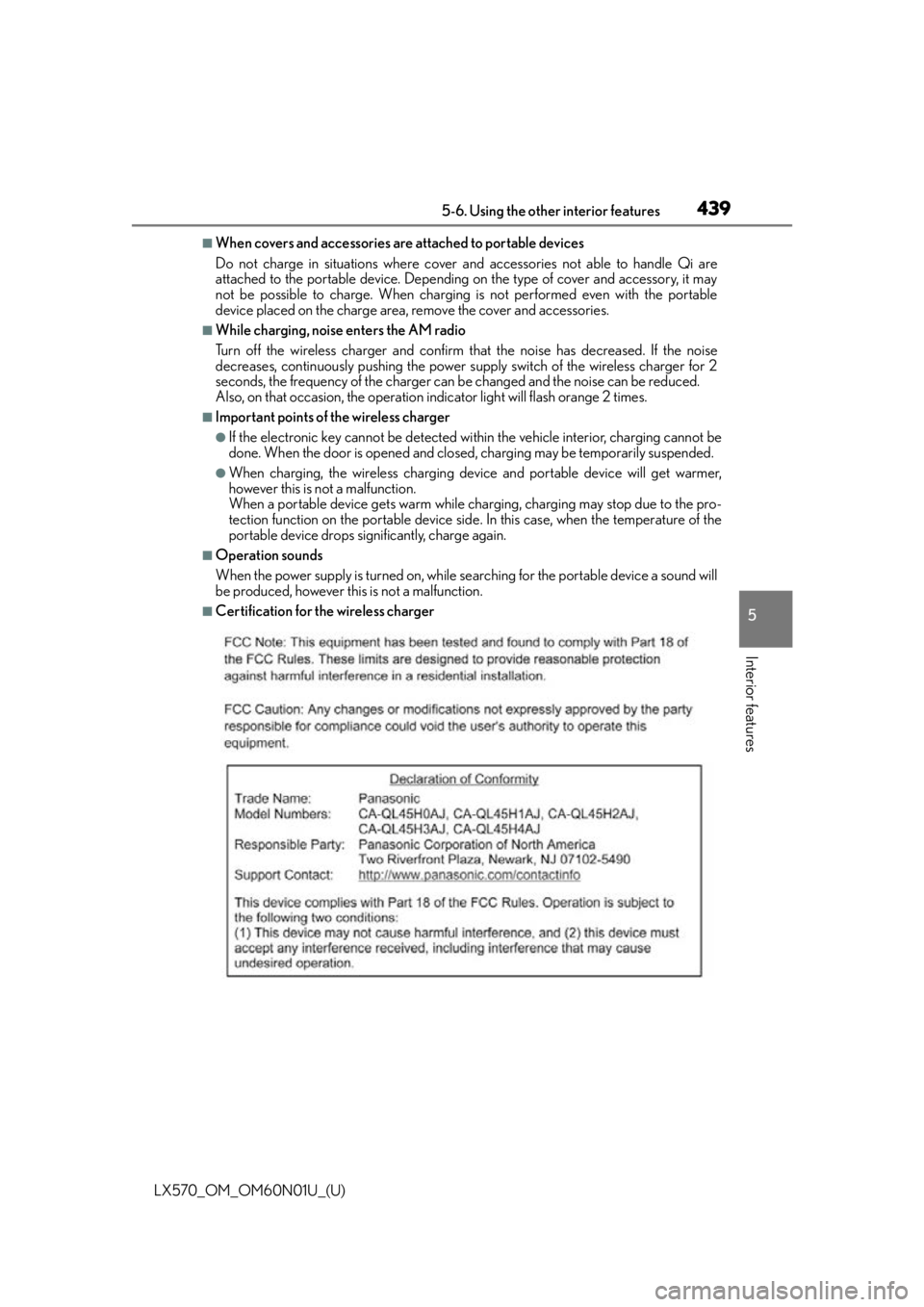
■Certification for the wireless charger
Page 442 of 632

442
LX570_OM_OM60N01U_(U)5-6. Using the other interior features
WA R N I N G
■Conditions in which the function may not operate correctly
In the following conditions, it may not operate correctly
●The portable device is fully charged
●There is foreign matter between the charge area and portable device
●The temperature of the portable device gets higher from charging
●The charging surface of the portable device is facing up
●The placement of the portable device is
out of alignment with the charge area
●Near a TV tower, electric power plant, gas station, radio station, large display, airport
or other facility that generates strong radio waves or electrical noise
●When the electronic key is in contact with , or is covered by the following metallic
objects
• Cards to which aluminum foil is attached
• Cigarette boxes that have aluminum foil inside
• Metallic wallets or bags
•Coins
•Hand warmers made of metal
• Media such as CDs and DVDs
●When other wireless keys (that emit radio waves) are being used nearby
In addition, excluding the above-mentioned, when the charger does not perform nor-
mally or the operation indicator light is flashi ng continuously, it is considered that the
wireless charger is malfunctioning. Contact your Lexus dealer.
■To prevent failure or damage to data
●Do not bring magnetic cards, such as credit cards, or magnetic recording media, etc.,
close to the charger while charging, otherw ise, data may disappear under the influ-
ence of magnetism. Also, do not bring pr ecision instruments such as wrist watches,
etc., close to the charger, as such objects may break.
●Do not leave portable devices in the cab in. The temperature inside the cabin may
become high, when under the sun, and cause damage to the device.
■To prevent battery discharge
When the engine is stopped, do not use the wireless charger for a long time.
Page 446 of 632
446
LX570_OM_OM60N01U_(U)5-6. Using the other interior features
Garage door opener
The garage door opener (HomeLink® Universal Transceiver) is manufactured under
license from HomeLink®.
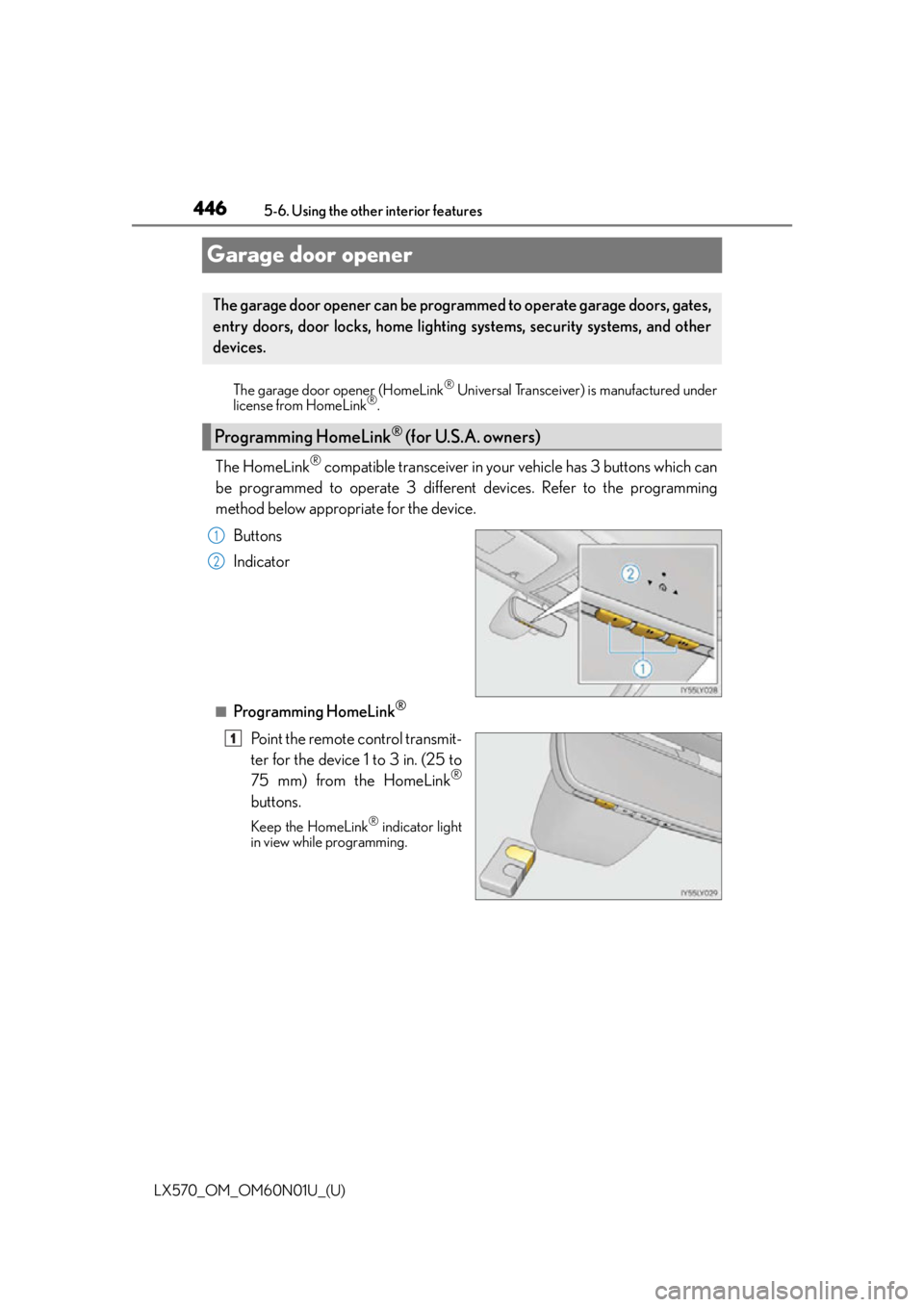
The HomeLink® compatible transceiver in your vehicle has 3 buttons which can
be programmed to operate 3 different devices. Refer to the programming
method below appropriate for the device.
Buttons
Indicator
■Programming HomeLink®
Point the remote control transmit-
ter for the device 1 to 3 in. (25 to
75 mm) from the HomeLink
®
buttons.
Keep the HomeLink® indicator light
in view while programming.
The garage door opener can be programmed to operate garage doors, gates,
entry doors, door locks, home lighting systems, security systems, and other
devices.
Programming HomeLink® (for U.S.A. owners)
1
2
1