wheel LEXUS LX570 2016 User Guide
[x] Cancel search | Manufacturer: LEXUS, Model Year: 2016, Model line: LX570, Model: LEXUS LX570 2016Pages: 632, PDF Size: 8.94 MB
Page 49 of 632
491-1. For safe use
LX570_OM_OM60N01U_(U)
1
For safety and security
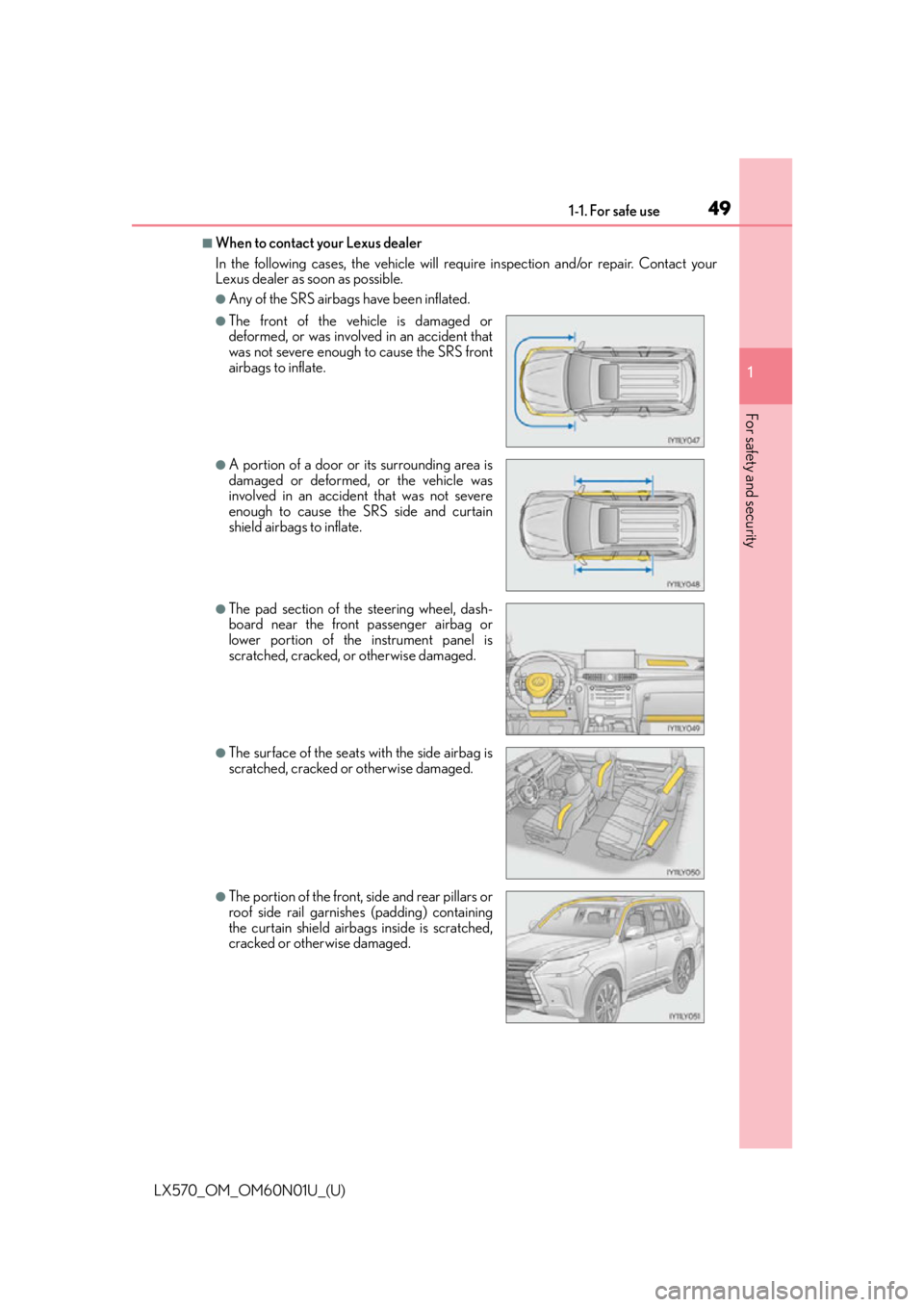
■When to contact your Lexus dealer
In the following cases, the vehicle will re quire inspection and/or repair. Contact your
Lexus dealer as soon as possible.
●Any of the SRS airbags have been inflated.
●The front of the vehicle is damaged or
deformed, or was involv ed in an accident that
was not severe enough to cause the SRS front
airbags to inflate.
●A portion of a door or its surrounding area is
damaged or deformed, or the vehicle was
involved in an accident that was not severe
enough to cause the SRS side and curtain
shield airbags to inflate.
●The pad section of the steering wheel, dash-
board near the front passenger airbag or
lower portion of the instrument panel is
scratched, cracked, or otherwise damaged.
●The surface of the seats with the side airbag is
scratched, cracked or otherwise damaged.
●The portion of the front, side and rear pillars or
roof side rail garnishes (padding) containing
the curtain shield airbag s inside is scratched,
cracked or otherwise damaged.
Page 83 of 632

LX570_OM_OM60N01U_(U)
832. Instrument cluster
2
Instrument cluster
Warning lights inform the driver of malfunctions in any of the vehicle’s systems.
Warning lights
*1
(U.S.A.)
Brake system warning light
( P. 5 2 4 )*1Automatic headlight
leveling system warning
light ( P. 5 2 5 )
*1
(Canada)
Brake system warning light
( P. 5 2 4 )*2Low speed four-wheel
drive indicator light
( P. 5 2 6 )
*1Charging system warning
light ( P. 5 2 4 )*2Center differential lock
indicator light ( P. 5 2 6 )
*1
(U.S.A.)
Malfunction indicator lamp
( P. 5 2 4 ) Open door warning light
(
P. 5 2 6 )
*1
(Canada)
Malfunction indicator lamp
( P. 5 2 4 ) Low fuel level warning light
(
P. 5 2 6 )
*1SRS warning light
( P. 5 2 4 ) Driver’s seat belt reminder
light (
P. 5 2 6 )
*1
(U.S.A.)
ABS warning light
( P. 5 2 4 )*3Front passenger’s seat belt
reminder light ( P. 5 2 6 )
*1
(Canada)
ABS warning light
( P. 5 2 4 )*1Master warning light
( P. 5 2 6 )
*1, 2
(if equipped)
PCS warning light
( P. 5 2 5 )*1Tire pressure warning light
( P. 5 2 6 )
*1Slip indicator light
( P. 5 2 5 )*2
(U.S.A.)
Parking brake indicator
( P. 5 2 6 )
Page 85 of 632
LX570_OM_OM60N01U_(U)
852. Instrument cluster
2
Instrument cluster
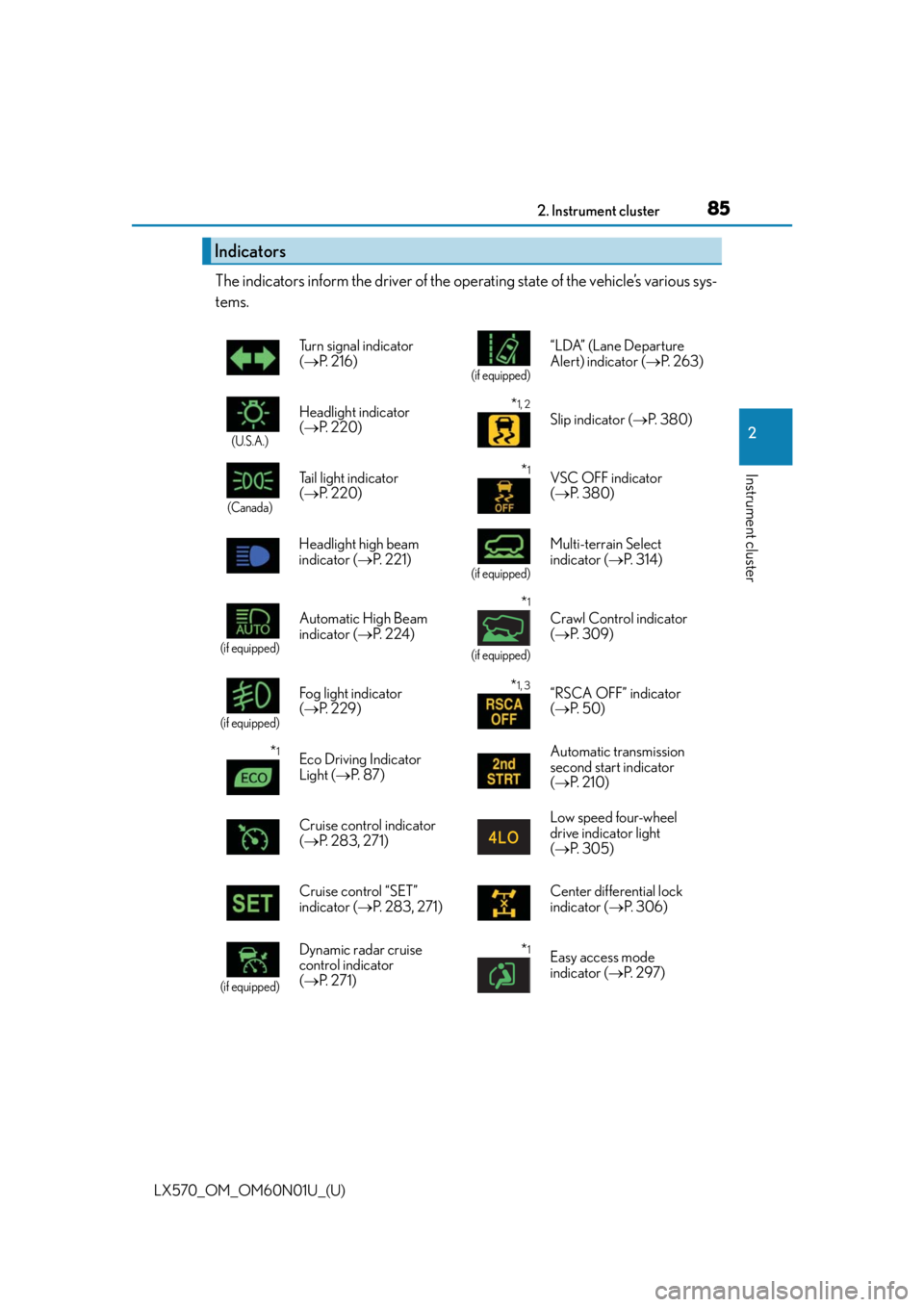
The indicators inform the driver of the operating state of the vehicle’s various sys-
tems.
Indicators
Turn signal indicator
( P. 2 1 6 )
(if equipped)
“LDA” (Lane Departure
Alert) indicator ( P. 2 6 3 )
(U.S.A.)
Headlight indicator
( P. 220)*1, 2
Slip indicator ( P. 3 8 0 )
(Canada)
Tail light indicator
( P. 220) *1VSC OFF indicator
( P. 3 8 0 )
Headlight high beam
indicator ( P. 221)
(if equipped)
Multi-terrain Select
indicator ( P. 3 1 4 )
(if equipped)
Automatic High Beam
indicator ( P. 2 2 4 )
*1
(if equipped)
Crawl Control indicator
( P. 3 0 9 )
(if equipped)
Fog light indicator
( P. 2 2 9 )*1, 3“RSCA OFF” indicator
( P. 5 0 )
*1Eco Driving Indicator
Light ( P. 8 7 ) Automatic transmission
second start indicator
(
P. 2 1 0 )
Cruise control indicator
( P. 2 8 3 , 2 7 1 ) Low speed four-wheel
drive indicator light
(
P. 3 0 5 )
Cruise control “SET”
indicator ( P. 2 8 3 , 2 7 1 ) Center differential lock
indicator (
P. 3 0 6 )
(if equipped)
Dynamic radar cruise
control indicator
( P. 2 7 1 )*1Easy access mode
indicator ( P. 2 9 7 )
Page 89 of 632

LX570_OM_OM60N01U_(U)
892. Instrument cluster
2
Instrument cluster
Odometer and trip meter display
Odometer:
Displays the total distance the vehicle has been driven
Tr i p m e t e r :
Displays the distance the vehicle has been driven since the meter was last reset. Trip
meters A and B can be used to record an d display different distances independently.
Shift position and shift range display
Displays the selected shift position or selected shift range (P. 2 1 0 )
4-Wheel AHC display
Display the status of 4-Wheel AHC (A ctive Height Control Suspension). (P. 2 9 7 )
Outside temperature
Displays the outside temperature within the range of -40 F (-40 C) to 122 F
(50 C). Low outside temperature indicator comes on when the ambient temperature
is 37 F (3 C) or lower.
Odometer/trip meter display change button
Switches between odometer and trip meter displays
Instrument panel light control dial
The brightness of the instrume nt panel light can be adjusted
Switches between odometer and trip
meter displays. When the trip meter is
displayed, pressing and holding the
button will reset the trip meter.
The brightness of the instrument panel lights can be adjusted.
Darker
Brighter
Changing the display
8
9
10
11
12
13
Instrument panel light control
1
2
Page 99 of 632
LX570_OM_OM60N01U_(U)
992. Instrument cluster
2
Instrument cluster
WA R N I N G
■Caution for use while driving
For safety, avoid operating the meter control switch while driving as much as possible,
and do not look continuously at the multi- information display while driving. Stop the
vehicle and operate the meter control switch. Failure to do so may cause a steering
wheel operation error, resultin g in an unexpected accident.
■Cautions while setting up the display
As the engine needs to be running during sett ing up the display, ensure that the vehicle
is parked in a place with adequate ventila tion. In a closed area such as a garage,
exhaust gases including harmful carbon mo noxide (CO) may collect and enter the
vehicle. This may lead to death or a serious health hazard.
NOTICE
■While setting up the display
To prevent battery discharge, ensure that th e engine is running while setting up the dis-
play features.
Page 109 of 632

109
LX570_OM_OM60N01U_(U)
3
Operation of
each component
3-1. Key information
Keys ....................................................110
3-2. Opening, closing and locking the doors
Side doors ........................................ 115
Back door........................................122
Smart access system with push-button start...................... 132
3-3. Adjusting the seats Front seats ...................................... 140
Rear seats ........................................142
Driving position memory ........... 151
Head restraints ............................ 155
3-4. Adjusting the steering wheel and mirrors
Steering wheel ............................. 158
Inside rear view mirror.............. 160
Outside rear view mirrors ........162
3-5. Opening, closing the windows and moon roof
Power windows ............................ 165
Moon roof ...................................... 168
Page 141 of 632

LX570_OM_OM60N01U_(U)
1413-3. Adjusting the seats
3
Operation of each component
■Power easy access system
The driver’s seat and steering wheel move in accordance with engine switch mode and
the driver’s seat belt condition. ( P. 1 5 1 )
■Active head restraints
Even small forces applied to the seatback may cause the head restraint to move. Pushing
up a locked head restraint forcibly may appe ar the head restraint inner structure. These
do not indicate problems.
WA R N I N G
■When adjusting the seat position
●Take care when adjusting the seat position to ensure that other passengers are not
injured by the moving seat.
●Do not put your hands under the seat or near the moving parts to avoid injury.
Fingers or hands may become jammed in the se at mechanism.
■Seat adjustment
To reduce the risk of sliding under the lap belt during a collision, do not recline the seat
more than necessary.
If the seat is too rec lined, the lap belt may slide past the hips and apply restraint forces
directly to the abdomen, or your neck may contact the shoulder belt, increasing the risk
of death or serious injury in the event of an accident.
Adjustments should not be ma de while driving as the seat may unexpectedly move and
cause the driver to lose control of the vehicle.
Inner
structure During rear-end collision
Page 151 of 632

151
LX570_OM_OM60N01U_(U)3-3. Adjusting the seats
3
Operation of each component
Driving position memory
The seat and steering wheel are automatically adjusted to allow the driver to
enter and exit the vehicle easily.
When all of the following have been
performed, the driver’s seat and steer-
ing wheel are automatically adjusted to
a position that allows driver to enter
and exit the vehicle easily.
• The shift lever has been shifted to P.
• The engine switch has been turned off.
• The driver’s seat belt has been unfas- tened.
When any of the following has been perf ormed, the driver’s seat and steering
wheel automatically return to their original positions. • The engine switch has been turn ed to ACCESSORY mode or IGNITION
ON mode.
• The driver’s seat belt has been fastened.
■Operation of the power easy access system
When exiting the vehicle, the power easy acc ess system may not operate if the seat is
already close to the rearmost position, etc.
■Customization
The seat movement amount settings of the power easy access system can be custom-
ized. (Customizable features: P. 585)
This feature automatically adjusts the dr iver’s seats, steering wheel and out-
side rear view mirrors to make enteri ng and exiting the vehicle easier or to
suit your preferences.
Power easy access system
Page 152 of 632

152
LX570_OM_OM60N01U_(U)3-3. Adjusting the seats
Your preferred driving position (the posi
tion of the driver’s seat, steering wheel
and outside rear view mirrors) can be entered into the computer’s memory and
recalled with the touch of a button. It is also possible to set this function to acti-
vate automatically when the doors are unlocked.
Three different driving positions can be recorded into memory.
■Recording procedure
Check that the shift lever is in P.
Turn the engine switch to IGNITION ON mode.
Adjust the driver’s seat, steering wheel, and outside rear view mirrors to the
desired positions.
While pressing the “SET” button,
or within 3 seconds after the
“SET” button is pressed, press
button “1”, “2” or “3” until the
buzzer sounds.
If the selected button has already
been preset, the previously recorded
position will be overwritten.
■Recall procedure
Check that the shift lever is in P.
Turn the engine switch to IGNITION ON mode.
Press one of the buttons for the
driving position you want to recall
until the buzzer sounds.
Driving position memory
1
2
3
4
1
2
3
Page 153 of 632

LX570_OM_OM60N01U_(U)
1533-3. Adjusting the seats
3
Operation of each component
■To stop the position recall operation part-way through
Perform any of the following:
●Press the “SET” button.
●Press button “1”, “2” or “3”.
●Operate any of the seat adjustment switches (only cancels seat position recall).
●Operate the tilt and telescopic steering co ntrol switch (only cancels steering wheel
position recall).
■Operating the driving position memory after turning the engine switch off
Recorded seat positions can be activated up to 180 seconds after the driver’s door is
opened and another 60 seconds after it is closed again.
■If the battery is disconnected
The memorized positions must be reset beca use the computer’s memory is erased when
the battery is disconnected.
Each electronic key can be registered to recall your preferred driving position.
■Registering procedure
Record your driving position to button “1”, “2” or “3” before performing the
following:
Carry only the key you want to regist er, and then close the driver’s door.
If 2 or more keys are in the vehicle, the driving position cannot be recorded
properly.
Check that the shift lever is in P.
Turn the engine switch to IGNITION ON mode.
Recall the driving position that you want to record.
While pressing the recalled but-
ton, press and hold the door lock
switch (either lock or unlock) until
the buzzer sounds.
If the button could not be registered,
the buzzer sounds continuously for
approximately 3 seconds.
Memory recall function (driver’s side only)
1
2
3
4