fuel LEXUS LX570 2018 User Guide
[x] Cancel search | Manufacturer: LEXUS, Model Year: 2018, Model line: LX570, Model: LEXUS LX570 2018Pages: 628, PDF Size: 12.38 MB
Page 94 of 628

94
LX570_OM_OM60Q78U_(U) 2. Instrument cluster
■
Drive information
4 of the following items can be register ed and displayed as the drive informa-
tion 1 and the drive information 2 (2 items on each screen).
Refer to P. 96 for the registration me thod of the drive information 1 and the
drive information 2. ●
Current fuel consumption (bar type/value type)
Displays the current rate of fuel consumption. ●
Average fuel consumption (after reset
* 2
/after start/after refuel)
* 1
Displays the average fuel consumption since the function was reset, the
engine was started, and the vehicle was refueled, respectively. ●
Average vehicle speed (after reset
* 2
/after start)
Displays the average vehicle speed si nce the function was reset and the
engine was started, respectively. ●
Elapsed time (after reset
* 2
/after start)
Displays the elapsed time since the function was reset and the engine was
started, respectively. ●
Distance (driving range/after start)
Displays the estimated maximum distance that can be driven with the
quantity of fuel remaining.
• This distance is computed based on your average fuel consumption.
As a result, the actual distance that can be driven may differ from that
displayed.
• When only a small amount of fuel is added to the tank, the display may
not be updated.
When refueling, turn the engine switch off. If the vehicle is refueled with-
out turning the engine switch off, the display may not be updated.
* 1
: Use the displayed average fuel consumption as a reference.
* 2
: The function can be reset by pressing for longer than 1 second when the item to
reset is displayed. If there is more than on e item that can be rese t, the item selection
screen will appear.Drive information
Page 105 of 628

105
LX570_OM_OM60Q78U_(U) 2. Instrument cluster
2
Instrument cluster
Fuel consumption information Remote Touch screen
Remote Touch knob ( → P. 392)
“MENU” button
“ENTER” buttonFuel consumption information can be di splayed on the Remote Touch screen.
The fuel consumption information can be displayed and operated on the side
display. 1
2
3
4
Page 106 of 628

106
LX570_OM_OM60Q78U_(U) 2. Instrument cluster
Press the “MENU” button on the Remote To uch, then select “Info” on the “Menu”
screen, and then select “Fuel Consumption”. ■
Trip information
If the “Past Record” screen is disp layed, select “Trip Information”.
Resetting the consumption data
Fuel consumption in the past 15
minutes
Current fuel consumption
Average vehicle speed since the
engine was started.
Elapsed time since the engine
was started.
Cruising range ( → P. 107)Average fuel consumption for the past 15 minutes is divided by color into past
averages and averages attained since the engine switch was last turned to IGNI-
TION ON mode. Use the displayed average fuel consumption as a reference.
The image is an example only, and may va ry slightly from actual conditions.Fuel consumption 1
2
3
4
5
6
Page 107 of 628
LX570_OM_OM60Q78U_(U) 1072. Instrument cluster
2
Instrument cluster ■
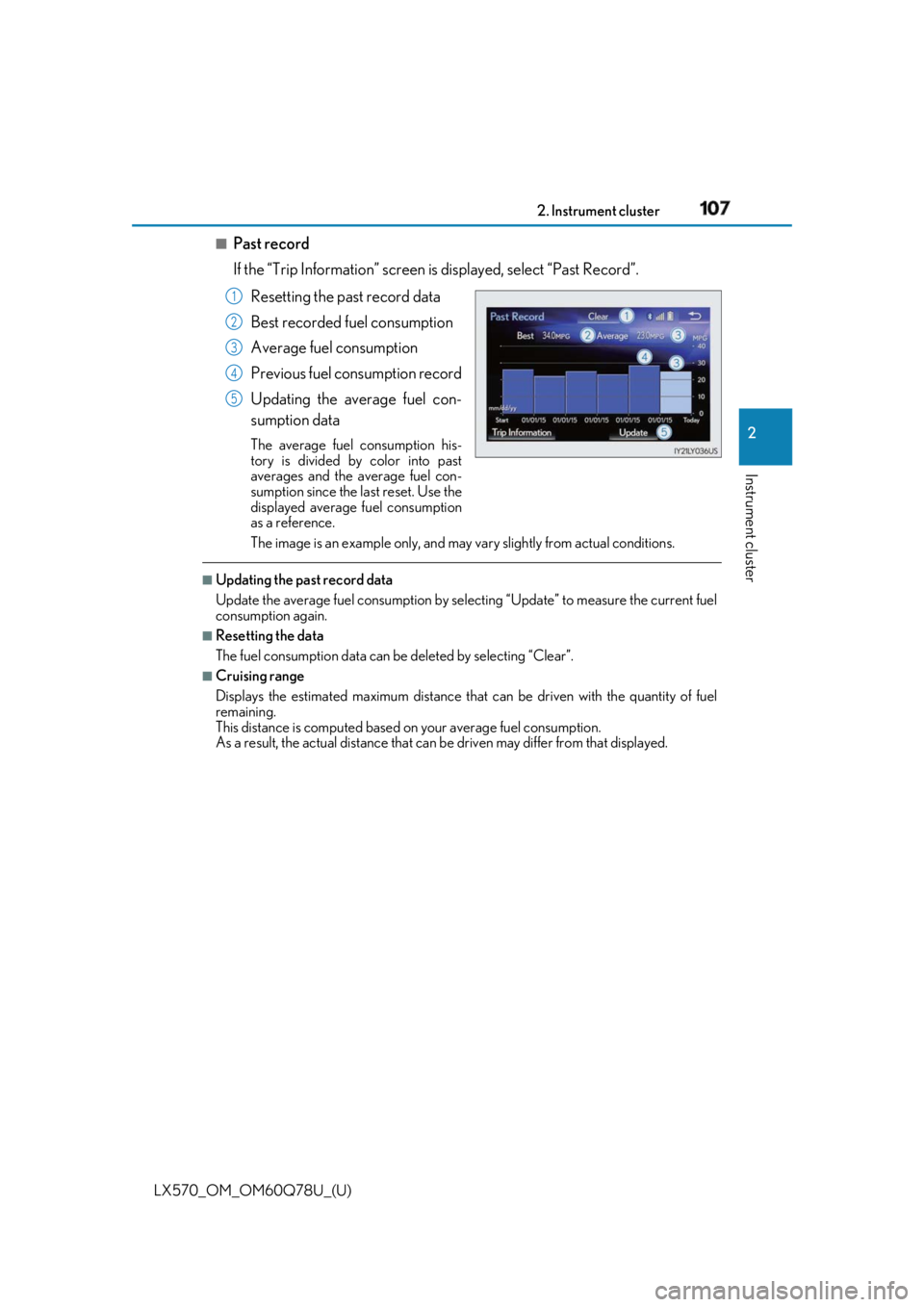
Past record
If the “Trip Information” screen is displayed, select “Past Record”.
Resetting the past record data
Best recorded fuel consumption
Average fuel consumption
Previous fuel consumption record
Updating the average fuel con-
sumption data The average fuel consumption his-
tory is divided by color into past
averages and the average fuel con-
sumption since the last reset. Use the
displayed average fuel consumption
as a reference.
The image is an example only, and may va ry slightly from actual conditions.■
Updating the past record data
Update the average fuel cons umption by selecting “Update” to measure the current fuel
consumption again. ■
Resetting the data
The fuel consumption data can be deleted by selecting “Clear”. ■
Cruising range
Displays the estimated maximum distance that can be driven with the quantity of fuel
remaining.
This distance is computed based on your average fuel consumption.
As a result, the actual distance that can be driven may differ from that displayed.1
2
3
4
5
Page 108 of 628
108
LX570_OM_OM60Q78U_(U) 2. Instrument cluster
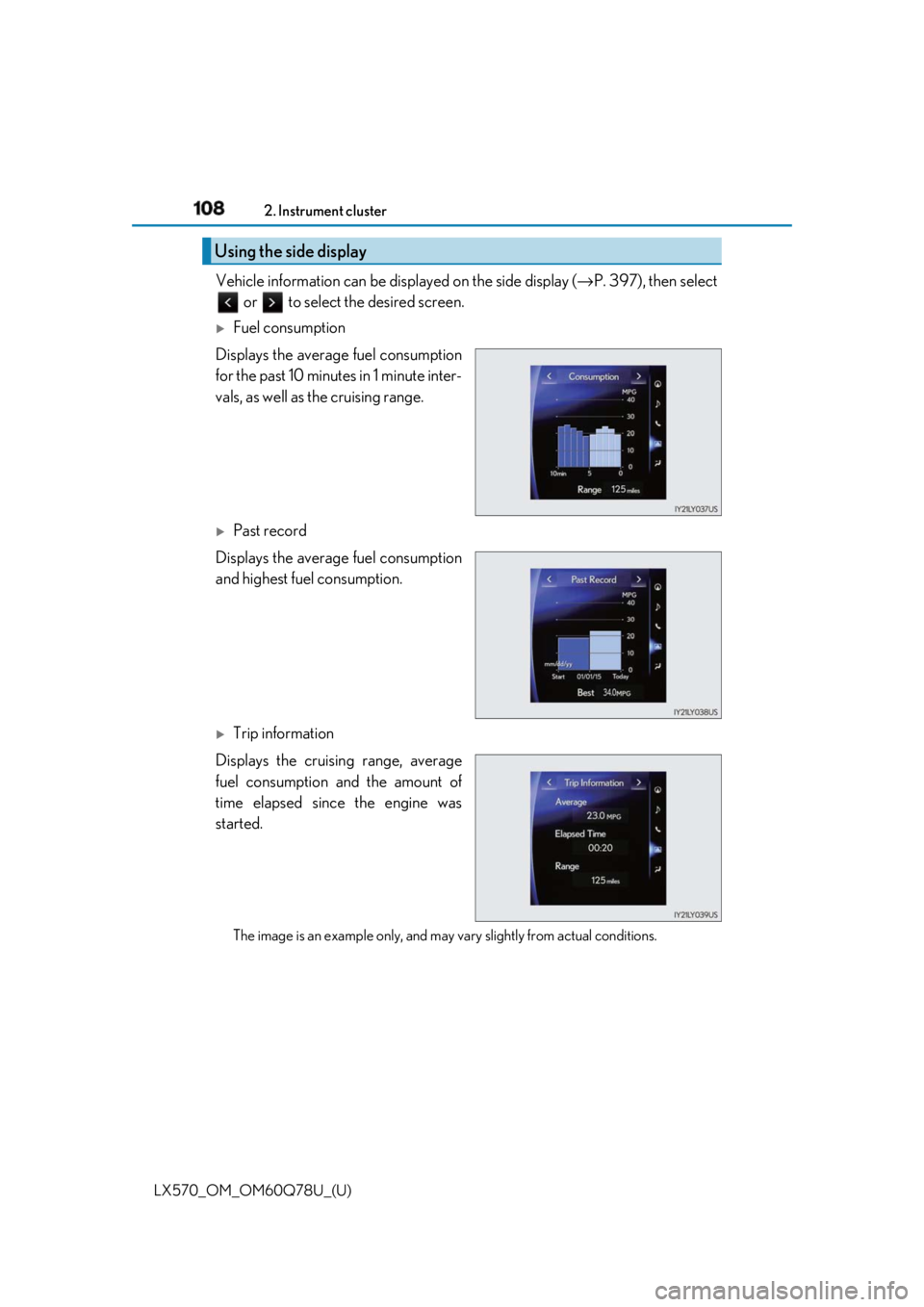
Vehicle information can be displayed on the side display ( → P. 397), then select
or to select the desired screen.
Fuel consumption
Displays the average fuel consumption
for the past 10 minutes in 1 minute inter-
vals, as well as the cruising range.
Past record
Displays the average fuel consumption
and highest fuel consumption.
Trip information
Displays the cruising range, average
fuel consumption and the amount of
time elapsed since the engine was
started.
The image is an example only, and may va ry slightly from actual conditions.Using the side display
Page 173 of 628

173
LX570_OM_OM60Q78U_(U) 4 Driving4-1. Before driving
Driving the vehicle ...................... 174
Cargo and luggage .................... 182
Vehicle load limits ....................... 186
Trailer towing ................................ 187
Dinghy towing .............................204
4-2. Driving procedures
Engine (ignition) switch .......... 205
Automatic transmission............ 210
Turn signal lever........................... 217
Parking brake ............................... 218
4-3. Operating the lights
and wipers
Headlight switch .......................... 221
Automatic High Beam ............. 224
Fog light switch ...........................229
Windshield wipers and
washer........................................... 231
Rear window wiper and
washer..........................................235
Headlight cleaner switch ....... 238
4-4. Refueling
Opening the fuel tank cap......239 4-5. Using the driving support
systems
Lexus Safety System+ .............. 242
PCS (Pre-Collision
System)........................................ 249
LDA (Lane Departure
Alert) ..............................................261
Dynamic radar cruise
control with full-speed
range ............................................ 269
Cruise control .............................. 281
Driving mode select
switch ........................................... 284
Intuitive parking assist .............. 287
4-Wheel AHC (Active
Height Control
Suspension) ............................... 295
Four-wheel drive system ........303
Crawl Control (with Turn
Assist function)......................... 307
Multi-terrain Select .................... 312
Multi-terrain Monitor ................ 316
BSM (Blind Spot Monitor) ..... 363
• BSM function ......................... 367
• RCTA function........................371
Driving assist systems .............. 377
4-6. Driving tips
Winter driving tips .....................382
Off-road precautions ...............386
Page 176 of 628

176
LX570_OM_OM60Q78U_(U) 4-1. Before driving■
Drum-in-disc type parking brake system
Your vehicle has a drum-in-disc type parking brake system.
This type of brake system needs bedding-down of the brake shoes periodically or when-
ever the parking brake shoes and/or drum are replaced.
Have your Lexus dealer, perform the bedding-down operation. ■
Operating your vehicle in a foreign country
Comply with the relevant vehicle registration laws and confirm the availability of the cor-
rect fuel. ( → P. 560)■
When turning off the engine
Emission system operating sounds may cont inue for a short time after the engine is
turned off. This is not a malfunction, and helps to ensure optima l performance of the
emission system.
Page 187 of 628
187
LX570_OM_OM60Q78U_(U) 4-1. Before driving
4
Driving
Trailer towing Your vehicle is designed primarily as a passenger-and-load-carrying vehicle.
Towing a trailer can have an adverse im pact on handling, performance, brak-
ing, durability, and fuel consumption. Fo r your safety and the safety of others,
you must not overload your vehicle or trailer. You must also ensure that you
are using appropriate towing equipment, that the towing equipment has been
installed correctly and used properly, and that you employ the requisite driv-
ing habits.
Vehicle-trailer stability and braking pe rformance are affected by trailer sta-
bility, brake performance and setting, tr ailer brakes, the hitch and hitch sys-
tems (if equipped).
To tow a trailer safely, use extreme ca re and drive the vehicle in accordance
with your trailer’s characteri stics and operating conditions.
Lexus warranties do not apply to damage or malfunction caused by towing a
trailer for commercial purposes.
Contact your Lexus dealer for further information about additional require-
ments such as towing kits, etc.
Page 222 of 628

222
LX570_OM_OM60Q78U_(U) 4-3. Operating the lights and wipers
With the headlights on, push the
lever forward to turn on the high
beams. Pull the lever back to the center position
to turn the high beams off.
Pull the lever toward you to turn on the high beams. Release the lever to turn them off. You can flash the high beams with the headlights on
or off. ■
Daytime running light system ●
The daytime running lights illuminate using th e same lights as the parking lights and illu-
minate brighter than the parking lights. ●
To make your vehicle more visible to other drivers during daytime driving, the daytime
running lights turn on automatically when a ll of the following conditions are met. (The
daytime running lights are not designed for use at night.)
• The engine is running
• The parking brake is released
• The headlight switch is in the (Canada only), or “AUTO”
* position
* : When the surroundings are bright
The daytime running lights remain on after th ey illuminate, even if the parking brake is
set again. ●
For the U.S.A.: Daytime running lights can be turned off by operating the switch.●
Compared to turning on the headlights, the daytime running light system offers greater
durability and consumes less electricity, so it can help improve fuel economy.■
Headlight control sensorTurning on the high beam headlights 1
The sensor may not function properly if an
object is placed on the sensor, or anything that
blocks the sensor is affixed to the windshield.
Doing so interferes with the sensor detecting
the level of ambient li ght and may cause the
automatic headlight system to malfunction. 2
Page 239 of 628
239
LX570_OM_OM60Q78U_(U) 4-4. Refueling
4
Driving
Opening the fuel tank cap ●
Turn the engine switch off and ensure that all the doors and windows are
closed. ●
Confirm the type of fuel. ■
Fuel types
→ P. 566 ■
Fuel tank opening for unleaded gasoline
To help prevent incorrect fueling, your Lexu s has a fuel tank opening that only accommo-
dates the special nozzle on unleaded fuel pumps.Perform the following steps to open the fuel tank cap.
Before refueling the vehicle
WARNING ■
When refueling the vehicle
Observe the following precautions while refueling the vehicle. Failure to do so may
result in death or serious injury. ●
After exiting the vehicle and before opening the fuel door, touch an unpainted metal
surface to discharge any static electricity. It is important to discha rge static electricity
before refueling because sparks resulting fr om static electricity can cause fuel vapors
to ignite while refueling. ●
Always hold the grips on the fuel tank cap and turn it slowly to remove it.
A whooshing sound may be heard when the fu el tank cap is loosened. Wait until the
sound cannot be heard before fully removing the cap. In hot weather, pressurized fuel
may spray out of the filler neck and cause injury.●
Do not allow anyone that has not discharged static electricity from their bodies to
come close to an open fuel tank. ●
Do not inhale vaporized fuel.
Fuel contains substances th at are harmful if inhaled.●
Do not smoke while refueling the vehicle.
Doing so may cause the fuel to ignite and cause a fire. ●
Do not return to the vehicle or touch any pe rson or object that is statically charged.
This may cause static electricity to build up, resulting in a possible ignition hazard.■
When refueling
Observe the following precautions to prevent fuel overflowing from the fuel tank: ●
Securely insert the fuel nozz le into the fuel filler neck.●
Stop filling the tank after the fuel nozzle automatically clicks off.●
Do not top off the fuel tank.