center LEXUS LX570 2020 Owner's Guide
[x] Cancel search | Manufacturer: LEXUS, Model Year: 2020, Model line: LX570, Model: LEXUS LX570 2020Pages: 636, PDF Size: 12.73 MB
Page 294 of 636

294
LX570_OM_OM60R61U_(U)4-5. Using the driving support systems
Intuitive parking assist
Front corner sensors
Front center sensors
Rear corner sensors
Rear center sensors
On/off
To turn the system on, press the switch.
The indicator light comes on and the
buzzer sounds to inform the driver that
the system is operational.
To turn the system off, press the switch
again.
The distance from your vehicle to nearby obstacles when parallel parking or
maneuvering into a garage is measured by the sensors and communicated via
the multi-information display, the remo te touch screen, and a buzzer. Always
check the surrounding area when using this system.
Types of sensors
1
2
3
4
Intuitive parking assist switch
Page 295 of 636

LX570_OM_OM60R61U_(U)
2954-5. Using the driving support systems
4
Driving
When the sensors detect an obstacle, a graphic is shown on the multi-informa-
tion display and the remote touch screen depending on the position and distance
to the obstacle.
Multi-information display
Front corner sensor operation
Front center sensor operation
Rear corner sensor operation
Rear center sensor operation
Remote touch screen
Intuitive parking assist
Rear Cross Traffic Alert (if
equipped)
A graphic is automatically displayed on
the side display when an obstacle is
detected. The screen can be set so that
the graphic is not displayed.
: Select to mute the buzzersounds.
Display
1
2
3
4
1
2
Page 296 of 636
296
LX570_OM_OM60R61U_(U)4-5. Using the driving support systems
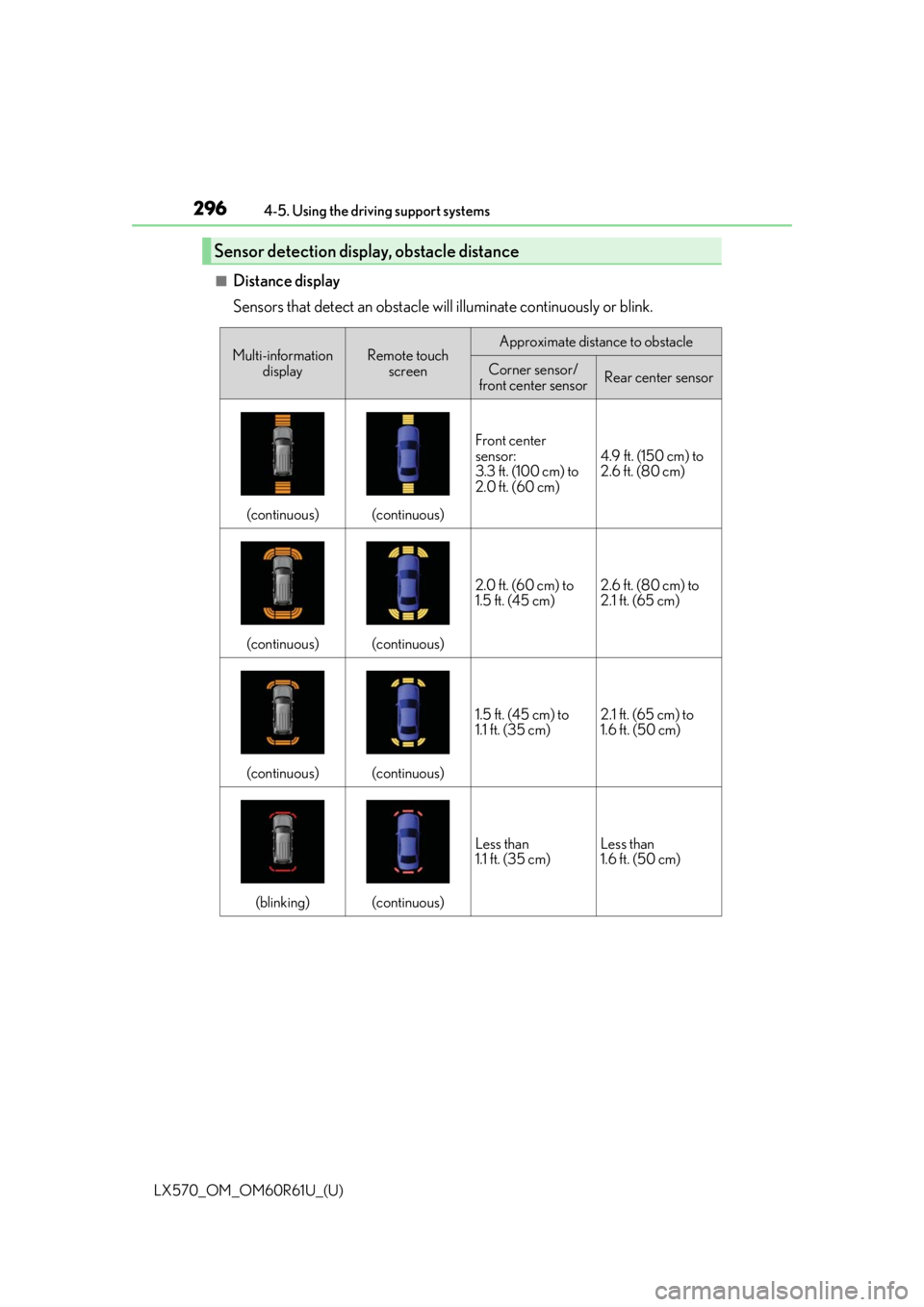
■Distance display
Sensors that detect an obstacle will illuminate continuously or blink.
Sensor detection display, obstacle distance
Multi-information
displayRemote touch screenApproximate distance to obstacle
Corner sensor/
front center sensorRear center sensor
(continuous)(continuous)
Front center
sensor:
3.3 ft. (100 cm) to
2.0 ft. (60 cm)
4.9 ft. (150 cm) to
2.6 ft. (80 cm)
(continuous)(continuous)
2.0 ft. (60 cm) to
1.5 ft. (45 cm)2.6 ft. (80 cm) to
2.1 ft. (65 cm)
(continuous)(continuous)
1.5 ft. (45 cm) to
1.1 ft. (35 cm)2.1 ft. (65 cm) to
1.6 ft. (50 cm)
(blinking)(continuous)
Less than
1.1 ft. (35 cm)Less than
1.6 ft. (50 cm)
Page 297 of 636

LX570_OM_OM60R61U_(U)
2974-5. Using the driving support systems
4
Driving
■Buzzer operation and distance to an obstacle
A buzzer sounds when the sensors are operating.
●The buzzer sounds faster as the vehicle approaches an obstacle.
When the vehicle comes within the following distance of the obstacle, the
buzzer sounds continuously. • Front center sensors: Ap proximately 1.1 ft. (35 cm)
• Corner: Approximately 1.1 ft. (35 cm)
• Rear center sensors: Approximately 1.6 ft. (50 cm)
●When 2 or more obstacles are detected simultaneously, the buzzer system
responds to the nearest obstacle. If one or both come within the above dis-
tances, the beep will repeat a lo ng tone, followed by fast beeps.
●You can change the volume of the warning beeps. ( P. 298)
Approximately 3.3 ft. (100 cm)
Approximately 4.9 ft. (150 cm)
Approximately 2.0 ft. (60 cm)
Approximately 2.0 ft. (60 cm)
The diagram shows th e detection range
of the sensors. Note that the sensors
may not be able to detect obstacles that
are extremely close to the vehicle.
The range of the sensors may change
depending on the shape of the object
etc.
Detection range of the sensors
1
2
3
4
Page 298 of 636

298
LX570_OM_OM60R61U_(U)4-5. Using the driving support systems
You can change the buzzer sound volume and the screen op
erating conditions.
Press the “SETUP” button.
Select “Vehicle”, and then select “L EXUS Park Assist”/“LEXUS Park Assist
Settings” on the screen.
Select the desired item.
The buzzer sound volume can be
adjusted.
On or off can be selected for intu-
itive parking assist display.
Front or rear center sensors dis-
play and tone indication can be
set.
Setting up intuitive parking assist
1
2
3
1
2
3
Page 299 of 636

LX570_OM_OM60R61U_(U)
2994-5. Using the driving support systems
4
Driving
■The intuitive parking assist can be operated when
●Front corner sensors:
• The engine switch is in IGNITION ON mode.
• The shift lever is in a position other than P.
• The vehicle speed is less than approximately 6 mph (10 km/h).
(At any speed when the shift lever is in R)
●Front center sensors:
• The engine switch is in IGNITION ON mode.
• The shift lever is in a position other than P or R.
• The vehicle speed is less than about 6 mph (10 km/h).
●Rear corner and rear center sensors:
• The engine switch is in IGNITION ON mode.
• The shift lever is in R.
■Intuitive parking assist display
When an obstacle is detected while the rear view monitor system, Lexus parking assist
monitor or Multi-terrain Monitor is in use, the warning indicator will appear in the upper
corner of the screen even if the display setting has been set to off.
■Sensor detection information
●The sensor’s detection areas are limited to the areas around the vehicle’s bumper.
●Certain vehicle conditions and the surrounding environment may affect the ability of a
sensor to correctly detect an obstacle. Pa rticular instances where this may occur are
listed below.
• There is dirt, snow or ice on the sensor . (Wiping the sensors will resolve this prob-
lem.)
• The sensor is frozen. (Thawing the area will resolve this problem.) In especially cold weather, if a sensor is frozen the screen may show an abnormal
display, or obstacles may not be detected.
• The sensor is covered in any way.
• The vehicle is leaning considerably to one side.
• On an extremely bumpy road, on an incline, on gravel, or on grass.
• The vicinity of the vehicle is noisy due to vehicle horns, motorcycle engines, air brakes of large vehicles, or other loud noises producing ultrasonic waves.
• There is another vehicle equipped with parking assist sensors in the vicinity.
• The sensor is coated with a sheet of spray or heavy rain.
• The vehicle is equipped with a fender pole or wireless antenna.
• The bumper or sensor re ceives a strong impact.
• The vehicle is approaching a tall or curved curb.
• In harsh sunlight or intense cold weather.
• The area directly under the bumpers is not detected.
• If obstacles draw too close to the sensor.
• A non-genuine Lexus suspension (low ered suspension etc.) is installed.
• People may not be detected if they are wearing certain types of clothing.
In addition to the examples above, there ar e instances in which, because of their shape,
signs and other objects may be judged by a sensor to be closer than they are.
Page 307 of 636

LX570_OM_OM60R61U_(U)
3074-5. Using the driving support systems
4
Driving
■In the following cases the 4-Wheel AHC will not operate
●The brake pedal has been depressed for a few seconds or longer while the vehicle is
stopped.
●Vehicle height control has not been frequently used.
●The suspension fluid temperature is lower than -22°F (-30°C).
●There is ice on the suspension.
●Driving on bumpy roads which may caus e the suspension to fully elongate.
●If the steering wheel is abruptly turned more than 3/4 of a revolution with the center dif-
ferential lock system activated.
■Cold weather operation
It may take longer for the vehicle height to change if the suspension fluid temperature
drops below 5°F (-15°C).
The 4-Wheel AHC does not operate when the suspension fluid temperature drops
below -22°F (-30°C).
●In this case, even if the height select switch is pressed, the vehicle height will not change.
Once the vehicle has been driven for a sh ort time and the suspension fluid has been
warmed to within normal operating limits , the 4-Wheel AHC will begin operating and
the vehicle height will automatically change to the selected mode.
●When the suspension fluid is around -22°F (-30°C), the vehicle height may not be able
to be raised, even if the 4-Wheel AHC is operating. In this case, pull the height select
switch to “” then push to “ ” after driving for a short time longer to select the desired
vehicle height.
■Parking and stopping tips
●If you immediately stop the en gine after off-road driving, the vehicle height may gradu-
ally lower. When parking, ma ke sure there is nothing under the vehicle that may come
in contact with the underbody. The vehicle will return to the set height when the engine
is started.
●The vehicle height may change as the temperature changes when the engine is
stopped. The vehicle will return to the set height when the engine is started.
■Propeller shaft noise
If the vehicle height is adjusted on a slope, or with the shift lever in a position other than P
or N while the vehicle is stopped, you may hear a sound caused by the expansion and
contraction of the propeller shaft. This does not indicate a malfunction.
■4-Wheel AHC failure warning
If a malfunction occurs in the 4-Wheel AHC , normal mode is automatically selected.
However, the system may not switch to norm al mode depending on the location of the
malfunction.
The warning message is displa yed on the multi-information display, and the 4-Wheel
AHC cannot be activated until the malfunction is corrected.
Stop the engine and start it again. If the wa rning message turns off, the system is operat-
ing correctly. If the warning me ssage continues to be displayed, have the vehicle checked
at your Lexus dealer as soon as possible.
Page 308 of 636

308
LX570_OM_OM60R61U_(U)4-5. Using the driving support systems
WARNING
■When switching the vehicle height mode
Before lowering the vehicle height, check that there are no people under or around the
vehicle, and check for obstacles.
If you do not do this, body parts may be ca
ught in the vehicle, possibly leading to an
accident.
■Using the high mode
The high mode should only be used when driving on rough roads, for example when
driving off-road. Because the vehicle’s center of gravity will become higher when in the
mode, the vehicle may become unstable when turning abruptly, resulting in an acci-
dent.
■When jacking up the vehicle or installing tire chains
Turn off the height control and stop the engine, otherwise the vehicle height may
change due to the automatic leveling function and you may catch part of your body in
the vehicle, resulting in an accident.
■When crossing rivers
Select the high mode and turn off the heig ht control. Drive at 18 mph (30 km/h) or
lower. Otherwise the vehicle height may change due to the automatic leveling function,
resulting in an accident.
■If your vehicle must be towed
Put the vehicle height in the normal mode and turn off the height control, otherwise the
vehicle height may change due to the automatic leveling function and you may catch
part of your body in the vehi cle, resulting in an accident.
■If your vehicle becomes stuck in a ditch
Turn off the height control, otherwise the vehicle height may change due to the auto-
matic leveling function, resulting in an accident.
■When loading cargo on the roof luggage carrier
Do not switch to high mode. Sudden steering could cause the vehicle to lose stability
due to the vehicle’s higher center of gr avity, possibly leading to an accident.
Page 310 of 636

310
LX570_OM_OM60R61U_(U)4-5. Using the driving support systems
Four-wheel drive system
H4 (high speed position)
Normal driving on all types of roads.
L4 (low speed position)
Driving requiring maximum power and
traction such as climbing or descending
steep hills, off-road driving, and hard
pulling in sand or mud, etc.
The low speed four-wheel drive indica-
tor will come on.
Use the four-wheel drive control switch
and center differential lock/unlock
switch to select the following transfer and center differential modes.
Four-wheel drive control switch
1
2
Page 311 of 636

LX570_OM_OM60R61U_(U)
3114-5. Using the driving support systems
4
Driving
Lock the center differential when your
vehicle’s wheels get stuck in a ditch or
when driving on a slippery or bumpy
surface.
The center differential lock indicator will
come on.
Unlock the center differential after the
wheels have been freed, or after moving
to a flat, non-slippery surface.
To unlock the center differential, push the switch again.
■Shifting from H4 to L4Stop the vehicle completely with brake pedal held down.
Shift the shift lever to N.
Push and shift the four-wheel drive control switch to L4.
Maintain this condition until the low sp eed four-wheel drive indicator turns on.
■Shifting from L4 to H4
Stop the vehicle completely with brake pedal held down.
Shift the shift lever to N.
Push and shift the four-wheel drive control switch to H4.
Maintain this condition until the low sp eed four-wheel drive indicator turns off.
■The four-wheel drive control switch can be operated when
●The engine switch is in IGNITION ON mode.
●The shift lever is in the N position.
●The vehicle is stopped completely.
■The low speed four-wheel drive indicator light
The indicator light blinks while shifting between H4 and L4.
■Advice for driving on slippery roads
●If you shift the four-wheel drive control switch to L4 and the shift lever to the 2 range of
S or D (vehicles with paddle shift switches) while driving in steep off-road areas, the
output of the brake can be co ntrolled effectively by the Active TRAC, which assists the
driver to control the driving power of 4 wheels.
●Use the 1 range of S or D (vehicles with pa ddle shift switches) for maximum power and
traction when your wheels get stuck or when driving down a steep incline.
Center differential lock/unlock switch
Shifting between H4 and L4
1
2
3
1
2
3