warning LEXUS LX570 2021 Owners Manual
[x] Cancel search | Manufacturer: LEXUS, Model Year: 2021, Model line: LX570, Model: LEXUS LX570 2021Pages: 635, PDF Size: 10.47 MB
Page 267 of 635
LX570_OM_OM60T33U_(U)
2674-5. Using the driving support systems
4
Driving
■If the PCS warning light flashes or illuminates and a warning message is displayed on
the multi-inform ation display
The pre-collision system may be temporarily unavailable or there may be a malfunction
in the system.
●In the following situations, the warning light will turn off, the message will disappear and
the system will become operational when normal operating conditions return:
• When the radar sensor or front camera or th e area around either sensor is hot, such
as in the sun
• When the radar sensor or front camera or the area around either sensor is cold,
such as in an extremely cold environment
• When a front sensor is dirt y or covered with snow, etc.
• When the part of the windshie ld in front of the front camera is fogged up or covered
with condensation or ice (Defogging the windshield: P. 413)
• If the front camera is obstructed, such as when the hood is open or a sticker is attached to the windshield near the front camera
●If the PCS warning light continues to flash or remains illuminated or the warning mes-
sage does not disappear even though the vehicle has returned to normal, the system
may be malfunctioning. Have the vehicle in spected by your Lexus dealer immediately.
■If VSC is disabled
●If VSC is disabled (P. 386), the pre-collision brake a ssist and pre-collision braking
functions are also disabled.
●The PCS warning light will turn on and “V SC Turned Off Pre-Collision Brake System
Unavailable” will be displayed on the multi-information display.
Page 268 of 635

268
LX570_OM_OM60T33U_(U)4-5. Using the driving support systems
LDA (Lane Departure Alert)
When driving on roads with white (yellow)
lines, this function alerts the driver
when the vehicle might depart from its lane.
The LDA system recognizes visible
white (yellow) lines with the front cam-
era on the upper portion of the front
windshield.
◆Lane departure alert function
When the system determines that
the vehicle might depart from its
lane, a warning is displayed on the
multi-information display, and either
the warning buzzer sounds or the
steering wheel vibrates to alert the
driver.
When the warning buzzer sounds or
the steering wheel vibrates, check
the surrounding road situation and
carefully operate the steering wheel
to move the vehicle back to the cen-
ter of the lane.
: If equipped
Summary of functions
Functions included in LDA system
Page 269 of 635

LX570_OM_OM60T33U_(U)
2694-5. Using the driving support systems
4
Driving
◆Vehicle sway warning function
When the vehicle is swaying or
appears as if it may depart from its
lane multiple times, the warning
buzzer sounds and a message is dis-
played on the multi-information dis-
play to alert the driver.
WARNING
■Before using LDA system
Do not rely solely upon the LDA system. The LDA system does not automatically drive
the vehicle or reduce the amount of attention that must be paid to the area in front of
the vehicle. The driver must always assume full responsibility for driving safely by pay-
ing careful attention to the surrounding cond itions and operating the steering wheel to
correct the path of the vehicle. Also, the driver must take adequate breaks when
fatigued, such as from driving for a long period of time.
Failure to perform appropriate driving operat ions and pay careful attention may lead to
an accident, resulting in death or serious injury.
■To avoid operating LDA system by mistake
When not using the LDA system, use the LDA switch to turn the system off.
Page 270 of 635

270
LX570_OM_OM60T33U_(U)4-5. Using the driving support systems
Press the LDA switch to turn the LDA
system on.
The LDA indicator illuminates.
Press the LDA switch again to turn the
LDA system off.
When the LDA system is turned on or
off, operation of the LDA system contin-
ues in the same cond
ition the next time
the engine is started.
WARNING
■Situations unsuitable for LDA system
Do not use the LDA system in the following situations.
The system may not operate properly and lead to an accident, resulting in death or
serious injury.
●A spare tire, tire chains, etc. are equipped.
●Objects or patterns that could be mistaken for white (yellow) lines are present on the
side of the road (guardrails, cu rbs, reflective poles, etc.).
●Vehicle is driven on a snow-covered road.
●White (yellow) lines are difficult to see due to rain, snow, fog, dust, etc.
●Asphalt repair marks, white (yellow) line marks, etc. are present due to road repair.
●Vehicle is driven in a temporary lane or restricted lane due to construction work.
●Vehicle is driven in a construction zone.
■Preventing LDA system malfunctions and operations performed by mistake
●Do not modify the headlights or place stickers, etc. on the surface of the lights.
●Do not modify the suspension etc. If the suspension etc. needs to be replaced, con-
tact your Lexus dealer.
●Do not install or place anything on the hood or grille. Also, do not install a grille guard
(bull bars, kangaroo bar, etc.).
●If your windshield needs repair s, contact your Lexus dealer.
Turning LDA system on
Page 272 of 635

272
LX570_OM_OM60T33U_(U)4-5. Using the driving support systems
■Operation conditions of each function
●Lane departure alert function
This function operates when all of
the following conditions are met.
• LDA is turned on.
• Vehicle speed is approximatel y 32 mph (50 km/h) or more.
• System recognizes white (yellow) lines.
• Width of traffic lane is approx imately 9.8 ft. (3 m) or more.
• Turn signal lever is not operated.
• Vehicle is driven on a straight road or around a gentle curve with a radius of more
than approximately 492 ft. (150 m).
• No system malfunctions are detected. ( P. 274)
●Vehicle sway warning function
This function operates when all of the following conditions are met.
• Setting for “Sway Warning” in (Setting s display) of the multi-information dis-
play is set to “On”. ( P. 584)
• Vehicle speed is approximatel y 32 mph (50 km/h) or more.
• Width of traffic lane is approx imately 9.8 ft. (3 m) or more.
• No system malfunctions are detected. ( P. 274)
■Temporary cancellation of functions
When the operation conditions are no longer met, a function may be temporarily can-
celed. However, when the operation conditio ns are met again, operation of the function
is automatically restored. ( P. 272)
■Lane departure alert function
The warning buzzer may be difficult to hear due to external noise, audio playback, etc.
Also, it may be difficult to f eel steering wheel vibrations due to the road conditions etc.
■Vehicle sway warning function
■White (yellow) lines are only on one side of road
The LDA system will not operate for the side on which white (yellow) lines could not be
recognized. When the system determines that the vehicle is
swaying while the vehicle sway warning function
is operating, a buzzer sounds and a warning
message urging the driver to rest and the sym-
bol shown in the illustration are simultaneously
displayed on the multi-information display.
Depending on the vehicle and road conditions,
the warning may not operate.
Page 274 of 635

274
LX570_OM_OM60T33U_(U)4-5. Using the driving support systems
■Warning message
If the following warning message is displaye
d on the multi-information display and the
LDA indicator turns off, follow the appropriate troubleshooting procedure.
If a different warning message is displayed, follow the instructions displayed on the
screen.
Warning messageDetails/Actions
“Lane Departure Alert
Malfunction
Visit Your Dealer”The system may not be operating properly.
Have the vehicle inspected at your Lexus
dealer.
“Forward Camera
System
Unavailable
Clean Windshield”
Dirt, rain, condensation, ice, snow, etc. are
present on the windshield in front of the front
camera.
Turn the LDA system of f, remove any dirt,
rain, condensation, ice, snow, etc. from the
windshield, and then turn the LDA system
back on.
“Forward Camera System
Unavailable”
The operation conditions of the front camera
(temperature, etc.) are not met.
When the operation conditions of the front
camera (temperature, etc.) are met, the
LDA system will become available. Turn
the LDA system off, wait for a little while,
and then turn the LDA system back on.
“Lane Departure Alert Unavailable”
The LDA system is temporarily canceled due
to a malfunction in a sensor other than the
front camera.
Turn the LDA system off and follow the
appropriate troubleshooting procedures
for the warning message. Afterward, drive
the vehicle for a short time, and then turn
the LDA system back on.
“Lane Departure
Alert
Unavailable
Below Approx 32 mph”The LDA system cannot be used as the vehicle
speed is less than approximately 32 mph
(50 km/h).
Drive the vehicle at approximately 32 mph
(50 km/h) or more.
Page 275 of 635

LX570_OM_OM60T33U_(U)
2754-5. Using the driving support systems
4
Driving
■Customization
The following settings can be changed.
For how to change settings, refer to P. 584.
FunctionSetting details
Lane departure alert functionAdjust alert sensitivity
Adjust alert type
Vehicle sway warning functionTurn function on and off
Adjust alert sensitivity
Page 277 of 635

LX570_OM_OM60T33U_(U)
2774-5. Using the driving support systems
4
Driving
WARNING
■Before using dynamic radar cruise control with full-speed range
●Driving safely is the sole responsibility of the driver. Do not rely solely on the system,
and drive safely by always paying ca reful attention to your surroundings.
●The dynamic radar cruise control with full- speed range provides driving assistance to
reduce the driver’s burden. However, there are limitations to the assistance provided.
Read the following conditions carefully. Do not overly rely on this system and always
drive carefully.
• When the sensor may not be correctly detecting the vehicle ahead: P. 286
• Conditions under which the vehicle-to-vehicle distance control mode may not function correctly: P. 287
●Set the speed appropriately depending on the speed limit, traffic flow, road condi-
tions, weather conditions, etc.
●Even when the system is functioning norma lly, the condition of the preceding vehicle
as detected by the system may differ from the condition observed by the driver.
Therefore, the driver must always remain alert, assess the danger of each situation
and drive safely. Relying on this system or assuming the system ensures safety while
driving can lead to an accident, resulting in death or serious injury.
●Switch the dynamic radar cruise control with full-speed range off using the “ON/
OFF” button when not in use.
■Cautions regarding the driving assist systems
Observe the following precautions, as there are limitations to the assistance provided
by the system.
Failure to do so may cause an accident resulting in death or serious injury.
●Assisting the driver to measure following distance
The dynamic radar cruise control with full-speed range is only intended to help the
driver in determining the following distan ce between the driver’s own vehicle and a
designated vehicle traveling ahead. It is no t a mechanism that allows careless or inat-
tentive driving, and it is not a system that can assist the driver in low-visibility condi-
tions. It is still necessary for driver to pa y close attention to the vehicle’s surroundings.
●Assisting the driver to judge proper following distance
The dynamic radar cruise control with full-speed range determines whether the fol-
lowing distance between the driver’s own vehicle and a designated vehicle traveling
ahead is within a set range. It is not capable of making any other type of judgement.
Therefore, it is absolutely necessary for the driver to remain vigilant and to determine
whether or not there is a possibility of danger in any given situation.
●Assisting the driver to operate the vehicle
The dynamic radar cruise control with full-speed range has limited capability to pre-
vent or avoid a collision with a vehicle trave ling ahead. Therefore, if there is ever any
danger, the driver must take immediate and direct control of the vehicle and act
appropriately in order to ensure the safety of all involved.
Page 278 of 635

278
LX570_OM_OM60T33U_(U)4-5. Using the driving support systems
WARNING
■Situations unsuitable for dynamic rada
r cruise control with full-speed range
Do not use dynamic radar cruise control with full-speed range in any of the following
situations.
Doing so may result in inappropriate speed control and could cause an accident result-
ing in death or serious injury.
●Roads where there are pede strians, cyclists, etc.
●In heavy traffic
●On roads with sharp bends
●On winding roads
●On slippery roads, such as thos e covered with rain, ice or snow
●On steep downhills, or where there are sudden changes between sharp up and down
gradients
Vehicle speed may exceed the set speed when driving down a steep hill.
●At entrances to freeways and highways
●When weather conditions are bad enough that they may prevent the sensors from
detecting correctly (fog, snow, sandstorm, heavy rain, etc.)
●When there is rain, snow, etc. on the front surface of the radar sensor or front camera
●In traffic conditions that require frequent repeated a cceleration and deceleration
●When your vehicle is towing a trailer or during emergency towing
●When an approach warning buzzer is heard often
Page 279 of 635
LX570_OM_OM60T33U_(U)
2794-5. Using the driving support systems
4
Driving
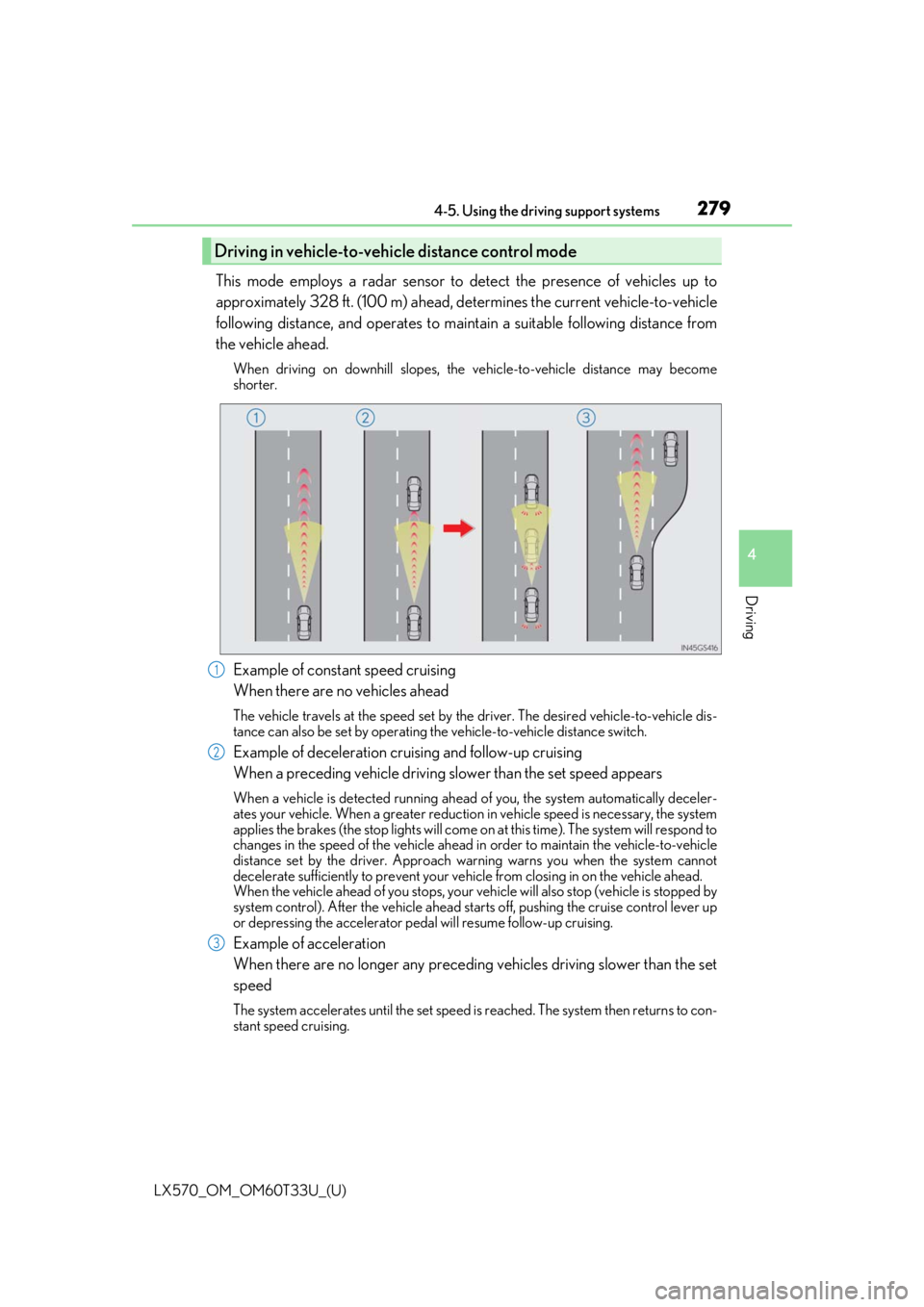
This mode employs a radar sensor to detect the presence of vehicles up to
approximately 328 ft. (100 m) ahead, determines the current vehicle-to-vehicle
following distance, and operates to main tain a suitable following distance from
the vehicle ahead.
When driving on downhill slopes, the ve hicle-to-vehicle distance may become
shorter.
Example of constant speed cruising
When there are no vehicles ahead
The vehicle travels at the speed set by the driver. The desired vehicle-to-vehicle dis-
tance can also be set by operating the vehicle-to-vehicle distance switch.
Example of deceleration cruising and follow-up cruising
When a preceding vehicle driving slower than the set speed appears
When a vehicle is detected running ahead of you, the system automatically deceler-
ates your vehicle. When a greater reduction in vehicle speed is necessary, the system
applies the brakes (the stop lights will come on at this time). The system will respond to
changes in the speed of the vehicle ahead in order to maintain the vehicle-to-vehicle
distance set by the driver. Approach warning warns you when the system cannot
decelerate sufficie ntly to prevent your vehicle from closing in on the vehicle ahead.
When the vehicle ahead of you stops, your vehicle will also stop (vehicle is stopped by
system control). After the vehicle ahead starts off, pushing the cruise control lever up
or depressing the accelerator pedal will resume follow-up cruising.
Example of acceleration
When there are no longer any preceding vehicles driving slower than the set
speed
The system accelerates until the set speed is reached. The system then returns to con-
stant speed cruising.
Driving in vehicle-to-vehicle distance control mode
1
2
3